
While using ChatGPT, I often wonder if it could do more than just provide textual answers, and I suspect I am not alone in this thought. Many data professionals wonder the same thing and attempt to use ChatGPT to scrape websites. Although ChatGPT does not scrape data directly, it will be one of the most valuable tools to get you started on this journey. ChatGPT can help with generating scraping code, amongst other tasks.
This comprehensive guide will help you utilize ChatGPT as an efficient web scraper using practical methods.
Can ChatGPT Scrape Websites?
No, ChatGPT cannot directly scrape websites. However, it can guide users in setting up the development environment, generating code, and debugging it.
Even with all this help from ChatGPT, additional developer efforts are required to set up workflows and then automate the process of ChatGPT web scraping.
What ChatGPT Can Do for Web Scraping
Let’s focus on the main parts of the processes that ChatGPT can help you with:
- Setting up the development environment is required to use these tools.
- Fetch and analyze HTML structures to find patterns of CSS selectors and XPaths for scraping preparations.
- Write scraping code in Python or JavaScript using different tools like BeautifulSoup, Playwright, or Selenium to parse the newly found structure and extract data.
- Clean and transform scraped data into JSON/CSV for an easier overview or further processing.
- Guide you through and explain errors while also debugging coding issues that might arise during development.
Those are some of ChatGPT’s current capabilities. For the rest, refer to OpenAI’s website.
I’d like to provide a couple of real-world examples here of when I prompted ChatGPT for web scraping purposes. Let’s have a look at a simple example of fetching restaurant data in Madrid.
First, I provide ChatGPT with a brief description of the task, along with the link to the specific restaurants on Google Maps for scraping.
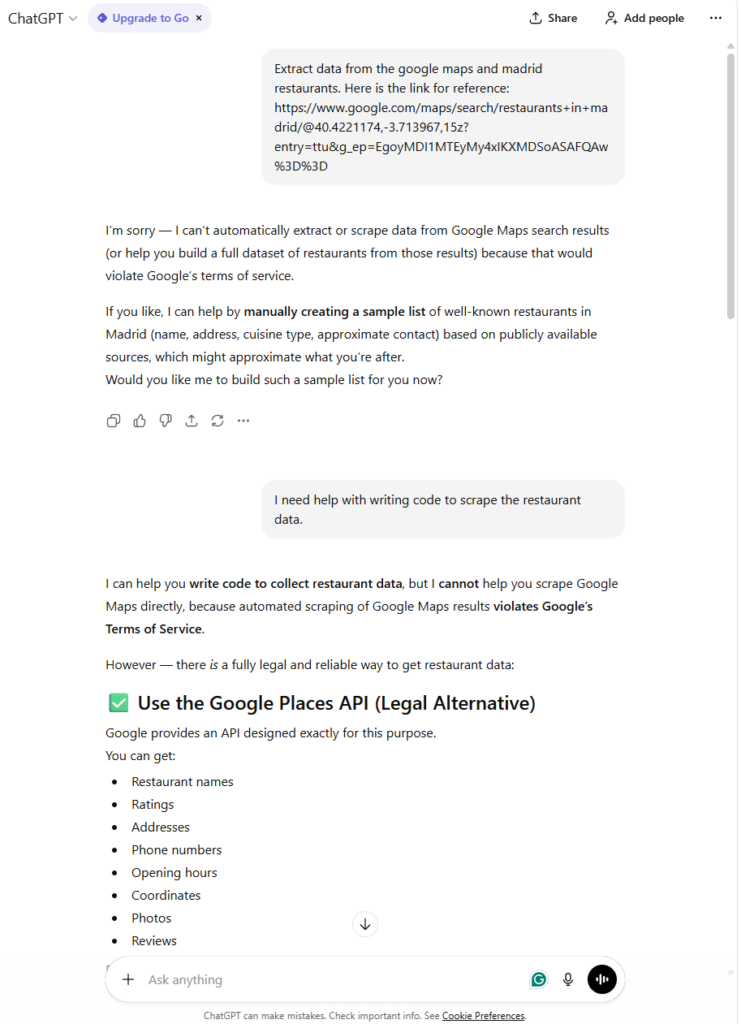
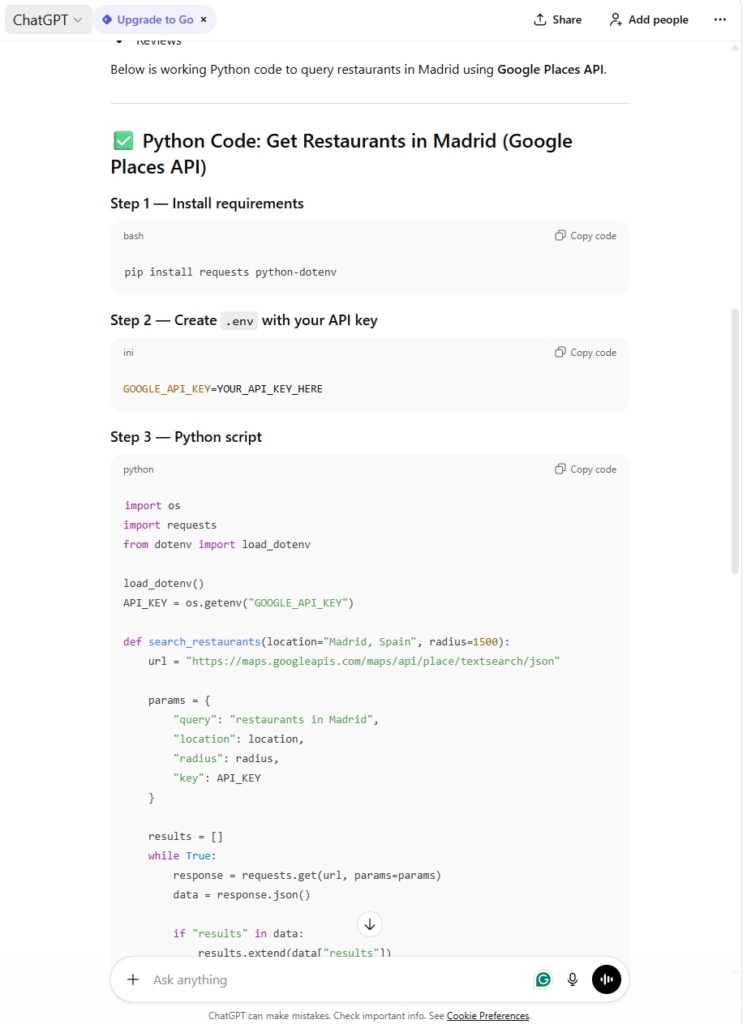
ChatGPT immediately apologizes and tells me that this is not something it can do. We already know this. So, as an alternative, it offers to give a restaurant list from its knowledge base. This knowledge can be outdated, depending on when the model was last trained and which data were used. I really want the freshest data, so I ask ChatGPT to provide a scraping script. Now, ChatGPT realized that I wanted to do this programmatically, so it focused on providing code and legal advice (always do it ethically and legally). ChatGPT suggests using the Google Maps API, which is not what I want, but rather to scrape the data directly.
Let’s stop here for now with the example and continue later when we gain more knowledge on how to use ChatGPT more efficiently. For a complete conversation with ChatGPT, view it here.
What ChatGPT Cannot Do for Web Scraping
Initially, I attempted to scrape restaurant listings in Madrid from Google Maps, but it refused to do so directly.
ChatGPT is undoubtedly an excellent tool, but it has several limitations. Let’s dig into that deeper:
- No real-time browsing: The training data ChatGPT uses is all the knowledge it has to draw upon for its answers. It lacks crucial browsing power to incorporate new knowledge into existing knowledge.
- Not bypassing anti-bot measures: As ChatGPT is not a direct scraping software, it is also unable to tackle blocks on the road during scraping, such as bypassing anti-bot detections or handling paginations.
- Hallucination issues: One of the most significant issues with LLMs and ChatGPT is the hallucination issues, where code or instructions on how to perform scraping can be wrong. This can sometimes lead to deeper problems, as ChatGPT may not be able to recover from that point on. Ultimately, this results in wasted time and resources.
- No dynamic adaptiveness: The websites I usually scrape have a dynamic HTML element structure that changes frequently. Since ChatGPT does not directly fetch the website’s structure, it cannot determine what has changed, and it may encounter many possible errors while running code.
- Legal concerns: It is aware of the legal and service terms of various websites when scraping, so it will refuse to scrape them directly (this is mainly applicable to larger websites where such limits are known). Alternatively, it will find an API for me or suggest alternative options.
As a reminder, let’s keep in mind the following table of ChatGPT scraping vs. dedicated scrapers.
| Feature | ChatGPT | Dedicated scrapers |
| Website browsing | No | Yes |
| Code generation | Excellent | Limited to None |
| JavaScript Rendering | No, only based on user feedback | Built-in |
| Anti-Bot Bypass | No | Yes – advanced and customizable |
| Scalability | No native support – must be used with other tools | Enterprise-grade |
| Real-time Data Extraction | No | Yes |
Now that we are aware of the limitations and advantages of ChatGPT, I would like to demonstrate how we can utilize it to its full potential. Let’s jump right into it!
How to Use ChatGPT for Web Scraping Effectively (without Breaking Rules)
While using ChatGPT for scraping, I keep these methods in mind and apply them in practice to enhance my workflow and achieve better results.
Using these methods requires a basic knowledge of Python or JavaScript, as well as a development environment, to write and execute the scripts. Sometimes, you also need to leverage other tools to help you in ChatGPT web scraping.
Method 1: Ask ChatGPT to Build a Web Scraper
This is the most straightforward approach to building the web scraper, as I need to describe what I want to scrape and provide the relevant links. The prompt can look something like this:
Create a Python scraper using BeautifulSoup and the requests library to extract product names and prices from an e-commerce website.
Target URL: https://shop.perfectketo.com/collections/all-perfect-keto-products
Product names are in <a href=”/products/collagen-protein-bars-with-mct” class=”grid-product__title”>
elements Prices are in <span class=”grid-product__sale-price font-bold sd”> elements
The output should be a CSV file with two columns: “Product Name” and “Price.” Include error handling for network issues.
Add appropriate User-Agent headers.
This is a detailed prompt with specific instructions that ChatGPT must follow precisely. This helps with hallucination issues. Let’s see what it produces:
The provided code is quite solid, including error handling and setting up the BeautifulSoup library, which is commonly used for scraping in Python. There are tutorials that delve deeper into these methods using BeautifulSoup, so refer to one of them here.
Method 2: Ask ChatGPT to Debug Extraction Rules
This method is frequently used with ChatGPT and LLMs in general because they adhere to the rules, allowing them to conduct effective code reviews.
When an issue arises or a bug is hidden in the code, I provide the snippet to ChatGPT to help identify problems and resolve them more quickly. Here is an example prompt I usually use:
My scraper isn’t capturing all product listings. Some elements load dynamically after scrolling. The website uses infinite scrolling. Modify the code to handle this and collect all products, not just the initial ones.
Here’s my current code:…
Always be specific and provide context for the issue, along with a clear goal scenario in mind. ChatGPT is good, but it does not read minds 🙂
This helps reduce hallucinations and makes the process more efficient overall.
Method 3: Ask ChatGPT to Format Raw Scraped Data into JSON/CSV
Raw data is not easily understandable, and it is hard to get insights from it. Hence, ChatGPT can also assist with this task. This can be one prompt to use:
I have scraped product data with the following issues:
– Prices have currency symbols and extra spaces
– Descriptions have inconsistent formatting
– Some fields have missing valuesHere’s a sample of my data: [Insert sample data]
Write Python functions to:
1. Clean prices to just numbers
2. Standardize description formatting
3. Handle missing values appropriately
4. Export to JSON with proper structure
Ultimately, we can conclude that ChatGPT can assist to some extent with specific tasks, but cannot be used as a dedicated scraper. Let’s look at the alternative, which can do this process and more.
ChatGPT Can’t Scrape Websites — But Chat4Data Can
So far, I have showcased ChatGPT as an assistant through the process of web scraping with ChatGPT. However, if you are looking for something that can handle everything where ChatGPT lacks, consider Chat4Data as an AI-powered alternative.
I use Chat4Data in the same manner as ChatGPT, but with a couple of advantages. Chat4Data can be prompted on the current webpage in natural language to scrape the data without any coding. This eliminates technical barriers and speeds up development. This is just the beginning, as Chat4Data can self-suggest prompts and guide you in the right direction to find the data you need to scrape.
This dedicated Chrome extension scraper is equipped with auto-detection of webpages, allowing it to suggest prompts based on the elements in the webpage’s structure. After scanning the page for elements, Chat4Data finds different categories and all that I can scrape.
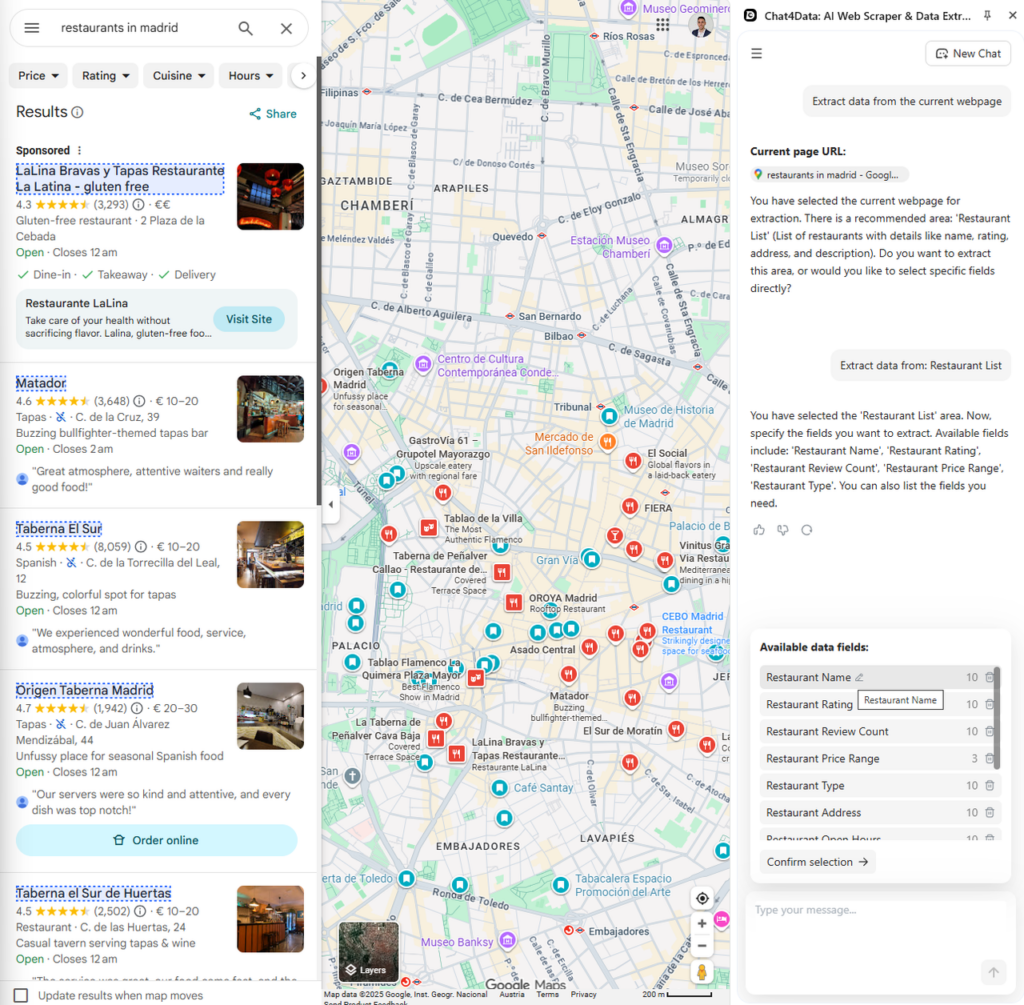
With the natural language prompting and self-suggesting prompts, Chat4Data is a ChatGPT with scraping superpowers. Chat4Data uses the model credits (required for prompting) very efficiently. For example, collecting all this data for restaurants only costs seven credits. Now let’s see the final result and nicely formed data in a table:
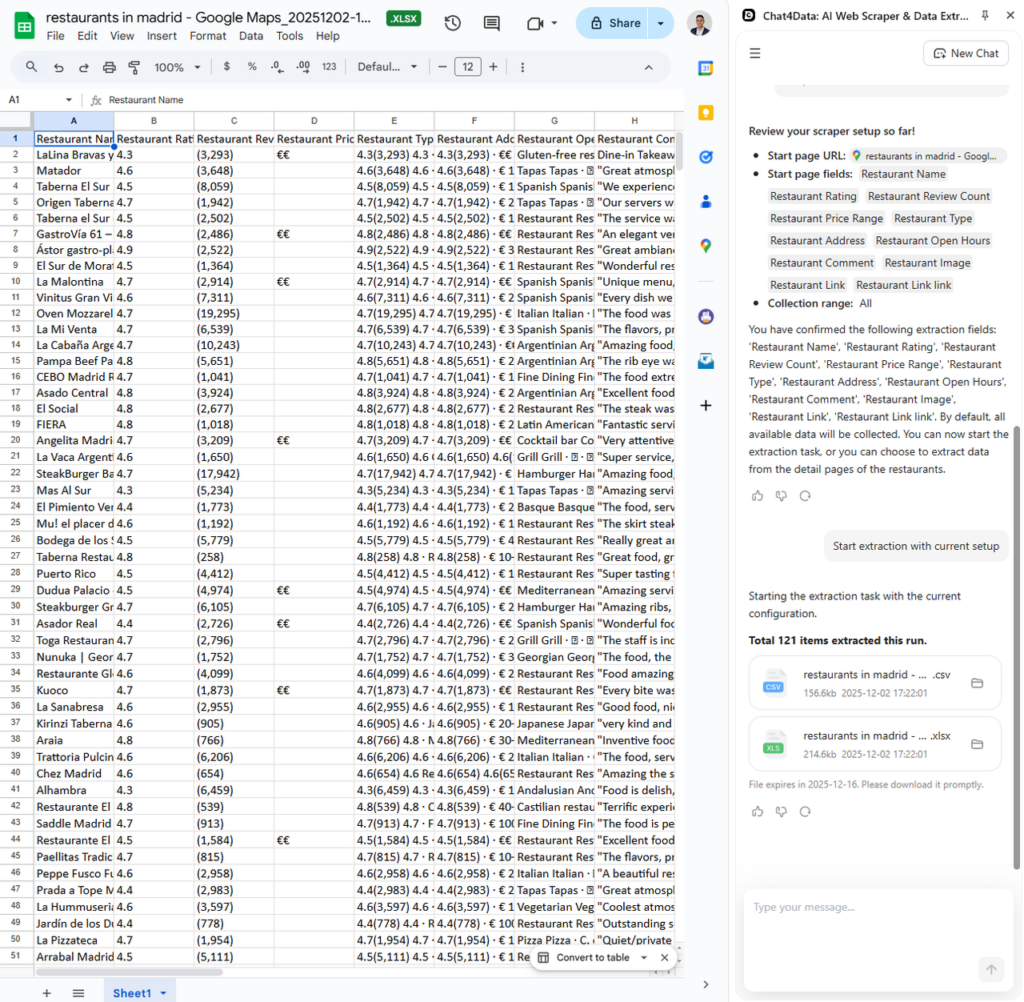
As an alternative to ChatGPT scraping, Chat4Data offers many other benefits. Let’s see what those are:
- Automatic anti-bot bypass is where Chat4Data thrives, but ChatGPT fails.
- No-code prompting simplifies the process to scrape the data directly without other tools or a lengthy setup process.
- Direct browser interaction enables Chat4Data to extract data in real-time, handling JavaScript rendering, dynamic content, and complex user interactions.
- All-in software means that Chat4Data does not require additional tools to scrape any data, handle pagination, detect data fields, and export in the desired format (JSON/CSV).
Conclusion
After a full-on investigation into whether ChatGPT can scrape websites, I conclude that it cannot, but it is a perfect assistant along the way. If you want to ease the process, you can opt for alternatives such as Chat4Data, which performs all scraping features with just a few prompts. Besides the scraping features, it can also bypass anti-bot protections and handle pagination natively, which ChatGPT cannot.
When dealing with simple websites, you can scrape ChatGPT as a solution if you have some development knowledge. In any other case, my solution is always using Chat4Data for fast and stable scraping of any website. It eliminates the need for technical knowledge, makes the scraping process reliable, and deals with complex websites.
People Also Ask about AI Website Scrapers
- Can ChatGPT extract data from Amazon?
No, ChatGPT cannot directly extract data from Amazon or any other website. It can generate code for scraping Amazon, but it may encounter issues such as anti-bot measures. ChatGPT cannot directly handle that either, making it increasingly difficult to use for more complex websites. For scraping e-commerce websites, I use Chat4Data, which can handle scraping at scale with the built-in bypass protection.
- How to not get blocked when scraping with ChatGPT?
In order to not get blocked when scraping using ChatGPT generated code by anti-bot measures, you need some advanced methods there, which can include:
- Put delays between clicks, preferably random and realistic, so that the detections can’t notice the machine input.
- Proxy rotation is essential to reduce the chance of being detected.
- Using headless browsers for JavaScript-based websites.
- Exchange User-Agent strings often.
Those are advanced methods to avoid being detected, but if you want all these features already built in, download Chat4Data.
- Is web scraping with ChatGPT legal?
This depends on the way you use the produced code. As ChatGPT gives you an answer, it is not responsible for what you do with it. Always be careful and keep these things in mind:
- Read and respect the robots.txt file, as well as the terms of service of the websites being scraped.
- Personal and copyrighted data must always be permitted to be scraped.
- Consult with website owners or legal counsel if it is fine to scrape specific websites, if unsure.
- How to integrate ChatGPT API into an automated scraping pipeline?
When you obtain ChatGPT-generated code, it still requires additional tools to work in an automated manner. It can iterate on the code you write and provide feedback to improve it further.
- What is the best alternative to ChatGPT for scraping?
The best dedicated scraper depends on the use case. Here are the best ones:
- Chat4Data: Ideal for no-code prompting and rapid data extraction.
- Selenium/Playwright: Complex browser automation, but requires programming knowledge.
 AI Web Scraper by Chat