
Facebook’s built-in search will not work if you need a lot of structured social media data. It is not meant for systematic extraction; it is meant for casual browsing. A dedicated Facebook post search engine fills in that gap by making the world’s largest social network an easy-to-use data source for analysts, marketers, and B2B teams.
Finding qualified leads in public groups, comparing a competitor’s content calendar, or putting thousands of posts into a sentiment analysis pipeline are all good examples of how to use this. But getting this information reliably in 2026 is harder than it seems. Facebook’s systems for stopping bots from getting in are always getting better. DOM structures can change at any time, and login walls block anonymous access almost right away.
Quick Answer
If you’re looking to extract Facebook posts, there are various tools and methods available depending on your team’s needs and technical capabilities. Here are the best options for different types of users:
- No-code teams: Chat4Data’s browser extension uses visual AI to extract Facebook posts without coding, perfect for competitor analysis, marketing insights, and market trends.
- Enterprise-scale operations: Cloud APIs like Apify and Bright Data can handle millions of requests but come with higher costs due to the scale and specialized infrastructure required.
- Engineering teams: Custom Playwright scripts offer full control but require weeks of development and ongoing maintenance to adapt to Facebook’s changing UI and anti-bot measures.
⚠️ Compliance Note
This article discusses methods to find and analyze publicly available Facebook posts for legitimate business purposes: brand monitoring, competitor research, and market analysis.
Automated post extraction is restricted by Meta’s Terms of Service. Before using any method described below:
- Prefer Meta’s official tools where available (Meta Content Library for researchers, Brand Rights Protection, Graph API)
- Limit extraction to publicly accessible posts — never target private groups or personal profiles without the account holder’s consent
- Strip personally identifiable information from your dataset unless you have a documented lawful basis
- Comply with GDPR, CCPA, and local data protection laws
- Consult qualified legal counsel before commercial deployment
You are responsible for the legality of your specific use case.
What Is a Facebook Post Search Engine?
The search bar on Facebook makes it easy for people to find friends and pages. However, a Facebook post search engine is a different beast altogether. It’s a specialized tool designed to extract, organize, and analyze post data for business purposes.
Here’s how a professional-grade system stands out from casual browsing:
- Structured Data Extraction: Unlike regular browsing, a Facebook post search engine converts unstructured data into clean formats such as CSV, Excel, or JSON. It also records key metrics like UNIX timestamps, engagement stats, and author details.
- Advanced Filtering: This tool allows for precise sorting by date or keyword density, giving you access to data that’s typically hidden by Facebook’s default interface.
- Scalability: A Facebook post search engine automates pagination, enabling you to collect data across hundreds or even thousands of result pages for comprehensive business analytics.
- Relational Context: It can identify relationships between root posts, authors, media attachments, and engagement metrics (likes, shares, comments), giving you deeper insights into interactions and engagement trends.
If you’re just doing one-off searches, Facebook’s built-in search bar might suffice. But, if you need a tool for market research, competitor tracking, or lead generation across multiple pages, you need a purpose-built Facebook post search engine to get the job done effectively.
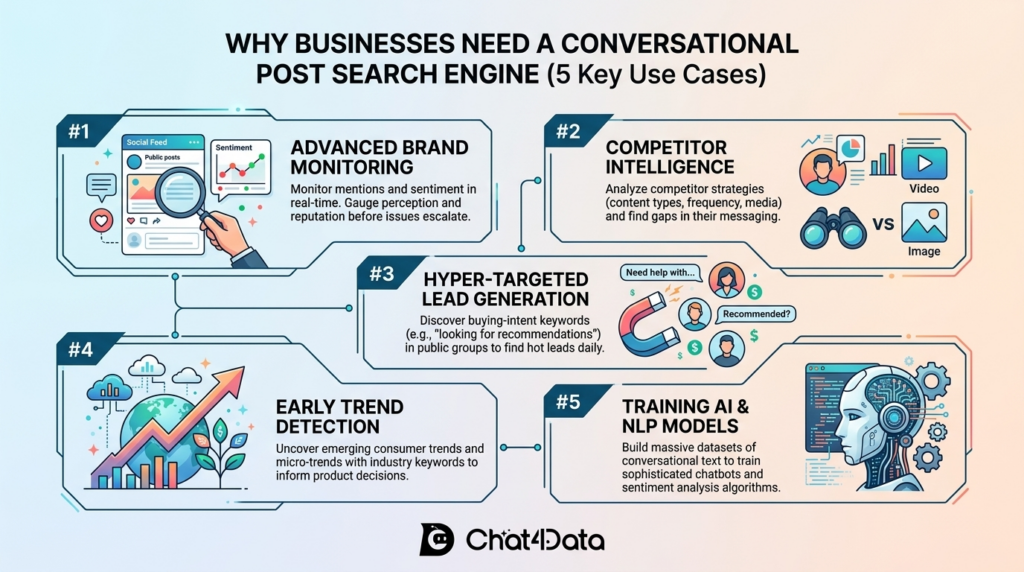
Why Businesses Need a Facebook Search Engine Scraper (5 Key Use Cases)
Before diving into the methods, here’s why organizations invest in this technology.
1. Brand Monitoring & Reputation Management
You can keep an eye on what people are saying about your business, products, or executives in public posts and groups almost in real time. Use sentiment analysis with extraction to find PR problems before they get worse.
2. Competitor Intelligence & Content Strategy
Get old and new post data from your competitors’ pages. Look at how often you publish, what types of media you use, how you write copy, and what your audience complains about to find gaps you can fill.
3. Lead Generation from Public Groups
A Facebook post search engine for B2B teams can go through public groups and look for buying-intent keywords like “looking for recommendations” or “need a new software for.” This will send a steady stream of warm leads straight to your CRM every day.
4. Trend Detection & Market Research
Keep an eye on industry keywords across thousands of posts to find micro-trends before they become popular. Product teams get real-time customer feedback faster than through surveys or focus groups.
5. Training NLP & Sentiment Models
High-volume post-extraction is used by data science teams to build conversational datasets for training chatbots, improving sentiment classifiers, and developing predictive text models that reflect how people really talk online.
What Are the Technical Barriers to Scraping Facebook Posts?
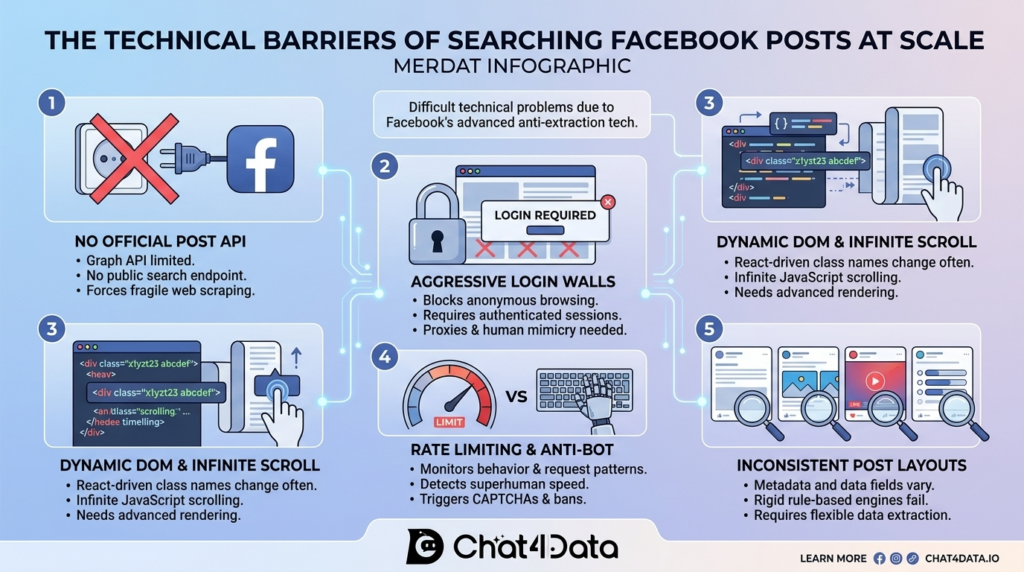
Facebook employs some of the world’s most sophisticated anti-scraping systems to protect its data. To successfully scrape Facebook posts, it’s essential to understand these five major barriers, each of which nullifies a different naive scraping solution.
1. No Public API for Post Search
Facebook’s Graph API no longer offers an endpoint for searching and retrieving public posts at scale. This limitation forces all post extraction to occur through web scraping, interacting with the frontend rather than a clean, accessible backend.
2. Login Walls & Session Management
To prevent anonymous browsing, Facebook requires users to authenticate their identity. Any scraper must work within an authenticated session, using proxy rotation and human-like request timing to avoid detection. If you’re wondering how to scrape Facebook posts without getting banned, solving this challenge is your first priority.
3. Dynamic DOM & Infinite Scroll
Facebook frequently changes class names (e.g., <div class="x1yzt23 abcdef">) and uses asynchronous infinite scrolling instead of traditional pagination. Scrapers need to run JavaScript and simulate natural scrolling patterns. Additionally, they must extract data using visual or semantic patterns, not hard-coded CSS selectors.
4. Rate Limiting & Anti-Bot Detection
Facebook detects and flags accounts that send too many requests, scroll too quickly, or fail to load images/fonts. Scrapers that violate these patterns risk encountering CAPTCHA challenges, rate limits, or even permanent bans. Successful scraping requires mimicking human behavior precisely to avoid detection.
5. Inconsistent Post Layouts
Facebook supports a wide variety of post formats, including text, videos, link previews, polls, and image carousels. A scraper designed with rigid rules may break when it encounters an unfamiliar layout. A professional Facebook post search engine must parse these diverse formats reliably and return key post details (author, timestamp, content) without issues.
6. Fingerprinting
In addition to IP and behavioral tracking, Facebook uses advanced browser fingerprinting techniques like Canvas fingerprinting, WebGL fingerprinting, and font list detection to thwart scraping efforts. These methods allow Facebook to identify and block scrapers even if they change IP addresses or use different user agents. As these technologies evolve post-2024, they represent one of the most significant barriers to scraping.
How to Build a Facebook Post Search Engine: 3 Methods
Method 1: No-code AI-Powered Solution Chat4Data
Traditional scrapers parse raw HTML and break every time Facebook changes its class names. Chat4Data takes a fundamentally different approach. Its multimodal AI model “reads” the page visually, just as you do. It recognizes that bold text next to a profile picture is the author’s name and the block below it is the post body, without relying on any HTML selectors.
Chat4Data’s no-code solution makes it incredibly easy for businesses to extract relevant data without technical expertise or lengthy setup. This makes Chat4Data the fastest path to a working Facebook public post extractor for non-technical teams. No code, no proxy management, no maintenance.
How to Scrape a Competitor’s Facebook Page with Chat4Data
Let us say you are a marketing analyst and your job is to figure out how a competitor makes their content work. This is how you do it:
1. To get ready, open Chrome, make sure the Chat4Data extension is turned on, and sign in to your Facebook account. In this case, let’s see what Starbucks is posting.
2. To extract, click on the Chat4Data sidebar. You will not write code; instead, you will create a natural-language prompt. Chat4Data prompts you to scan the current webpage, so let’s do that now.
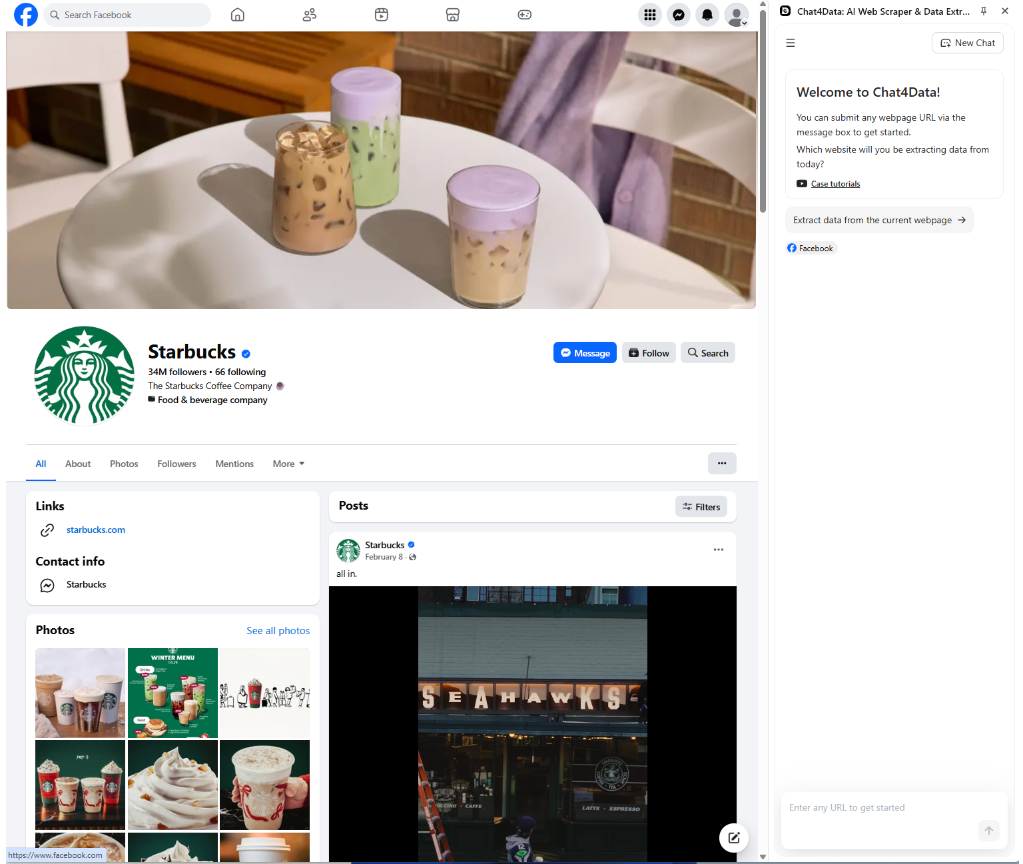
3. Execution: Chat4Data must first find the data area, and once I confirm the plan, it starts scraping. The AI will take control of the tab you are currently using. You will see the page scroll down, pause to let Facebook’s lazy-loading image scripts run, and then resume at a speed that mimics how people read.
4. The Output: In just a few minutes, Chat4Data will show you a table that is ready to be exported:
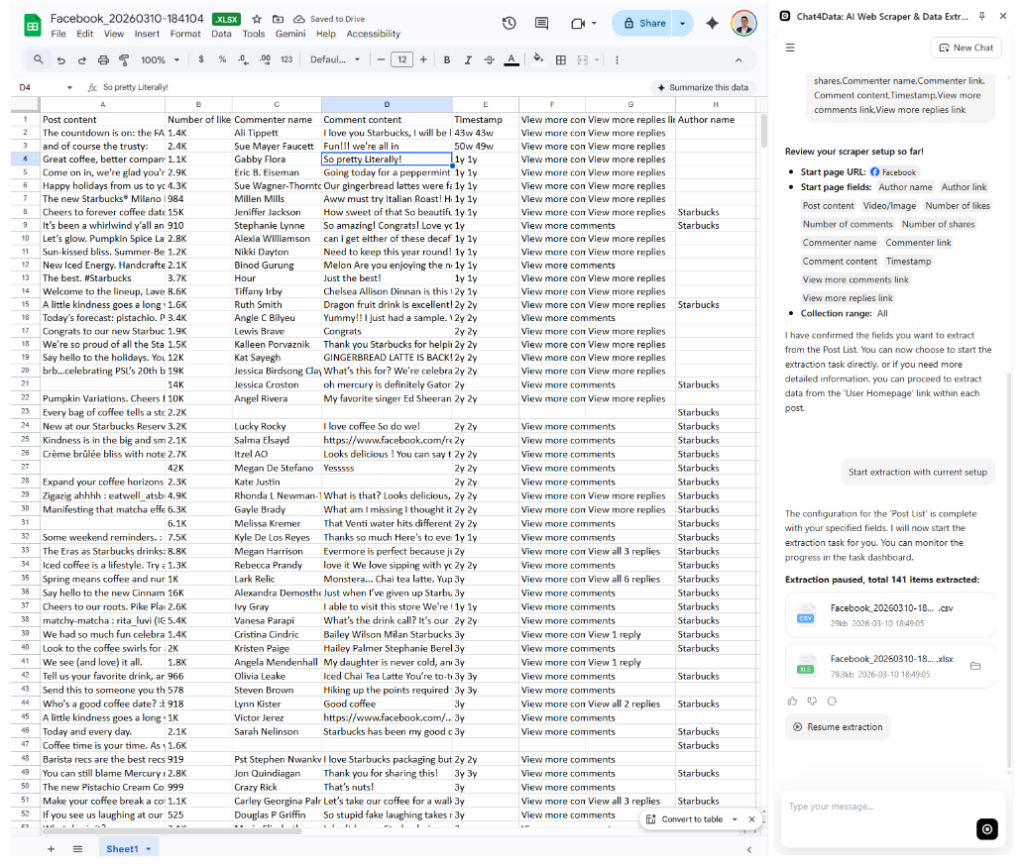
Now that you have the data, you can run competitor content audits, feed it into a sentiment analysis tool, or build a publishing calendar based on your project’s requirements.



Method 2: Enterprise Cloud APIs & Automation (Apify & Bright Data)
For teams that need to operate at a massive scale without managing a local browser environment, cloud APIs provide fully outsourced infrastructure. This means using Cloud Automation tools or Enterprise Cloud APIs. Instead of using the official Facebook API, this method uses large networks of residential proxies and cloud-based headless browsers.
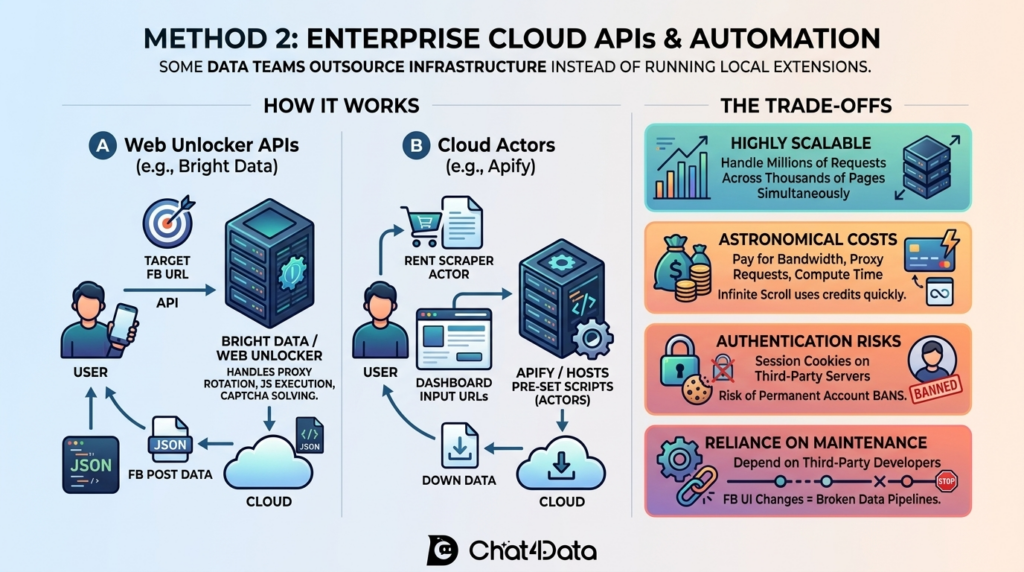
How it works: Bright Data and other companies offer “Web Unlocker” APIs designed for this purpose. You send an API request to their servers with a Facebook URL that you want to target. Their infrastructure handles proxy rotation, JavaScript execution, and CAPTCHA solving in the background.
In the end, it returns a JSON payload containing the post data. Platforms like Apify also host “Actors,” which are pre-set scraping scripts. You rent a specific Facebook post search engine Actor that was made by someone else. You enter the URLs you want to find on a web dashboard, and the script runs on their cloud servers.
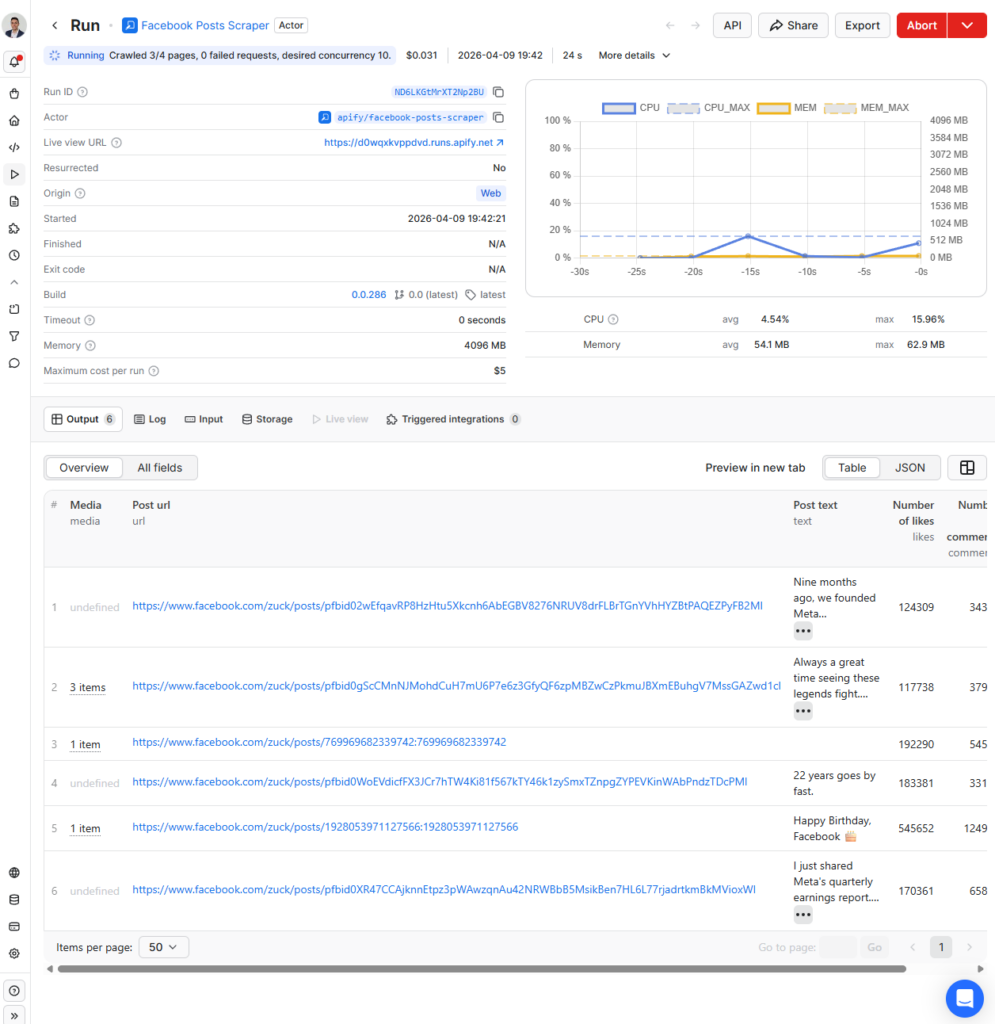
The trade-offs: If you need to make millions of requests across thousands of pages simultaneously, this method is highly scalable. But it has some big problems:
- Astronomical Costs: For every gigabyte of bandwidth, every successful proxy request, and every minute of compute time, you are paying top dollar. Heavy, infinite-scroll Facebook pages that you scrape use up cloud credits quickly.
- Authentication Risks: To scrape deep posts or group data, you often have to send your personal Facebook session cookies to these third-party cloud servers. If the cloud scraper goes too fast or uses an IP address that has been flagged, your personal Facebook account could be permanently banned.
- Reliance on Maintenance: If you use an Apify Actor, you are completely dependent on the third-party developer. If Facebook changes its UI, the Actor will stop working, and your data pipeline will stop working until the developer releases a patch.
- For enterprise teams running millions of requests daily with dedicated DevOps support, cloud APIs remain the most scalable option.”
Method 3: DIY Facebook Python Scripts (Playwright)
Building a custom Facebook post search engine from scratch is the last option for software engineering teams that need full control over the extraction logic and do not want to pay third-party subscription fees.
In 2026, most developers use Playwright, a modern browser automation library from Microsoft, rather than older tools like Selenium. This is because Playwright handles Facebook’s heavy asynchronous JavaScript loading much better.
Step-by-Step: Building a Facebook Scraper with Python & Playwright
You need to set up a Python environment, manage your own proxies, and keep the code up to date to build this. This is a very simple, conceptual example of the main extraction loop. But this approach has issues with maintenance and initial development.
- Environment Setup: Your engineering team must set up the environment:
- The Extraction Script: The developer writes a script that opens a browser, adds authentication cookies, and looks for certain HTML nodes. Developers often have to use ARIA roles to find posts on Facebook because its classes change all the time.
- The harsh truth is that running the code above in production is a nightmare, even though it shows the idea. Facebook will detect the automated browser fingerprint and block it within minutes. To get this ready for production, developers have to spend weeks adding stealth plugins, rotating residential proxy IPs, and building custom parsers to transform unstructured inner_text() output into clean, structured data fields.
Tools Comparison Table: Choose the Right Facebook Post Scraping Method
Use this table to identify which method fits your team’s technical resources, budget, and data volume requirements. The comparison will show you which Facebook post search engine architecture works best for your needs.
| Feature | Chat4Data (Method 1) | Cloud Automation (Method 2) | DIY Python Script (Method 3) |
| Type | AI Browser Extension | Cloud API / Hosted Scripts | Python Code / Frameworks |
| Technical Skill Req. | None (Natural Language) | Medium to High | Very High (Software Eng.) |
| Instant (Plug & Play) | Instant (Plug & Play) | Days (API Integration) | Weeks (Dev & Testing) |
| Cost | Low (Runs locally) | Very High (Pay per GB/Compute) | Free tools, High Dev Cost |
| Data Customization | High (Natural language prompts) | Fixed Schema (Depends on API) | Fully Customizable |
| Maintenance Burden | Zero (AI auto-adapts) | Medium (Vendor managed) | Extreme (Constant fixes) |
| Ban Risk | Low (Uses human profile) | High (If sharing session cookies) | High (If poorly configured) |
| Output Formats | CSV, Excel, JSON | JSON, CSV | Fully customizable |
| Legal Risk | Low (local processing, no PII transfer) | Medium (data passes through third-party servers) | Varies (depends on implementation) |
| Best For | Marketing & Analysis (No-Code, Quick Start) | Enterprise Scale & High Volume (Outsourced Infra) | Engineering Teams (Full Control & Customization) |
Each method works best for a different type of project. For most teams looking to extract Facebook posts without hiring engineers, Chat4Data is the fastest way to turn a question into a usable dataset.
Legal and Ethical Considerations
Start With Meta’s Official Channels
Before scraping, check whether Meta’s official tools meet your need:
- Meta Content Library — free access to public post data for academic and accredited researchers
- Graph API — for Pages and Groups you own or administer
- Brand Rights Protection — for trademark and reputation monitoring
- CrowdTangle successors — various partner tools for public content analysis
If any of these fits your use case, they are the only fully ToS-compliant path and should be your first choice. The methods below should only be considered when no official channel serves the need.
Disclaimer: This section is just general advice and not legal advice. Before using any data extraction pipeline, talk to a lawyer who knows what they are doing.
Facebook’s Terms of Service
Facebook’s Terms of Service explicitly prohibit automated data collection. Section 3.2 states that users may not “access or collect data from our Products using automated means (without our prior permission).” If you break these rules, you could lose your account for good and face legal action.
Meta has actively enforced these terms, obtaining injunctions and settlements against commercial scraping operations. Even if a court ultimately rules your scraping legal, defending such a case can cost significantly more than using official APIs.
GDPR & CCPA Compliance
Privacy laws apply when your Facebook post search engine finds personally identifiable information (PII), such as names, profile URLs, and locations.
- Establish a legal basis for processing under GDPR Article 6 (e.g., legitimate interest).
- Maintain a data processing register documenting what you collect and why.
- Implement deletion procedures to fulfill user data-removal requests within required timeframes.
- Anonymize PII that lacks a specific, documented business purpose.
robots.txt
Facebook’s robots.txt file restricts automated crawling of most paths. While robots.txt is not legally binding in all jurisdictions, ignoring it weakens any “good faith” defense and increases the likelihood of enforcement actions.
Legal Risk by Method
- Chat4Data (local, single-session): The lowest risk profile. Your data stays on your computer. No sharing of cookies with other people. Still have to follow Facebook’s rules.
- Cloud APIs (third-party infrastructure): More risky. Moving session cookies to servers outside of your own raises both data protection and ToS issues.
- The risk of DIY scripts (self-managed) depends entirely on how they are set up. Aggressive scraping without rate limits or proxy rotation can get you banned and could even get you in trouble with the law.
Real-World Consequences
In hiQ Labs v. LinkedIn (2019), the U.S. Ninth Circuit ruled that scraping publicly accessible data did not violate the Computer Fraud and Abuse Act, but this ruling applied only to public profiles, not to authenticated-session scraping. Meta has separately pursued legal action against scraping companies, resulting in injunctions and financial settlements.
Ethical Best Practices
- Only gather the information you need to run your business.
- Set strict rate limits to keep the server from slowing down.
- Before you store or share data, anonymize it.
- You should never scrape private groups or profiles without permission.
Conclusion
Each of the three methods fits a different team profile. Cloud APIs suit enterprise operations with DevOps budgets and millions of daily requests. Custom Playwright scripts give engineering teams full control at the cost of weeks in development and constant upkeep. Chat4Data’s no-code approach eliminates both the technical barrier and the maintenance burden.
The best option for you will depend on three things: how much data you need, how much money you have, and how skilled your team is. For most non-engineering teams, like marketers, analysts, and brand managers, Chat4Data is the fastest and cheapest way to get from a question to structured data.
Disclaimer
This article is provided for educational and informational purposes only and does not constitute legal advice. Techniques and tools described are presented as a technical reference; the author and Chat4Data do not guarantee that any specific use case complies with Meta’s Terms of Service or applicable law.
Chat4Data is designed to operate within a user’s own authenticated browser session on pages the user has legitimate access to view. Users remain responsible for ensuring their data collection activities comply with platform terms, privacy laws, and professional obligations in their jurisdiction.
FAQs about Facebook Post Search Engines
- Can you use a Facebook post search engine without an account?
Technically, you can extract a small amount of data without an account, but it is very limited. Anonymous IP addresses can only see a small amount of data on Facebook. An aggressive login wall will stop you from getting in after a few scrolls or clicks. To find many Facebook posts quickly and reliably, you need to use a specific, old, and verified session. This will give you access to deep content and ensure that all post metadata is displayed.
- What specific data points can a Facebook post search engine extract?
If the engine is set up correctly, it can capture almost anything on the screen. This usually includes the author’s name, profile URL, the exact time the post was published, the main body of the post, hashtags used, outbound links, and quantitative engagement metrics (total likes, shares, and comments). You can also use advanced AI tools like Chat4Data to pull out and sort nested comments or find out if certain types of media (like a video) are attached to the post.
- Is there a completely free Facebook post search engine?
No enterprise-grade, maintenance-free tool is completely free. You can build one using open-source Python and Playwright (Method 3), but you’ll spend significant developer time plus residential proxy costs. For teams looking for a Facebook public post extractor free of heavy infrastructure costs, Chat4Data runs locally and keeps per-user expenses well below enterprise API pricing.
- How do I search for specific posts within a private Facebook group?
You need an account that has been verified and accepted as a group member. Once you have real access, go to the group feed and use a local tool like Chat4Data. The AI reads and extracts group posts exactly as you see them because it works inside your authenticated browser session. This lets it bypass the restrictions that prevent external cloud scrapers. This is the best Facebook group post scraper for 2026 private community data.
- How to install Chat4Data for Facebook post search engine scraping?
You install the Chat4Data browser extension and sign in to Facebook in Chrome. To begin extraction, click on the Chat4Data sidebar and create a natural-language prompt. The AI will then execute the plan by taking control of the tab, scrolling, and extracting the data, eliminating the need for coding and maintenance.