
A few months ago, I received a list of 300 research targets and was told the data I needed lived exclusively on Facebook. I spent two hours copying names, bios, and locations into a spreadsheet before realizing there had to be a better way.
Facebook holds one of the most detailed public social graphs on the web: names, profile pictures, bios, workplaces, and location data. This structured information is valuable for researchers, recruiters, lead generators, and data scientists. The problem is that it’s locked inside an interface designed to resist extraction.
A reliable Facebook profile scraper automates this process, but building one in 2026 means navigating Facebook’s constantly shifting DOM, aggressive anti-bot systems, and strict login walls. This guide walks through three methods, from easiest to most technical, so that you can pick the right approach regardless of your coding experience.
Quick Answer
A Facebook profile scraper gets public profile information like names, bios, workplaces, locations, and profile pictures without having to copy and paste them by hand. The AI-powered Chrome extension from Chat4Data does this without any code or proxy setup. Developers have full control over custom Python scripts that use Selenium or Playwright. The open-source facebook-scraper GitHub library is a lightweight way to start prototyping and learning.
Each method is explained in detail below. Choose the one that best matches your technical comfort level.
Why Scraping Facebook Profiles Is Harder Than It Looks
Before choosing a method, understand what you’re up against. Facebook runs one of the most aggressively defended DOMs on the web.
- DOM obfuscation. Facebook changes CSS class names constantly. The div.profile-bio you relied on yesterday is now div.x1yzt32a.x45jkl. Traditional scrapers using static XPath or CSS selectors break daily.
- Rate limiting and behavioral fingerprinting. Facebook knows how quickly you scroll, how often you click, and how often you ask for things. My first simple Selenium script reached a checkpoint page at 2 AM after only a few dozen profiles.
- Public vs. private data. A Facebook profile scraper can only access what’s publicly visible — name, bio, profile picture, job, and city. Hidden friends lists, restricted posts, and private contact info are simply not returned, regardless of method.
- Login walls. To get to the most useful profile data, you need to log in. Adding a login step means managing session cookies and raises ethical issues.
To resolve the issues above with Facebook profile scraping, here is what I look for in a great Facebook profile scraper:
How we evaluated these methods
To provide a fair and robust comparison of the three Facebook profile scraping methods, we established four key evaluation criteria:
- Setup Time: Calculates the time needed to transition from no setup to an active scraper, which is vital for users without development skills.
- Maintenance Burden: Analyzes the continuous work required to manage Facebook’s frequent anti-bot measures and DOM obfuscation.
- DOM Handling: Measures how effectively each method manages dynamic content and unpredictable changes in class names.
- Cost: Considers subscription costs alongside hidden fees for infrastructure and proxy services needed for reliable data extraction.
Method 1: Powerful AI Chat4Data for Facebook Profile Scraping
For 80% of Facebook profile scraping tasks, writing code is unnecessary. Chat4Data is a Chrome extension that uses AI to visually parse page structure, bypassing DOM obfuscation that breaks traditional scrapers.
Functional Specifications: What Chat4Data Extracts
Chat4Data is an AI-powered Chrome extension that provides genuine functional specifications to address readers’ needs:
- Extracted Data Fields: Can pull all publicly visible Facebook profile information (names, bios, profile picture URLs, city, and workplace). It also supports deep, structured extraction from list and detail pages, supporting up to two levels of page depth (subpage crawling) for comprehensive data gathering.
- Batch URL Processing: Supports processing a list of URLs, but as a local browser extension, it requires the user to remain on the page during the scraping process.
- Data Storage and Privacy: Data is processed and stored locally in the user’s browser, ensuring no data is uploaded to the cloud, and no login credentials are ever stored on Chat4Data’s servers.
- Pricing Structure: It operates on a freemium model, offering a free tier (up to 5 pages) and paid plans starting at $10 for 2,000 monthly credits. Once the scraper is configured, users can run scraping tasks for unlimited data without using tokens.
A Step-by-Step Guide using Chat4Data for Facebook Profile Scraping
1. Get the Extension: Get Chat4Data from the Chrome Web Store and add it to your browser.



2. Go to the Target Facebook Profile: Open the Facebook profile or a list of URLs you need to work on. I will look at what Mark Zuckerberg has been up to lately.
3. To get the AI to do something, open the Chat4Data sidebar and type a command in plain English. Let Chat4Data automatically scan the current page. I type in the chat: “Extract personal details. Living location, Birthday, and gender.” This immediately lets Chat4Data know what I want, and it proceeds with the plan of action.
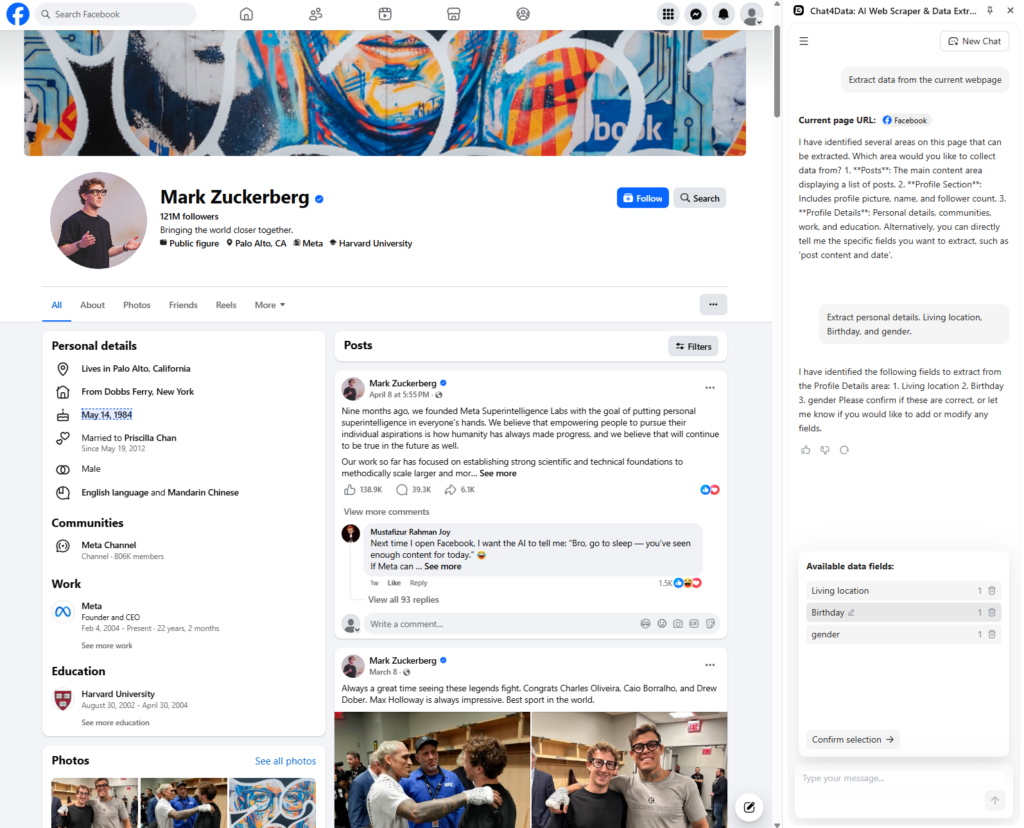
4. Chat4Data’s AI returns the concrete data fields: “I have identified the following fields to extract from the Profile Details area: 1. Living location, 2. Birthday, 3. gender”. I let it execute this scraping plan.
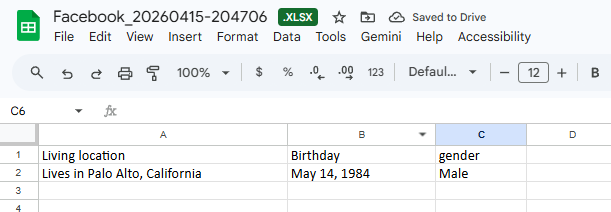
5. Extract and Export: The AI visually inspects the fields, ignoring the hidden DOM. You can view the scraped Facebook profile data in a clean table before exporting to CSV or Excel.
Why This Is the Best Starting Point
- No complex setup: Requires no proxy configuration, selector maintenance, or local environment setup.
- Secure authentication: Runs locally in your browser using your existing session, so credentials are never sent to third-party servers.
- AI-driven adaptability: Automatically handles dynamic class name obfuscation, removing the need for daily manual script fixes.
I ran Chat4Data against 47 speaker profiles. It was completed in 11 minutes. The Selenium script I’d built three weeks earlier failed on profile 12. Facebook had renamed the bio container overnight.
Method 2: A Python Script Facebook Profile Scraper
Writing a Python script to scrape a Facebook profile is the next logical step if you need a very specific pipeline or want to add extraction to a larger app.
Libraries and Setup
Standard requests and BeautifulSoup fail on Facebook because the page relies on JavaScript rendering. You need a headless browser, such as Selenium or Playwright, that executes JavaScript the way a real browser would.
For authenticated scraping, I prefer Playwright or Selenium. For the following example, I chose Selenium as it has broader documentation and community support for beginners. This is a simplified look at the main logic behind Selenium:
What You Can Realistically Extract
You can get the public-facing parts of a Facebook profile using a working Python setup for a Facebook profile scraper. These parts include the name, bio/headline, profile picture URL, current city, and workplace.
But be honest about what needs a login. If you do not add session cookies to your Selenium driver, you will only see what a visitor who is not logged in sees, which is getting less and less.
Dealing with the Hard Parts
Writing the scraper is only 10% of the work; the other 90% is keeping it running.
- Rate Limiting: You need to use time-based delays, sleep(), and randomization together.
- Fingerprinting: Rotate user agents and vary viewport dimensions to avoid consistent fingerprinting patterns. This is where the Facebook scraper Playwright vs Selenium debate becomes critical: many choose Playwright for its modern stealth capabilities.
- Proxies: If you have more than a few dozen profiles, you will need a rotating pool of residential proxies. To master how to avoid IP bans on scraping Facebook, ensure your proxy pool is geo-distributed, and your script handles automated rotation and exponential back-off on rate-limit errors.
The Honest Warning: This method often fails. Facebook’s DOM changes all the time without warning. For a side project, I have kept up a Facebook profile scraper, and I have had to fix it more times than I would like to say. When you use a Facebook scraper Python script, think of it as a living thing that needs constant feeding and care.
Method 3: Use the Facebook-scraper GitHub Repository
If your goal is to understand how Facebook scraping works or to pull a quick dataset without building infrastructure, the kevinzg/facebook-scraper library gets you results in under 5 minutes.
What It Does
This is a Python library that lets you scrape public Facebook data without requiring official API access. It abstracts away much of the boilerplate code needed for fetching data, such as managing session cookies, setting request headers, and performing internal HTML parsing. This means you can pull public profile data with a single function call instead of writing 50 of lines of Selenium or Playwright boilerplate.
Installation & Quick Usage
pip install facebook-scraper
The usage is impressively clean for public profiles:
Without cookies, `get_profile` returns only publicly visible fields. To access more data, pass a cookies file: `get_profile(“zuck”, cookies=”cookies.txt”)`.
What It Gives Back
When it works, it returns a neat dictionary with the name, about section, address, email (if public), profile picture, cover photo, and other public fields.
The Real Deal
The truth about using open-source scraping repos is that they change a lot. The Facebook-scraper repository is great, but it does not always get used. When Facebook changes its backend, these libraries stop working, and you have to wait for a community maintainer to merge a fix. The quality and stability of community-maintained forks can vary widely.
Use this library to learn how scraping works, validate a data structure, or collect a one-time dataset from public profiles. Once you need reliability, scheduled runs, or scale beyond a few hundred profiles, move to Method 2 or a managed API.
Comparison Table
Here is a quick look at how the three methods stack up:
| Feature | Chat4Data | Python Script | GitHub (facebook-scraper) |
| Technical skill needed | None | Intermediate | Beginner–Intermediate |
| Setup time | 2 minutes | 30–60 min | 10 min |
| Maintenance burden | Managed by vendor | High | Medium–High |
| Handles login wall | Yes (your session) | Yes (with Selenium) | Limited (cookies supported, but unreliable) |
| Best for | Fast, reliable extraction | Custom pipelines | Learning/prototyping |
| Cost | Subscription | Free + proxy costs | Free |
How to Choose the Best Facebook Profile Scraper
Before committing to a method, ask yourself three questions.
- How much data, how often? For a one-time batch of under 100 profiles, any method works. For recurring extractions or large-scale runs, you need something that won’t break every time Facebook updates its DOM — that means Chat4Data or a maintained Python pipeline with proxy rotation.
- How much maintenance are you willing to do? Python scripts give you full control but require ongoing fixes. If you’d rather not babysit a scraper, use Chat4Data. If you’re learning or prototyping, the GitHub library is a low-stakes starting point.
- How sensitive is your data? Chat4Data processes everything locally in your browser — your session never leaves your machine. If you’re working with research targets that require discretion, local-first tools reduce your exposure.
One more thing: budget. Chat4Data starts at $10/month. Python scripts are free but carry hidden costs in proxy services and your own time. The GitHub library is free, with reliability as the tradeoff.
Conclusion
The right Facebook profile scraper can save you hours of work and make copy-paste workflows that do not work go away.
If you’re staring at a long list of profile URLs, stop copying and pasting. Install Chat4Data, point it at a few profiles, and watch the AI parse the data automatically.
FAQs about Facebook Profile Scraper
- Can I scrape member profiles from a Facebook group?
Yes, but with caveats. Group member lists load dynamically and usually require an authenticated session. You’ll need either a managed tool like Chat4Data (which uses your existing browser session) or a custom Python script with careful cookie and session management. Open-source libraries are generally unreliable for this use case. Whichever method you choose, pace your requests to avoid hitting rate limits.
- How can I scrape emails from Facebook profiles?
You can only scrape emails if the user has made their email address “Public” in their contact information. A Facebook profile scraper can not magically find hidden or private email addresses.
- Is there a working Python library for scraping Facebook profiles in 2026?
Yes, there are still libraries like facebook-scraper, but they need to be updated regularly. Because Facebook changes its DOM so often, pure-Python libraries often go down until community patches are released.
- What data fields can a Facebook profile scraper extract?
You can usually get the name, profile URL, bio/intro, profile picture URL, current city, and workplace from a public profile. Most of the time, anything more than that needs both parties to be logged in and have a mutual connection.
- Is it legal to scrape Facebook Profiles?
The short answer is generally yes, but it is a breach of contract with Meta.
- Legal Precedent (US): Scraping publicly available data from the internet is generally not considered a violation of the Computer Fraud and Abuse Act (CFAA), as established by the hiQ Labs v. LinkedIn court case. However, this ruling specifically applied to public profiles, not to data that requires an authenticated session.
- Facebook’s Terms of Service (ToS) explicitly prohibit automated data collection. If caught, Meta can block your IP or ban your account, and may pursue legal action.
- Data Type: The real legal limits depend on the data you extract. You must only scrape publicly available content. You must comply with privacy laws like GDPR and CCPA if you collect personal data (PII).
- Can I scrape public Facebook profiles without logging in?
Scraping Facebook profiles without login is becoming increasingly difficult. Facebook often redirects unauthenticated users to a login wall. While some basic profile data (name, picture) might be publicly visible, most useful fields like job, city, and bio are now hidden unless the scraper is operating from an authenticated session.