
Google search results have all the competitive intelligence you need, like rankings, where your competitors are, ad copy, and featured snippets. The problem is getting it out on a large scale. If you point a simple script at a SERP, you will either get an IP ban or a wall of CAPTCHA before you get to page two.
This guide talks about three safe ways to scrape Google search results: custom Python scripts, no-code visual tools, and dedicated SERP APIs. Each part talks about how to set up your scrapers, the pros and cons of doing so, and how to keep them running without getting blocked.
Quick Answer
You have full control over Python scripts, but you have to keep them up to date and manage proxies. No-code tools like Octoparse and Chat4Data make it easy to extract SERPs quickly, without worrying about engineering. SerpApi, DataForSEO, and Serper are SERP APIs that provide the cleanest data at scale, but they charge per query. Choose based on how much you need, how good you are at technology, and how much money you have.
Each approach fits a different need:
- Python scripts — best for technical users who can keep them updated and manage proxies
- AI web scrapers — best for no-code users:
- Chat4Data: The first conversational AI agent for web scraping. You can scrape SERP data just by chatting, no set up or third-party cloud storage.
- Octoparse: A visual point-and-click workflow builder with prebuilt Google SERF templates, cloud scheduling, and support for large-scale scraping.
- SERP APIs (SerpApi, DataForSEO, Serper) — Best for developers and teams that need clean, structured data at scale and want to skip proxy and parsing maintenance; they charge per query
Choose based on how much you need, how comfortable you are with technology, and your budget.
What Can You Actually Scrape from Google Search Results?
Before you write a single line of code or build a scraping task, you need to know what you’re actually targeting.
A Search Engine Results Page (SERP) is no longer just a list of ten blue links. It is a complex, dynamic layout. Depending on the query, a single SERP for a competitive keyword can contain 10 organic results, 3–5 paid slots, a featured snippet, and a knowledge panel, each of which is a different scraping target.
Here is what you are typically looking to extract:
- People Also Ask (PAA): Invaluable for content gap analysis and finding long-tail keywords.
- Featured Snippets: Position zero text that answers the query directly.
- Organic Results: The core ranking data includes Title URL and meta description snippet.
- Ads & Shopping Results: These results serve as tools to track how competitors allocate their advertising budgets and develop their pricing strategies.
- Local Packs & Maps: These elements serve essential functions for both local SEO and lead generation. To pull the businesses behind them, see how to scrape Google Maps without code.
To get this data, you generally have three paths: building a custom scraper in Python, using a visual no-code tool, or plugging into a SERP API. Before diving into the methods, here’s what you need to know about the legal and ethical boundaries.
The Legal and Ethical Side You Need to Know First
Let us get the disclaimer out of the way: Google’s Terms of Service say that you can not automatically scrape its results. But the legal landscape of web scraping is unclear. The hiQ Labs v. LinkedIn case and others like it have strongly supported the claim that scraping publicly available data does not violate the Computer Fraud and Abuse Act (CFAA).
What does this mean for you in real life?
- Low Risk: Scraping Google for personal research, internal SEO monitoring, or competitor analysis.
- High Risk: Collecting huge amounts of Google data and selling it as a raw commercial product.
Always follow the rules. Do not hit the servers too hard by spacing out your requests. Do not ever try to scrape or store Personally Identifiable Information (PII), and do not just give it away; use it for analysis instead.
Method 1: No-Code Chat4Data Google Search Results Scraper
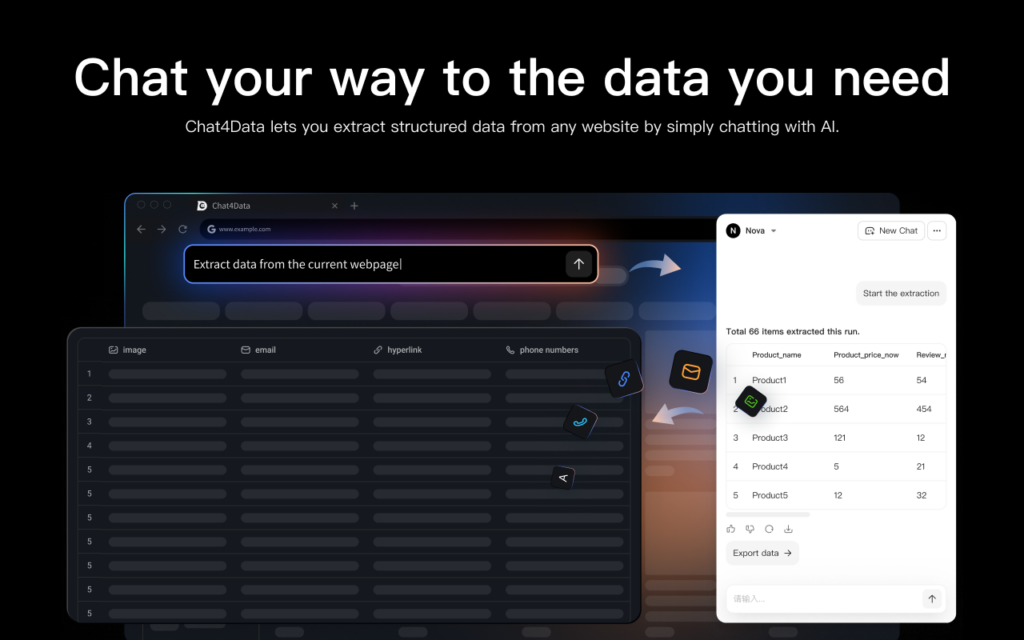
Chat4Data is a conversational AI agent for data collection. As a lightweight Chrome extension, it requires no setup, no downloads, and no third-party cloud storage. With Chat4Data, marketers, SEO analysts and other users without coding background can access SERP data just by chatting.
I’d start with Chat4Data for no-code users, for four reasons:
- Covesational interaction: No learning curve at all, the quickest way for no-code users
- All data processed locally: Nothing is sent to external servers, so your data privacy and security are fully protected.
- Handles complex pages: Pagination, infinite scroll, detail pages, and one-level-deeper extraction.
- Adapts to dynamic pages: keeps extracting accurately even when layouts change
Here’s how to put it to work on Google Search results.
Scraping Google Search Results with Chat4Data (Step-by-Step)
Chat4Data’s AI-powered Chrome extension lets you extract SERP data with plain-language prompts, rather than code or CSS selectors. To show you how you can scrape Google Search Results with no-code Chat4Data, follow the next steps:
1. Install and navigate. Add Chat4Data from the Chrome Web Store. Open Google in Chrome and search for your target keyword (e.g., “best project management software”).
2. Prompt the AI. Open the Chat4Data sidebar and describe what you want in plain English, for example, “Extract the title, URL, and description for all organic results on this page.” Chat4Data scans the SERP layout and proposes an extraction plan.
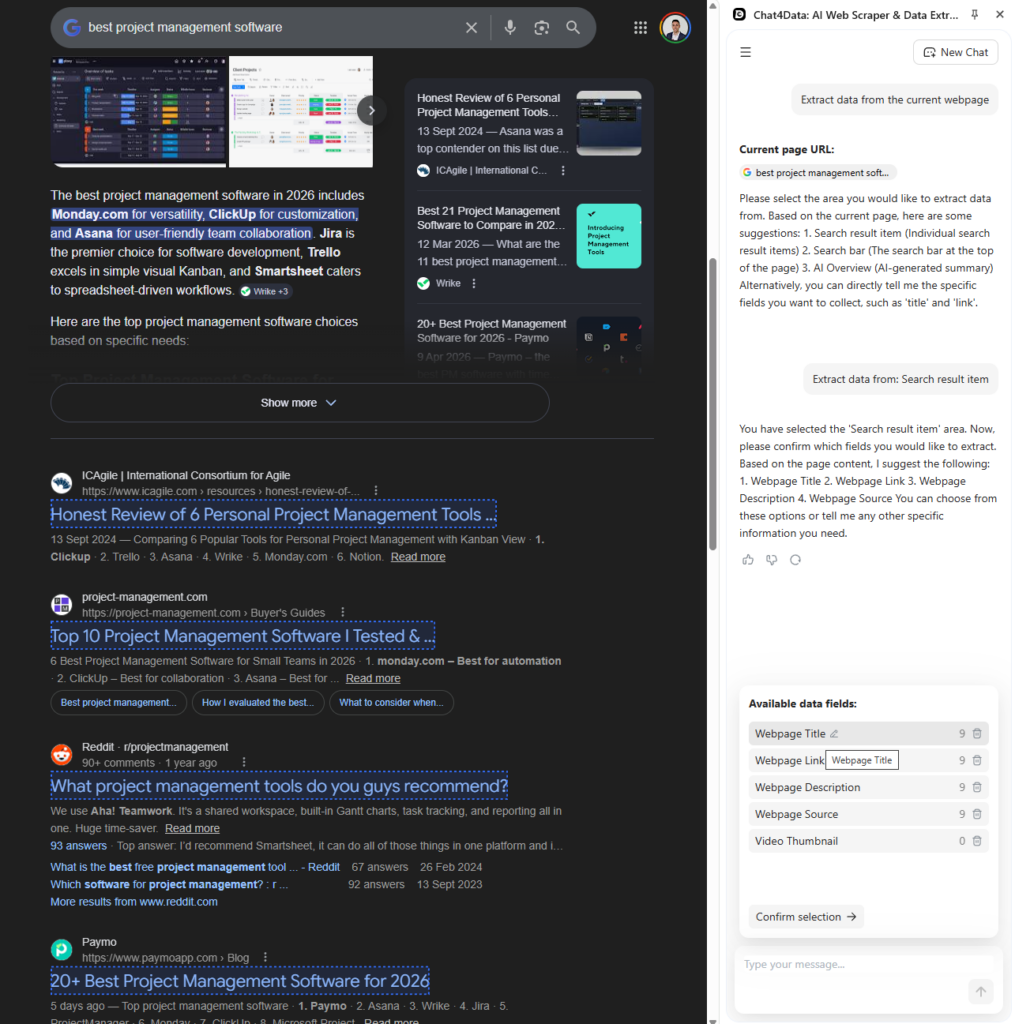
3. Execute. Confirm the plan. Chat4Data takes over the active tab and automatically scrolls through the results. It reads the page visually, so it continues to work even when Google changes the names of its HTML classes. Chat4Data also automatically handles pagination.
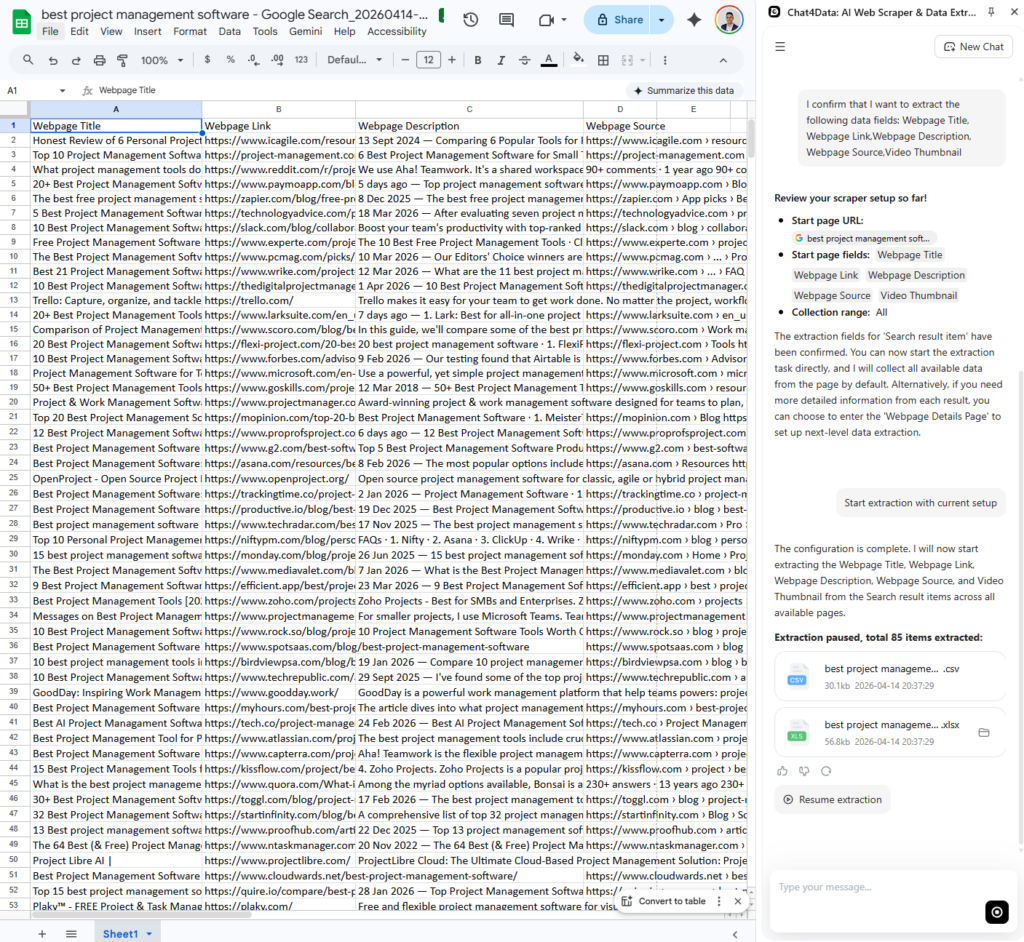
4. Export. You can check the extracted data, presented in a tidy table format, in the sidebar before exporting it to CSV or Excel. For multi-keyword jobs, repeat with your next search query or feed Chat4Data a list of keywords to process sequentially.
Chat4Data functions as a local application that runs in your web browser, preventing any of your search data from being transferred outside your device. The system requires no proxy setup, no selector upkeep, and no API key management.
Other No-Code Options
Octoparse offers a visual task builder with cloud scheduling. Set up a Google SERP extraction workflow once, have it run every day, and automatically save the results as CSV or JSON files. Better for keeping an eye on many keywords in the SERPs regularly and in large volumes.
ParseHub provides a desktop-based visual scraper with a free tier. It handles basic JavaScript rendering and works for moderately complex SERP layouts, though it runs slower than Octoparse at scale.
The trade-off: No-code tools sacrifice some of the granular programmatic control Python offers, but they eliminate the maintenance burden and cut setup time from hours to minutes.
Method 2: How to Scrape Google Search Results with Python
For developers who want full control over extraction logic, a custom Python script is the most flexible approach.
Most tutorials recommend the standard requests library, but that’s a fast path to getting blocked. Use httpx (supports HTTP/2 for more realistic browser behavior) and parsel for clean XPath parsing instead.
Here is the logic behind each step:
- Build the Search URL: Use urllib.parse.quote to safely encode your search query into a valid Google URL string (e.g., https://www.google.com/search?q=your+keyword).
- Set Realistic Headers: Google will instantly block requests missing a standard User-Agent or Accept-Language header. Make your script look like a real Chrome browser.
- Parse the Results: Use XPath to target the specific HTML nodes. For example, organic titles are typically wrapped in //h3/text().
- Handle Pagination: To get to page two, append &start=10 to your URL. For page three, &start=20, and so on.
A crucial note on rate-limiting: Google blocks fast scrapers very aggressively. If you are going through hundreds of keywords, it is time. Set your delays to 3-10 seconds per request. This basic script will not work for bigger production runs; you will need the methods in the next two sections.
Method 3: SERP APIs: The Fastest Path to Clean Google Data
A SERP API is what you use when you need a lot of reliable data that can be used in production.
A SERP API handles all proxy management, CAPTCHA solving, and HTML parsing on its end. You just send them API request, and they send you back perfectly structured JSON. It was made for developers who want the data but do not want to deal with the scraping infrastructure.
SerpApi, DataForSEO, and Serper are some of the best companies in this field. The pricing models and free tiers differ a bit, but the implementation is always easy.
This is what a normal request to a SERP API looks like:
The Trade-off: It costs money. If you track tens of thousands of keywords every day, the costs of the API add up. But for many teams, the time and money they save in engineering by avoiding the need to fix broken scrapers make the API subscription worth it.
Method Comparison to Scrape Google Search Results
| Factor | Python Script | No-Code Tools | SERP API |
| Setup time | Hours–days | Minutes | Minutes |
| Technical skill | High (Python required) | None | Low–Medium |
| Control | Full | Limited | Moderate |
| Maintenance | High (selectors break) | Low (tool-managed) | None |
| Cost | Free (+ proxy costs) | $10–$249/month | Per-query billing |
| Scale | Limited without proxies | Medium–High | Very High |
| Best for | Developers needing custom logic | Marketers need repeatable workflows | Teams needing production reliability |
What to Watch Out For When Scraping Google SERP
Every scraper eventually breaks. The question is how quickly you can adapt. Here are the specific problems you’ll encounter and how to handle them.
- IP Blocks: Google is very strict about rate limits. You will be banned if you send 50 requests from the same IP address in one minute. You need to use a proxy pool (preferably residential proxies) to change your IP address frequently if you want to do more than just small tests.
- CAPTCHA: CAPTCHA is triggered by strange traffic patterns. but using heavyweight headless browsers like Selenium can sometimes make this worse due to browser fingerprinting. To avoid triggering CAPTCHA, change your User-Agent and IP addresses.
- Dynamic Content: Regular HTTP libraries (like httpx and requests) only get the static HTML. Shopping carousels and local maps are examples of features that often load dynamically with JavaScript. You will need a headless browser (like Playwright) or a SERP API to get this data.
- Changes to HTML structure: Google often A/B-tests and redesigns its HTML classes. The XPath selector that works perfectly for a featured snippet today may break with Google’s next A/B test or layout update. Be ready to change your parsing logic frequently.
- Geolocation: Search results vary widely depending on where the search is conducted. To get local ranking data, you need to add the gl= (country) and hl= (language) parameters to your URL, or you can send your traffic through a proxy in the city you want to target.
Conclusion
If you use the right method for your scale, you can get to and use Google SERP data.
Python scripts give developers the most freedom, but they have to be willing to keep the code up to date. No-code tools like Octoparse and Chat4Data let you extract SERPs repeatedly without any engineering work. At production scale, SERP APIs deliver the cleanest, most reliable data.
If you’d rather pick a ready-made tool than build your own, we tested and ranked the best Google SERP scrapers by accuracy, pricing, and ease of use.
Ready to start? Chat4Data’s Google SERP scraping lets you begin extracting search results today without writing code.
FAQs about How to Scrape Google Search Results
1. Is it legal to scrape Google search results?
Yes, but limited. Google’s Terms of Service clearly say that automated scraping is not allowed. However, U.S. legal precedents on public data suggest that scraping publicly available information is mostly okay. Using something on a small scale and for personal use is usually low risk. Never scrape personal data or sell raw Google data as a business.
2. Why does my Python scraper keep getting blocked by Google?
You might be running into one of these issues:
- Not sending realistic HTTP headers (like User-Agent)
- Sending too many requests too quickly
- Not rotating your IP address
To fix this, add random delays between your requests, change your User-Agents, and send your traffic through a reliable pool of residential proxies.
3. What’s the difference between a SERP API and scraping Google directly?
- SERP API — functions as a proxy service that automatically rotates proxies, solves CAPTCHA challenges, and parses HTML to deliver structured JSON
- Direct scraping — gives you complete control over extraction logic and avoids API fees, but you have to repair broken selectors and handle all proxy operations yourself
4. Can I scrape Google search results without coding?
Yes. You do not have to be a programmer to get this data. Tools that let you build, schedule, and automate Google SERP extraction and send the data straight to spreadsheets include:
- Chat4Data — a conversational AI agent for web scraping; describe what you want in plain English
- Octoparse — a visual task builder with cloud scheduling
- ParseHub — a desktop-based visual scraper with a free tier
For a full walkthrough, see our guide on how to scrape Google search results without code.
5. How do I scrape Google results for multiple keywords at once?
- Python — loop through a list or CSV of keywords, adding a random delay (
time.sleep) between each request to avoid rate limits - SERP APIs — usually support batch queries out of the box
- No-code tools — let you upload a keyword list so the scraping task runs automatically
6. Can I scrape featured snippets and People Also Ask boxes?
Yes. A SERP is more than ten blue links, and most scrapers can target these elements separately:
- Featured snippets — the position-zero answer box at the top of results
- People Also Ask (PAA) — the expandable question boxes, useful for content gap analysis and long-tail keywords
- Knowledge panels — the info box on the right for brands, people, or places
- Local packs — the map-based business listings for local queries
With a no-code tool like Chat4Data, you describe which elements you want in plain English, and it pulls them in one run. With Python, each element needs its own XPath selector, which you’ll have to update when Google changes its layout.
7. How many Google search results can I scrape per query?
Google shows about 10 organic results per page by default. To collect more:
- Paginate through additional pages by appending
&start=10,&start=20, and so on to the search URL - Space out your requests with a 3–10 second delay to avoid rate limits and CAPTCHAs
- For large keyword sets, use a SERP API that handles batch queries, or a no-code tool that processes a keyword list automatically
Realistically, most SEO use cases only need the first 2–3 pages, since results past page three see almost no clicks.
8. Can I scrape localized results for different countries?
Yes. Google search results vary by location, so localization matters for accurate ranking data. Your options:
- Python — add the
gl=(country) andhl=(language) parameters to your search URL, or route traffic through a proxy in your target region - SERP APIs — pass a location parameter (e.g., “New York, NY”) and the API returns results as a local user would see them
- No-code tools — run the scrape from a browser session set to your target region
For multi-country tracking at scale, a SERP API with residential proxies gives the most reliable localized results.
9. Can I scrape other Google data, like reviews, the same way?
Yes. The same no-code approach extends to a business’s Google reviews, which pair well with local-pack rankings for competitor and reputation research. You describe the fields you want and export to CSV or Excel, just like with search results.
 Try AI Web Scraper