
Accessing accurate data quickly means gaining a competitive advantage in today’s digital world. One of the most practical solutions to achieve this is by using a web scraper Chrome extension.
Unlike complex software, a web scraper extension is a powerful tool you can add to your browser in seconds. It requires no coding knowledge, and delivers instant results.
This guide will compare the best extensions on the market to help you make the right choice for your needs.
What You Will Learn in This Guide:
I designed this article to help you make an informed decision when choosing the best Chrome extensions. We’ll cover:
- The key differences between desktop and browser-based scrapers.
- The critical features you should look for in a good web scraper extension.
- A detailed review of 7 popular tools, including their pros, cons, and pricing.
- A practical example of how Chat4Data, in particular, simplifies data collection with its AI-powered approach.
Chrome Scraper vs. Desktop Scraper
Before we delve into those plugins, we need to understand how they differ from desktop software. While both methods are frequently used for web scraping, they cater to different needs and customer profiles.
- Chrome Scraper Extension: Think of it as a lightweight and agile assistant that lives directly in your browser. It’s installed with a single click from the Chrome Web Store, runs while your browser is open, and is generally designed for ad-hoc, smaller-scale data collection tasks.
- Desktop Scraper Software: This is a full-fledged, standalone program you install on your computer. It uses its own processing power and resources. This allows it to process very large data sets, create complex automation scenarios and is suitable for much more scalable projects.
Here is a table summarizing the key differences between the two approaches:
| Criteria | Chrome Scraper Extension | Desktop Scraper Software |
| Ease of Installation and Use | Very Easy: Can be installed from the Chrome Web Store with one click and is ready to use immediately. | More Complex: Requires downloading, installation, and usually a configuration process. |
| Power and Scalability | Limited: Ideal for quick and medium-scale, on-demand scraping tasks. | High: Designed for large-scale, continuous, and complex data scraping projects. |
| Resource Consumption | Uses the browser’s memory and CPU. May slow down when many tabs are open. | Uses its own system resources. Generally more stable and powerful. |
| Best Use Case | Quick market research, generating instant data lists, beginner users. | Enterprise-level data collection, large datasets, scheduled tasks that need to run regularly. |
In this guide, we’ll focus on the first category: Chrome extensions that offer quick and practical solutions for daily workflows.
What to Look for in a Good Web Scraper Chrome Extension?
There are dozens of data scraping extensions available in the Chrome Web Store. So, which one is right for you? Based on my testing and experience, there are some critical factors I always check when evaluating an extension. Here’s my “checklist”:
1. Ease of Use (Learning Curve)
This is the most important criterion. The purpose of a web scraper extension for Chrome is to speed up your work, not to make you spend hours trying to figure out how it works. A good web scraper extension should have an intuitive interface.
Ideally, you should be able to select the data you want to scrape by simply pointing it with your mouse, and the web scraper plugin should handle the rest automatically. If you can’t scrape data from a simple site within the first 10 minutes of installing a plugin, it’s probably too complex for you.
2. Dynamic Content Support
Most websites today are “dynamic.” This means that not all content appears when the page first loads, but rather loads as you scroll (infinite scroll) or click a button. Make sure the scraper extension you choose can handle this type of modern site. Can it automate actions like pagination and scrolling? This is where many simple extensions fall short.
3. Data Export Options
Collecting data is only half the equation. The other half is getting that data in a format you can use. Make sure a plugin supports at least CSV and Excel (XLSX) formats. This will allow you to export the data you collect directly to other programs for analysis.
4. Data Scraping Limits and Pricing
Many free web scraper Chrome extensions have restrictions on the number of pages you can scrape simultaneously or on the amount of data you can collect monthly. Consider the scale of your project. Will the free plan be sufficient for your needs, or will you need a paid plan that offers higher limits at a reasonable price? It’s important that the pricing model is transparent and understandable.
5. Artificial Intelligence (AI) and Automation Features
This is the key feature that distinguishes modern scrapers from the old ones. Newer-generation extensions, particularly the AI Web Scraper Chrome Extension, take the process a step further. Tools like Chat4Data, which allow you to collect data simply by typing what you want in plain text (for example, “scrape the name and price of all products on this page”), are incredibly time-saving, even eliminating the hassle of manual selection.
By considering these five factors, you can more informedly evaluate the 7 popular web scraper Chrome extensions we’ll review in the next section.
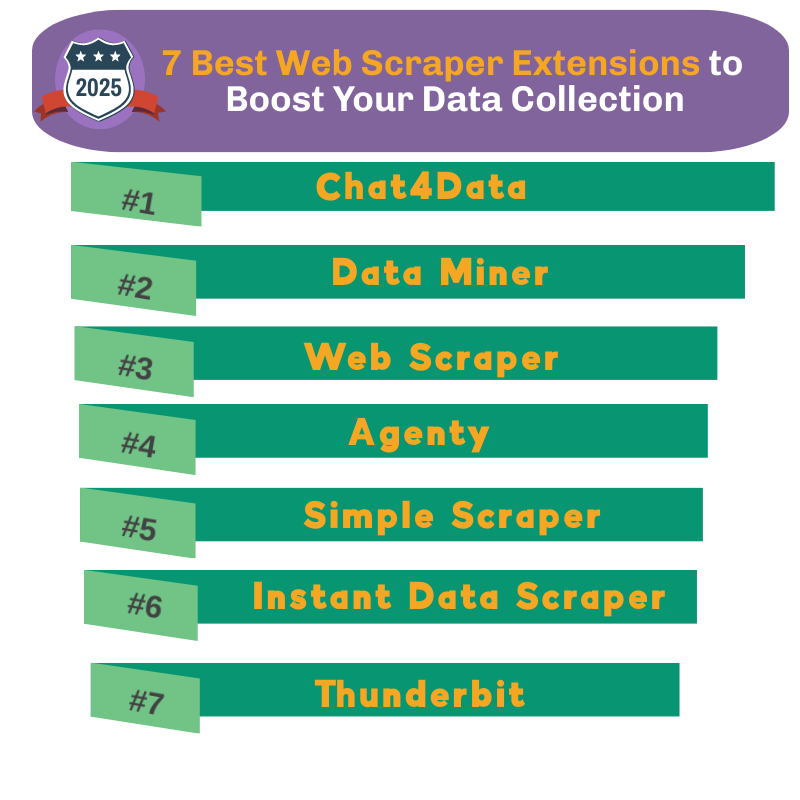
The 7 Best Web Scraper Chrome Extensions of 2025
Chat4Data
Chat4Data is a next-generation tool that brings the AI revolution to data scraping. Instead of fiddling with complex selectors or interfaces, it lets you collect data simply by typing what you want in plain text. A command like “Get the product name, price, and image link on this page” is all it takes for the plugin to automatically recognize and structure the relevant data. This natural language processing capability makes it incredibly accessible, especially for non-technical users.
- Pros:
- Revolutionary Ease of Use: The ability to scrape data using natural language commands reduces the learning curve to almost zero.
- Automatic Data Detection: AI automatically recognizes and suggests key data fields on the page (names, emails, prices, etc.). So it can flexibly adapt to the dynamic content.
- Generous Free Plan: 1 million free tokens for new users allow for extensive testing of the tool.
- Supports List and Detail Page Scraping: Beside list page scraping, it can automatically handles multiple types of pagination without manual setup — including “Next” buttons, “Load More” buttons, standard scrolling, and progressive scrolling pages.
- Cons:
- A New Tool: It doesn’t have as long a history or a large user base as some of its competitors.
- Advanced Customization: It may offer less flexibility for expert users who want to make detailed manual selector adjustments like those found in traditional scrapers.
- Pricing:
- Pay-as-you-go model. Starts with 1 million free tokens for new users, and charges only $1 per million tokens thereafter.
- Ease of Use:
- Unrivaled. If you can use AI chatbots like ChatGPT, you can use Chat4Data. Not to mention, ChatGPT cannot crawl Google. Chat4Data is by far the easiest option for non-technical users.
Data Miner
Data Miner is a very popular plugin, particularly known for its library of pre-made recipes. With over 60,000 publicly available recipes, you can start scraping data from popular sites like Amazon and LinkedIn with just one click. It also offers a “click and choose” interface for creating your own recipes.
- Pros:
- Extensive Recipe Library: Saves you time by offering ready-made solutions for popular sites.
- Flexibility: Offers ready-made recipes for beginners and allows advanced users to create their own rules.
- Cons:
- Limited Free Plan: The free plan is limited to monthly page credits and may not be sufficient for heavy use.
- Learning Curve: Creating your own custom recipes can be a little confusing at first.
- Pricing:
- There is a free plan with a monthly page credit limit and several paid subscription tiers with higher limits.
- Ease of Use:
- Medium. It’s very easy if you find a pre-made recipe. However, creating a recipe from scratch requires a bit more practice than some other “click and choose” tools.
Webscraper.io
Web Scraper is one of the most well-known and powerful browser-based scrapers on the market. Its greatest strength is its ability to crawl multi-layered and complex websites (e.g., category -> product list -> product details) by generating “sitemaps.” It’s quite capable of handling dynamic and JavaScript-intensive sites.
- Pros:
- Powerful and Flexible: Can handle complex site structures, page transitions, and dynamic content.
- Powerful Free Version: Completely free and highly capable for native browser scraping.
- Cons:
- Significant Learning Curve: Understanding the logic of a sitemap and how selectors work can be time-consuming and challenging for beginners.
- Paid Cloud Features: Upgrading to paid cloud plans is essential for automated and large-scale tasks like scheduling and IP rotation.
- Pricing:
- A powerful free plan for local scraping. Monthly subscription plans are available for cloud-based features.
- Ease of Use:
- Difficult. It can be confusing at first for non-technical users. However, once you understand the logic, it becomes a very powerful tool.
Agenty
Agenty is more than just a simple plugin; it’s actually a data scraping and automation platform. Its real power lies in the ability to schedule these “agents” you create in the cloud, run them behind anonymous proxies, and send the results to places like Google Sheets or an API.
- Pros:
- Powerful Automation: Perfect for creating scheduled and periodic scraping tasks.
- Integration Capabilities: Provides advanced options for exporting collected data to other platforms.
- Cons:
- Complicated Interface: The platform itself can be too complex and intimidating for beginners who just want to pull up a quick list of data.
- Pricing:
- Offers a very limited free trial plan and various credit-based paid subscriptions.
- Ease of Use:
- Medium-Difficult. While the plugin is simple to use, utilizing the platform’s full potential requires a technical perspective and learning curve.
Simple Scraper
True to its name, Simplescraper focuses on providing a simple and straightforward user experience. The plugin allows you to create reusable “recipes” that scrape across multiple pages or subpages on a schedule. It is also easy to use. Simply click on the data field you want to scrape, give it a name, and click the “Run” button. It’s highly effective for basic, one-time tasks.
- Pros:
- Extremely Simple: The interface is very clean and takes only a few minutes to learn.
- Fast Results: Great for instantly creating data lists from uncomplicated, static websites.
- Cons:
- Limited Capabilities: Dynamic sites struggle with tasks that require multiple page pagination or complex JavaScript actions.
- Credit System: Scraping credits on the free plan can run out quickly, even for medium-sized projects.
- Pricing:
- They have a free plan with limited credits and affordable paid plans that offer more credits.
- Ease of Use:
- Easy. It’s a great starting point for a non-technical user. However, it might fall short when your project gets a bit more complex.
Instant Data Scraper
This free web scraper chrome extension aims to provide a one-click solution to data scraping. When you run the plugin, an AI-powered algorithm automatically detects table-like data on the page. If your data is in a clean HTML table, this tool works like magic and delivers it to you as a CSV or Excel file within seconds.
- Pros:
- Instant Data Detection: Finds and selects structured data (tables, lists) with incredible speed.
- Zero Setup: You often don’t even need to make any manual selections.
- Cons:
- Inflexible: When the automatic detection algorithm fails or encounters non-standard data structures, you have very limited options to manually adjust or fix the extraction.
- Dynamic Pages: Generally does not support page transitions or infinite scrolling.
- No Longer Actively Maintained: As of 2026, the original developer (Web Robots) has stopped updating the extension. There are no new features or bug fixes planned, which means compatibility issues on newer sites may go unresolved. If you’re using it for ongoing tasks, it’s worth having a backup option.
- Pricing:
- It is often free to use, making it very popular for quick, one-off jobs.
- Ease of Use:
- It’s very easy. As long as your data is in the correct format, it’s probably the fastest tool on the list. However, it’s an all-or-nothing approach.
Thunderbit
Thunderbit is a simple and effective data scraper extension that offers a visual selector interface. It features a simple “2-click” process where AI suggests how your data should be structured and automatically pulls the fields for you — no selectors or manual scripts needed. It’s especially good for standard tasks like scraping product lists from e-commerce sites.
- Pros:
- Intuitive Visual Selection: The data selection process is simple and straightforward.
- Free Plan Sufficient: The free version offers sufficient features for most basic scraping tasks.
- Cons:
- Lacks Advanced Features: Lacks the power of tools like Webscraper.io for complex site structures or automation scenarios.
- Less Known: May not have as large a community or support resources as other popular plugins.
- Pricing:
- There is a free plan for basic features and a paid Pro version for more advanced capabilities.
- Ease of Use:
- Easy-Medium. Offers slightly more features than Simple Scraper, but isn’t as complex as Webscraper.io. A good middle-ground option.
Which Scraper Chrome Extension Should You Choose?
Each of the seven tools we reviewed excels in different areas. The “best” plugin is actually the one that best suits your specific project needs and technical skill level. To help you decide, here’s a quick summary table comparing all the tools based on their key features, followed by my personal recommendations.
Quick Comparison Table
| Tool | Best Use Case | Ease of Use | Dynamic Content Support | Pricing Model |
| Chat4Data | Fast data collection through AI commands; ideal for non-technical users. | Very Easy | High (AI-based) | Pay-as-you-go (Free start) |
| Data Miner | Using ready-made templates (recipes) for popular websites. | Medium | Medium | Subscription (Limited free plan) |
| Web Scraper | Multi-layered, complex site scraping with full control. | Hard | High | Freemium (Cloud paid) |
| Agenty | Scheduled, automated, and cloud-based scraping tasks. | Medium-Hard | High | Subscription (Very limited trial) |
| Simple Scraper | Quick data list creation from simple, single-page static sites. | Easy | Low | Credit System (Free plan available) |
| Instant Data Scraper | One-click data extraction from clean HTML tables. | Very Easy | Very Low | Free |
| Thunderbit | Collecting standard lists and product information with a visual interface. | Easy-Medium | Medium | Freemium (Pro paid) |
Tips According to Your Needs
If you are still unsure, think like this:
- Want zero learning curve? → Chat4Data / Instant Data Scraper
- Just need quick data now? → Simple Scraper / Thunderbit
- Need control & scalability? → Web Scraper / Agenty
- Want ready-made solutions? → Data Miner
My Top Pick and Why
While all the tools we’ve reviewed are valuable, one is a game-changer in its approach to data scraping: Chat4Data. While other web scraper extensions try to simplify the “click and select” approach, Chat4Data eliminates this step entirely. This is the main reason it’s the best choice for me. It makes scraping data as simple as a chat.
Other web scraper Chrome extension tools always involve a learning curve: finding the right CSS selectors, understanding the page structure, and adjusting pagination settings. With Chat4Data, you only need to type in what you want, and it finds and structures the data for you. This is a revolutionary feature, especially for marketers, analysts, and small business owners like me who are short on time and don’t want to get bogged down in technical details. I’ll show you an example below from my real experience.
How I Used Chat4Data to Scrape a Book Sales Website
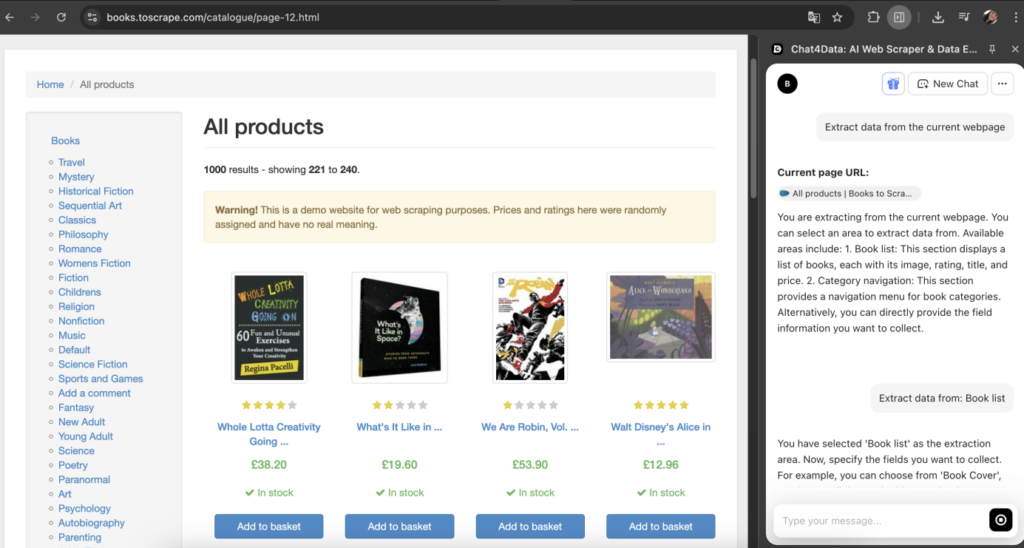
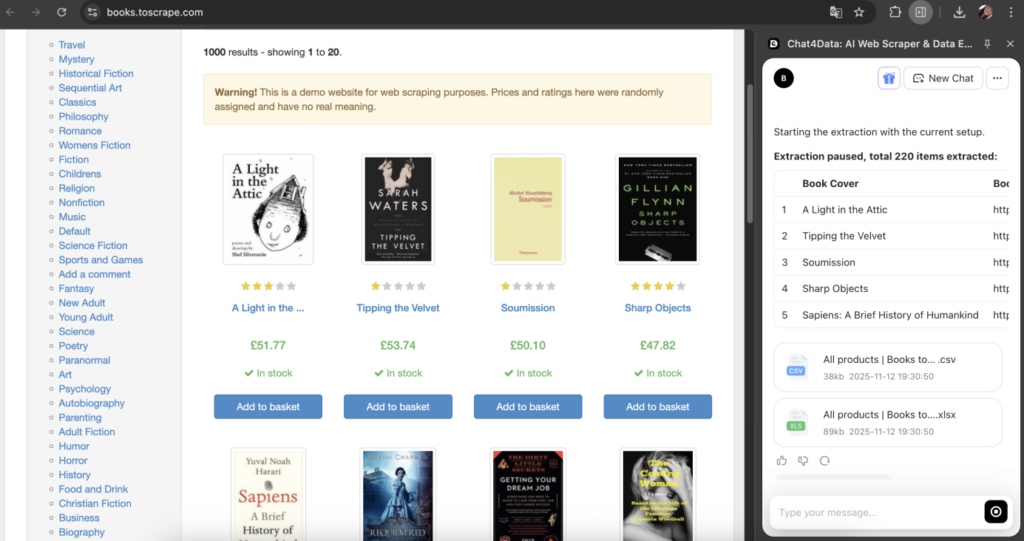
I wanted to use Chat4Data to scrape a book sales website designed for scraping. To do this, I opened the page I wanted to scrape and clicked Chat4Data from the Google add-ons. A chat window opened. I entered the pre-defined prompt, “Extract data from the current webpage”. Chat4Data scanned the page and suggested the data fields available for extraction. After I confirmed the areas to scrape, it instantly began pulling the data for me. Then it shared the scraped data in both CSV and Excel formats. How smooth it is!
Its importance and ease cannot be overstated. Being a Chrome extension means you don’t have to install anything on your computer (installations can be quite tedious, and I like that feature). You can also make it work just from the chat screen. No technical knowledge is required. You don’t have to worry about annoying technical details like having to know CSS or find the XPath!
Chat4Data isn’t just a data scraper Chrome extension; it’s also a productivity tool. By removing technical hurdles, it allows you to focus directly on the results: the data itself.
Conclusion
So, what did we learn after looking at so many options? From simple, one-click tools to powerhouses designed for complex sites, the world of web scraper Chrome extensions is quite rich. It would be easy to just say, “The best one depends on your needs.”
But I think the real takeaway is deeper. It’s not just about choosing a tool; it’s about how our perspective on data collection has changed. For years, our goal was to do a better job of “pointing and clicking.” But with AI-powered tools like Chat4Data, the goal is to eliminate the need for pointing and clicking altogether.
Instead of trying to decipher a site’s structure, you simply ask your question. Instead of adjusting selectors, you describe your desired outcome. Ultimately, the right tool isn’t just a “scraper”; it’s the shortest path between your question and the data that answers it.
FAQs about Web Scraper Extensions
1. Which of these extensions offers the best AI-powered scraping experience?
Among the listed tools, Chat4Data clearly stands out as the most innovative in its use of artificial intelligence. While some other extensions (like Instant Data Scraper) use AI for automatic data detection, Chat4Data’s natural language processing (NLP) capability allows users to collect data simply by typing what they want in plain text. This makes the process as easy as having a conversation, providing the most intuitive AI-assisted scraping experience.
2. How do the pricing tiers of the top extensions compare?
Pricing models generally fall into three categories:
- Freemium (Web Scraper, Thunderbit): Offers a strong free version but requires a paid subscription for advanced features like scheduling or cloud functionality.
- Credit/Subscription (Data Miner, Simple Scraper): The free plan includes limited monthly usage (page credits), with monthly subscriptions available for higher limits.
- Pay-as-you-go (Chat4Data): Starts with a generous free credit (tokens), and afterward, you only pay for what you use. This model is usually more flexible for those with irregular but occasionally heavy usage needs.
3. Which extension handles dynamic pages best in 2025?
For dynamic pages (infinite scrolling, click-to-load content, etc.), Web Scraper (.io) remains the most capable tool. Its sophisticated “sitemap” structure can simulate JavaScript actions (clicks, scrolls) and wait for data to load. However, Chat4Data’s AI is increasingly capable of understanding such pages and can often handle pagination automatically with simple commands like “continue to the next pages.” This makes it a more user-friendly alternative.
4. Can you compare cloud-based and local scraping options?
Here is a brief comparison and tool examples based on cloud-based and local scraping features:
- Local Scraping: The extension performs all operations using your computer’s resources (CPU, RAM) and IP address. Most free extensions work this way. Ideal for small to medium-scale tasks.
- Cloud Scraping: Your scraping task runs on the provider’s servers. This allows you to shut down your computer, schedule recurring jobs, and avoid IP blocking using rotating proxies. Agenty and the paid version of Web Scraper offer this feature. It’s the best approach for large-scale and automated projects.
5. Which extension is the easiest for non-coders?
If the goal is absolute ease of use, two tools stand out:
- Instant Data Scraper: If your data is inside a clean HTML table, this tool delivers results with a single click. It doesn’t get easier than that.
- Chat4Data: For almost any site structure, the ability to collect data simply by writing what you want makes it the most powerful and intuitive “all-purpose” tool for non-technical users. It eliminates the need to deal with complex interfaces or CSS selectors.
 Try AI Web Scraper