
Facebook has become harder to scrape. With Meta’s Graph API locked behind app review and the React-based desktop site constantly changing, even a couple of quick requests from a fresh IP can get you blocked.
Despite this, with over 3 billion active users, Facebook remains a key source for competitor analysis, sentiment monitoring, and lead generation in public Groups. So, the question isn’t whether to scrape Facebook, it’s which method still works in 2026.
Three Methods That Still Work:
- Chat4Data: A Chrome extension that runs within your logged-in session, offering a low-maintenance solution.
- Playwright + Cookie Injection: For developers, a flexible but higher-maintenance server-side method.
- facebook-scraper (kevinzg): An open-source Python library that targets m.facebook.com.
By the end of this guide, you’ll know which method fits your project, the maintenance costs, and how to avoid common mistakes that get accounts banned.
⚠️ Important Notice Before You Continue
This article is an educational technical reference for developers working with publicly accessible data for legitimate business purposes such as competitor research, sentiment analysis, and academic study.
Automated access to Facebook is governed by Meta’s Terms of Service, and the methods discussed below may violate those terms. We strongly recommend you:
- First consider Meta’s official APIs (Graph API, Marketing API, CrowdTangle successors) : they are the only fully ToS-compliant path
- Never collect personally identifiable information (PII) from private profiles or non-consenting individuals
- Comply with GDPR, CCPA, and local data protection laws in your jurisdiction
- Consult a lawyer before deploying any scraper in a commercial context
The techniques in this article are shared for technical education. You are responsible for ensuring your use case is lawful.
What Changed About Facebook Scraping in 2026?
Facebook scraping has evolved significantly in recent years. Unlike platforms like Twitter or LinkedIn, Facebook hosts valuable conversations within public Pages, Groups, and profiles. Here’s a quick reality check:
- Desktop site (www.facebook.com): The desktop site is almost impossible to scrape without a real browser. Facebook uses React SPA (Single Page Application) technology, with obfuscated class names that rotate frequently. A simple
requests.get()won’t work because most content is rendered client-side via internal GraphQL calls. - Mobile site (m.facebook.com): The mobile site still serves server-rendered HTML for public Pages and Groups, making it more scrape-friendly. However, the trade-off is that the mobile site lacks features like Marketplace, Events, and full reaction breakdowns.
Core Business Value of Facebook Scraping:
- Competitor analysis: Use Facebook page scrapers to harvest posts, likes, and comments from competitors, gaining insights into effective posting strategies, audience engagement, and content formats.
- Sentiment monitoring: Combine Python comment scrapers with NLP to categorize brand mentions in real-time, enabling quick sentiment analysis and early crisis detection.
- Lead generation: Scraping conversations from public Groups can turn high-intent prospects into a structured sales pipeline.
- Market research and forecasting: Analyzing posts for macro consumer trends allows analysts to identify changes before traditional surveys do.
Legal and Compliance Framework: Read This Before You Code
Before writing a single line of scraper code, you need to understand the legal terrain. Getting this wrong can result in account bans, civil lawsuits from Meta, or regulatory fines under GDPR/CCPA.
The Official Path Should Be Your First Choice
Meta provides several official APIs designed for data access:
- Graph API: for Page and Group data you own or have been granted access to
- Marketing API : for ad performance and audience insights
- Meta Business SDK: for commerce and catalog data
If your use case fits these APIs, stop here and use them. Scraping is only a reasonable fallback when the official APIs cannot serve a legitimate business need.
When Scraping May Be Defensible
Courts have not reached a final verdict on public-data scraping, but the current landscape suggests the following factors reduce risk:
- Target only publicly accessible data — content visible without logging in or visible to any logged-in user on a public Page/Group
- Exclude personally identifiable information (PII) — strip names, profile URLs, and any identifiers not essential to your analysis
- Respect rate limits — throttle requests to human-like pace (1 request per 3–5 seconds minimum)
- Never circumvent technical barriers designed to protect private data (2FA, member-only groups you haven’t joined, etc.)
- Do not resell or redistribute raw scraped data
What Will Almost Certainly Get You in Trouble
- Scraping private profiles, private groups, or direct messages
- Collecting PII for commercial databases without a legal basis under GDPR Article 6
- Using scraped data to target individuals (stalking, harassment, unsolicited marketing)
- Circumventing authentication (cracking 2FA, credential stuffing)
- Reselling raw Facebook data as a product
Account Risk Is Separate From Legal Risk
Even perfectly legal scraping (e.g., of fully public Page data) can get your Facebook account checkpointed or banned. That’s a contractual consequence, not a legal one — but it still costs you. Use dedicated, disposable accounts for any automated access, never your personal account.
Consult a Lawyer
This section is general guidance, not legal advice. Scraping laws vary by jurisdiction (the EU is stricter than the US, which is stricter than many APAC countries). Before deploying any scraper commercially, consult an attorney familiar with data protection and computer fraud statutes in your operating jurisdiction.
How to Build a Facebook Scraper in Python: 3 Methods
Method 1: The No-Code AI Solution (Chat4Data)
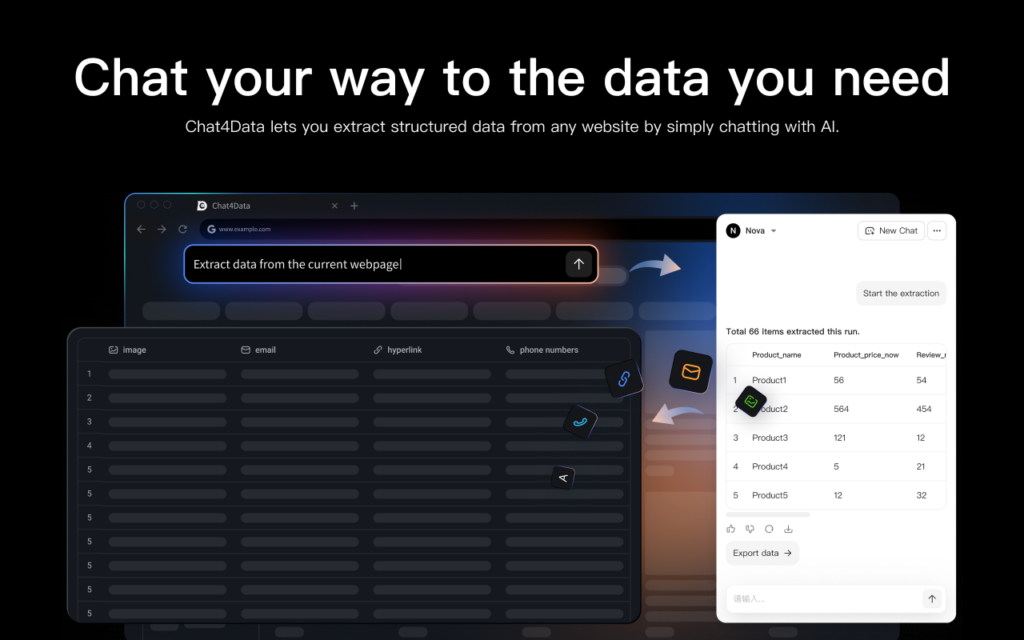
For most non-engineering use cases and even many engineering ones, running an effective web scraper within the browser tab you’re already logged into is the easiest approach. Chat4Data is a Chrome extension that uses an LLM (Large Language Model) to read the page’s rendered DOM and extract structured data based on natural language prompts.
What makes this particularly effective for Facebook scraping is that Chat4Data inherits your real browser session. Facebook sees a human-driven Chrome instance with normal cookies, user agents, canvas fingerprints, and mouse activity, because you’re physically on the page. There’s no need for proxy handling, cookie injection, or masking headless-browser fingerprints.
Key Features:
- Natural language prompting means explaining in plain language what Facebook data you need, and the tool fetches it accordingly.
- Scrape list and subpage data: Extracts data from search results (list of posts, groups, or pages) and then drills down into individual posts or profile pages (subpage) to get comprehensive details.
- AI-powered data structuring: Automatically recognizes and structures data fields from unstructured Facebook text, often eliminating the need for manual setup.
Pros:
- Efficient credit usage enables this tool to be utilized for various Facebook scraping tasks.
- Privacy-focused is essential as the tool processes everything locally and can scrape data from Facebook profiles or groups that require a login.
Cons: The user must be in the window where Chat4Data is actively scraping.
Chat4Data Pricing: Freemium – Free credits for trying out, $10 for 2,000 monthly credits, and $35 for more extensive Facebook scraping.
Ease of use: 5/5. Chat4Data auto-suggests prompts that can navigate me in the right direction. After that, it quickly and precisely fetches all the Facebook data I need.
Here is the workflow to launch your first Facebook data scraper task:
- Download the Extension: Go to the Chrome Web Store and look up Chat4Data to download the extension. Click “Add to Chrome” to install the extension.
- Sign In: Click the puzzle piece symbol in your browser. Launch it and log in with your email address or Google account. This synchronizes your history and credits.
- Navigate to Target: Open a new tab and go to the Facebook page or group you wish to analyze.
- Start Chat4Data: Click the Chat4Data icon to open the sidebar. The AI will immediately analyze the page structure. You can now simply type “Scrape data” or select the suggested data categories, and the tool will begin collecting data immediately.
Method 2: The Custom Python Build (Selenium & BeautifulSoup)
Use this method if you need server-side automation, full control over the scraping schema, or if you’re integrating Facebook scraping into an existing data pipeline. However, this is not for beginners — debugging headless browsers and managing proxy stacks comes with a significant maintenance burden.
In 2026, Playwright is the preferred choice for scraping. It’s faster, more stealthy by default, and its asynchronous API handles concurrent scraping better than Selenium. Unlike Selenium, which is easily detectable due to the
navigator.webdriverflag and other traces, Playwright withplaywright-stealthis much harder to detect.
Setup:
The Cookie Injection Pattern
One key technique to bypass Facebook’s bot detection: don’t automate the login. Instead, log in manually using a real Chrome profile, export the cookies, and inject them into your Playwright session. Facebook’s bot detection doesn’t trigger on cookie reuse as it does on automated login attempts.
To export the cookies, use a browser extension like Cookie-Editor while logged into Facebook. Save the cookies as JSON. The important cookies for an authenticated session are: c_user, xs, fr, datr, and sb — at minimum c_user and xs are required.
A Few Key Points About the Code
- Mobile-Safari User Agent & iPhone Viewport
The use of a mobile-Safari user agent paired with an iPhone viewport is intentional. Facebook serves a lighter, more parseable page to mobile clients. The parsing logic (looking for<article>tags and<abbr>timestamp elements) is built around this markup, which has remained stable over the years. Switching to a desktop user agent will change the markup entirely, causing the parser to return zero results. - Headless=False
If you’re used to running scrapers in production, theheadless=Falseline may seem unusual. In reality, headless Chromium has several detectable fingerprints (e.g., window dimensions, missing GPU, no plugins), all of which Facebook checks for. Running in headed mode on a small VPS with Xvfb has become the standard production setup in 2026. - Human_Scroll Function
Thehuman_scrollfunction uses randomized scroll distances and pauses. This is important because uniform scrolling (e.g., scrolling exactly every 4 seconds) is an easy behavioral pattern for Meta’s detection system to flag as automated.
Pros:
- Full control over schema, throttling, and storage.
- Can run unattended on a server, making it ideal for automation.
- Free, aside from development time and proxy costs.
Cons:
- High maintenance: Every 2-3 months, something is likely to break.
- Cookies expire: You’ll need a refresh process (manual re-export or rotating cookie pools with burner accounts).
- Proxies for scale: Adding proxies introduces another stack to manage. For Facebook, residential or mobile proxies are necessary, while datacenter IPs get blocked immediately.
- 2FA, checkpoints, and CAPTCHAs: These remain unsolved challenges. Typically, you’ll handle them by burning accounts and rotating to new ones.
Method 3: facebook-scraper (open-source, fastest to set up)
facebook-scraper by kevinzg has been a popular community tool for years. It’s a simple, requests-based scraper that targets m.facebook.com, parses server-rendered HTML, and returns posts as Python dictionaries. No need for a browser, JavaScript engine, or Playwright installation — just pip install and you’re ready to go.
The Trade-off:
Since it doesn’t use a real browser, it tends to break faster than Playwright when Facebook updates the mobile site. The repository has often gone weeks without a fix, depending on community contributions or maintainers. If you’re relying on it for anything time-sensitive, be sure to check the open issues first.
What It Handles Well:
- Public Page Timelines
- Posts in Public Groups
- Comments and Reactor Lists (Note: these options can slow the scrape significantly)
What It Doesn’t Handle Well:
- Personal Profiles: Due to Facebook’s strict privacy settings, scraping personal profiles is very limited.
- Marketplace, Events, Stories: These are not well-supported on the mobile site.
- JavaScript-dependent content: Anything requiring JavaScript execution won’t work.
Best Use Case:
For one-off jobs or prototyping, facebook-scraper is the fastest option. However, for production-level tasks, treat it as a fallback. Pin the version, monitor the issue tracker, and keep a Playwright-based backup ready for when it inevitably breaks.
🔎Important Notes on Maintenance:
facebook-scraper is a requests-based scraper that can grab Facebook posts quickly. However, it faces challenges when Facebook updates its mobile layout, causing the tool to fail until a fix is contributed by the community. Be cautious if relying on it for time-sensitive tasks — always check the open issues in the GitHub repo for known problems.
Facebook Scraper Python Method Is Right for You?
To help you decide which of the three methods is best for your specific needs, the following table provides a quick side-by-side comparison. We will evaluate each approach based on the technical skill required, maintenance demands, and overall risk. Use this comparison to quickly match a method to your project goals.
| Chat4Data | Custom Playwright | facebook-scraper | |
|---|---|---|---|
| Skill required | None | High (Python + browser automation + proxy management) | Medium (Python basics) |
| Setup time | Minutes | Days, plus ongoing | Minutes |
| Maintenance | None — LLM adapts to DOM changes | High — expect breakage every 2–3 months | Medium — depends on community fixes |
| Ban risk | Lowest — runs in your real browser | Medium-high — manageable with cookies + proxies + throttling | Medium — requests-based is more obvious than a browser |
| Runs unattended on a server | No | Yes | Yes |
| Cost | Free tier, then $10–$35/mo | Free + your dev time + proxy costs | Free |
| Handles login-gated content | Yes (your session) | Yes (cookie injection) | Yes (cookie file) |
| Comments & reactions | Yes | Yes, with extra parsing work | Yes, with options flag |
| Marketplace / Events | Yes | Yes, with significant parsing work | No |
| Best for | Analysts, marketers, one-off research, login-gated scrapes | Engineering teams with existing data pipelines | Developers prototyping or running short jobs |
Quick recommendations by use case
- You need data once or once a week, and you’re not an engineer → Chat4Data. The credit cost will be lower than the time cost of any other path.
- You’re building a sentiment-monitoring product or feeding a data warehouse → Custom Playwright build, with rotating burner accounts and residential proxies. Budget ongoing maintenance time.
- You’re a developer prototyping a one-off analysis → Start with
facebook-scraper. If it breaks or doesn’t return what you need, fall back to Playwright. - You need Marketplace, Events, or Stories data → Custom Playwright. The mobile-site approach won’t get you there.
Conclusion
Choosing the right Facebook scraping method depends on your use case and the trade-offs you’re willing to make. If you need quick data with minimal maintenance, Chat4Data is the ideal choice. For ongoing projects requiring more control and scalability, the Custom Playwright build is better, though it comes with higher maintenance costs.
For one-off analyses, facebook-scraper is the fastest way to get started, but it’s less reliable for long-term use. If you need to scrape Facebook Marketplace, Events, or Stories, Custom Playwright is the only reliable option.
Ultimately, the right tool for you will depend on your goals, budget, and the level of control you need over the scraping process. Remember, your choice should balance the effort to implement the solution with its reliability and long-term maintenance.
Disclaimer
This article is provided for educational and research purposes only. Nothing in this article constitutes legal advice. The author and Chat4Data do not endorse or encourage violations of any third-party Terms of Service, including Meta’s. Readers are solely responsible for ensuring their use of any technique described here complies with applicable laws and platform agreements in their jurisdiction.
Chat4Data’s own tool is designed to operate within a user’s authenticated browser session on pages the user has legitimate access to. It is not a circumvention tool and should not be used to access data the user is not authorized to see.
FAQs about Facebook Scraper Python
1. Why do Python Facebook scrapers constantly break?
They frequently break because Facebook is a single-page application (SPA) that constantly updates its DOM structure and dynamic CSS classes. This requires high maintenance and constant manual fixes for custom scripts (Method 2) or waiting for updates from the open-source community (Method 3).
2. Can I use a Python script to scrape data from private Facebook groups or personal profiles?
Scraping from private groups or personal profiles is the most challenging task due to strict privacy settings and the need for verified access or a login. While the Chat4Data method is privacy-focused and can scrape data from profiles or groups that require a login by using your local session, custom Python scripts using Selenium risk getting blocked if you try to log in automatically.
3. What is the easiest Facebook scraper method for someone with no coding experience?
The Chat4Data AI Browser Extension (Method 1) is the easiest because you do not need any technical skills to use it, and it uses natural language prompts to get data. You can set it up right away and never have to worry about it again, so you can focus on analyzing data instead of managing infrastructure.
 Try AI Web Scraper