

This World Cup has already delivered its share of shocks. Norway knocked out Brazil in the knockout stage. Cabo Verde, a nation of half a million people, held both Spain and Uruguay to draws in the group stage. And in the Round of 16, all four of the pre-tournament favorites (France, Spain, Argentina, and England) needed a single-goal margin just to survive. None of that happened quietly on the odds boards. Every one of those results showed up first as a shift in the numbers, sometimes hours before kickoff.
If you’ve ever tried to actually track that shift yourself, refreshing a sportsbook page, copying numbers into a spreadsheet, switching tabs to compare a few matches, you know how fast that gets tedious. Here’s why that data is worth grabbing, and how I scrape betting odds in a few minutes with Chat4Data.
Why Bother Collecting Betting Odds at All?
Betting odds aren’t just a number next to a team name. They’re a rough public estimate of how likely an outcome is. The more money and confidence piles onto one side, the shorter (lower) that side’s odds get. Sportsbooks adjust constantly to balance their own risk, which means the odds board is really a live snapshot of collective opinion, updated in real time.
That’s useful for a few different reasons:
- Spotting how “chaotic” a tournament is. You can compare how often the underdog wins against what the odds implied going in, a rough measure of how many upsets a tournament produced.
- Tracking sentiment shifts. A team’s odds tightening or loosening over the course of a day often reflects news (injuries, lineup changes, weather) before it’s fully reported elsewhere.
- Content and analysis. If you write about sports, run a newsletter, or just like arguing with friends about who’s overrated, having the actual numbers on hand beats going from memory.
- Personal research. Some people like testing their own predictions against what the market believed at the time.
None of that requires real-time infrastructure or a trading desk. It just requires being able to grab the numbers off a page without it turning into a whole afternoon.
My Workflow: Using Chat4Data to Grab Odds in Minutes
Here’s the actual process. Let’s use Polymarket as an example.
Step 1: Open Chat4Data and describe my needs.
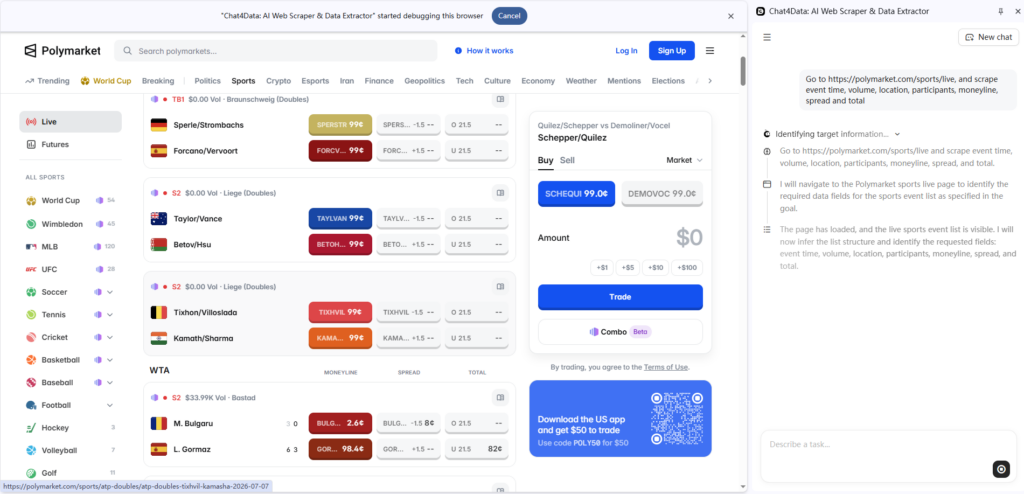
I open Chat4Data in my toolbar and type: “Go to https://polymarket.com/sports/live and scrape event time, volume, location, participants, moneyline, spread, and total.” Then I just wait for Chat4Data to analyze the webpage for me.
Step 2: Preview the data.
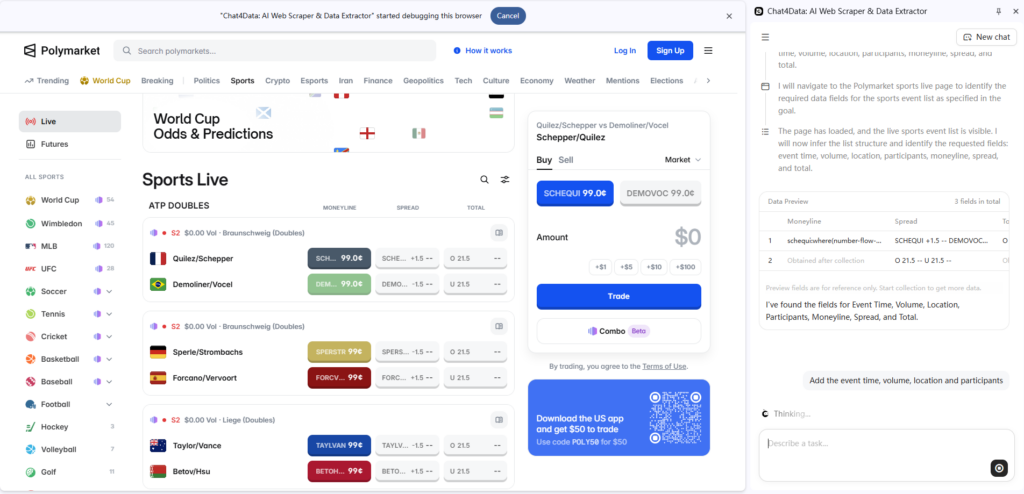
When Chat4Data first shows its planned workflow and data preview, I notice it has missed event time, volume, location, and participants. So I type: “Add the event time, volume, location, and participants.”
Step 3: Confirm the fields.
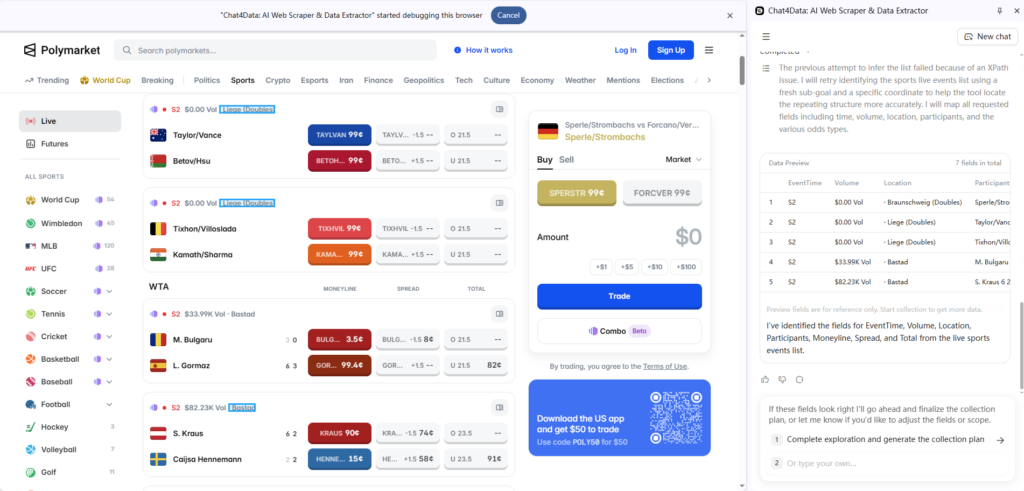
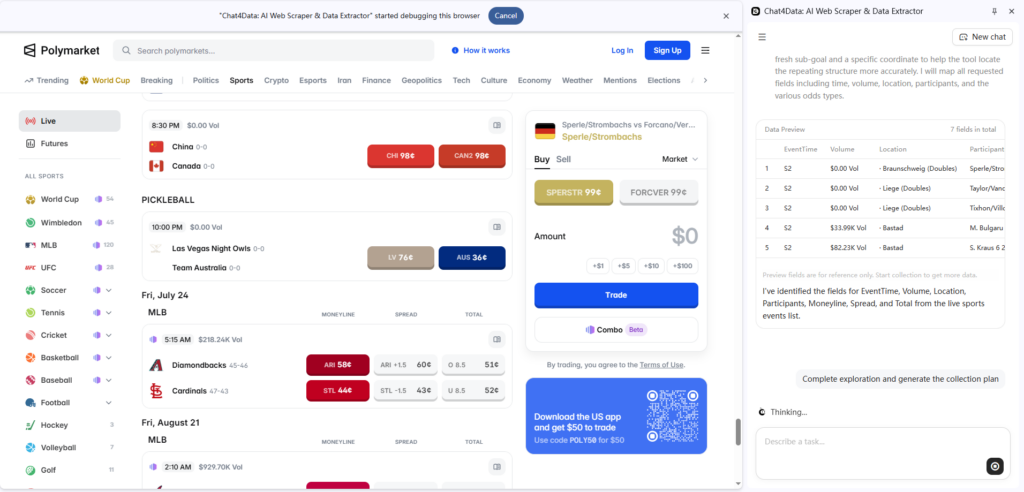
Chat4Data updates the preview to include everything I asked for, and this time all the fields I need are there. So I click “Complete Exploration and Generate Collection Plan.”
Step 4: Review the final preview.
Before finalizing anything, Chat4Data shows me one last preview of exactly what it found — this way I can catch any mislabeled columns before exporting.
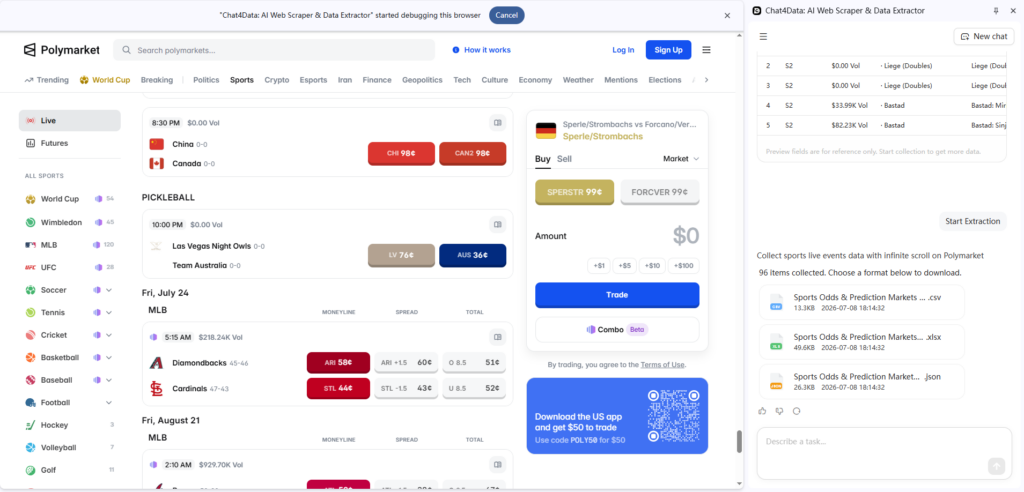
Step 5: Hit “Start Extraction” and download the data.
And here’s what the final dataset looks like:
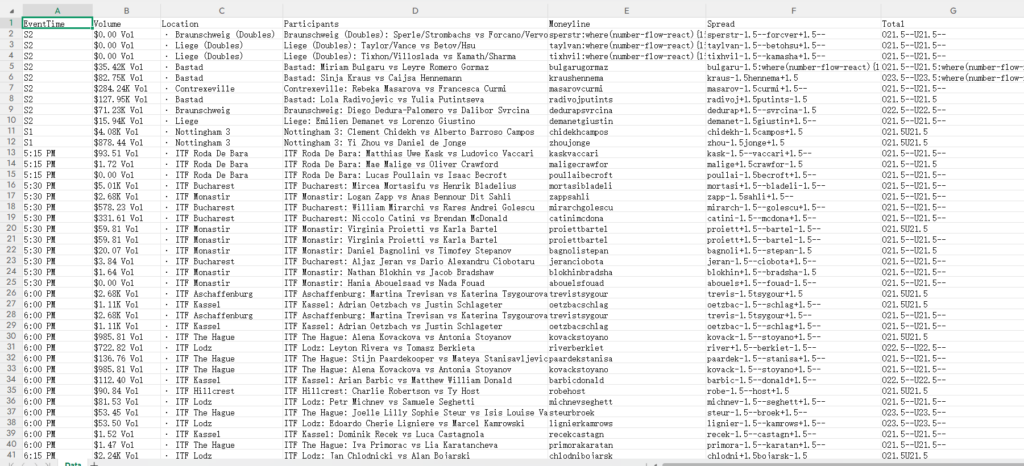
Saving the conversation for next time. The part I didn’t expect to matter as much as it did: the conversation itself gets saved automatically. The next time I wanted odds from a similar page, I didn’t have to re-explain what I wanted from scratch. I just reused the same conversation. For something like a tournament that runs for weeks, that adds up. It turns “describe my request every single time” into “open the same thread and run it again.”



What Chat4Data Is Good For (And What It Isn’t)
I want to be upfront about this instead of overselling it. Chat4Data is not a monitoring system. It doesn’t sit in the background pinging odds pages every five minutes, and it’s not built for someone running an automated arbitrage strategy across a dozen sportsbooks around the clock.
What it’s actually good for is the in-between case a lot of people are actually in: you’re on a page, you want the data that’s on it, and you don’t want to write a script or fight with a scraping tool’s configuration screen to get it. That covers a lot of ground: content creators pulling numbers for a post, casual analysts comparing a handful of matches, students working on a stats project, or anyone who just wants this week’s odds without a 20-minute copy-paste session.
If what you need is continuous, scheduled, multi-site monitoring, that’s a different kind of tool entirely. If what you need is “get this data off this page, right now, without touching code,” that’s exactly the gap Chat4Data fills.
Wrapping Up
That’s it: five simple steps, and no coding required. Chat4Data handled the entire process, from understanding my request, to previewing and refining the data fields, to finally extracting a clean, structured dataset from Polymarket’s live sports odds page.
What used to require writing and maintaining a custom scraper, dealing with page structure changes, pagination, and messy HTML, now takes just a few natural-language prompts. Whether you’re tracking betting odds, monitoring prediction markets, or pulling any other structured data from the web, this same workflow applies: describe it, preview it, confirm it, extract it.
FAQ
Is it legal to scrape betting odds?
This depends on the site’s own terms of service and your local regulations around sports betting data, which vary a lot by country and even by state. It’s worth checking the specific site’s terms before pulling data from it regularly.
What format does the data come in?
Chat4Data exports to Excel, CSV, or JSON, depending on what you need it for.
Can I scrape betting odds into Excel?
Yes. Chat4Data exports directly to Excel, along with CSV and JSON if you’d rather work with those.
Can I use this for multiple matches at once?
Yes. If the page has a table with several matches on it, Chat4Data can extract the whole table in one pass rather than requiring a separate request per match.
Does Chat4Data work on any betting site?
It’s built to work on standard HTML pages generally, including most odds tables. If you run into a page that doesn’t extract cleanly, you can report it and the team tunes support for it.