
You have Google Maps open on one screen and a spreadsheet on the other. Copy the business name. Paste. Phone number. Paste. Address. Paste. Two hours later, you have 40 leads and sore fingers.
A Google Maps scraper does all of that automatically, pulling thousands of local business records into a clean spreadsheet in minutes. Whether you are building a B2B sales pipeline, sizing up local SEO competitors, or doing market research, the right tool saves you hours with a single click.
This guide helps you pick the tool that fits your scale, technical skill, and budget.
Quick Answer
Each tool fits a different need:
- Chat4Data: A conversational AI agent for data collection. It can understand yoru prompts and extract Google Maps data for you. Best for non-technical users who want results fast.
- Data Miner: A browser extension for quick, on-page data extraction. Good for simple one-off pulls.
- Octoparse: Handles large-scale visual scraping with pre-made templates and cloud scheduling. Best for high-volume, recurring jobs.
- Apify: An API-based platform for developers who want to automate scraping at scale.
- PhantomBuster: Built for complex lead-generation workflows that start with Google Maps data and chain into other steps.
Pick based on your technical comfort, the volume you need, and whether scraping is a one-off task or an ongoing workflow.
What Is a Google Maps Scraper?
A Google Maps scraper is a tool that automatically extracts publicly listed business information from Google Maps at scale, such as
- business names
- addresses
- phone numbers
- ratings
- reviews.
Nowadays, AI Google Maps scrapers, which use LLMs to interpret the page structure and locate data fields automatically rather than following pre-written selectors, have become the mainstream choice for most non-technical users.
Some AI agents go even further, carrying out the whole web scraping job from a single plain-language request.
What Data Can You Actually Pull from Google Maps?
Before you start to scrape Google Maps, it helps to know exactly what’s on the menu. The beauty of these tools is that they don’t just grab basic contact info; they pull metadata that helps you qualify your leads or deepen your research.
Here is the structured data you can typically extract:
- The name of the business, its address, phone number, and website URL
- Total number of reviews and star ratings
- Hours of operation and the status of the business (for example, open, closed for a short time)
- Tags and sub-tags, like “Italian Restaurant” and “Pizza Delivery.”
- GPS coordinates, which are latitude and longitude
- High-resolution pictures (available in some tools)
- Full review text, questions, and answers
If you want to scrape data from Google Maps, you likely have a specific end goal: B2B lead generation, local SEO audits, competitor review monitoring, or market research. The data fields above map directly to the following use cases: review counts for sentiment analysis, categories for market segmentation, and coordinates for geographic targeting.
How We Evaluated Google Maps Scraper Tools
We evaluated each Google Maps scraper with five specific assessment criteria:
- Ease of use: The system’s performance requires no technical skills from users during its initial configuration and user training periods.
- Scalability: The system can handle data growth from 100 records to over 100000 records.
- Free tier: The system provides users with free tier access, allowing them to test its features while pricing remains stable throughout the entire testing period.
- API access: The system provides APIs for developers to connect their applications and automate processes.
- Anti-bot resilience: The system protects itself from detection by Google’s anti-bot systems through its built-in anti-bot protection mechanisms.
In April 2026, testing was done on Chrome 124 (Windows 11 and macOS Sonoma) using “dentists in Chicago” as a standard search term. We looked at 11 tools and chose these five because they were reliable, accurate with data, and actively maintained. The “Our Test” sections below show the results, timing, and UX observations.
The 5 Best Google Maps Scraper Tools
Not all scrapers are made to do the same thing. Some are made for developers who need API access at scale, while others let non-tech-savvy people download a CSV in less than 2 minutes. Here is our list of the best tools for scraping Google Maps, ranked by how useful they are, not just how many features they have.
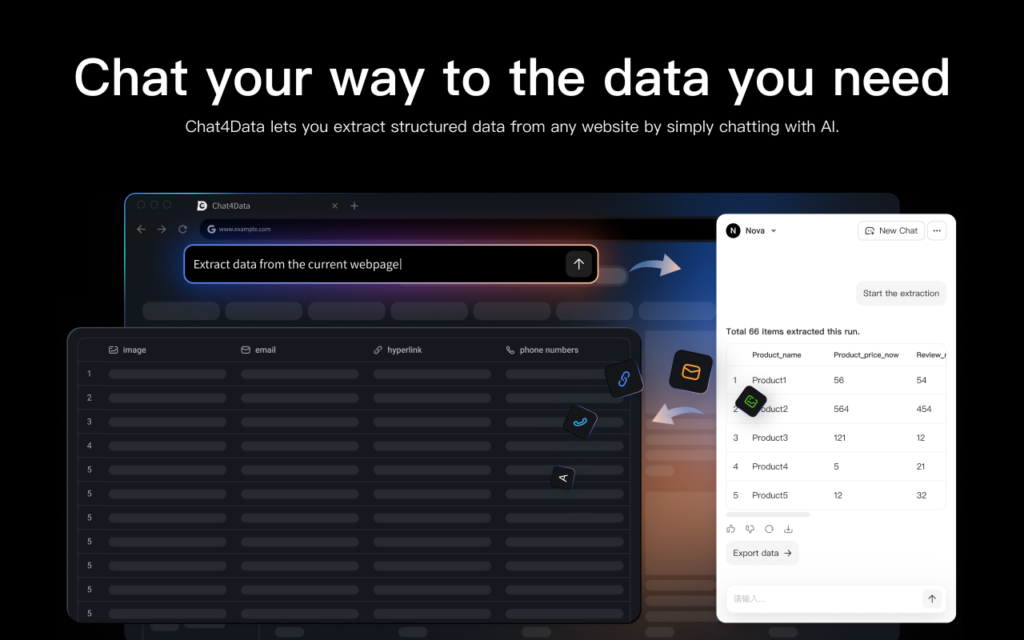
1. Chat4Data
- What it is — Chat4Data is a conversational AI agent for data collection. As a lightweight Chrome extension, it requires no setup, no downloads, and no learning curve to scrape data.
- Who it’s for — non-developers, marketers, and researchers who need a fast, simple, no-code tool for data extraction.
- What makes it stand out — four things set it apart from other no-code scrapers:
- Conversational interaction: No learning curve at all, the quickest way for no-code users to get data
- All data processed locally: Nothing is sent to external servers, so your data privacy and security are fully protected
- Handles complex pages: Pagination, infinite scroll, detail pages, and one-level-deeper extraction
- Adapts to dynamic pages: Keeps extracting accurately even when layouts change
- Limitations — a local browser extension, so it comes with two trade-offs:
- Requires your computer to stay on while it runs
- Not suited for large, all-day, multi-city extraction campaigns that need cloud infrastructure
- Pricing tier: Start free, 10$ for extensive usage.
- Our test: We typed “dentists in Chicago” into Google Maps. We told Chat4Data to get names, ratings, phone numbers, and addresses. It returned 22 listings in 40 seconds, with automatic sidebar scrolling. There was no need for post-processing, as the data was clean and ready for export. The natural-language setup meant that I did not have to spend any time looking at DOM elements.
2. Octoparse
- What it is: Octoparse is a powerhouse visual web scraping tool built around a drag-and-drop interface.
- Who it’s for: People who are not developers, growth marketers, or researchers who need enterprise-level scraping tools but do not want to learn how to code.
- What makes it stand out: Octoparse automatically handles dynamic JavaScript rendering, infinite scrolling, and AJAX loads. You can type in keywords and a location into its Google Maps data scraper template, then hit “run” to get easy-to-read results. Cloud scheduling runs extraction tasks daily or weekly without keeping your computer on. Google’s anti-bot defenses are handled by built-in IP rotation and CAPTCHA solving.
- Limitations: Older computers may not have enough resources for the desktop app, but paid users can get around this by using cloud extraction.
- Pricing tier: There is a free basic plan, and paid plans with cloud extraction start at $69 per month.
- Our test: When I used the Google Maps template for “dentists in Chicago,” Octoparse found 120 listings (the maximum number Google Maps can show) in about 2 minutes via cloud extraction. The template did not need any manual setup; all you had to do was enter a keyword and a location. The data output was well-organized, with separate columns for each field. The desktop client used a lot of CPU when running locally, but cloud mode eliminated that issue.
3. Apify Google Maps Scraper
- What it is: Apify is a robust cloud scraping and web automation platform.
- Who it’s for: Developers, data scientists, and technical marketers who want to be able to make changes and use APIs.
- What makes it stand out: The dedicated Apify Google Maps scraper “Actor” is one of the most popular tools in the developer community. It’s API-first, meaning you can trigger scrapes programmatically, integrate the output into your own apps via webhooks, and push data straight to platforms like Make or Zapier. It bypasses Google Maps’ 120-result display limit by dividing the map into granular grids.
- Limitations: This is a developer tool first. Setup runs through a JSON input payload, so there is a real learning curve, and non-technical users will likely need a developer to get started. Pricing is pay-as-you-go and usage-based, which makes costs harder to predict than a flat monthly plan, and large jobs can add up. There is no point-and-click or natural-language option; if you can’t read JSON, this isn’t the tool for you.
- Pricing tier: Pay-as-you-go based on how much you use the computer (starting at about $4 for 1,000 places).
- Our test: We set the Google Maps Scraper Actor to look for “dentists in Chicago” and got 200 results. It returned 187 results in about 6 minutes, exceeding the usual limit of 120, thanks to geographic grid splitting. The data was very good, structured JSON with all fields filled out. It took about 5 minutes for a first-time user familiar with API tools to edit a JSON input payload for setup. Non-technical users would need help from developers.
4. PhantomBuster
- What it is: PhantomBuster is a cloud-based automation and lead generation platform that uses pre-built “Phantoms.”
- Who it’s for: Salespeople and growth professionals who want to make lead generation workflows that work together.
- What makes it stand out: PhantomBuster excels at chaining actions. You can use their Google Maps Search Export Phantom to pull a list of businesses, and then immediately pipe those results into another Phantom that hunts for contact details or LinkedIn profiles across the web.
- Limitations: It bills by execution time (hours per day) rather than data volume. Scraping Google Maps can eat up your daily time limits quickly if you aren’t careful. Additionally, it is built for lead-gen chaining, not raw scraping volume, so if all you need is a clean list it can be more overhead than it’s worth.
- Pricing tier: Free trial available; paid plans start at $66/month.
- Our test: The Google Maps Search Export Phantom found 40 listings for “dentists in Chicago” in just 3 minutes and 15 seconds. PhantomBuster does not scroll down as far by default, so it returned fewer results than Octoparse or Apify. When we connected the output to a Phantom email-finding Tool, it turned raw Maps data into better leads in one automated workflow. That is when we really saw the value. Execution-time billing means that big extractions need to be carefully planned.
5. Google Maps Scraper Chrome Extension (Data Miner)
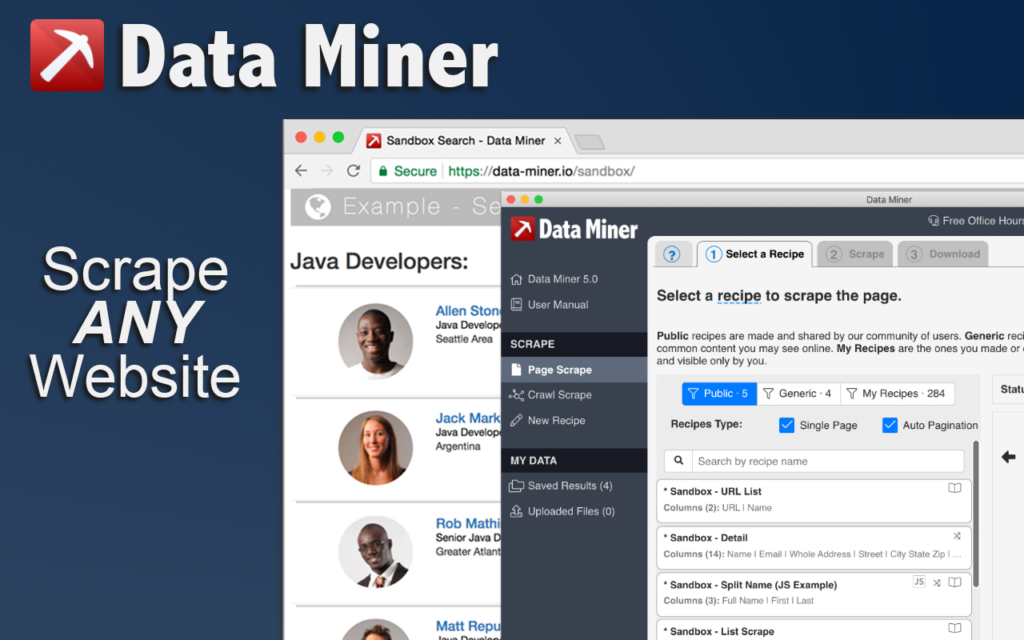
- What it is: Data Miner is a versatile Google Maps scraper Chrome extension that extracts data straight from your browser window into a CSV file.
- Who it’s for: People who work for themselves, SDRs, and anyone who needs to do a quick, local scrape without signing up for a big platform.
- What makes it stand out: It works only in your browser. You look for something on Google Maps, open the extension, choose a public recipe, and download the information that appears on your screen. It is the best tool for quick, low-stakes on-the-fly extraction.
- Limitations: Your computer needs to be awake and working for it to work. It cannot get around Google Maps’ limit of 120 results on its own, so it is not suitable for large-scale extraction campaigns across multiple cities.
- Pricing tier: Free for up to 500 pages/month; paid plans start at $19.99/month.
- Our test: Data Miner got 20 visible listings in less than 45 seconds by using the Google Maps public recipe for “dentists in Chicago.” It only takes a picture of what is on the screen right now; it does not scroll automatically. It is the fastest option tested for quick, small-scale grabs (less than 50 results). The lack of scroll automation becomes a hard limit for anything bigger.
How to Scrape Google Maps in 3 Steps (Chat4Data Walkthrough)
This guide shows how quick the process can be if you have never used a Google Maps scraper Chrome extension before. Let us take Chat4Data as an example: no code, no account setup, and no proxy setup.
Step 1: Install and Search
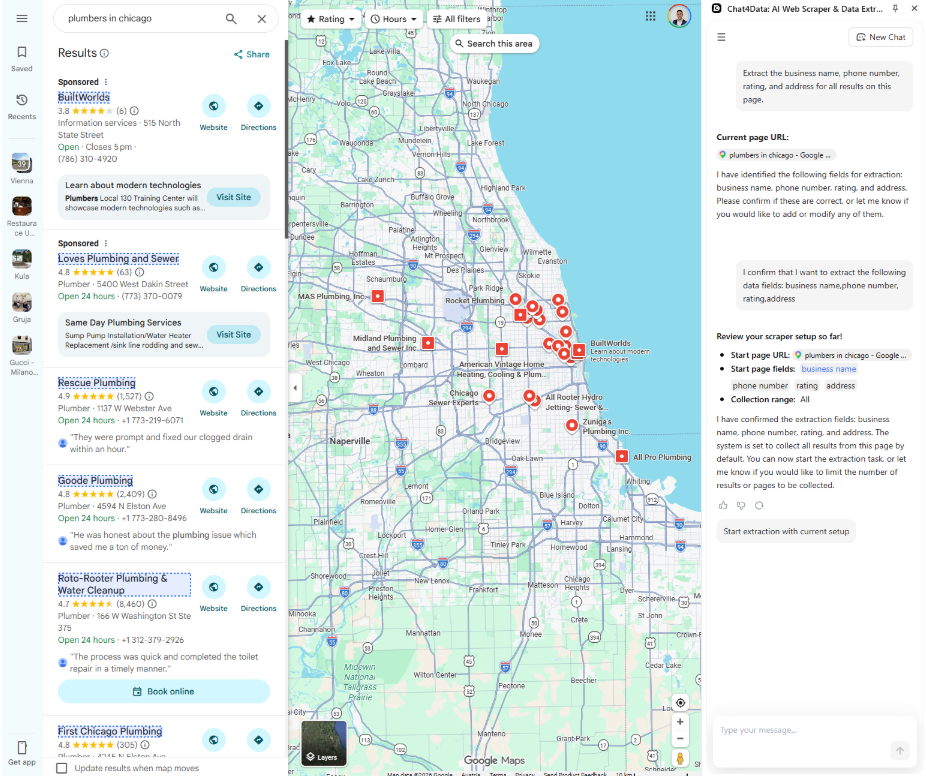
Get Chat4Data from the Chrome Web Store. In Chrome, open Google Maps and type in your search term, like “plumbers in Chicago.”
Step 2: Prompt the AI
Open the Chat4Data sidebar and describe what you want in plain English, for example, “Extract the business name, phone number, rating, and address for all results on this page.” Chat4Data scans the page layout visually and proposes an extraction plan. Confirm it, and the AI automatically scrolls through the results sidebar, handling Google Maps’ infinite scroll without any configuration.
Step 3: Export
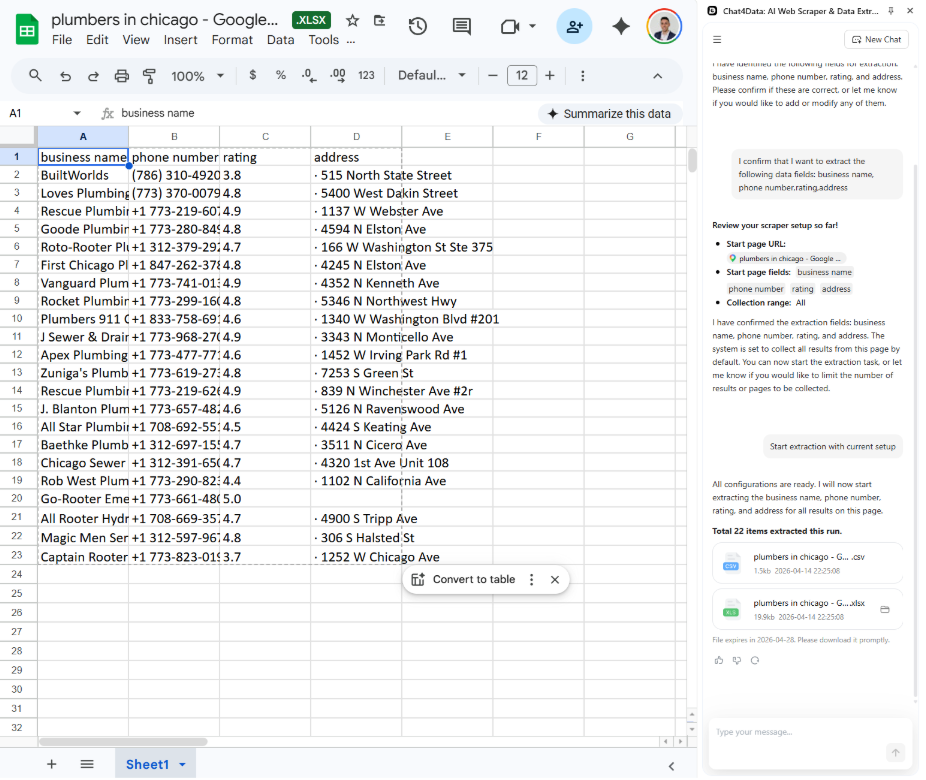
Review the extracted data in a clean table inside the sidebar. Download as CSV or Excel. For multi-query jobs, repeat with your next search term.
The entire process, from installation to exported spreadsheet, takes under 3 minutes for a single search query: no CSS selectors, no proxy management, no scripts to maintain.
Tool Comparison: The Best Google Maps Scraper Tools in 2026
Tool / Feature | Free Plan / Trial | No-Code Friendly | API Access | Best For | Cloud Extraction | Speed & Scale Profile |
| Chat4Data | Yes | Yes | No | Fast, AI-driven browser extraction | No (Requires machine on) | Fast, small-scale browser extraction |
| Octoparse | Yes | Yes | Yes (paid) | Visual template scraping without coding. | Yes (Cloud scheduling) | Large-scale visual scraping |
| Apify | Yes (Free credits) | No (Low-code) | Yes | Developers scaling massive, automated data pulls. | Yes (Robust cloud platform) | Massive-scale, API-driven pulls |
| PhantomBuster | Yes (Trial) | Yes | No | Chaining lead-gen automations together. | Yes (Cloud-based platform) | Variable speed, optimized for multi-step workflows |
| Data Miner | Yes (500 pages/mo) | Yes | No | Quick, small-scale browser extraction. | No (Requires machine on) | Quick, low-stakes on-the-fly extraction |
Before choosing a tool, consider the three factors below:
How to Pick the Right Google Maps Scraper for Your Use Case
If you’re still wondering how to scrape data from Google Maps effectively, the answer isn’t to just pick the tool with the longest feature list. It depends entirely on three things:
1. Scale: 100 records vs. 100,000 records
If you just need a quick list of 50 local coffee shops, firing up a massive cloud infrastructure is overkill. A Google Maps scraper extension like Chat4Data will get the job done in seconds. However, if you are aggregating a national database of 100,000 restaurants, browser extensions will fail. You need cloud infrastructure with IP rotation: Octoparse or Apify. Those are designed for extracting 100,000+ records.
2. Technical Skill: Python-comfortable vs. No-code preferred
Tell the truth about how well you know technology. Stay away from developer-first platforms if you do not like the idea of setting up webhooks and JSON payloads. You do not have to write code to get things done with tools like Octoparse. If you want to add real-time mapping data directly to your app, you need an API-first platform.
3. Budget: Free tools work until they don’t
The free Google Maps scraper attracts many users because of its no-cost access. The free tier limits users to a specific number of row exports, while the service does not offer any premium features, including email enrichment and CAPTCHA bypass. The UI demo is free, but users must be prepared to pay for most of its features.
- The Marketer: You want a clean list of prospects with their email addresses to upload to your CRM. Use Chat4Data.
- The Developer: You want to build an internal dashboard tracking competitor review velocity. Use Apify.
- The Researcher: You want to scrape thousands of listings visually without learning an API. Use Octoparse.
Common Google Maps Scraping Use Cases
Different teams pull Google Maps data for very different reasons:
- Sales prospecting: B2B teams identify businesses within a target region and collect company websites, phone numbers, and other publicly available contact info before outreach.
- Lead generation: sales teams build cold-outreach lists by category and location.
- Local SEO: agencies track local rankings, monitor competitor listings, and analyze review patterns across a region.
- Market research: analysts estimate market size, map competitor density, and evaluate geographic coverage before expanding.
- Competitor analysis: brands watch competitor ratings, review velocity, and category positioning over time.
Is Scraping Google Maps Legal?
When learning how to scrape Google Maps, this is the elephant in the room. Is it legal?
The short answer: Scraping publicly available data is generally considered legal, but there are rules of engagement.
The legal precedent (notably the hiQ Labs v. LinkedIn case) established that scraping publicly accessible data on the internet does not violate the Computer Fraud and Abuse Act (CFAA) in the US. The data on Google Maps—business names, addresses, ratings, and phone numbers—is explicitly public.
However, “legal” does not mean “immune to being blocked.” Google’s Terms of Service prohibit unauthorized automated access. Scrape too aggressively from your own IP address, and Google will serve a CAPTCHA and eventually block you. This is exactly why cloud scrapers use proxy rotation.
Here are the rules for safe scraping:
- Use only public data: only get information that anyone can see.
- Do not scrape personal information: instead, focus on businesses, not individual customers.
- Do not hit servers too hard to the point of breaking them. Respect rate limits.
- Do not skip logins: Only scrape pages that are open to the public and do not need a login.
Stick to publicly available business data, and you’re in well-traveled territory.
Conclusion
Manual copy-pasting from Google Maps is an inefficient use of anyone’s time. The right Google Maps scraper turns a two-day data entry task into a five-minute job.
For most non-technical users: marketers, researchers, sales teams, Chat4Data offers the fastest path from search query to clean spreadsheet. No code, no proxy setup, no maintenance. Its AI-driven approach handles Google Maps’ infinite scroll and dynamic loading automatically, adapting to changes in Google’s interface without manual fixes.
Ready to try it? Install Chat4Data from the Chrome Web Store, search Google Maps for your target query, and you can have structured data exported in under three minutes.



FAQs about Google Maps Scrapers
1. What is the best free Google Maps scraper?
Several tools offer free tiers, each with different limits:
- Chat4Data — scrape with AI for free; paid plans start at $10 for extensive usage
- Data Miner — 500 free pages a month for quick in-browser grabs
- Octoparse — free plan lets you run 10 tasks on your own
All free tiers have limits for serious volume. If you need to extract a lot of data, you’ll need to upgrade.
2. Can I scrape more than 120 results from Google Maps?
When you search on Google Maps, you get about 120 results per query. To collect more:
- Break your search into smaller areas (neighborhoods instead of cities)
- Use more specific category searches
- Use a tool like Apify’s Google Maps Actor, which does this automatically by splitting the map into geographic grids
3. Can I scrape Google Maps reviews?
Yes. Most Google Maps scrapers can extract review-related data, including:
- Star ratings and total review count
- Full review text and reviewer names
- Owner responses (in some tools)
For deep review analysis across many businesses, a dedicated review scraper or cloud tool handles large volumes better than a browser extension.
4. Google Maps Scraper vs Google Places API — which should I use?
The two options serve different needs:
- Results per query — Scrapers have no hard cap (with grid splitting). The Places API tops out at 60 per search
- Review text — Scrapers return full review content. The API only returns aggregate ratings
- Cost — Scrapers run on a flat subscription. The API is free up to $200/month credit, then per-call pricing
- Setup — No-code scrapers need no code. The API requires an API key and code integration
Use the Places API for official programmatic access inside an app. Use a scraper for lead generation, competitor research, or any task where the API’s result cap or missing review text is a dealbreaker.
5. How do I scrape Google Maps without getting blocked?
A few practices help you avoid IP bans:
- Use a residential proxy rotation service
- Put random delays of at least 3 to 5 seconds between requests
- Don’t scrape hundreds of queries from the same IP in a short period
Octoparse and Apify handle proxy rotation and rate limiting automatically. Browser add-ons like Chat4Data run in your logged-in session, which makes them less likely to be flagged.
6. Is scraping Google Maps legal?
Under U.S. law, it is generally legal to scrape publicly available business data such as names, addresses, phone numbers, and ratings. A few things to keep in mind:
- Automated access is against Google’s Terms of Service
- Breaking this rule may get your IP blocked, but it is not a crime
- Avoid scraping personal data, and consult a lawyer about your specific situation
7. Which Google Maps scraper is best for lead generation?
It depends on your scale and workflow:
- Chat4Data — gets names, phone numbers, and addresses into a CSV in minutes, ideal for quick prospect lists
- PhantomBuster — links Google Maps extraction to multi-step prospecting workflows that find emails and LinkedIn profiles
- Octoparse — cloud scheduling runs daily extractions for lead databases with 10,000+ records
8. What’s the difference between a Chrome extension scraper and a cloud scraper?
- Chrome extension scrapers (Chat4Data, Data Miner) — run in your own browser. Fast for small tasks, but your computer has to stay on, and Google Maps only shows 120 results at a time
- Cloud scrapers (Octoparse, Apify) — run on remote servers with proxy rotation, CAPTCHA solving, and task scheduling. Built to extract large volumes across thousands of listings
9. Can a Google Maps scraper extract emails?
No. Google Maps listings don’t include email addresses. You can extract:
- Business name, phone, website, and address
- Ratings, reviews, and opening hours
To get emails, scrape the website URLs first, then crawl those sites separately (tools like Octoparse can batch this).
10. How many businesses can I extract from one Google Maps search?
Google Maps shows roughly 120 results per query. How tools handle this:
- Browser extensions (Chat4Data, Data Miner) work within the 120 limit
- Cloud tools (Apify) exceed it by splitting the map into geographic grids — our test pulled 187 with Apify
- For a full city or category, break the search into smaller areas and combine exports
11. Do I need proxies to scrape Google Maps?
Not always. It depends on the tool:
- Browser extensions that run in your own session usually don’t need proxies for normal volumes
- Cloud tools handle proxy rotation for you automatically
- Custom scripts are the only case where you manage proxies yourself
12. Can I scrape Google Maps on a schedule?
Only with cloud tools:
- Octoparse and Apify support scheduled runs that don’t need your computer on
- Browser extensions require your machine awake and the tab open