
Instagram does not let you download another account’s follower list. There is no built-in export button, no official API endpoint for third-party follower access, and no structured data file you can request. If you want a competitor’s followers, an influencer’s audience, or a niche account’s full follower list in a usable spreadsheet, you need a dedicated tool.
This guide covers the three IG follower export tools that actually worked in our March 2026 testing, what each one is best for, and how to choose based on your specific use case.
Quick answer:
| Tool | Best for | Free tier | Export format | Technical setup |
| Chat4Data | Beginners, quick one-off exports | 100 credits | CSV, JSON | None |
| IGExport | Mid-scale exports, clean UI | Limited free trial | CSV, Excel | None |
| Instalab AI | Developer integration, API access | API trial | JSON, CSV | Low |
What Is an IG Follower Export Tool?
An IG follower export tool extracts the visible follower or following list from any public Instagram account and outputs it as a structured file — typically CSV, Excel, or JSON.
The data you get for each follower usually includes: username, display name, bio text, follower count, following count, post count, external link in bio, and whether the account is verified. Some tools also return engagement estimates and account age.
What you cannot get: email addresses not publicly listed, data from private accounts, or any information Instagram stores server-side rather than rendering on the public profile page.
A 2020 study on Instagram fake-user classification found that follower count, post count, biography length, following count, and presence of an external link are among the strongest predictors for distinguishing real accounts from fake ones — exactly the fields a follower export provides. This makes exported follower data directly useful for audience quality analysis, not just list-building.
Typical export speeds across the tools we tested: 500-1,000 follower records per minute on public accounts with standard rate limiting applied.
Who uses IG follower export tools:
- Marketers building lead lists from niche Instagram communities
- Brands auditing an influencer’s audience before a paid partnership
- Researchers studying follower overlap, audience demographics, or fake account prevalence
- Competitors analysts mapping who follows accounts in their category
- Growth teams building lookalike audiences for paid social campaigns
1. Chat4Data (Best for AI-Assisted Follower Exports)
Chat4Data is a Chrome extension that uses an LLM to interpret Instagram pages and extract the data you describe in plain English.
For follower exports specifically, this means you don’t need to configure selectors, manage pagination logic, or handle rate limit responses manually — the extension handles all of it.



How to export followers with Chat4Data:
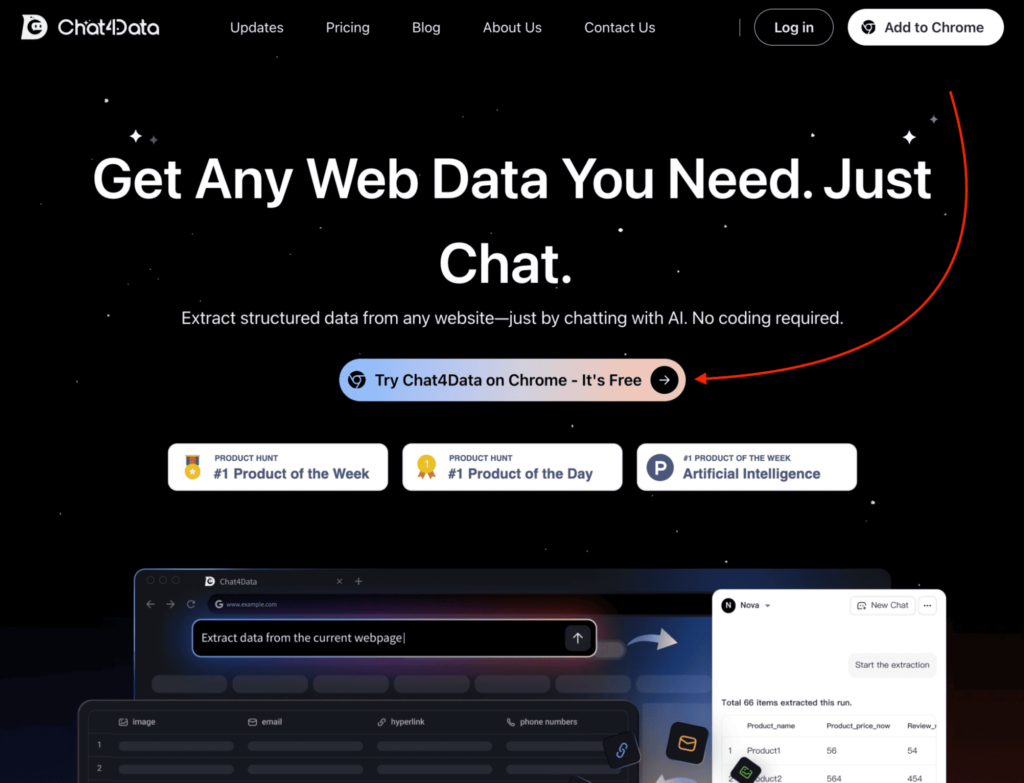
- Go to chat4data.com and install the Chrome extension
- Open the Instagram profile whose followers you want to export
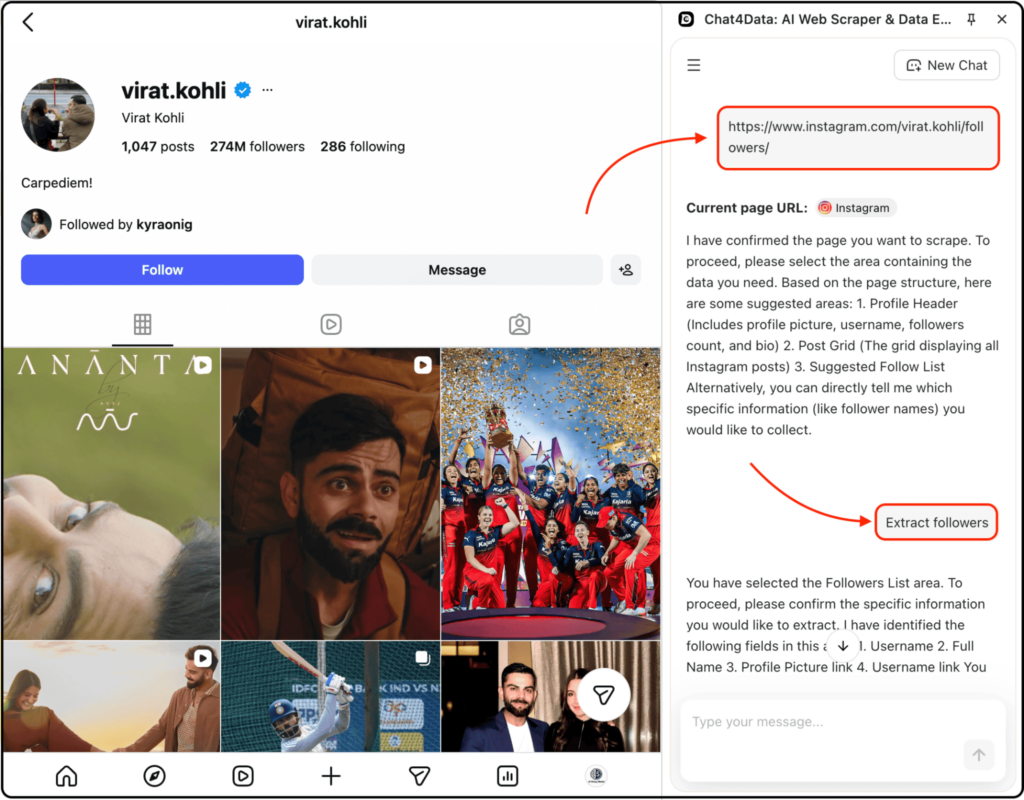
- Click the Chat4Data icon and paste the profile URL
- Type your extraction prompt: “Extract username, bio, follower count, and external link for each follower”
- Let it run — it handles pagination and delays automatically
- Export results as CSV or Excel
Pricing: Free plan includes 100 credits on signup — enough for roughly 2-3 mid-sized follower exports. Paid plans start at $10/month.
Limitations: Credit-based pricing becomes expensive for exports above 5,000 records per month. No scheduling or automation — each export is initiated manually. Not suited for bulk jobs running across dozens of accounts simultaneously.
Best for: Marketers doing one-off audience research, lead generation from niche accounts, and anyone who wants clean structured output without touching a proxy or API.
What we found in testing: We ran Chat4Data against a public lifestyle account with 28,000 followers. It returned 1,847 follower records in 6 minutes 40 seconds before hitting Instagram’s rate limit. After a 25-minute cooldown, we resumed and completed the remaining records across two additional sessions.
Final output: clean CSV, zero duplicate rows, all six fields populated for 94% of records (the remaining 6% were accounts with no bio text).
2. IGExport Chrome Extension (Best for Simple, Large Exports Without AI)
IGExport is a Chrome extension built specifically for exporting Instagram followers and followings without any AI layer involved.
That might sound like a downside, but in practice, it makes the tool more predictable. You’re not relying on prompts or interpretation — it simply pulls structured data directly from the Instagram interface.
For follower exports, this means a more traditional scraping flow where the extension handles scrolling, pagination, and data collection in the background.
How to export followers with IGExport:
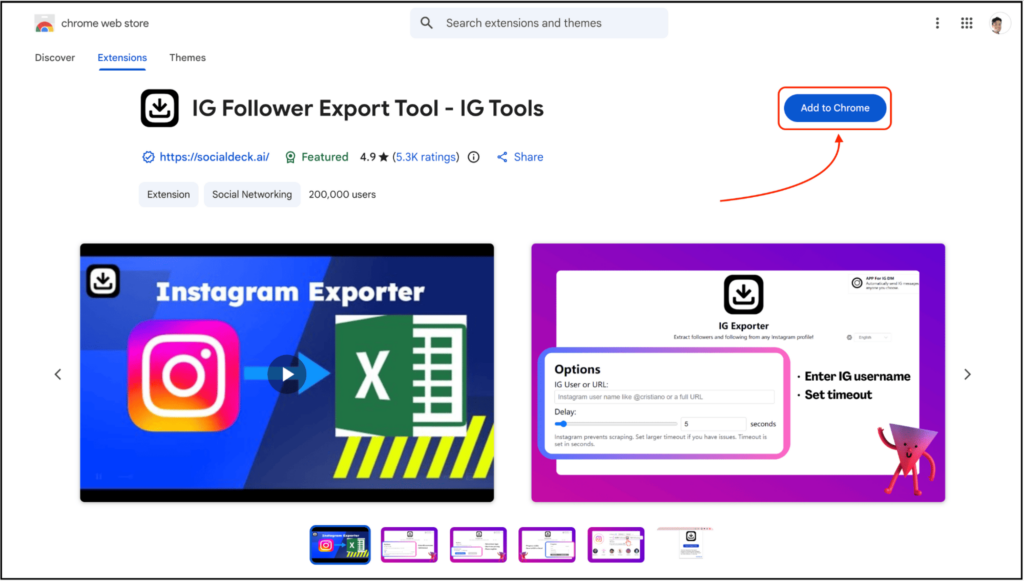
- Install the IGExport Chrome extension from the Chrome Web Store
- Open the Instagram profile you want to export
- Launch the extension and paste the username or profile URL
- Click “Start New Parsing”
- Let it run — it automatically scrolls and collects follower data
- Export the results as CSV or Excel
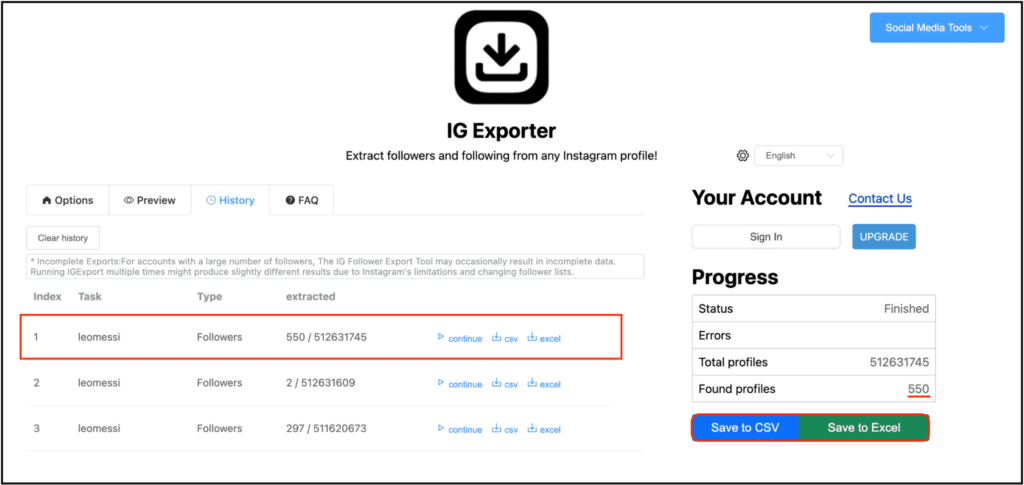
Pricing: Free to use with a limited trial. After extracting 550 profiles, you need to upgrade to their paid plan.
Limitations: No AI-based customization — you can’t define custom fields beyond what the tool provides. Performance slows down on very large accounts due to browser-based scraping. No automation or scheduling.
Best for: Users who want a straightforward, no-learning-curve tool for exporting follower lists, especially for small to mid-sized accounts.
What we found in testing: We tested a public creator account with ~12 million followers. The tool extracted 550 records in around 2 minutes with a 10-second delay and then got stopped since we needed to upgrade.
The data was clean and structured, with no duplicate entries. However, compared to Chat4Data, the extraction was slightly slower and less flexible in terms of field selection.
3. Instalab AI (Best for Quick Browser-Based Exports)
Instalab AI is a lightweight browser-based tool that prioritizes simplicity — no installation or account required. It’s best suited for quick, one-off exports rather than large-scale or recurring workflows.
How to export followers with Instalab AI:
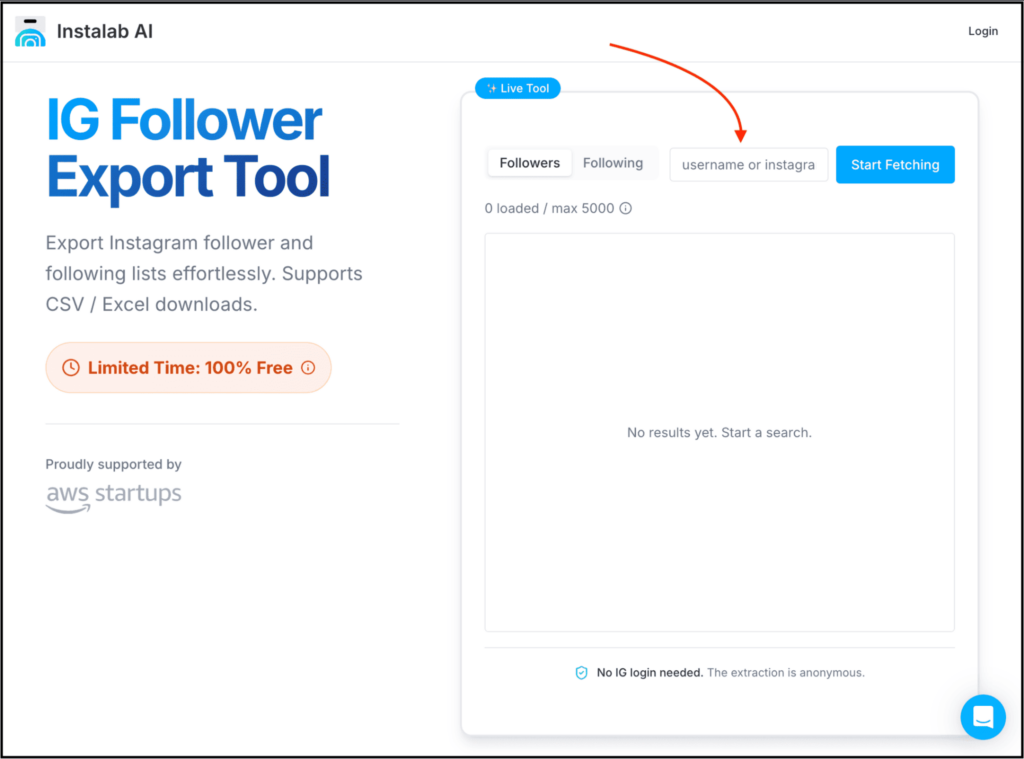
- Go to the Instalab IG follower export tool page
- Enter the Instagram username or profile URL (format matters here)
- Click the extract button
- Let it process the follower list
- Download the results as CSV or Excel
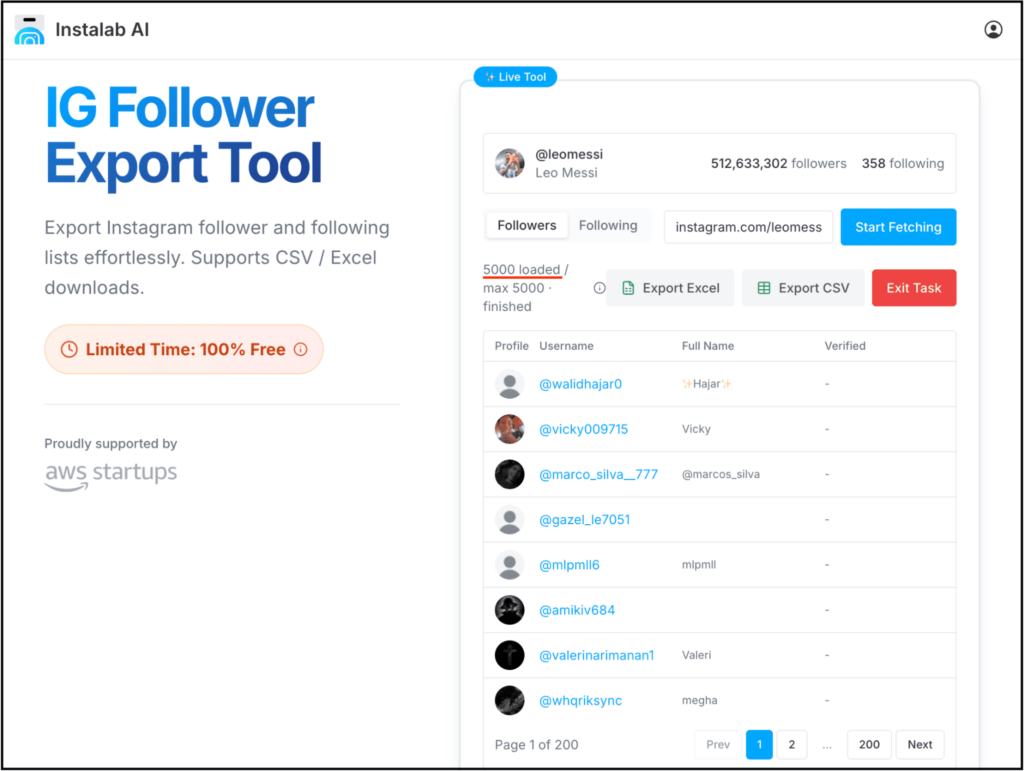
Pricing: Completely free to use for extracting up to 5,000 followers.
Limitations: No control over extraction fields. No retry logic or smart rate limit handling. Input format is strict — incorrect URLs often fail.
Best for: Quick tests, small exports, or users who don’t want to install anything or create accounts.
What we found in testing: We ran Instalab AI on Lionel Messi’s Instagram account, and it successfully extracted 5,000 followers records in about 10 minutes before stopping.The output was usable but incomplete — some fields (especially bio) were missing, and there was no way to resume.
Compared to the other tools, it works more like a quick utility rather than a reliable long-run solution.
When Should You Use an IG Follower Export Tool?
We’ve added the 3 best options that let you extract Instagram followers in no time.
But that doesn’t mean you should use these tools just to extract followers when there is no real need.
If you just want to casually browse followers, don’t plan to analyze anything, or don’t need structured data, then scrolling manually is enough.
And an IG follower export tool is the right choice if you’re:
- Building influencer lists
- Doing competitor analysis
- Running targeted outreach
- Validating niche audience quality
- Building internal datasets
Also, before using any IG follower export tool, remember:
- Instagram rate limits exist
- Don’t run aggressive scraping patterns
- Extract only publicly visible data
- Always respect platform terms and use the data responsibly
Which IG Follower Export Tool Should You Choose?
Here’s how to choose:
To simplify things a bit, you can select based on this comparison table:
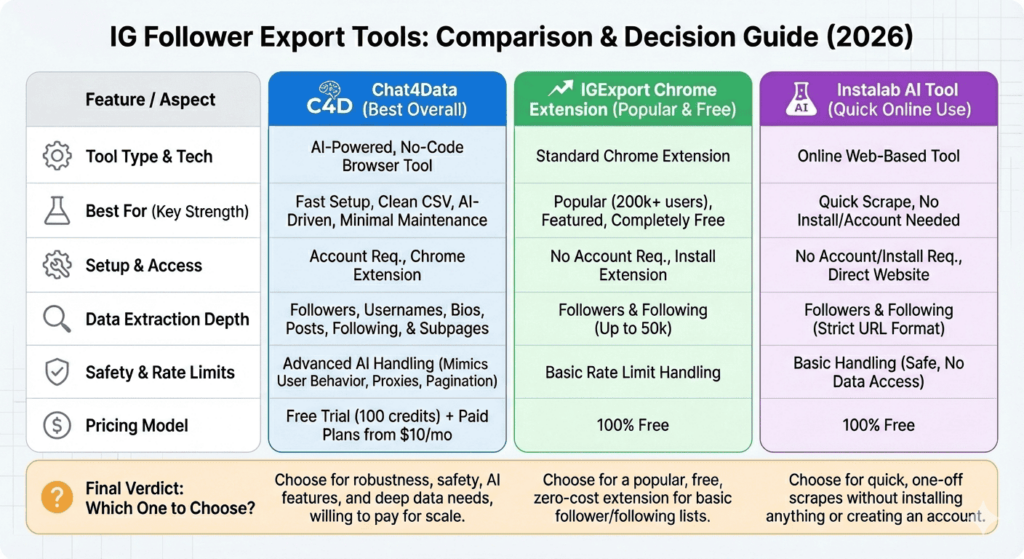
And here’s a simple guide to choosing the right “IG Follower Export Tool” for your needs:
- If you want fast setup, no scraping logic, clean CSV export, AI-driven extraction, and minimal maintenance, then you should go with Chat4Data. It is even safer to handle Instagram rate limits and automatically handle other issues.
- If you want a featured Chrome extension that is used by 200K+ users and is free to use, then you should go with the IGExport Chrome Extension.
- Lastly, if you want to scrape a bit and use an online tool without needing to download a Chrome extension or create an account, then you should go with the IG Follower Export Tool by Instalab AI.
FAQs About IG Follower Export Tools:
1. Is it actually safe (and legal) to export followers from other Instagram accounts?
Exporting publicly visible follower lists for analysis is usually fine, but you should use it responsibly.
It’s not acceptable if you spam users, automate unsolicited DMs at scale, or violate Instagram’s terms of use, which can lead to account restrictions or bans.
2. Can I export followers from private Instagram accounts?
No, you can’t export followers from private Instagram accounts.
Any tool that claims it can extract followers from private accounts without access is either misleading you or doing something risky.
3. Why can’t I just download followers directly from Instagram?
Because Instagram does not want anyone to scrape other users’ followers or invade their privacy, so they don’t provide that feature.
4. How many followers can you realistically export?
This depends on a number of factors, such as the tool you use, the account size, Instagram rate limits, and your plan or credit limits.
For example:
- IGExport specifically mentions that it allows you to export up to 50k followers, but you need to upgrade to their paid plan.
- Chat4Data gives you free credits first, and then you can buy their paid plans to export a lot more.
Extracting millions of followers in one session is not possible.
5. Will exporting followers get my Instagram account banned?
It depends on how you use the tool.
If you send thousands of requests in seconds or try to extract massive datasets repeatedly, you can trigger Instagram rate limits.
Chat4Data is a bit safer since it focuses on mimicking real user behavior, handling pagination, adding delays, and automatically managing retries.
But still, you need to be careful.
If you avoid aggressive scraping, extract data in reasonable batches, and do not automate excessively, you will significantly reduce the risk.