
If you only want to scrape one Instagram post, you can just do it manually. How? Just visit the specific Instagram profile, open the post, inspect it, and copy-paste whatever content you need.
But the problem starts when you want to scrape 500 posts from 50 different profiles for competitor research, lead generation, content analysis, or building a dataset.
That’s when it stops being simple and starts becoming real work.
Since the manual copy-paste method becomes tedious, it would be exhausting to rely on it. And if you use a random Chrome extension or a random scraping tool, you may get blocked, or Instagram may impose rate limits.
The reason is that Instagram clearly mentions that they don’t allow unauthorized scraping, and your account may get blocked.
However, there are still a couple of ways you can safely scrape Instagram posts for free.
Quick Answer: Three Ways to Scrape Instagram Posts for Free
| Method | Best For | Coding Required | Free Tier | Setup Time |
| Chat4Data | Non-technical users who want clean data fast | No | 100 credits on signup | 2–3 min |
| Instaloader (Python) | Developers who want full control | Yes | Fully free (open-source) | 5–10 min |
| Apify Instagram Post Scraper | Scheduled, scalable scraping with API access | No | $5 sign-up credit (~2,000 posts) | 4–5 |
TL;DR: Use Chat4Data for the fastest no-code path, Instaloader if you’re a developer scraping at home, Apify if you need scheduled or production-grade scraping.
Why Scrape Instagram Data
Instagram has over 3 billion monthly active users, making it one of the largest and most valuable sources of social media data online. Every post contains important signals, including captions, hashtags, engagement metrics, and content formats. This data is highly useful for businesses, marketers, and content creators for purposes such as:
- Competitor research
- Lead generation
- Content analysis
- Building datasets for AI models
Manually checking a few posts works for small tasks, but when you need data from hundreds of profiles or thousands of posts, Instagram scraping becomes the only scalable solution.
Challenges of Scraping Instagram
While Instagram data is valuable, scraping it comes with several challenges:
- Dynamic Content Loading: Most content is loaded via JavaScript, so posts are not available through simple request-response methods.
- Strict Rate Limits: Aggressive scraping can quickly result in IP blocks or account restrictions.
- Graph API Limitations: Instagram’s official API is designed for business accounts you manage, not for large-scale public data extraction. It requires authentication and is not optimized for scraping public posts at scale.
Legal and Compliance Considerations
Scraping public data is generally not illegal, but Instagram explicitly prohibits unauthorized automated scraping. Violating their terms can lead to account restrictions or bans. To stay safe:
- Scrape only publicly available data
- Avoid private accounts
- Use data responsibly without violating Instagram’s policies
How to Scrape Instagram Efficiently
The simplest way to scrape Instagram posts is by using dedicated Instagram scraping tools. These tools handle complex tasks like:
- Dynamic content loading
- Rate limit management
- Pagination and session handling
Not all tools are the same:
- No-code tools – Easy to use, quick setup, suitable for beginners or small-scale scraping
- Python or API-based tools – Offer full control, suitable for large-scale or production-ready scraping
Choosing the right tool depends on your technical skill level, data volume, and whether you need a quick solution or a scalable system.
Method 1: Try Chat4Data (No-Code Approach)
Chat4Data Chat4Data is a Chrome extension that scrapes any public webpage based on a plain-English description. You type what you want and say, “open this Instagram profile, scroll through the first 50 posts, and grab the caption, hashtags, like count, comment count, and post date for each”, and the agent shows you exactly what it’ll do before running. After you confirm the plan, it executes and delivers the data as Excel, CSV, or JSON.



Best for: Non-technical users who want clean structured data without dealing with selectors, templates, or code.
Free Tier: 100 free credits on signup.
Time to First Result: Approximately 2–3 minutes.
Steps:
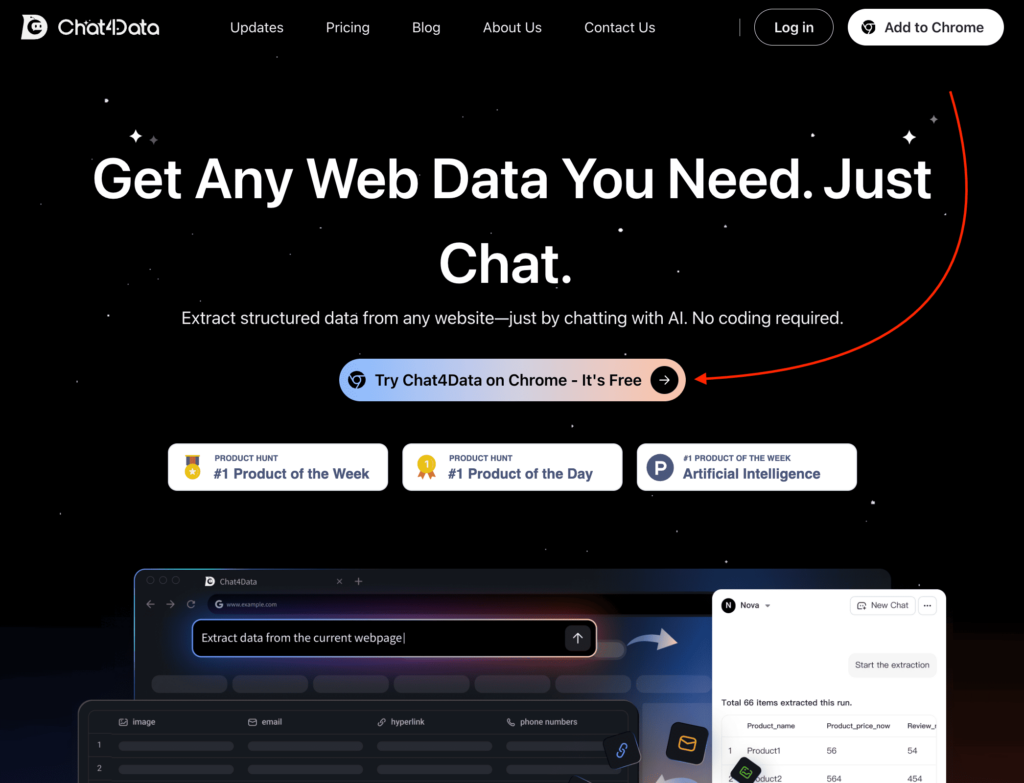
- Install Chat4Data from the Chrome Web Store and create an account.
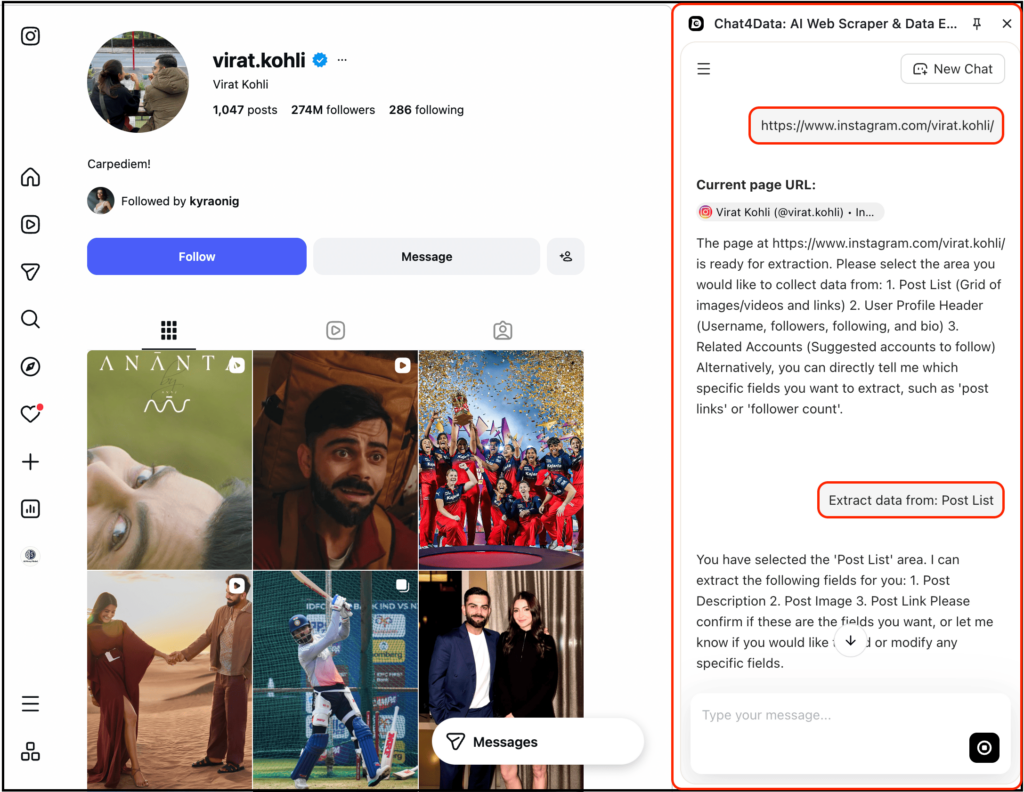
- Open the Instagram profile you want to scrape in your browser.
- Open the Chat4Data extension and type the task in plain English. Be specific, like instructing a colleague: which profile, which fields, how many posts.
- Review the execution plan. The agent shows every step it intends to take, including pagination, scrolling, and field detection before it runs. Please tweak it if you want to add a field, or approve it as is.
- Run it. If the page hits a login prompt or rate limit, the agent pauses and waits for you to handle it, then resumes.
- Export to Excel, CSV, or JSON.
⚠️ Important Notes:
- Instagram is not officially supported, so behavior may vary depending on updates.
- Heavy scraping can still trigger rate limits if not handled properly.
- Limited customization compared to code-based solutions.
Pricing: Free plan available (get 100 free credits when you sign up); paid plans start at $10/month for higher usage.
Method 2: Python-Based Instagram Post Scraping
This method uses Python libraries like Instaloader to scrape Instagram posts with full control and flexibility. It requires coding but gives you complete ownership over how your scraper works.
Best for: Developers who want automation, customization, and full control over scraping.
Free Tier: Completely free (open-source tools).
Time to First Result: Approximately 5–10 minutes (depending on setup, and your programming experience).
Steps:
- Install Instaloader using pip3 install instaloader.
- Import the library and initialize the scraper.
- (Optional but recommended) Log in to avoid blocks and rate limits.
- Use a post shortcode or profile to fetch data.
- Extract fields like captions, likes, and comments programmatically.
Here’s the code to scrape Instagram posts from a single profile:
⚠️ Important Notes:
- You may get blocked or rate-limited if you scrape aggressively.
- Requires handling sessions, delays, and proxies manually for scaling.
- Instagram changes can break your scraper, so maintenance is required.
Pricing: Free to use, but may require infrastructure (proxies, servers) for scaling.
Method 3: Apify Instagram Post Scraper (Cloud Platform)
Apify is a cloud-based web scraping platform that offers pre-built “actors” (ready-made scrapers). We will use the Instagram Post Scraper actor to extract post data.
Best for: Scenarios requiring scalability, scheduled automation, and API integration.
Free Tier: $5 sign-up credit, sufficient to scrape approximately 2,000 posts.
Time to First Result: Approximately 4–5 minutes.
Steps:
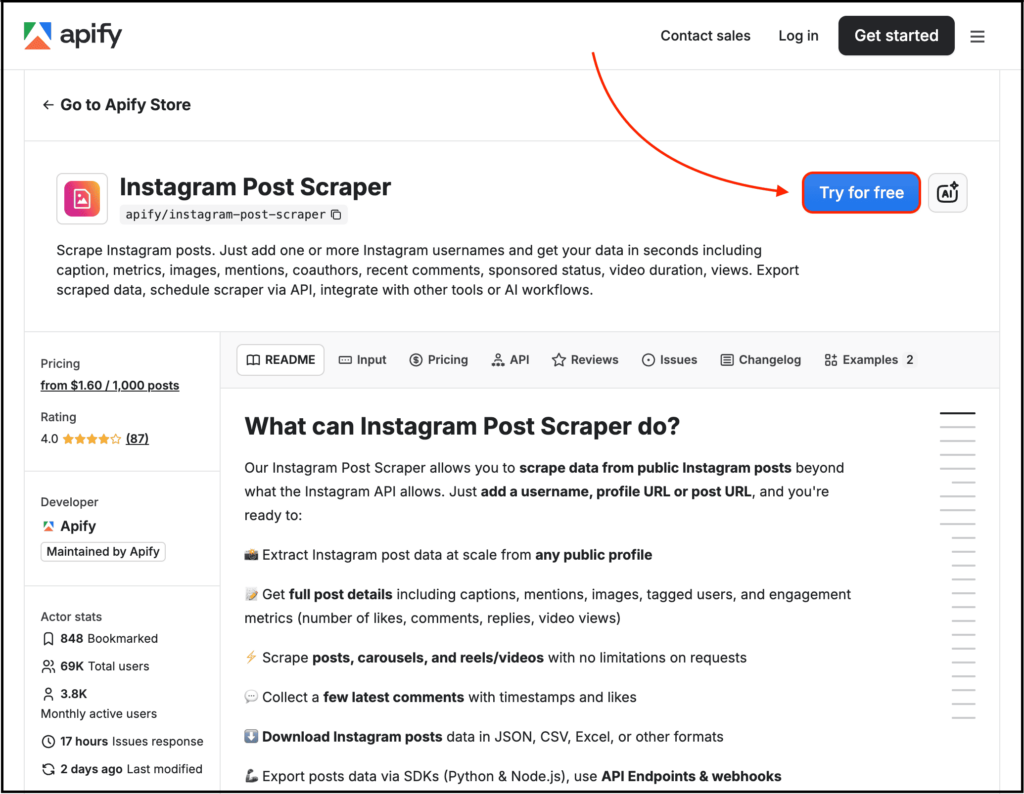
- Visit the Apify Instagram Post Scraper page and click “Try for free”.
- Sign up for an account (Google One-Tap Sign-in supported).
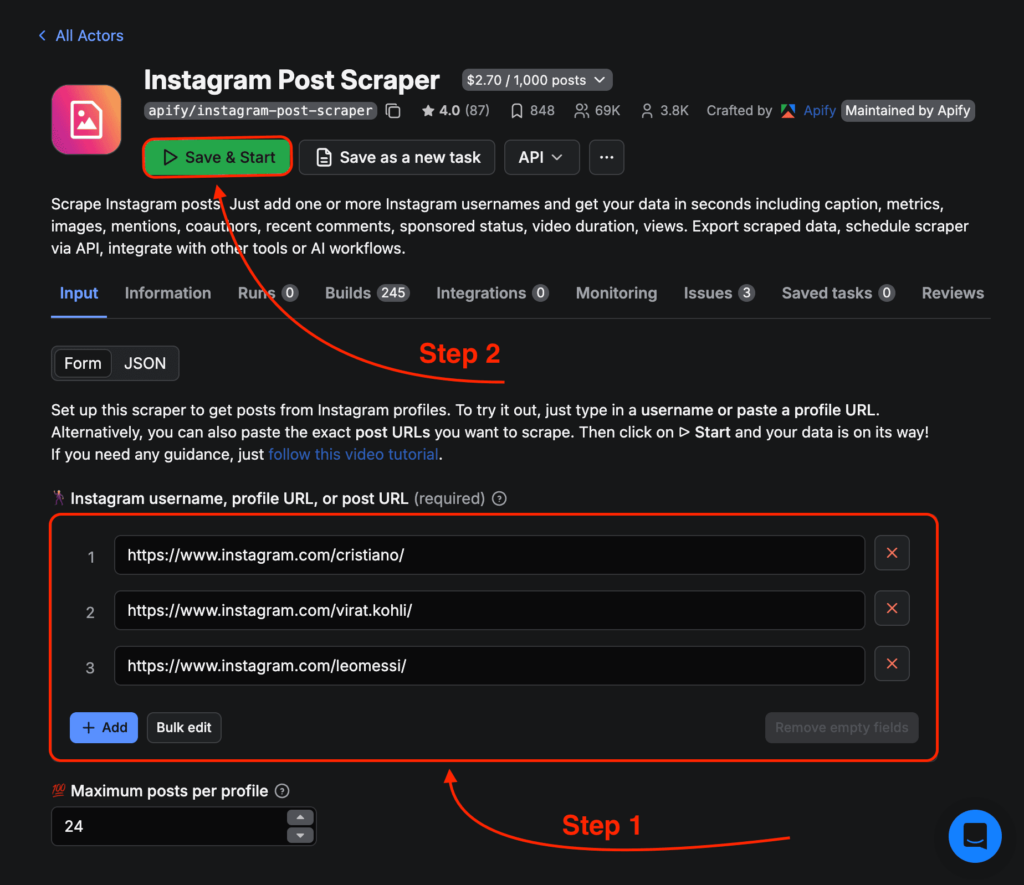
- Paste the target Instagram post URLs into the “Input” section; you can paste multiple URLs at once.
- Click “Save & Start” and wait for the actor to complete its run.
- Once the run is finished, download the results from the “Storage” tab (available in JSON, CSV, or Excel formats).
⚠️ Important Notes:
- Private accounts cannot be scraped—the actor will immediately return an error.
- A single profile is limited to scraping a maximum of 500 posts at a time; this is a pagination limit imposed by the Instagram API.
- Stories and Highlights require user authentication to access; this specific actor cannot scrape them—you will need to use the separate Instagram Story Scraper actor instead.
Pricing: Free sign-up includes a $5 credit; thereafter, rates are $2.70 per 1,000 posts (on the Free plan) or $2.30 per 1,000 posts (on the Starter plan).
What’s the Best Way to Scrape Instagram Posts for Free?
So far, we’ve gone through different ways to scrape Instagram posts. But the real question is: which method should you actually use?
The answer depends on how technical you are, how much data you need, and whether you want something quick or something scalable. Each method solves the same problem, but in a completely different way.
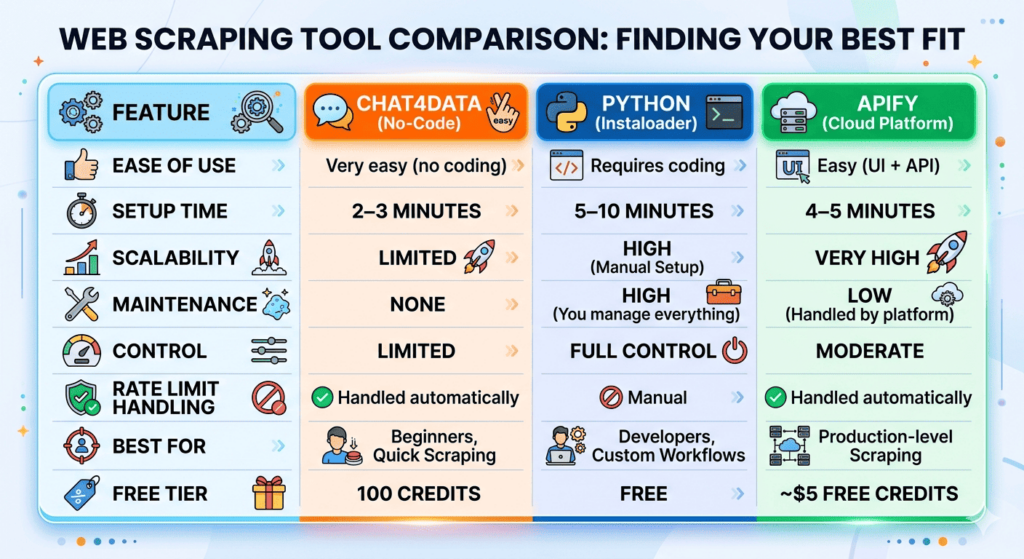
Here’s a quick comparison to help you decide:
Quick Answer:
- Use Chat4Data if you want the fastest and simplest way to scrape data without coding.
- Use Python (Instaloader) if you want full control and don’t mind handling rate limits, maintenance, and scaling yourself.
- Use Apify if you want a reliable, scalable solution that works in production and don’t mind paying a bit.
What Can You Actually Do With Scraped Instagram Post Data?
This section is almost never touched by most posts on the internet.
But you need to know where you can actually use this scraped Instagram post data beyond what you are currently focusing on.
With that said, you can use this scraped data to:
- Analyze competitor content themes
- Find high-performing caption formats
- Extract hashtag patterns to go viral
- Track engagement-to-follower ratios
- Detect viral post structures and monitor brand mentions
- Build AI training datasets or even an AI tool
- Generate content ideas automatically
FAQs About Instagram Post Scraping
1. Are Instagram scraping APIs better than open-source scrapers?
Instagram scraping APIs (such as Apify and Chat4Data) and open-source tools (such as Instaloader) each have their own distinct strengths. API-based solutions excel in their low maintenance overhead, as service providers handle proxies, anti-scraping measures, and changes to Instagram’s interface on your behalf. Open-source tools, conversely, offer the advantages of zero cost and complete control; however, you are personally responsible for updating the code every time Instagram modifies its API. If your project is intended for long-term operation and you wish to minimize the time spent on maintenance, opt for an API; if you require deep customization or a complete architectural overhaul, choose an open-source solution.
2. How can you scrape Instagram posts without logging in?
Technically, yes, you can scrape public Instagram post data without logging in.
Public posts are visible in incognito mode, so scrapers can fetch that same publicly available information.
Tools like Chat4Data and Apify can scrape public post details without requiring login credentials.
However, if you are using Python libraries like Instaloader, logging in is usually recommended.
3. How do you avoid Instagram rate limits and blocks?
You can’t completely eliminate rate limits. However, you can minimize them.
Here’s how:
- Slow down your request frequency
- Avoid scraping thousands of posts in a few minutes
- Use rotating proxies when scraping at scale
- Maintain session cookies properly
- Randomize delays between requests
- Or simply use tools that handle all of this, like Chat4Data.
4. What kind of data can you scrape with an Instagram post scraper?
If the post is public, you can typically scrape everything that is visually accessible on the page.
That includes the post URL, caption text, hashtags, mentions, number of likes, number of comments, post date, media URL (image or video), and more.
In short, if you can see it publicly, it can usually be extracted.
5. How can you use scraped Instagram data responsibly?
There are a couple of points you need to remember to scrape responsibly:
- Do not scrape private accounts
- Do not republish someone’s content as your own
- Do not intentionally violate Instagram’s terms
- Avoid storing sensitive personal data
- Do not clone someone’s entire content strategy word-for-word
- And lastly, be extremely cautious about how you collect, store, and process scraped data.