
Traditional web scraping has reached its limits, and AI is now perfectly positioned to take it to the next level. Traditional web scraping is fragile and requires significant investment in terms of both time and technical expertise. This is where AI steps in to help and fix the ongoing issues.
There are many features that AI is enhancing, so in this article, I aim to highlight which ones are being improved and how they are benefiting the web scraping industry.
By the end of the article, you will learn:
- Why and how AI is transforming Web Scraping
- Best AI web scraping tool and how to use it to scrape multiple websites
How is AI Transforming the Web Scraping Industry
First, we have to understand “why” we even want AI in the web scraping industry. It is not here that AI is enhancing the performance and accuracy of all products across many industries. With the powerful algorithms, it is very flexible and dynamic in many tasks. That is the exact reason we also use it in the web scraping tools. Scraping code often breaks due to dynamic HTML structure changes, but AI can adapt and recognize these changes to achieve the best results.
Instead of simply following computer instructions, AI-powered web scraping utilizes machine learning and natural language processing to gain a deeper understanding of the context. Ultimately, we aim for data with minimal setup and configuration. Let’s take a look at the main features, where AI stands out and helps with web scraping.
- The field detection feature means AI can auto-detect fields to scrape for data and
- Dynamic structure adaptiveness: AI can adapt its scraping algorithm to the changing dynamic HTML structures of the webpages being scraped.
- Natural language prompting enables users to simply describe the data they want from the page they are scraping, and scrapers can handle the rest.
- Human-like behavior avoids bot detection algorithms. There are built-in random timings between actions.
- The no-code approach takes AI-powered scrapers to the next level, as it requires no technical knowledge to use or any coding skills.
My Chosen AI Scraping Assistant: Chat4Data
Chat4Data is the best AI web scraping tool I have tested so far in the current market of best AI web scrapers. Most users prioritize ease of use, performance, and accuracy. Chat4Data offers all of that and more with the natural language prompting feature. Chat4Data has a unique approach to today’s web scraping problem, solving it through AI and natural language prompting.
Key features that make Chat4Data stand out from other AI web scrapers:
- Privacy-focused: All processes occur locally, and even on authenticated pages, no credentials are saved.
- Efficient credit usage: Chat4Data uses a minimal amount of credits per scraping job (7-10), and the paid plans already give you 2000 credits to start, so no worries about the usage.
- Subpage scraping offers even more possibilities for scraping, as Chat4Data self-discoveres links and subpages on the main page. This means even more details can be scraped for each item.
This video provides a great introduction to the tool, but I would like to offer a more practical approach to it with specific websites. Vast amounts of data are not easy to come by, but with web scrapers, it is very possible, so let’s take a look at how we can fetch data from some of the biggest websites.
Practical Ways to Boost Scraping with Chat4Data
To show the full extent of Chat4Data, let’s see it in action and how it scrapes the most popular websites out there. First, download and install the Chat4Data extension from the Chrome Web Store.
I start the extension by clicking on the icon, and that prompts the sidebar chat. Chat4Data will automatically suggest scanning the current page to look for any possible data.
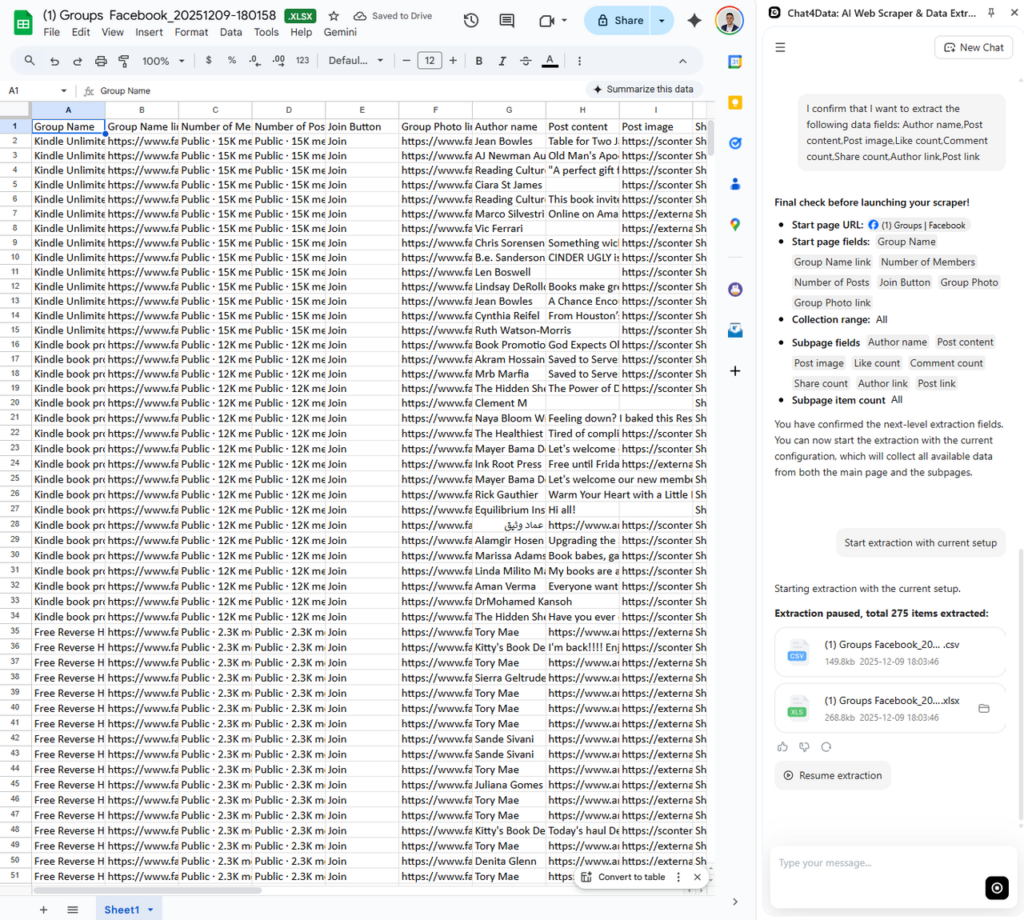
At the end of each scraping session, JSON and CSV formats are provided for downloading and further processing. Let’s start!
Scrape Facebook
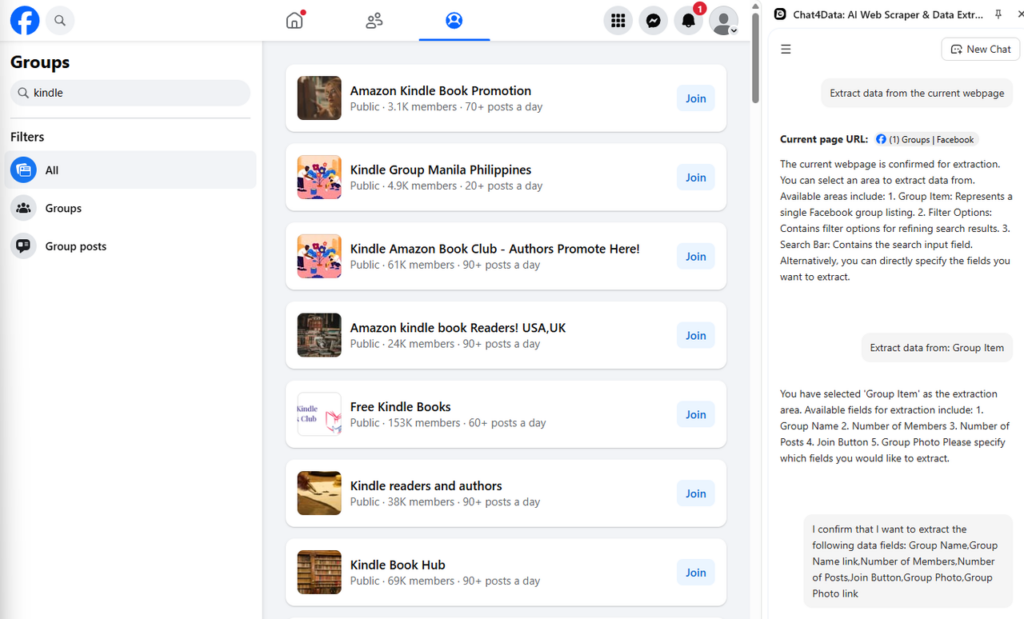
Meta, or Facebook, is the largest social media platform ever created, and with so many people on it, there is a vast amount of data. Building scrapers on top of it opens up numerous possibilities. In the following example, I want to investigate what groups are available for “kindle” keyword.
Initially, Chat4Data identifies each item in a group and suggests the potential data fields that can be scraped for that item.
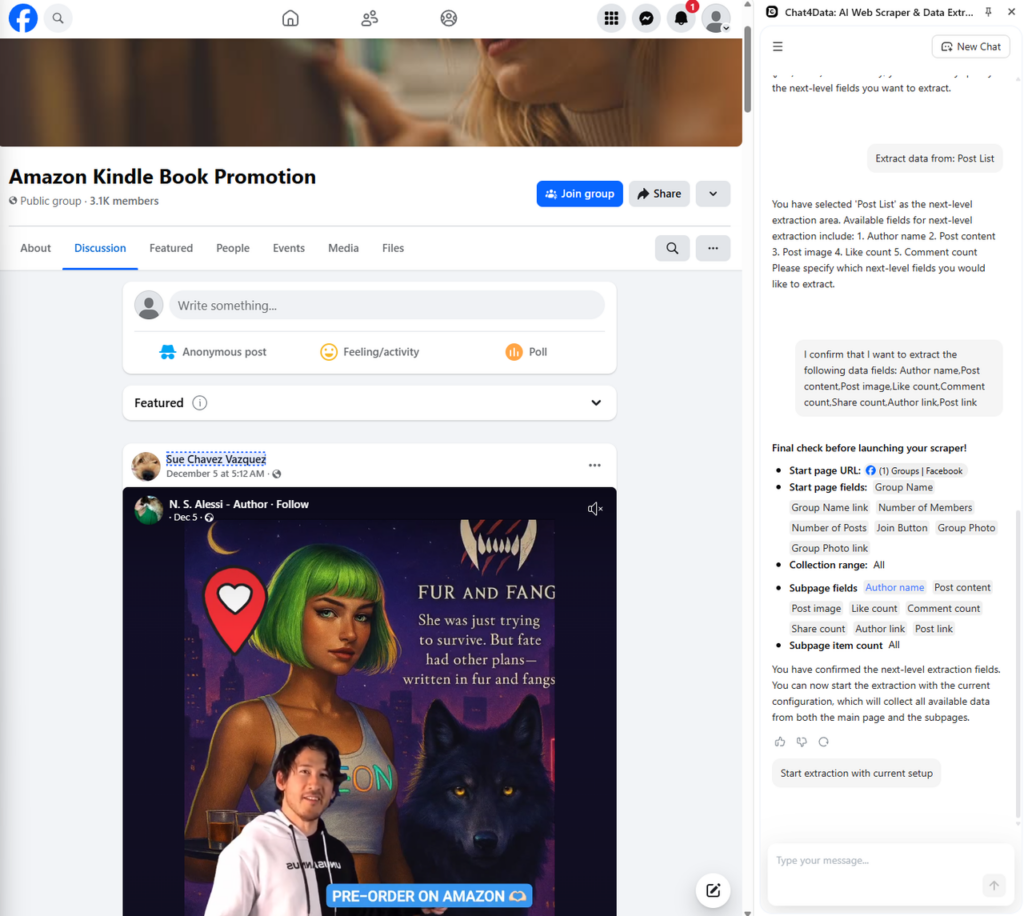
After the initial scan, it also suggests scraping the subpages. In this case, each group will be scraped for additional information. Here is the final plan, including subpages:
Finally, Chat4Data comes up with JSON and CSV of this data, and here is what that looks like:
Scrape Amazon
Amazon, as the largest marketplace in the world, has almost anything you can think of. Searching for a product and investigating the current market is really easy with Chat4Data. Let’s take an example, if you are searching for mustard and want to compare prices.
After the initial prompt to see what data I am available to fetch, Chat4Data suggests all available data fields:
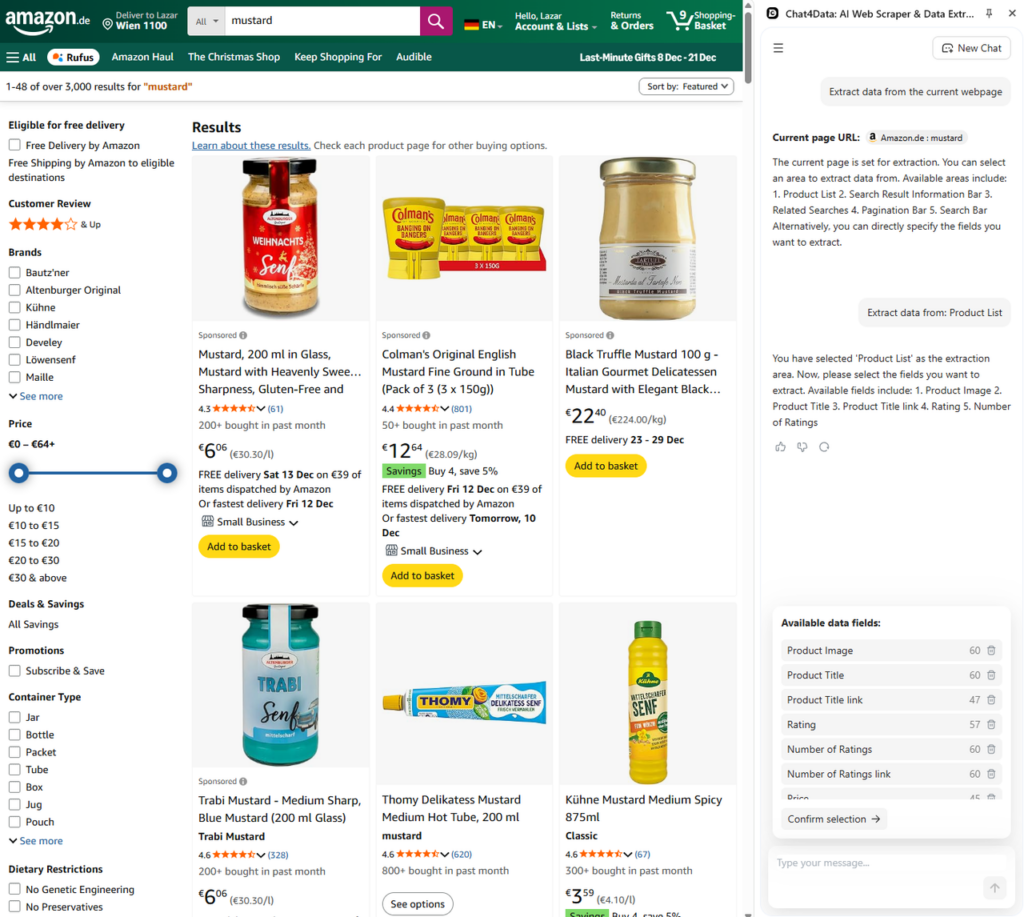
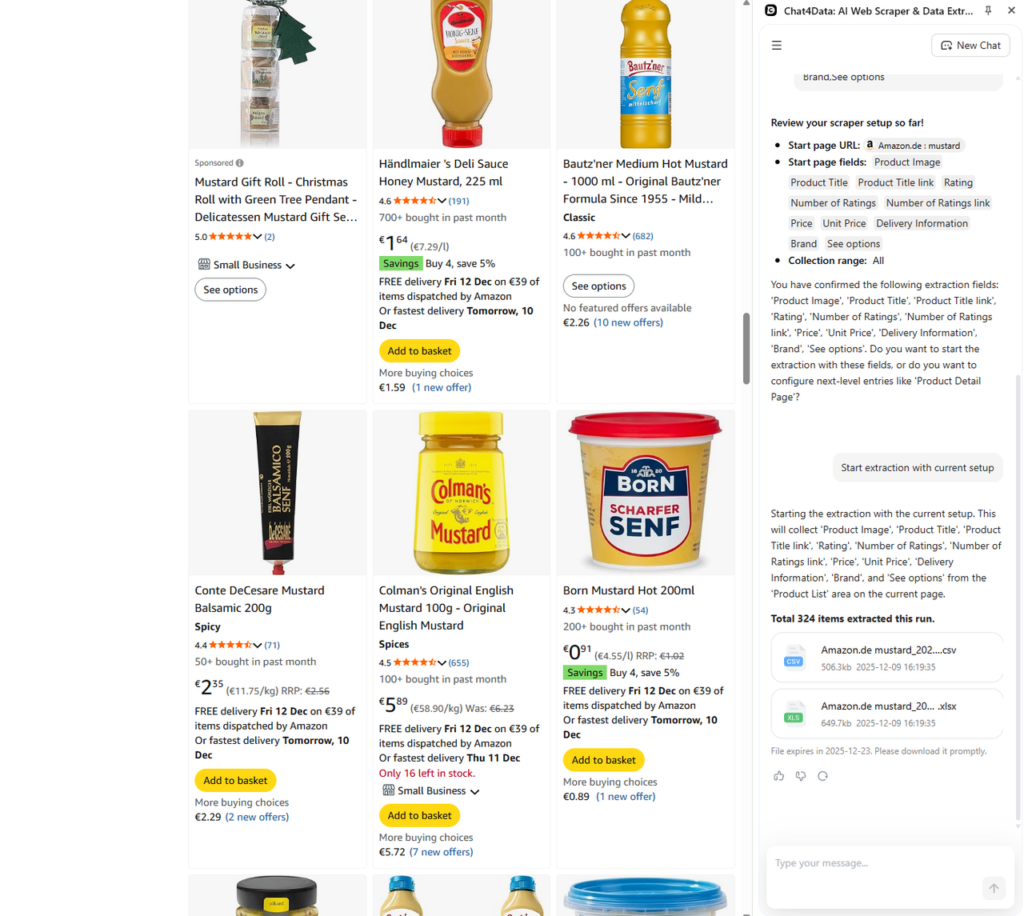
I want to focus here on the prices, which are included, so let’s go with only that. Chat4Data starts scraping quickly, and I obtain all the items across multiple pages.
Chat4Data can also scrape subpages, providing more insight into each product. Since I only need prices, there is no need for it. However, if you are looking for shipping information or more details, Chat4Data will also suggest scraping additional information for you.
Scrape LinkedIn
With so many jobs to go through, it feels like an impossible task, but using an AI web scraper like Chat4Data makes it super easy. For market researchers, such a tool can save hundreds of hours in manual work.
I am currently in the market for a data science position in Vienna, and based on that, I have started my Chat4Data chat to scrape all possible job openings.
Chat4Data immediately finds all possible data from the current page and suggests it:
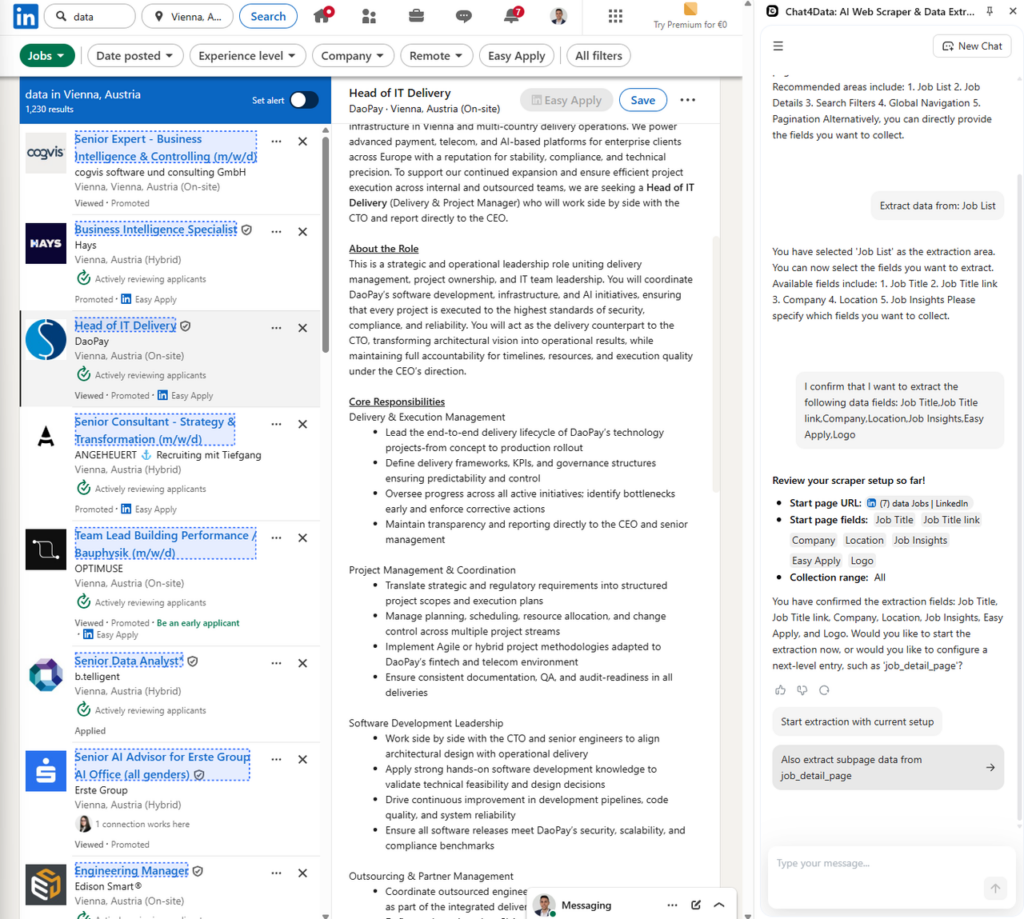
First, I want the job list.
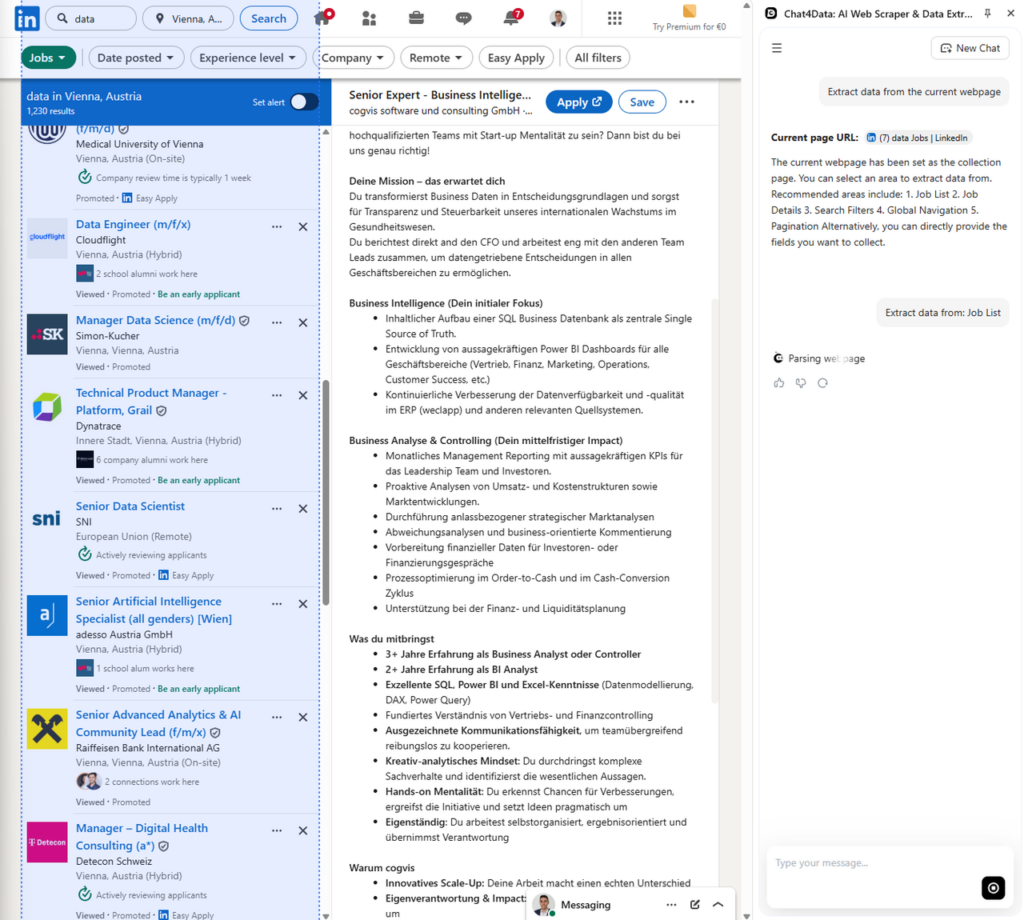
Chat4Data found all the data I wanted that relates to each job, but I still want a detailed description, so Chat4Data asks me if I want to fetch that as well.
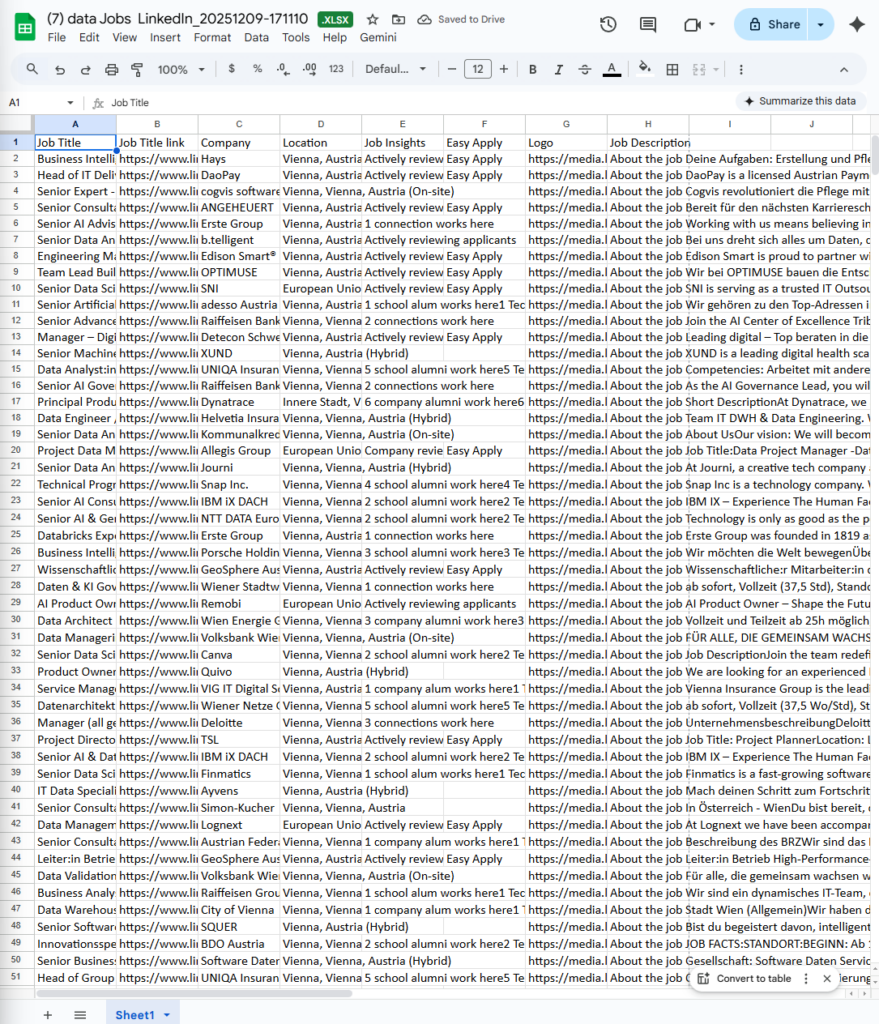
After the scraping sessions, here is how that data looks:
Scrape Yellowpages
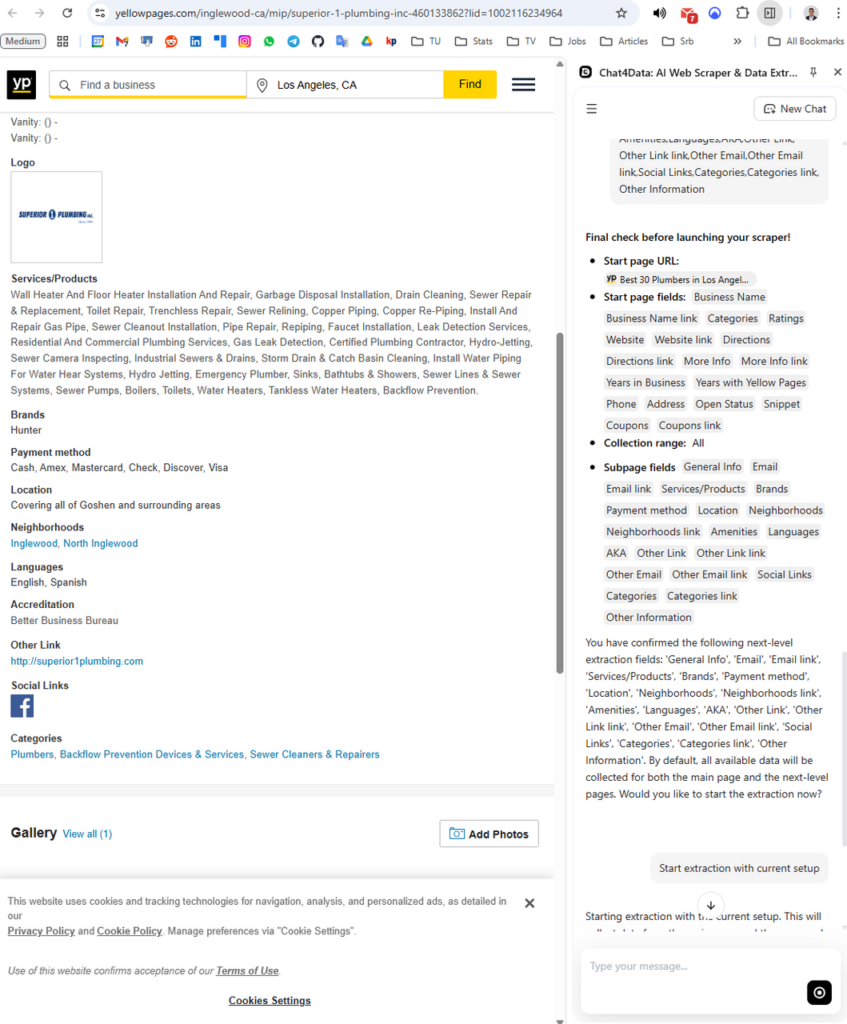
Yellow Pages enable users to see specific services in a particular location. For example, let’s say I need a plumber, but I require a specific service, which is why I need to scrape all the listings and their subpage descriptions. Here is what that plan looks like:
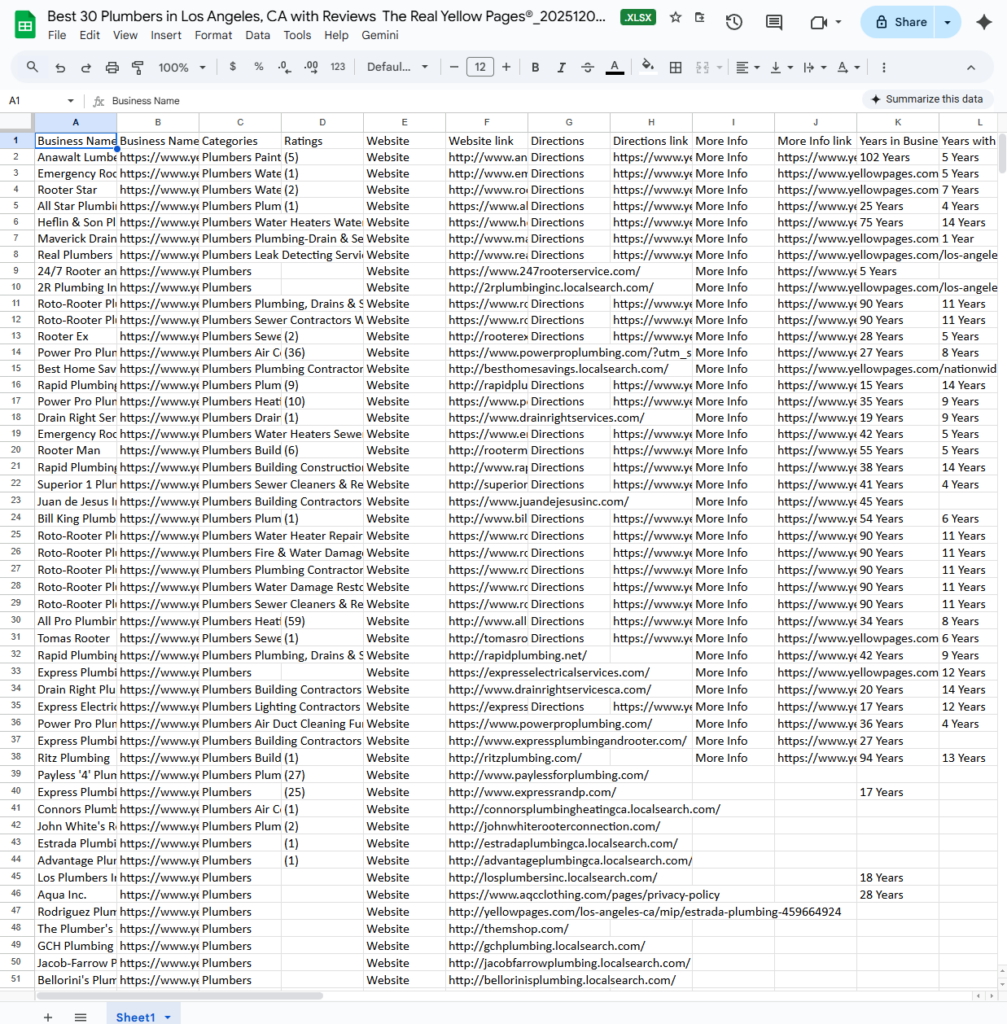
Now I can further process this data or filter it in Excel.
Conclusion: Unleash the Full Data Potential
AI has taken over the world, including the web scraping industry, so there is no reason to stay behind! It is time to upgrade your web scraping process using Chat4Data. It has all the modern AI web scraping features and more.
By understanding the full context, AI-powered web scraping tools can achieve significantly more beyond traditional web scraping. Tools like Chat4Data help analysts and market researchers fetch data in seconds.
Ready to transform how you collect data? Download the Chat4Data extension today and turn your browsing into actionable intelligence in minutes.
FAQs about AI Scraping
- How does Chat4Data compare to other Chrome scraper extensions?
Chat4Data is a unique tool on the market, featuring the latest AI capabilities while maintaining a strong privacy-focused approach to safeguard users’ data and privacy. Their efficient credit usage makes the tool worth using, even for long-term scraping. This detailed comparison between Data Scraper Extensions will provide you with a better understanding of how it compares to the competition.
- Can Chat4Data extract data from login-protected pages?
Yes, Chat4Data is perfect for scraping data from login-protected or user-authenticated pages. Since Chat4Data works in the same pages you see in your browser, all you need to do is log in to the page you want to scrape and let Chat4Data do the rest. Not only this, but Chat4Data is also very privacy-friendly, as it does not save any of your credentials and processes everything locally.
- What export formats and integrations does Chat4Data offer?
The standard formats are JSON and CSV, which are also available in Chat4Data. This gives freedom for further processing of the scraped data.
- What are Chat4Data pricing tiers and free trial details?
Chat4Data has a freemium pricing model. There is a free version that allows you to try all the features Chat4Data has to offer, and later scales to credit usage. Depending on your scraping needs (efficient credit usage). Pro plans from $7 (2k credits) to $24 (8k credits) per month.
- Are there known limitations or privacy concerns with Chat4Data?
For repetitive tasks, setting up the workflow can be a time-consuming process. Currently, a user must stay on the browser page where Chat4Data is scraping.
 Try AI Web Scraper