

Screen scraping lives somewhere between hands-on engineering and everyday business work. If you’ve ever copied a table from a website into a spreadsheet, you’ve already done a basic form of it—just manually.
In this guide, let me show you how to do the same thing responsibly and at scale. I’ll walk through two practical paths: writing a screen scraper in Python if you want full control, and using no-code, AI-driven tools when speed matters more than setup.
Along the way, I’ll cover what’s legal and ethical, explain how modern websites actually deliver data, and help you decide which screen scraping tools make the most sense for your needs.
Understand Screen Scraping vs. Web Scraping vs. Crawling
“Screen scraping” historically meant extracting data from rendered user interfaces—think grabbing text from a web page as a user sees it, or from desktop/terminal screens. In today’s web context, it often involves using a real browser (headless or visible) to load JavaScript‑heavy pages and then reading the DOM.
By contrast, “web scraping” can mean parsing HTML or JSON API responses without a full browser. Web scraping is the automated process of pulling information from web pages (HTML code) using software (bots or crawlers), and storing it in a local database or spreadsheet for analysis.
In practice, the lines blur. When a website relies on complex client-side rendering, using a headless browser—sometimes called web screen scraping—tends to be more reliable because it executes JavaScript and waits for AJAX calls to complete before extracting data.
“Crawling” is different: it’s the process of discovering and fetching pages by following links or sitemaps, while “scraping” is extracting structured data from those pages.
If your targets are simple static pages or public JSON endpoints, sending HTTP requests and parsing the returned data is often enough. However, for login‑gated, infinite‑scroll, or anti‑bot‑protected sites, a browser automation approach like Playwright, Selenium, or Puppeteer is usually more reliable.
In addition to these tools, you can also use dedicated screen scraper platforms such as Chat4Data or Octoparse, which handle much of the browser automation and data extraction for you, making the process faster and easier.
Is screen scraping legal and ethical?
Let me make this clear. This section is general guidance, not legal advice. Laws vary depending on where you are and what you’re scraping. So consult a lawyer for specific situations.
CFAA and public vs. restricted data
In the U.S., the Computer Fraud and Abuse Act (CFAA) targets unauthorized access to computer systems. However, the 2021 Supreme Court decision in Van Buren clarified that using data you’re allowed to access isn’t considered “exceeding authorized access.”
In practical terms, this means scraping publicly available pages is usually not a CFAA violation. A case that illustrates this is hiQ Labs v. LinkedIn, where the court confirmed that accessing public profiles is generally fine under the CFAA—but other laws, like contracts or copyright, can still apply.
For accessible summaries and analysis, see the California Law Review’s “Great Scrape” article.
Robots.txt and Terms of Service
Robots.txt isn’t legally binding in the U.S.—ignoring it won’t trigger a lawsuit by itself. But courts have treated robots.txt violations as evidence of bad faith in contract disputes. In Meta v. Bright Data, the company’s decision to ignore robots.txt strengthened Meta’s argument that they acted deceptively. Treat robots.txt as a litigation risk signal, not just an ethical guideline.
Terms of Service (ToS) become enforceable contracts once you click “I agree” or log into an account. Violating these terms can expose you to breach-of-contract claims, even if the underlying data is public.
1. For a deeper perspective on the ethics of ignoring robots.txt, see the EFF’s ethics‑focused post.
2. For a practical overview of scraping disputes based on contracts, check out Farella Braun + Martel’s summary of Meta v. Bright Data.
DMCA §1201 anti‑circumvention
Section 1201 of the DMCA prohibits bypassing technological measures that control access to copyrighted works. The complexity arises because “technological measure” can be interpreted broadly or narrowly depending on the court and the specific protection mechanism.
The U.S. Copyright Office updates exemptions every three years; the 2024 cycle introduced refinements for research and security purposes. In practice: avoid circumventing paywalls or DRM-style protections without explicit permission.
See the Copyright Office’s 2024 Section 1201 recommendation for official guidance.
Privacy: GDPR and CCPA/CPRA
Public availability doesn’t remove privacy obligations.
Under GDPR, collecting personal data requires a lawful basis—often “legitimate interests.” This requires a three-part balancing test: (1) identify your legitimate interest, (2) show the processing is necessary for that interest, and (3) balance it against the data subject’s rights. You must also be transparent and respect data subject rights like erasure requests.
In California, CCPA/CPRA provides limited exemptions for publicly available information, but these don’t cover all scenarios.
1. For a clear explanation of legitimate interests, see the EDPB guidelines (2024).
2. For an official overview, refer to the California AG’s CCPA page.
Ethical Checklist
🙋Do:
- Prefer official APIs and open datasets when available; get permission when feasible.
- Set conservative rate limits (1-2 requests per second for most sites), add contact info in your User-Agent, and honor Retry-After headers.
- Minimize collection of personal data; document your lawful basis and retention policy.
🙅Don’t:
- Bypass paywalls, DRM-style gates, or CAPTCHAs in ways that violate law or ToS.
- Scrape where harm outweighs benefit; weigh public interest against individual privacy.
How Screen Scraping Works
In practice, screen scraping involves loading a website just like a user would—using a headless browser like Playwright or Selenium—running scripts, and accessing the page’s DOM. You select the fields you need with CSS selectors (patterns like .product-title that match HTML classes) or XPath expressions (paths like //div[@class=’price’] that navigate the document tree), handle pagination or infinite scroll, and export structured data.
For example, to track prices on an online store: the scraper loads the page, waits for JavaScript to render the product listings, extracts each item’s name, price, and rating using selectors, scrolls through all pages, and exports results to a spreadsheet—automatically replicating what you’d do manually.
Since many sites deploy anti-bot systems, practical scraping also means mimicking human behavior: pacing requests, using realistic headers, randomizing wait times, and—where allowed—using residential proxies. Planning for permissioned access is increasingly important as providers tighten restrictions.
Step-by-step Guide to Screen Scraping (3 Methods Included)
Method 1: Python Screen Scraping with Playwright & Selenium
This method is for developers who need to scrape dynamic, JavaScript-heavy websites—think dashboards, infinite scroll pages, or sites that require login.
Don’t worry if this looks long at first. You don’t need every step for every project. Treat it like a toolbox: pick what you need and skip the rest. As always, scrape responsibly and follow the site’s ToS and local laws.
Step 1: Set up your environment (one-time work)
Before writing any scraping logic, make sure your local environment is ready.
- Install Python 3.10 or later.
- Then, run the following commands to install the required libraries:
To keep the project manageable as it grows, you can organize your files like this:
Step 2: Handle Login and Session Reuse
Many sites require a login before the data is accessible. With Playwright, you can log in once, save the session state, and reuse it in later runs instead of logging in every time. The example below shows you how to:
- Open a browser and log in
- Save the authenticated session
- Reuse that session for scraping
Tip:
Treat the saved session file like credentials. Rotate it periodically and avoid sharing it.
Step 3: Navigate Pagination and Infinite Scroll
Once data is visible, the next challenge is loading all the result pages. Most sites follow one of two patterns.
1. “Next page” button
Some sites split results across pages. In that case, you simply keep clicking Next until there are no more pages left.
The function below does exactly that: it collects items from the current page, clicks the next button, and repeats until the button disappears.
Tip:
Always set practical limits (page count, time, or item count) so your scraper doesn’t run forever.
2. Infinite scroll
Other sites load more results only when the user scrolls down. To handle this, you can scroll the page step by step and stop when no new content appears.
This approach works well for feeds, listings, and search results—but always cap the number of scrolls.
Step 4: Configure Proxies, Headers, and Request Pacing
If you’re scraping sensitive sites or running larger jobs, proxies are usually necessary.
As a rule of thumb:
- Use reliable residential or ISP proxies
- Rotate IPs by session or small batches
- Keep headers looking like a real browser
Here’s a simple Playwright example:
If you’re using Selenium, proxy setup varies by browser and provider, so it’s best to follow your proxy vendor’s documentation.
Step 5: Reduce CAPTCHA Triggers
The easiest CAPTCHA to solve is the one you never trigger.
To reduce the chances:
- Slow your requests down
- Spread activity over time
- Keep browser fingerprints consistent
- Follow site rules and ToS
If a site clearly allows it, third-party solvers can help with basic image CAPTCHAs. Just make sure this is legal and compliant in your region.
Step 6: Export Data in Clean Formats
Once you’ve collected your records, you’ll usually want to save them as CSV or Excel files. Pandas makes this quick and painless.
For long-running scrapers, it’s safer to save data in batches and remove duplicates along the way.
Step 7: Add Retry Logic
Web scraping isn’t always smooth—timeouts and random failures are normal. Adding retries helps your script recover instead of crashing.
Logging key actions and taking screenshots on failure can save a lot of debugging time later.
Deployment Notes
If this is a recurring task:
- Run Playwright or Selenium in Docker
- Schedule jobs with cron or APScheduler
- Scale by running multiple workers instead of one long script
Official Playwright and Selenium Docker images make setup much easier.
Method 2: Node.js Screen Scraping with Playwright and Puppeteer
Some might ask here: How about Playwright and Puppeteer? Let’s be honest. Playwright is usually the better choice if you need to test or scrape across multiple browsers, while Puppeteer works well for Chrome-first workflows. Conceptually, the overall approach is much like Python scraping: handle sessions, wait for the page to load, and scrape at a reasonable pace.
Here’s a quick Playwright example that shows the basic flow: launching a browser, opening a page, extracting data, and closing everything cleanly:
Method 3: No-Code and AI Screen Scraping Workflows
If you need structured data in minutes and don’t want to write scripts, modern no‑code and AI‑assisted screen scraping tools like Chat4Data offer a faster alternative. Such an AI web scraper can simulate human browsing, follow pagination, and export results to formats like CSV and XLSX. Think of it as telling ChatGPT what to collect rather than how to code it.
I tested Chat4Data by scraping Canon product listings. Here’s the workflow:
- Download Chat4Data Chrome extension, launch it, and open the target website on the same interface. Here, I wanted to scrape the product listings related to Canon. Chat4Data gets it.
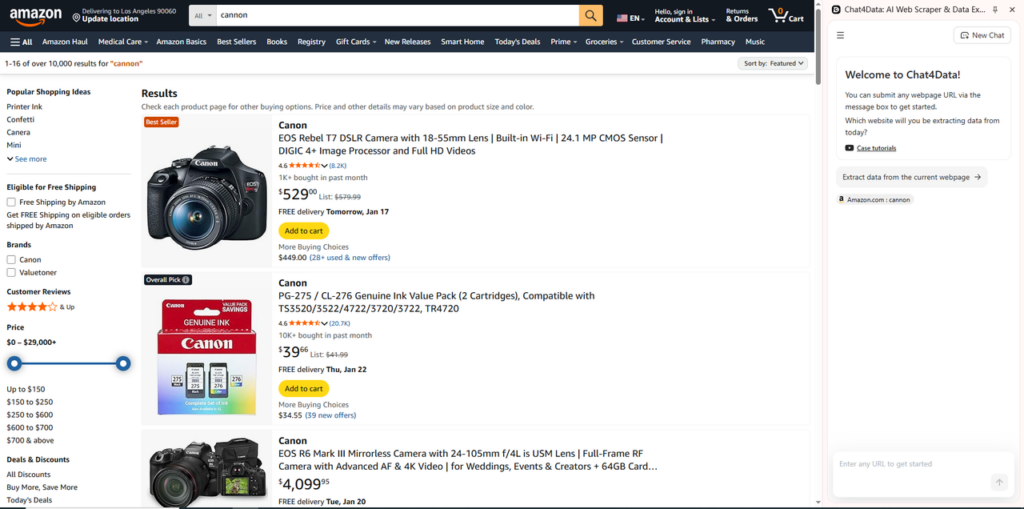
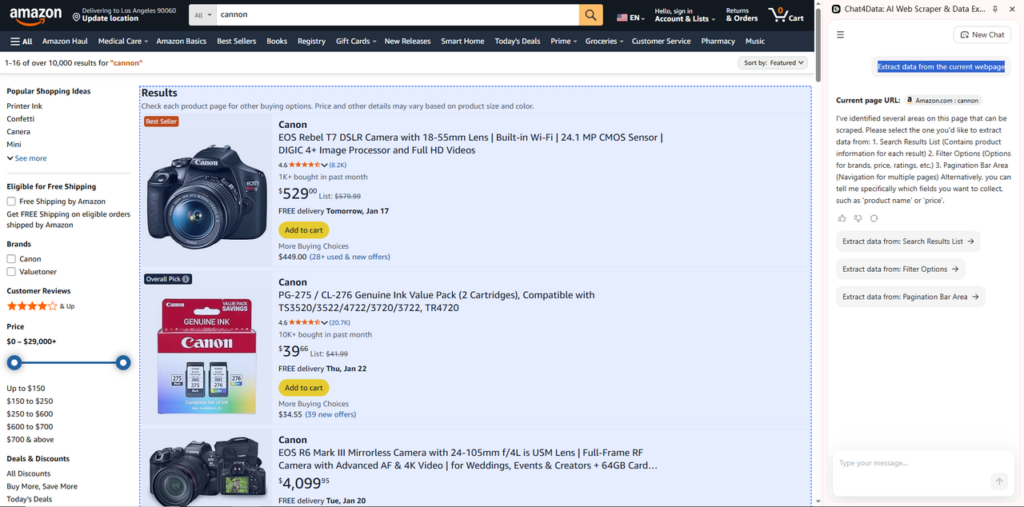
- Chat4Data will start working by analyzing the website structure and guiding you on what to extract (such as title, price, and URL). I clicked the prompt, which showed on the screen “Extract data from the current webpage” to scrape the search results of “Canon”, and it started analyzing the target area without urging me to log in (which is really awesome!). Then it asked me to confirm which area I wanted to extract:
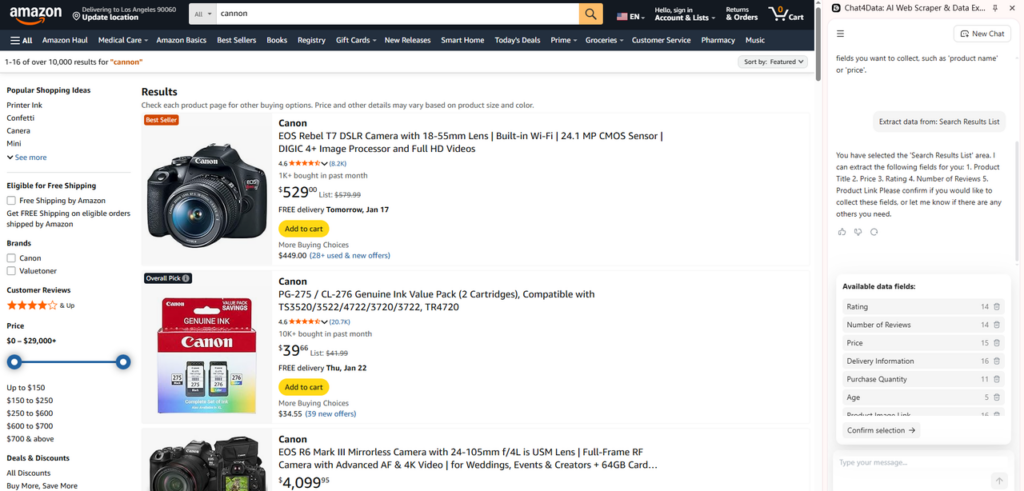
- Confirm the data you want to scrape without inputting any code. It will ask you to confirm the data fields available, as shown in the following screenshot. Here, I chose to “Extract data from: Search Results List” and confirmed all the fields available, as they were all I wanted. You can also specify the number of pages you want to extract.
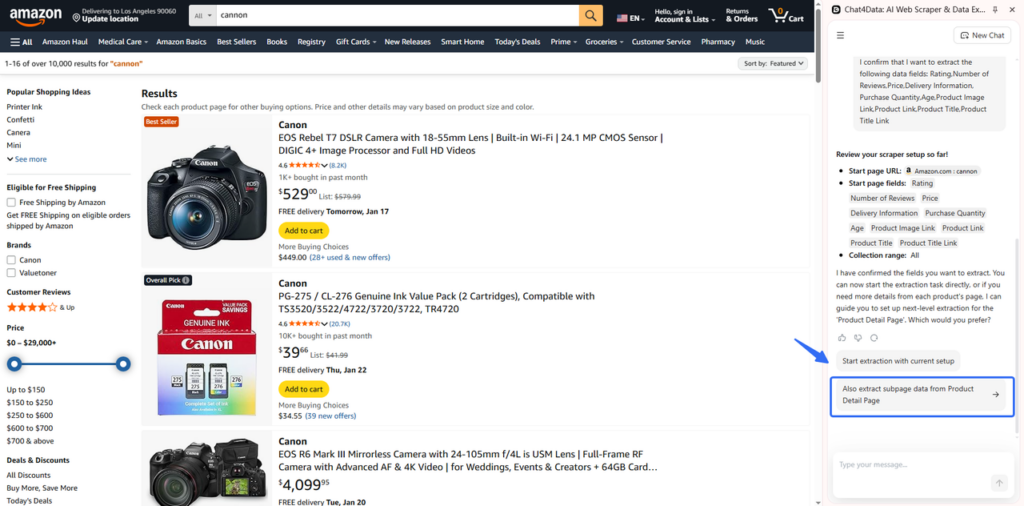
- Confirm whether you need to scrape subpage data or not. Considering the data on search results is enough for me. So I stop here.
- Finally, run the task and export the data in CSV or XLSX.
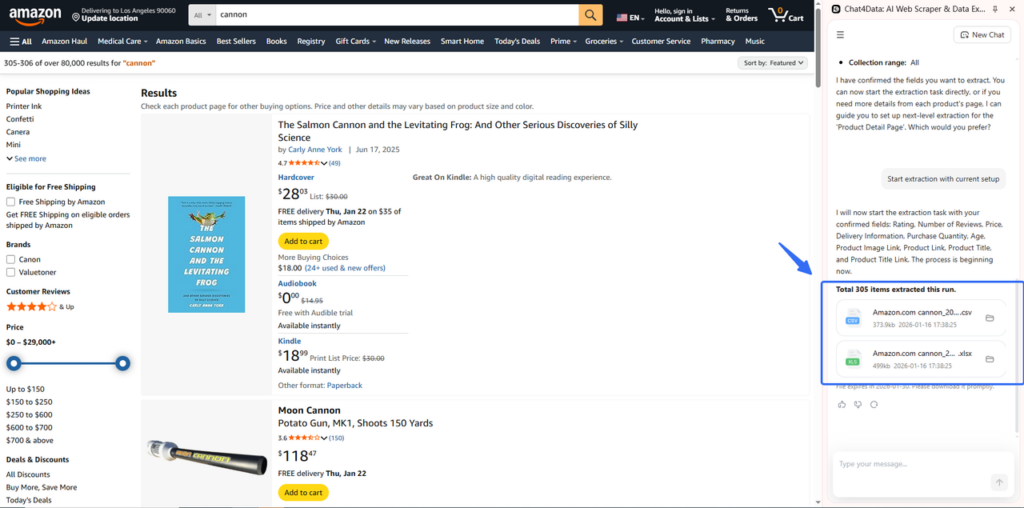
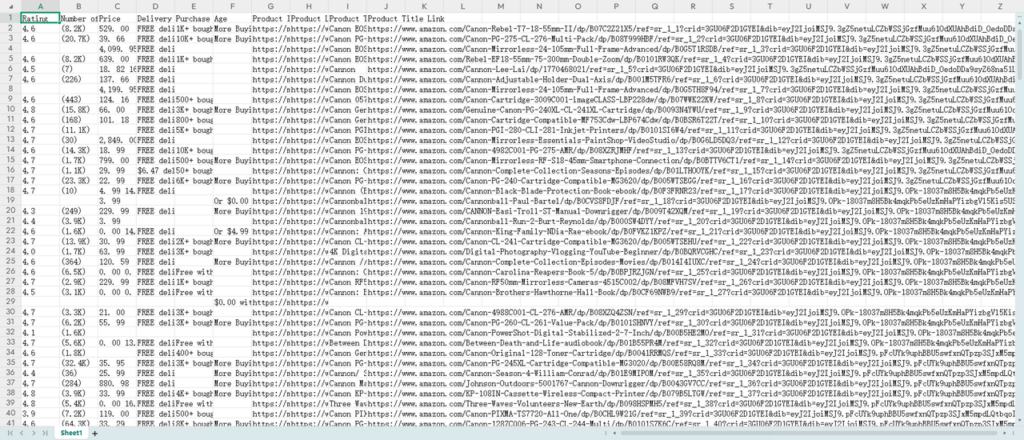
Pretty hands-free, right? No-code tools make it easy to iterate quickly and let non-technical teams get results without writing a single line of code.



Other Screen Scraping Tools That Work Smoothly in 2026
If the methods above are not enough for you, let me bring in the best screen scraping tools. I’ve put a bunch of them through their paces. Here’s how they compar. Pick one that fits your needs:
| Tool | Best For | Learning Curve | JavaScript Support | Anti-Bot Handling | Pricing | Standout Feature |
| Octopa-rse | Visual workflow building | Low | Full | Excellent | Free tier + paid | Point-and-click interface |
| Scrapy | Large-scale Python projects | High | Limited (needs Splash) | Manual setup | Free (open source) | Speed and scalability |
| Bright Data | Enterprise-grade collection | Medium-High | Full | Excellent | Premium pricing | Massive proxy network |
| Import.i-o | Business analysts | Low | Full | Moderate | Enterprise pricing | Spreadsheet-style output |
| WebScra-per.io | Chrome-based workflows | Low | Full | Basic | Free extension + cloud paid | Browser extension simplicity |
How to Choose the Right Screen Scraping Method for Your Project
The right choice depends on your technical comfort level, the complexity of the sites you’re targeting, and how often you need fresh data. Here’s how I’d break it down:
- If you want results fast and don’t want to write code, Chat4Data or Octoparse will get you there with minimal friction. You describe what you need, and the tool figures out the rest.
- For developers building production-grade scrapers, Apify offers a nice middle ground—cloud infrastructure, pre-built templates, and the flexibility to customize when needed.
- Scrapy remains the gold standard for Python-based, high-volume scraping, but it requires real engineering effort to set up and maintain.
- If you’re scraping sites with aggressive anti-bot measures, Bright Data’s proxy infrastructure is hard to beat—though you’ll pay enterprise prices for it.
Conclusion
Long story short, start with the simplest approach that works: no-code tools for quick, one-off extractions; Python or Node.js when you need login handling, complex pagination, or custom logic. Whichever path you choose, the same rules apply—respect rate limits, check ToS, and minimize personal data collection. When a site offers an official API, use it.
FAQs about Screen Scraping
- What is screen scraping vs. web scraping?
Screen scraping extracts data from rendered interfaces—often via headless browsers—while web scraping may parse HTML/JSON directly. In practice, the lines blur; choose the method that matches your site’s complexity.
- Python screen scraping or Node.js—which should I choose?
Pick the ecosystem your team knows. Python’s Playwright/Selenium and Node’s Playwright/Puppeteer offer parity for dynamic sites. For static pages, Python’s Requests + BeautifulSoup or Node’s Cheerio are efficient.
- Are there open source screen scraping tools?
Yes: Scrapy, Playwright, Selenium, and Puppeteer are popular open‑source options. Each has strong communities and documentation.
- How do I avoid blocking when screen scraping websites?
Act politely: respect rate limits, use session reuse, add realistic headers, and consider residential proxies. When in doubt, ask for permission or use official APIs.