
The AI web scraping industry is gaining more competitors every day, and it is not easy to choose from the market offerings. Web scraping tools save time, money, and effort for gathering data among many professionals. From rare use to daily efficient data scraping tasks, these tools benefit many data analysts, market researchers, and e-commerce sellers.
Both Thunderbit and Chat4Data are rising in popularity in the web scraping industry. They strive to enhance their workflow using AI, but they are not the same. In today’s guide, I will compare the differences between Thunderbit and Chat4Data in all aspects.
By the end of the article, you will get a good grasp of:
- How AI features improve web scraping workflows
- In-Depth Reviews of Thunderbit and Chat4Data
- Head-to-head comparison of Thunderbit and Chat4Data
- Best use cases for both tools
How AI Improves Modern Web Scraping
Using AI for intuitive decisions and defining structures is what makes these tools now so simple and easy to use. Like any other industry, AI is making tools more efficient and precise. A productivity report based on 2025 data indicates that teams using AI are 77% more efficient, 70% have fewer distractions, and experience a 45% overall productivity boost. As both Thunderbit and Chat4Data are AI web scrapers, let’s talk about how their AI features enhance the web scraping efficiency.
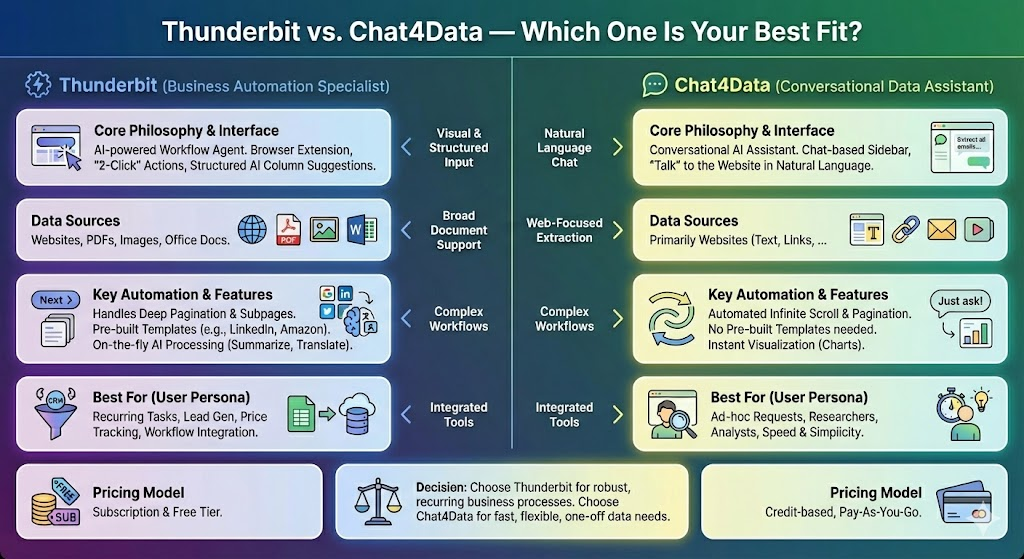
Thunderbit and Chat4Data employ most of these advanced AI features, but let’s see both in action and compare. They share many similarities in their features, but also exhibit significant differences.
These are the main aspects where AI enhances the workflows of webscrapers:
- AI field detection: AI can automatically identify and label relevant data fields (e.g., product name, price, description) on complex or dynamic web pages without manual configuration.
- AI anti-bot algorithm avoidance: AI-driven features mimic human browsing behavior, employing dynamic scrolling, random delays, and other techniques to bypass sophisticated bot detection and CAPTCHA.
- AI Pagination detection: AI automatically recognizes the navigation elements (like “Next Page” buttons or numbered links) required to proceed through multi-page lists, eliminating the need for manual setup.
Thunderbit In-Depth Review: The AI-Powered Workhorse
With around 100,000 users, Thunderbit is already settling in as one of the most popular extension-based AI web scrapers. Their developers claim they built this for sales and operations teams, enabling them to scrape leads and other data with just two clicks. The tool can, of course, do much more than that, especially with AI features.
Core Features and Capabilities
Thunderbit, as an extension web scraper, interacts directly with the browser, providing easier access to all the data on the current page you want to scrape. With the power of AI, they offer robust features, but they require some setup when scraping. Pagination and subfield scraping require additional effort to set up, but they can be saved for the next run, which is a convenient feature. Here are the top-most used Thunderbit features:
- Subpage Scraping (paid)
- Pre-built Scraper
- Bulk Scraping (paid)
- File & Image (paid)
- Pagination
- Max Paginated Pages
- Data Enrichment (paid)
- Scheduled Scrapers
How to Scrape Data with Thunderbit
After installing the Thunderbit extension, I can start it directly on the page I want to scrape. As an example, let’s scrape Walmart using Thunderbit.
Thunderbit recognizes all the data fields but misses the pagination part.
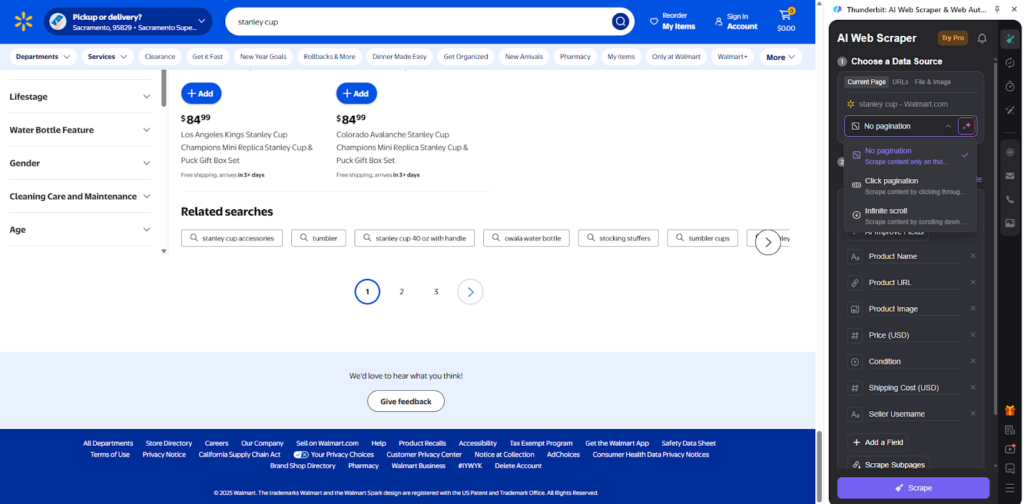
I have to handle pagination on my own, but I could either use AI to recognize it or show Thunderbit where the buttons are. This can be an issue if the page changes, and I schedule the task to be executed in the future.
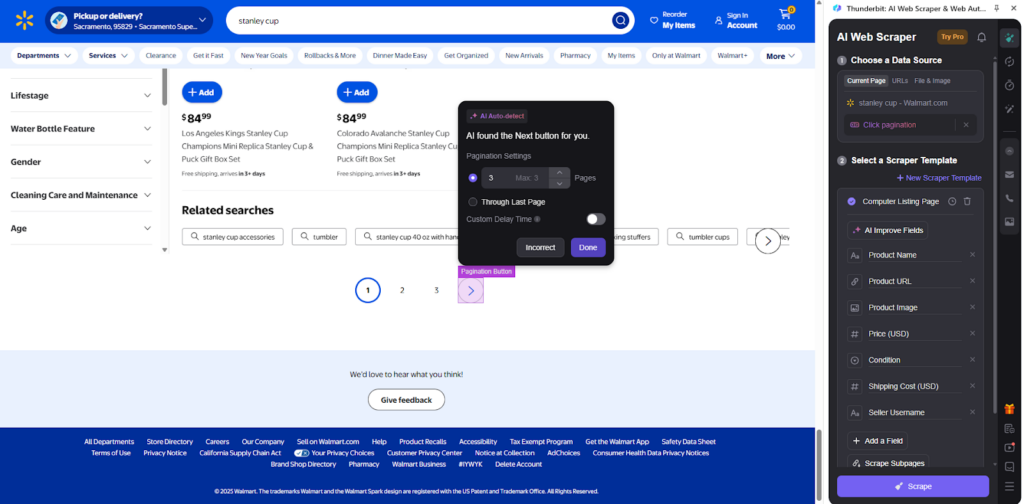
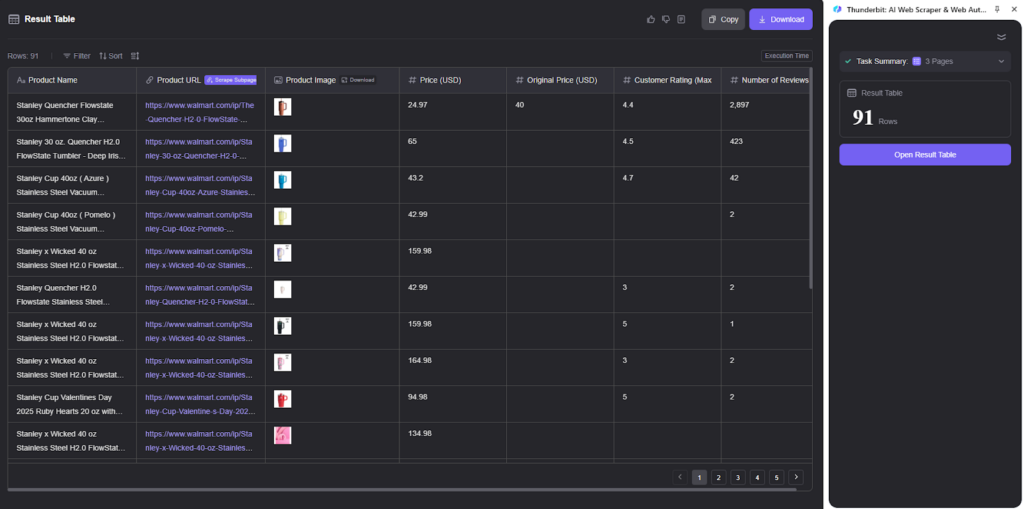
After successful scraping, there are 91 rows of data without detailed pages, as this feature is not included in the free plan.
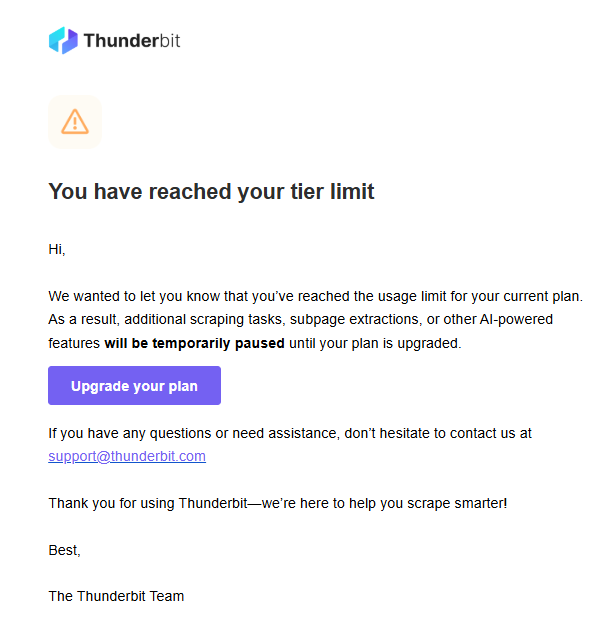
After two runs, I already reached the free tier limit.
Pricing and Plans of Thunderbit
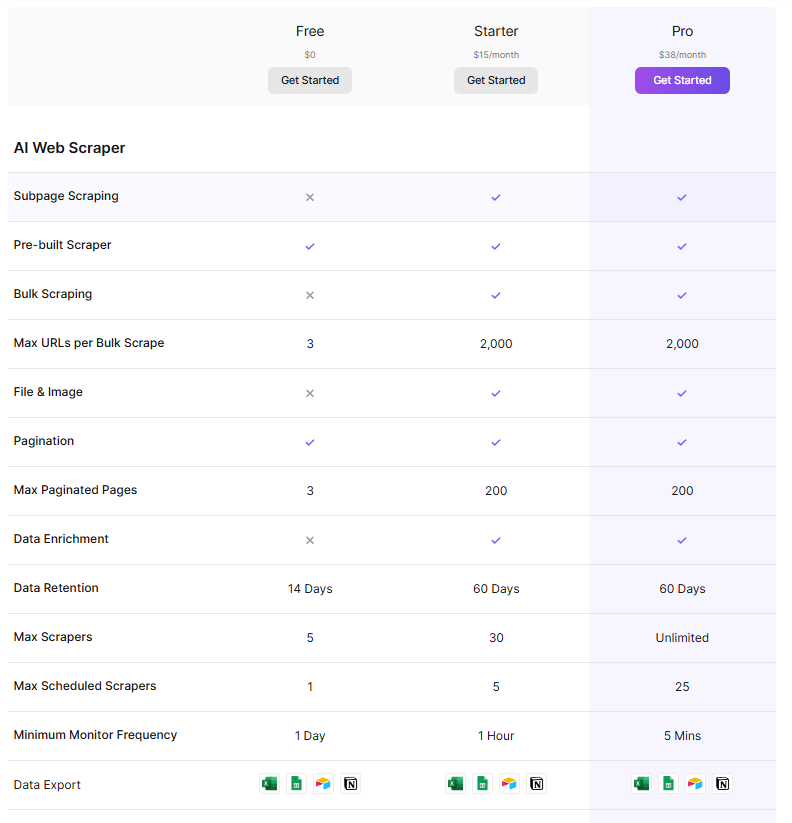
Thunderbit’s free plan offers six pages to scrape per month, along with up to 30 credits per page. That approach is an excellent plan for users who casually need scraping tasks or want to test the tool. However, Thunderbit is on the more expensive side, starting at $15 per month with only 500 credits per month. Such a package would provide up to 500 rows of data with its AI web scraper. Each credit is used per output message of Advanced Model Messages, and besides the maximum scraping rows, you have access to their premium features, pre-built scrapers, subpage scraping, bulk scraping, and pagination, as well as 60 days of data retention.
The Pro package offers flexibility in choosing the number of credits you want, starting at $38 for 3,000 credits, $75 for 6,000 credits, $125 for 10,000 credits, and finally $249 for 20,000 credits. Such pricing is intensive considering the number of features you get, especially since it offers more advanced usage in the Pro plan.
Chat4Data In-Depth Review: The Conversational Pioneer
Similar to Thunderbit Chat4Data, it is a Chrome extension web scraper with powerful AI features and conversation-style interaction. All the commands you provide, Chat4Data will understand in natural language and provide the data you want. As simple as it gets. It has high-quality data scraping and efficient credit usage.
Core Features and Capabilities
All the AI features of Chat4Data are already included in the Free plan, so trying it will give you a complete perspective on its power. Chat4Data is the first web scraper to feature a chat component as the primary means of interaction with the tool. Such an approach is impressive, especially for beginners and users returning who don’t want to worry about dynamic pages that change their structure often. Maintenance is minimized in this case.
Here are the best Chat4Data features:
- Natural language interaction
- Scrape lists and subpage data
- Use previous chats as scraping templates
- Automatic pagination recognition
- Unlimited scrapers via chat
- Unlimited data scraping once the scraper is configured
- Clear field names for data output
- AI models for data field recognition
How to Scrape Data with Chat4Data
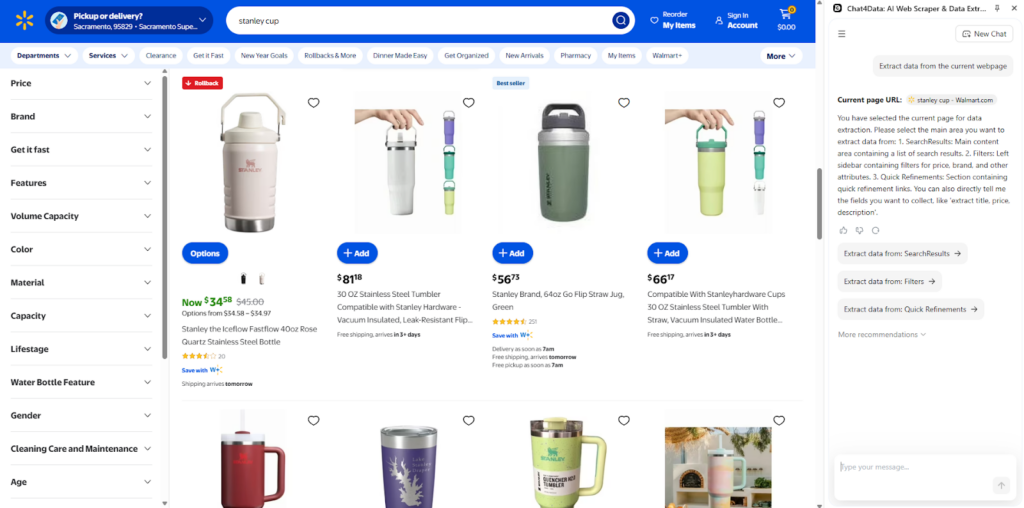
Similar to Thunderbit, I installed the Chat4Data extension from the Chrome Store and started it. I will scrape Walmart’s data using Chat4Data, looking for Stanleys.
Immediately, Chat4Data suggests scanning the page for all data fields.
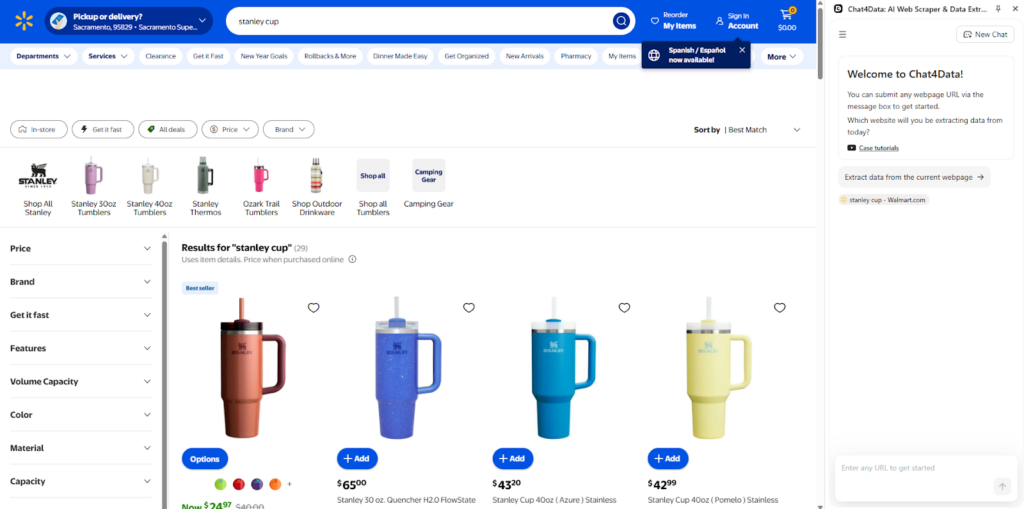
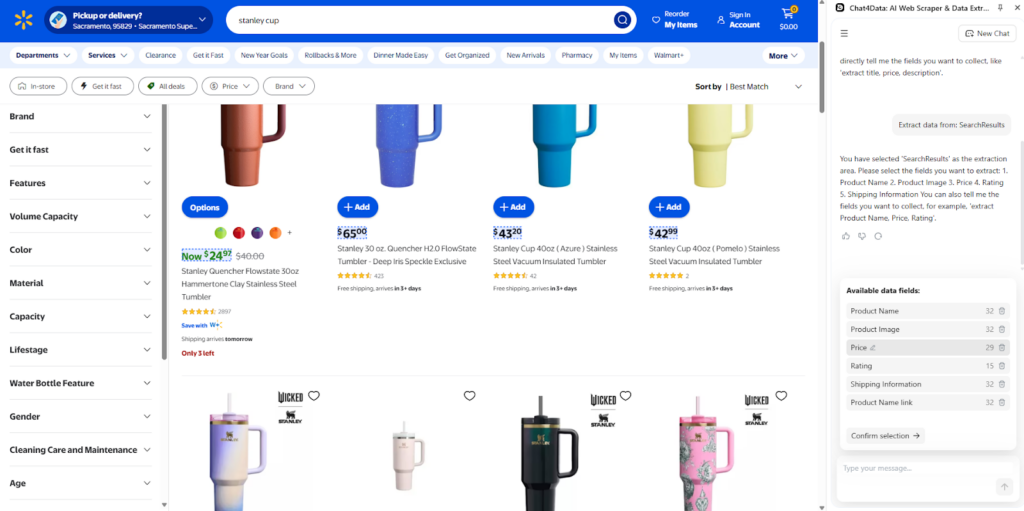
Here, I want to scrape the results, although Chat4Data found multiple different sources, making even more options possible.
The data fields within that list are already parsed and separated by name using AI.
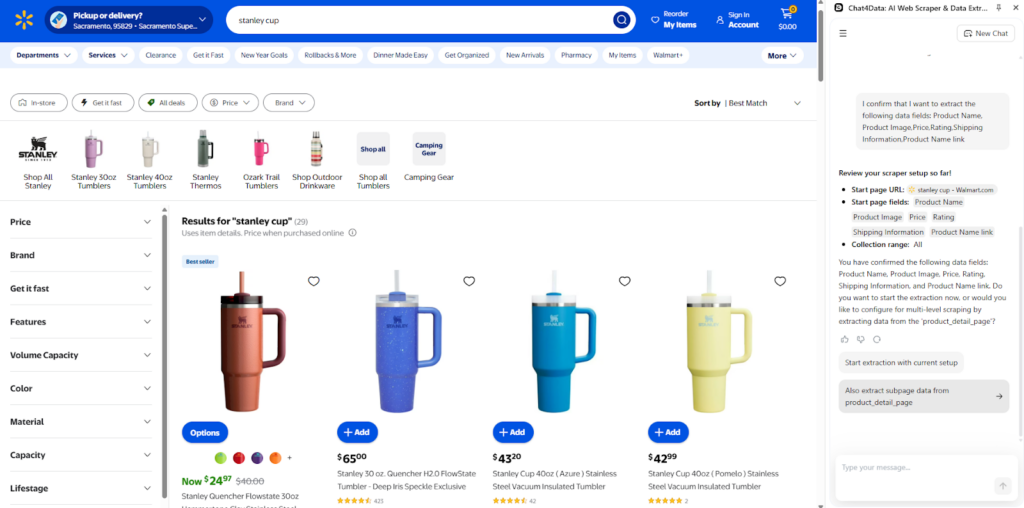
The plan is suggested, but it does not stop here, as a second option is to scrape the detailed pages of all products. Unlike Thunderbit, Chat4Data can also scrape subpages in its free version already.
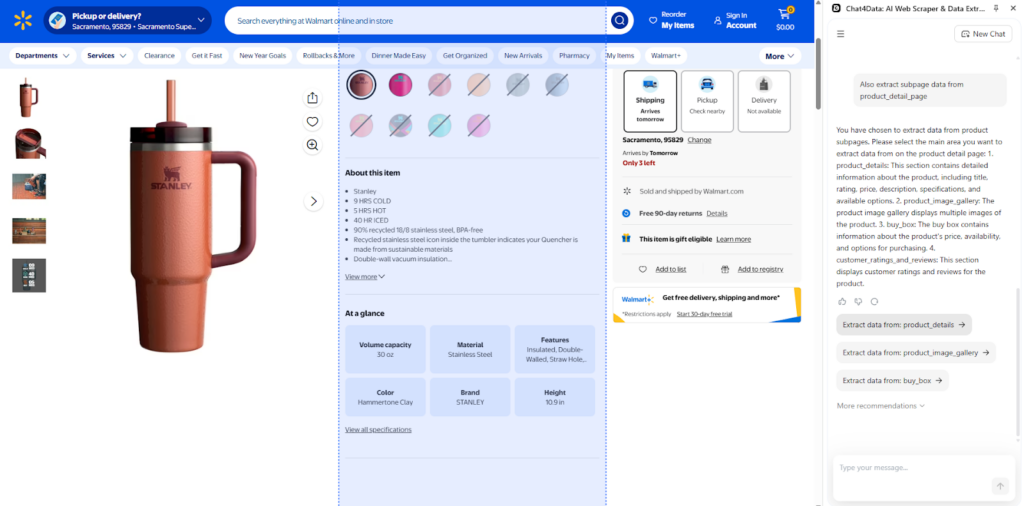
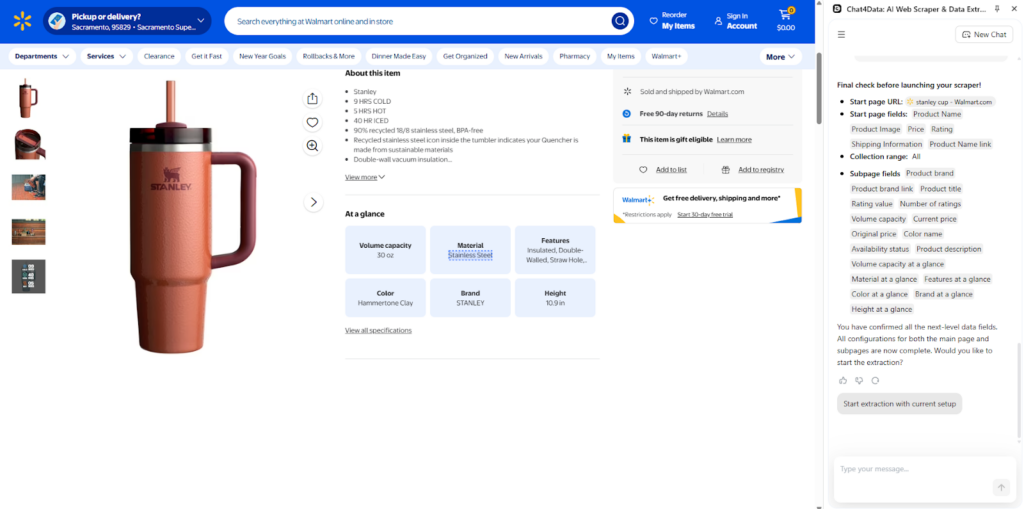
The detailed page is open, allowing Chat4Data to search for additional data fields and include them in the plan as well.
The final plan is created, and I can start my scraping process.
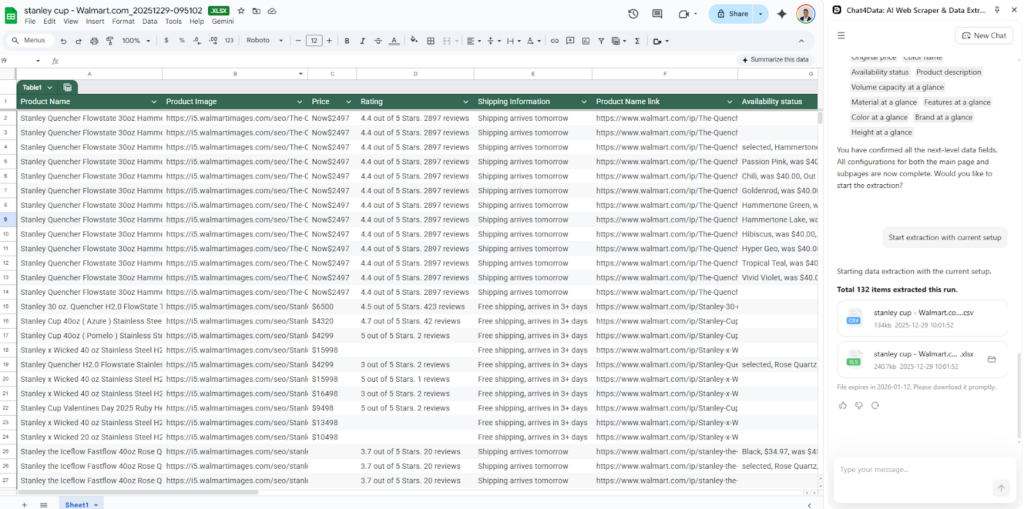
After the scraping process is complete, I can export the data in CSV and Excel formats.
Pricing and Plans of Chat4Data
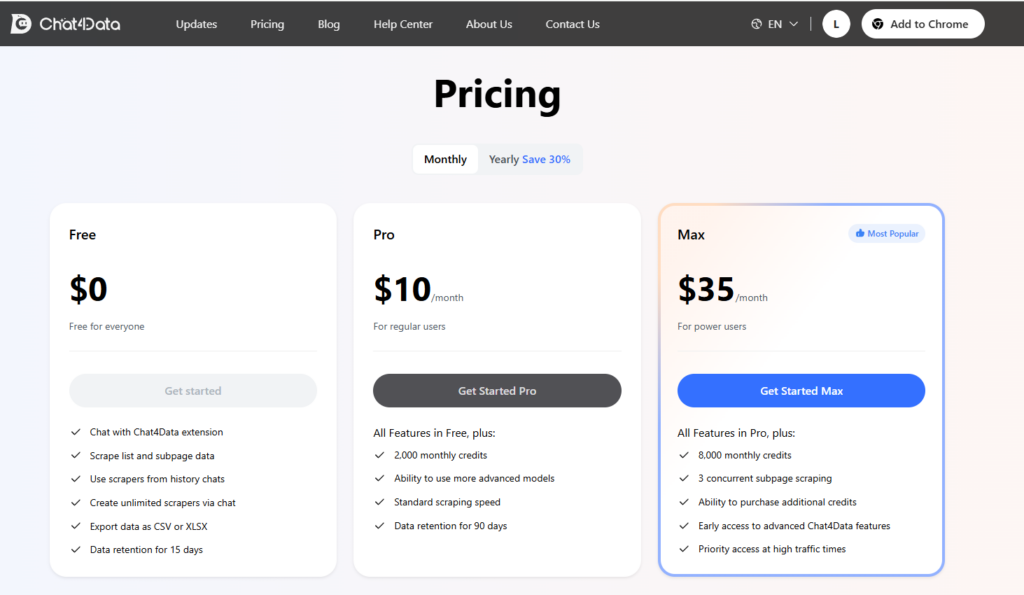
Chat4Data offers only three plans, and all features are included in the free plan. The advantage of the paid plans is faster models and more credits, of course. Such an approach is particularly convenient for individuals new to the tool who want to explore its full potential.
With the free plan, you can scrape up to 5 pages. Paid plans offer 2,000 monthly credits for $10 and 8,000 for $35.
Compared to Thunderbit, Chat4Data employs an efficient credit usage approach, where tokens are utilized for configuration rather than actual scraping. Meaning that once configured, you could scrape infinite data.
Configuring the scraper also does not require many credits, as it utilizes models trained on general website structures, which can recognize pagination and data fields with minimal effort.
Head-to-Head Comparison: Thunderbit vs. Chat4Data
The following table shows differences in all aspects between Thunderbit and Chat4Data:
| Feature | Thunderbit | Chat4Data |
| Natural language interaction | For scanning fields, additional context and pagination are required. | Interact in a conversation-style manner to perform all actions. |
| Subpage scraping | Only available in paid plans. | Available in the Free plan as well. |
| Pagination | Has to be manually selected.Only available in paid plans. | Automatic on all pages. Available in the Free plan as well. |
| Data retention | Free: 14 days Paid plans: 60 days | Free: 15 days Paid plans: 90 days |
| Credit usage | 1 credit = 1 row scraped 1 credit = output message 30 credits = successful Personal Data enrichment | Scraper configuration 40 credits on average. Unlimited scraping once the scraper starts. |
| Pricing | Free: 6 pages to scrape.Starter ($15): 500 rows.Pro ($38-$249): 3,000 credits to 20,000 credits. | Free: 5 pages to scrape.Pro: 2,000 credits up to 20 jobs with potentially unlimited scraping.Max ($35): same as pro features with 8,000 credits and faster scraping. |
| Scheduled scraper | Yes, in paid plans. | No. |
| Number of scraping tasks comparison | Pro plan: 6,000 rows of data If 100 rows per task -> 60 tasks. | Max plan: Infinite data, around 60 scraping tasks. |
Overall, both Thunderbit and Chat4Data are great AI web scraping tools, but at the more affordable price point, you get even more features with Chat4Data. Chat4Data has fewer users, and they are growing, so they might be offering more at a lower price point. However, Chat4Data is a more user-friendly product, especially for beginners.
Let’s see what Chat4Data does better than Thunderbit.
What Thunderbit Can’t Do (And Where Chat4Data Excels)
The most significant advantage Chat4Data has over Thunderbit is its direct use of natural language to command the scraper and efficient credit usage. These facts are significant for beginners, as you do not want to deal with pagination for every single website you scrape or constantly ensure column names are correct.
Scraping an infinite amount of data does not directly limit your usage, as Chat4Data utilizes efficient models and AI to generalize on webpages. Thunderbit uses an exact amount of credits per scraping job, which can be significantly limiting, making it necessary to scale quickly with large projects.
Conclusion: Which AI Scraper Is Your Best Fit?
For beginners and data professionals, Chat4Data is a better choice compared to Thunderbit overall, as it does not require maintenance or a complicated setup. They both have their advantages and disadvantages. Here is which tool to choose when:
Thunderbit: Thunderbit is suitable for users who need scraping tasks to run automatically on a fixed schedule (for example, daily, weekly, or at specific times), and who are not concerned about how much those scraping jobs cost.
Chat4Data: For non-technical users who are looking to repeatedly extract data from any possible website without worrying about data quality, setup, and maintenance at a low cost. Conversation style is what many users look for, hence, Chat4Data delivers.
The best factor when deciding between these tools is to examine your current workflows and determine if they align with the capabilities of one of these tools. Both Thunderbit and Chat4Data are amazing at what they do, but with these subtle differences, I hope this guide has helped you make the right choice.
FAQs about AI Web Scrapers
- Is it legal to scrape websites with AI web scrapers like Thunderbit or Chat4Data?
Yes, it is legal as long as you respect the website’s Terms of Service and the robots.txt file. It is more about compliance and accountability than legality. Directly republishing the scraped data is generally not permitted, and you should be particularly cautious with personal data.
- Can Thunderbit and Chat4Data scrape data from social media sites like LinkedIn or Facebook?
Yes, Thunderbit and Chat4Data can extract data from LinkedIn and Facebook. In general, social media websites require a login, but these tools do not have an issue with that, as they perform screen web scraping, which means that the current webpage is being scraped as long as you are logged in. The tools themselves do not store any credentials, ensuring your data remains safe.
- Is Thunderbit or Chat4Data better for a complete beginner with zero technical skills?
For absolute beginners, Chat4Data has an advantage in that it is easier to use, employing a pure natural language approach. There are no selection buttons or complicated procedures. Instead, commands simply instruct the tool on what data you need. You type what you want, and Chat4Data gets it for you.
- How do these AI scrapers avoid getting blocked by websites?
By directly mimicking human behavior while scraping, Chat4Data avoids detection. Chat4Data introduces random pauses, dynamic scrolling, and sparse clicking. This is a powerful AI feature that easily bypasses any detection.
- How many pages can I scrape for free with Chat4Data and Thunderbit?
Thunderbit allows for up to 6 pages per month in the free package, while Chat4Data provides 100 credits, enabling the scraping of up to three websites per month. Chat4Data is very efficient with credit usage. It uses, on average, 30 credits per scraping job because it utilizes AI models that generalize well by learning website patterns rather than analyzing every page individually.
 Try AI Web Scraper