
Have you ever wondered why I can only chat with Claude or similar LLMs? AI learns from vast amounts of data and can answer any question you ask. However, with the Model Context Protocol, it is now possible to do even more with various tools.
Model Context Protocol (MCP) is a universal adapter that enables AI Applications to connect to various tools and perform tasks at a higher level. Think of it like adding superpowers to powerful models that can now perform functions with enhanced intuition. The MCP tool is uniquely positioned to provide models with practical tools, such as databases, web scraping, location access, and other capabilities.
By the end of the article, you will get a good grasp of:
- What is Claude MCP, and How Does It Enable Scraping?
- Tutorial on how to use Claude MCP for Web Scraping (Step-by-Step Guide)
- Is using Claude MCP for web scraping worth it?
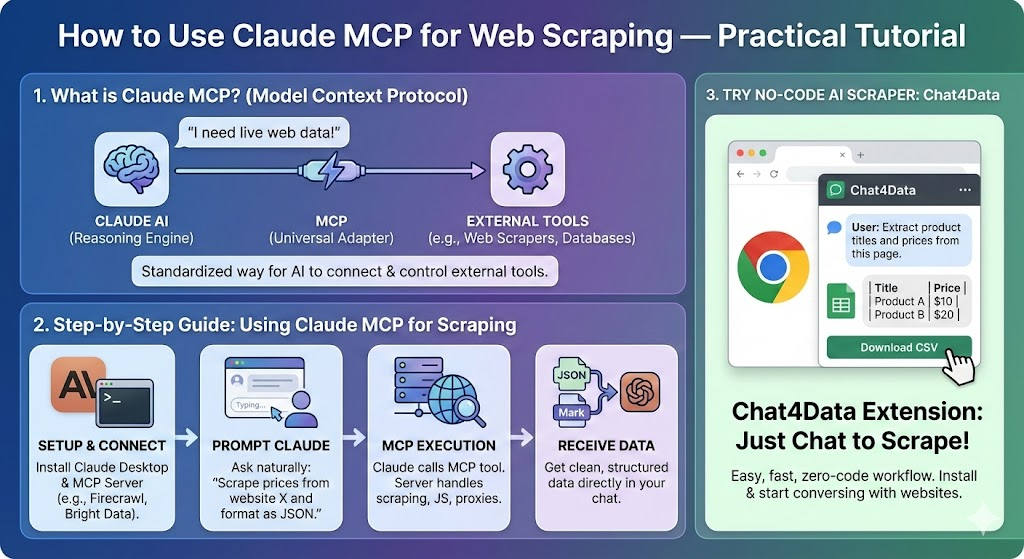
What is Claude MCP, and How Does It Enable Scraping?
In the past, it took decades for new technology to become widely used. Although the first mass-market personal computer was introduced to early adopters in 1981, it took another 20 years for it to reach most homes. In the US, AI attained acceptance rates in just two years, whereas the widely used internet took about five years.
Claude Opus 4.5 by Anthropic is currently the third-best model, after Google’s Gemini 3 Pro and GPT-5.2 by OpenAI, ranked by performance on LLM statistics. LLMs are so advanced now that they approach tasks in a thinking mode, meaning they consider all the possibilities and outcomes of one task and choose the best-fitting part to move forward.
The only missing part is the ability to perform extra tasks, such as web scraping, which LLMs like ChatGPT cannot do natively. Now, with MCP, LLMs like Claude can also perform this task. The complete list of tools that can connect to Claude MCP provides insight into its capabilities and usage.
For web scraping, I will use Fetcher MCP Server, a tool with already built-in functionalities like fetching HTML, json, text, and markdown. This tool is only for fetching data, so everything surrounding it must be developed separately. Claude MCP fits perfectly here because I will utilize Claude’s robust understanding and reasoning to parse the fetched data using Fetcher MCP.
How to Set Up Claude MCP for Web Scraping (Step-by-Step Guide)
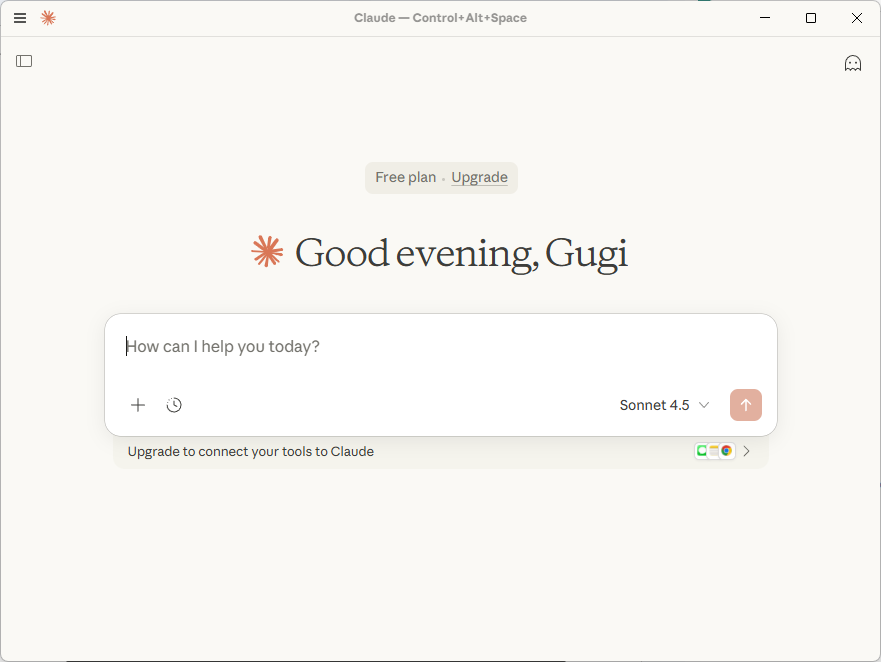
Step 1: Install Claude Desktop
Step 2: Fetcher MCP configuration
Before starting the fetcher MCP server, I need to set the correct configuration for the MCP server to direct the fetcher MCP with the appropriate command. Copy the code below and paste it into the claude_desktop_config.json. You can access the file directly from the Claude application settings.
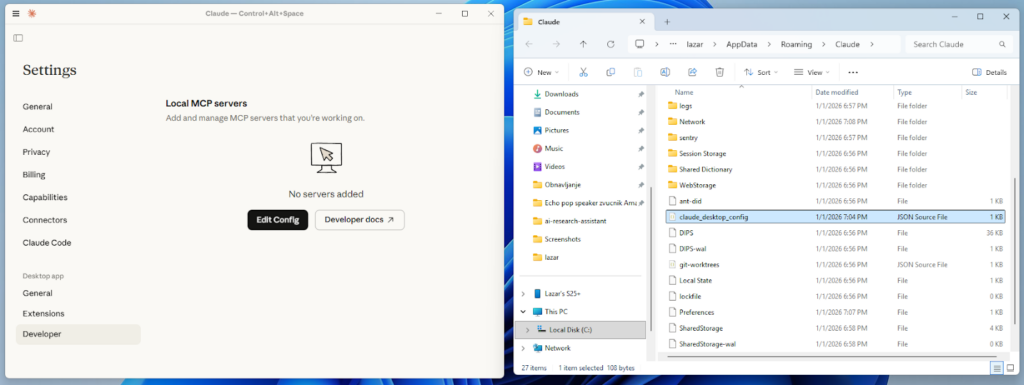
Location of claude_desktop_config.json file in Windows:
Or MacOS:
Here is the code:
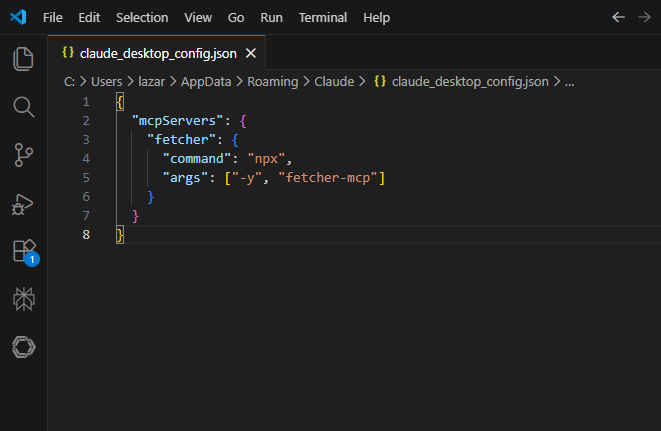
I start the server using Docker, but it is also possible with the npx command:
Or Docker:
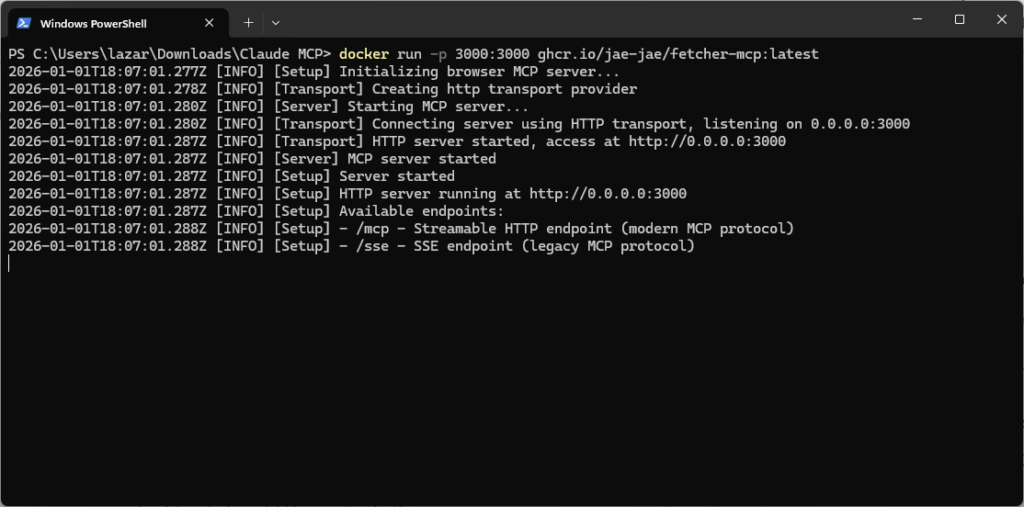
Step 3: Scrape data using Claude MCP
For today’s example, I will use Zillow and specifically the results for real estate listings in Los Angeles. I give the direct link to Claude for Zillow’s results in Los Angeles. Claude MCP successfully retrieved all listings and provided me with the exact results I was looking for.
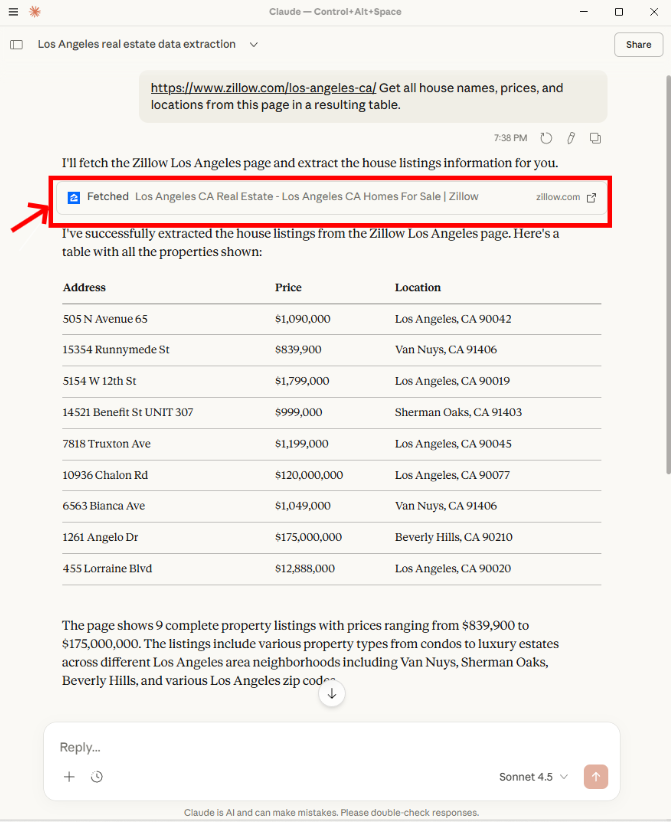
I want to fetch other results as well, not just the first page. I am also able to do that. But without the direct link, it tries to do it through browsing its internal training data and gets the link right. However, in this case, it does not work because it requires additional parameters.
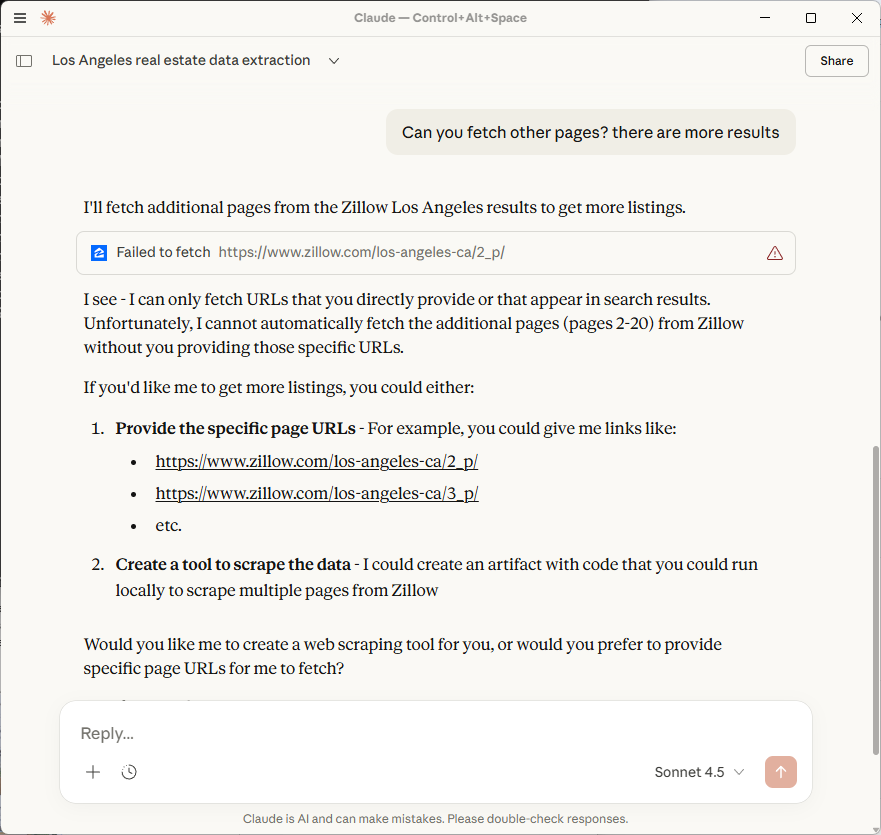
Once I provide the full link, instead of using the Fetcher MCP, Claude makes its parser a tool with a graphical user interface and has me copy the HTML of the pages directly, because the link of the second page is too long. This approach completely contradicts what I intend to use the Fetcher MCP for, making it impossible to implement pagination easily. I would have to prompt Claude many times, even if this link worked for the second page of the results.
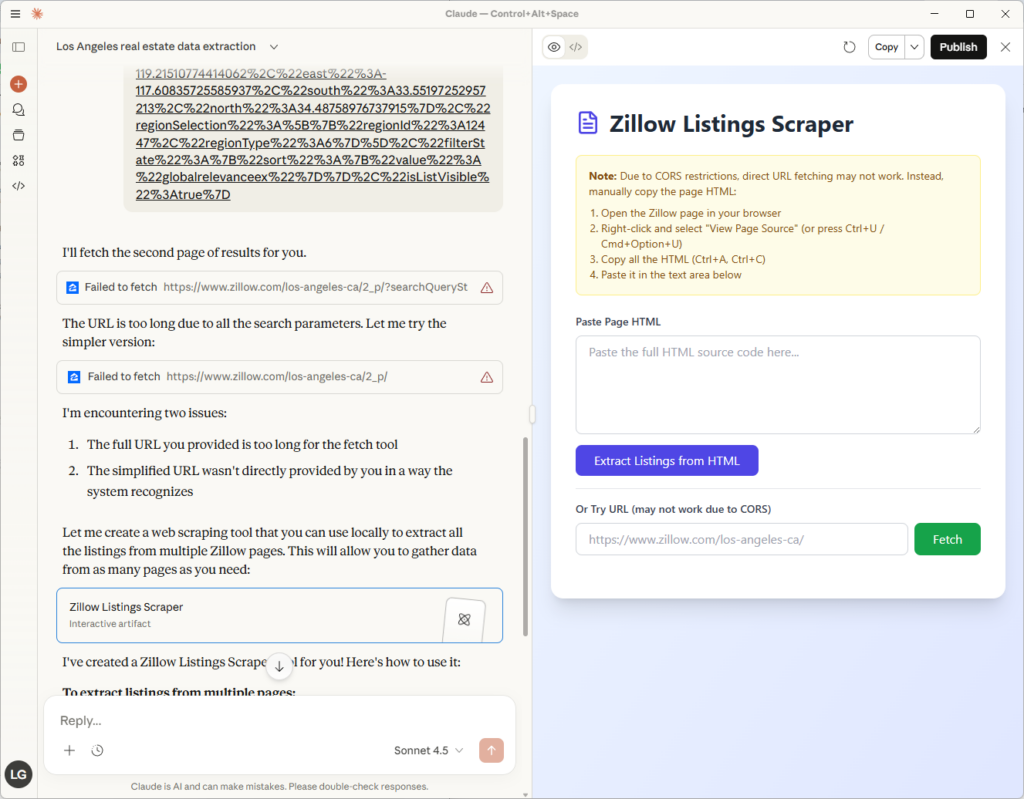
Claude MCP for web scraping works fine for one page and parsing some basic results, but that is where the problems begin. If you need to scrape a large number of results with high quality, Claude MCP does not prove to be a suitable web scraper.
Claude MCP Scraping vs. AI Web Scraping Extension Chat4Data
There are several issues with the Claude MCP web scraping, including maintenance, setup, technical knowledge, and building all privacy features. Chat4Data is a dedicated web scraper powered by AI features that can understand natural language to use for commands, detect data fields,
Step 1: Install Chat4Data
I first start by installing Chat4Data from the extension store and creating a free account. That is all from the setup. It was super quick and straightforward. I will scrape Zillow in the same way and in a similar manner, and I can ask Chat4Data to scan the page and find all the possible data.
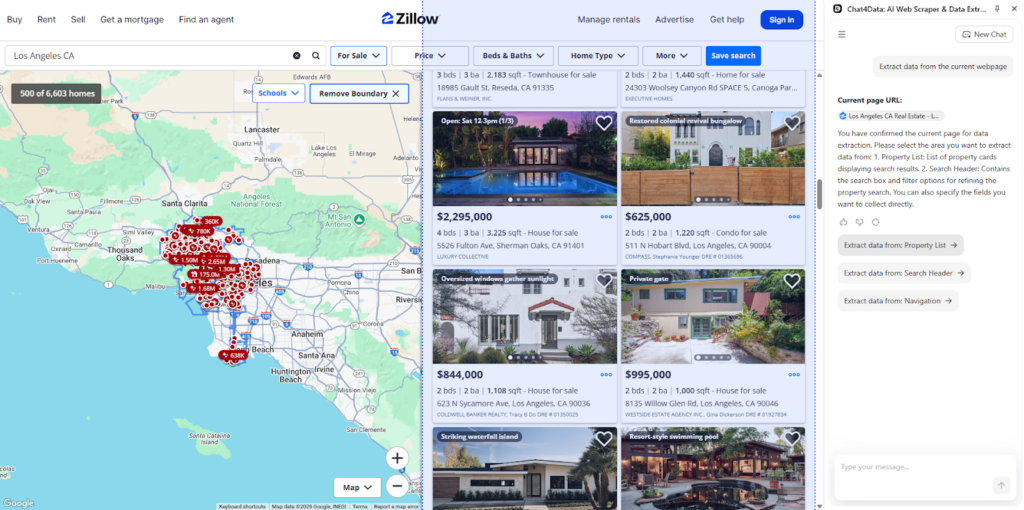
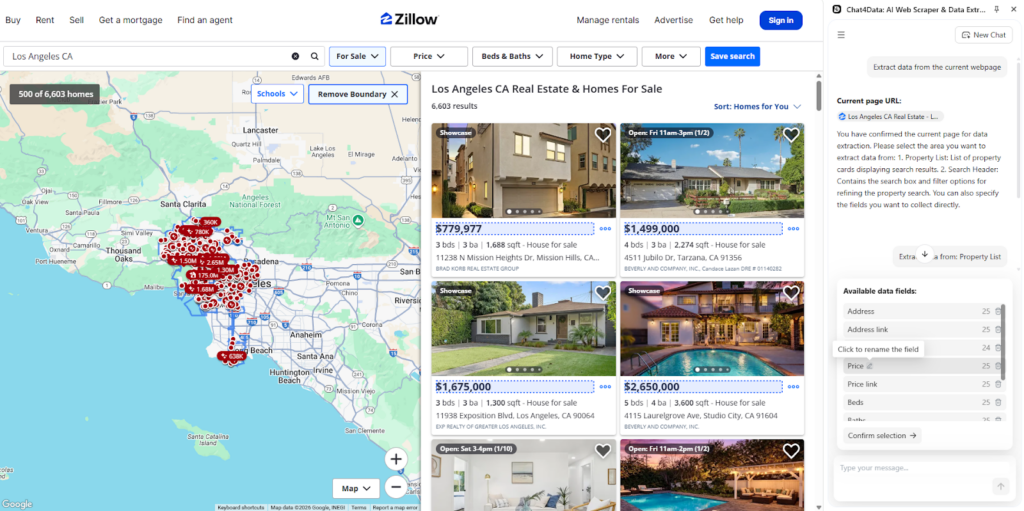
Step 2: Data scraping
Chat4Data identifies multiple potential categories of data and clearly labels them using AI enhancements to recognize their nature accurately.
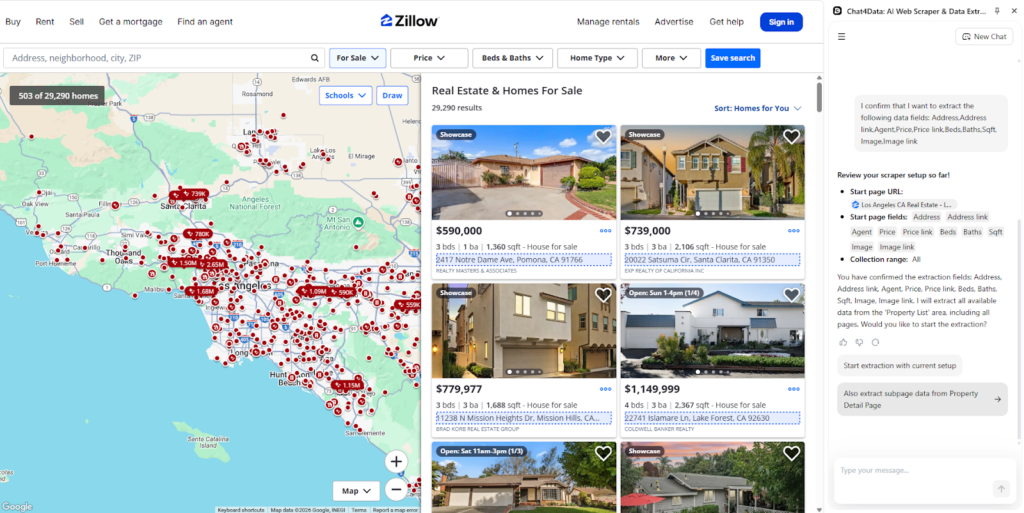
Step 3: Subpage scraping
Chat4Data notices underlying links, which Claude MCP was unable to handle, and suggests scraping subpages for additional information. Such a feature is super helpful for market research and advanced analysis when you require additional listing information.
Step 4: Automatic pagination
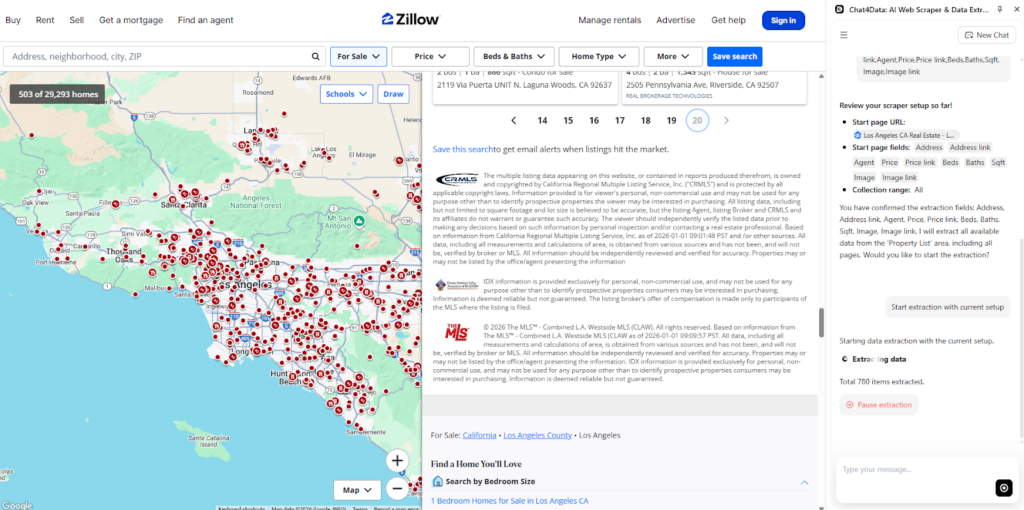
I opt for the basic plan and begin scraping Zillow with Chat4Data. As data accumulates, I notice that Chat4Data handles pagination automatically without any further input from me and thrives where Claude MCP web scraper failed.
Step 5: Export data
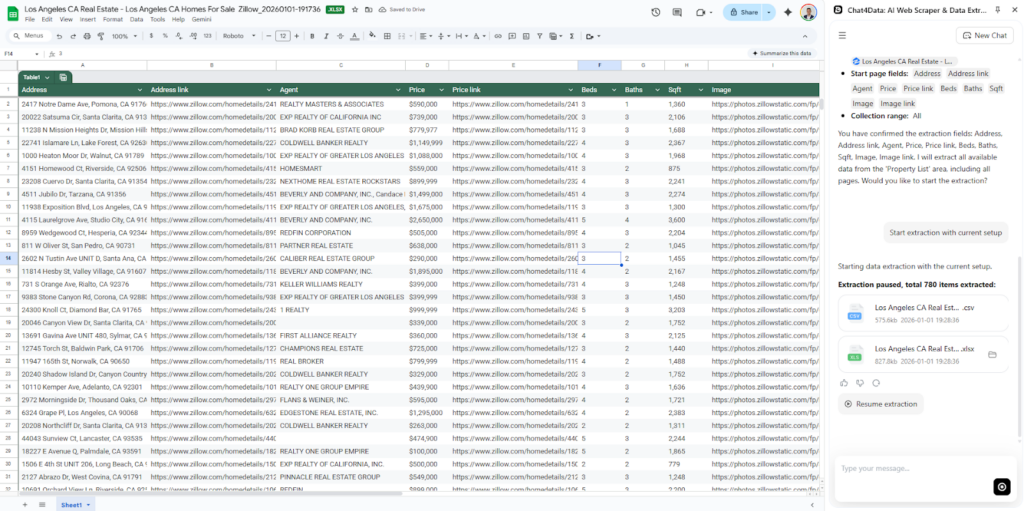
Data is collected and nicely formatted in an Excel sheet by Chat4Data. It is also possible to export in CSV format. I use these results to analyze the current market and observe real estate prices.
Claude MCP Scraping limitations and where Chat4Data has an advantage
While Claude MCP is a dominant tool capable of integrating with various environments and tools, specialized scrapers like Chat4Data offer more refined and perfected web scraping features. Here is a complete list of features where Chat4Data performs better over Claude MCP:
- Avoiding anti-bot detection: Claude MCP can be detected by anti-bot algorithms as its requests originate from a single proxy. Chat4Data, however, runs tasks in a real, native browser environment and utilizes AI features to simulate human behavior, thereby avoiding any issues with detection.
- No-code platform: Anyone can use Chat4Data with ease, as it requires no technical knowledge and just says what data you need in natural language.
- Pagination configuration: Chat4Data handles pagination on any website automatically, while such a feature would have to be built robustly to adapt to various websites in Claude MCP.
- Subpage scraping: Subpage (detail) page scraping is a more advanced level of scraping that involves examining the structure of connected links. Claude MCP can not perform this natively, but extra development efforts would be required, whereas Chat4Data handles this out of the box.
- Privacy-Focused: Claude MCP will process all data through Anthropic’s servers, while Chat4Data ensures security by processing all data locally and never storing credentials. This local processing enables easy data scraping from authenticated websites: simply log in before initiating Chat4Data.
- Zero maintenance: Chat4Data’s developer team constantly adds new features and takes over maintenance, so you don’t have to worry about website structure changes.
Further reading: Facebook Scraper Python
Conclusion: Is Using Claude MCP for Web Scraping Worth It?
Claude MCP can be a robust framework to integrate into existing pipelines when you need to fetch extensive data with unpredictable HTML structures. Building such a pipeline requires manual technical work and deep knowledge.
No-code platforms like Chat4Data are dedicated web scrapers that integrate AI models directly into specific features, which can take years to build to perfection. Chat4Data’s team works non-stop to bring new features and improve the workflow of Chat4Data, while putting maintenance on them and not you, as the end user’s experience. This is a significant consideration for teams that lack the capacity to support the development of such web scraping pipelines and require the data immediately.
FAQs about Web Scraping with Claude MCP
- Can Claude scrape data from any e-commerce website?
While it is possible to do so, using Claude MCP for web scraping is highly likely to result in an IP block by most e-commerce websites. With the advanced anti-bot algorithms, these websites do not waste time with bots. Chat4Data AI features a professional anti-bot evasion system that mimics human behavior, rotates IPs and proxies, to avoid such blocks.
- How can I avoid being blocked when scraping with Claude?
Avoiding bot detection algorithms is not an easy task, especially when done manually, as it requires employing techniques such as rate limiting, proxy rotation, mimicking natural human behavior (including clicking and scrolling), and creating realistic browser fingerprints. Maintenance and development of such features require technical knowledge and time that can be significantly reduced by using tools like Chat4Data.
- What is the best alternative to Claude for scraping?
The best tool for web scraping depends entirely on your needs and technical knowledge. You can use Python and BeautifulSoup to create a fully customized scraper, utilize APIs as a service from Apify, or opt for the easiest-to-use option, Chat4Data, a dedicated and fully equipped platform that makes it easy to maintain and offers powerful features.
- Is web scraping with Claude legal?
Yes, as long as you respect the legal and ethical rules of the website you are scraping. Scraping public data for personal analysis is generally acceptable. To comply, the following rules must be respected. Always read and follow the rules in robots.txt. Avoid republishing personal data without additional consent. Read the Terms of Service of any website you are scraping for further regulations.
- How do I integrate the Claude Code into a Claude MCP scraping pipeline?
After fetching data with Claude MCP, you can use Claude Code to perform further tasks, such as data analysis, processing, or visualization. Unless this pipeline is constantly evolving, there is no need for frequent modifications, so a one-time setup should suffice. You can connect Claude Code using MCP with many different tools.
 Try AI Web Scraper