
Let’s be honest, web scraping is one of those things almost everyone has heard of, but very few realize how powerful it actually is when used the right way.
It quietly runs behind some of the biggest products on the internet today.
Even big companies like OpenAI, Google, and DeepSeek scrape large parts of the internet to train their models.
And you may know that web scraping has been around for a long time, and people have been doing it in many different ways.
Like scraping the web manually, using devtools, different Python and JavaScript libraries like BeautifulSoup, multiple web scraping tools, Chrome scraper extensions, and so on.
And now, thanks to AI, there is a new web scraping method called “web scraping with an LLM scraper” that is going viral and quietly changing the game.
The best part? With this method, we no longer need to write code. We just need to tell an LLM what we want to scrape.
And in this post, we are going to learn everything about what an LLM web scraper is, how LLM-based web scraping actually works, a practical walkthrough on building an LLM web scraper, and more.
With that said, let’s get started.
The Problem With Traditional Web Scraping
If you’ve ever maintained a web scraper, you know the pain.
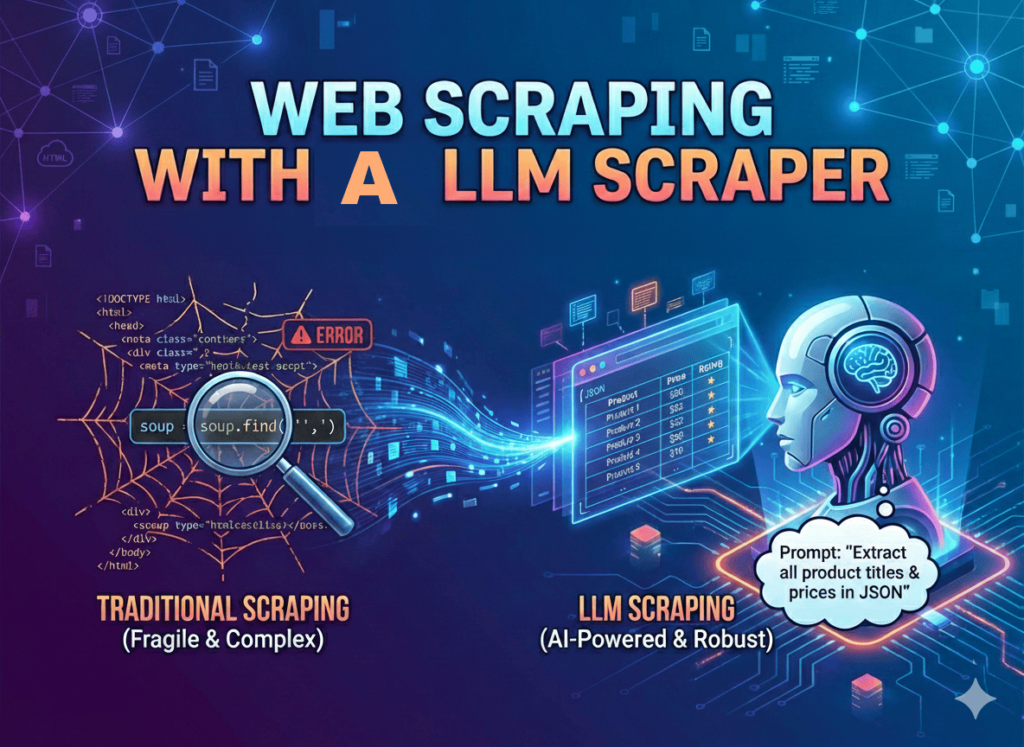
You spend hours inspecting elements, crafting the perfect XPath to grab a product price. Your script works beautifully, only for the website to update its UI the next morning and break everything.
To be more precise, traditional web scraping methods depend on the DOM structure.
You tell your code (using BeautifulSoup or something else):
- This div contains the product title.
- This class contains the price, “soup.find(‘div’, class_=‘price_v1’)”.
- This class holds the product rating.
And exactly after 3 days, if the class name changes from “price_v1” to “price_v2”, your whole app crashes.
What’s next? Well, now your scraper returns empty data or sends you an error, and you need to spend hours debugging HTML.
And that’s where LLM web scraping can be helpful, since it works on semantic understanding. Here, you just need to feed the raw HTML (or a text representation) to an LLM and ask: “Return a JSON of all product titles”.
And even if the website changes its layout the next day, there is no issue. As long as the data is visible to a human, your LLM scraper will find it.
What Is an LLM Web Scraper & How It Works?
Well, an LLM web scraper is a new type of web scraper that uses a large language model (LLM) to read, understand, and extract information from a website, the same way a human would.
In simple terms, as the terms suggest, it means using LLMs for web scraping.
And it doesn’t care about the HTML structure, so you don’t need to write “Find the element with class .product-price”.
Instead, you can say: From this page, extract the product name, price, rating, and top customer complaints.
And then the LLM reads the page like a human would and returns structured data. Just semantic understanding applied to scraping.
This is why people also call it:
- LLM scraper or LLM-based web scraper
- LLM website scraper or web scraper for LLM
- and so on.
And now, here’s how the LLM web scraper works in the simplest way possible:
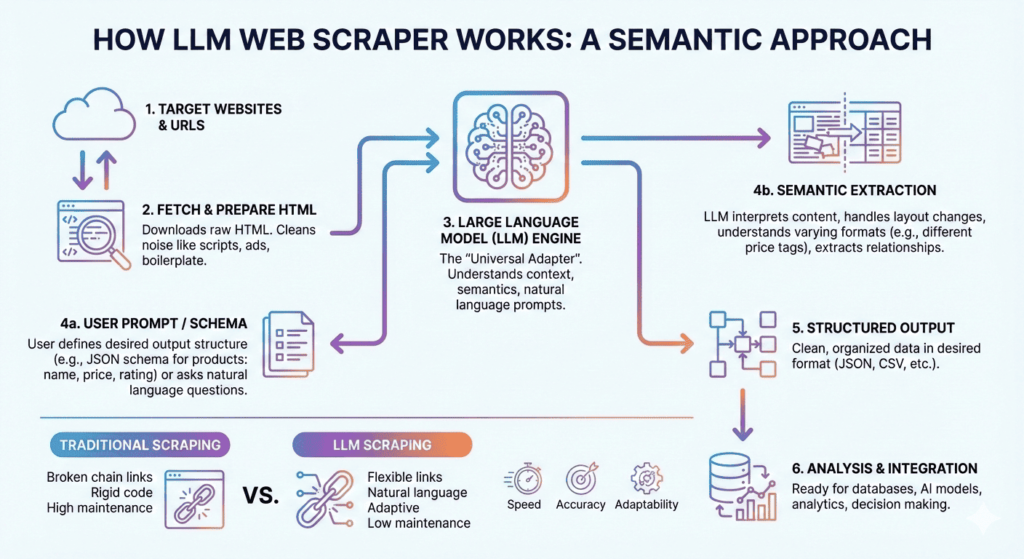
Step 1: Fetch the webpage using Requests, Playwright, Puppeteer, or Selenium
Step 2: Clean the page text, like removing navigation, ads, cookie banners, and scripts
Step 3: Send the page text to an LLM with instructions like extracting all the product pricing, and more
Step 4: Ask the LLM to extract structured data or output it in JSON, CSV, or table format
Yes, that’s the entire pipeline, along with the respective pseudocode examples to help you understand the working of an LLM scraper in simple terms.
Building Your First LLM Web Scraper (Step-by-Step Tutorial)
Now, for this post, we are going to use Crawl4AI.
Why? Because it is open source (57k+ stars on GitHub), built specifically as a web scraper for LLM workflows, and it handles the heavy lifting of converting messy HTML into clean Markdown for you.
With that said, let’s get started and build our first LLM web scraper.
Prerequisites:
- Python 3.9+
- An OpenAI API Key (or access to a local model like Ollama if you want to save costs)
Step 1: Installation
Open your terminal and install the libraries.
Step 2: Building Your First LLM Scraper in Python
Let’s scrape a tech news site.
And as we know, we don’t want to hunt for <h2> tags, we just want to let the LLM know that we want the article titles and links.
For that, simply create a file named “scraper.py” inside VS Code or whatever editor you use.
And here’s the code:
Well, this Python script simply “reads” the Hacker News page and finds the articles.
And the best part? If Hacker News changes its HTML structure tomorrow, this Python script still works.
What If You Don’t Want to Write a Scraper in Python?
Up to this point, we’ve talked about how LLM web scraping works conceptually, and we also saw how to build your first LLM web scraper.
But most of you may not want to write Python code or may have no programming knowledge, and that’s where tools like Chat4Data can help you.
You can think of it as an LLM web scraper packaged as a browser extension.
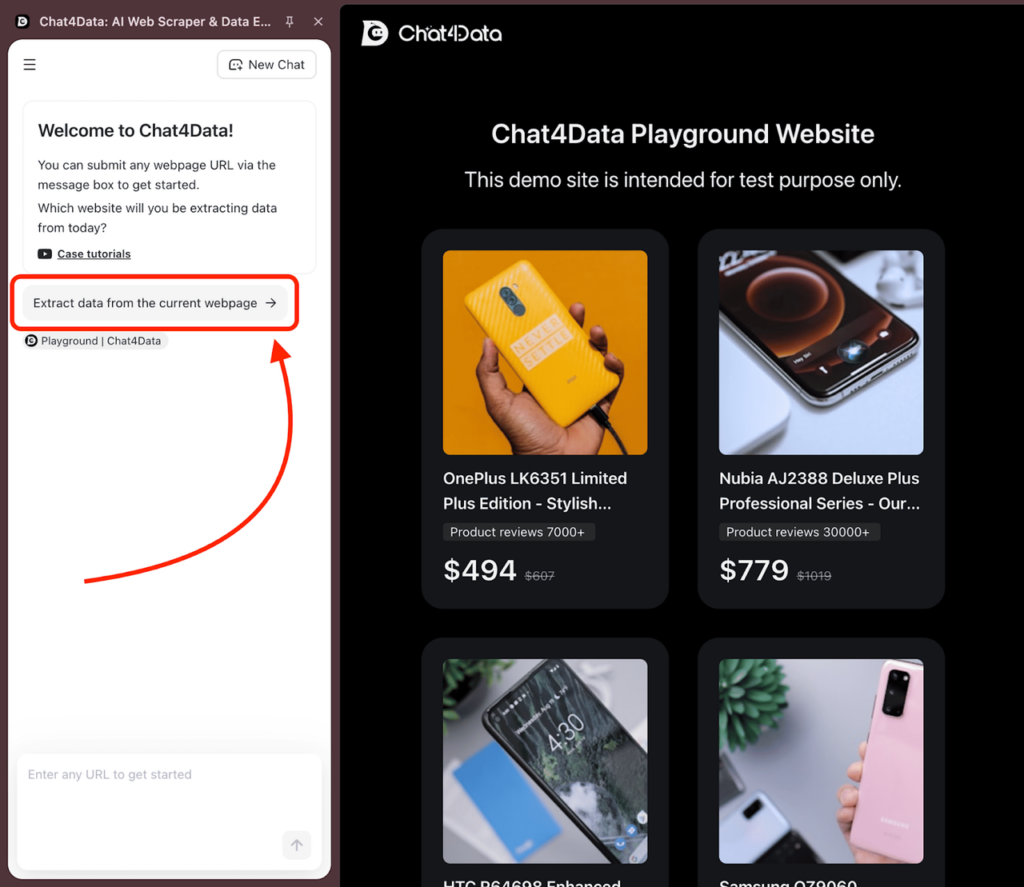
The best part is that instead of fetching data and prompting an LLM manually like we discussed earlier, you simply open a webpage, tell it what you want in plain English, and it extracts structured data for you.
Because of this, you can ask it to extract all product names, generate a CSV of companies, and much more.
Behind the scenes, it is doing the same things we discussed earlier:
- Reading the visible content like a human
- Understanding meaning instead of DOM structure
- Returning structured data that you can export as CSV or Excel
So if you need data quickly, don’t want to maintain scraping scripts, or don’t want to deal with messy or frequently changing layouts, you can go with chrome scraper extensions like Chat4Data.
As for the pricing, you can get started for free and even export data with their free plan.
Other Popular Libraries for LLM Web Scraping
In the previous part, we talked about using Crawl4AI for LLM web scraping, but there are other popular LLM scraping libraries that you can use:
- Firecrawl: This is another open-source, popular, and advanced, production-ready LLM scraper that lets you scrape, search, and crawl, along with some great features.
- ScrapeGraphAI: This one lets you build graph-based pipelines using LLMs to scrape via natural language prompts, supporting single- and multi-page extraction into JSON/CSV, and more. Their website claims that this is the only scraping API designed for autonomous AI agents. And it is best for extraction from complex, changing websites where writing selectors is painful.
- Spider: While Firecrawl is fast, Spider is often cited as the fastest. It is written in Rust and has excellent Python bindings. It is optimized for high-concurrency crawling (visiting thousands of pages) rather than just single-page extraction. And so it is best for building a massive dataset.
- LLM Scraper: This is another popular TypeScript library that uses a headless browser (Playwright) to load the site and then uses an LLM to extract exact fields you define in a schema.
- ScrapingAnt: Well, this one is a web scraping API provided by LangChain that uses real headless browsers, can handle JavaScript-heavy websites, rotates proxies automatically, and even tries to bypass basic anti-bot systems.
Should You Use an LLM Web Scraper?
Now, you understand what an LLM scraper is, how it works, and how to get started with it.
But the real question is this:when should you use an LLM scraper, and when should you avoid it?
First, be clear about one thing: an LLM scraper is not a replacement for every scraping method. It is powerful, but it is not magic. You need to be careful and have a clear understanding of when to use it.
To be specific, an LLM scraper works best when the page structure is messy, the layout changes often, or when you want to scrape data using simple English instructions instead of writing selectors.
In short, if traditional scraping feels painful, fragile, or time-consuming, LLM scraping is usually the better option.
That is why LLM web scrapers are great for tasks like:
- Scraping product listings or extracting FAQs, pricing pages, and documentation
- Extracting insights from long-form articles or blog posts
- Summarizing research papers or monitoring competitor websites
- Extracting leads from messy or poorly structured directories
However, LLM scraping is not a good choice when you are scraping millions of pages every day, need millisecond-level performance, the page structure is stable and rarely changes, or when cost matters a lot, since LLM calls can get expensive very quickly.
There are also some common mistakes beginners make.
These include passing raw HTML directly to the LLM without cleaning it, ignoring token limits, and using LLMs for everything even when a simple BeautifulSoup script can do the job faster and cheaper.
Finally, remember this clearly: LLM scraping does not bypass legality. You still need to:
- Respect the robots.txt file
- Follow the website’s terms of service
- Avoid scraping personal or sensitive data
- Prefer official APIs whenever they are available
FAQs about Web Scraper for LLM
- Is an LLM web scraper slower than BeautifulSoup?
→ Yes, an API call to an LLM takes longer than local CPU parsing. So, I suggest using LLM scrapers for complex or fragile sites, and traditional scrapers for high-volume or simple sites.
- Can I use a local LLM to scrape website data?
→ Yes, absolutely.
If you run a local model like Llama 3 or Mistral using Ollama, you can connect Crawl4AI to your local LLM endpoint. This way, your scraping works without calling any paid API.
- Does this bypass captchas?
→ The LLM handles the parsing (reading the data), but it doesn’t bypass captchas. You still need a tool or library to handle the network or bypass captchas.
- Is LLM scraping better than BeautifulSoup or other options?
→ There is no specific answer, as it depends on what you want to scrape. You can use BeautifulSoup for stable layouts, and use an LLM-based web scraper when structure changes or meaning matters.
- Can an LLM scrape a website automatically?
→ An LLM can interpret content, but you still need code to fetch pages, clean text, and handle errors.
- How expensive is it to scrape data using an LLM?
→ It depends on page size and volume. For high-value pages, the cost is often higher, so beware of that. Most experts combine LLMs with traditional methods for massive scraping.
 Try AI Web Scraper