
Let me be honest, most people talk about web scraping like it’s either magic or rocket science.
And if you go a bit deeper, some people think it’s something only Python nerds do at 2 a.m., while others imagine no-code tools that magically scrape everything with one click.
In reality, it’s neither.
It’s just a painful, boring problem that business users keep running into again and again.
But you need structured data from the web, but you don’t want to code, maintain scrapers, fight broken selectors, or spend hours copy-pasting each row.
And this isn’t some niche problem either.
In fact, the global web scraping market is already a multi-hundred-million-dollar industry and is forecast to almost quadruple over the next decade. That tells you one thing very clearly: this pain isn’t going away.
So over the last few months, I’ve been testing a number of AI web scrapers and Chrome scraper extensions for real work, trying to find the absolute best ones for lead generation, competitor tracking, content research, dataset building, and more.
That’s where I started using Browse AI, one of the most popular tools in the web scraping space that actually tries to solve this problem.
And honestly, it is good. But it’s also not the tool most beginners think it is.
So I’m writing this post as a hands-on breakdown of what Browse AI does well, where it breaks down in real workflows, and why there’s a better fit for most non-technical users.

What Is Browse AI (and Why People Like It)
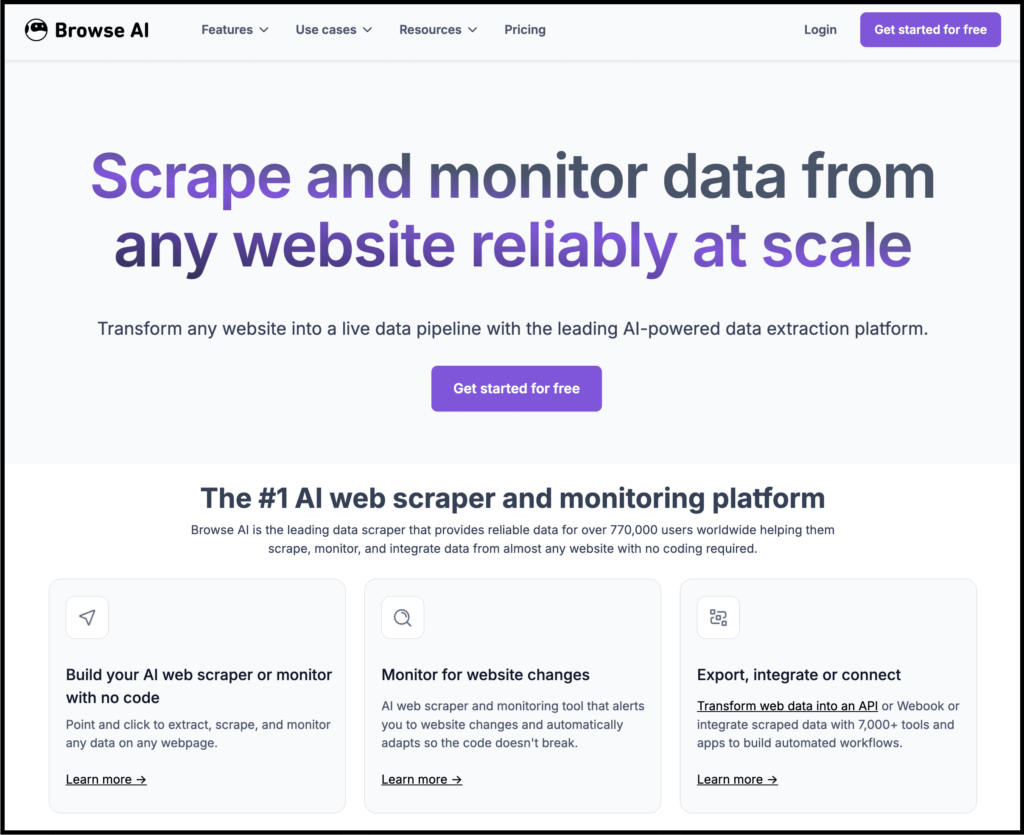
Well, Browse AI is a no-code web scraping tool that lets you scrape and monitor data from any website without writing a single line of code.
The workflow is simple:
- Add the website link you want to scrape
- Click on elements to train a robot using a point-and-click interface
- Extract data into tables
- Schedule runs
- Push data to Sheets, via API, or integrate with 7,000+ tools to build automated workflows
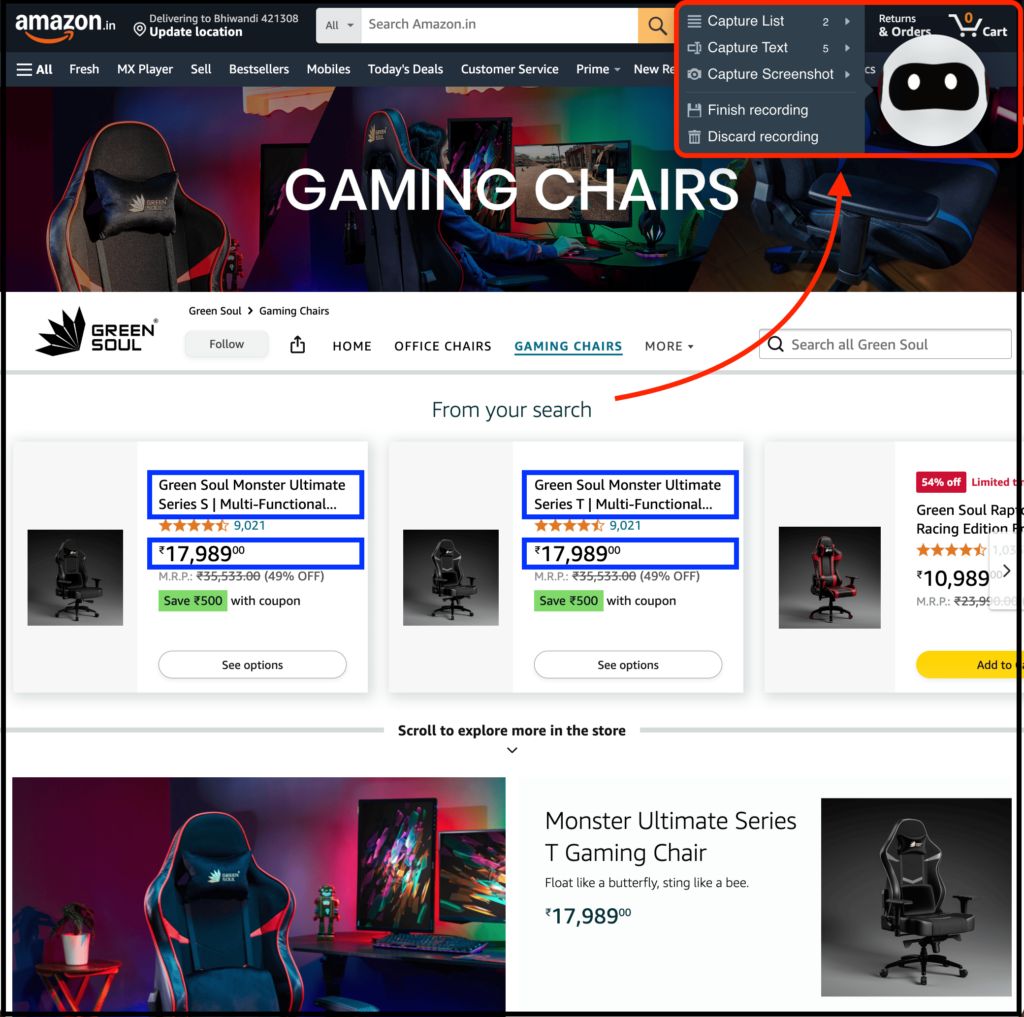
They also have a Chrome extension that makes the process even simpler and works the same way as mentioned above.
Lastly, they offer 250+ pre-built robots to automatically extract data from top websites with one click.
I’ve personally tried it multiple times, and so far, it has worked completely fine for scraping the data I need.
What Browse AI Actually Does Well
Now, I’ll say this upfront: Browse AI didn’t become popular by accident.
It solves a real and genuine problem for users.
If you’ve ever tried scraping websites manually, you know it takes too much time to copy-paste, deal with broken scripts, and handle blocked IPs. That’s exactly what Browse AI solves.
And here’s where it genuinely shines:
1. Point-and-click scraping actually works
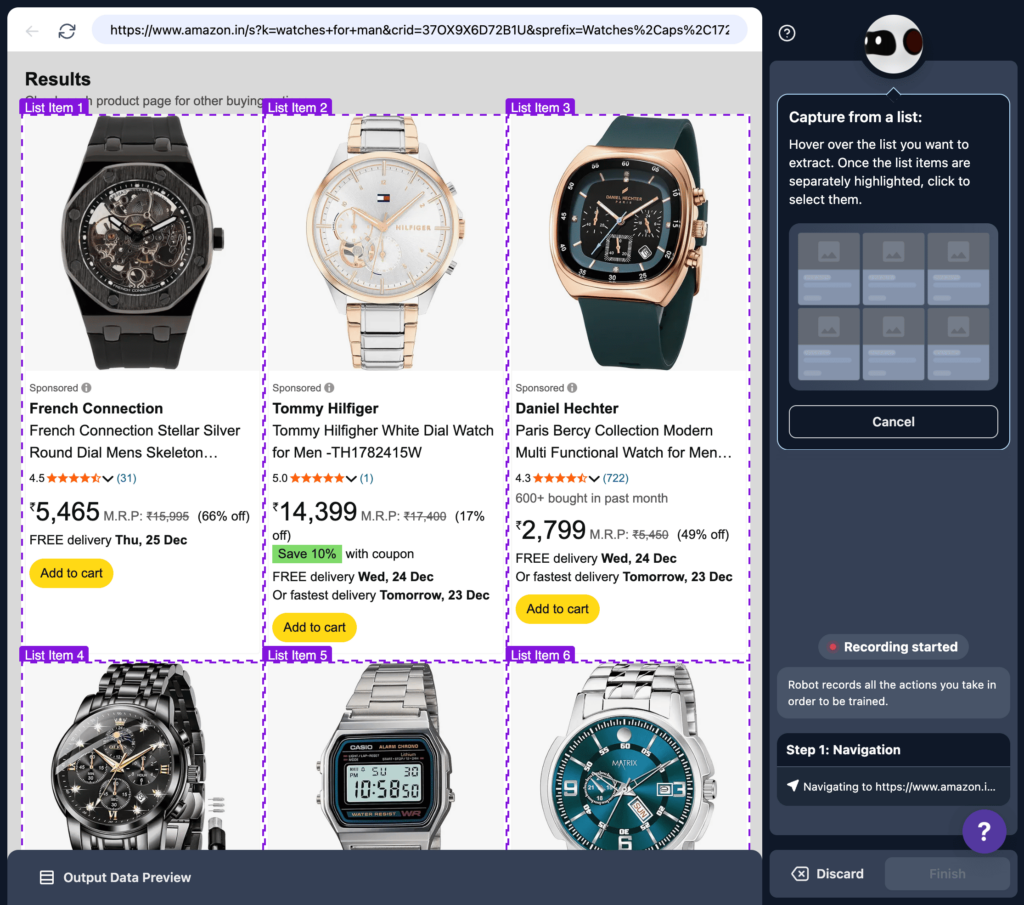
You open a site, select elements, train a robot, and it remembers the pattern. For basic sites, this is smooth and far better than writing breakable scripts.
2. Helps you monitor websites for changes
This feature is especially useful for people who want to track competitor websites and monitor changes.
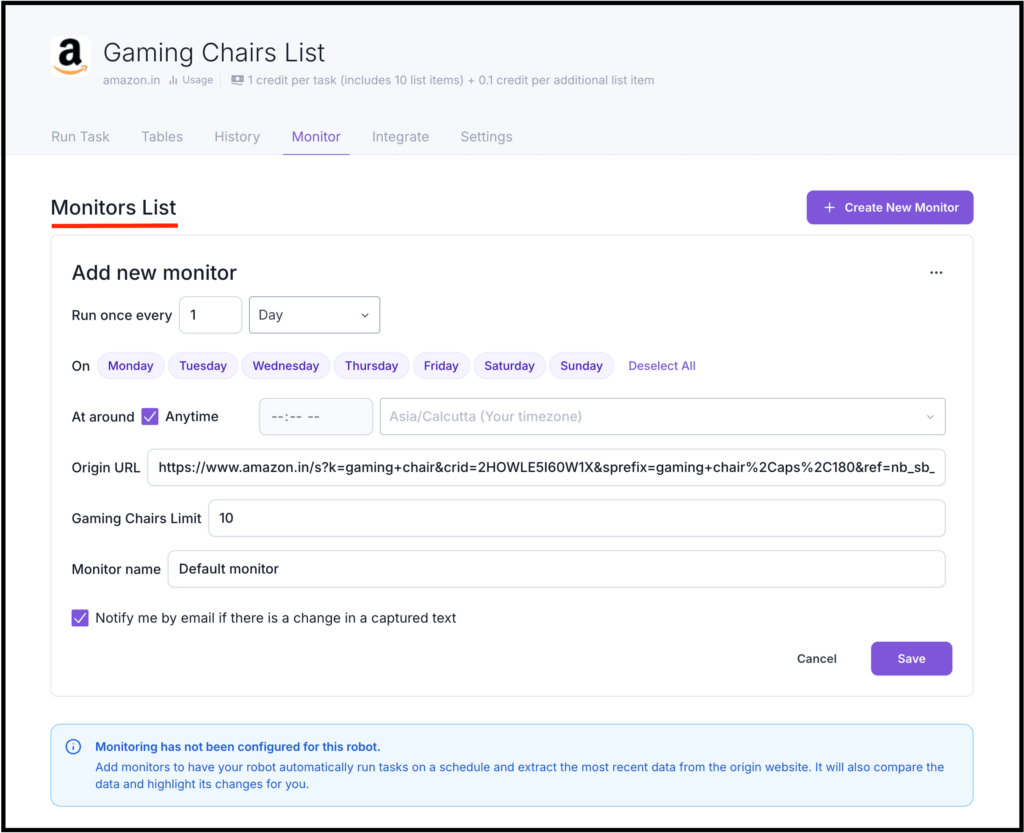
Thanks to that, you can track prices, new listings, and pages, and Browse AI handles really well.
You can also customize when you want to monitor changes and how often you want it to run.
I haven’t seen a feature this solid in any other no-code web scraping tool.
3. Integrate with multiple apps
Further, you can easily integrate with apps like Google Sheets, Airtable, APIs, Zapier, and more.
It plugs nicely into existing workflows if you already live inside those tools.
4. It scales… technically, and helps you automate
For teams with defined scraping needs and some tolerance for setup complexity, Browse AI can run at scale.
You can extract data, handle complex actions, and bypass protections with the help of their API. You can then integrate that scraped data directly into 7,000+ tools to build automated workflows.
It also helps you run tasks in bulk, create automation workflows, and perform deeper scraping by chaining multiple robots together.
So yes, Browse AI is a seriously useful tool, but that’s also where the problems start.
Where Browse AI Starts Falling Apart (In Real Use)
So far, I’ve told you what Browse AI is and shared what it can do.
But it still has some limitations and starts falling apart when you try to use it in practice.
1. It still requires a reasonably complex process
No doubt, Browse AI removes coding, but it still comes with a learning curve.
In short, you need to understand pagination, dynamic content, login flows, infinite scroll, and element consistency.
And if you don’t already think like a scraper or have the basics clear, you end up with:
- trial-and-error clicking
- burning credits while experimenting
- generating not-so-useful outputs
For beginners, this is exhausting.
It’s not obvious at first, but Browse AI assumes you already know how websites behave, and then provides tutorials to get started.
2. Robots break more often than people admit
If a website changes its layout, you need to re-train your robot and make the necessary changes.
For complex or frequently updated sites, this quickly becomes maintenance work and cannot be automated easily.
Also, the Browse AI robot is not smart enough to go through multiple pages and find the data you need without manual intervention.
3. Scraping complex sites doesn’t work
No doubt, Browse AI gets the job done when you want to scrape a simple website.
But the moment you move beyond simple sites like:
- JavaScript-heavy pages
- advanced anti-bot protection
- complex websites
Browse AI becomes fragile and fails in many real-world scenarios.
4. The credit system feels abstract (and stressful)
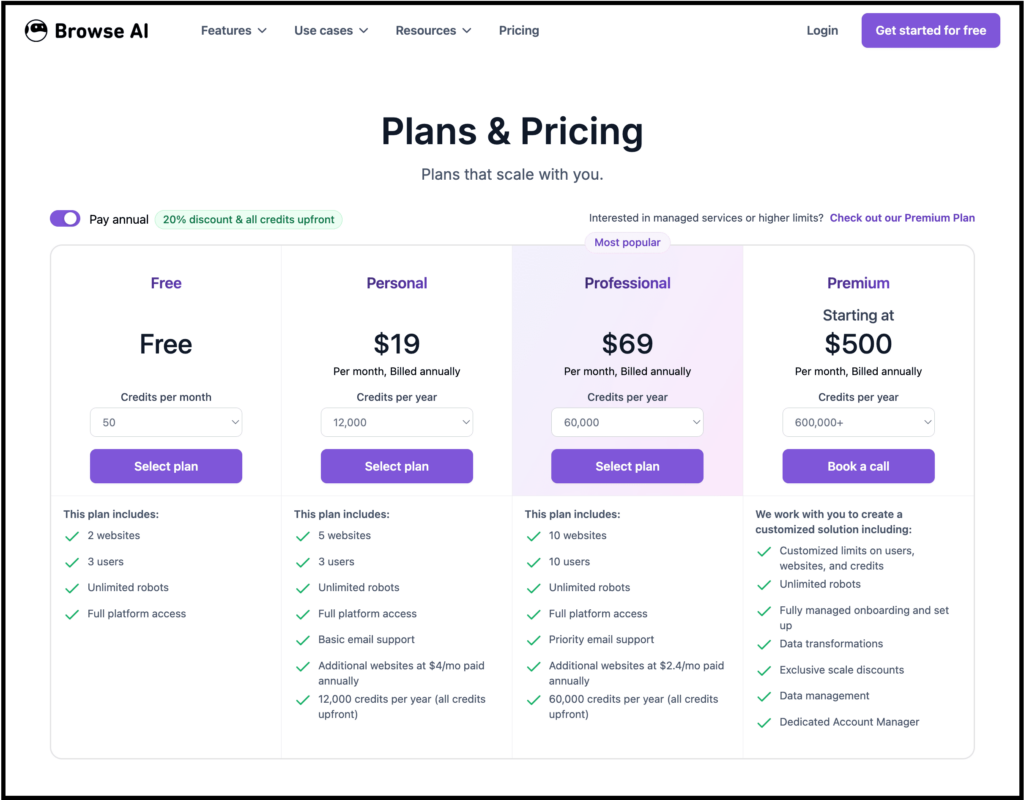
Browse AI provides a free plan that includes just 50 credits per month, and each credit helps you scrape 10 rows.
So if you scrape 500 rows, your free credits are gone and you need to upgrade.
If you are a beginner who is still on the learning curve and rely on trial-and-error clicking, you can easily burn through credits much faster.
Credits are also consumed based on:
- task complexity
- number of pages
- monitoring changes or automations
This means you don’t clearly know the cost upfront.
You often realize it later and wonder, “Why did this simple scrape consume so many credits?”
That uncertainty matters when you’re scraping daily.
5. Browse AI is still rule-based
This is the core limitation most reviews never talk about.
Browse AI works by learning patterns and rules from your clicks, and it is trained to operate in a specific way.
Because of this, you are limited in what you can do, and when you try something complex, the robot eventually breaks.
The worst part is that it doesn’t truly understand:
- context
- intent
- meaning of data
And as you already know, when an AI has no context, it becomes far less useful for complex scraping or producing better outputs.
Why I Started Looking for an Alternative
Let me be honest, it’s not that I was actively looking for an alternative to Browse AI.
Browse AI is actually great and has a ton of use cases that I didn’t find in other web scraping tools or web scraper Chrome extensions.
But I wanted to find a no-code scraping tool that is genuinely easy for beginners to try and solve the limitations I was facing.
Something that:
- understands the page and the context behind my scraping
- doesn’t break when the layout changes and can figure out the structure automatically
- works on more complicated things like understanding subpages and more
- doesn’t require technical thinking and doesn’t punish experimentation
That’s when I started using Chat4Data, and it met all the criteria I had in mind. The difference was immediate.
How Chat4Data Fixes the Core Problems
Most of you may be thinking, “Nitin, we don’t trust you. Show us how Chat4Data actually fixes the core problems, and whether it’s really beginner friendly”.
Well, that’s exactly what I’m going to share here, practically, with examples.
First off, Chat4Data doesn’t work like Browse AI, where you have to train robots using a point-and-click interface.
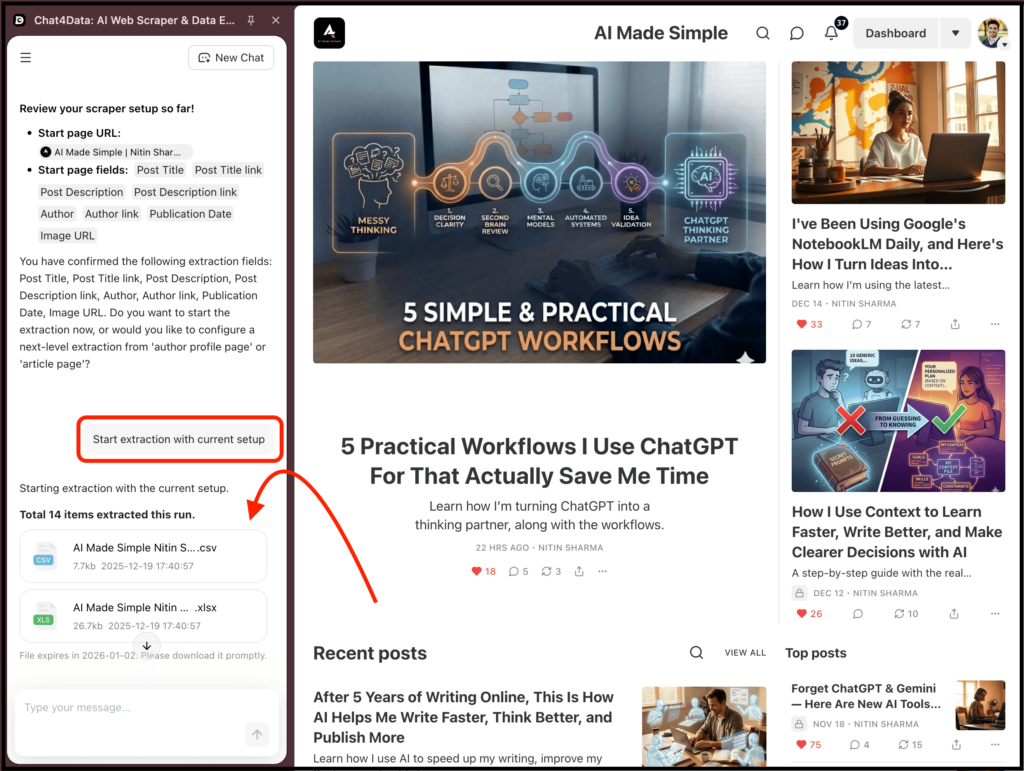
The process is simpler than that. You just tell Chat4Data what you want in plain English and let the AI handle the ugly parts.
And this AI-first approach isn’t just a UX choice.
The AI web scraping market is growing rapidly, and companies using AI-driven scraping tools report 30–40% time savings and higher accuracy on complex pages compared to traditional rule-based tools.
With that said, here’s where it genuinely outperforms Browse AI.
1. You don’t need to use a point-and-click interface anymore
If you’re using Browse AI, you need to rely on a point-and-click interface to select data and then customize things further based on your needs.
With Chat4Data, the process is much simpler.
Instead of clicking a div, then a span, then finding the data, and finally naming the list, you simply ask:
“Extract company name, email, location, pricing, and website”.
That’s it, and Chat4Data figures out how to do it and delivers the data in no time. This alone removes almost 80% of the learning curve.
2. Subpages aren’t a separate mental model
In Browse AI, subpage scraping is an extra step.
In simple terms, if you want to scrape subpages, you need to train your robot again since it has no idea what exists inside those subpages.
With Chat4Data, the AI can go deeper and extract data from the second layer as well.
It understands that:
- listings lead to detail pages
- profiles contain richer data
- and so on
So it updates rows automatically without any manual effort from you.
3. The pricing model is simple enough
When you register with Chat4Data as a new user, you get 100 free credits.
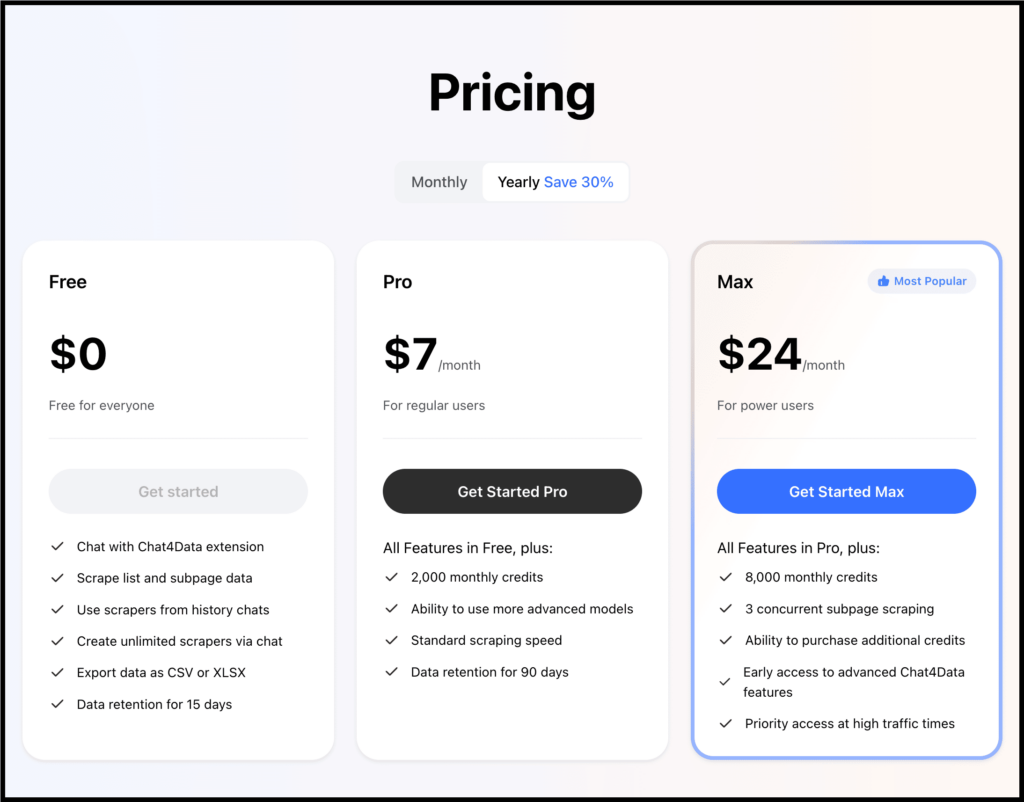
They also offer a free plan that lets you use their Chrome extension, scrape data, create unlimited scrapers, and export data in CSV or XLSX format without any issues.
And they have clearly mentioned how credits are going to get consumed:
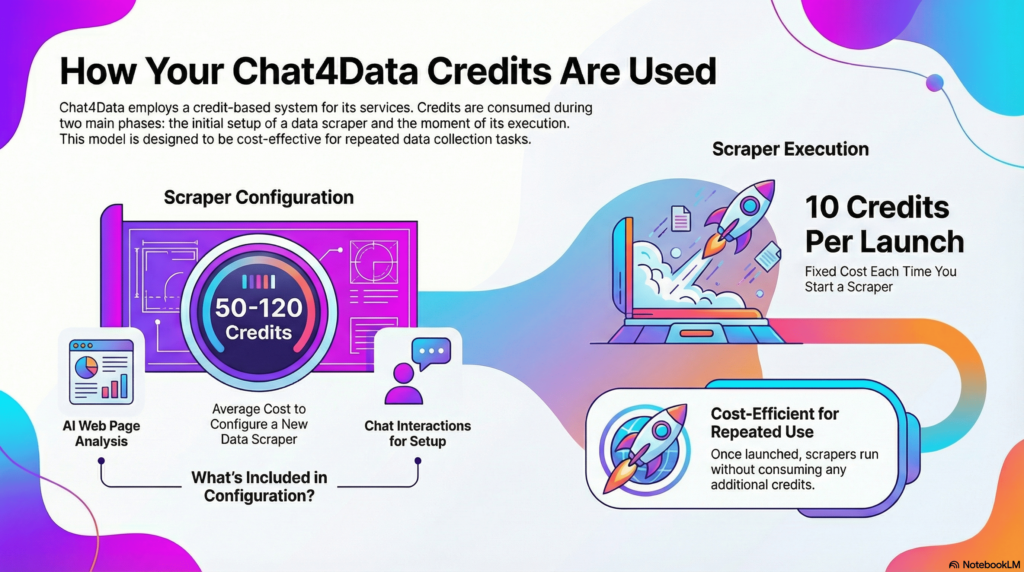
That’s what makes it simple enough for individuals to get started.
4. It’s specifically built for non-technical users
If you compare how Chat4Data and Browse AI work side by side, the difference becomes obvious.
Getting started with Chat4Data is genuinely simple, and scraping only requires plain English.
So if you want to scrape data from a specific website without any learning curve, Chat4Data should be the first option that comes to mind.
Let’s Wrap This Up
So far, I’ve compared Browse AI and Chat4Data by looking at their real use cases and the areas where each one works better than the other.
And here’s the simplest way I can put it.
First off, Browse AI is a solid tool if you already think like a scraper. If you understand how websites are structured, don’t mind fixing broken robots once in a while, and mostly deal with clean, predictable pages, it will get the job done.
But that’s also the problem.
If you are a beginner or don’t want to think about pagination, layout changes, training a robot or why a scrape suddenly stopped working, and just want clean data by prompting, then you should use Chat4Data.
Instead of teaching you how to scrape, it lets you say what you want and figures out the rest.
And the best part? Subpages aren’t a separate workflow, layout changes don’t immediately break everything, and experimentation doesn’t feel expensive or risky.
FAQs
1. If Browse AI already works, why would I even consider switching?
→ Because “it works” and “it fits naturally into your daily workflow” are two very different things.
Browse AI does work when the website structure is predictable, the layout stays mostly unchanged, and you have already spent time learning how its logic thinks.
But the moment you are a beginner, or a site changes its layout even slightly, friction shows up fast and progress slows down.
That’s where Chat4Data feels different. Instead of making you plan scraping logic step by step, it lets you simply describe the data you want, and handles the how in the background, removing that mental overhead entirely.
2. Is Chat4Data really beginner-friendly, or does it just look simple on the surface?
→ Well, Chat4Data isn’t “beginner-friendly” because the UI looks clean. It’s beginner-friendly because it removes scraping concepts entirely.
You don’t need to know:
- how pagination works
- whether data is loaded dynamically
- how subpages are structured
You just say what fields you want, and the system figures out how to get them, even if that means going one or two levels deeper.
3. Can I use Chat4Data for serious work like lead generation or research?
→ Yes, Chat4Data can be useful and work in almost every scenario, like:
- extracting leads from directories with profile pages
- pulling pricing, emails, and metadata from SaaS listings
- competitor monitoring where pages update frequently
- building datasets for content, SEO, or market research
And so, you can use Chat4Data in serious work without any issues.
4. If I only need data occasionally, which tool makes more sense long-term?
→ If scraping is occasional, context-driven, and changes from project to project, Chat4Data makes more sense.
Since you won’t remember how your old robots were trained.
If scraping is repeatable, predictable, and part of a fixed workflow, Browse AI can still be a solid choice.
5. Which tool should I pick if I just want fewer headaches?
→ Well, if you enjoy configuring things, don’t mind fixing robots, and can spend time learning, Browse AI is still a solid tool.
But if your goal is:
- less setup
- less maintenance
- fewer “why did this break?” moments
- more focus on using the data instead of extracting it
Then Chat4Data is simply the better fit.
 Try AI Web Scraper