
For years, the Instant Data Scraper Chrome extension has been a go-to solution for many versatile web scraping tasks. Whether it is e-commerce or jobs scraping, Instant Data Scraper provides a solution. Now with the AI Revolution, its one-click extraction has gathered a vast user base.
The limitations of Instant Data Scraper’s configuration become apparent and inadequate as projects grow in complexity and data requirements increase.
In this article, I will examine whether Instant Data Scraper falls short compared to modern AI Web Scrapers, introducing Chat4Data as a next-generation AI-powered alternative.
By the end of the article, you will get a good grasp of:
- Instant Data Scraper advantages and limitations in the current market
- How to use Instant Data Scraper
- Alternative Chat4Data compared to Instant Data Scraper
- Real-world usages of Instant Data Scraper and alternatives
Understanding Instant Data Scraper
Instant Data Scraper is a web scraper that extracts data from web pages and exports it as CSV or Excel files. It uses AI to some extent to help with field detection. As Instant Data Scraper is an extension, it has direct access to the websites you are scraping, which is good. This allows for seamless HTML and JS access to traverse the structure and elements.
Instant Data Scraper (by Web Robots) is one of the most established web scraping tools in the industry. This product is free and falls under the umbrella of products by Web Robots. Beyond Instant Data Scraper, they offer “Full Service” and “SaaS” tools designed for advanced use cases.
There have been no significant updates to these tools in the last two years, and no updates to Instant Data Scraper in the previous year. As Instant Data Scraper is a free tool, it must be hard to maintain and keep up with the latest trends. The community also frequently lacks the necessary support.
Use cases of Instant Data Scraper and Chat4Data
Instant Data Scraper focuses on multiple use cases. Some of those are:
- Lead generation for companies and freelancers.
- Growth hackers are seeking straightforward methods to collect data.
- Recruiters seeking job candidates.
- Crawl results from search engines.
- Get product pricing data from e-commerce websites.
- Amazon sellers, distributors, and review analysts.
- Get email addresses and phone numbers from directories.
- Get contact info from professional association websites.
- Scrape reviews and ratings.
- Analyze posts for likes, comments, connections, and contacts.
- Extract emails and ID from social media profiles.
Chat4Data can do the same, but let’s see how that really is through a real-world example. We can scrape TV prices on Amazon and thoroughly investigate the product features.
Real-World Usage Comparison: How to Use Instant Data Scraper and Chat4Data
After installing the Chrome extension from the Chrome Web Store, starting the Instant Data Scraper is easy with just one click.
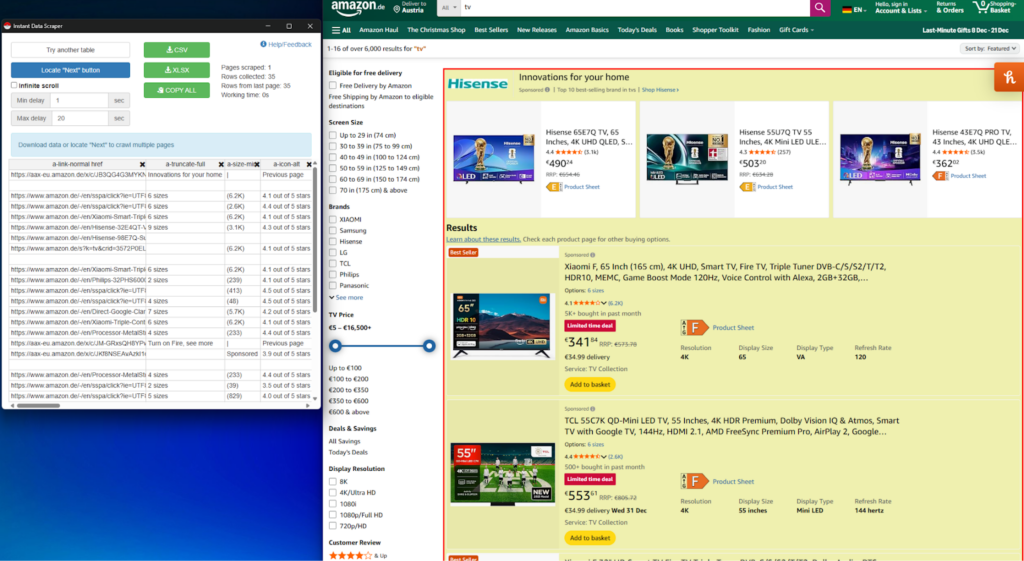
It instantly extracts data into a table that can be exported, and as expected, collects all the data from the current page.
If we want to scrape all the pages, the Next button for pagination must be set before starting the crawling process. Click on “Locate “Next” button” and then crawling begins until all pages are exhausted.
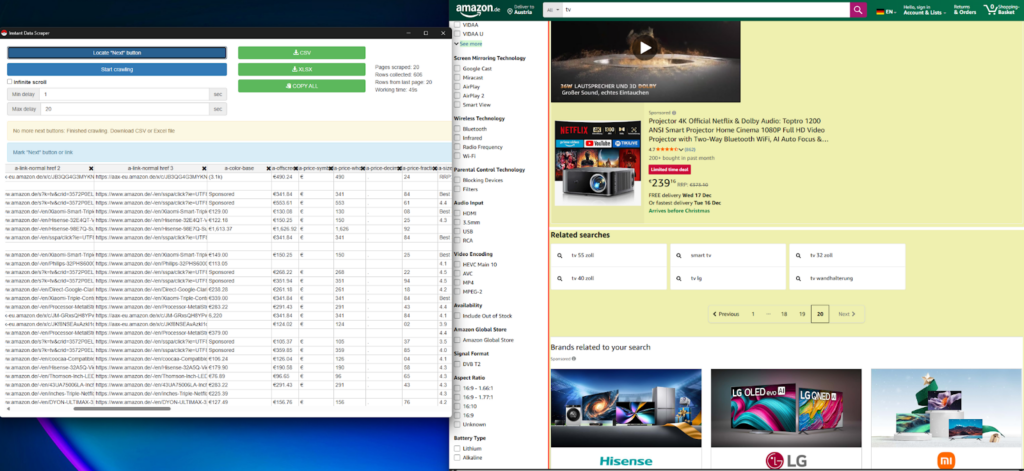
Now that we have all the data, let’s examine it.
As I scroll through it, I notice that the data is sparse and missing for some rows.
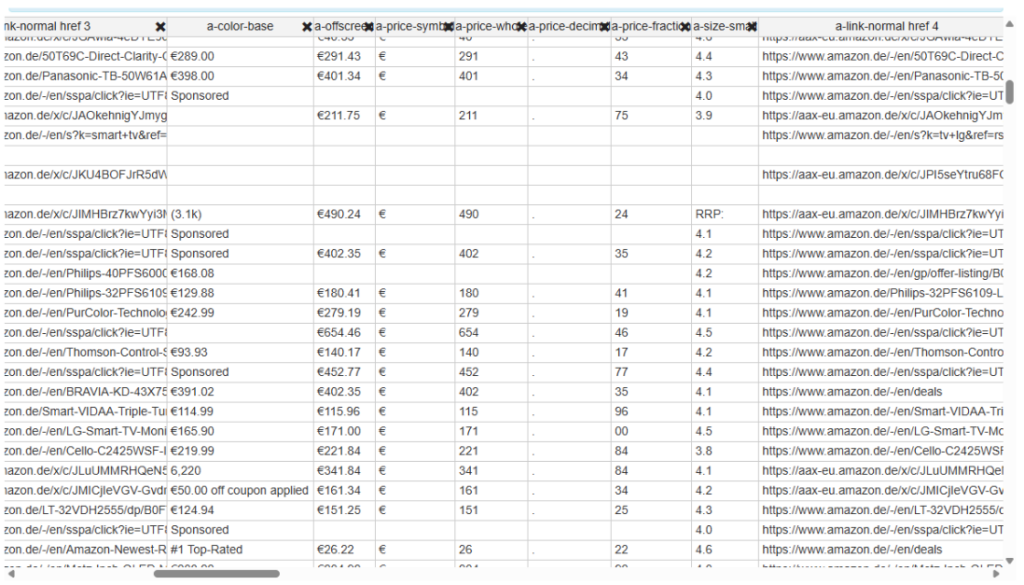
Not only is some data missing, but the column names are also inconsistent and difficult to read and understand.
It is immediately noticeable that there are issues with Instant Data Scraper, but let’s see how Chat4Data performs.
After installing the same procedure from the Chrome extension store and starting Chat4Data. Chat4Data features built-in natural language prompting powered by AI, which automatically suggests the first prompt to scan the page for all data fields, allowing for the extraction of data. Instantly, there are various options available for possible scraping, and I chose the Product List, as that was my intention. If I had wanted to, I could have instructed Chat4Data to scrape the product data, and it would have done so.
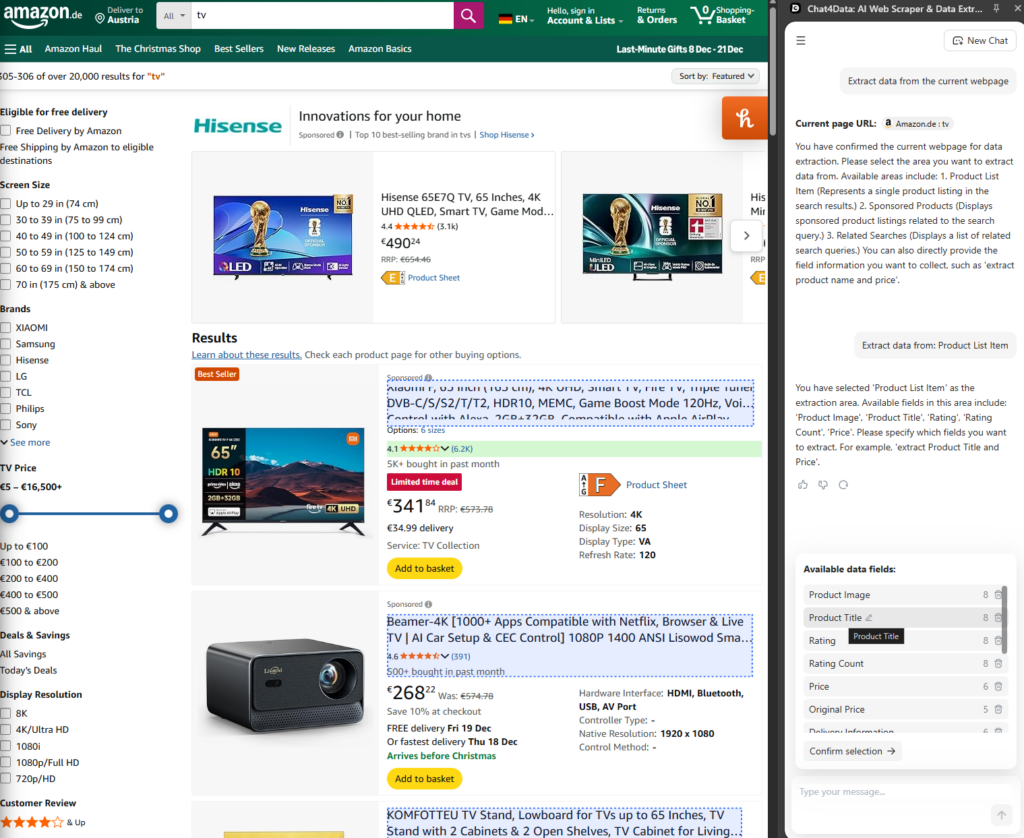
All the separate fields of data are clearly named and ready for extraction. Additionally, pagination and multiple scrolling features are automatically enabled, eliminating the need for further configuration. Chat4Data supports various page loading methods, including traditional page numbers, “Next Page” buttons, and infinite scrolling.
Here comes the best part: after Chat4Data scans the current product list, it notices that there are underlying links (leading to each product) and asks me if I want to crawl them as well and extract additional information. That can be a description or shipping information, which is not directly available in the initial overview list. For this example, I will extract the product description to analyze all the features each TV has for later.
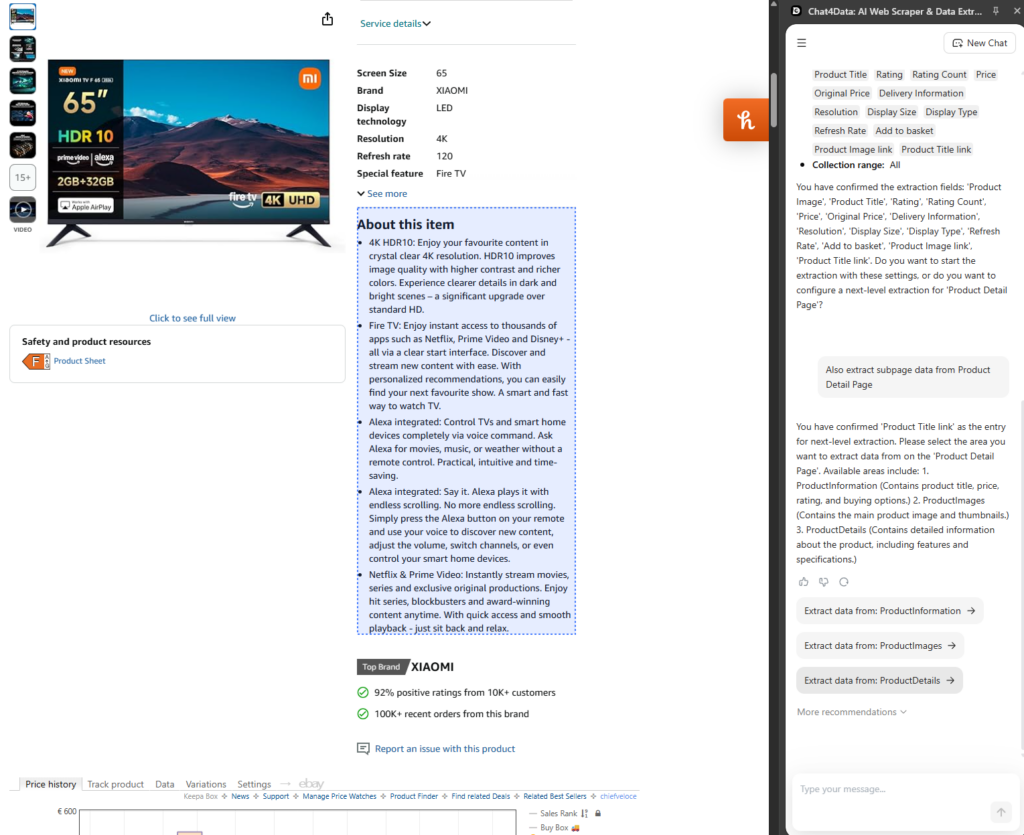
Chat4Data collects much more detailed and extensive data while doing it blazingly fast. Here is what that looks like in the end:
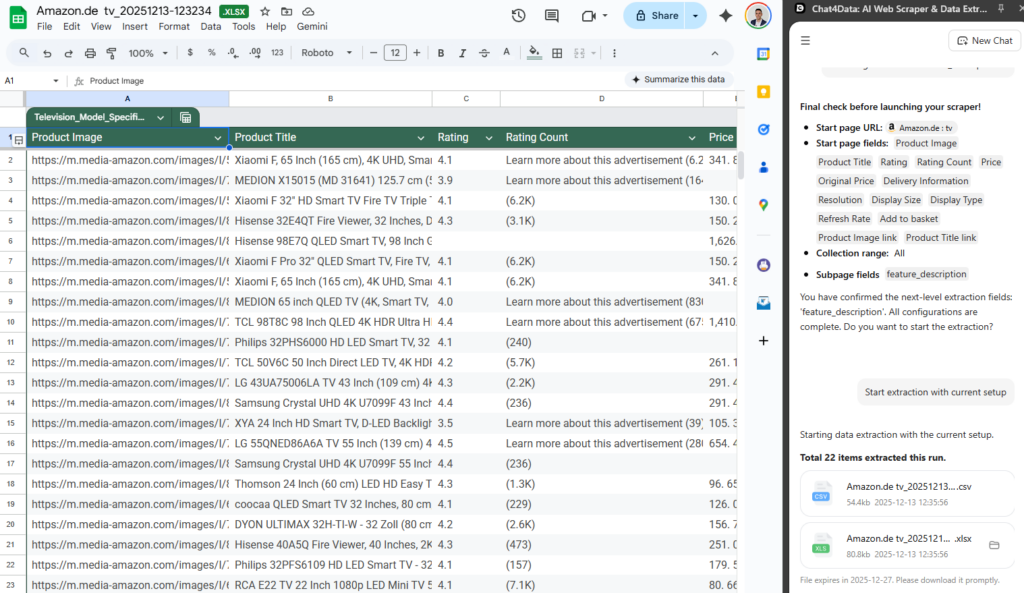
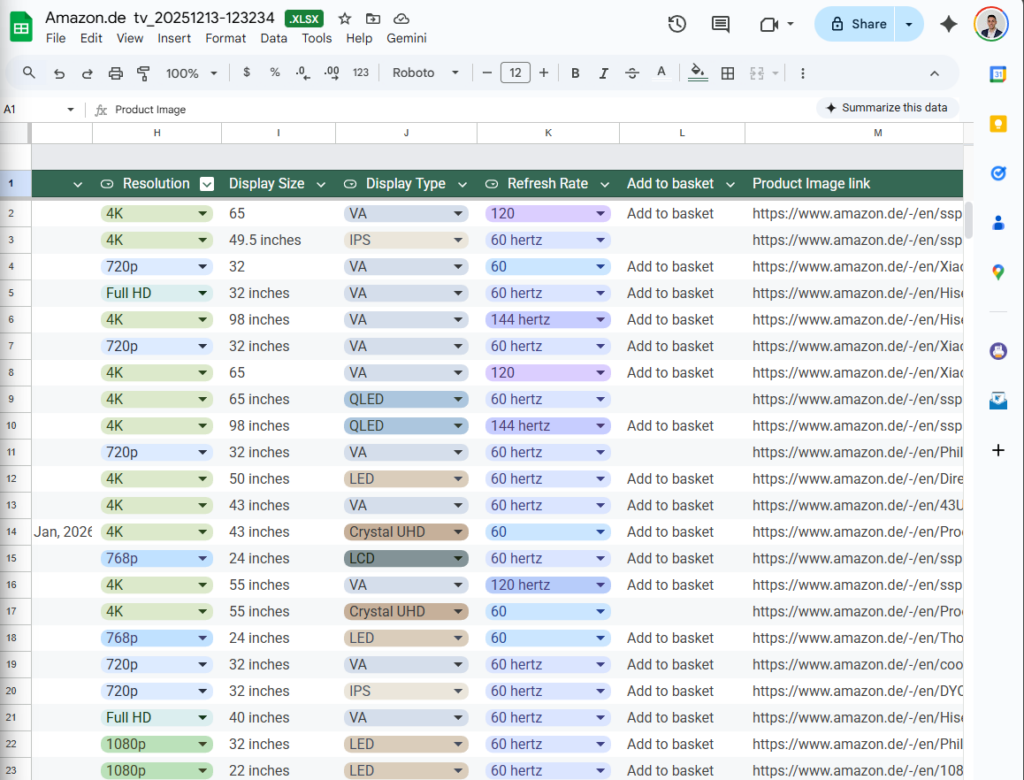
Very precise and detailed, with clear column names.
Now you can easily proceed with further analysis of this scraped dataset and look for the perfect product you need.
Finally, when scraping such data, we would have to click each product to scrape additional information using Instant Data Scraper and also provide the location of the ‘Next Page’ button, etc. It is much more time-consuming than Chat4Data, where you simply state what you need, and it gets it for you.
Why “Instant” does not work so instantly
The biggest concern with Instant Data Scraper is that configuration can take a considerable amount of time, and even then, accuracy and reliability may still be lacking in the data itself.
Here are a few points where Chat4Data performs better and provides leverage to its users:
- Natural language prompting: Chat4Data enables users to describe the data they need in a conversational style, similar to ChatGPT for scraping purposes.
- Automatic pagination: Finding “Next page” buttons and other styles of pagination is automatically handled by Chat4Data’s algorithm.
- Data precision and performance: The Instant Data Scraper may contain missing data or incorrectly sorted data per column; however, this is where Chat4Data excels, with clear column names and properly sorted data. Chat4Data utilizes AI to ensure this process is efficient and accurate.
- Advanced AI Field detection: Finding data fields to scrape is stable with the latest AI features.
- Subpage crawling: Unlike Instant Data Scraper, Chat4Data enables crawling to the subpages of each scraped element on the main page. This fetches additional information, such as shipping details or delivery dates, that are not visible on the main scraping page.
- Guaranteed privacy and local processing: When you are already authenticated on the page and activate Chat4Data, the tool processes data locally and directly, without saving any credentials on their servers.
- Maintenance and upgrades: Chat4Data is a highly available tool backed up by a large team of developers and users, whereas Instant Data Scraper has a small team and no updates in the last year. Maintenance can be expensive, so Chat4Data has an advantage here.
- Easy data export: After the scraping task plan is executed, Chat4Data automatically generates Excel and CSV formats for further processing.
Now that we’ve seen some of the differences in the tool’s features, let’s take a look at the bigger picture of all the differences between tools and how they are used.
Head-to-Head Comparison: Instant Data Scraper vs. Chat4Data
After careful review and firsthand testing, here is a comprehensive comparison of all aspects of both Instant Data Scraper and Chat4Data:
| Feature | Instant Data Scraper | Chat4Data | Key difference |
| Core mechanic | Point and click on the website. AI for data fields. | Conversational prompts to describe data needed in natural language | Chat4Data is intuitive and has advanced AI features for field detection. |
| Setup and Learning curve | Easy to install and set up. It can be hard to configure for complex websites. | As simple as it gets to install and use. Use natural language to ask for data. | Chat4Data is simple for everyone, but the Instant Data Scraper requires some getting used to. |
| Multiple Scrolling and Detail Scraping | Scrolling is configurable, but there is no detail scraping. | Automatic pagination and detail scraping. | All automatic for Chat4Data, yet Instant Data Scraper lacks these features. |
| Precision and data quality | Missing and sparse data. | Uses AI to ensure high data quality. | Chat4Data produces higher-quality results. |
| Dealing with complexity | Struggles with JavaScript-heavy websites to find data. | AI-powered field detection for precise data fetching on complex websites. | Chat4Data scales for complexity, but the Instant Data Scraper is designed for simple scraping tasks. |
| Pricing | Free. | Freemium. | The Instant Data Scraper is entirely free, but its scraping features are minimal. |
Conclusion: Choosing the Right Tool for Your Needs
To be fully objective, the “best” tool depends entirely on your specific requirements, technical comfort, and the scope of your project. For general use cases and most people in various fields, such as marketing, e-commerce, and data specialists, Chat4Data is a better choice due to the features it offers and ease of use.
When Instant Data Scraper Might Suffice:
- Your project is straightforward and non-repetitive: You only need data from a single, well-structured page.
- The data is presented in a tabular or list format. The website you scrape is static and straightforward, without complicated JavaScript content.
- The budget is tight, but it’s free to use, which is an advantage.
When You Should Consider Chat4Data:
- You want precision and high-quality data: Your work requires combining information from list pages and individual detail pages.
- Modern AI scraping features, including field detection, natural language prompting, and anti-bot evasion, are essential for a great scraper.
- For non-technical professionals: Chat4Data is very easy to use and offers great power for any professional in any industry looking to access data.
FAQs about Chat4Data and Instant Data Scraper
- Do both Chat4Data and Instant Web Scraper have AI features?
Yes, during the field detection on the websites to scrape data from. However, that is where it stops for Instant Data Scraper with AI features; yet, Chat4Data provides natural language prompting using AI for an easier user experience, making the tool more accessible to most users. Another AI feature Chat4Data has is automatic pagination handling and anti-bot detection avoidance. Chat4Data behaves like a human and remains undetected by websites while scraping data. Auto-pagination is essential, as you don’t have to worry about how the website is configured or how to handle pages of results; Chat4Data handles it all.
- Can Chat4Data handle websites that require a login or have anti-bot measures in place?
Yes, this is the perfect scenario for Chat4Data as it processes all websites that require a login directly. When you are already authenticated on the website, Chat4Data does not save any credentials and processes all the data locally. This means that they never store your data on their servers, making it a very privacy-friendly approach.
- What are credits in Chat4Data, and how many are needed for a typical task?
Credits are a virtual currency within Chat4Data that are used to estimate the cost of each task for scraping. The usual scraping task required for Chat4Data is between 7 and 10 credits. Free starting credits are included when you make a Chat4Data account, and premium packages start at $7 (2,000 credits) and $24 (8,000 credits) per month.
- What types of data can Chat4Data extract compared to Instant Data Scraper?
Chat4Data and Instant Data Scraper can both extract common data types found on web pages, such as product lists, search results, contact information (including emails and phone numbers), reviews, ratings, and pricing data.
However, Chat4Data offers a significant advantage in data depth and variety due to its advanced AI capabilities:
- Chat4Data (Advanced Extraction): Can perform deep, structured extraction by crawling subpages (product detail pages) linked from an initial list. This allows it to gather more comprehensive and specific data, such as complete product descriptions, detailed specifications, shipping information, and underlying HTML elements not visible in the main list view. It also ensures high precision and clean data, with consistent and clearly named columns, making complex datasets easier to analyze.
- Instant Data Scraper (Basic Extraction): Primarily focuses on one-click extraction of visible table data from the current page or a simple series of paginated pages. While it can get lists of items and basic fields, it generally produces sparse, less reliable data for complex pages, often resulting in inconsistent or difficult-to-read column names and missing data points, especially when trying to capture deeply embedded information.
- Do I need to know how to code or understand HTML to use Chat4Data?
No, Cha4Data uses natural language prompting to obtain a command from a user and executes all the steps required to scan the HTML structure and fetch data. This is all possible because of advanced AI features that allows it to work as ChatGPT for scraping.
 AI Web Scraper by Chat