
If you’re searching for an Instagram scraper, you probably need it for one of four jobs: lead generation, competitor analysis, influencer research, or bulk email/username collection. Most search results give you outdated APIs, generic tutorials, or tools that break the first time you try them.
I tested 20+ Instagram scrapers over the past few months. This post covers the 5 that actually work in 2026, plus how to use them without getting blocked.
Instead of wasting time with trial and error, this post will guide you through:
- What an Instagram Scraper Actually Is
- What You Can (and Can’t) Scrape From Instagram
- The Problem With Most Instagram Scrapers & How I Tested
- Best Instagram Scrapers
- How to Scrape Instagram Data Without Getting Blocked
- Which Instagram Scraper Should You Actually Use?
What Is an Instagram Scraper?
An Instagram scraper is a tool designed to extract visible data from Instagram profiles quickly and efficiently. Rather than manually scrolling through profiles, copying followers, and compiling the data by hand, an Instagram scraper automates this process.
The best Instagram scrapers will allow you to download the data in an easy-to-use format like CSV or Excel. This includes:
- Followers and Following counts
- Usernames, bios, and emails (if publicly available)
- Posts, hashtags, and engagement metrics
There are mainly three types of Instagram scrapers:
- No-code tools (Chrome extensions, web apps) describe what you want, and get a CSV. Best for beginners.
- Ready-made platforms (cloud actors, scraping APIs), pre-built scripts you configure. Best for mid-scale.
- Custom code (Python libraries, your own scripts), full control, full maintenance. Best for developers.
In this post, we’ll dive into each type of scraper and help you choose the one that works best for your use case.
What You Can (and Can’t) Scrape From Instagram
Instagram scrapers can only access publicly visible data, anything viewable in an incognito browser without logging in. Private profiles, DMs, and account-restricted content are off-limits, no matter what the tool promises.
To clarify, here’s what you can scrape:
- Followers (public accounts)
- Following lists
- Profile data (bio, username, links)
- Posts (likes, comments, captions)
- Hashtag results
- Photos and images from public profiles
- Reels (limited metadata)
What you can’t scrape:
- Private account data of any kind
- Emails not publicly listed in a bio (for those that are public, see our guide on scraping Instagram emails)
- Direct messages
- Any content requiring an account login to access
Lastly, if an Instagram scraper claims that you can extract private followers without login, then it’s either fake or risky enough to get your account banned.
Now that you have a complete idea of what an Instagram scraper is and what you can scrape, let’s look at how I evaluated multiple Instagram Scrapers, and selected the best ones.
The Problem With Most Instagram Scrapers & How I Tested
Google “best Instagram scraper” and you’ll get hundreds of Chrome extensions, APIs, and scripts. After testing 20+ of them, I found that most fail in one of three ways: they get blocked within minutes, return incomplete or duplicated data, or require so much manual cleanup that the “automation” is faster done by hand.
And so I focused on these parameters to find the best Instagram scrapers:
- Ease of Use: An Instagram scraper should work smoothly for both beginners and advanced users without requiring complex setup.
- Anti-blocking Features: The scraper should handle anti-blocking techniques like proxy rotation, rate limiting, and avoiding detection from Instagram’s systems.
- Data Quality: A good scraper should give clean, accurate, and structured data in formats like CSV or Excel, without requiring manual cleanup or formatting.
- Comprehensive Data Extraction: The scraper must be able to accurately extract useful data like followers, usernames, bios, posts, and engagement metrics without missing or duplicating entries.
- Scalability: Can scale when needed without crashing, slowing down, or getting blocked immediately after a few runs.
- Saves Time: Total time-to-result (setup + run + cleanup) under 15 minutes for a basic profile scrape.
By focusing on these criteria, I was able to identify the most reliable Instagram scrapers. Here’s a look at the best tools I found:
1. Chat4Data (Best Overall Instagram Scraper)
Chat4Data is a Chrome extension that scrapes Instagram using natural language. You simply describe what you want in plain English, and it extracts the matching fields.
It works across Instagram profile scraping,, hashtag results, follower lists, and post data, mimicking human browsing patterns to keep detection rates low.
The key features include:
- Human-like Scraping: Chat4Data mimics human actions during scraping to avoid detection, reducing the chances of getting blocked by Instagram.
- Subpage Scraping & Pagination: The tool can handle scraping across multiple pages or subpages, ensuring you get all the data you need.
- Anti-detection: Uses JavaScript rendering to bypass Instagram’s anti-scraping measures.
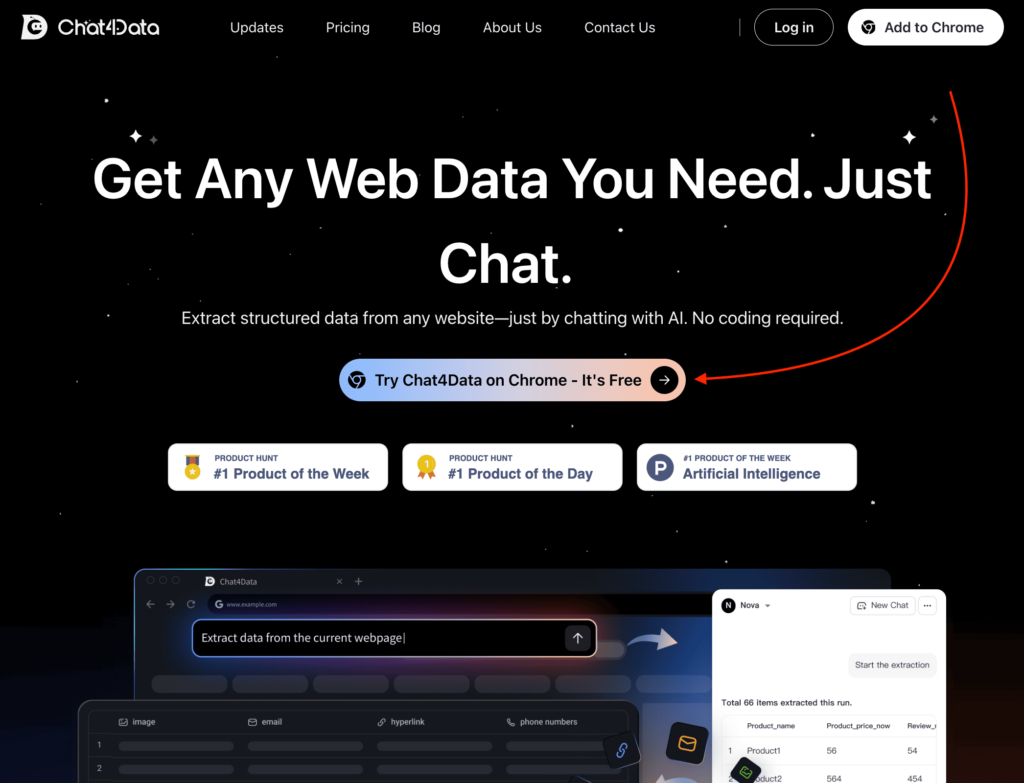
To try it out, simply visit their website and click on the “Try Chat4Data on Chrome” button to download their Chrome extension.
Then, add the Instagram URL from which you want to scrape data inside the Chat4Data extension.
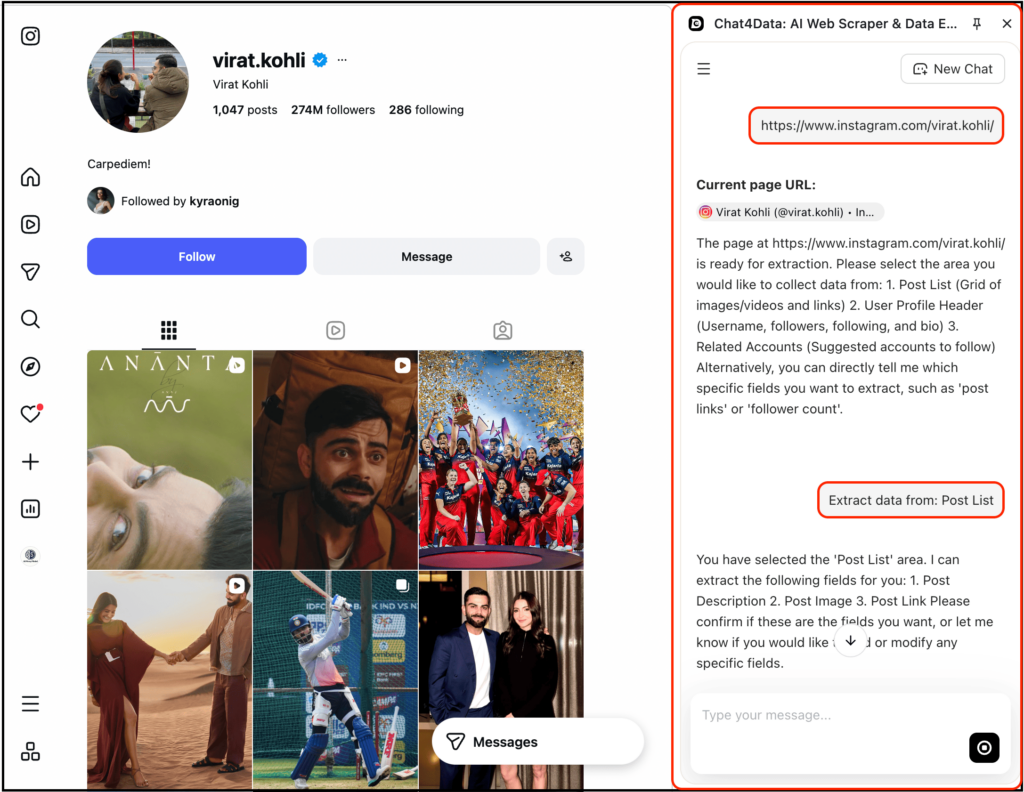
Further, you just need to describe what you want to scrape in plain English, as you can see in the image below.
Based on that, here’s the accurate output:
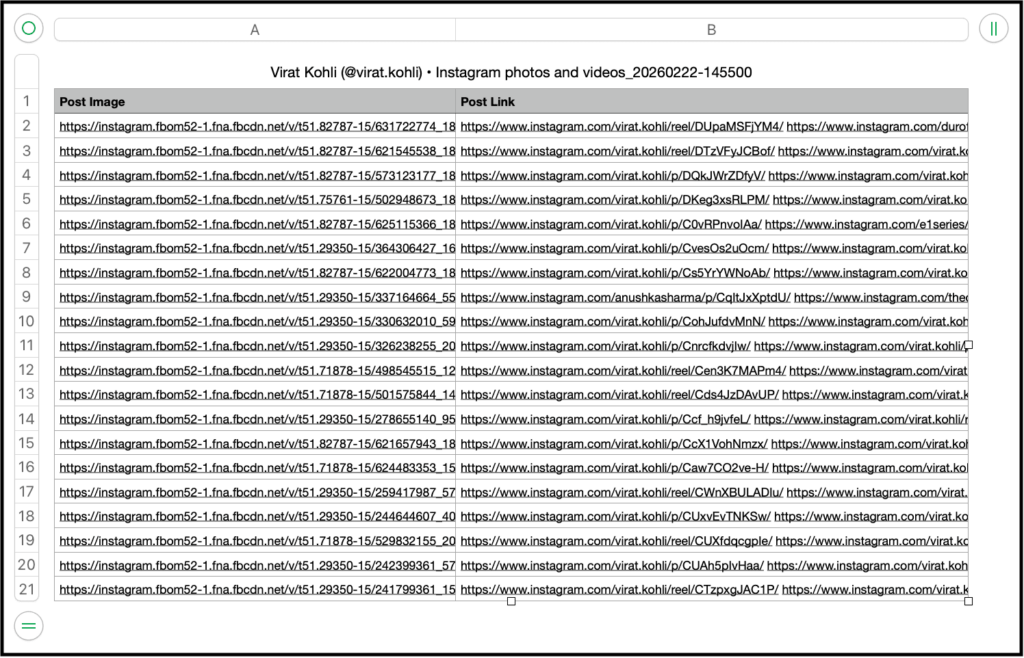
The process is actually the same for scraping hashtags, followers, following, and more. You just need to describe what you want to scrape.
Pricing & Plans:
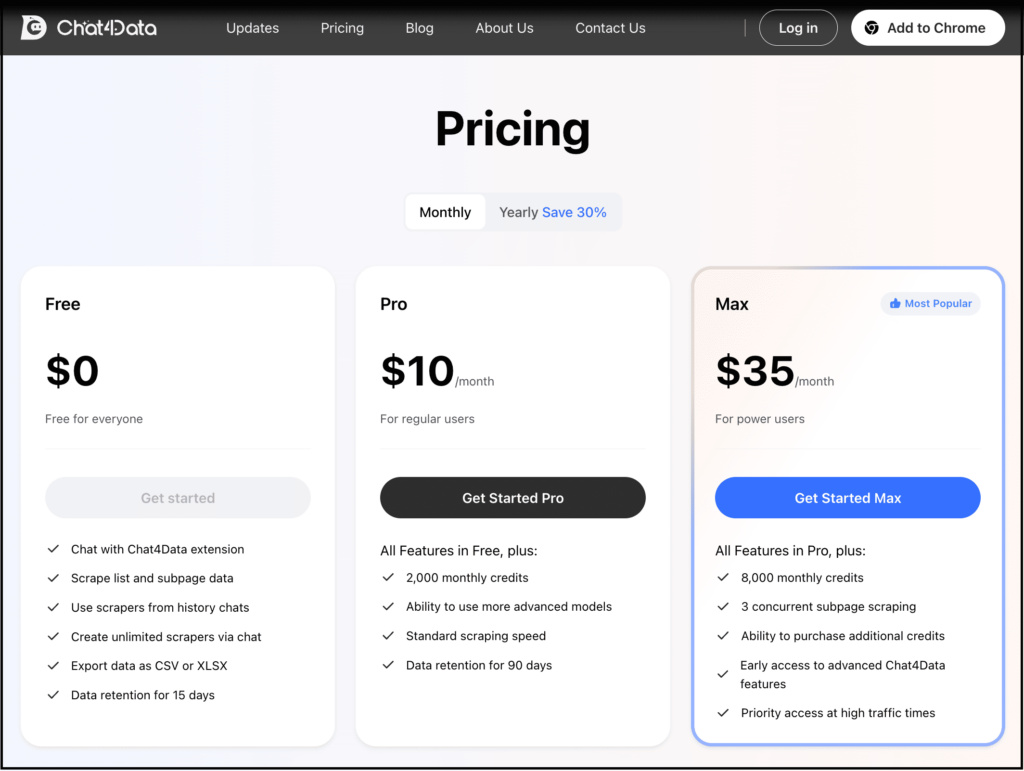
Chat4Data offers a free plan that gives you 100 credits when you sign up, which is great for small tasks or testing. If you need to scrape more, you can opt for one of their paid plans starting at $10 per month.
Best For:
- Beginners who don’t know scraping
- Marketers who want leads quickly
- People who don’t want to deal with setup, proxies, or APIs
Limitations:
- Credit-based pricing scales poorly at volume. 100 free credits cover roughly one mid-sized profile scrape; serious lead-gen at 5,000+ profiles/month makes Apify or Bright Data more economical.
- No API or scheduled runs. Chat4Data is interactive — you trigger each job manually in the browser. Not suitable for automated daily pipelines.
- Doesn’t officially support Instagram yet (per Chat4Data’s docs). It works in practice, but expect occasional field-mapping hiccups when Instagram changes their UI.
Since this tool is best suited for quick web scraping, if you need highly structured, large-scale scraping, the next tool is a better fit.
2. Apify Instagram Scraper
Apify is a cloud scraping platform built around “actors” — pre-built, configurable scripts for specific scraping tasks. Apify’s Instagram-related actor library includes 100+ tools covering posts, profiles, hashtags, comments, and reels, with full REST API access for automation. These actors allow you to extract structured data from Instagram (and other platforms) without having to build everything from scratch.
Key Features:
- Multiple Instagram Scrapers: Apify offers several Instagram-specific scrapers, such as the Instagram Post Scraper, Instagram Hashtag Scraper, and Instagram Profile Scraper. Each one allows you to extract different types of Instagram data, including posts, comments, hashtags, reels, and more.
- API and Automation: Apify’s robust API makes it easy to integrate Instagram scraping into your automation pipelines. This is ideal for teams or users working on large-scale projects or building custom workflows.
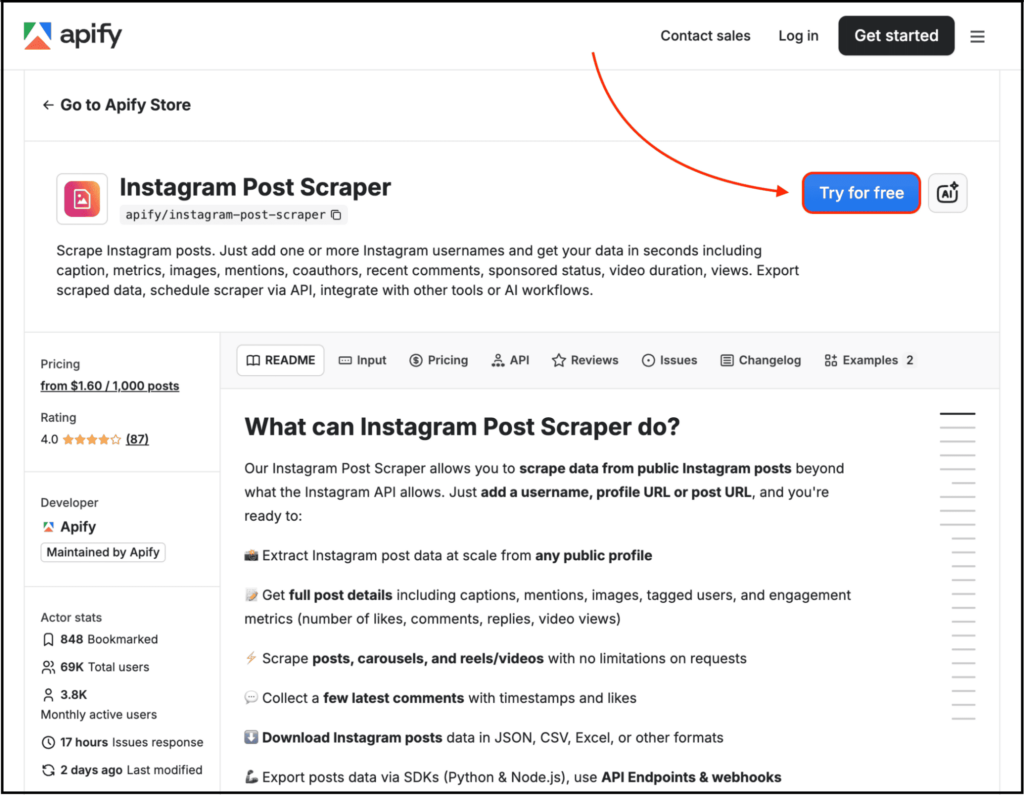
Here, simply visit the Instagram Post Scraper page and click on the “Try for free” button.
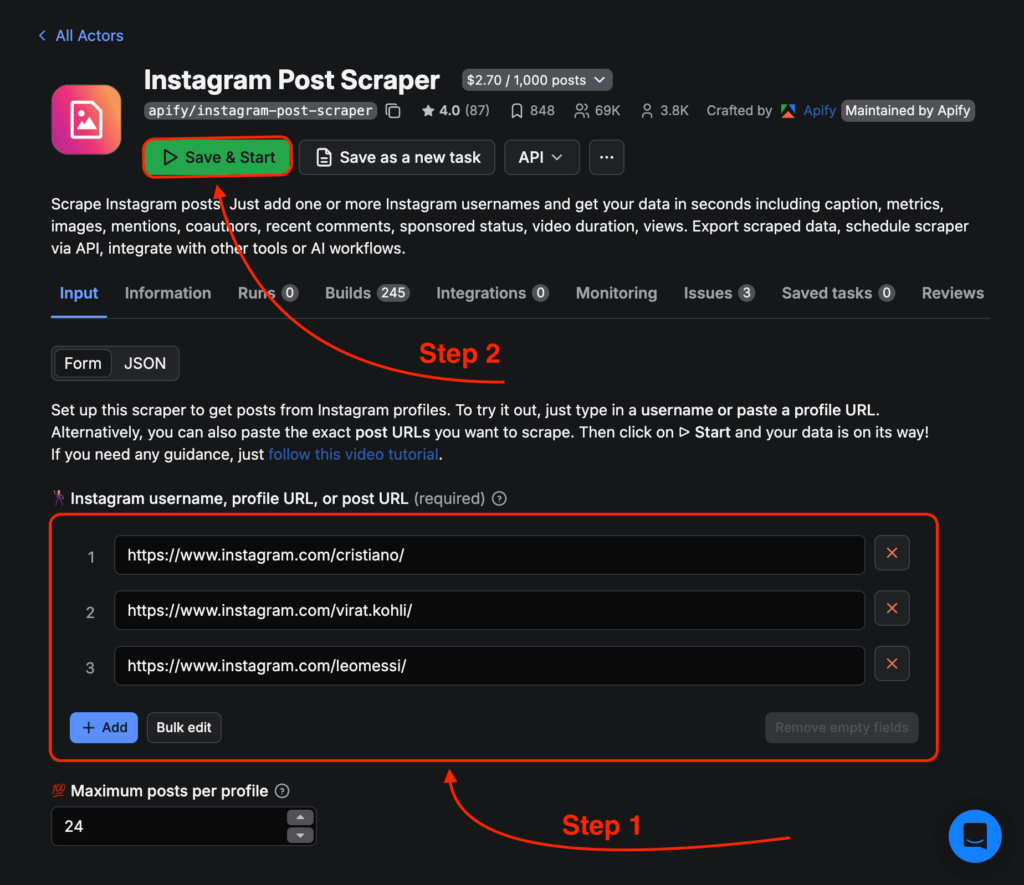
After that, you need to create your account, add the post URL, and click on the “Save & Start” button.
Based on that, here’s the precise data it scraped:
This one even lets you get started for free and scrape Instagram posts up to a certain limit.
Pricing:
- Free Plan: Apify offers a free plan with limited usage, ideal for small-scale scraping or testing.
- Paid Plans: $2.70 per 1,000 results on the Free plan; the Starter plan ($49/month) brings it down to $2.30 per 1,000 results. Higher tiers offer additional discounts — check Apify’s pricing tab for current rates.
This one is ideal for:
- Intermediate users
- People who want structured scraping outputs with ready-made workflows
- Teams working with automation pipelines
Limitations:
- Learning Curve: Apify requires users to understand “actors”—which are essentially pre-built scripts that handle specific scraping tasks. This can be a challenge for non-technical users or those looking for a quick setup.
- Dependence on Apify’s System: You are fully dependent on Apify’s infrastructure. If there are system issues, it may affect your scraping workflows.
- Pricing for Heavy Use: While the pricing is affordable for small to mid-scale projects, costs can increase significantly for large-scale scraping or frequent usage.
If you need full control or more scalability than Apify offers, you might want to consider building a custom Instagram scraper, which we’ll discuss next.
3. Custom Instagram Scraper Using Python
If you want full control over scraping logic, building your own Python scraper is the way to go. Three common library choices:
- Instaloader: Fully open-source, free, no external API. Best for downloading public profiles, posts, and stories. You’ll need to handle proxies and rate limits yourself.
- Selenium / Playwright: Full browser automation. Slowest but most flexible. Best for cases where you need to interact with the page, like scrolling or clicks.
- ScrapeGraphAI: LLM-powered scraping library that replaces hand-written CSS selectors with natural-language prompts. It has a free tier (50 credits / 10 requests per minute).
Below, I’ll walk through ScrapeGraphAI, as its workflow generalizes. Once you understand how to prompt-extract from Instagram, swapping in Instaloader for the open-source path is straightforward.
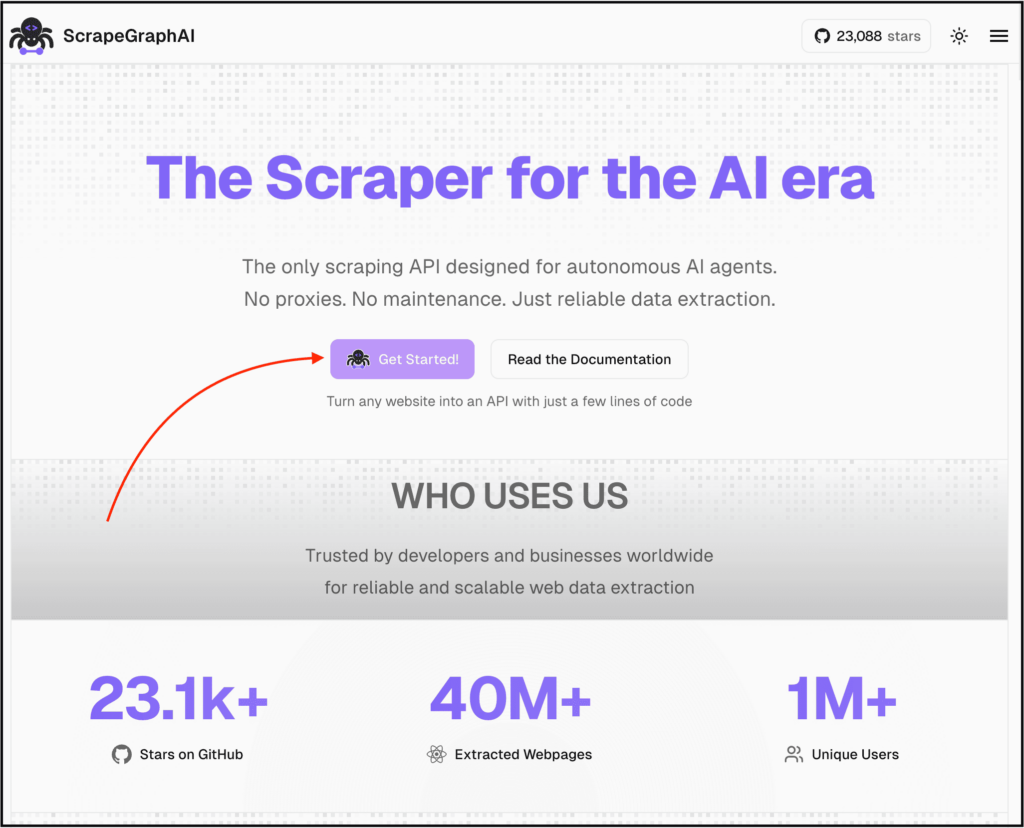
Here’s an example of how to use ScrapeGraphAI:
As you can see, we are importing some packages, then adding the Instagram profile URLs, and then prompting what we want to scrape.
To get it to work, you just need to add your API details, and here’s the output:
(Output abbreviated. Run the snippet yourself for the most up-to-date numbers, as Instagram counts change daily.)
You can get started for free with 50 API credits or up to 10 requests per minute.
Key Features:
- Free API Credits: You can get started with 50 API credits or up to 10 requests per minute for free.
- High Customization: You have full control over what you scrape and how you structure the data.
Best For:
- Developers and Startups: This approach is perfect for developers who want full control over their scraping logic and data flow.
- Data Products: Ideal for building long-term scraping systems or integrating scraping into existing pipelines.
- Customization: If you need to decide exactly what to scrape and how to format the data, a custom scraper gives you that flexibility.
Limitations:
- Coding required: You need basic Python knowledge, including virtual environments, package installation, and API keys.
- Maintenance burden: Instagram updates its internal HTML/JSON structure every few months. While ScrapeGraphAI’s LLM layer handles much of this, with raw libraries (like Instaloader or Selenium), you’ll need to debug any issues yourself.
- Anti-blocking is on you: Proxy rotation, randomized delays, and session management aren’t built-in unless you use a paid service like Bright Data.
4. Bright Data Instagram Scraper
Bright Data is the enterprise-tier choice in the scraping space — best known for its 72M+ residential proxy network and pre-built Web Scraper APIs for major platforms including Instagram.
Unlike Chat4Data or Apify, Bright Data isn’t a quick setup tool. It’s designed for teams running structured data pipelines at scale: e-commerce intelligence, brand monitoring, or large-scale lead generation.
Key Features:
- Pre-built Instagram Scraper API: Handles authentication, anti-bot measures, and proxy rotation automatically.
- 72M+ residential IPs: The largest publicly available residential proxy network, offering higher success rates on heavily-protected sites.
- Compliance-aware: Bright Data follows GDPR/CCPA guidelines and has a know-your-customer process for paid accounts, making it useful if your legal team needs documentation.
How to use it:
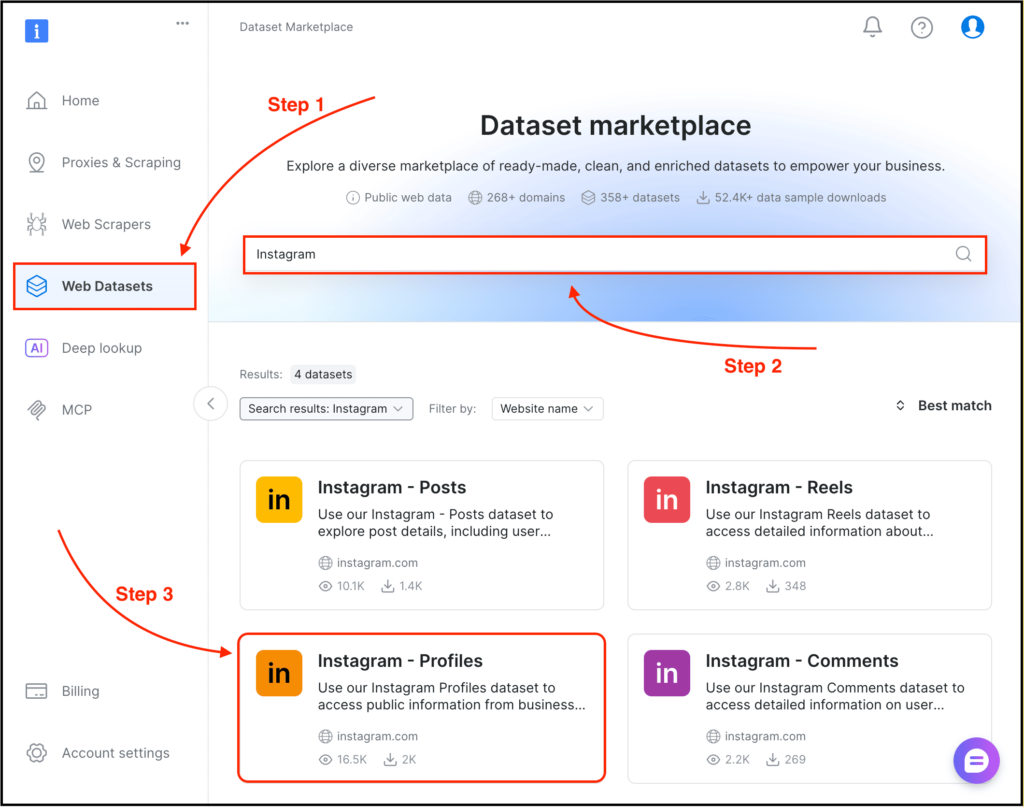
1. Create a Bright Data account and verify your business use case.
2. Open the Web Scraper API marketplace and select the Instagram template that matches your need (profile, post, hashtag, reel).
3. Configure input fields and request format.
4. Trigger via dashboard or REST API; download results as JSON/CSV.
Pricing:
No free tier for production use. Pay-as-you-go starts around $0.001 per record for the Instagram Scraper API, with volume discounts on annual contracts. Proxy services are billed separately at $4-15 per GB, depending on the type.
Best for:
- Enterprise teams with a budget for premium infrastructure
- High-volume scraping (50K+ records/month)
- Use cases requiring strict compliance documentation
Limitations:
- Expensive for small projects. If you’re scraping fewer than 5,000 profiles/month, Chat4Data or Apify are 5-10x cheaper.
- Onboarding can take time. Account verification and use-case approval may take 1-3 business days.
- Steeper learning curve than no-code tools. You’re working with raw API requests, not a UI.
5. Oxylabs Web Scraping API
Oxylabs combines powerful scraping APIs with AI-assisted extraction through OxyCopilot, making it great for developers who want automation with a bit more intelligence built in.
And the functionality here is a bit different.
First, you need to create an Oxylabs account and then have to visit their Web Scraping API Playground.
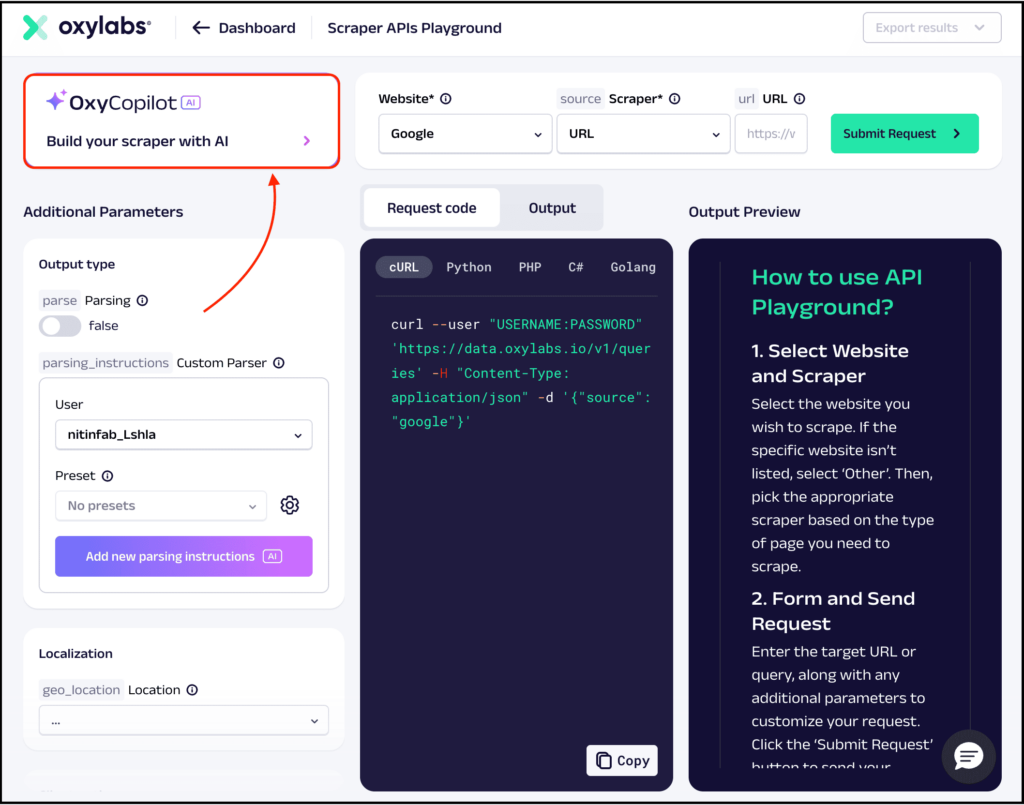
Here you will find the “OxyCopilot AI” feature where you just need to provide the URLs and then describe what you want to scrape.
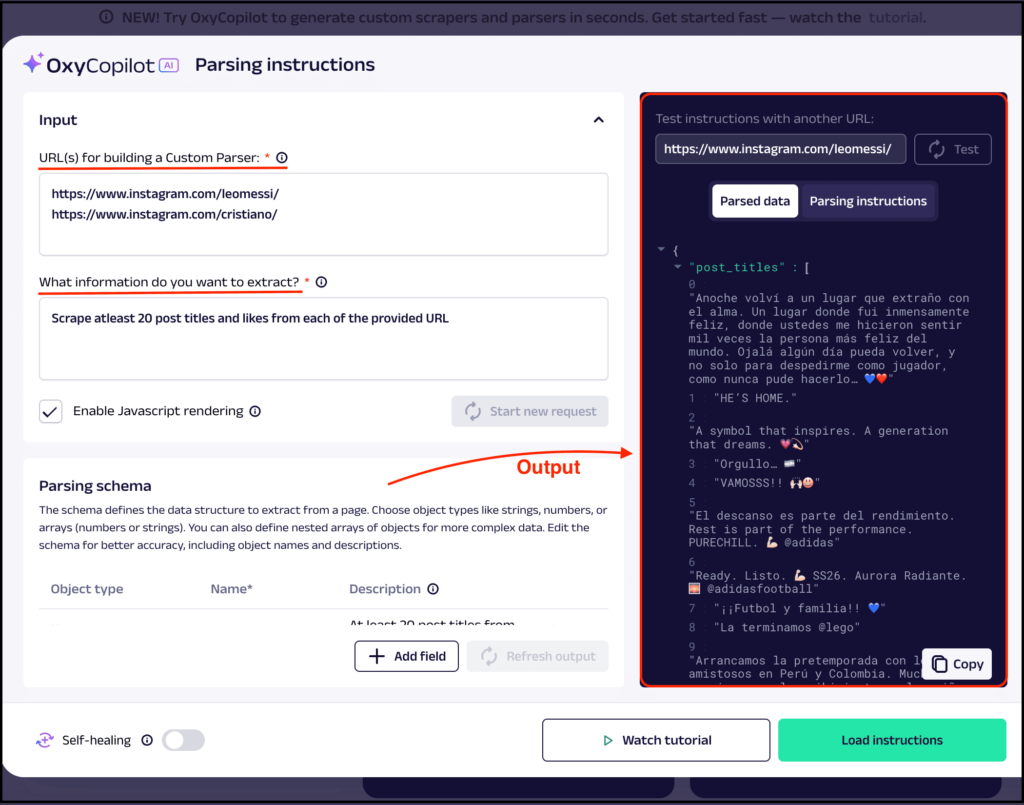
As you can see, I’ve added two Instagram URLs and described what I want to scrape to get the accurate output.
It has a free plan which can help you scrape Instagram data up to a limit.
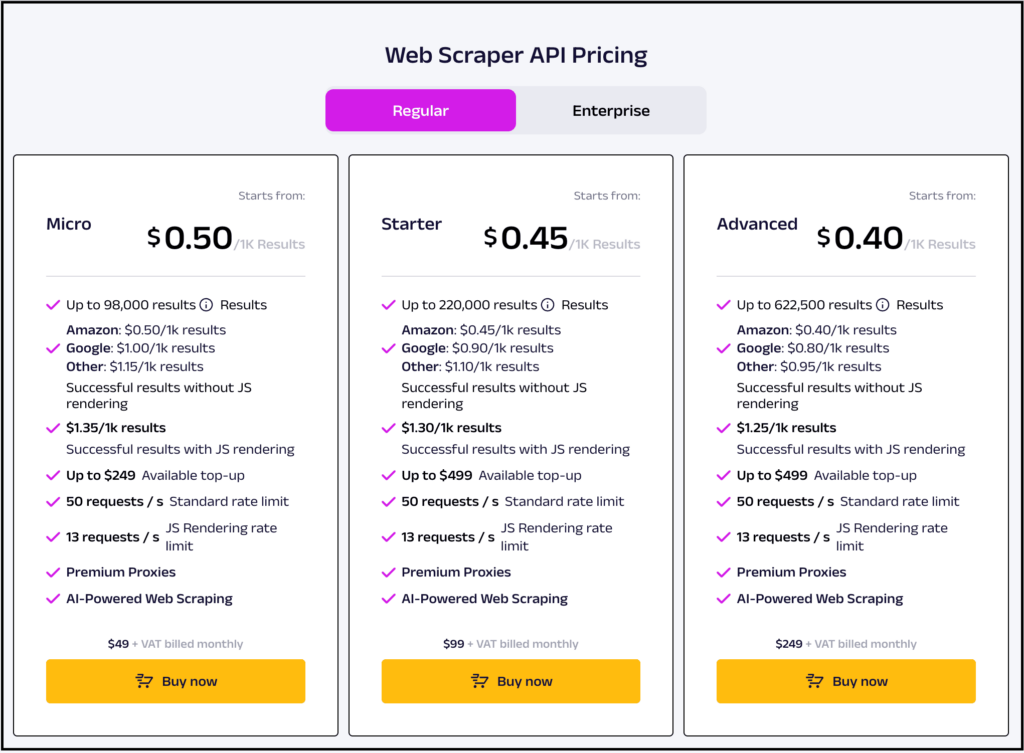
And then you need to upgrade if you want to scrape more Instagram data with the plan as shown above.
This one is great for:
- Developers who want automation
- Businesses needing structured data pipelines
- Users who want AI-assisted scraping with more control
And if you want to do large web scraping then you still require technical handling, and it’s generally not suited for quick scraping.
How to Scrape Instagram Data Without Getting Blocked
We’ve discussed the best Instagram scrapers, but scraping data from Instagram without getting blocked requires more than just using the right tool.
Instagram employs sophisticated detection techniques to protect its data from aggressive scraping, so understanding how their system works is crucial to avoid being flagged.
1. How Instagram Detects Scrapers
Instagram relies on a combination of signals:
- IP Address:If too many requests come from a single IP in a short time, that IP gets flagged or temporarily blocked.
- User Agents and Device Info:Even if you rotate IPs, Instagram can still identify you using user agents, screen resolution, device information, cookies, and session patterns.
- Behavior Analysis: It also analyzes human behavior such as scrolling, pausing, and interaction patterns.
If your scraper sends requests aggressively, follows predictable patterns, or uses unnatural techniques, it will get blocked.
Instagram tracks these differences very closely.
2. Rate Limiting: How Many Requests Are Safe?
While there’s no fixed limit, practical experience suggests:
- 20–40 requests per minute per IP is generally safe
- Going beyond that increases detection risk rapidly
- Burst traffic (like 100 requests in 5 seconds) is the fastest way to get blocked
Remember, it’s better to scrape in smaller, consistent batches to avoid being detected or blocked.
3. Proxy Rotation and Residential IPs
If you’re scraping at scale, proxies are essential.
There are different types:
- Datacenter proxies: Fast and cheap, but easily detected by Instagram.
- Residential proxies: Provide real user IPs, much harder to detect, more expensive, but worth it.
For serious scraping, you should always:
- Rotate IPs after a set number of requests
- Avoid reusing the same IP too frequently
- Distribute requests across multiple regions if needed
This is exactly why tools like Bright Data and Oxylabs perform better at scale.
4. Mimicking Human Behavior
To avoid detection, your scraper should behave like a real user. Here’s how you can make your scraper appear more human-like:
- Introduce random delays between requests
- Use real headers by rotating user agents
- Maintain cookies and sessions
- Scroll and interact before extracting data
- Navigate pages like a real user
Tools like Chat4Data excel here because they already mimic human behavior during scraping, making them ideal for beginners who want to avoid getting blocked.
5. Batch Scraping vs Continuous Scraping
There are two main approaches:
- Batch scraping: Scraping in chunks (e.g., 1,000 profiles per day). Lower risk and easier to manage.
- Continuous scraping: Running 24/7. More efficient but significantly higher risk if not optimized properly.
Recommendations:
- For Beginners: Start with batch scraping. It’s safer and easier to manage, especially if you’re just learning the ropes.
- For Advanced Scraping: If you’re building a serious scraping system, use continuous scraping but make sure to implement rate limits, proxy rotation, and human-like behavior to minimize the risk of being blocked.
What to Do With Instagram Data After Scraping
Scraping is just the first step. The value lies in what you do next. Four high-leverage applications:
- Lead Generation → CRM Pipeline
Filter scraped profiles by bio keywords (“founder”, “agency”, “coach”), export the follower list to HubSpot or Airtable, then run targeted cold outreach. Roughly 10-15% of business accounts list a public email — combine email scraping with bio filtering to maximize hit rate. - Influencer Research → Engagement Ranking
Calculate the engagement rate as (Likes + Comments) ÷ Followers for each influencer. This filters out fake-follower accounts and highlights micro-influencers with high engagement, often 5-10x more cost-effective than mega-influencers for niche brands. - Competitor Analysis → Pattern Discovery
Track posting frequency, content formats (e.g., reels, carousels, static), caption hooks, and hashtag combinations across competitor profiles. After 50+ posts, patterns emerge: which hashtags drive reach, which post types convert, and the best posting times. - Content Strategy → Performance-Backed Planning
Aggregate top-performing posts in your niche by engagement, then reverse-engineer what works: caption length, hook style, and visual format. Replace guesswork with data.
Which Instagram Scraper Should You Actually Use?
By now, you have a solid understanding of what Instagram scrapers are and how they work. You’ve seen the tools, from AI-based scrapers to Chrome extensions and custom solutions. But now, you might be wondering: Which one should you actually use?
Here’s a simple guide to choosing the right scraper for your needs:
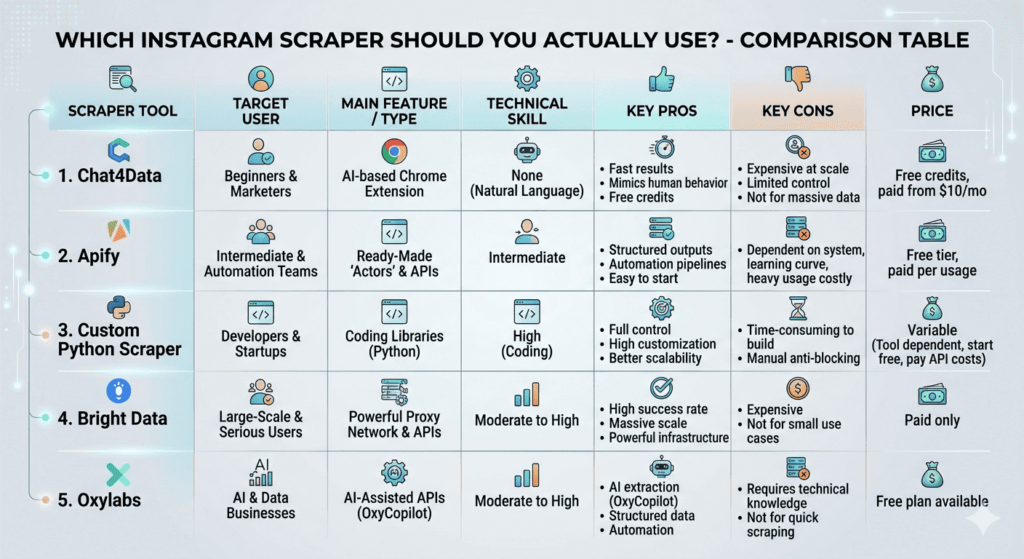
- Use Chat4Data → When you need quick results with minimal setup. Perfect for beginners who just want the data without technical complexity.
- Use Apify → If you prefer ready-made workflows and want structured data extraction. Great for users who want something pre-configured.
- Use a Custom Scraper → When you want total control over the scraping process and need a scalable solution. Ideal for developers or businesses with specific needs.
- Use Bright Data → When you need a robust, scalable solution and have the budget to invest in high-quality proxies.
- Use Oxylabs → When you want a combination of AI and API support, especially if you need structured data at scale.
To simplify things a bit, you can select based on this comparison table as well:
FAQs
1. Can you actually scrape emails from Instagram?
You can only scrape emails that are publicly visible — listed directly in a bio or on a linked external website. No tool can access emails that Instagram stores privately, because those never appear in the page source that scrapers read. In practice, roughly 10-15% of business accounts on Instagram include a public email address. For lead generation purposes, combine email scraping with bio keyword filtering to target accounts most likely to have public contact details.
2. Which Instagram scraper is actually best for beginners?
Chat4Data is the most accessible starting point. You describe what you want in plain English, point it at an Instagram URL, and get a structured CSV back — no selectors, no proxy configuration, no code. The free tier (100 credits) is enough to validate whether scraping fits your workflow before committing to a paid plan.
3. Do I need coding skills to scrape Instagram data?
No, Chat4Data and Apify both work without writing a single line of code. Coding becomes necessary when you need custom extraction logic, direct database integration, or scraping patterns that off-the-shelf tools don’t support. If you’re comfortable with Python basics, ScrapeGraphAI removes the hardest parts (selector maintenance, anti-detection) while keeping you in control of the pipeline architecture.
4. Is there any Instagram Scraper that provides an API for developers (with automation, webhooks, etc.)?
Apify, Bright Data, and Oxylabs all offer full REST APIs, webhook support, and SDKs. Apify additionally supports MCP (Model Context Protocol) for connecting scraping workflows to AI applications. For pure API flexibility, Bright Data’s Web Scraping API gives the most granular control over request parameters, proxy selection, and output format.
5. Should you build your own scraper or use a tool?
Your choice ultimately depends on your specific scraping requirements.
If your priority is to obtain results quickly with minimal setup, tools like Chat4Data or Apify are the most efficient options.
However, if you require full control, scalability, and customization, building your own scraper is the superior approach.
That said, this approach comes with web scraping challenges, including handling rate limits, solving CAPTCHAs, managing frequent breakages, and ongoing debugging.
6. What’s the safest way to scrape Instagram without getting banned?
Follow these four practices to minimize risk:
- Stay under 30 requests per minute per IP
- Use residential or ISP proxies, not datacenter proxies
- Add randomized delays (1-4 seconds) between requests
- Scrape only publicly visible data without logging in
Batch scraping at set intervals is safer than continuous scraping. For runs over 1,000 profiles, rotate your IP pool every 50-80 requests and watch for 429 response codes, which indicate Instagram has flagged the session.
7. Is it legal to scrape Instagram data?
Scraping public Instagram data is legally grey. While the 2022 hiQ v. LinkedIn ruling protects public web scraping, Instagram’s Terms of Service ban automated collection, risking account suspension. For most commercial uses, the main risk is suspension, not legal issues, as long as you avoid storing or selling personal data in GDPR/CCPA areas.
 Try AI Web Scraper