
Everything can be viewed as a business opportunity, and Instagram is no exception. Networking in real life has evolved into an online presence with the rise of social media. Almost every second person on Earth uses it, and the vast majority is in developed countries. Reaching valuable information is not easy, but I will show you how in multiple ways.
By the end of the article, you will get a great understanding of:
- Why would one scrape Instagram for emails?
- Problems with Scraping Instagram Emails
- Four methods of Instagram email scraping
- Conclusion and the best tool recommendation
Why Would One Scrape Instagram for Emails?
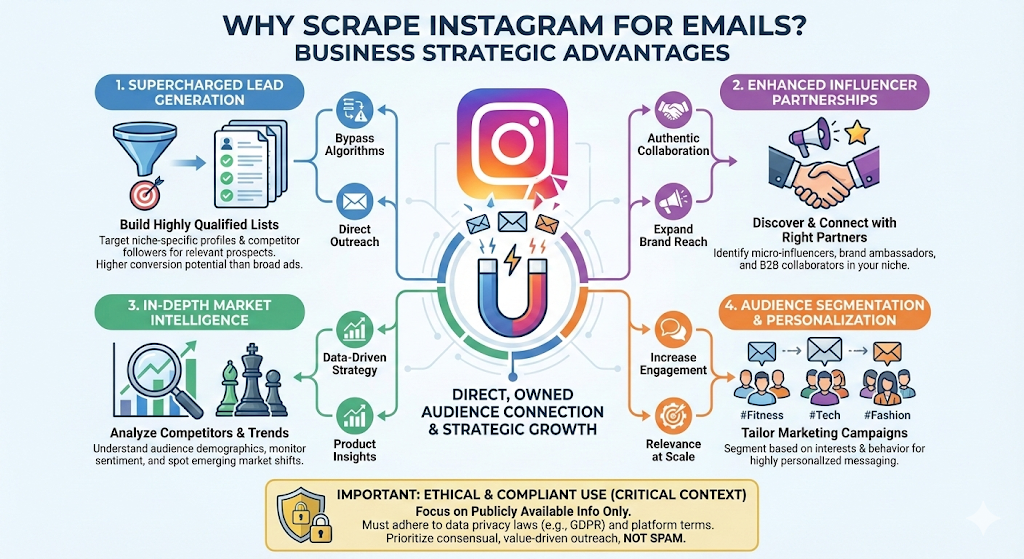
With over 3 billion users, Instagram is one of the world’s largest social media platforms. Each of those users has valuable data that is quite beneficial to businesses conducting market research or building valuable connections. Many companies conduct their entire operations online, and sometimes specifically on Instagram. Accessing this data is not easy, as it is distributed across different pages and in large quantities. Anyone who needs to access it must use a data scraper or an API access.
The primary focus of such scraping is on business email and related data that can help you generate leads and build your business. With such data, you can make data-driven strategies and grow in the industry.
Another related benefit of scraping emails from Instagram is business observation and audience monitoring. Leveraging the audiences of competitors can give you a business and market advantage.
Problems with Scraping Instagram Emails
Instagram’s API has undergone many changes over the years. Before 2018, it was relatively open and allowed for third-party apps. That API is now considered legacy, but it had powerful features, including accessing public content, follower lists, likes, and the ability to post comments on public media. In 2020, Instagram introduced the Basic Display API, which came with several limitations and was primarily used for displaying personal feeds on websites. The Basic Display API is now also deprecated and is replaced by the Graph API in 2025. There are also many ongoing challenges with this API, which makes Instagram’s goal to be more privacy-oriented.
Using their API is not possible in this case, so using a scraper or third-party API-based apps is the solution to obtain data from Instagram.
Of course, scrapers have many problems as well, but they can at least perform the task we need. These are the most common issues that I face when scraping Instagram:
- Behavioral Pattern Detection: Non-human behavior is strictly forbidden on Instagram, so to avoid being blocked, one must make the algorithm perceive them as human. Random delays between clicks and scrolling with random delays are a reasonable solution to this problem.
- IP blocking: Using big data center machines is easily recognizable by Instagram, as most requests come from the same source and are often flagged.
- Quality detection: To appear legitimate, sending requests from residential homes with high-speed internet is a good way to prevent blocking.
- Advanced Browser Fingerprinting: Beyond the simple requests, Instagram checks for technical signatures, TLS/SSL handshakes, and HTTP/2 framing. It can even detect Python tools that we will discuss later, such as Selenium and Playwright.
- Dynamic doc_id: Specifically for Instagram, scrapers interact with the underlying GraphQL API, which utilizes the doc_id parameter for all types of access to their data. For scrapers that do not take advantage of AI features, this can result in errors or crashes.
- Changing dynamic JavaScript: Similar to doc_id, Instagram has some of the most dynamic JavaScript structures, and scrapers that do not adapt from job to job can break, resulting in additional maintenance efforts.
In the following, I will address the levels of web scraping Instagram emails and the challenges associated with each approach.
How to Scrape Emails from Instagram: Four Methods (Step-by-Step)
All the following methods for creating your Instagram email scraper will accommodate a range of experience levels, pricing tiers, and challenges along the way.
Method 1: Try Chat4Data (No-code AI-Powered Solution)
As we are talking about the quickest ways to scrape Instagram emails, here I recommend you to try a powerful AI No-code web scraping tool — Chat4Data, which can extract all visible data in your browser. I chose Chat4Data because it doesn’t require any technical knowledge, making it accessible to anyone. You can converse with Chat4Data in a similar manner to how ChatGPT’s scraping works.
Step 1: Install Chat4Data
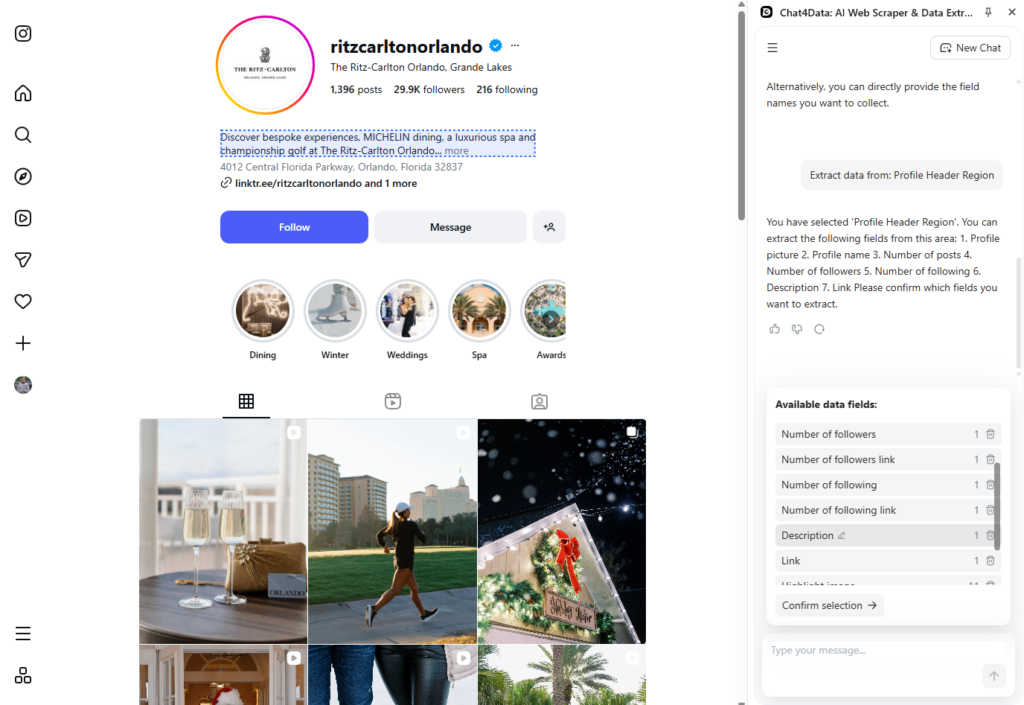
I start by installing Chat4Data from the Chrome extension store. Immediately after, the extension can be started on the page I would like to scrape, and I chose the Ritz-Carlton in Orlando.
Chat4Data accepts commands in natural language, so it is enough to tell us what data you want, and it will create a plan and fetch it for you. For simpler use, Chat4Data can automatically detect all data fields using AI, so there is no need for you to think about it at all.
Step 2: Scrape data
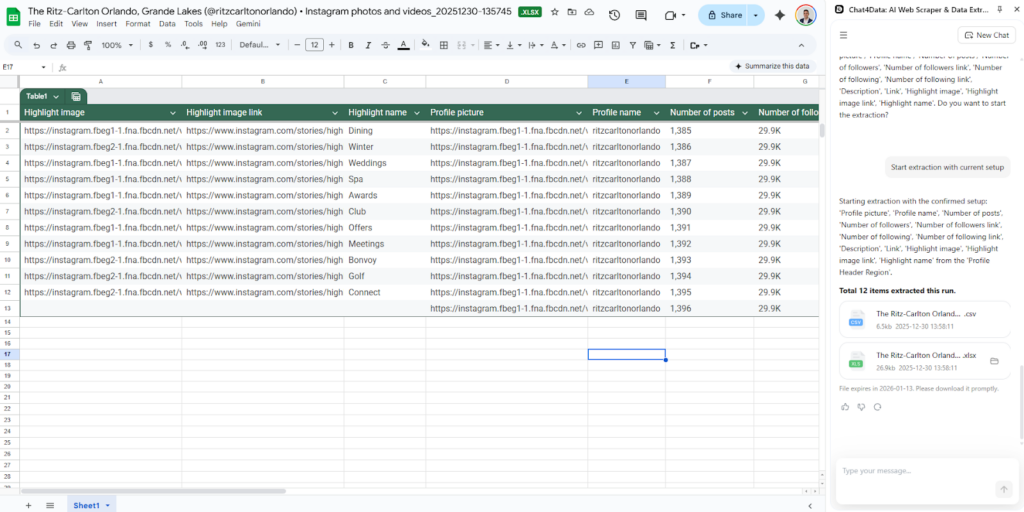
I scrape the data from their profile description to learn more about their business, and Chat4Data finds more data than I expected. Even better, here I can fully monitor their audience by using Chat4Data’s feature of subpage scraping.
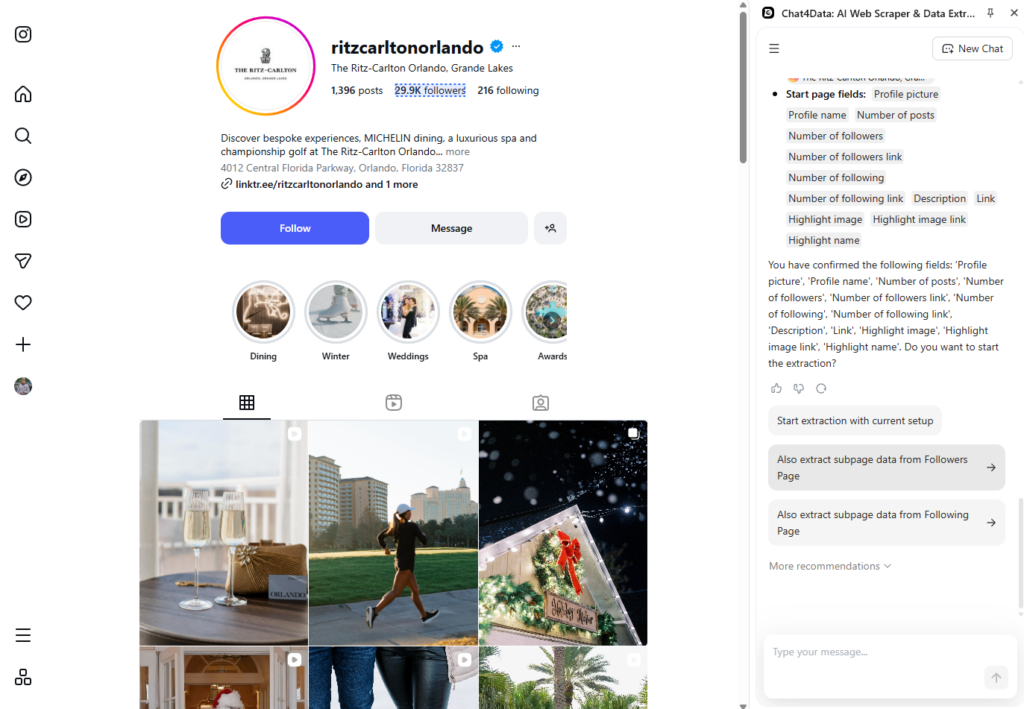
I scraped all the data extremely quickly using Chat4Data for Instagram data scraping. I export this data in Excel format, making it easy to view and analyze.
Tools like Chat4Data
If that is not enough, there are some other tools like Chat4Data that are also capable of Instagram email scraping and may be useful for you:
- Octoparse: A powerful visual web scraping tool (Windows/Mac) that allows users to extract data from websites without coding, suitable for handling dynamic content and large-scale scraping projects, including social media.
- Thunderbit: A dedicated tool designed to specifically scrape public contact information, including emails and phone numbers, from Instagram profiles for lead generation and marketing purposes.
- IG Email Scraper: A specialized web service/tool focusing exclusively on extracting emails from targeted Instagram profiles or hashtag/location searches to build marketing lists.
- Email Scraper for Ins: A Chrome browser extension designed to quickly and easily scrape publicly available emails from Instagram pages as you browse, simplifying the process of lead collection.
- Influencer club: A platform primarily focused on influencer marketing, offering an Instagram email scraper feature to help users find and extract contact details of influencers for outreach campaigns.
Method 2: Custom Python Instagram Email Scraper
The first method is the most challenging one, as building all the anti-bot evasion features and specific selectors can be pretty time-consuming and requires a lot of technical knowledge. Having said that, let’s begin!
To begin, you will need a development environment such as Visual Studio Code, along with Python as the programming language. Python supports many libraries for web scraping data, and today I will showcase Beautiful Soup and requests. BeautifulSoup is a Python library that has built-in features for parsing HTML structures. Requests fetch those HTML structures by making HTTP requests.
Step 1: Install the scraping libraries
To install the libraries, use the following command in your terminal:
Step 2: Import libraries
Starting a new Python script, we first import the installed libraries.
Step 3: Configure the scraper
During the scraping, we need to start a session, which acts as the browser session with specific settings.
Step 4: Get the Instagram profile
In this step, I need a profile to scrape the data from, so I either need to find it manually or build an automated system that can go through large lists and scrape every single profile, looking for the emails.
Step 5: Find email in profile
In the Instagram profile HTML structure, I look for links that include “mailto:” as this is the standard pattern for sending emails.
All these steps produce a script that can fetch an email from an Instagram profile; however, there are issues that we previously discussed. Instagram loads content dynamically using JavaScript, and if it does not find any email in this manner using a link, you have to add more selector options to make it foolproof.
Other issues are related to bot blocking, so in the advanced version of this script, you need to switch proxies, rotate IPs, and limit request rates.
Method 3: Using a GitHub Repository to Scrape Instagram Emails
Instead of typing all the code ourselves, we can use a template which functions as an Instagram scraper on GitHub with most of the features we need to scrape Instagram. GitHub is a version control platform with numerous public repositories that contain valuable open-source code. InstaGPy is one of those repositories, and I will now test how easy it is to use.
InstaGPy is an unofficial Instagram API that allows you to extract data from Instagram profiles. Scrape data from the user’s profile, including username, user ID, bio, email, phone number, followers/following list, profile media, account type, and other relevant details. It works by making HTTP requests to fetch the page and then scraping the targeted data from it.
I follow the instructions provided in the repository and define the account I want to scrape.
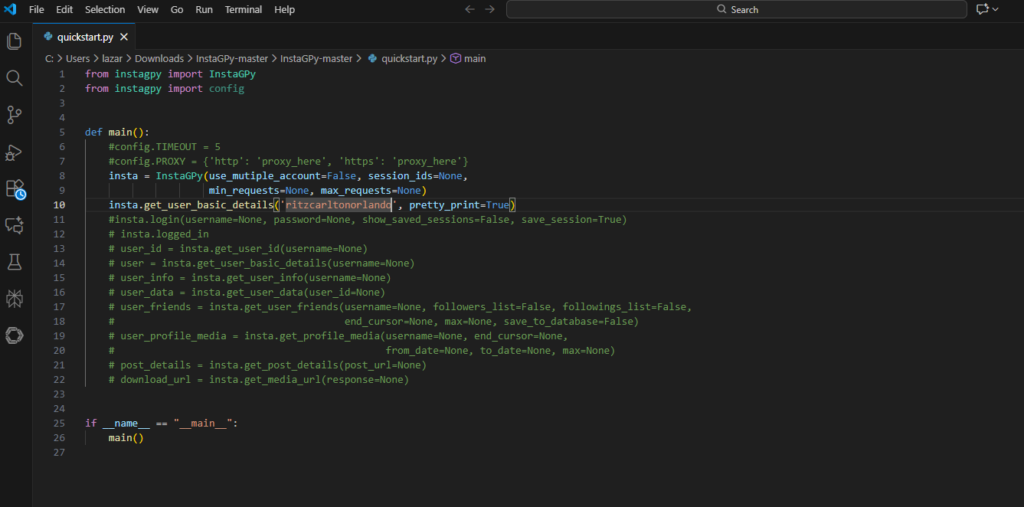
In the terminal, I install the library and start the Python script.
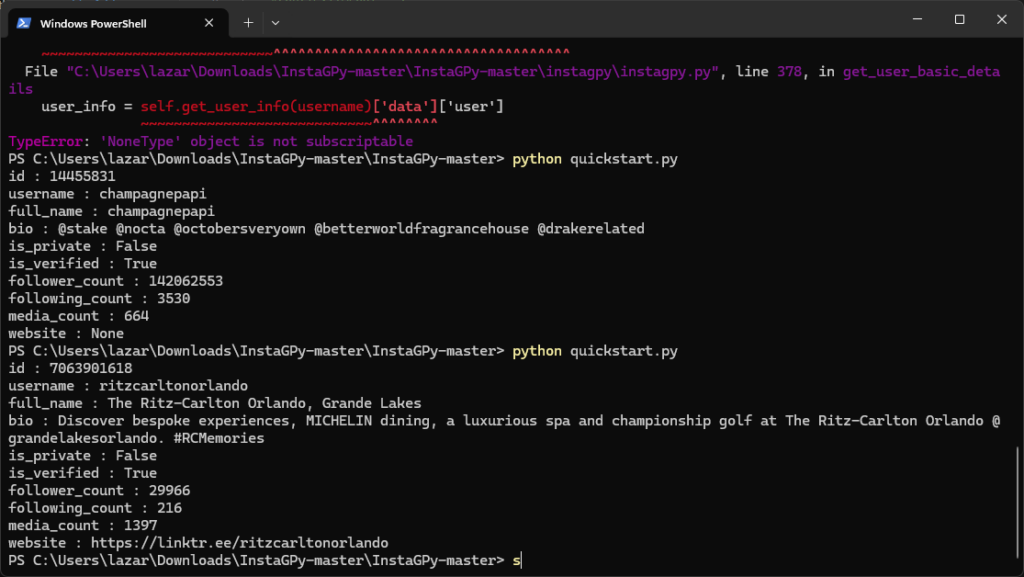
The repository is easy to use if you have technical knowledge and saves a significant amount of time if you have all the necessary tools at hand. However, without those prerequisites, it can be challenging.
GitHub code is typically maintained by independent contributors who are not well-funded, which can lead to code breaks. All the maintenance is a lot of work, and it is not easy to do.
Method 4: API-Based Scraping Tools
As an alternative to coding, some tools, such as Apify, replace the official Instagram API with already configured machines and tasks. Compared to the previous approach, it is already hosted and configured for you, reducing the maintenance work required. Apify utilizes AI to extract data from websites and make it accessible as an API source. Various preconfigured scraping tasks allow you to input the necessary parameters and scrape data directly. Pricing is based on usage.
Apify’s Instagram email scraper fetches emails from a specific profile from a search engine based on your keyword. Such an approach is excellent as it can quickly scrape a massive amount of data. However, it cannot scrape subpages for additional information and becomes quite expensive quickly. For usage, an additional fee is charged on top of the base rate of $10 per month for access.
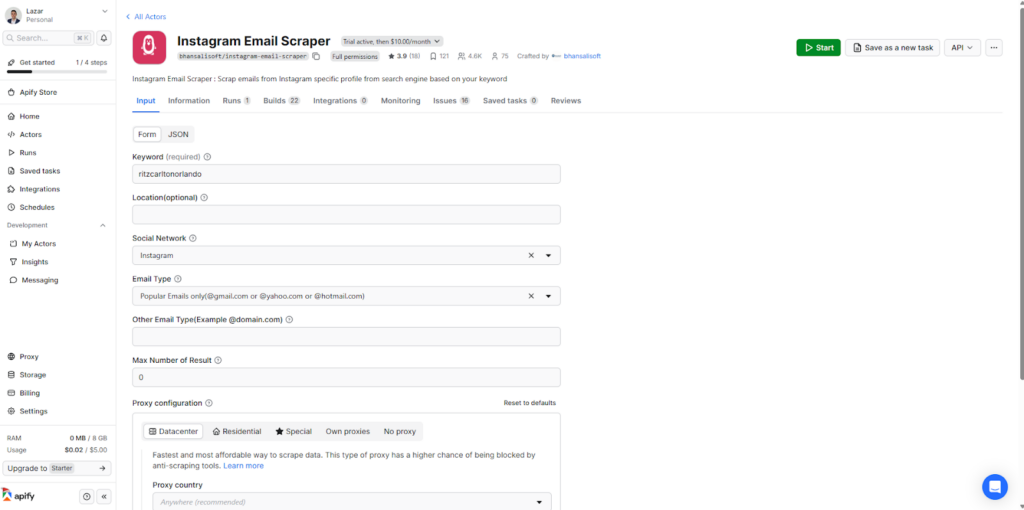
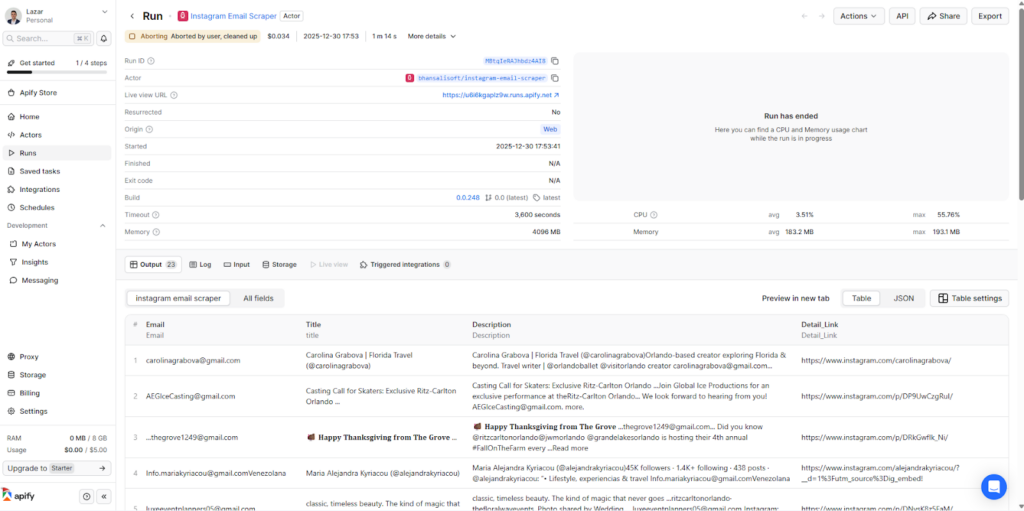
This method is super easy to use and fetches data very quickly.
Conclusion
The first three approaches to the Instagram email scraper have issues, as they require technical knowledge. Chat4Data is the best solution overall because it integrates advanced AI features for field detection, natural language processing, and anti-bot algorithm avoidance. It is especially easy to use for beginners who are enthusiastic about web scraping and require valuable data to develop their business.
Manual coding requires technical knowledge, time, and ongoing maintenance. Most people do not have those, so Chat4Data is a perfect solution. Apify’s scraper costs more than Chat4Data’s web scraper, and it has fewer features.
Chat4Data takes web scraping seriously, and here is a complete list of features that make it stand out over other options for building an Instagram email scraper:
- No-code platform: Anyone can use Chat4Data with ease, as it requires no technical knowledge and just says what data you need in natural language.
- Instagram’s anti-bot algorithm: Instagram has one of the most advanced bot detection systems, but Chat4Data utilizes AI features to act like a human, thereby avoiding any issues with it.
- Subpage scraping: When scraping data from Instagram profiles, you should monitor the audiences of different businesses, and Chat4Data can help with precisely this. Chat4Data automatically recognizes additional data fields that can be scraped and clicks through them automatically.
- AI Features: Beyond the AI feature of mimicking human behavior, Chat4Data utilizes AI to recognize data fields, assign names to columns to maintain clarity, and enable automatic pagination on all pages.
- Zero maintenance: Chat4Data’s developer team constantly adds new features and takes over maintenance, so you don’t have to worry about website structure changes.
- Privacy-Focused: Chat4Data processes all data locally and never stores any credentials. You can easily scrape data on authenticated websites just by logging in before starting Chat4Data.
FAQs about Instagram Email Scraping
- Is it legal to scrape emails from Instagram?
Scraping personal data is always a tricky endeavor, so it’s essential to consider both the ethical and legal aspects of it. Republishing this data directly is strictly in violation of Instagram’s Terms of Use. However, you can use it for private research purposes. Always ensure that you respect robots.txt and its rules.
- Does Chat4Data handle scraping data from other social media platforms?
Yes, Chat4Data can scrape various platforms, including X, Reddit, Facebook/Meta, YouTube, LinkedIn, WhatsApp, and TikTok, among others. Chat4Data has models that are trained on the general structure of websites, allowing them to scrape data from any platform, regardless of its type.
- What other types of websites can Chat4Data scrape besides social media?
Chat4Data is a versatile AI-powered web scraper that can fetch data from e-commerce platforms, news sites, real estate listings, job boards, directories, and educational portals. It has direct access to the page you are currently browsing, so it can adapt and scrape almost any type of data you need.
- What’s the biggest mistake people make when scraping Instagram?
Using a personal account is not a wise choice, as it can result in permanent suspension from Instagram. Scraping from large cloud servers is easily detectable, as those are some of the most well-known IPs. Overloading with requests can also make you a target for a possible ban from the platform.
- Can I scrape Instagram without getting blocked?
Yes, but you have to be very careful. Instagram has one of the most advanced bot detection algorithms. There is a risk that your Instagram account may be banned for scraping if you are not using the right tools. To avoid problems, use scrapers that exhibit natural human-like behavior, including rate limiting, proxy rotation, and rotating user agents.
 AI Web Scraper by Chat