
An Instagram photo scraper is essential for automating workflows like creating a dataset to train computer vision models, assessing a competitor’s visual strategy, and preserving user-generated content for a campaign. However, getting this information is not easy. Instagram employs some of the most powerful anti-bot systems in the world, making traditional extraction methods dangerous or ineffective.
This article dives deep into Instagram image extraction and focuses on legal, safe methods for scraping. We’ll cover advanced strategies like Chat4Data’s AI-powered extraction, the officially sanctioned Instagram Graph API, and custom technical solutions for developers.
By the end of the article, you will get a good grasp of:
- Why You Need an Instagram Photo Scraper?
- Challenges When You Scrape Instagram Photos
- How to Scrape Instagram Photos: Three Methods
Why You Need an Instagram Photo Scraper?
An Instagram photo scraper does more than download images. It captures the competitive context behind those images: engagement rates, posting patterns, and audience reactions that drive real business decisions.
Here are the main ways a scraper creates value:
- Visual Competitor Analysis: On a visual-first platform, text analysis is not enough. By scraping competitor photos, you can analyze color palettes, composition styles, and product placements — then correlate those image types with like counts to reverse-engineer their visual strategy.
- Brand Monitoring & UGC Discovery: Customers post photos of your products without tagging you every day. A tool that can scrape Instagram photos by hashtag or location tag lets you surface high-quality user-generated content (UGC) to repost or analyze.
- AI & Machine Learning Training Data: Building an image recognition model requires thousands of labeled images. An Instagram photo scraper is one of the fastest ways to gather categorized training data at scale.
What Data Can You Scrape from Instagram?
Instagram’s public data offers rich business intelligence when systematically extracted. Key data types include:
- Profiles: bio text, follower/following counts, verification status, contact emails, and post statistics. Useful for building lead lists of verified business accounts in a target niche.
- Posts: captions, image and video URLs, like counts, view counts, timestamps, location tags, and tagged users. Useful for analyzing which content formats resonate with a shared audience.
- Reels: video URLs, play counts, music attribution, length, and engagement analytics. Monitor trending audio and formats before they peak.
- Comments: comment text, nested replies, author profiles, timestamps, and like counts. Perform sentiment analysis on competitor posts to identify customer pain points.
- Hashtags: aggregated posts, trending scores, and usage growth over time. Discover micro-influencers by ranking hashtag posts by engagement rate rather than follower count.
Challenges When You Scrape Instagram Photos
Instagram aggressively protects its user data and infrastructure. If you try to scrape photos from Instagram without a strategy, you will likely face immediate blocks.
- Rate Limiting: Instagram limits the number of requests you can make in a short period. Aggressive scrapers are promptly discovered and temporarily prohibited (Action Blocked).
- Login issues: Unlike many other websites, Instagram requires a login to read extensive material or navigate beyond the first few postings. If your scraping accounts are not correctly handled, they are at risk.
- Constantly changing page structure: Instagram regularly updates its HTML structure (e.g., renaming a CSS class from _aagv to _b3d1), breaking scrapers that rely on fixed selectors. An AI-powered Instagram scraper adapts automatically, maintaining a consistent data flow without manual fixes.
How to Scrape Instagram Photos: 3 Approved Methods
Method 1: Chat4Data: No-Code AI-Powered Scraper
Chat4Data is a no-code Chrome extension that functions as an AI-powered Instagram scraper. Instead of writing code or configuring CSS selectors, you describe what you want in plain English, and Chat4Data extracts it, making it the fastest path to scrape Instagram photos without technical expertise.
While Chat4Data does not presently provide a straight “one-click” template for this platform, its generative AI features enable you to steer it. Here’s how to scrape Instagram photographs using Chat4Data’s method:
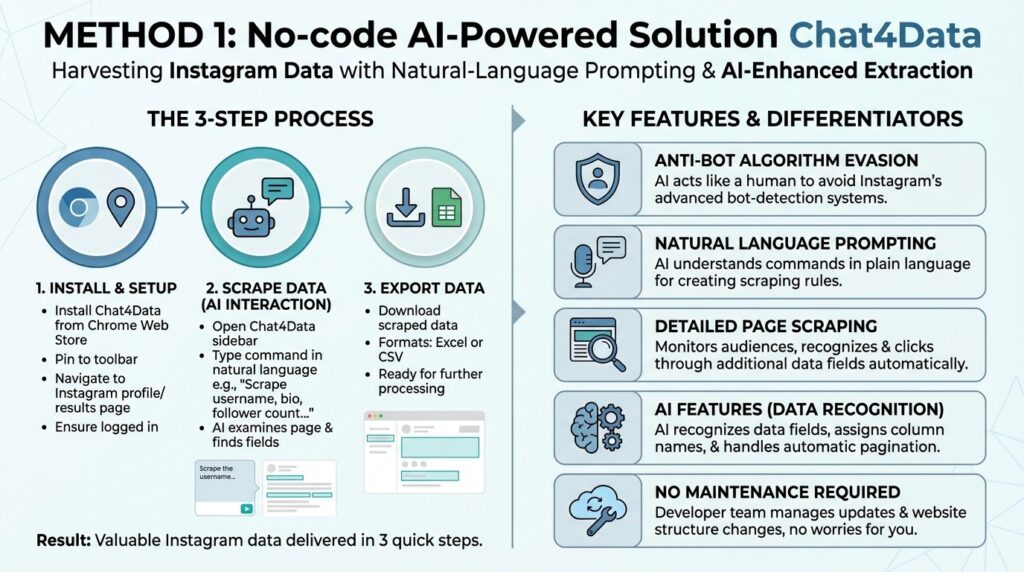
Step 1: Install Chat4Data
Starting the process, go to the Chrome Web Store and install the Chat4Data plugin. Once installed, pin it to your browser’s toolbar for easy access. Go to the Instagram site that you wish to scrape. This might be a user’s profile page or a search results page that includes a large number of people. To view the entire profile, ensure that you are logged in to Instagram.
Step 2: Scrape data
Describe what you want to scrape. Click the Chat4Data icon in your toolbar to open the sidebar chat. Instead of picking pieces manually, you will interact with the AI.
In the chat box, type a command in plain language. For example:
“Scrape the username, bio, follower count, following count, and website URL from this photo.”
Chat4Data will examine the page’s visual structure and find the appropriate data fields you requested.
Step 3: Export data
After all the data is scraped, Chat4Data will let you download it in Excel or CSV format for further processing.
In just 3 quick steps, Chat4Data delivers valuable Instagram data for you to process later.
Chat4Data is a professional web scraping tool with ChatGPT-like capabilities, and here is a complete list of features that make it stand out over other options for building an Instagram photo scraper:
- Instagram’s anti-bot algorithm: Instagram has one of the most advanced bot-detection systems, but Chat4Data uses AI to act like a human, thereby avoiding issues with it.
- Natural language prompting: With AI capabilities, Chat4Data understands you in natural language and executes commands when creating scraping rules.
- Detailed page scraping: When scraping data from Instagram photos, you should monitor the audiences of different businesses, and Chat4Data can help with precisely this. Chat4Data automatically recognizes additional data fields that can be scraped and clicks through them automatically.
- AI Features: Beyond mimicking human behavior, Chat4Data uses AI to recognize data fields, assign column names for clarity, and enable automatic pagination across all pages.
- No maintenance: Chat4Data’s developer team constantly adds new features and takes over maintenance, so you don’t have to worry about website structure changes.
Method 2: Using the Official Instagram Graph API
The Instagram Graph API is the most suitable and stable way to access Instagram data, as Meta officially sanctions it. It is meant for businesses, producers, and developers who need access to their own data or the data of users who have given explicit permission.
This strategy is the most secure for long-term, professional use, but it does not allow for data scraping from arbitrary public accounts; it is limited to firm and creator accounts, as well as the media with which they are linked.
- Setup and Authorization: You must have an Instagram Business or Creator Account linked to a Facebook Page, and register an app in the Facebook Developer Portal.
- Access Tokens: You need to request authorization from the user (often yourself or your client) to obtain a User Access Token.
- Data Extraction: Use the token to query specific API endpoints (e.g., /me/media) to retrieve structured data about photos and videos, including their URLs, captions, and engagement metrics.
Pros:
- Fully legal and in line with Instagram’s regulations.
- The data flow is very trustworthy and organized.
- Owners can view engagement stats (likes and comments).
Cons:
- Limited to your own content or content where you have explicit user permission/tags.
- Requires developer knowledge to set up and manage API calls.
- Strict rate limits based on your account’s follower count.
Method 3: Custom Python Script (Technical Scraping)
For developers who need to scrape large volumes of public data or require functionality not available via the API, a custom Python scraping script remains the most powerful—but riskiest—approach. This involves simulating a web browser to load Instagram pages and parse the HTML to find the image links.
- Headless Browser Setup: To trigger dynamic loading on Instagram, use libraries such as Selenium or Playwright to run a headless browser (one without a graphical interface).
- HTML Parsing: Use a library such as BeautifulSoup to parse the returned HTML and retrieve the JSON data embedded in the page source, which often contains direct image URLs.
- Proxy Management: To prevent instant IP restrictions and rate limits, you must cycle proxies (IP addresses) frequently to spread your requests, which generally requires a paid proxy service.
- Anti-Bot Evasion: Use complex ways to simulate human behavior (e.g., random delays, mouse movements) to avoid Instagram’s powerful detection algorithms.
Pros:
- Maximum flexibility and control over the data being collected.
- Can target any publicly visible profile.
- Potential for high-volume data extraction if proxy/account management is robust.
Cons:
- Requires advanced coding and web scraping expertise.
- High maintenance; scripts break frequently due to Instagram website updates.
- High risk of IP bans and account blocks.
- Ethically and legally contentious due to Terms of Service violations.
Which Instagram Photo Scraper Is Right for You?
Choosing the right way to scrape Instagram photos depends entirely on your resources and goals.
- If you are a developer building an app for your own business analytics, an API is the sustainable choice.
- If you are a data engineer willing to fight constant code updates and proxy battles, a Custom Python Script offers the most raw power.
- However, for analysts, marketers, and researchers who need data now without writing code, Chat4Data offers the smartest balance. It allows you to scrape photos from Instagram by leveraging AI to navigate the site’s visual complexity, treating the extraction process as a human user would.
A reliable Instagram scraper, whether built on the official API, powered by Chat4Data, or coded in Python, is the foundation of any serious visual data strategy. The right tool gives you a systematic edge: competitor insights, UGC discovery, and AI training data that manual browsing can never match.
Ready to scrape Instagram photos without the setup headache? Install Chat4Data in 60 seconds and run your first extraction today. For more advanced Instagram data collection strategies, see our complete guide to Instagram scraper tools.
Keep learning
Curious about how corporations collect visual data from social media? Understanding the science underpinning dependable picture collection—from how an Instagram data scraper extracts structured data to the complexity of online scraping—opens up a plethora of options for large-scale data initiatives. Learning how Instagram works, particularly in terms of web-scraping techniques for photos, might be a valuable exercise for your organization.
Here are some good starting points:
The more you understand about how the web works, the better equipped you are to troubleshoot problems, build your own projects, or simply make sense of the digital world around you.
FAQs About Scraping Instagram Photos
- Is it legal to scrape Instagram photos?
Scraping publicly available data from the internet is a complicated task. While theoretically doable and often permitted in other circumstances, it is troublesome for sites such as Instagram due to their unique constraints.
- Terms of Service: Scraping is strictly banned by Instagram’s Terms of Service and can result in a permanent account ban.
- Copyright: Even if the data is publicly available, extracting images or other visual material risks infringing the original creator’s copyright, which may result in severe legal penalties.
- Privacy and Personal Data: Scraping must rigorously avoid collecting or processing personal or sensitive data, even if it is publicly available, to protect user privacy and comply with rules such as the GDPR or the CCPA.
- Can I scrape high-resolution photos?
Scraping photos, including high-resolution ones, is complicated because Instagram deliberately restricts access to the original, highest-quality images. Instagram optimizes and compresses images for fast loading on the platform. The standard image URLs visible through basic scraping are typically compressed, lower-resolution versions.
- Accessing Original URLs: The direct URL to the highest-resolution photo (the “original”) is often buried deep within the page’s source code or in specific metadata (like GraphQL queries). A basic scraper might miss this.
- Advanced Scraping Tools Required: To reliably extract the best available resolution, your scraping method needs to be sophisticated. Either simulating a Browser or using a Graph API.
In summary, it’s possible but requires a more advanced and resource-intensive scraping setup than simply downloading the visible image from the page.
- How do I download photos in bulk?
Most scrapers, including the Chat4Data method, offer a list of image URLs (in CSV or Excel format). You can then use a simple download manager or a GitHub repository like TabSave to download all of the photos from that list to your hard drive at once.
- Does Chat4Data work on Mac and Windows?
Yes. Since Chat4Data is a browser extension, it works on any operating system that supports Google Chrome, allowing you to scrape Instagram photos on any device.
- How much does it cost to scrape 100 Instagram photos using Chat4Data?
Based on the current pricing models, scraping 100 Instagram photos with Chat4Data is effectively free or costs less than $0.01. Unlike many competitors that charge per row, Chat4Data’s unique model primarily charges credits for AI analysis (the chat used to set up the scraper) rather than for the extraction itself. Once the AI identifies the photo pattern, scrolling and extracting 100 rows typically consume no additional credits.
- Free Plan: New users receive a generous free tier that easily covers scraping 100 items.
- Estimated Cost: If you were on a paid plan (e.g., ~$10 for 2,000 credits), the “chat” to set up this scraper would cost a fraction of a cent. Then Chat4Data scrapes virtually unlimited data at no additional cost.
 AI Web Scraper by Chat