
Amazon is the largest e-commerce website in the world, with over 310 million users. Most of them are regular shoppers, but many are sellers and even more advanced market researchers. They use web scraping techniques to gather product data, track market trends, and scrape Amazon reviews. Scraping Amazon reviews is essential for evaluating products you have never handled, assessing quality from multiple sources, and understanding what customers actually think.
Most analytical tools focus heavily on pricing and sales rank. Although this data is very valuable, it neglects the qualitative nuance found in the text of reviews. Pricing tells you what sold; reviews tell you why it sold (or why a user returned it). To get the complete picture, analyzing verified purchases, video reviews, helpful vote counts, and specific product variations, you need a way to scrape Amazon reviews at scale.
By the end of the article, you will get a good grasp of:
- What to look for in a Great Amazon Review Scraper?
- Methods for scraping Amazon reviews: Code + No-code
- Legal and ethical concerns when scraping Amazon reviews
Quick Answer
Three ways to scrape Amazon reviews:
- No-code (easiest): Chat4Data, a conversational AI agent for data collection. Just Type what you want, and it can automatically figure out the rest.
- Python + Selenium: full control (filter by rating or keyword), but you write the script and manage proxies. Best for developers.
- GitHub repo: a prebuilt scraper for a head start, but you still run and maintain the code.
For most people, the no-code route is the easiest way to turn thousands of reviews into a spreadsheet.
What Is an Amazon Review Scraper?
An Amazon review scraper is a tool that collects customer reviews from Amazon product pages automatically, turning thousands of scattered reviews into a clean spreadsheet. Pricing tells you what sold; reviews tell you why. And a single review holds far more than a star:
- The review text and title carry the actual opinion, the raw input for any sentiment analysis
- Star ratings and helpful votes tell you which feedback to trust and which the crowd already endorsed
- Reviewer names and dates let you track how opinion shifts over weeks, not just where it sits today
- Verified-purchase tags and the variant bought pin each complaint to a real buyer and a specific size or color
- Attached photos show how the product actually holds up once it leaves the listing
Most scrapers now handle this with AI. Rather than depending on hard-coded rules that snap the moment Amazon shifts its layout, they read each page like a person would and label the fields themselves, and the most capable ones act as agents: tell them what you want, and a finished spreadsheet comes back.
What to look for in a Great Amazon Review Scraper?
Amazon vigorously protects its data, making review extraction challenging. A standard HTML parser isn’t enough; a robust scraper needs these essential features:
- AI Pagination: Automatically detects and navigates through multiple review pages.
- Anti-Bot Protection: Uses IP rotation and fingerprinting to bypass CAPTCHAs and 503 errors.
- Subpage Extraction: Navigates from product lists to individual product pages to fetch detailed reviews.
- Scalability & Reliability: Handles thousands of reviews across hundreds of pages without manual intervention.
- Ease of Use: Provides a user-friendly interface as an alternative to the steep learning curve of Python.
- Low Maintenance: Eliminates the need for constant script updates, which can require ten times the initial development effort.
Scrape Amazon Reviews in Action: 3 Methods (No-code + Code)
Whether you code or not, the following methods cover every skill level. No-code and code options for you to fit your projects and needs. Let’s begin scraping Amazon reviews.
Method 1: No-Code Scraping with Chat4Data (Browser Extension)
We begin our exploration with Chat4Data, a Chrome extension that meets our needs as a data scraper. Its unique usage of natural-language prompts and AI-enhanced data extraction capabilities make it an excellent pick. These strong capabilities allow us to effortlessly harvest Amazon reviews.
Once you install the browser plugin, Chat4Data starts in the browser and can analyze the DOM (Document Object Model) of the Amazon review page. With the power of AI, Chat4Data can identify all data fields and determine their types during extraction, ensuring a clean output.
Let’s see Chat4Data in action before we share more of its excellent features.
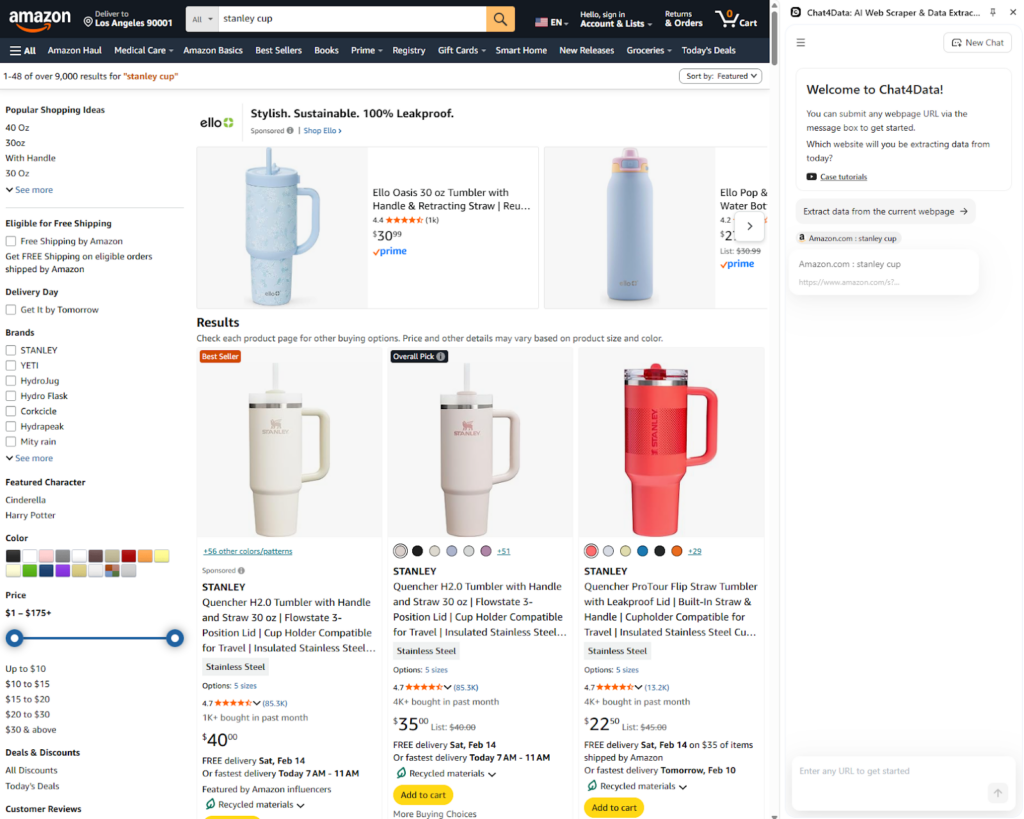
Step 1: Go to Amazon and start the Chat4Data browser extension
Chat4Data appears on the side of your current tab and asks you to scan the current page, or at the bottom, you can type what data you need in plain, natural language.
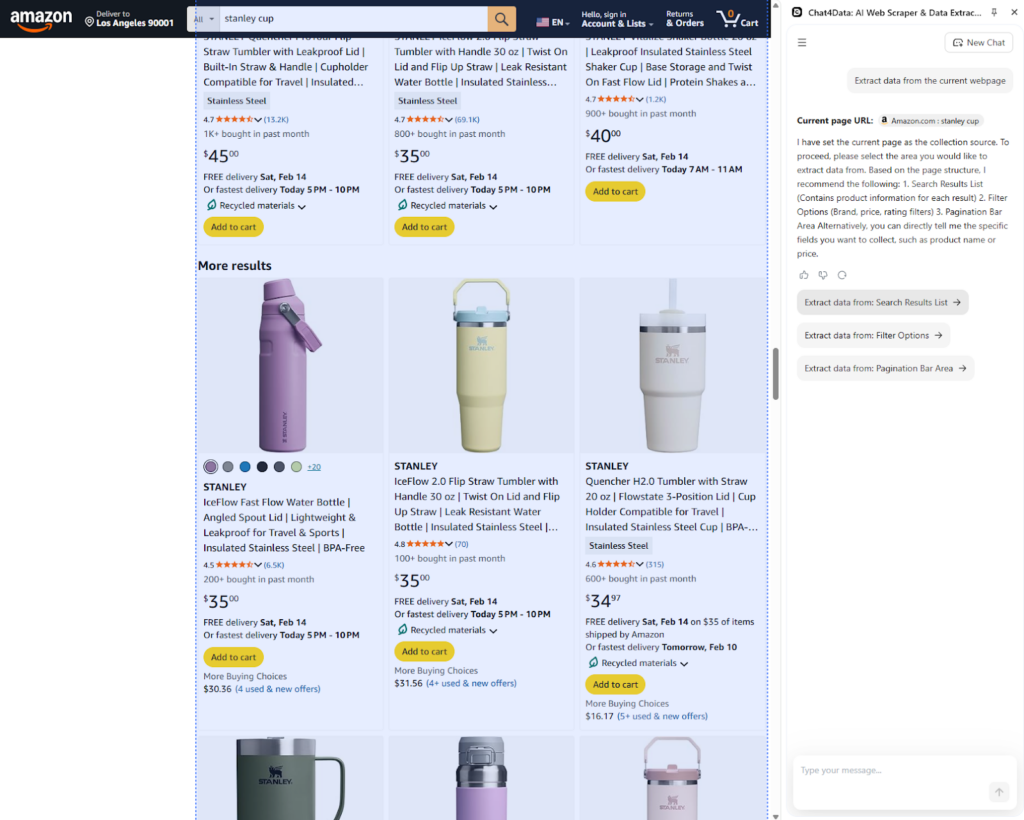
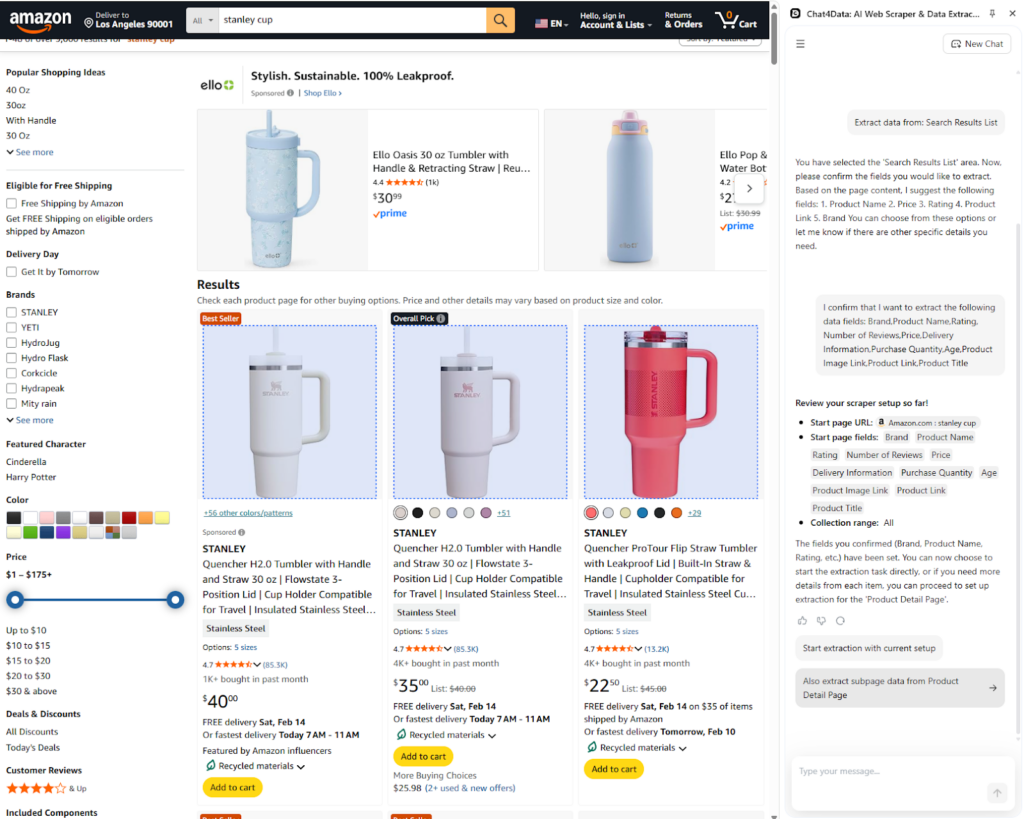
Step 2: Scan data categories with Chat4Data
Chat4Data automatically recognizes data categories it can fetch data from. Here, I select the product list because we can also extract customer reviews from it.
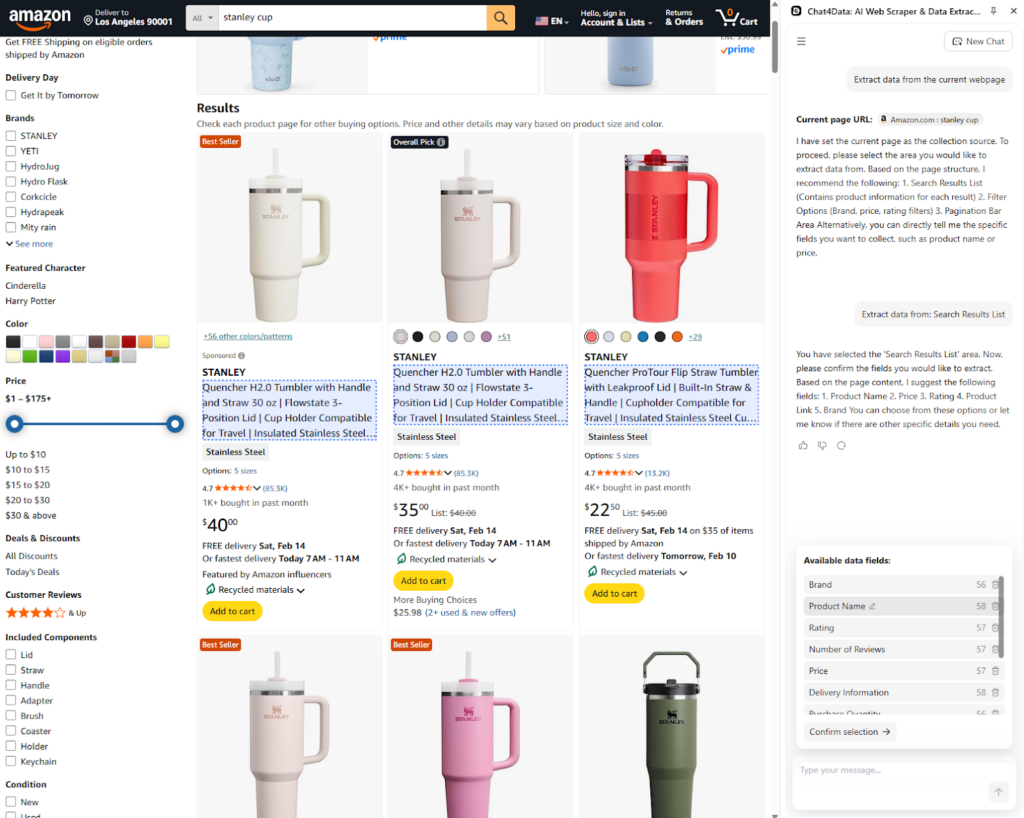
Step 3: Recognize data fields
Chat4Data defines the underlying data fields and gives them clear column names using AI tools.
Chat4Data handles automatic pagination by recognizing the type and automatically scrolling to it.
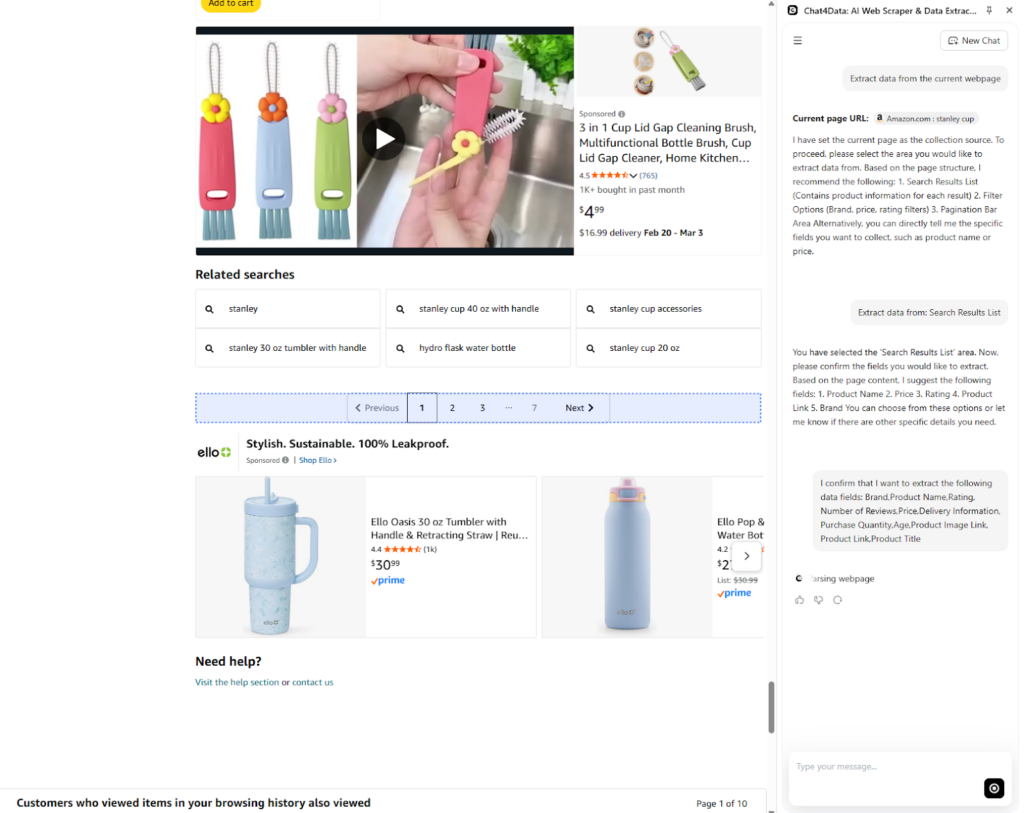
Step 4: Subpage scraping
At this point, Chat4Data automatically recognizes the underlying links for each product in the product list and asks whether you want it to scrape the detailed page for each. We do want to scrape the subpages of each product to reach the Amazon reviews.
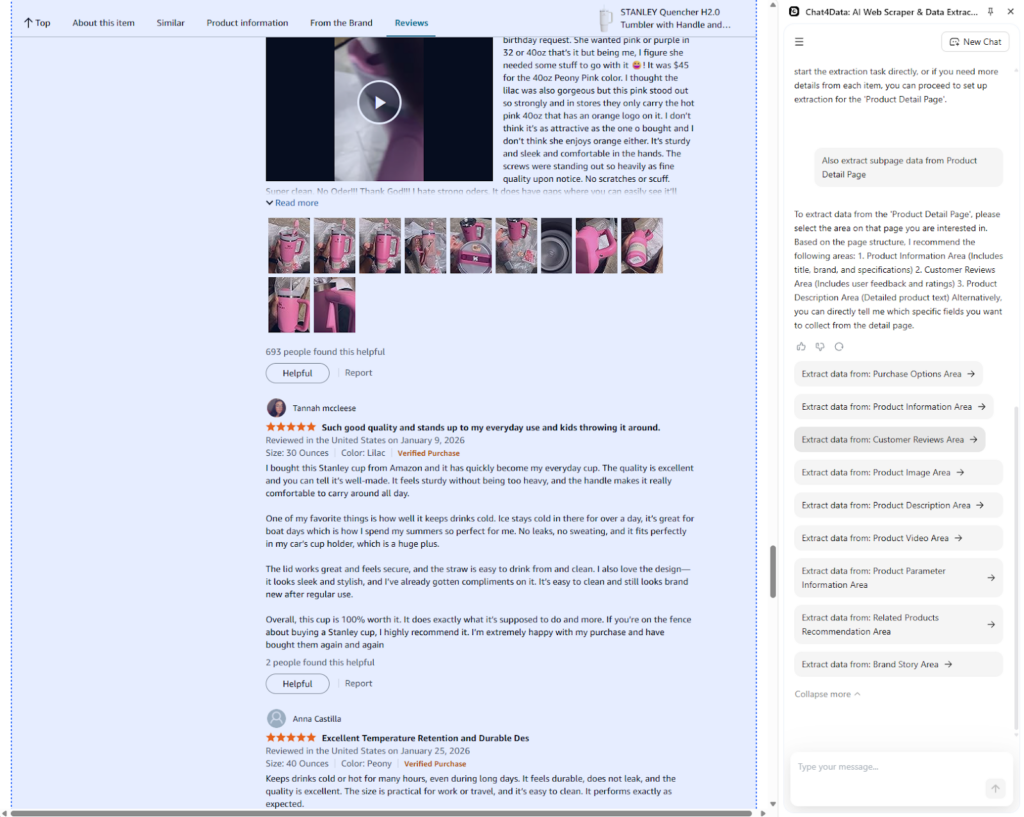
Step 5: Subcategories finding
Chat4Data offers, once again, different categories to fetch from on the product page. I go with reviews, but there are many more available, including shipping information, product details, and video reviews.
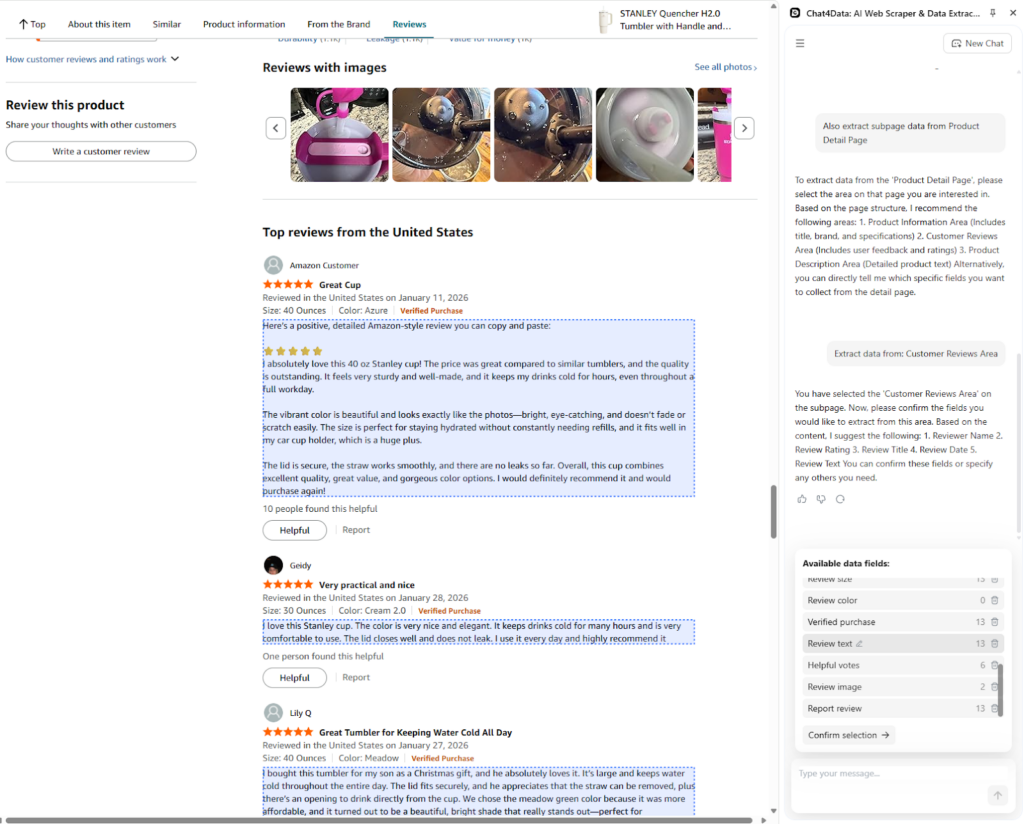
Step 6: Subpage data fields
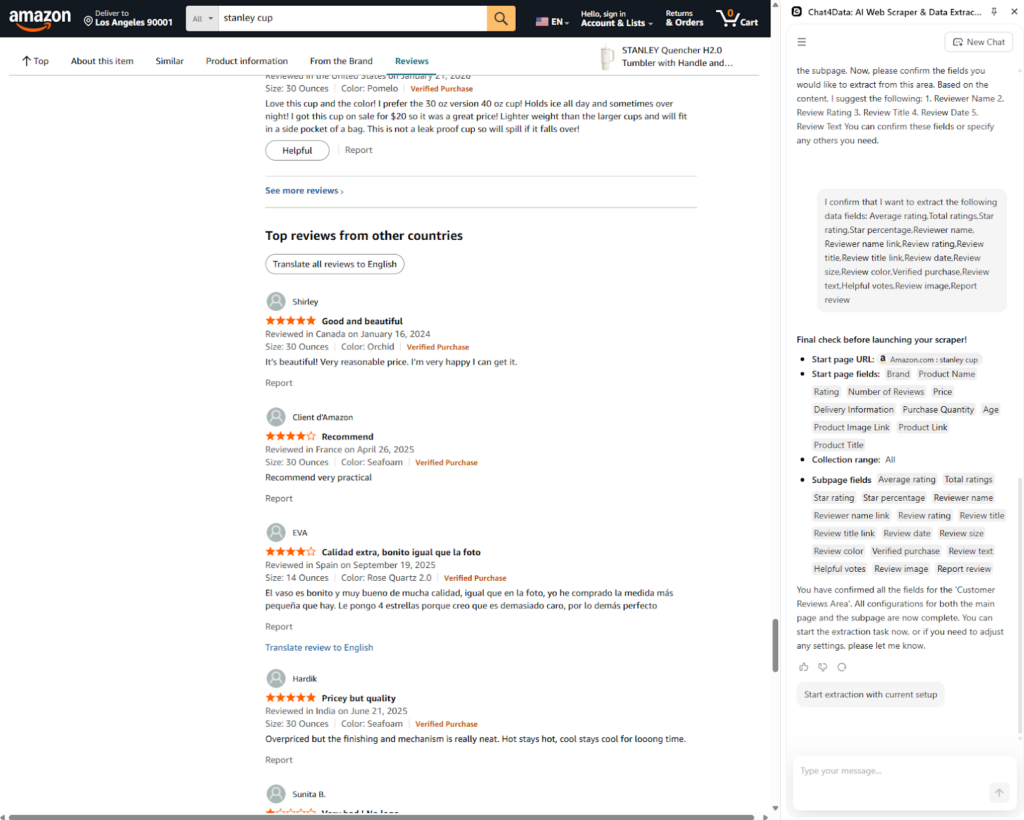
From the selected subpage category of Amazon reviews, I let Chat4Data suggest data fields. As you can see, it is very detailed. It extracts the following fields: Average rating, Total ratings, Star rating, Star percentage, Reviewer name, Reviewer name link, Review rating, Review title, Review title link, Review date, Review size, Review color, Verified purchase, Review text, Helpful votes, Review image, Report review.
Step 7: Final plan
Before scraping Amazon reviews, Chat4Data presents the final plan. You can tell it to adjust it or confirm and continue.
Step 8: Export data
Chat4Data offers CSV and Excel export, and when you download it, you can open it directly.
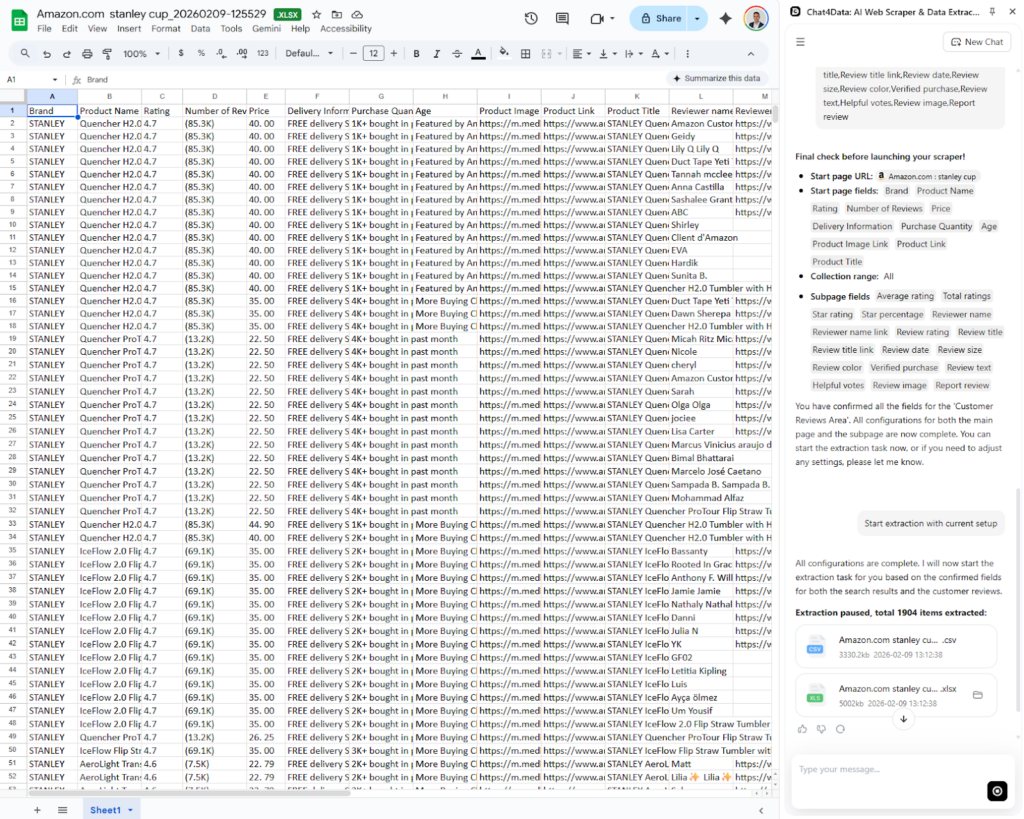
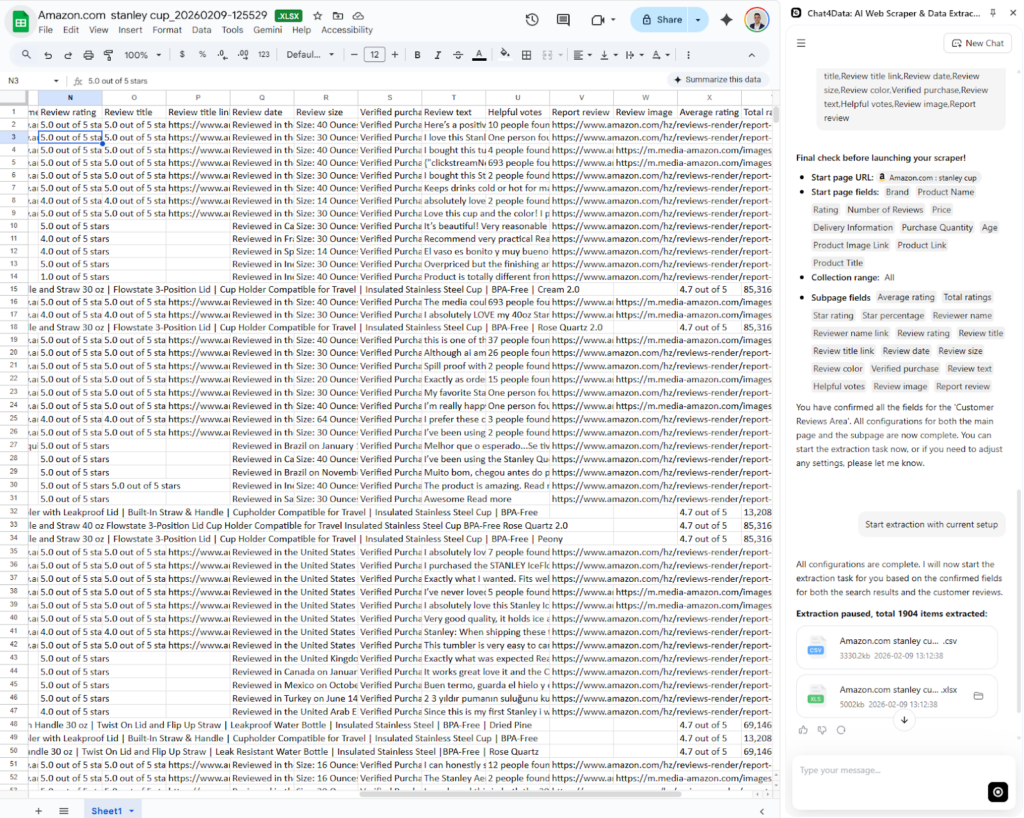
Chat4Data collected a large number of Amazon reviews in a short time. Let’s summarize the key features of Chat4Data:
- Natural language prompting: Describe what you need in plain English – no CSS selectors, no code—and Chat4Data retrieves it instantly. Zero technical setup required.
- Subpage Scraping Capabilities: Unlike many basic data-scraping extensions, this tool can scrape data from lists and their corresponding subpages to extract Amazon reviews for each product.
- Privacy is Key: All data is processed locally on your device—meaning Chat4Data can access login-protected pages without ever sending your credentials to a third-party server.
- Cost-Effective Operation: The tool’s efficient credit usage makes it a practical solution for a wide range of data scraping requirements
- Adapts to dynamic pages: It keeps extracting data accurately even when a site changes its layouts.
Method 2: Python + Selenium Amazon Review Scraper (Full Code)
Python is widely regarded as the go-to language for web scraping, thanks to its mature libraries like Selenium, BeautifulSoup, and Scrapy. This method takes time but gives you maximum control over the data and the flow. You can customize the logic to scrape only reviews with 3 stars or fewer, or only those containing specific keywords like “battery life” or “broken.”
Unfortunately, it requires more than coding knowledge and brings many challenges because Amazon is such a big website that protects its data. Proxy rotation, maintenance, and a steep learning curve are some of the issues with this approach.
First, we have to set up our working environment, usually an IDE (Integrated Development Environment), for example, Visual Studio Code, and install Python. The library for today’s example is Selenium, which is directly integrated with Python and allows you to interact with the browser. Selenium is a robust open-source framework for automating web browsers. It simulates a real user: it opens a Chrome window, types in the URL, scrolls down, and extracts text.
I use pandas to manage the data structure, but you can use polars as well.
The following code defines a function, scrape_amazon_reviews, that opens the desired link from the main function. This function starts a webdriver, finds appropriate data elements on the page using CSS selectors, and then parses everything and exports it.
Method 3: Open-Source Amazon Review Scrapers on GitHub
Instead of writing and maintaining code yourself, there are GitHub repositories that do it for you. With little gratitude, you get this open-source code for free to run on your machine. Such a repository offers a direct Amazon product review scraper. You can download the code and run it like you would in the pure Python method.
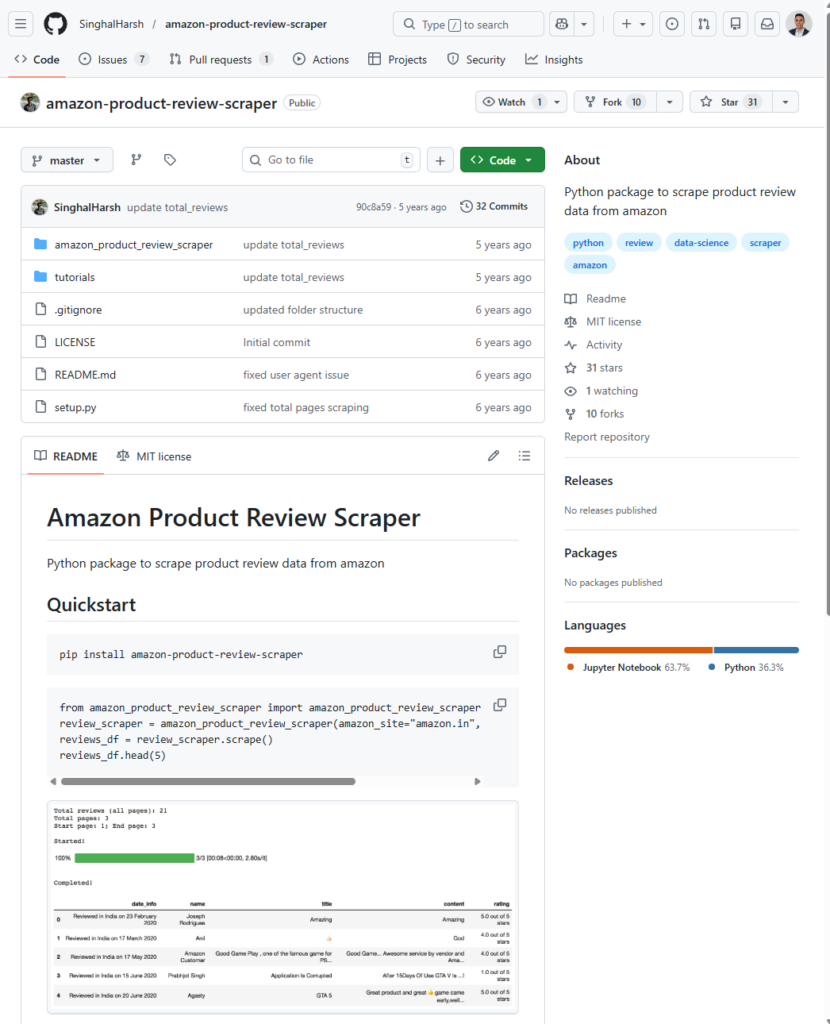
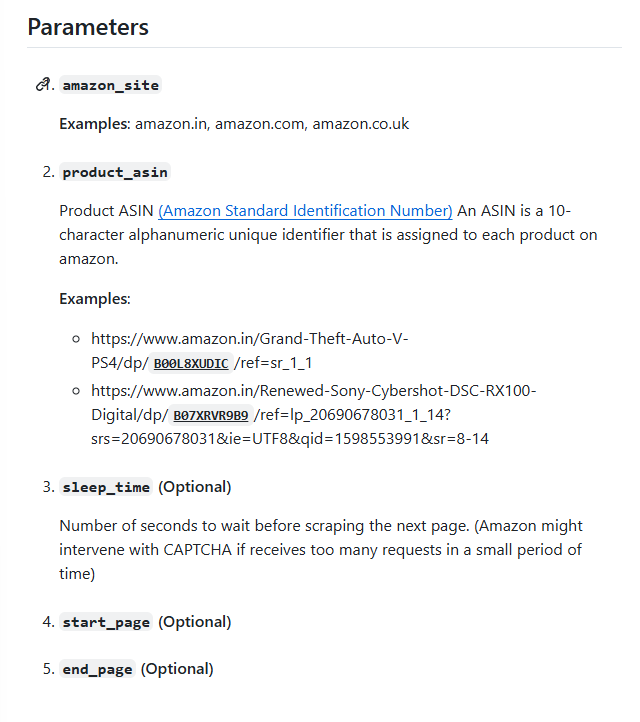
Once you have the code, you can modify it. For starters, the repo maintainers provide some parameters to get started.
Conclusion
In the end, the most suitable solution for your project is the one that fits the business and technical requirements. Chat4Data is the modern solution for most people looking to fetch data easily without coding. Alternatively, go with Python if you already have existing infrastructure or workflows based on Python.
Choose a different path that best suits you:
- Chat4Data: The robust, AI-powered solution that removes the technical barrier and maintenance burden. It is the modern way to scrape, utilizing Large Language Models to interpret the page for you.
- Python and Selenium: The flexible, browser-based approach for specific interaction needs, but requires deep knowledge and time to build/maintain.
- GitHub: The shortcut for developers who want a head start but still want to manage the code themselves.
Keep learning about Amazon Review Scraping
Curious about how businesses gather Amazon customer feedback? Understanding the technology behind reliable product reviews—from how an Amazon data scraper extracts structured data to the complexities of web scraping—opens up many possibilities for large-scale data projects. Learning how Amazon works, particularly in the context of web scraping techniques for reviews, can be a beneficial exercise for your business.
Here are some good starting points:
The more you understand about how the web works, the better equipped you are to troubleshoot problems, build your own projects, or simply make sense of the digital world around you.
FAQs about How to Scrape Amazon Reviews
- Can I scrape Amazon reviews without coding?
Yes. Many no-code web scraping tools like Chat4Data allow you to fetch Amazon reviews without coding. Even further, Chat4Data will enable you to fetch data from any website using the powerful AI tooling it provides.
- How do I scrape images from Amazon reviews?
Scraping images is not available directly in most web scrapers. You need additional tools or steps in the scripts. When using Python, after fetching the image URLs, you must loop through each link and download the images. With no-code tools, this feature is limited and available only in the most advanced web scrapers, such as Octoparse.
- Why does my Python script get blocked by Amazon (503 Error)?
Amazon has one of the highest levels of anti-bot protection. If you receive a 503 error, it means Amazon detected your script due to overloading or maintenance. More often than not, it is due to overloading the servers from the same IP address. Blocking usually happens because you are:
- Not using a User-Agent header
- Hitting the server too fast (no time.sleep)
- Scraping too many pages from a single IP address (you need rotating residential proxies)
- Can I export scraped reviews to Excel?
Yes, almost all web scraping tools can export data to Excel. Excel is the most popular format for its flexibility and portability. No-code tools like Chat4Data AI make it easy to export and automatically prepare your data at the end of a web scraping task. In Python, it is more difficult as you first have to format the data and then export it to an Excel file.
- How many reviews can I scrape at once?
With a basic Python script and a single home based IP, you might fetch up to 200 reviews before getting blocked. With a professional tool like Chat for Data or a script equipped with rotating proxies, you can scale this to thousands of reviews across multiple product pages.
- Is it legal to scrape Amazon reviews?
Scraping publicly available data is generally legal, but with consideration. Always be respectful towards the robots.txt file and Amazon’s Service Agreement. Personal data is especially sensitive because it is not permitted to be republished without obtaining the necessary licenses or permissions. Also, avoid bypassing a login barrier, accessing personally identifiable information (PII), or scraping at a rate that slows down the target website.
 Try AI Web Scraper