
Videos are the best way to understand a product you haven’t seen. For data analysts, marketers, and shoppers, product videos are vital for analysis. As Amazon is the biggest e-commerce website in the world, it contains most products and, along with them, videos. That is why we are exploring today how to scrape Amazon video results.
Most analytical tools focus on and rely on Amazon pricing and text reviews. Although this data is very valuable, it omits essential video metadata, such as titles, runtimes, production studios, cast lists, video-specific ratings, etc. Whether you are a streaming analytics firm trying to predict the next big genre or an e-commerce seller analyzing how competitors use video to promote their products and convert sales, you need a way to scrape Amazon video results at scale.
In today’s guide, I will walk you through three distinct ways to scrape Amazon video results that people at different skill levels can use. We will see both no-code and code solutions for scraping Amazon video results.
Quick Answer
There are three ways to scrape Amazon video results:
- No-code (easiest): Chat4Data is a conversational AI agent for data collection. Describe what you want in plain English and it detects the video fields, handles pagination, and drills into product subpages. Best for analysts and marketers who don’t code.
- Python + Selenium: full control over the logic, but you build and maintain the script and fix it whenever Amazon changes its HTML. Best for developers.
- GitHub repo: a prebuilt script saves setup time, but still needs dev skills and your own proxies.
For most people, the no-code route gets you from search page to spreadsheet in minutes.
What Is an Amazon Video Results Scraper?
An Amazon video results scraper is a tool that automatically pulls the video content attached to Amazon listings and search results, at scale. Most scrapers stop at price and text reviews, but video carries its own metadata, each piece useful in a different way:
- Video titles and links — to build a catalog of which products lead with video and pull the source files later if you need them
- Runtimes and thumbnails — to study how competitors pace and frame video to drive conversions
- Production studios and cast lists — to map who’s behind the content in media and entertainment categories
- Video-specific ratings and review counts — to see how the video itself lands with buyers, not just the product
- Linked product title, image, and URL — to tie each video back to the listing it’s selling
Most of today’s scrapers are AI-powered. Instead of leaning on brittle, pre-written CSS selectors, AI web scrapers use LLMs to read the page the way a person would and figure out which field is which on their own. The most advanced ones act as AI agents: they understand your instructions and pull the data straight into a spreadsheet.
What Makes a Great Amazon Video Results Scraper?
In general, Amazon data scraping is not as easy as it seems, as it involves some of the most advanced challenges along the way. Scraping videos in general is different from other static scraping, where you directly extract the text; videos are not available for direct download but rather via links. Once you have all the links, you can create a separate script to extract the videos if you need them locally.
Here is what we will be looking for in a great scraper for Amazon video results:
- Anti-bot evasion: Sites like Amazon have extensive anti-bot detection systems, so a great Amazon video scraper must be able to evade them.
- Data quality: The most important stage is to extract high-quality data from Amazon video scraping, such as product titles and descriptions. The scraping task’s output file must also include clear column names, such as video link, video name, etc.
- Scalability: We require the scraper to handle a range of tasks, from scraping individual products to comprehensive market research, including up to 10,000 products.
- Ease of use: Because the vast majority of users are non-technical, the tool’s usability is crucial. The primary goal is to obtain the data.
- Maintenance: Once you build a Python Amazon Video Scraper, maintenance takes 10 times as long. Dynamic website structures change frequently, so you must adapt your script and keep the external libraries it uses up to date.
Scrape Amazon Video Results in Action: 3 Methods (No-code + Code)
To accommodate all levels of knowledge, we will examine both no-code and code-based approaches. Each technique will demonstrate its practical use, key features, pros and cons, and ease of use, as ease of use is most important for the everyday user.
Method 1: The “Visual and Communication” Solution – Chat4Data
Chat4Data is a conversational AI agent for web scraping. As a lightweight Chrome extension, it combines ChatGPT’s conversational style with web scraping. When you install the browser extension, Chat4Data is already ready to scrape Amazon video results for you. Before we look at the practical tutorial, let’s see some other features Chat4Data brings.
Key Features:
- Natural language prompting: With AI capabilities, Chat4Data understands you in natural language and executes commands when creating scraping rules.
- AI data field detection: Using AI’s complex thinking, Chat4Data identifies valuable data fields and assigns them clear, descriptive column names in the output tables.
- Automatic pagination: Chat4Data recognizes pagination patterns on websites and scrapes all pages to retrieve the complete data.
- Subpage scraping: If you need extensive data, such as underlying product video reviews of each item on an Amazon webpage, Chat4Data can automatically retrieve it for you. This expands the pool of possible scraping targets and makes market research easier.
Pros:
- Fast Setup and Results: You install the Chrome extension and start scraping almost instantly — no proxies or server setup.
- Free Plan + Affordable Usage: There’s a free tier with starter credits (new users: get 100 credits upon registration), and paid plans are relatively inexpensive compared to hiring developers or buying datasets.
- Privacy: All data is processed locally and not saved by Chat4Data. If there is data behind the login, log in first, then start Chat4Data. It does not process your credentials at any time.
- Adapts to dynamic pages: keeps extracting accurately even when layouts change
Cons: Scrape only one site at a time.
Pricing: Freemium – Free starting credits are included (up to 5 pages), and premium packages start at $10 (2,000 credits) and $35 (8,000 credits) per month.
Ease of use: 5/5. With simple commands in natural language, AI can understand any website and provide you with the data you wish quickly.



Practical tutorial:
The following video tutorial shows how to scrape Amazon video results in a step-by-step manner, with the final results. Since Chat4Data can scrape subpages, we can research entire product markets in a single scraping task. Start by simply searching for the item you want, then observe how Chat4Data finds all data fields, creates a scraping plan, and finally exports the data in a clean, formatted table.
Let’s see in a step-by-step tutorial how easy Chat4Data fetches all the data you need without code:
- Find the category you want to research on Amazon and start the Chat4Data extension. I converse with Chat4Data in plain language, so I just tell it to extract data from the current page to scan all available data fields.
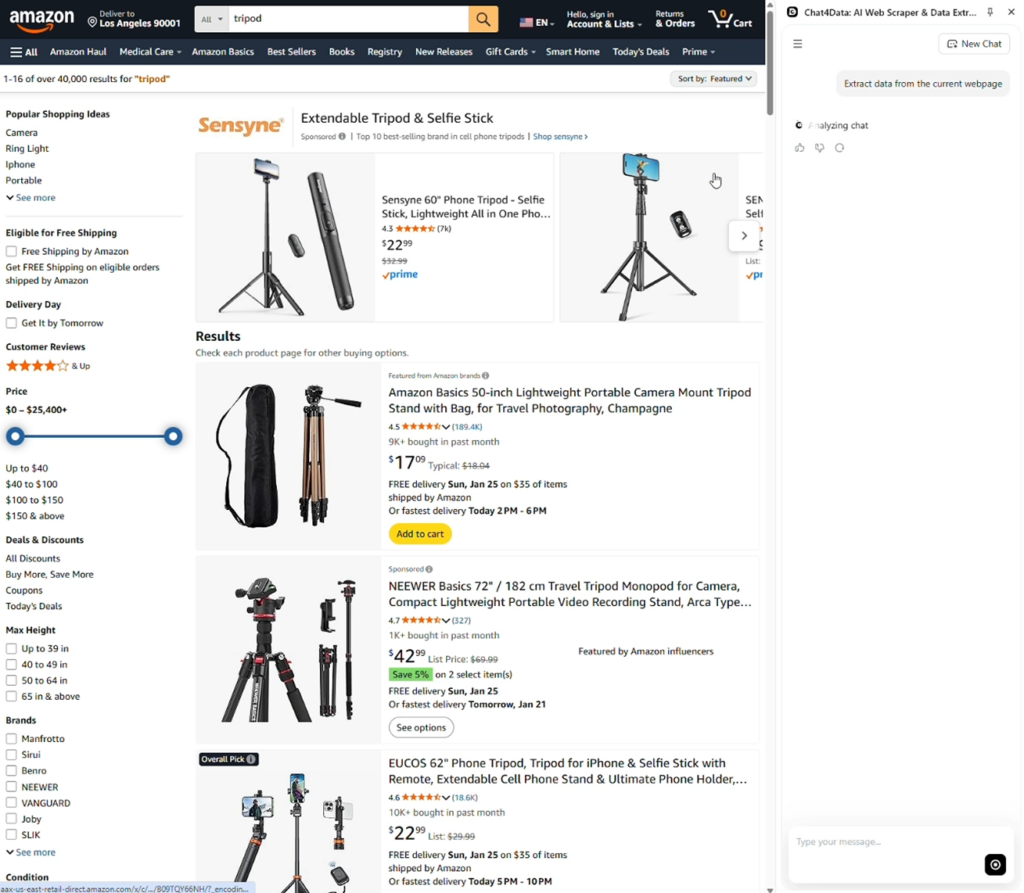
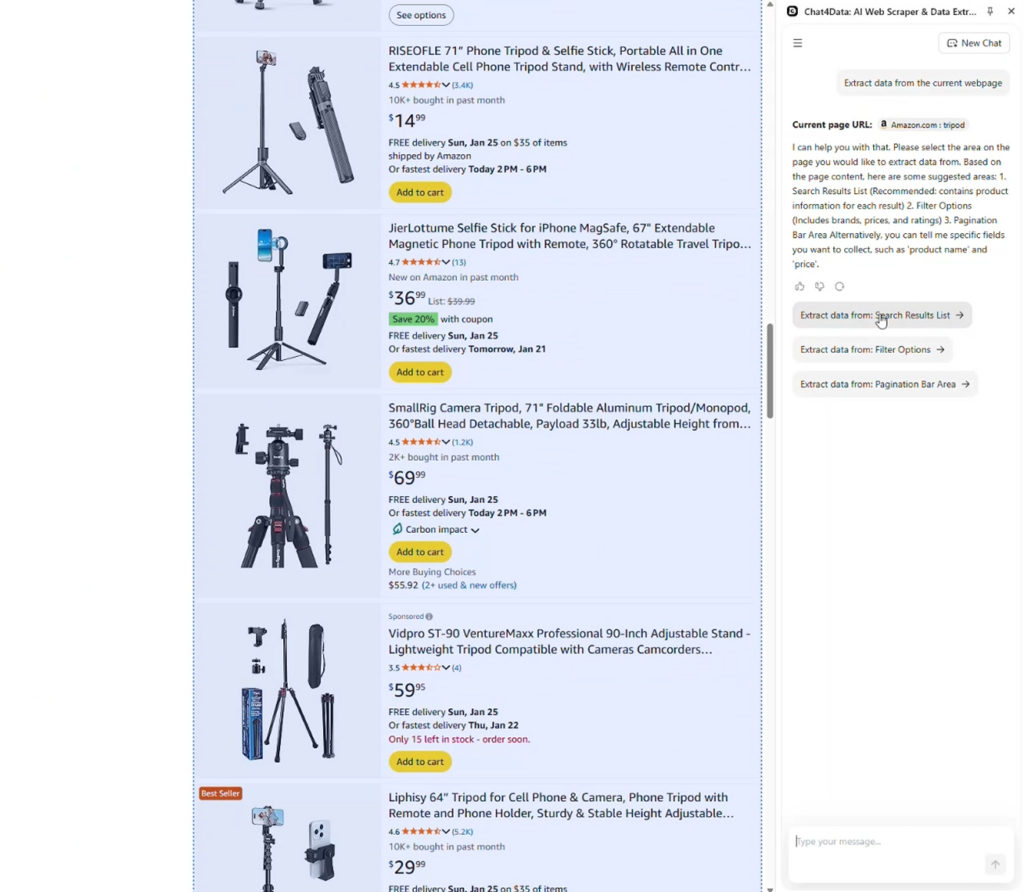
- Chat4Data identified parts of the website that can be scraped, and I’m focusing on the product list here so I can get to the underlying videos.
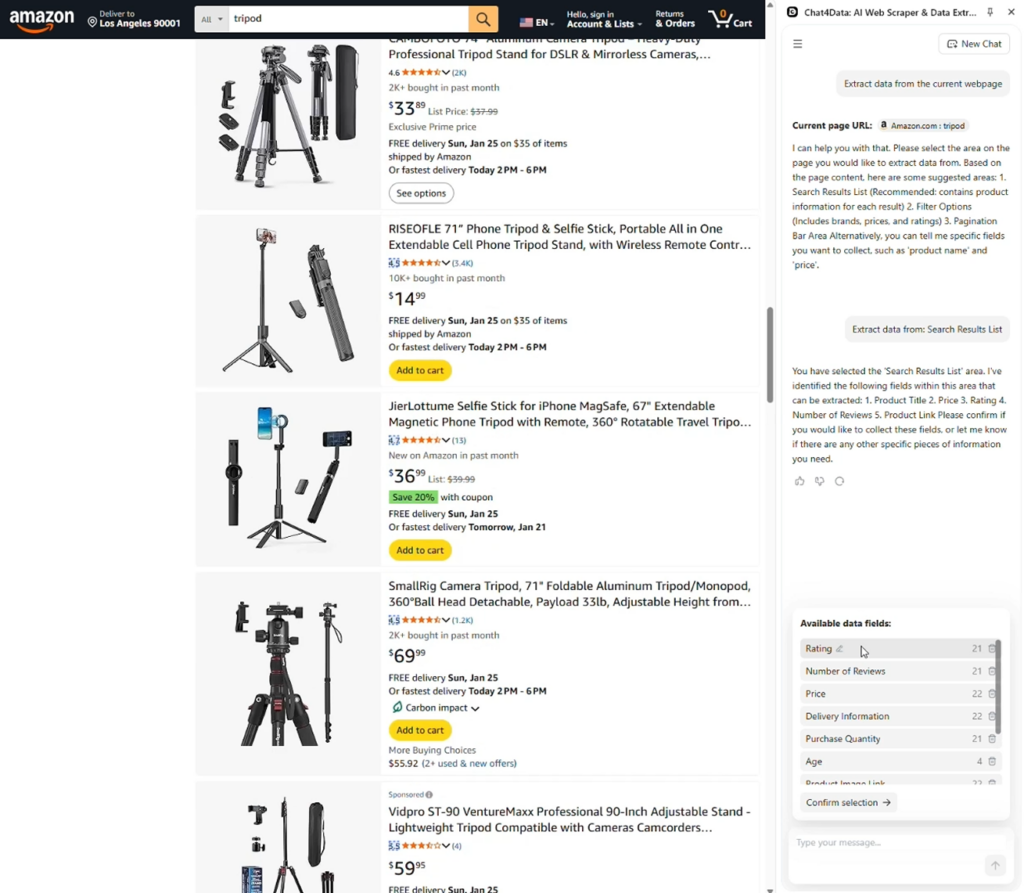
- After Chat4Data identified data fields such as rating, number of reviews, price, etc., we confirm and move on to the final plan. However, why did I start with all products instead of just one? This is the magic of Chat4Data.
- Chat4Data notices that there is underlying data for each product subpage. That means we can go into the details of each product and get even more detailed data.
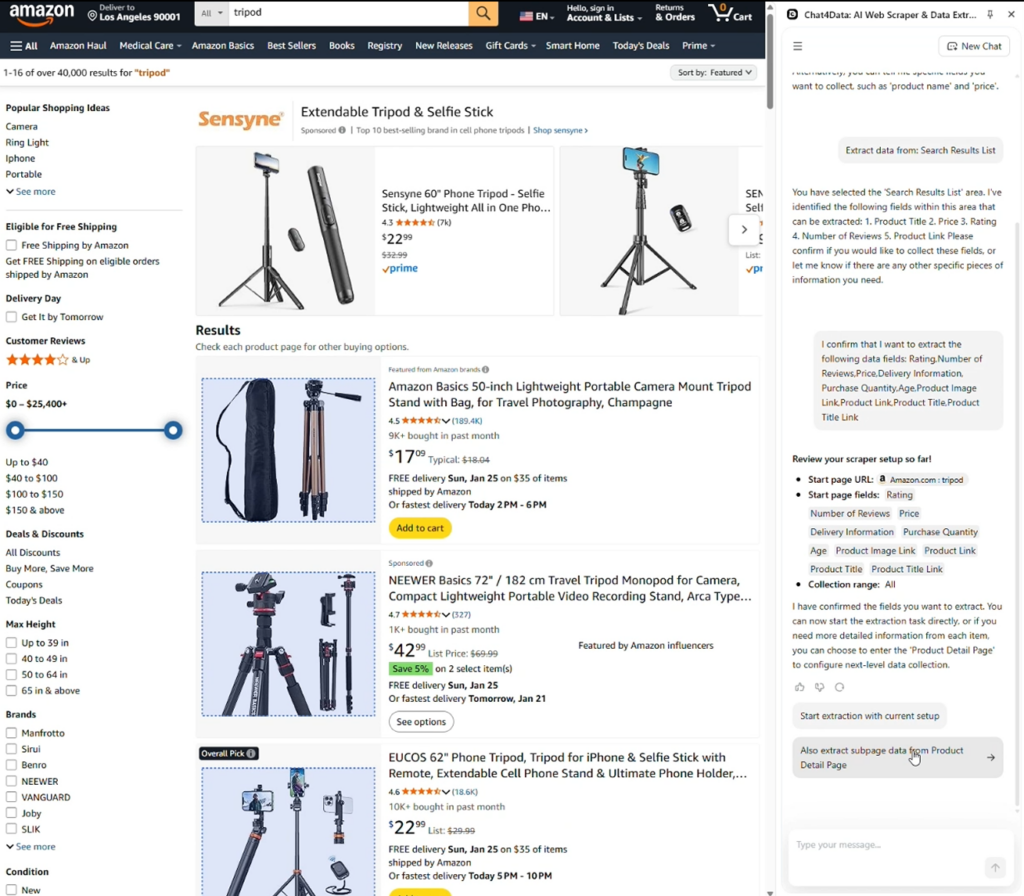
- I found what I was looking for, and those are all the Amazon product video results.
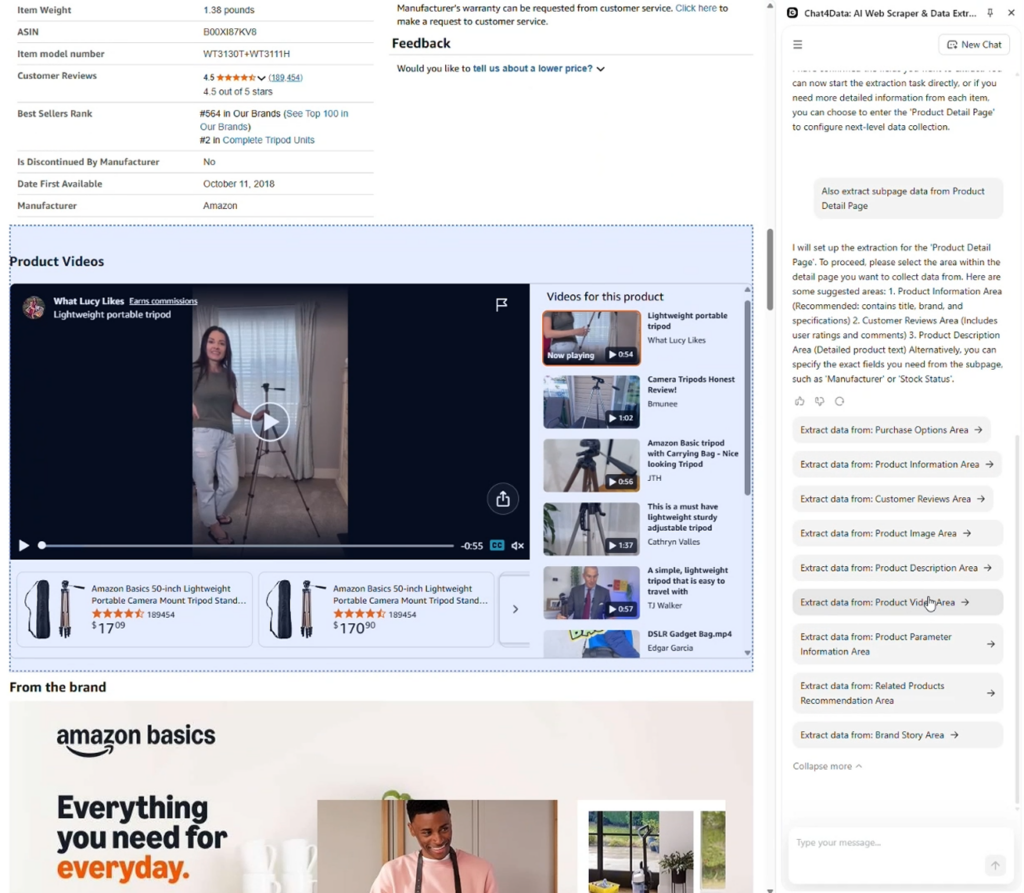
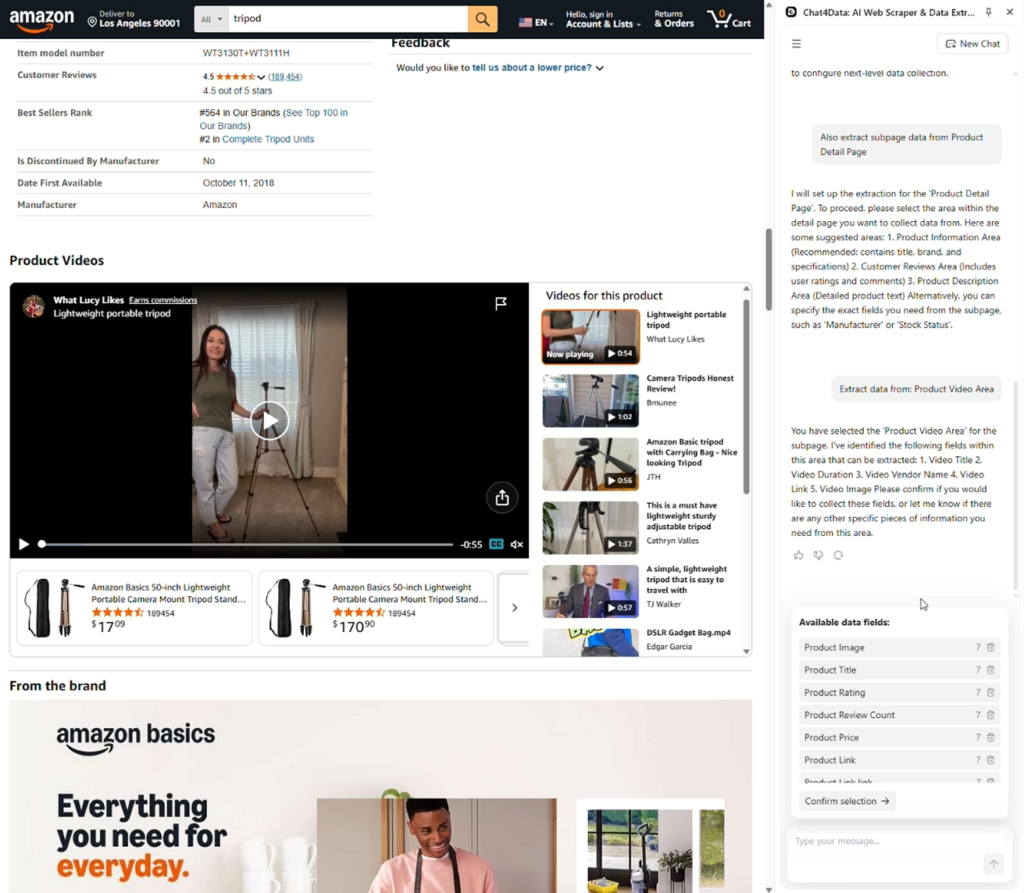
- Chat4Data again gives more data fields and adds them to the final plan. This time, the data includes a video link, a product image, a product title, a product link, etc.
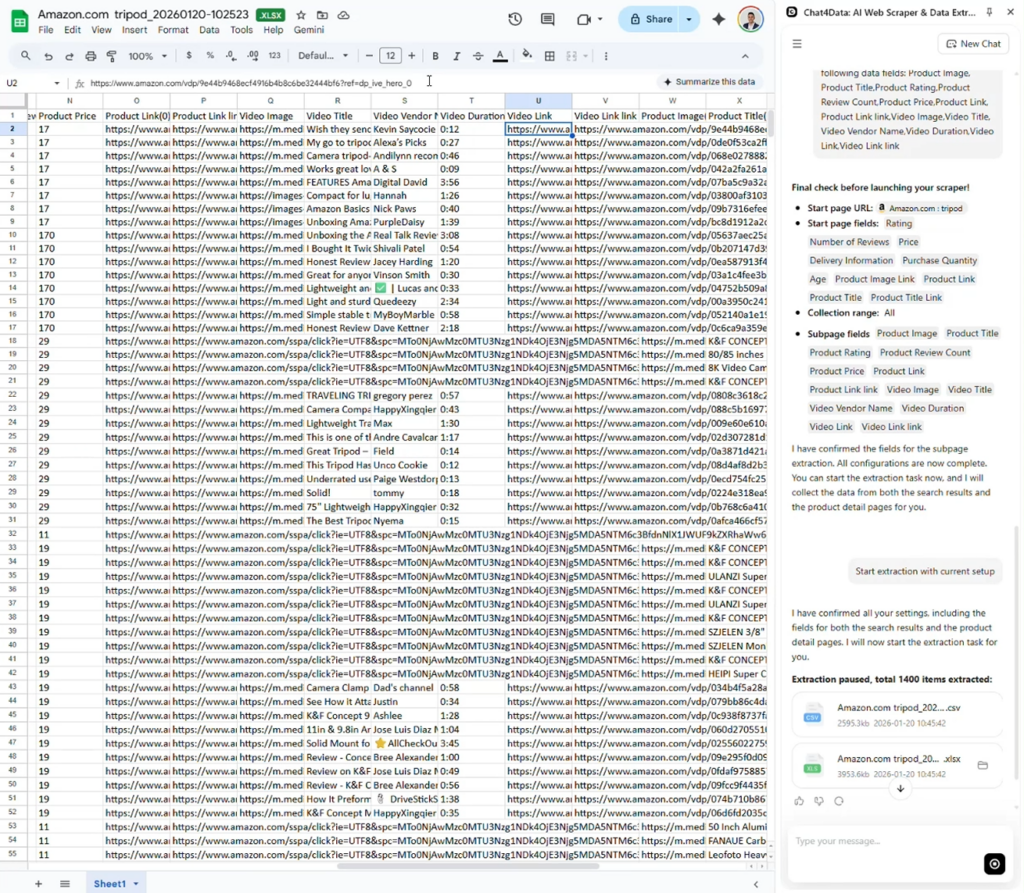
- I export the final data to Excel format, and the data is clean, with clear column names and no missing fields. Excellent and quick, I like it.
Further reading: Facebook Scraper Python
Watch a full video tutorial on how to scrape Amazon video results with Chat4Data here:
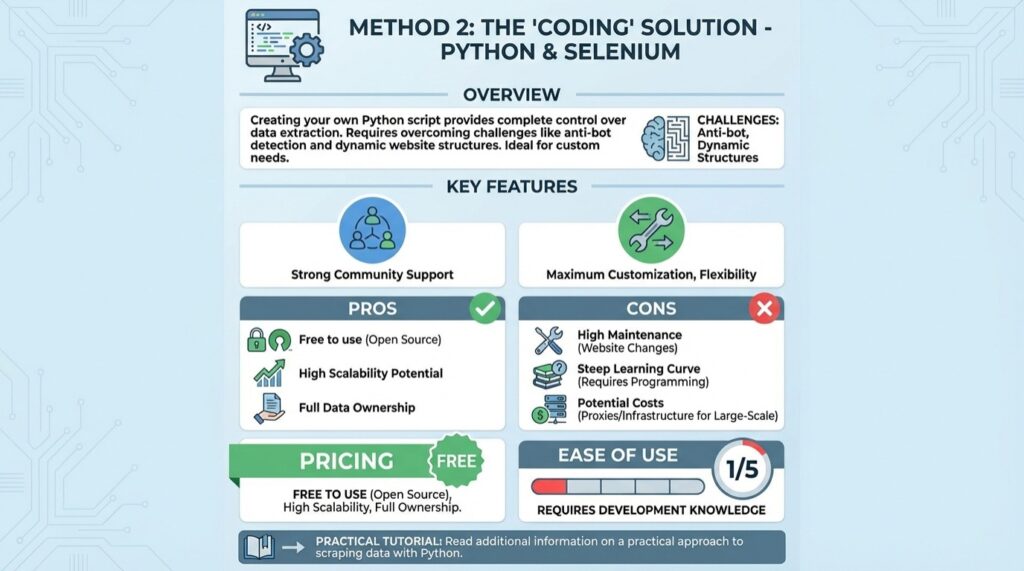
Method 2: The “Coding” Solution – Python and Selenium
Creating your own Python script can take time, but it gives you complete control over the data you need. Anti-bot detection algorithms and dynamic website structures are the most difficult challenges you will face. Read additional information about a practical approach to scraping data with Python.
Key Features:
- Strong community support.
- Maximum customization, flexibility
Pros:
- Free to use (open source), high scalability potential, full data ownership.
Cons: High maintenance (due to website changes), steep learning curve (requires programming knowledge), potential costs for necessary proxies/infrastructure for large-scale use.
Pricing: Free to use (open source), high scalability potential, full data ownership.
Ease of use: 1/5. Requires development knowledge.
Practical tutorial:
First, we have to set up our working environment, usually an IDE (Integrated Development Environment), for example, Visual Studio Code, and install Python. The library for today’s example is Selenium, which is directly integrated with Python and allows you to interact with the browser. Selenium is a robust open-source framework for automating web browsers for testing and tasks.
The following code imports the required libraries from Selenium and pandas to process data more easily in a clean format and save it at the end. You can export it to Excel, CSV, JSON, etc. A driver is used to control (“drive”) the browser, and through it, we can perform various actions, such as clicking, scrolling, and waiting.
It is smart to integrate waiting periods between actions to simulate human behaviour. Just note that the following code can break at any time, so adapt it to your specific needs.
Method 3: The “Premade coding” Solution – GitHub
Similar to the Python approach, we use code to scrape Amazon video, which makes the process easier since development and maintenance are handled by someone else. With GitHub, we are looking for a simple script that can effectively scrape Amazon video, nothing complicated. One such repository provides all the libraries and code to scrape Amazon videos.
Key Features:
- Speed up development
Pros:
- Customizable with premade basics
Cons: Some development and customization come down to you, as repository developers cannot handle everything alone.
Pricing: Free.
Ease of use: 2/5. Still requires development knowledge.
Practical tutorial:
Similar to the pure Python and Selenium approach, we will use the mentioned repository to speed up the process, directly use the code, and offload maintenance to the repository maintainers. The script on GitHub follows the same principle of interacting with the browser but uses BeautifulSoup, another Python library for web scraping.
You can clone the repository to your local machine and, as in the previous method, run the code to fetch the data.
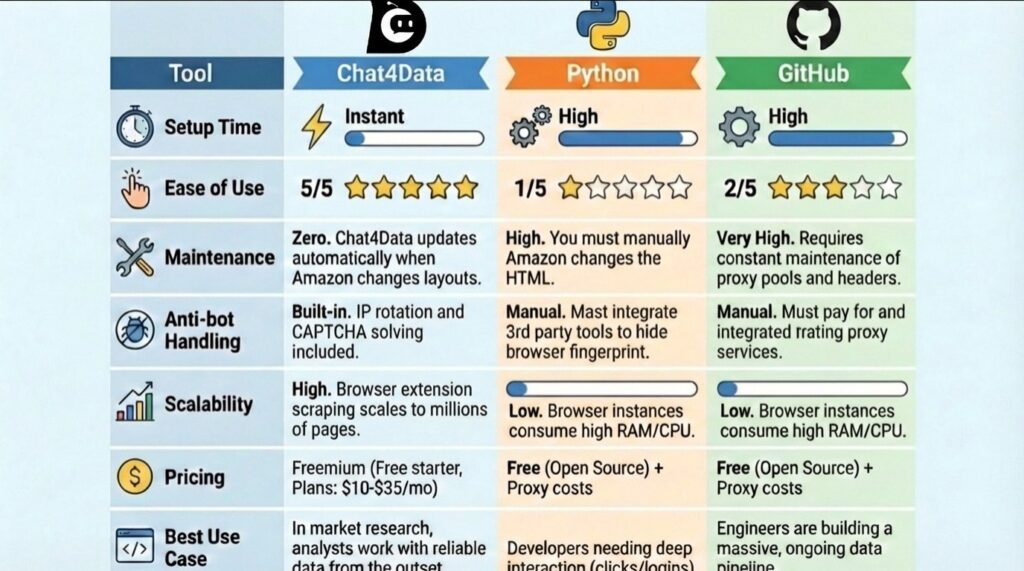
Feature Comparison Table of Three Amazon Video Scraping Methods
| Tool | Chat4Data | Python | GitHub |
| Setup time | Instant. Simple browser extension installation. | High. Requires installing Python, drivers, libraries, and scripts. | High. Requires project scaffolding and middleware config. |
| Ease of use | 5/5 (Natural Language) | 1/5 (Requires coding) | 2/5 (Requires dev skills) |
| Maintenance | Zero. Chat4Data updates automatically when Amazon changes layouts. | High. You must manually update selectors if Amazon changes the HTML. | Very High. Requires constant maintenance of proxy pools and headers. |
| Anti-bot handling | Built-in. IP rotation and CAPTCHA solving included. | Manual. Must integrate 3rd-party tools to hide browser fingerprint. | Manual. Must pay for and integrate rotating proxy services. |
| Scalability | High. Browser extension scraping scales to millions of pages. | Low. Browser instances consume a lot of RAM/CPU. | Low. Browser instances consume a lot of RAM/CPU. |
| Pricing | Freemium (Free starter, Plans: $10-$35/mo) | Free (Open Source) + Proxy costs | Free (Open Source) + Proxy costs |
| Best use case | In market research, analysts work with reliable data from the outset. | Developers needing deep interaction (clicks/logins). | Engineers are building a massive, ongoing data pipeline. |
Conclusion
The ability to scrape Amazon video results offers a window into consumer trends, content popularity, and competitive positioning that simple price tracking cannot provide. Whether you are analyzing the rise of specific movie genres or tracking how competitors utilize video in their product listings, the data is there for the taking.
We have explored three valid paths:
- Chat4Data: The robust, enterprise-ready solution that removes the technical barrier and maintenance burden.
- Python and Selenium: The flexible, browser-based approach for specific interaction needs, but requires knowledge and time to build/maintain.
- GitHub: The high-volume framework for massive data fetching, but requires knowledge and time to build/maintain.
Most companies and experts believe that the costs of maintaining a bespoke script exceed the benefits. The continual battle against Amazon’s anti-bot measures, combined with regular modifications to HTML structure, can transform a basic data project into a full-time technical job.
If you want to focus on analyzing the data rather than fighting for it, Chat4Data is your strongest ally. Its visual workflow allows you to scrape Amazon video results in minutes, not days, giving you the competitive edge you need in 2026.
Start your first Amazon video scraping task for free with Chat4Data.
Want a deeper dive? Check out these articles:
- Top 9 Amazon Price Scraper Comparison in 2026 (No-code & Code)
- ScrapingBee: An Honest Review and an Alternative
- How to Use Claude MCP for Web Scraping
- 4 Quick Methods to Scrape Instagram Emails
FAQs about Scraping Amazon Video Results
- Can I download the actual videos when I scrape Amazon video results?
Yes, right after the scraping task, you can take all the scraped links and, with another script, download each video for local processing. Most web scraping tools are designed to fetch links rather than the video file directly.
- Why does my Python script get blocked by Amazon?
Amazon has one of the highest levels of anti-bot protection, with advanced CAPTCHA and detection algorithms. If your script is not mimicking human behaviour, it will be easily detected.
- How often does Amazon change its page structure?
Amazon regularly makes unannounced modifications to the HTML elements and class names on its pages. This means that the scraping strategy (CSS selectors or XPath expressions) frequently fails for developers who depend on bespoke scraping scripts (such as Python/Selenium or GitHub solutions). One of the leading causes of the high maintenance requirements of self-built scrapers is this continuous flux.
- Can I scrape Amazon Prime Video stream links?
While technically possible if you are already authenticated on the page, you can only scrape the video metadata, not the links themselves. One such repository lets you do this, and you can see the charts directly.
- Is it legal to scrape Amazon video results?
Yes, scraping publicly available data is legal, but with consideration. Always be respectful towards the robots.txt file and Amazon’s Service Agreement. Because it cannot be republished without the required licenses or permissions, personal data is particularly sensitive. This is a concern not just of legality but also of ethics; thus, always use caution when scraping any website.