
In a world where data is worth more than gold, extraction and efficiency are everything. Professionals from various careers, such as developers building a price monitoring tool, market competitor analysts, and those with the overall ability to gather data accurately, are crucial. For this reason, I will review ScrapingBee, a popular tool among developers for web scraping.
ScrapingBee is known for handling heavy lifting in web scraping by managing proxies and a headless browser, but will it fit everyone’s needs? That question will take us on a journey today to explore the advantages and disadvantages of using the tool, as well as compare it to the ScrapingBee alternative, where it may not be the best fit for the use case.
This guide will provide insights into ScrapingBee’s capabilities, API, pricing, and technical requirements. Through a practical example, I will demonstrate what ScrapingBee can and cannot do. As ScrapingBee is a highly technical tool, I would like to offer a no-code, AI-powered ScrapingBee alternative.
By the end of the article, you will get a good grasp of:
- ScrapingBee in-depth honest review
- Limitations of ScrapingBee
- How to use ScrapingBee
- ScrapingBee alternative
ScrapingBee Review
The ScrapingBee API for web scraping handles headless browsers, rotates proxies for you, and offers AI-powered data extraction. An Application Programming Interface (API) means that accessing data is available through code, requiring higher technical knowledge. ScrapingBee is generally intended for developers.
If you are not familiar with APIs, they are essentially special tunnels opened by a company that allow access to specific data. In the case of ScrapingBee, it acts as a middleman between the web scraping script and any website from which you want to fetch data. Instead of traditional web scraping (where a Chrome browser instance is started), an API request is sent to ScrapingBee, and the tool visits the desired website directly.
The benefit of such an approach is a much more lightweight environment, as ScrapingBee’s servers handle all the resources, including machine resources and browser maintenance. Besides the infrastructure, ScrapingBee offers advanced proxy rotation and AI features that help avoid getting blocked during scraping.
What ScrapingBee Can Do
Since ScrapingBee is built for developers first, they focus on creating a rich API for multiple use cases, and here is a list of all APIs they offer:
- Markdown Scraper: Get Markdown or Plain Text content from any website you want to scrape.
- AI Data Extraction: Utilizes machine learning to identify and extract specific data points from unstructured web pages, eliminating the need for explicit CSS selectors or XPath.
- CSS/Xpath Data extraction: The standard web scraping API that allows users to specify data fields using CSS selectors or XPath expressions.
- Screenshots: Renders a webpage and returns a screenshot image (JPEG, PNG) of the content, useful for visual monitoring.
- JavaScript scenario: Enables the execution of complex JavaScript actions on a page (such as clicking buttons, filling forms, and scrolling) before scraping, which is essential for dynamic websites.
- Make Integration: Provides a dedicated “make” endpoint and instructions for integrating ScrapingBee directly with most mainstream tools, such as ChatGPT scraping or Gmail.
- n8n Integration: Offers specific support and documentation for connecting ScrapingBee to n8n workflows, a powerful open-source automation platform.
- Zapier Integration: Enables non-developers to connect web scraping results to thousands of other applications via Zapier’s automation platform.
- MCP Server: (Mobile Content Platform Server) A dedicated service optimized for scraping mobile versions of websites or content often explicitly rendered for mobile devices.
Those are different APIs ScrapingBee offers, but when scraping, here are the main features of ScrapingBee:
- Proxy Management: It automatically rotates IP addresses with every request. This is crucial for scraping sites that ban IPs after a few hits. It offers both data center and residential proxies.
- Geotargeting allows you to scrape as if you were browsing from a specific country, which is essential for e-commerce sites that display different prices in different regions.
- AI-Powered Extraction: With its AI features, ScrapingBee intelligently recognizes data fields and parses website structures.
What ScrapingBee Cannot Do
Despite the versatility of ScrapingBee and the numerous APIs it offers, it has its limitations, particularly for non-technical users who are unfamiliar with coding. With the objective observation of all facts and after using ScrapingBee alternatives, here is what ScrapingBee cannot do and the disadvantages:
- Must use code: Most of ScrapingBee’s tools require coding skills at a high level and are usually used along with other tools in a web scraping pipeline.
- No real-time browsing: You cannot “watch” the scraper work or interact with the page visually. You send a request and wait for a response. With the screenshot feature, you get some visual feedback, but that is also limited.
- No data storage: All data collected from scraping must be saved by developers (locally or in the cloud), as ScrapingBee does not provide this service.
- Costly: ScrapingBee has fairly clear-cut pricing plans, and they can become quite expensive depending on usage. We will examine the pricing plans in more detail later on.
ScrapingBee Pricing
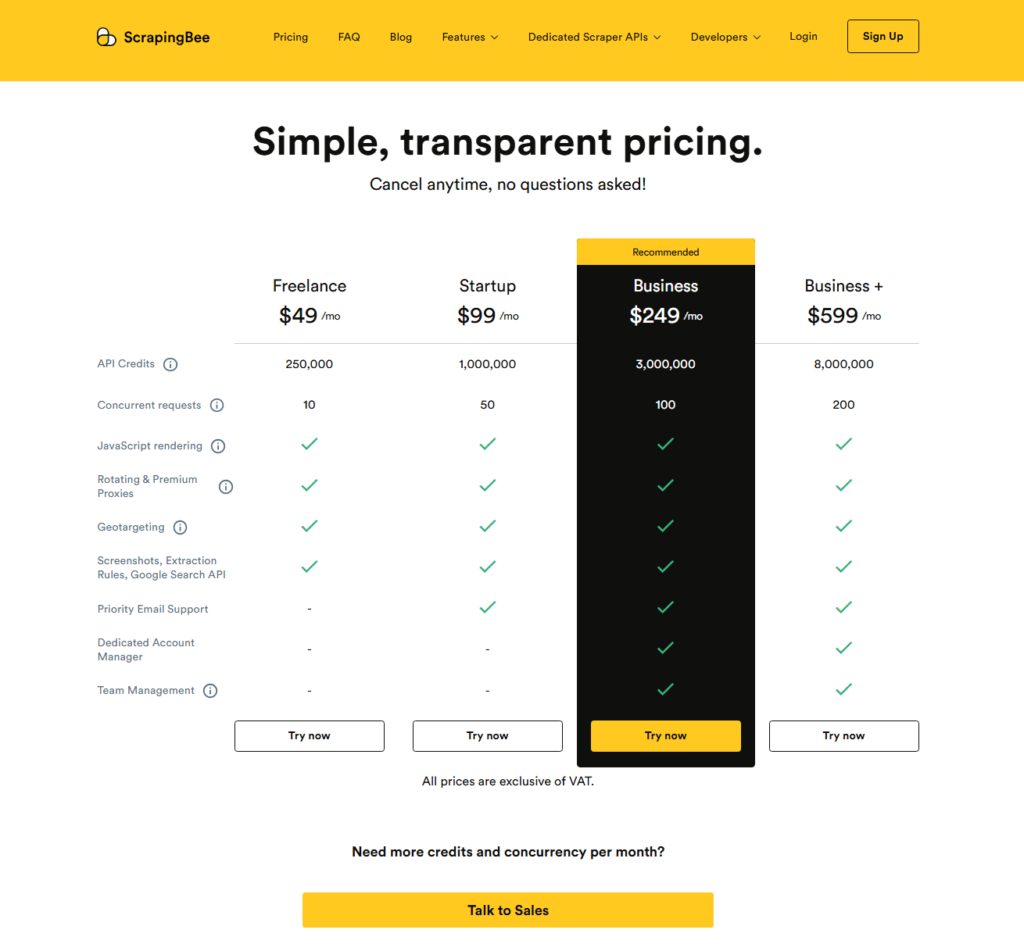
The pricing of ScrapingBee is straightforward, as it offers a pay-per-use subscription model, which means that a certain number of credits is allocated each month for API requests to ScrapingBee. There is no rollover so the credits won’t be transferred to the next month. If you plan to use ScrapingBee, use all or at least most of the credits in the plan.
Each request costs between 10 and 25 credits on average (depending on whether you use premium proxies). The first plan, at $49, allows you to make between 10,000 and 25,000 requests per month, which is sufficient for smaller projects. Still a hefty price for Freelancers, as they advertise this package as being for whom it is intended.
Businesses receive a large number of API credits, and it costs 5 times as much as the freelance plan, but you get 12 times the amount of credits. With additional perks like priority email support, a dedicated account manager, and team management, it is significantly more worthwhile for businesses than hiring freelance developers.
Can ScrapingBee Extract Data Accurately? (Amazon Example)
For today’s example, I will use ScrapingBee’s AI Data extraction, since that is the direction most tools are heading now with the AI revolution.
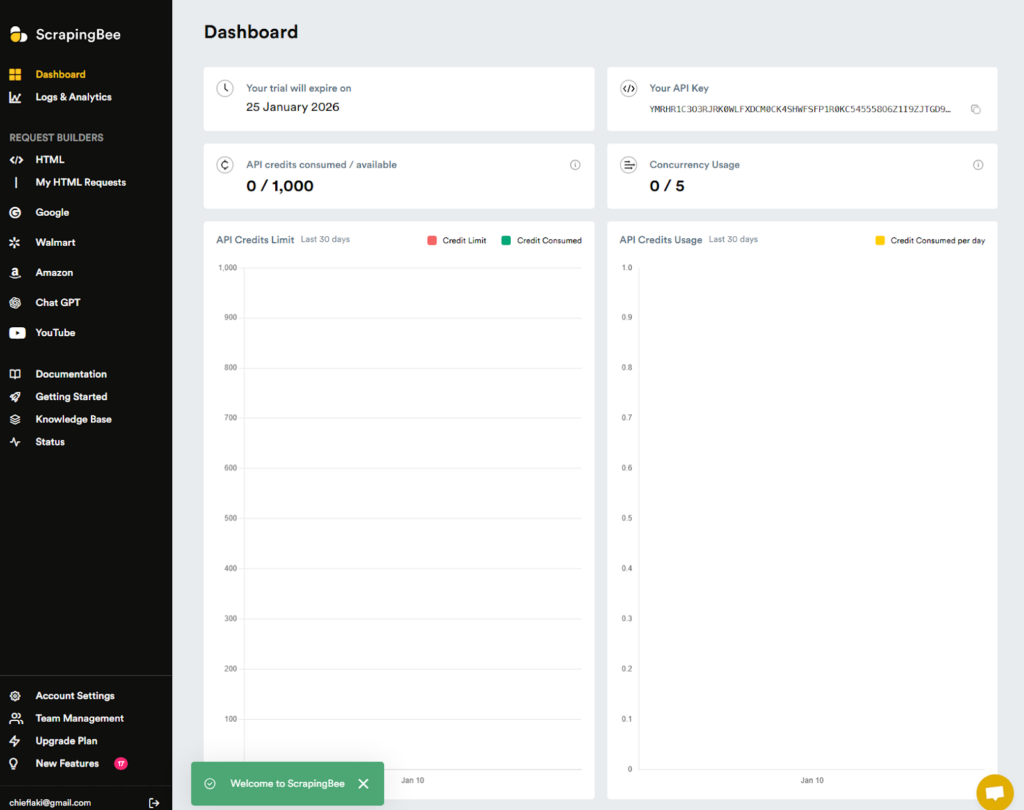
After creating your ScrapingBee account, you are directed to the dashboard, where you can view various templates and access API usage statistics.
For today’s scraping task, I will use a basic e-commerce website with clear sections and a product list that should be straightforward to scrape. The point of the task is to extract data and assess its richness and ease of use, rather than navigating a complex website structure. Let’s see how ScrapingBee does.
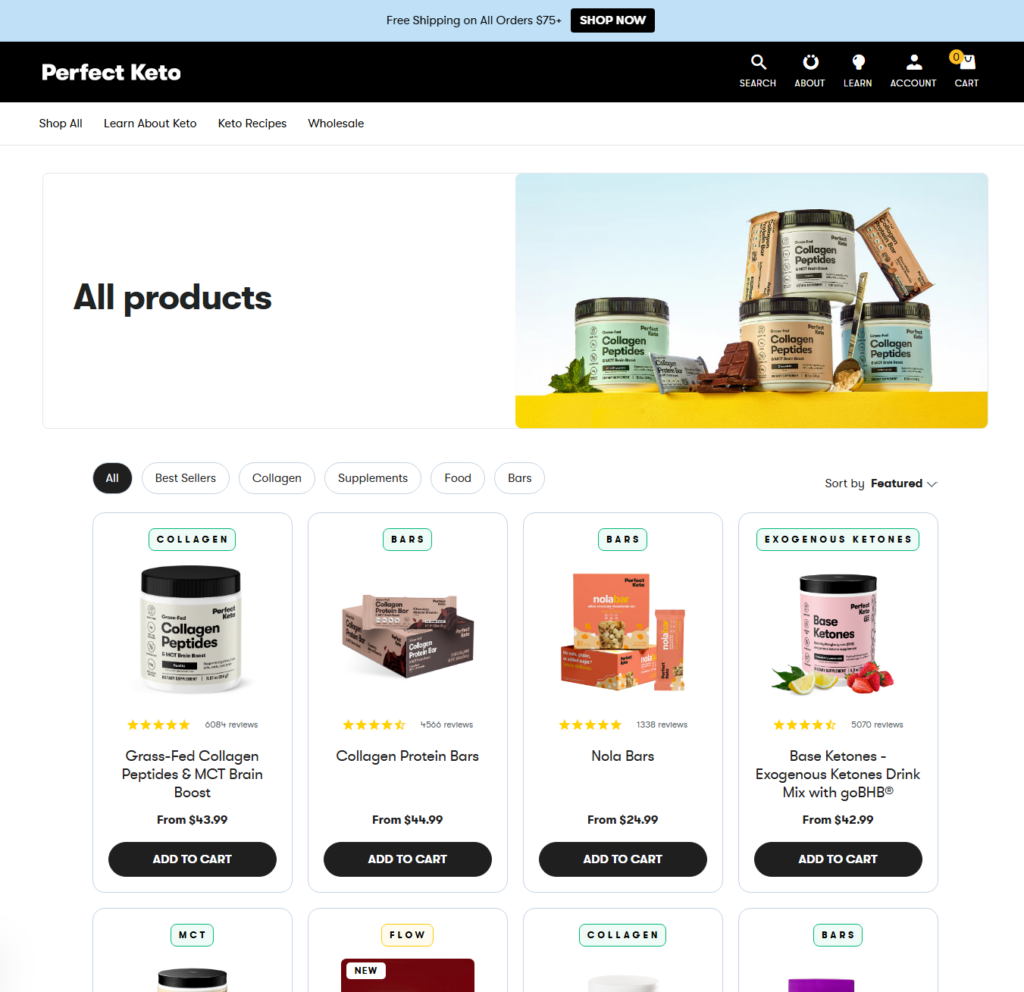
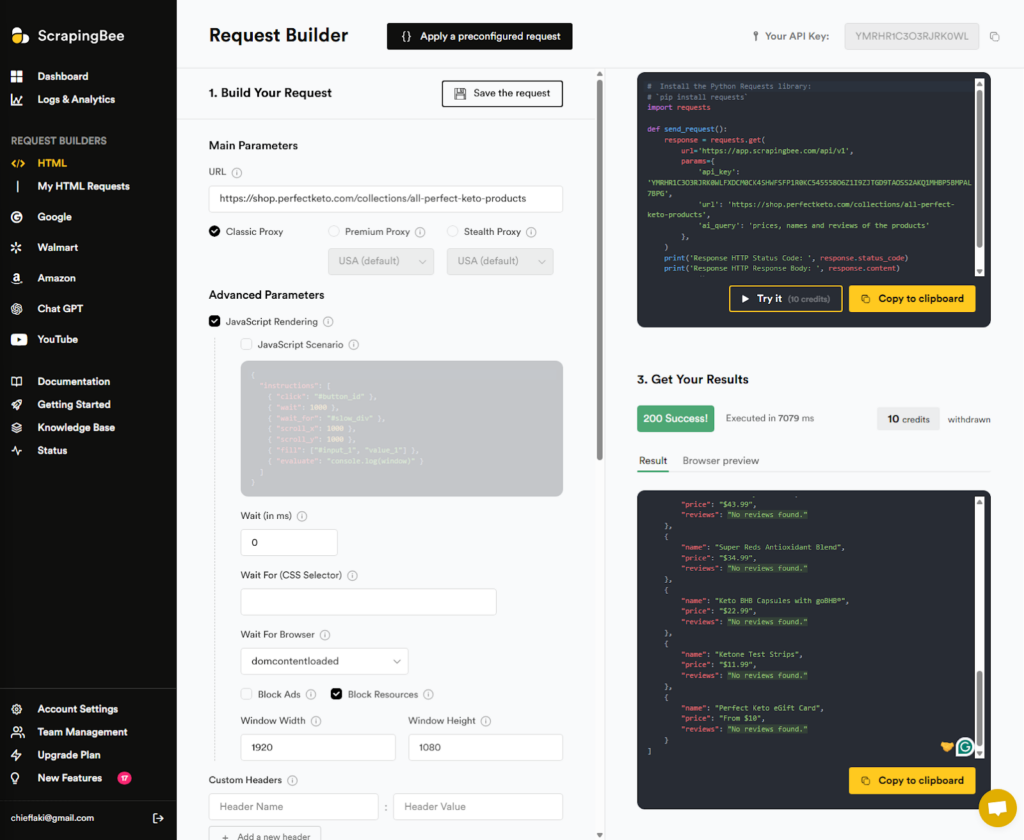
In ScrapingBee’s Request Builder, there are numerous options to select from, and I would say this is an advanced setup with a wide range of features. ScrapingBee provides code that can be used in various programming languages, or you can send the request directly in the browser for testing purposes.
I define the link to scrape data from and use a classic proxy for this task, as this website does not have high bot detection levels. You should use the premium proxy for more popular websites that have high levels of anti-bot detection.
In the second part of the request, I specify what data I want, which is prices, names, and reviews of the products. ScrapingBee appears to be fetching incomplete data, as no reviews are found. ScrapingBee does not have a subpage scraping feature, which would require clicking on each product and gathering more detailed data. However, I at least expected the number of reviews and ratings, as shown on the page for each product.
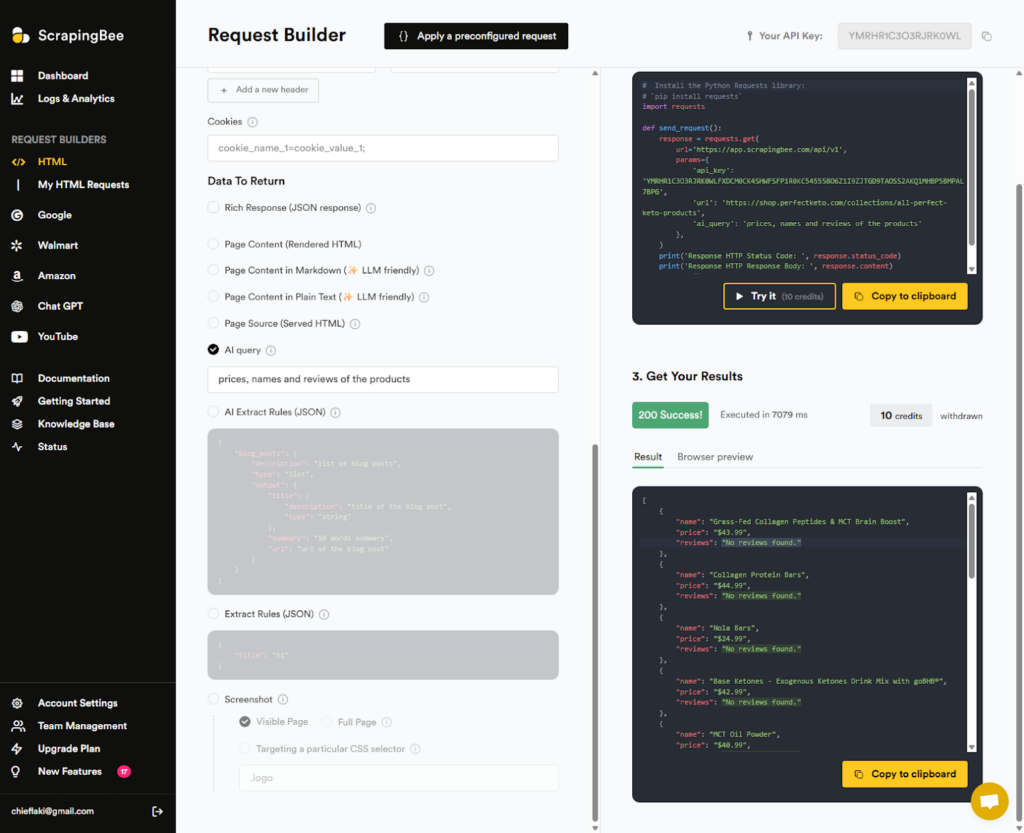
Very little data is collected, and I had to specify what I wanted, which is not what I received. Now, of course, this is just one aspect of ScrapingBee, and with a specific look into the fetched HTML structure, we could extract more detailed data. However, this would make it much more complicated to use.
I want to try another example, and this time I will use ScrapingBee’s template for Amazon scraping, along with Python code. Using the requests library, ScrapingBee’s server can return results after the HTTP request is made.
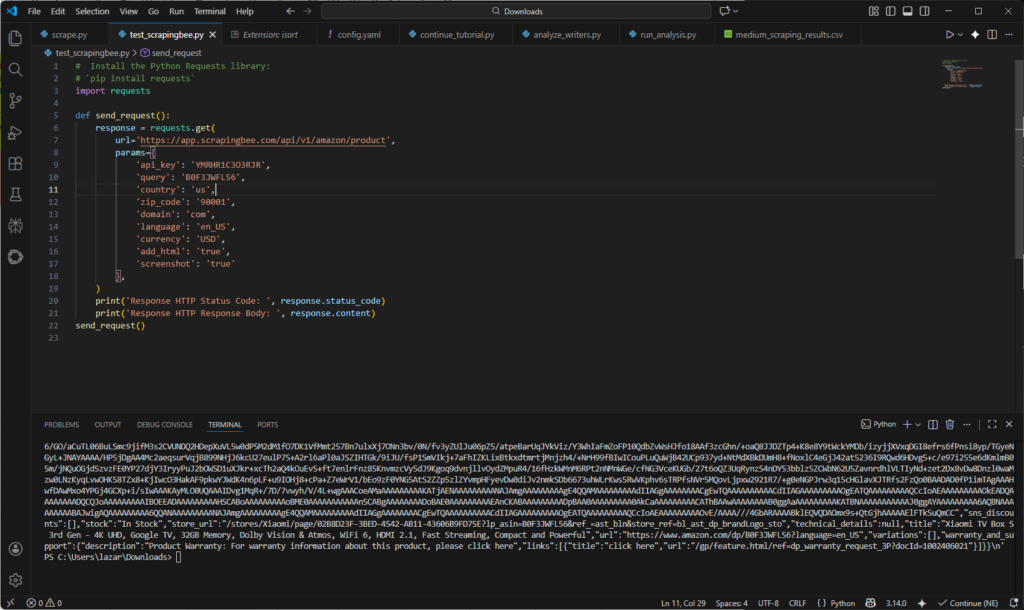
The data is fetched, but it is tough to read and must be processed further before it is in a valid state. Let’s see how alternatives perform.
ScrapingBee alternative: Chat4Data Review
Chat4Data is a no-code, AI-powered web scraping tool that utilizes natural language to extract data from any website. Chat4Data is a ScrapingBee alternative that performs web scraping tasks with significantly higher accuracy, especially in terms of data quality.
Before I discuss all the features of Chat4Data, let’s see how it performs in action compared to ScrapingBee.
Chat4Data is a Chrome extension that starts on any website and allows you to understand what data you want with natural language. It automatically recognizes the HTML structure and, with the aid of AI, assigns different categories immediately. In this case, I want to scrape the product list, but Chat4Data found more, in case you want something different from the website.
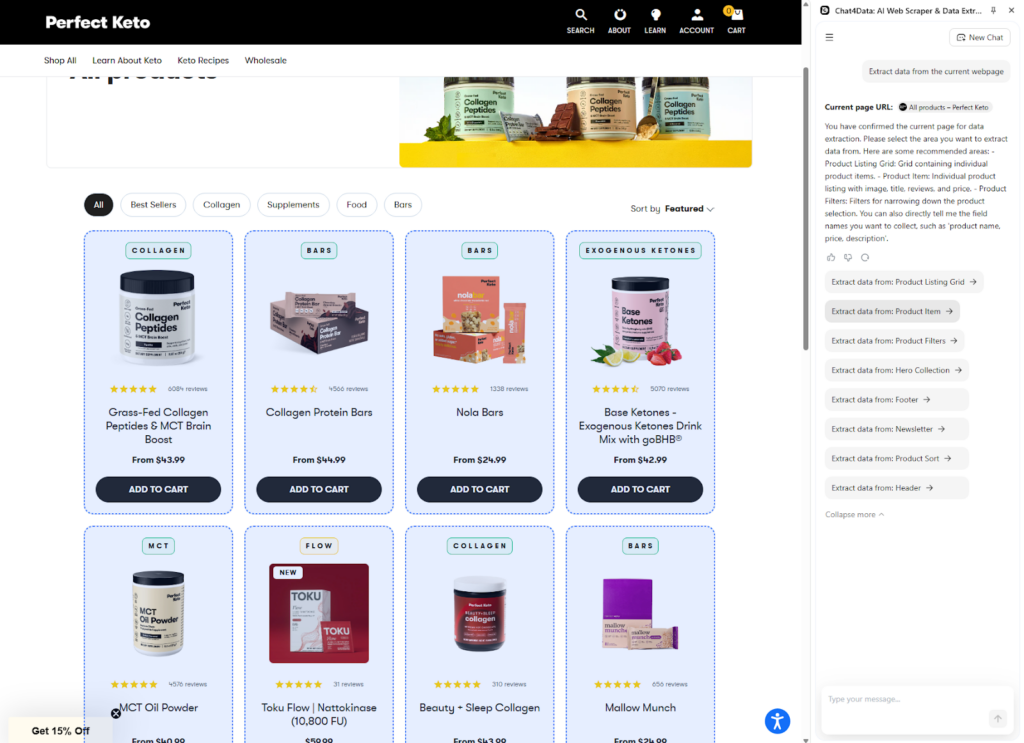
After the initial analysis, Chat4Data finds all the elements with clear names that are ready to be extracted. Compared to ScrapingBee, Chat4Data can extract reviews, and this is already an improvement in data quality.
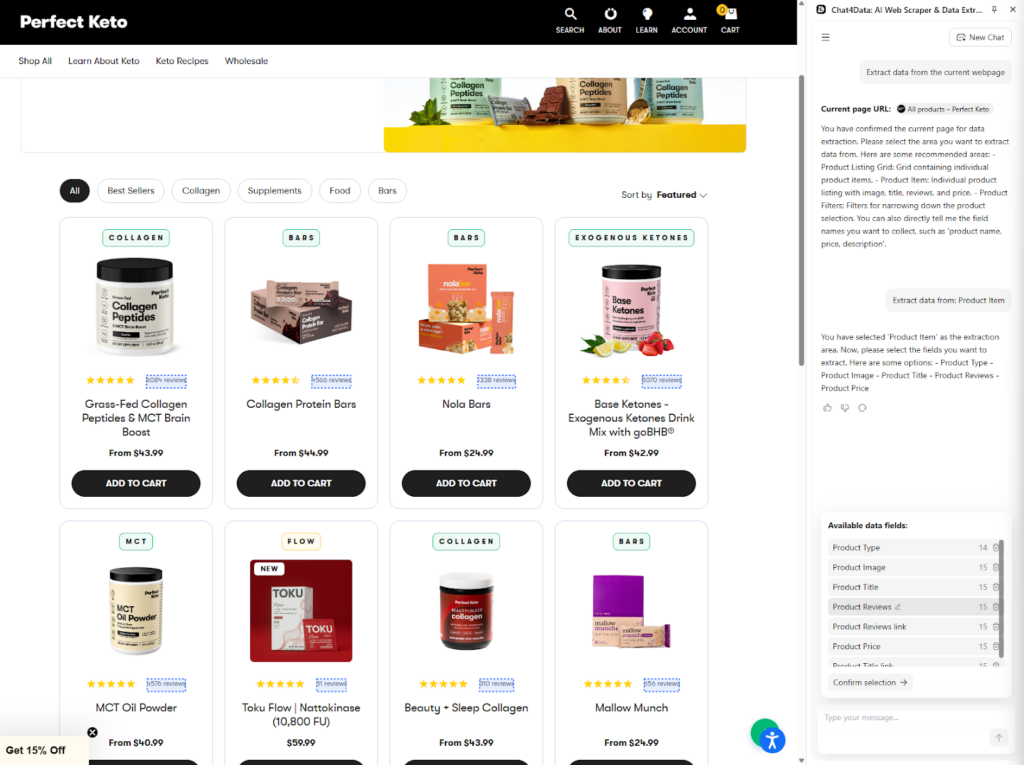
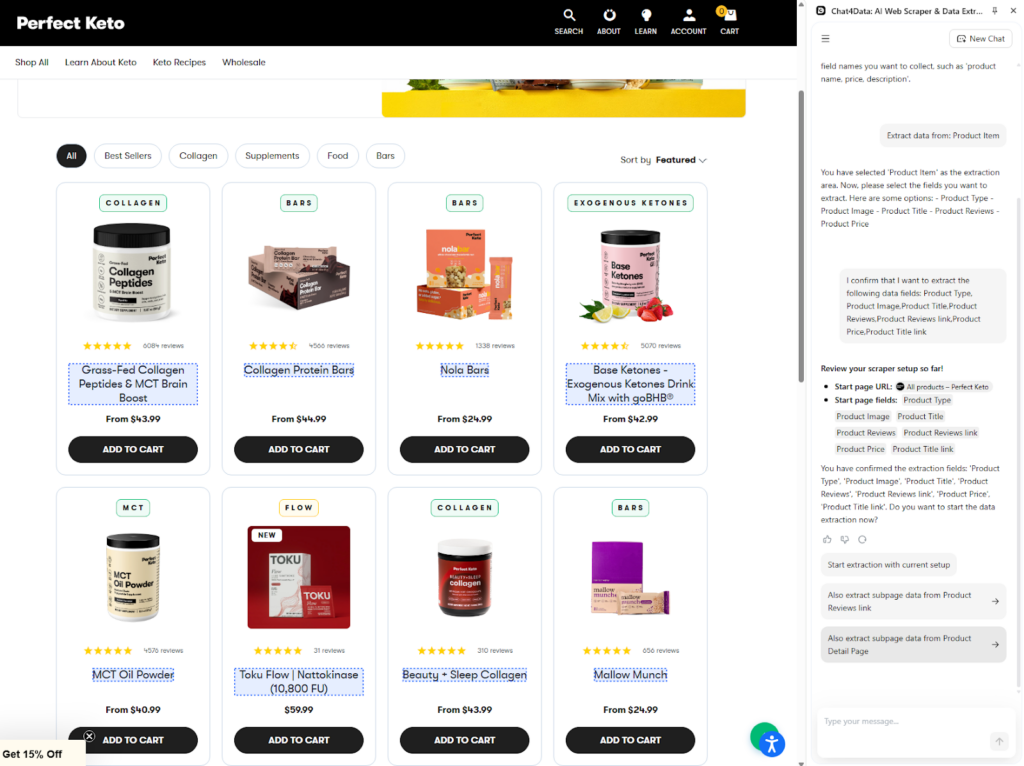
After confirming the initial data field, Chat4Data finds underlying links that can be scraped for extra information. Subpage scraping is a feature that Chat4Data utilizes to automatically cover all bases of information. I will scrape the subpage of each product for this example.
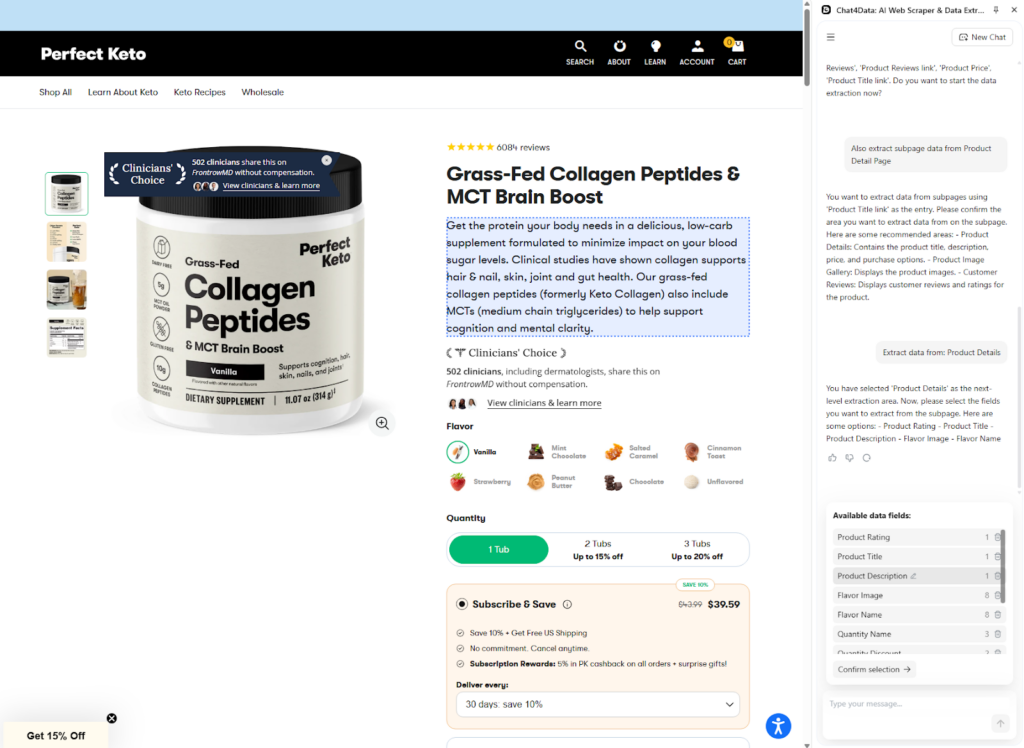
In the subpage of each product, Chat4Data analyzes what it can scrape and suggests multiple options. I decided to go with the product description so I can perform a market analysis and gather competitor statistics for later.
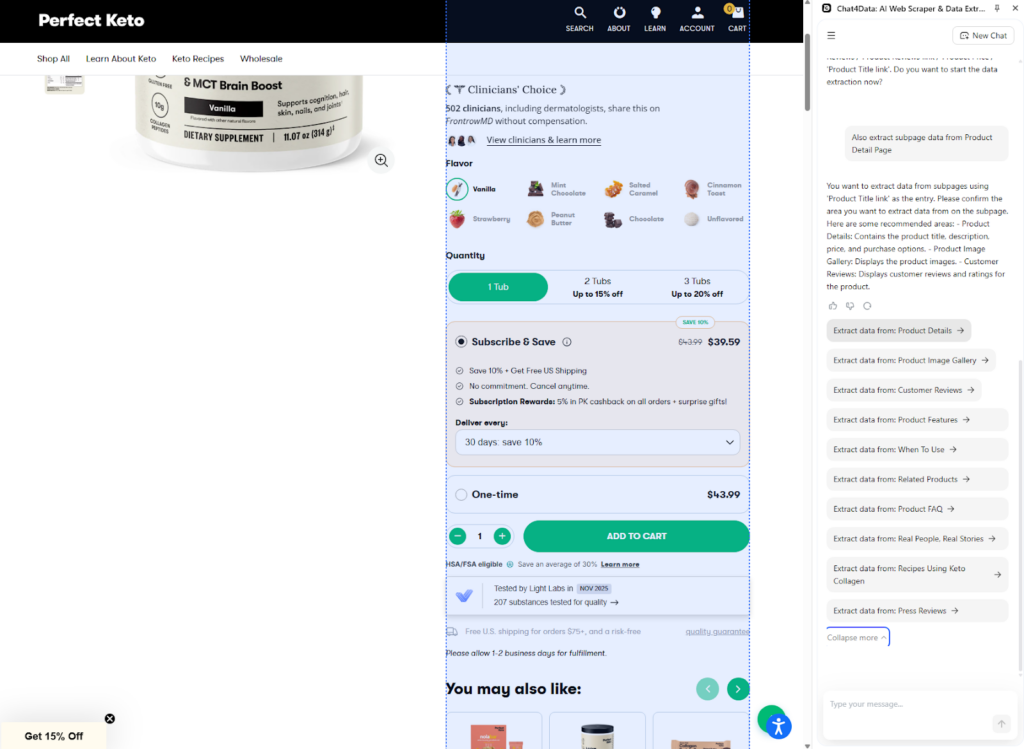
Chat4Data also finds additional information that can be used for analysis and scrapes it as well.
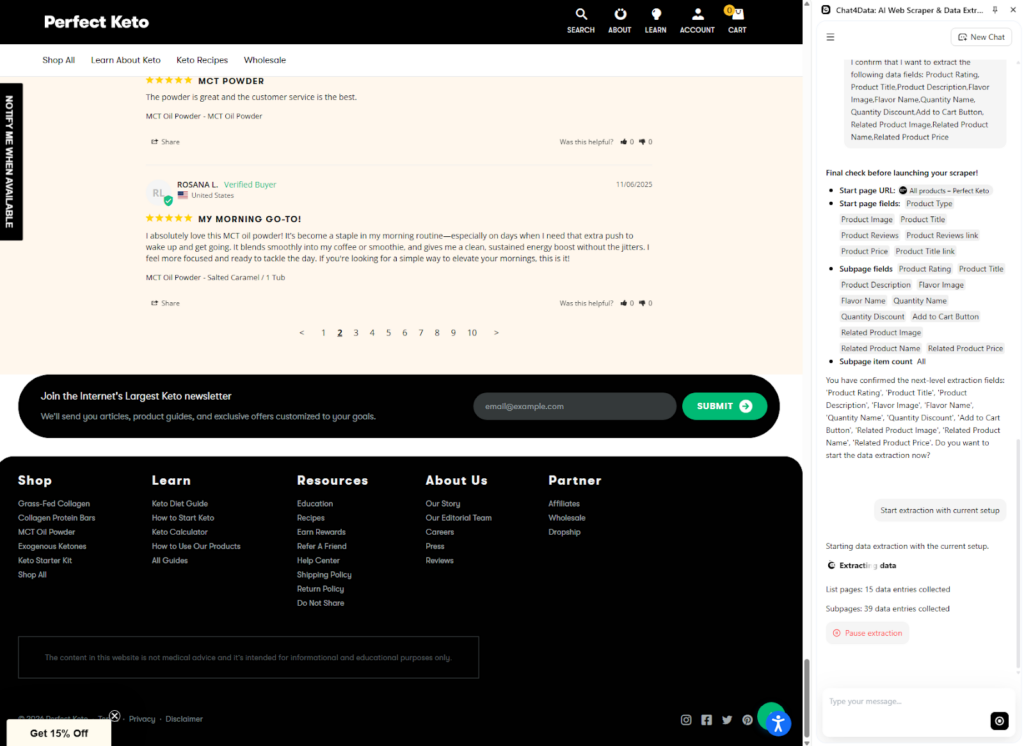
Compared to ScrapingBee, Chat4Data automatically handles pagination using AI detection of buttons and fields to navigate to the next page and scrape the full extent of the data offered.
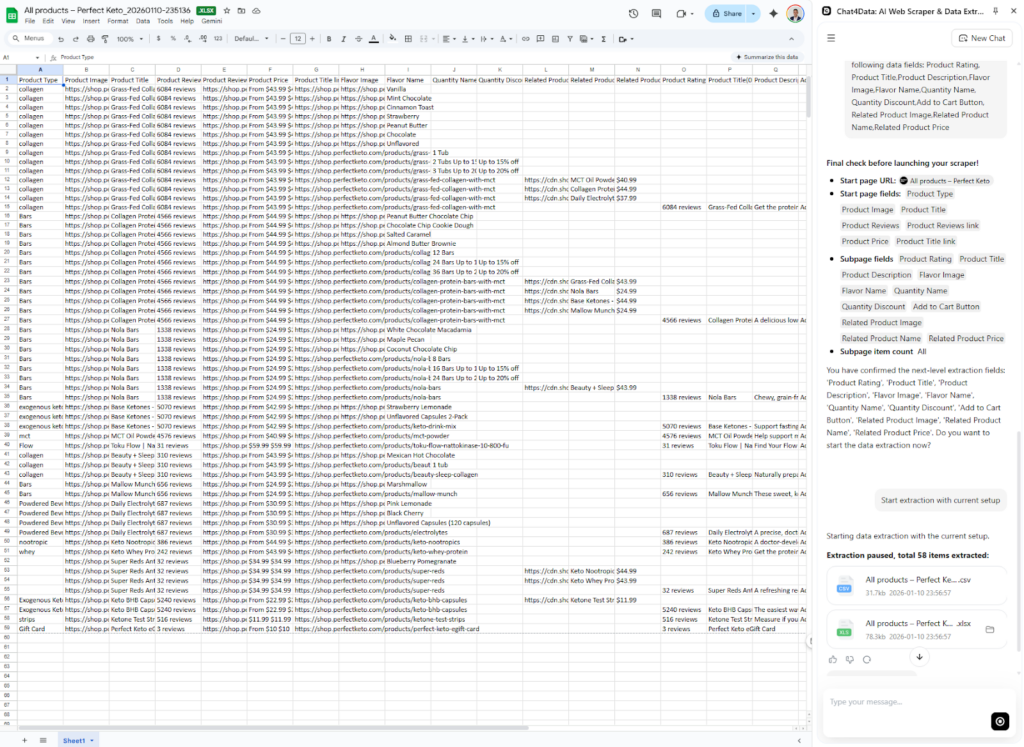
Final data is presented in either Excel or CSV formats and can be easily exported. Chat4Data saves your files in chats with premade templates for 90 days (15 days for free users). The data is precise, with straightforward column names, and all information available on the website is collected.



Key Features and Advantages of Chat4Data over ScrapingBee
- Automatic pagination: Chat4Data handles multipage websites by automatically detecting pagination buttons and traversing them with ease. For ScrapingBee, you are required to build custom code for each website to perform this task.
- Automatic Field detection: The system can recognize target URLs and data fields entered by the user, automatically creating the scraping task for faster setup.
- Data retention: Saves scraped data within the platform for 90 days (15 days for free users), providing a temporary storage and management solution, which ScrapingBee does not offer.
- AI Column names: Generates straightforward, user-friendly, and relevant names for extracted data columns using AI, making the final dataset immediately ready for analysis.
- Natural language prompting: Allows users to specify their scraping goals and desired data points using simple, conversational language, eliminating the need for coding skills.
- Privacy of data: All data is processed locally, and no credentials are saved during the scraping process. Unlike ScrapingBee, which must send all requests through its servers, this ensures complete privacy.
- Affordable cost: Offers a more cost-effective solution, especially for freelancers and small businesses, compared to ScrapingBee’s credit-based API subscription model, which can quickly become expensive with high usage.
- Maintenance: Almost no maintenance is required since there is no code to maintain. Chat4Data automatically adapts to changing websites and scrapes data daily, just as it has before.
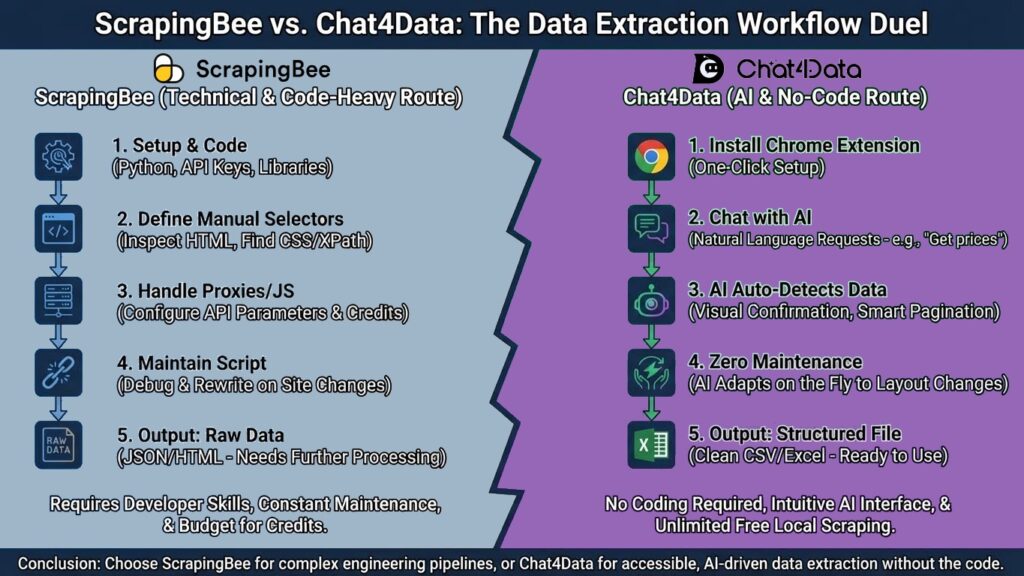
Conclusion: Choosing the Right Tool for Your Needs
Based on my experience with both ScrapingBee and Chat4Data, I would opt for Chat4Data because of its ease of use and the quality of data it provides. Other features, such as automatic pagination and privacy, make it a stronger choice for most users, especially beginners. If you are a developer, integrating ScrapingBee can be easier and a better option. For the vast majority of users—data analysts, marketers, researchers, and business owners—the goal is the data, not the code, so a better choice is Chat4Data.
For this reason, Chat4Data is the best alternative to ScrapingBee. It makes data extraction more accessible. Anyone can transform the web into a database by combining the power of AI with an intuitive chat interface. Chat4Data simplifies data collection with features such as deep scraping (listing and detail), unlimited free local scraping, and automatic field detection.
It’s time to switch if you’re sick of troubleshooting Python programs or worried about API credit restrictions.
FAQs about Scrapingbee and Its Alternative
- What is the best ScrapingBee alternative?
Chat4Data is the best alternative to ScrapingBee, offering higher-quality data, greater privacy, and ease of use. Although ScrapingBee has many features to offer, it lacks focus on sharpening the ones already in its arsenal.
- Can ScrapingBee bypass CAPTCHA?
Yes, ScrapingBee has advanced proxy rotation and CAPTCHA bypass algorithms that are utilized when requesting to fetch data. It can be costly to do so because some websites have advanced anti-bot detection, and you have to use ScrapingBee’s premium proxy. Chat4Data utilizes advanced detection avoidance algorithms in all subscriptions, ensuring there is nothing to worry about.
- How does Chat4Data handle pagination compared to ScrapingBee?
ScrapingBee does not automatically support pagination; instead, developers must build this logic into the code of the web scraping workflow. Chat4Data, on the other hand, makes this simple by automatically recognizing pagination and fetching all available data.
- Is web scraping with ScrapingBee legal?
Yes, scraping publicly available data is generally acceptable in many jurisdictions, as long as you do not violate personal data protection conditions (such as GDPR/CCPA) or harm the website’s infrastructure. Chat4Data promotes ethical scraping by running at a human pace locally, as opposed to bombarding servers with thousands of concurrent API queries, unlike ScrapingBee.
- Can ScrapingBee scrape data behind a login?
Yes, ScrapingBee can scrape data behind a webpage that requires a login, and there are multiple ways to do so programmatically. All settings related to the request you send are listed here. Compared to Chat4Data, this approach is significantly more complex and requires ongoing maintenance. Since Chat4Data is a browser extension, all you need to do is log in to the webpage and then start Chat4Data to scrape any data you want.