

Web data extraction used to mean one of two things: copy-pasting by hand, or writing and maintaining code. The first is slow, the second shuts out anyone who can’t program. AI scraping removes both bottlenecks, which is why it’s quickly becoming the default way to get web data, especially for non-technical users. And the AI-driven web scraping market, which is projected to nearly double from $10.2 billion in 2026 to $23.7 billion by 2030, is growing fast.
With that much momentum behind it, it’s a must to learn more about AI scraping. This guide covers what AI scraping is, how it compares to traditional methods, how to choose the right tool, and real-world use cases for 2026.
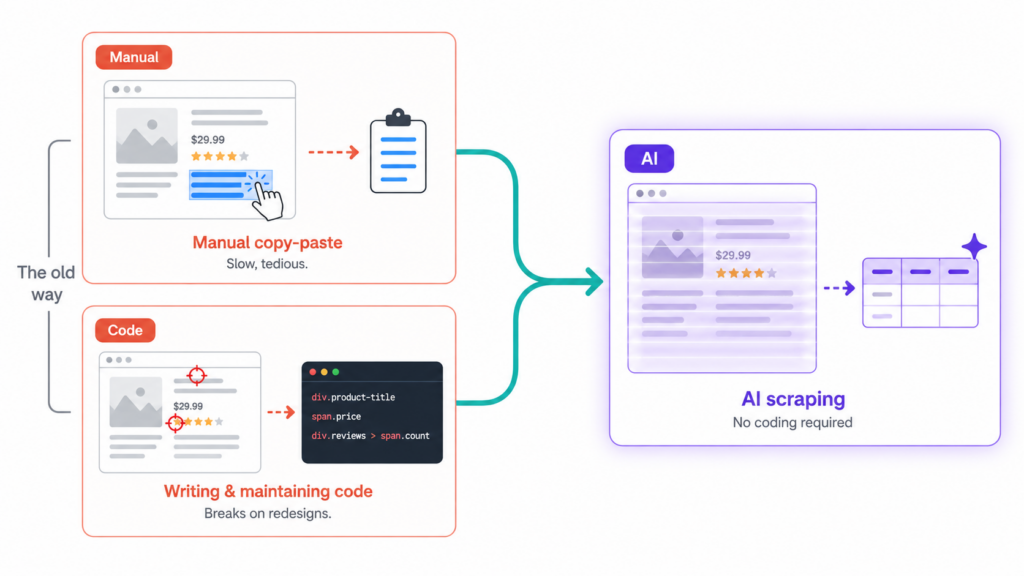
What Is AI Scraping?
AI scraping is the use of artificial intelligence to automate web data extraction.
Think of it as a machine that reads a page the way a person would. Using large language models, natural language processing, and computer vision, it interprets what each part of the page actually means, recognizing that one number is a price and a block of text is a product description, regardless of where they sit or how the HTML is structured.
That shift unlocks things rule-based scrapers struggle with. The same setup can pull data from sites with completely different layouts, keep working when a page is redesigned, and even read information locked inside images, PDFs, or scanned documents that have no clean HTML to target at all.
Traditional Scraping vs AI Scraping
The difference goes deeper than convenience: it comes down to how each one handles complexity and change.
Traditional scraping follows fixed rules like CSS selectors and XPath. That makes it fast and cheap on stable sites, but brittle: any layout change breaks it, and a developer has to step in to fix it. The maintenance cost is not trivial either. According to data tracked by Outsource Bigdata across production environments, teams maintaining rule-based scrapers across 10 or more websites spend about 30% of their engineering time just keeping those scrapers alive.
AI scraping reads each page on the fly, so it handles layout changes more gracefully, though it still needs prompt tuning and output validation to stay reliable. The trade-off is that it runs slower uses more compute per page and at scale the per-page cost can be significantly higher. The table below breaks down how that plays out across the dimensions that usually matter.
| Feature | Traditional Scraping | AI Scraping |
| Setup | Requires coding (Python, CSS selectors, XPath). Developer needs to understand HTML structure and write parsing logic. | Natural language prompts, visual builders, or API calls. Lower barrier, but complex pages still need prompt tuning. |
| Maintenance | Breaks when site structure changes. Needs manual rule rewrites and ongoing monitoring. | More resilient to layout changes, but not maintenance-free. Prompt adjustments and output validation still need human oversight. |
| Data types | Primarily structured HTML. Can handle other formats with extra libraries, but requires more code. | Handles unstructured text, images, PDFs, and messy markup more naturally, often out of the box. |
| Learning curve | High. Programming knowledge required (Python, JS, regex, DOM). | Low to medium. Simple prompts are easy; reliable large-scale extraction still takes technical skill. |
| Dynamic content | Needs headless browsers (Puppeteer, Playwright) plus custom wait/scroll logic. | Most AI scraping tools have built-in JS rendering with minimal config. |
| Speed | Very fast, milliseconds per page. Built for high-volume pipelines. | Slower, seconds per page due to LLM inference overhead. |
| Cost | Low per-page cost. Main expense is developer time for building and maintaining scrapers. | Higher per-page cost from LLM API calls. At scale, can be 10-50x more expensive than traditional approaches. |
| Reliability | Deterministic: same input always gives same output. Breaks hard on site changes, but predictable when running. | Non-deterministic: same page may return different formats or miss fields across runs. Risk of hallucinated data and format drift. |
| Anti-bot | Requires manual integration of proxies, CAPTCHA solvers, and fingerprint rotation. | Some tools bundle anti-bot features, but advanced protections still need extra engineering. |
| Best for | High-volume, stable-structure pipelines where speed and cost efficiency matter most. | Varied sources, changing layouts, rapid prototyping, or when dev speed matters more than per-page cost. |
It is also worth noting that AI extraction is non-deterministic: the same page can return slightly different results across runs, so spot-checking output is good practice.
Neither approach wins outright; the right fit depends on who you are. If you run high-volume pipelines over stable sites and have a developer on call, traditional scraping is still hard to beat on speed and cost. For everyone else, especially non-technical users dealing with varied or changing sites, AI scraping is what makes the job possible at all.
How AI Scraping Works
Under the hood, modern AI scrapers combine four layers of technology that together mimic how a human would gather data from a website. Understanding these layers helps explain why AI scrapers handle complex sites that traditional scrapers cannot, and where their limits are.
| Layer | What it does | Key technologies |
| Acquisition | Navigates to the page, renders JavaScript, manages sessions and proxies. | Playwright, Puppeteer, headless Chrome |
| Interpretation | Identifies and extracts the requested fields by reading the page contextually. | LLMs (GPT, Claude, Gemini), NLP, computer vision |
| Adaptation | Detects layout changes and re-maps fields without human intervention. | Pattern recognition, embedding similarity |
| Output | Cleans, structures, and exports the data in usable formats. | JSON schemas, CSV/Excel converters |
A typical workflow runs through those four layers in order. The scraper takes an extraction request, navigates to the target site like a real browser would, uses vision and language models to identify the requested fields, adapts on the fly if the layout differs from what it expected, and then returns clean structured data.
No method clears every hurdle, though. Anti-bot detection, login walls and CAPTCHAs, and JavaScript-heavy pages that load only as you scroll are facts of life for any scraper, AI or not, and no tool handles all of them equally well.
Types of AI Scraping Tools
AI web scraping tools fall into three main categories along one axis: how much technical work they ask of you, and where they run. Understanding which one fits your situation will save you from buying capabilities you do not need.
AI Scraping Chrome Extensions
- Popular tools: Chat4Data, Bardeen, Instant Data Scraper
- Strengths: runs in your own browser, so authenticated pages work without extra setup
- Limitations: built for on-demand jobs, not industrial-scale pipelines of thousands of pages a day
- Pricing: free tier available; paid plans from $10+/month
Best for: non-technical users and small teams; lightest to start
No-Code Cloud Platforms
- Popular tools: Octoparse, Browse.AI
- Strengths: cloud scheduling, IP rotation, and template libraries included
- Limitations: steeper point-and-click learning curve; your data passes through the vendor’s cloud
- Pricing: free tier available; paid plans from $50+/month
Best for: teams that need scheduled, recurring scrapes without writing code
Developer / API Platforms
- Popular tools: Firecrawl, Oxylabs Web Scraper API, ScrapingBee
- Strengths: offers the most control over extraction logic and output format
- Limitations: requires coding and API key management; credit costs climb fast at volume
- Pricing: $16-$99+/month
Best for: developers and production pipelines at scale
A Closer Look at Popular AI Scrapers
Within these categories, a handful of tools come up most often. Here is how a few of the better-known options compare, and who each one suits best.
Chat4Data
The most conversational of the three approaches. You describe the whole job in plain language and refine it through chat, rather than clicking fields or picking templates.
- Best for: non-technical users and small teams who want lightweight scraping.
- Strengths: runs entirely in your own browser, so authenticated pages work and no data leaves your machine.
- Trade-offs: built for lightweight, on-demand scraping rather than industrial-scale pipelines that process thousands of pages per day.
- Pricing: free credits to start; paid plans from $10/month.
Octoparse
A mature no-code cloud platform with scheduled execution.
- Best for: complex, recurring scheduled jobs run by non-developers.
- Strengths: cloud scheduling, IP rotation, automatic CAPTCHA solving, and 500+ site templates.
- Trade-offs: point-and-click workflow has a steeper learning curve than browser-based tools; full features and proxy/CAPTCHA usage sit behind higher-tier plans.
- Pricing: free forever plan (10 tasks); Standard from $69/month (billed annually).
Firecrawl
A developer API that turns whole websites into clean, LLM-ready markdown.
- Best for: feeding data into a language model or building an automated pipeline.
- Strengths: clean structured output, handles crawling and extraction at scale.
- Trade-offs: assumes you are comfortable writing code and managing API keys; credit costs climb once you enable AI extraction.
- Pricing: free tier (500 one-time credits); paid plans from $16/month.
No single tool wins on every axis.
Just start with a web scraping extension when you want to test a workflow quickly, move up to a no-code cloud platform when you need scheduling, and reach for an API platform when extraction volume or pipeline integration demands it.



Common Use Cases
AI scraping supports a wide range of business applications. Here are the most common ones at a glance:
| Use Case | Who Uses It | Typical Data Sources |
| E-commerce & Price Monitoring | Online sellers, e-commerce operators | Amazon, Walmart, eBay, Shopify stores |
| Market Research & Competitive Intelligence | Marketing and strategy teams | Competitor websites, industry publications, review platforms |
| Lead Generation | Sales teams, recruiters | Directories, LinkedIn, business databases |
| Academic & Data Research | Researchers, academics | Government databases, news archives, academic directories |
| Sentiment Analysis & Brand Monitoring | Product, support, and PR teams | Review sites, forums, social media |
A few notes on the most impactful applications:
- E-commerce price monitoring is the most common use case. Dynamic pricing is now standard practice across retail, and a seller tracking hundreds of competing products can have updated pricing in minutes instead of days.
- Customer Reviews Gathering is equally valuable: tracking competitor ratings and customer feedback at scale helps sellers spot product issues and market gaps early.
- Lead generation turns hours of manual copy-paste into structured contact lists ready for CRM import. One scrape can replace a full afternoon of research.
- Academic research is where AI scraping arguably adds the most value, since public data sources like government databases and news archives often have inconsistent layouts that break traditional scrapers within weeks.
What AI Scraping Looks Like in Practice
Concepts aside, what does an AI scrape actually look like? We’ll walk through Chat4data, since its browser-based workflow is representative of how this category of tools operates.
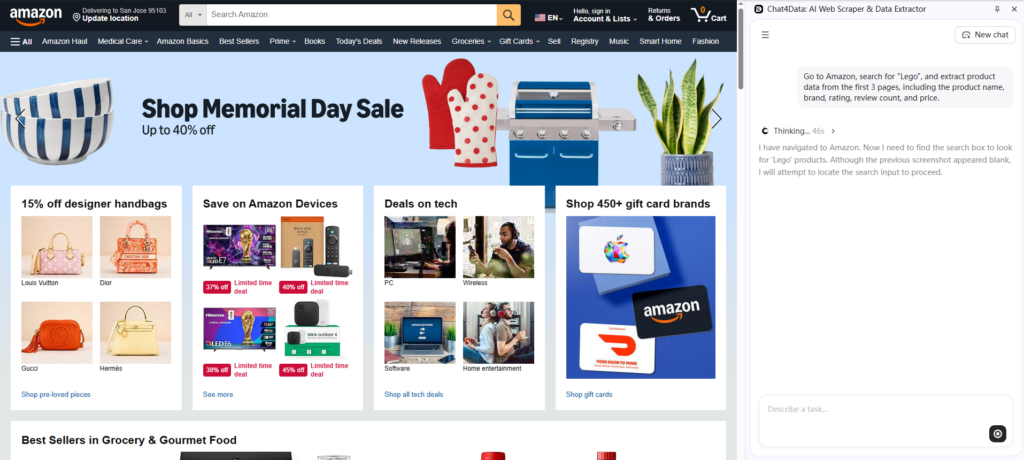
Say you want to collect product names, brands, ratings, review counts, and prices for the top Amazon results for “Lego,” sorted by best sellers, across the first three pages. With Chat4data, that task compresses to four steps:
- Describe the task. Open the Chat4data Chrome extension and type your request in plain language: “Open Amazon, search for ‘Lego’, sort by best sellers, and scrape product name, brand, rating, number of ratings, and price from the first 3 pages.”
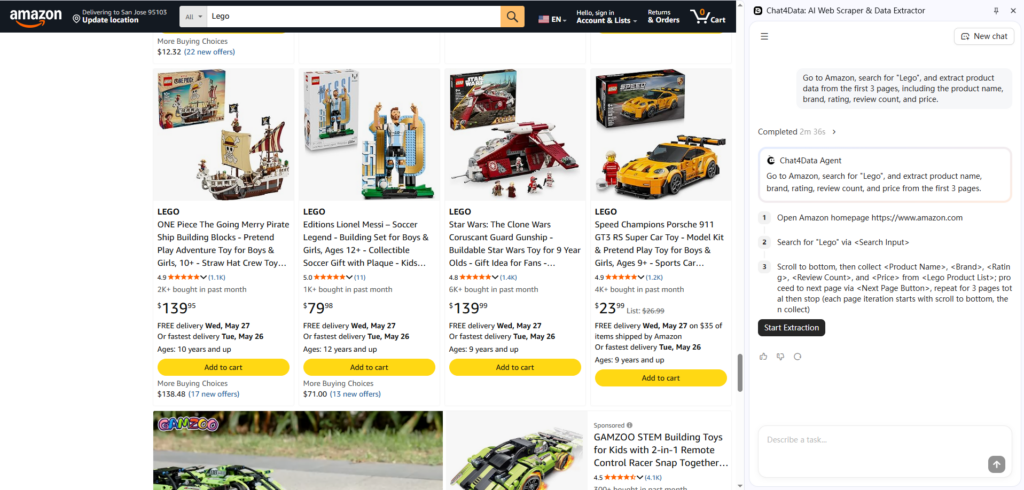
- Review the plan. Before anything runs, Chat4data shows you an execution plan step by step: which pages will be visited, what actions will be taken, what fields will be extracted. This lets you catch errors before spending time or credits. If you need to adjust the fields or add a column, just say so in the chat.
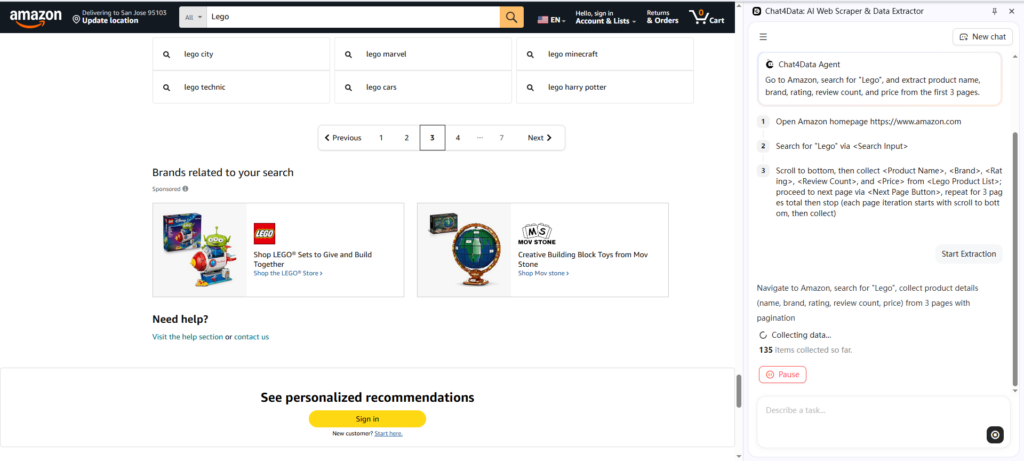
- Run the extraction. The tool navigates the site like a real browser session, scrolling, clicking pagination, and handling pop-ups along the way.
- Export the results. Download your data as CSV, Excel, or JSON.
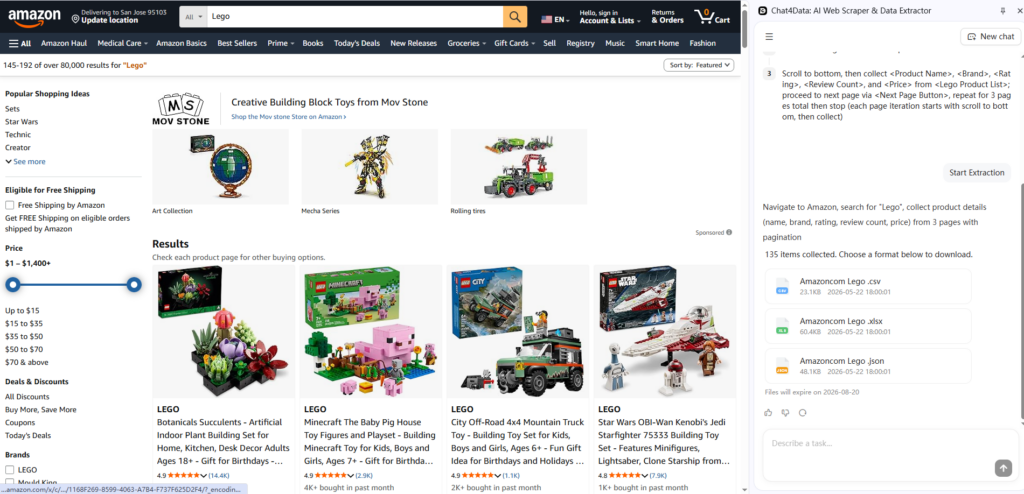
A few seconds later, the messy product listings have become a clean, structured table:
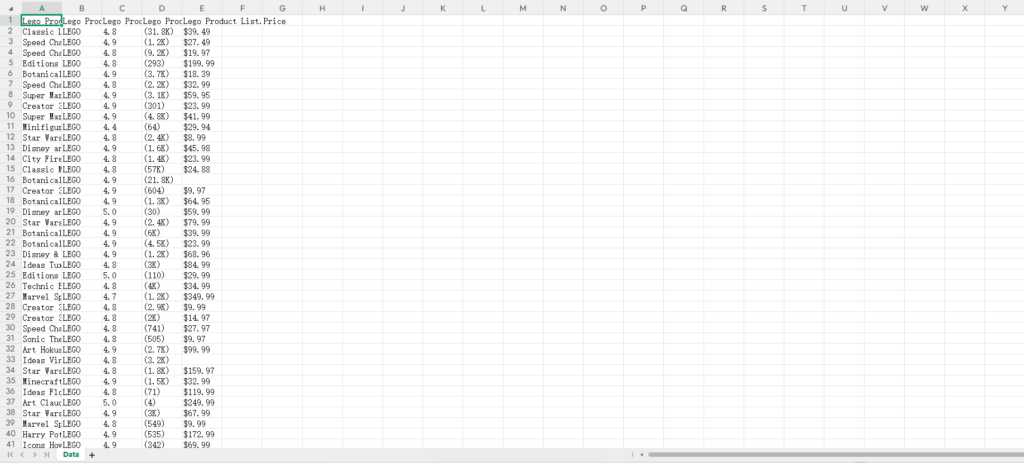
From request to finished spreadsheet, the whole run takes a couple of minutes and zero code. The best way to get a feel for what AI scraping can do is to run one yourself, free.
The Bottom Line
The real shift behind AI scraping is not a single tool but a change in who gets to use web data at all. For years, turning a website into a usable dataset meant either tedious manual work or writing and maintaining code, which kept it in the hands of developers. By reading pages the way a person does, AI scraping moves that capability to anyone who can describe what they want.
That does not make traditional scraping obsolete. High-volume, stable pipelines still run faster and cheaper on hard-coded rules, and AI extraction carries real trade-offs in speed, cost, and the occasional misread page. The right approach still depends on your sources, your scale, and whether you have a developer on hand.
But for the research, monitoring, and lead-generation work most people actually need, the barrier has dropped to almost nothing. The simplest way to understand what that feels like is to try it: pick a low-friction tool, a browser-based one is the easiest place to start, point it at a page you care about, and see how close the result gets to the spreadsheet you had in mind.
FAQ
Before you start, here are answers to a few questions readers commonly ask.
1. What is AI scraping in simple terms?
AI scraping, also called AI web scraping, uses artificial intelligence to pull data from websites automatically. Instead of writing code that tells a scraper exactly which element to look at, you describe the data you need in plain language, and the AI reads the page’s structure and meaning to find and organize it for you.
2. How is AI scraping different from regular web scraping?
Traditional scraping follows coded rules (CSS selectors, XPath) that break when a site’s structure changes. AI scraping interprets page content contextually, so it adapts to layout changes without manual rewrites. The core difference is understanding meaning versus following rigid instructions. The trade-off is that AI scraping is generally slower and more compute-intensive, and can occasionally misread complex pages.
3. How accurate and reliable is AI scraping?
On clean, well-structured pages it is highly accurate, and its big advantage is resilience: because it reads meaning rather than fixed positions, it keeps working after a site is redesigned, where rule-based scrapers would break. It is not flawless, though. Deeply nested or unusual layouts can still trip it up, so for data you depend on, it is worth spot-checking results or adding a step that flags missing or malformed fields.
4. What is the best AI scraping tool?
There is no single best tool; the right one depends on your technical skills and use case.
- AI Scraping Chrome Extensions (Chat4Data) — easiest and fastest way to get started, no coding required
- No-code cloud platforms (Octoparse) — best for recurring, scheduled scrapes of moderate complexity
- API platforms (Firecrawl, Oxylabs) — most control, best for developers building custom pipelines
For most users, a browser-based tool like Chat4Data is the fastest path from zero to structured data.
5. Is AI scraping legal?
Scraping publicly available data (product listings, reviews, public directories) is generally legal in most jurisdictions, as long as no technical access controls are bypassed. To stay on the safe side:
- Respect robots.txt
- Avoid collecting personal data covered by GDPR or CCPA
- Check each site’s Terms of Service
- Do not overload servers with aggressive request patterns
Consult a legal advisor when in doubt, especially for personal data or commercial use.
6. Do I need coding skills to use an AI web scraper?
No. Modern AI scraping tools, particularly browser-based ones, are designed for non-technical users. You describe what you need in everyday language, and the tool handles the technical work: navigation, field detection, pagination, and data export.