
You know, I’ve tried a lot of web scraping methods in the recent months, web scraper Chrome extensions, LLM-based scrapers, and everything in between, all in search of the easiest and best way to scrape data.
So when I first came across Firecrawl, my initial thought was, “Here we go again. Another web scraping tool that claims you can scrape data just by writing prompts”.
After all, we already have plenty of no-code web scraping tools like Octoparse and Browse AI, along with Chrome extensions like Chat4Data that let you scrape websites using simple prompts.
But once I actually tested Firecrawl, I realized it is genuinely useful for real-world use cases, and more specifically for LLM-ready data.
And you might be wondering the same things I did. Who stands out among a group of Firecrawl alternatives? Why do we need another tool like Firecrawl? What is the best way to use it? And when does it actually make sense to include it in your workflow?
That’s exactly what I’m going to share here.
I’ll also compare it with a better alternative so you can clearly understand where Firecrawl fits, where it falls short, and how to use it properly.
With that said, let’s get started.
What Is Firecrawl (And Who It’s Really For)
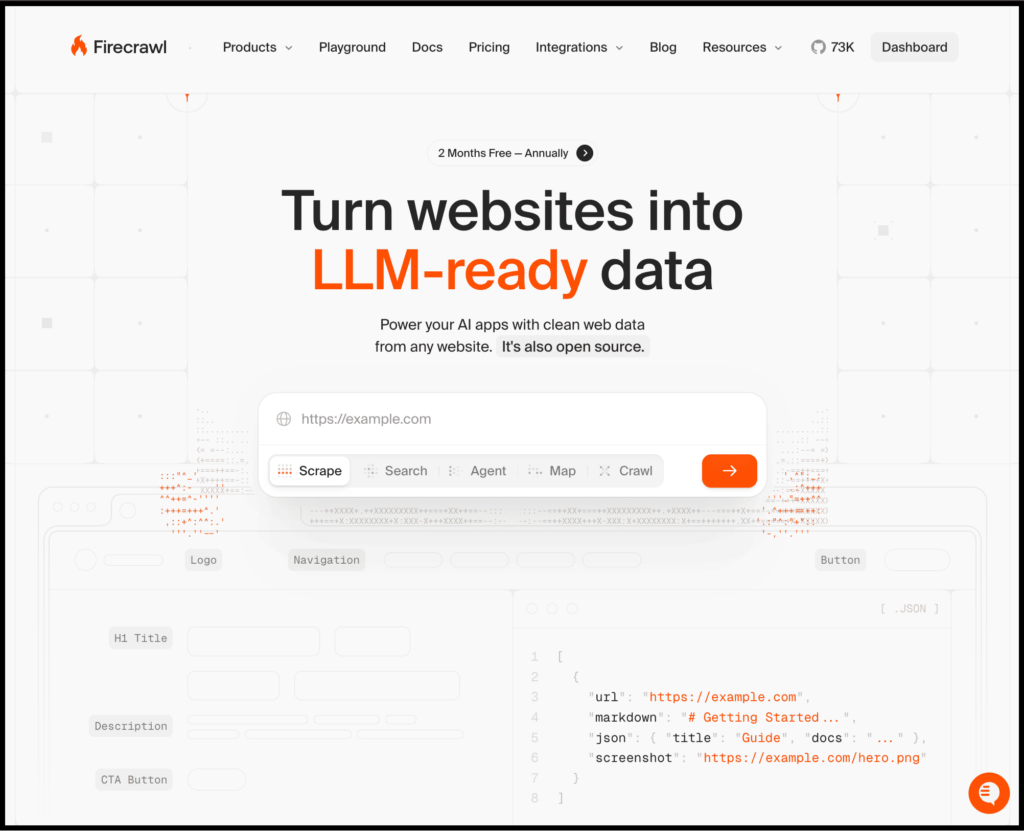
Well, Firecrawl is essentially a web-to-data layer designed for AI applications.
According to their Product Hunt page, “Firecrawl is one of the easiest ways to extract data from the web. Developers use it to reliably convert URLs into LLM-ready Markdown or structured data with a single API call”.
At a surface level, it looks simple.
You can provide a specific URL and scrape data, or use their agent to describe what you want to extract, and it handles the rest.
But at its core, Firecrawl is fundamentally built for developers.
Its real audience is AI agents, developers building autonomous workflows, and tools that need to programmatically pull structured web data at scale.
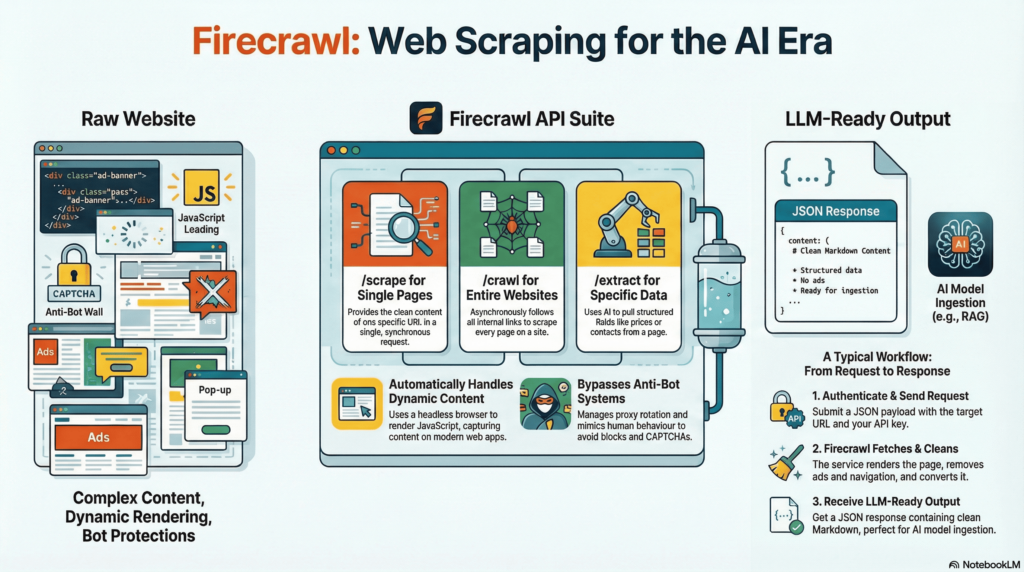
And for that, Firecrawl provides a number of API endpoints (each one is designed for a specific data-extraction task) that turns websites into clean, structured data. So LLMs can actually understand and work with it.
Here’s a simple process it follows:
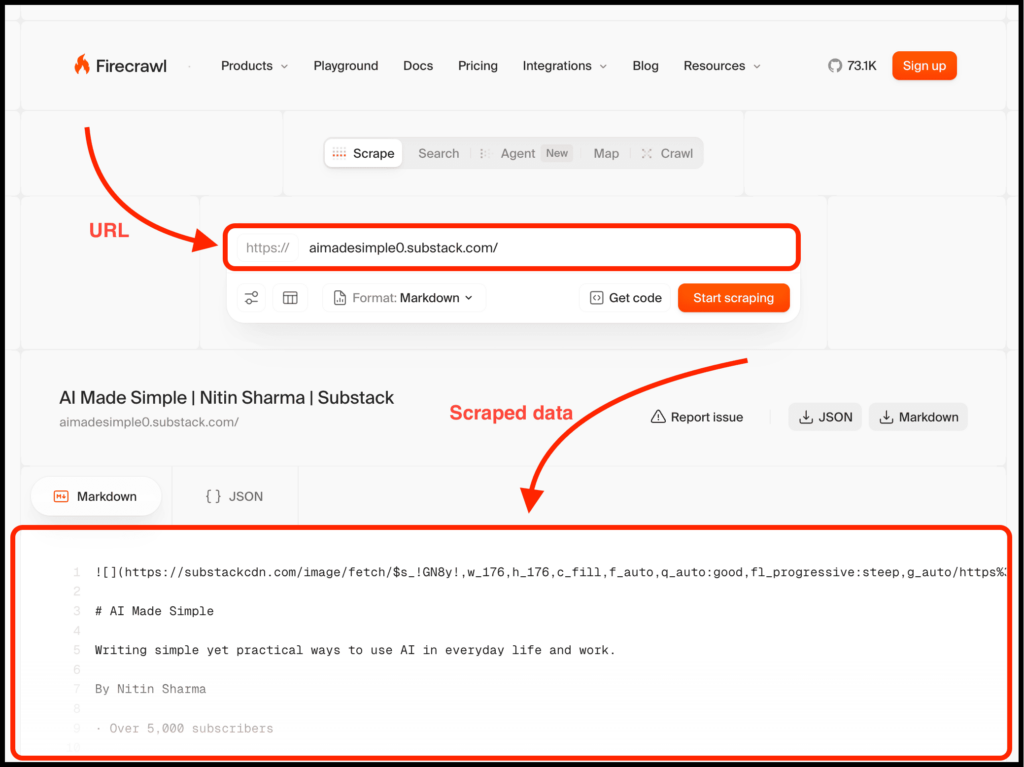
You can try it out by simply visiting their playground page and adding the specific URL, as you can see below.
Talking about Firecrawl pricing, you can get started for free with 500 credits, which allows you to scrape 500 pages.
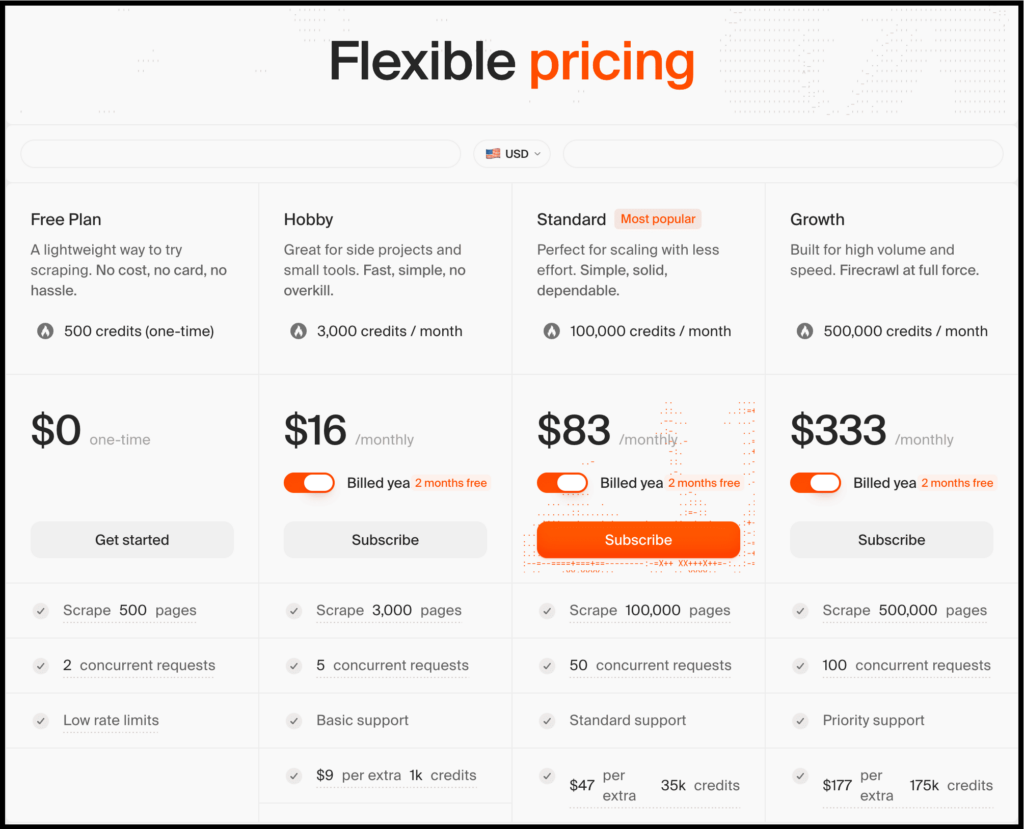
And then you need to upgrade to one of their paid plans as you can see above.
What Firecrawl Actually Does Well
By now, you know that Firecrawl is built specifically for developers and offers multiple API endpoints to turn websites into clean, structured data that LLMs can actually work with.
Here are the core technologies behind Firecrawl’s data scraping:
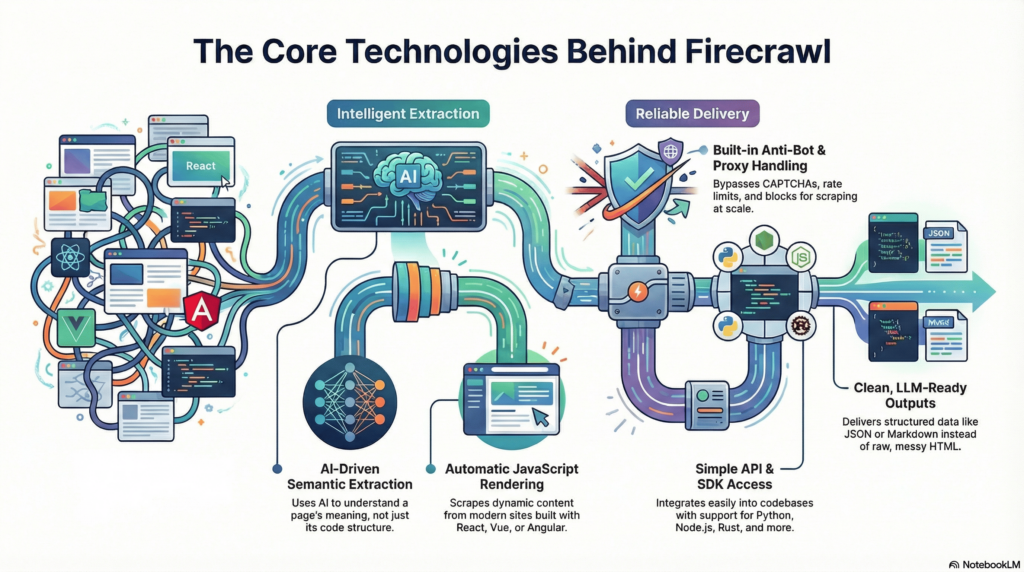
In short, it uses AI, LLMs, semantic search, and related techniques to extract data more intelligently instead of relying on brittle rules.
This approach is already proving effective in practice. A 2024 study on LLM-based web scraping found that these extraction pipelines match or outperform traditional parsers on several complex web extraction benchmarks .
With that said, this is where it genuinely shines.
1. It’s built for LLM workflows
If you are a developer who simply wants to scrape data in a reliable and scalable way, Firecrawl is one of the strongest options available.
It provides a /scrape endpoint that extracts content from a single URL into formats like markdown or HTML, without requiring any AI agent setup.
You can also use the /extract endpoint to pull structured data from entire webpages using natural language instructions.
On top of that, Firecrawl is optimized for AI use cases. It focuses on converting websites into LLM-ready data, while expecting developers to handle advanced logic such as retries, pagination, validation, and error handling.
So if:
- You are building an AI agent
- You already know exactly what data you want
- You are comfortable handling logic, retries, pagination, and validation yourself
then Firecrawl is a great fit.
2. It handles modern websites better than most legacy scrapers
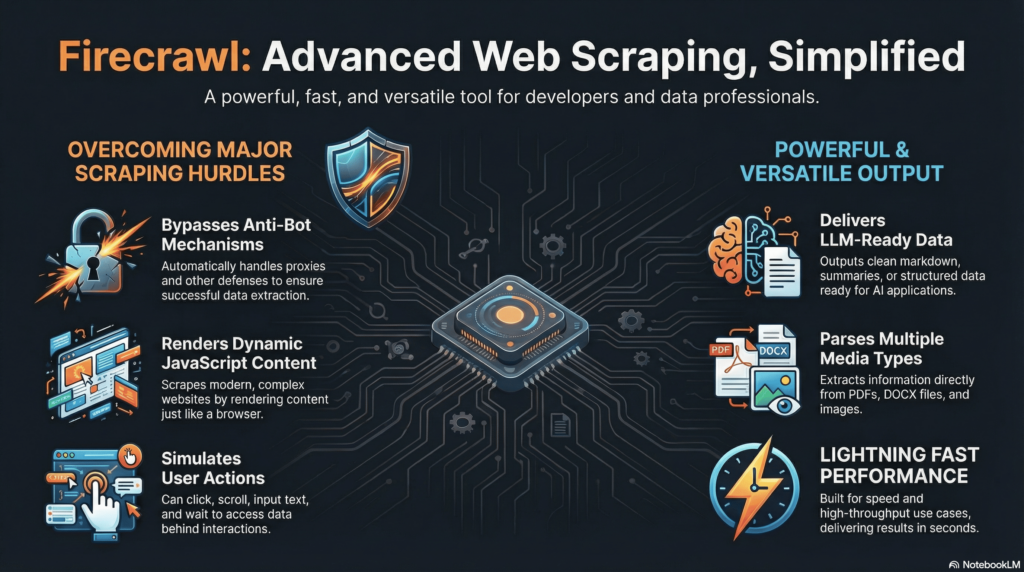
Firecrawl performs well on websites that typically break traditional scraping tools, including:
- JavaScript-heavy pages
- Highly dynamic content
- Long-form pages that often confuse or overwhelm older scrapers
And that is not all. It also offers several powerful capabilities, such as:
3. It’s composable
Firecrawl integrates cleanly with modern AI and backend systems, including:
- LangChain
- Custom agents
- Backend pipelines
- RAG setups
- MCPs
So if you are building an actual product and not just extracting data, this level of composability matters a lot and can be extremely useful in real-world workflows.
The best part is that Firecrawl is open source, which means you can also run it locally if needed.
However, this is also where things start to break down for many people reading this, especially if you are a non-technical user.
Where Firecrawl Starts Feeling Painful in Real Use
I’ll be honest, if your use case is purely developer-focused, Firecrawl is a solid choice.
But if you are a non-technical user who simply wants to scrape data without writing code or understanding concepts like LLMs, MCPs, and related tooling, then Firecrawl is not for you.
Beyond that, there are still several challenges you will face.
1. You still have to think like a scraper, and it gets complicated
Firecrawl removes the pain of browser automation so you are not fighting headless browsers, selector issues, or brittle scripts every time a page changes.
But it does not remove the need to think like a scraper.
If you are building or shipping AI products, you still need to make decisions such as:
- Should I set the crawl depth to 1 or 3
- How do I avoid crawling useless or irrelevant pages
- What happens when links expand into thousands of URLs
- How do I design the app logic and manage API pricing
And that is not all.
You also need to handle errors during the process, manage ongoing maintenance, and deal with edge cases. All of this quickly becomes mental overhead.
2. Not friendly for experimentation, and open source comes with trade-offs
If you want to use Firecrawl mainly for experimentation, this is likely not the right tool.
It becomes efficient only after everything is properly set up, and that usually assumes you are a developer.
Several Reddit users have also mentioned that the self-hosted version has multiple issues and often does not work reliably, especially when workflows become more complex.
As a result, even simple experimentation can become expensive in terms of time, mental effort, and sometimes money.
3. Firecrawl has a learning curve and is not for non-technical users
The Firecrawl team describes it as one of the easiest ways to extract data from the web.
That may be true at a high level, but once you go deeper or try to build anything beyond a simple use case, there is a clear learning curve.
Even basic API usage requires reading the documentation and understanding different endpoints such as scrape, search, map, and crawl.
Further, if you want to get started with the MCP Server or use webhooks, you need to invest even more time.
On top of that, you still have to integrate everything into your code, handle pagination, manage edge cases, and make sure the entire pipeline works reliably.
So if your goal is simply to extract data without dealing with APIs, pagination, or technical complexity, Firecrawl will likely make your workflow more complicated.
That is where a tool like Chat4Data becomes a better option.
Why Chat4Data Feels Completely Different
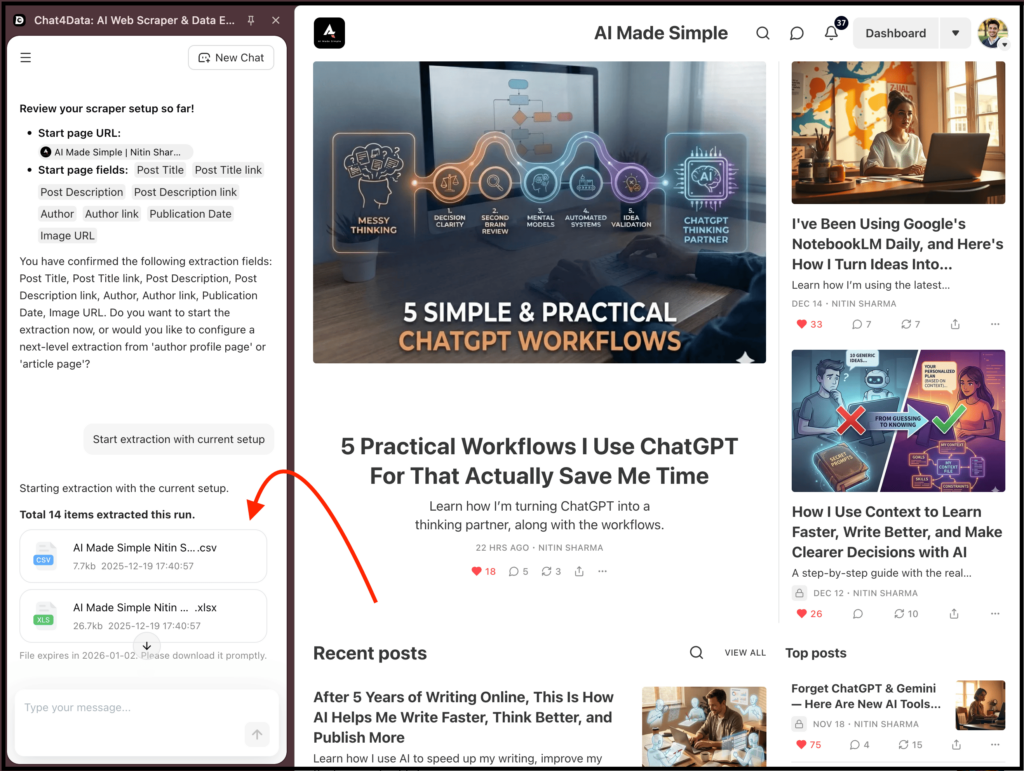
Well, Chat4Data is built for anyone who wants to scrape data quickly by simply using natural language prompts.
Yes, it is not just for developers.
The biggest advantage is that you do not need to select elements, think about pagination, tweak selectors, guess what might break, or learn APIs.
It even goes a step further by automatically exploring relevant subpages to extract the data you need.
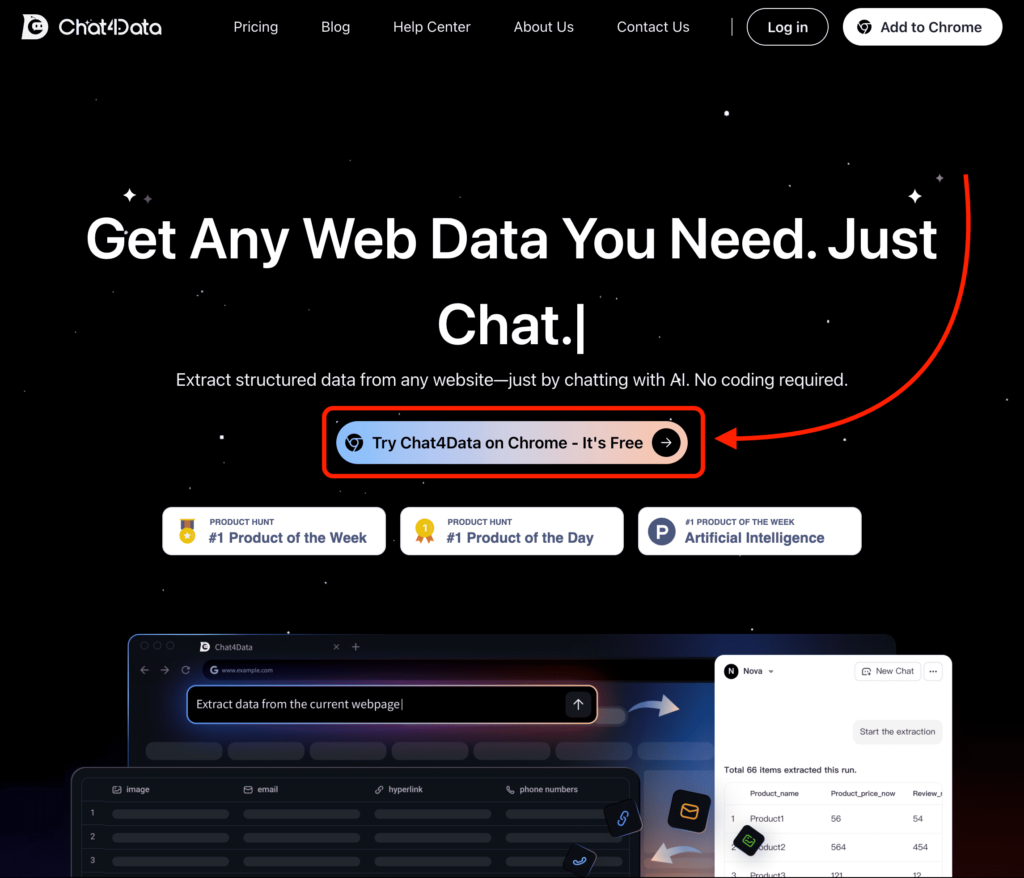
All you have to do is visit their website, install the extension, and write a prompt describing what you want to scrape from the target website.
As for the pricing, one can try out Chat4Data for free with 100 credits, and it even provides a free plan lasting for 15 days.
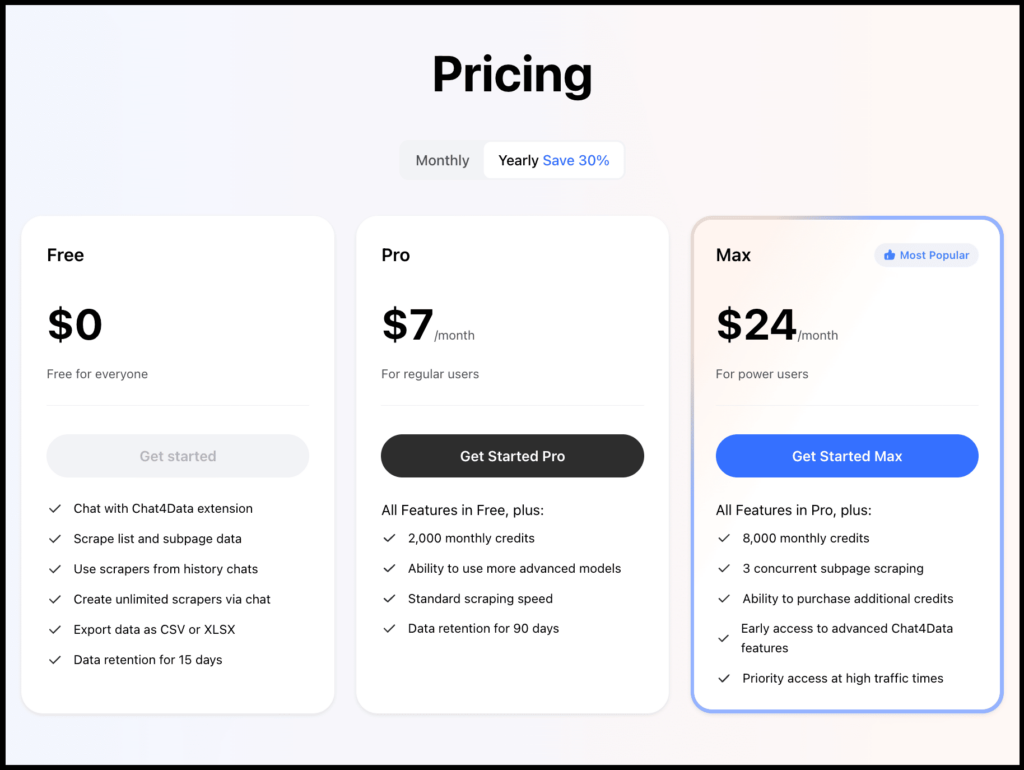
What stands out is that Chat4Data is not trying to be a better scraping engine. Instead, it focuses on removing the boring and error-prone parts of the scraping process.
1. You describe what you want to extract, and it delivers results
With Chat4Data, you do not think in terms of HTML, DOM structure, crawl depth, or parsing rules.
You simply describe your goal, such as “Extract company name, pricing, email, and website from this directory.”
The system then figures out:
- Where the data lives
- Whether it exists on subpages
- How many layers deep it needs to go
- How to normalize everything into clean rows
The best part is that you do not have to deal with pagination, link handling, or application logic. This alone removes around 80 to 90 percent of the mental overhead involved in scraping.
2. No learning curve, fast, and built for everyone
Let’s be honest, most people aren’t programmers, which naturally makes tools like Firecrawl harder to use.
This is where Chat4Data stands out.
It handles the complexity for you and delivers the data without friction, which makes the entire process much faster.
The best part is that everything you have learned about Chat4Data in this post is already enough to get started.
And tasks like pagination and other complex scenarios are handled in the process, helping you extract exactly the data you need without extra effort.
3. Experimentation does not feel risky
With Firecrawl, every experiment comes with a cost:
- Tokens
- Engineering time
- Debugging cycles
On top of that, the open source version often does not work as expected and comes with multiple issues.
With Chat4Data, experimentation is simple and low risk:
- Change the prompt
- Add or remove fields
- Go deeper into subpages
- Refine the output
- Have enough credits to try several websites
This makes the process far more flexible, and experimentation no longer feels risky or time consuming.
Which One Should You Actually Use?
If you have read this far, you already know that these two tools work very differently and are built for different use cases.
To keep it simple:
- Use Firecrawl if you are a developer shipping AI products.
- Use Chat4Data if you want a data extraction tool that delivers scraped results quickly, without complexity.
That is why it does not make sense to recommend one over the other universally. The right choice depends entirely on what you are trying to do.
Here’s a table comparing features, pricing, and more to give you a clearer idea:
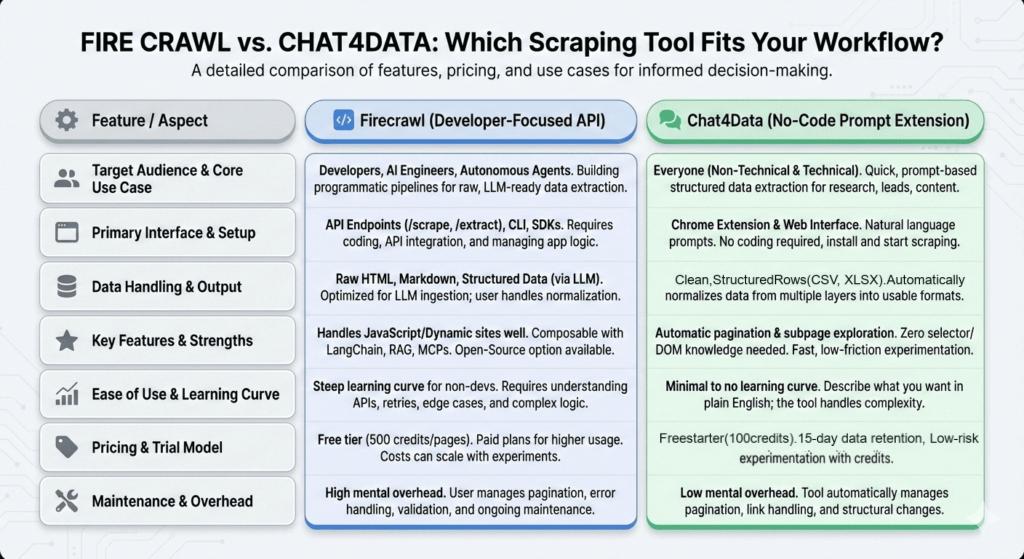
And here is the simplest way to think about when to use each one.
Use Firecrawl if:
- You are a developer
- You want raw website content
- You are building something custom like an AI agent or a SaaS product
- You prefer control, configuration, and flexibility
Use Chat4Data if:
- You want structured data fast
- You care more about results than setup
- You scrape data for research, lead generation, or content
- You do not want scraping logic to become part of your job
FAQs
1. Is Firecrawl a replacement for no-code web scraping tools like Chrome extensions?
Short answer: no, and it’s not trying to be.
Firecrawl is not built to replace no-code scrapers or Chrome extensions. It is designed to act as a web-to-data layer for AI systems, not as a point-and-click scraping tool for everyday use.
2. Is Firecrawl a bad choice if I only need to scrape data for research, content, or leads?
Most of the time, yes. Not because Firecrawl is weak, but because it is misaligned with that goal.
If you do not want a heavy setup, do not want to write API endpoints, and simply want to scrape usable data, Firecrawl is not the right fit.
In that case, go with Chat4Data or any similar tool built for quick and direct data extraction.
3. If I had to pick one question to decide between Firecrawl and Chat4Data, what should it be?
Ask yourself this: Do I want to build on top of scraped data, or do I just want usable data right now?
If you want to build systems, workflows, or products on top of the data, go with Firecrawl. If you just want clean, ready-to-use scraped data, go with Chat4Data.
4. Which tool scales better for long-term use?
It depends on what you mean by “scale”.
If you are scaling an AI product or an autonomous system, Firecrawl is the better choice. It gives you more control, composability, and predictable behavior inside complex pipelines.
If you are scaling research, lead generation, or content workflows, Chat4Data scales better for humans. You can move faster, adapt to layout changes easily, and keep experimenting without turning web scraping into a full-time job.
 Try AI Web Scraper