
We tested 7 Google image scraper tools against the same query and recorded three things for each: retrieval rate out of 100, original-URL success rate, and steps from install to exported file. Six tools returned 100% of the URLs as original. One returned 100% thumbnails. The differentiators are setup time, code requirements, and price.
Quick Answer: Which Tool Should You Use?
The best Google image scraper for you will depend on your specific project and your coding skills.
- No code AI web scraper: Chat4Data (conversational AI agent for data collection, Data Privacy )
- Recurring scheduled scrapes: Octoparse (template library, cloud runs)
- One-off cloud job: Apify’s Hooli Google Images Scraper
- Quick free test: Outscraper (generous free tier)
- Enterprise image search API datasets: Bright Data
- Custom navigation paths: ParseHub (free desktop app, point-and-click)
- Single visible page, no account needed: Image Downloader Chrome Extension
If you’re not sure which tool fits your case, start with Chat4Data. Install the extension, describe what you want in plain English, and you’ll have a CSV of original image URLs in roughly three minutes.
What we tested for Google Image Scraper, and how
Most tool-list articles rate scrapers by speed and price. Both are secondary. The five things that actually decide whether a Google Images tool is worth your time:
- Original URLs, not thumbnails. Google lazy-loads full-size images. The initial HTML only contains base64-encoded thumbnails — typically 100 to 200 pixels wide, useless for downstream work. To get original URLs, a scraper has to either render JavaScript or intercept the network requests that fire on scroll. This is where most tools quietly fail, and it’s the single most important criterion in this test.
- Bulk download vs. URL list. Some tools give you a CSV of URLs and let you handle the downloading. Others write image files directly to a folder. Both are valid — know which you’re getting before you pay.
- Metadata preservation. Source page URL, alt text, dimensions, and file format are often more useful than the image itself for legal research, compliance, or training datasets.
- Anti-blocking resilience. Google blocks aggressive scrapers. Tools that mimic human behavior — random delays, realistic browser fingerprints — last longer before hitting CAPTCHA walls.
- No code required. Code is a blocker for designers, marketers, and researchers. If a no-code tool delivers the same data quality, it’s worth the price premium.
Test setup: query “vintage bicycle”; target the first 100 image results; capture original image URL, source page URL, and alt text. All tests run on Chrome 124 / Windows 11 within the same two-hour window. Each tool was run twice; the better run was used. We excluded enterprise-scale concurrency (100,000+ jobs), proxy rotation performance, OCR, and long-term reliability — those need a different methodology.
Scope: Google Images web search only. We note where each tool extends to Bing, Amazon, or Lens in its own section.
The 7 Best Google Image Scrapers Ranked
Rankings are based on test results, original URL success rate, time to first file, and the effort required for the first run. Price was a tiebreaker, not a primary factor.
1. Chat4Data: Best for Non-Technical Users Who Want Plain English Scraping
Best for: Designers, marketers, researchers, and analysts who need image data without writing code.
Chat4Data is a conversation AI agent for data collection. As a lightweight chrome extension, it requires no setup or download or third party cloud service. You can immediately open the extension and scrapes any public webpage just by Chat. Just type what you want, and it will automatically navigates to your targeted site, handles pagination, and delivers clean, structured output as Excel, CSV, or JSON.
Step-by-step walkthrough:
- Go to Google Images and enter the query “vintage bicycle”.
- Open Chat4Data within Chrome by clicking on its icon. Enter the following prompt: “Extract the image url and source url for all of the images.”
- Review the execution plan preview that the agent generates before running and confirm it. Chat4Data scrolls the page, collects the data, and exports to CSV, Excel, or JSON.
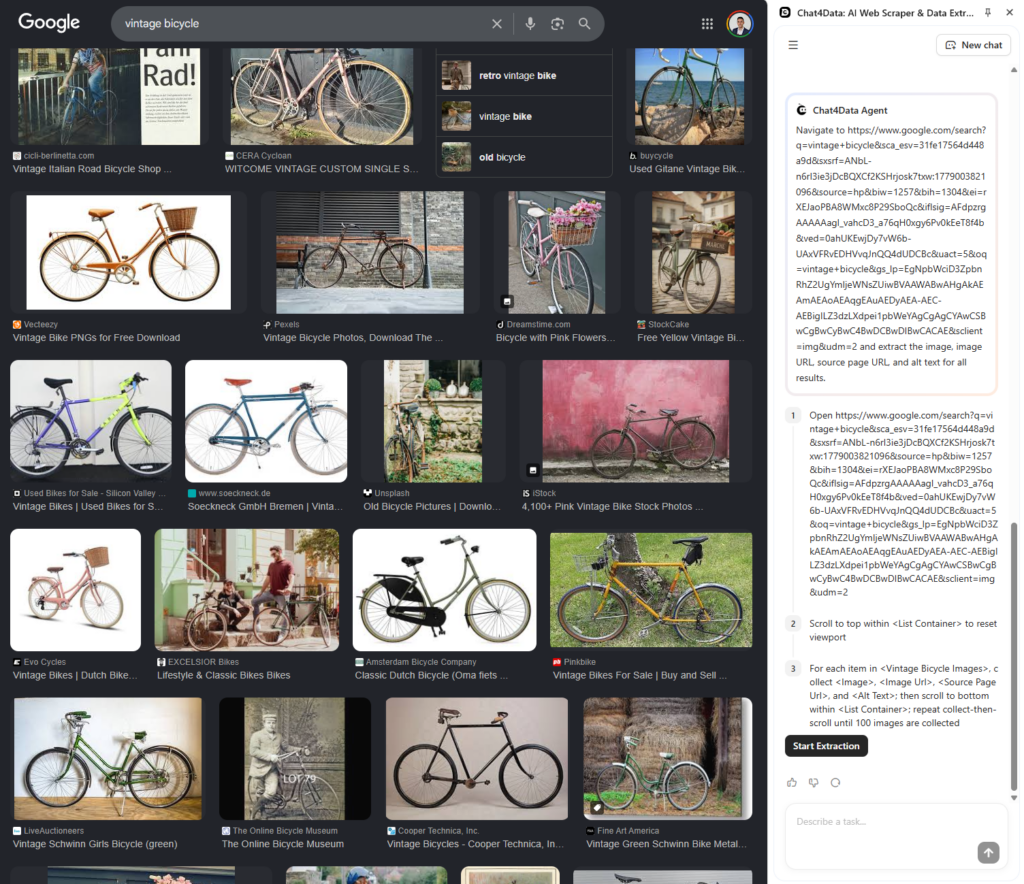
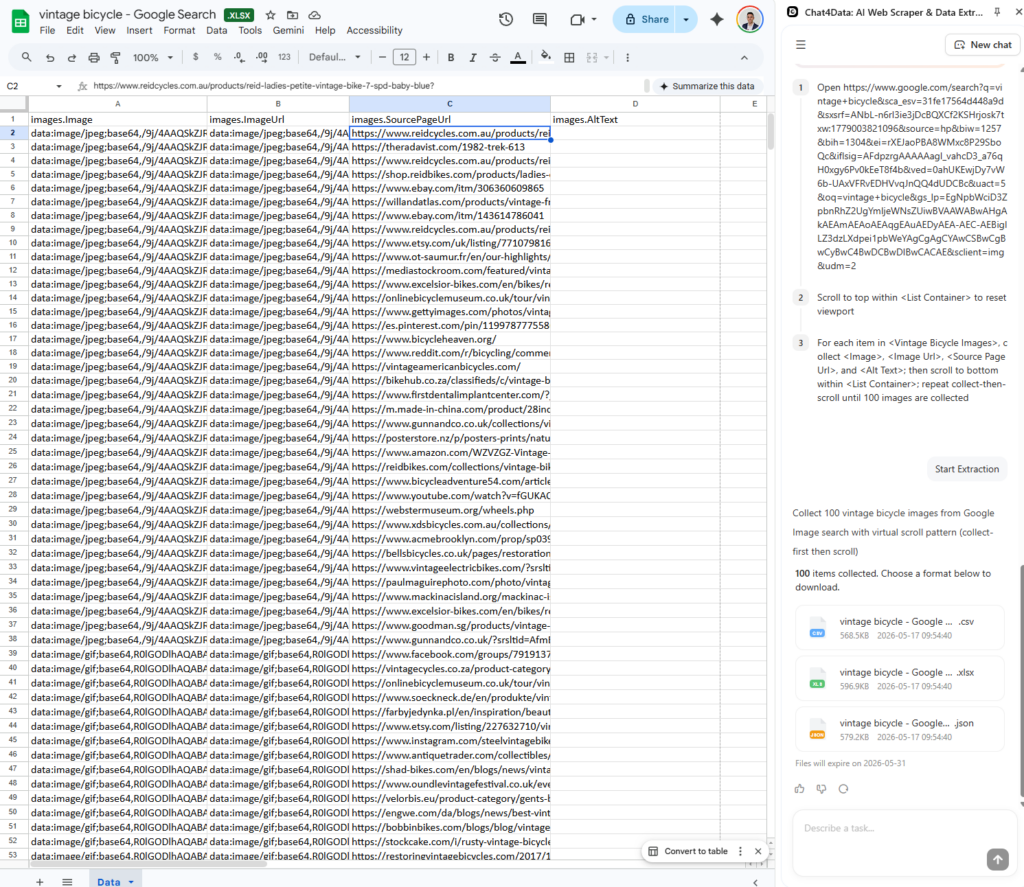
Test results (vintage bicycle, 100 images): 100 images retrieved, 100% original URL success rate, 2 minutes 40 seconds from extension open to exported file, 5 steps from install to download. Metadata captured: image URL, source page URL
Beyond Google Images: Chat4Data works on Bing Images, Amazon product images, Pinterest, and most other public pages. Same workflow, same plain-English commands. For documentation on advanced data extraction options, read our documentation.
Pros:
- Covesational interaction: No learning curve at all, the quickest way for no-code users
- All data processed locally: Nothing is sent to external servers, so your data privacy and security are fully protected.
- Handles complex pages: Pagination, infinite scroll, detail pages, and one-level-deeper extraction.
- Adapts to dynamic pages: Keeps extracting accurately even when layouts change.
Cons: Page analysis on first run takes a few seconds while the AI maps the structure. Not suitable for headless server-side automation.
Pricing: Freemium. Free tier covers initial pages for testing the workflow. Paid plans start from $10/month, with usage-based credits — verify current tiers at chat4data.ai/pricing before purchase.
2. Octoparse: Best for Recurring Scrapes with Templates
Best for: Users who need the same scrape to run weekly or monthly.
Octoparse is a desktop app with a visual, point-and-click interface for scraping. It also ships with pre-built templates for common sources, including Google Images, so you can start scraping without building a workflow from scratch. Run jobs when your computer is off with cloud scheduling.
Extracting data using the Octoparse Google Image Scraper template for the vintage bicycle test:
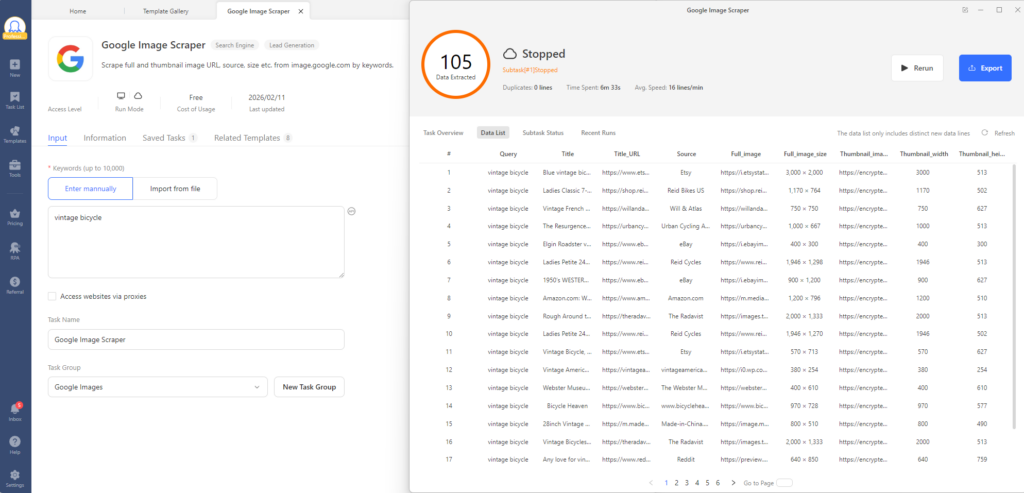
Result: 100/100 images · 100% original URLs · 6 min 15 sec, including 1 min of template config · 7 steps · metadata: URL, source page, image size, source name (no alt text). Free with an Octoparse subscription.
Pros: The template library significantly reduces manual configuration time; cloud scheduling and automatic pagination are other smooth features.
Cons: The desktop install can feel like overkill for one-off jobs. Highly customized workflows have a learning curve, and the free plan limits concurrent runs.
Pricing: Free plan available. Standard plan starts at $69/month.
3. Apify Hooli Google Images Scraper: Best for One-Off Cloud Runs
Best for: Technical users who want a managed cloud job without setting up their own infrastructure.
Apify hosts a marketplace of “Actors”: pre-built scraping scripts you can run on their cloud. The Hooli Google Images Scraper is one of the most popular. You configure it via a web interface, hit Run, and download the results when the job completes.
Extracting data using the Apify Google Image Scraper template for the vintage bicycle test:
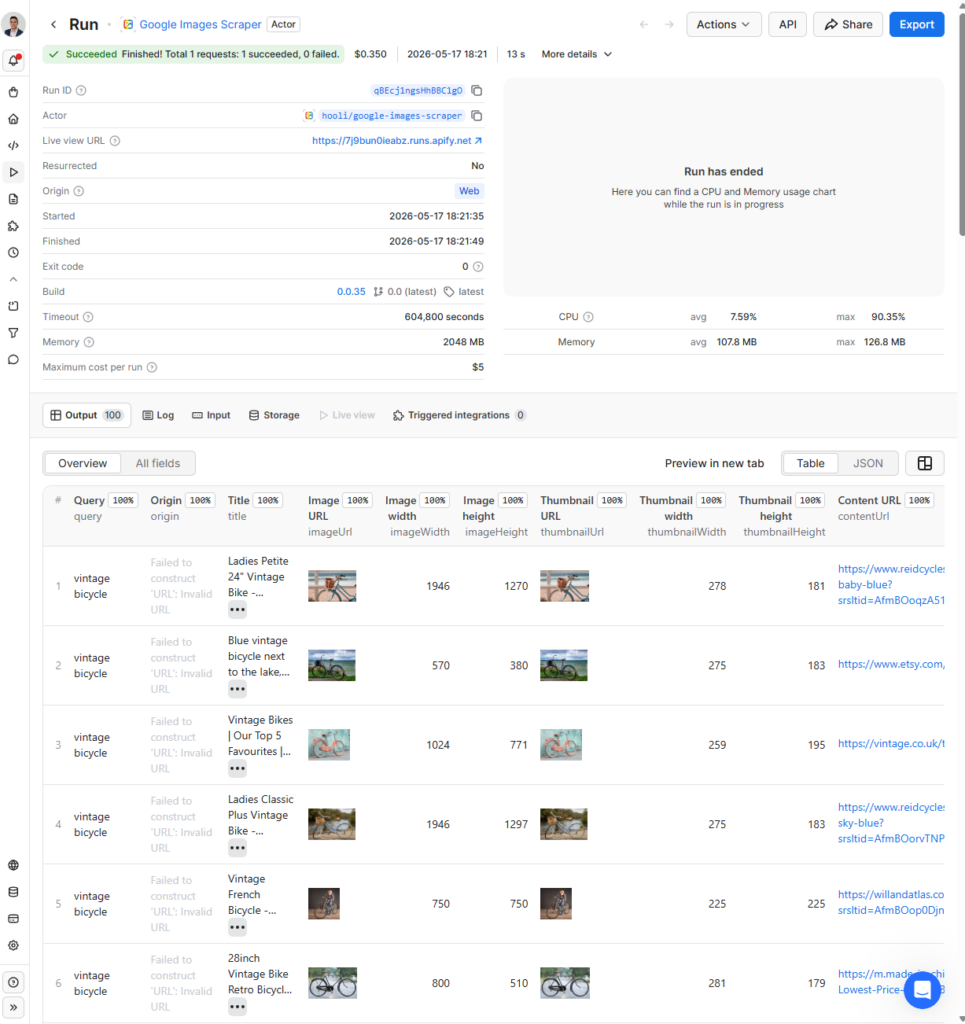
Test results: 100 images retrieved, 100% original URL success rate (strongest in the test), 2 minutes 20 seconds including setup. Only 13 seconds for actual data fetching. Metadata: URL, source, no alt text, image dimensions, file size. About $0.35 for fetching 100 results.
Pros: No local environment needed, strong metadata output.
Cons: You’ll need an Apify account. It is a pay-as-you-go cost, so that it can add up quickly with larger, more frequent jobs. The UI also feels more fragmented than most browser extensions.
Pricing: Free plan includes $5/month in platform credits. Pay-as-you-go after that, at $3.50 per 1,000 images.
4. Outscraper: Best Free Tier for Quick Tests
Best for: People who want to test image scraping without committing to a paid plan.
Outscraper is a web-based scraping platform with a free tier that still handles a meaningful number of requests each month. There’s no installation needed, so you just go to the site, log in, enter your query, and download the results. It runs on their own servers, so your computer workload is not involved at all.
Extracting data using the Outscraper Google Image Scraper template for the vintage bicycle test:
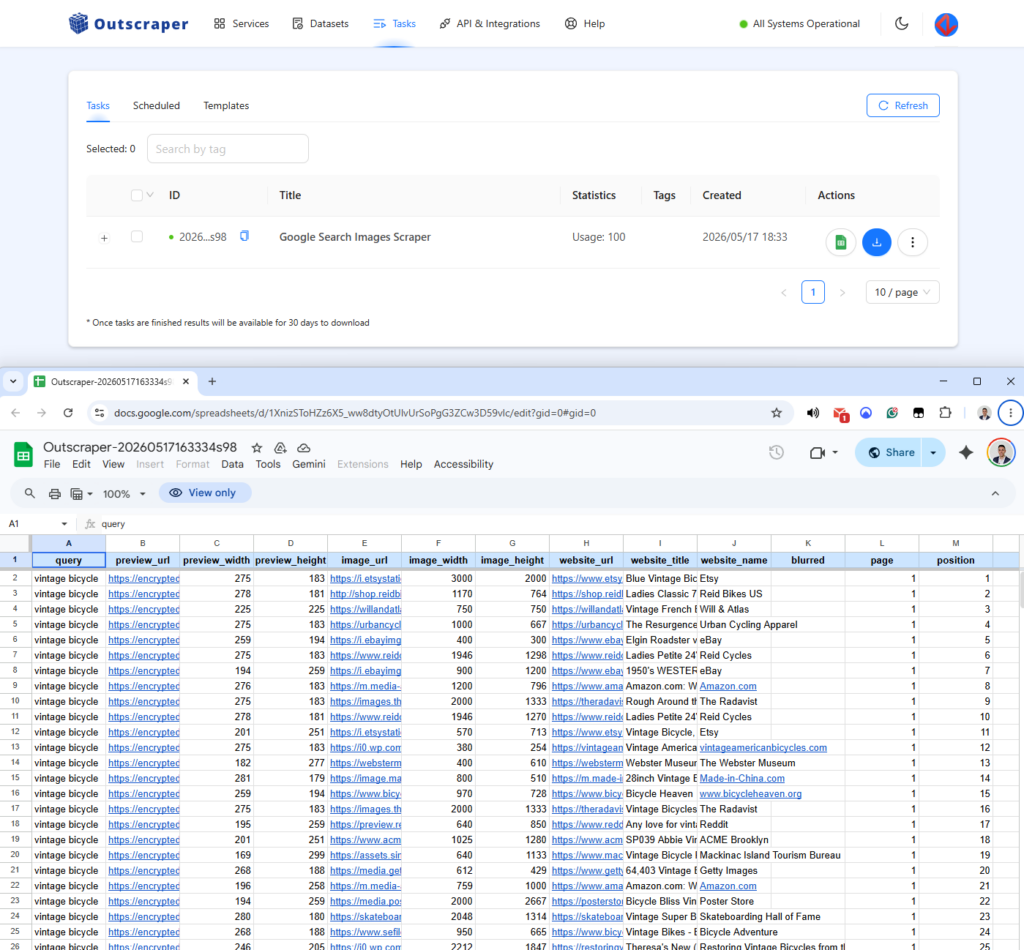
Test results: 100 images retrieved, 100% original URL success rate, 4 minutes 10 seconds, 4 steps. Metadata: URL, source page, image size. $0 for the first 500 images, so this run is free.
Pros: No installation, generous free tier, clean web interface, no code required.
Cons: You’re limited in the amount of sparse metadata you get back, and you quickly begin to run into the rate limits in the free tier when you’re really scaling.
Pricing: Free tier available. Paid plans from $19/month. $0.004 per image starting with the 500th, so $2 per 1000 images.
5. ParseHub: Best for custom scrapers
Best for: Users who need to follow a navigation path or extract a nested piece of data and prefer a desktop application over a browser extension.
ParseHub is a free desktop application that lets you create scraping rules through a point-and-click interface. You select items on the rendered page, and the extraction logic is built around the selected item. ParseHub also works natively with JavaScript, so Google Image searches render fully before parsing. One caveat: pagination must be set up manually — you identify the “next page” element, and ParseHub follows it across pages.
Unlike Octoparse, ParseHub does not offer cloud scheduling on its free plan. Jobs run locally and can take longer on large queries due to processing overhead.
Extracting data using the ParseHub Google Image Scraper for the vintage bicycle test:
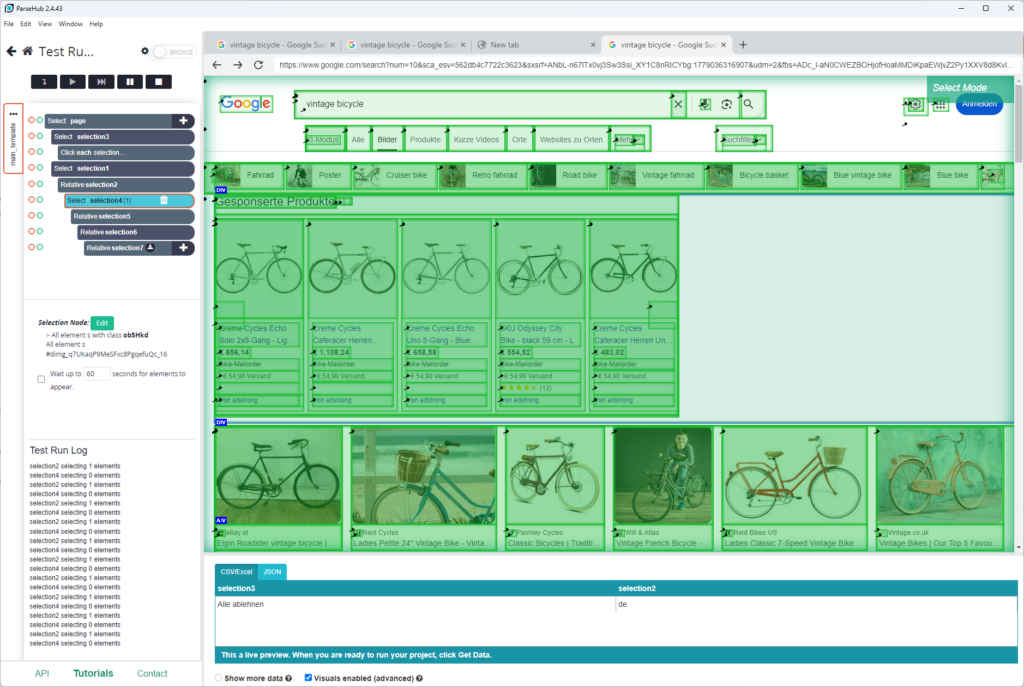
Test results: 100 images retrieved, 100% original URL success rate, 10 minutes 10 seconds, 7 steps. Metadata: URL, source page, image title. ParseHub is much more confusing when performing actions (select, click, etc.) on the webpage than Octoparse.
Pros: Completely free with limit of 200 pages per process. Good at handling nested data and exporting data to CSV, JSON and Google Sheets.
Cons: Slow on larger jobs, manual pagination setup, no cloud scheduling without a paid plan, and a desktop install is required.
Pricing: Free plan available. Standard plan starts at $189/month.
6. Bright Data: Best for Enterprise-Scale Image Datasets
Best for: Large organizations building image datasets at a scale of millions of records through an API.
Bright Data’s solution is oriented toward data infrastructure teams, not scrapers. The Google Images scraping API completely handles proxies, CAPTCHA, and browser rendering on their end. You just send one request, and the response is returned in JSON format. The cost per request is relatively low given the high volume, and the required implementation requires engineering effort.
Extracting data using Bright Data’s Google Image Scraper template for the vintage bicycle test:
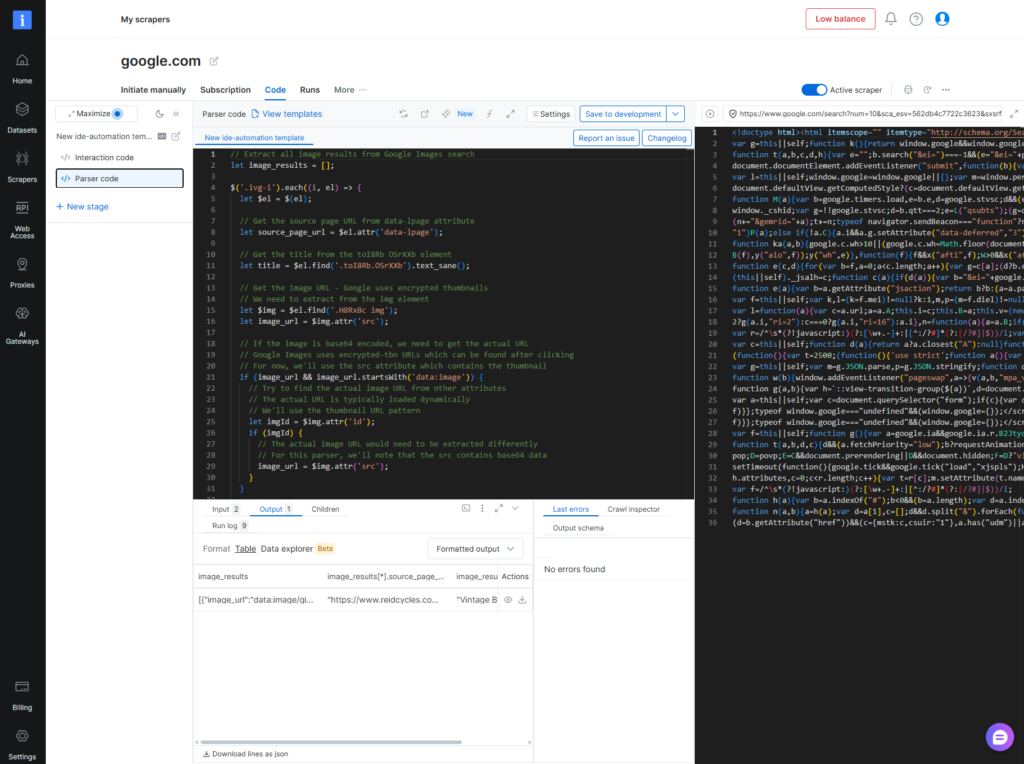
Test results: 100 images retrieved, 100% original URL success rate, 7 minutes 30 seconds once configured, 8 steps. Metadata: Image title. Complicated setup because it requires code (they have in-house AI that can help).
Pros: Highest data quality of any tool tested, no maintenance burden, scales to millions of images, detailed metadata output.
Cons: Requires developer integration, is overkill for small jobs, and has enterprise-grade pricing that’s opaque for smaller teams.
Pricing: Pay-as-you-go from $1.50 per 1,000 requests. Contact sales for enterprise plans.
7. Image Downloader Chrome Extension: Best for Quick One-Off Saves
Best for: Anyone who may need to save displayed image on the current page with only one-click.
“Image Downloader” refers to a category of free Chrome extensions (including ones literally named Image Downloader and Download All Images) that scan the page’s DOM for image elements and give you a one-click download button. No account, no configuration, no scraping in the traditional sense, just whatever the browser has already rendered.
Extracting images using the Image Downloader for the vintage bicycle test:
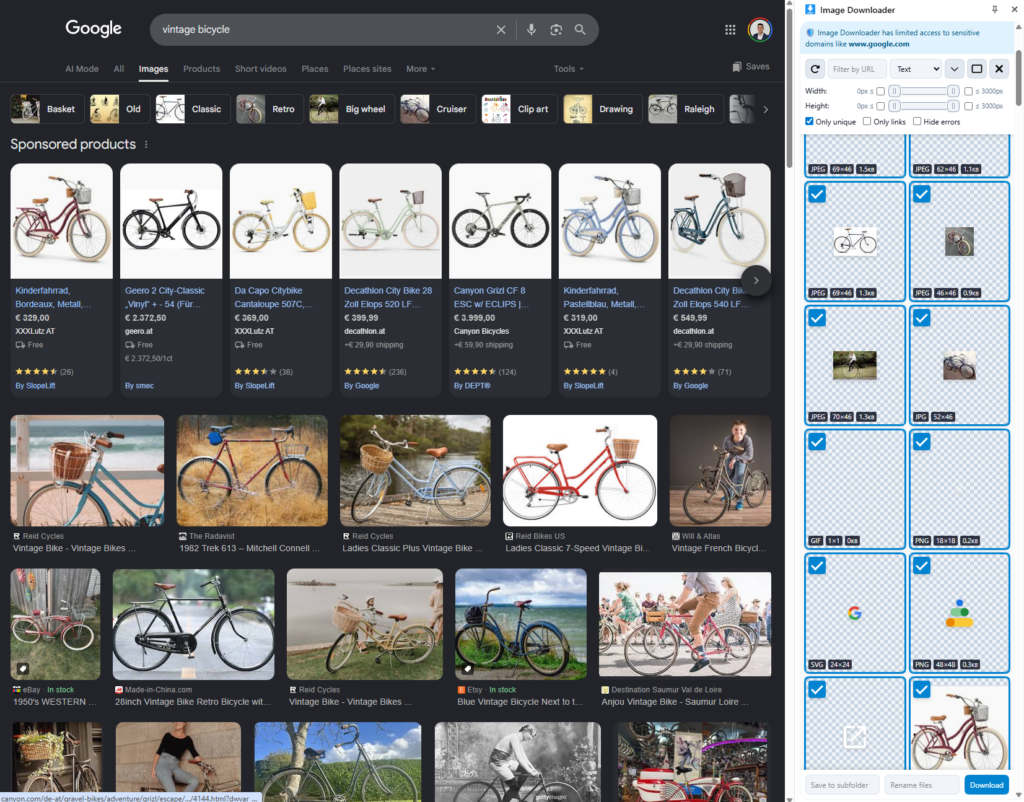
Test results: 100 images acquired as a webp file (visible page only, no auto-scroll), 0% successful URL grab (numerous thumbnails taken), 1m10s, 2 steps. Metadata: nothing.
Pros: Completely free, no account required, fastest setup of any tool tested.
Cons: No pagination, no automatic scrolling, captures only what is visible. Original URL usage rate is low, no meta information available. Can be broken easily by Google’s layout change.
Pricing: Free.
Side-by-Side Comparison: All 7 Tools at a Glance
| Tool | Best For | Code Required | Original URL Rate | Time to 100 Images | Metadata | Starting Price | Free Tier |
| Chat4Data | Non-technical users | No | 100% | 2:40 | URL, source | $10/mo | Yes (5 pages) |
| Octoparse | Recurring scrapes | No | 100% | 6:15 | URL, source, size, name | $69/mo | Yes (limited) |
| Apify Hooli | Cloud one-off | Light (HTTP) | 100% | 2:20 | URL, source, dimensions, size | $5 credit/mo | Yes |
| Outscraper | Free testing | No | 100% | 4:10 | URL, source, size | $19/mo | Yes |
| ParseHub | custom scrapers | No | 100% | 10:10 | URL, source page, image title | $189/mo | Yes |
| Bright Data | Enterprise scale | Light (HTTP) | 100% | 7:30 | Image title | Contact sales | No |
| Image Downloader | Single visible page | No | 0% | 1:10 | None | Free | Yes |
Winner for original URL rate: tie at 100% among six tools (Chat4Data, Octoparse, Apify, Outscraper, ParseHub, Bright Data). Among them, Chat4Data is the most accessible.
How to Choose: A Decision Tree by Use Case
“I’m a designer and I need 50 reference images for a moodboard.” Use Chat4Data or the Image Downloader Chrome extension. Run the search, export the results, and you’re done in under five minutes.
“I’m a researcher who needs to track which bicycle images appear in Google results each week.” Use Octoparse. Set up the monitoring robot once and let it run on a schedule.
“I’m a developer integrating image metadata into a product recommendation engine.” Bright Data API or Apify. Both of them return structured JSON. They handle the infrastructure on their end.
“I want to test if this type of scraping is working for my use case before I pay anything.” Try the Outscraper Free plan or Image Downloader extension.
“I run a content agency and need to extract 500+ images per week across several queries.” Use Octoparse, the template library and cloud scheduling make repeat extraction easy.
The Legal and Ethical Side of Scraping Google Images
Scraping publicly visible images is technically possible. Whether it is legally or ethically appropriate depends on what you do with the data.
Copyright still applies. Images appearing in Google Image Search are not in the public domain. Google indexes them from third-party websites. The photographer or creator holds the copyright unless they have licensed the work otherwise. Scraping an image URL does not grant you any rights to the image.
Google’s Terms of Service prohibit automated scraping of their search results. As a practical matter, the risk of a civil suit against an individual researcher seems negligible. However, if it’s commercial at scale and especially if you’re reselling the scraped datasets, then yes, the risk becomes real.
Creative Commons filtering helps. You can also filter your results to show only images licensed for reuse using the ‘Usage Rights’ filter in Google Images. Applying this filter before scraping reduces, but does not eliminate, copyright risk. ALWAYS check the licenses before publishing or distributing.
Scraping is not permission to publish. Downloading a picture might be allowed, but if you want to use it for advertising, in an article, or in a product, you still need a license that allows those uses. Scraping an image for internal research, to create a dataset, or for a competitive analysis is murky territory, and the rules vary depending on your country. If you’re unsure whether a commercial use is appropriate, you should talk to an attorney.
As a practical rule: scrape what you need, do not republish raw scraped images without verifying licenses, and never scrape personal data.
Conclusion
The biggest failure point in Google image scraping is getting thumbnails when you need originals. Every tool in this guide was tested against that same benchmark. Six of the seven returned 100% original URLs — the one exception was the Image Downloader Chrome extension, which only captured visible thumbnails. Once original-URL extraction is solved, the real differentiators become setup time, code requirements, and price.
On those three factors, Chat4Data is the default pick for most users: zero code, plain-English prompts, and a working CSV in under three minutes. Octoparse is the better choice if you need the same scrape to run on a weekly or monthly schedule, thanks to its template library and cloud runs. Bright Data wins for enterprise-scale datasets where engineering effort is acceptable. For one-off Python projects, open-source libraries like ohyicong/Google-Image-Scraper on GitHub still hold up.
For everyone else, the five minutes you spend installing Chat4Data will save hours of manual work.
Keep learning
Scraping more than just images? The same no-code approach works across Google’s other data types:
- For business listings like names, phone numbers, and ratings, check out how to scrape data from Google Maps.
- To see where you rank against competitors, here are the best Google SERP scrapers.
- For customer reviews, take a look at the best Google review scrapers.
FAQs about Google Image Scrapers
1. Why does my scraper only return low-resolution thumbnails?
On Google Images, lazy loading of full-size images happens only after a user clicks or scrolls. The original HTML contains base64-encoded thumbnails. Scrapers that just read the HTML source will get these small thumbnails instead of the original files. Your scraper has to render JavaScript or hook into the XHR requests fired on scroll to retrieve the original URLs. Tools like Chat4Data do this automatically for you. Simple Python scripts with requests and BeautifulSoup don’t.
2. Can I use the same tool to scrape images from Bing or Amazon?
Yes, for the no-code tools in this list. Chat4Data and Octoparse work across any public webpage, including:
- Bing Images
- Amazon product image galleries
- Most other image-heavy sites
The workflow is identical: navigate to the page, describe what you want, and export. Apify also has dedicated actors for Bing and Amazon. The Image Downloader extension works on any page in your browser by default.
3. Do I need to know Python to scrape Google Images?
No. Five of the seven tools on this list require no coding. No-code tools include:
- Chat4Data
- Octoparse
- Outscraper
- ParseHub
- Image Downloader Chrome Extension
Python comes into play when you need custom logic, server-side automation, or integration with an existing data pipeline. If that is what you are looking for, then start with the ohyicong/Google-Image-Scraper library on GitHub.
4. How many Google Images results can I export?
It depends on the tool. In our tests, all six tools successfully retrieved 100 images in a single run. For larger exports:
- Chat4Data handles pagination automatically, scrolling and loading more results until it hits your target count
- Octoparse and Apify support bulk runs with higher limits on paid plans
- Outscraper caps at 500 images on the free tier, then charges per image after that
- Image Downloader only captures what’s visible on screen, with no auto-scroll, so you’re limited to roughly 20–30 images per run
For most practical use cases under 1,000 images, any of the top five tools will handle it without hitting a hard limit.
5. Google Images Scraper vs Google Custom Search API — what’s the difference?
Google’s Custom Search JSON API is the official, sanctioned way to retrieve image search results programmatically. The key differences:
- API: Up to 100 queries/day free, then $5 per 1,000 queries. Returns structured JSON. Requires a Google Cloud account and API key setup. Results are limited to 10 per query.
- Scraper: No official quota, but subject to rate limiting and CAPTCHA. Returns the same results a user sees in the browser, including metadata not available via the API such as alt text, source page, and image dimensions.
Use the API if you need a reliable, ToS-compliant integration in a production system. Use a scraper if you need bulk results, richer metadata, or can’t justify the API cost at scale.
6. Can I extract metadata like alt text and source URLs from Google Images?
Yes, and for many use cases the metadata is more valuable than the images themselves. Most tools in this guide capture at least the image URL and source page URL. Richer metadata varies by tool:
- Alt text: Chat4Data, ParseHub
- Image dimensions and file size: Apify, Outscraper, Octoparse
- Source page URL: All tools except Image Downloader
If metadata completeness matters for your project — for example, building a training dataset or doing copyright research — Apify returns the most complete output of any tool tested.
7. Can I scrape image sources from Google Lens?
Google Lens returns visually similar images and the websites where they appear, a different structure from a standard Google Images query. A dedicated Google Lens scraper is not standard. However, Chat4Data can extract what is visible on a Google Lens results page, including source URLs. For systematic scraping at scale, you would need a custom Apify actor or a Python script.
8. Can Google detect and block image scrapers?
Yes. Rate limiting, CAPTCHA, and IP blocks are all part of how Google fights aggressive scrapers. Tools that simulate human behavior last longer before hitting CAPTCHA walls, including:
- Random delays between requests
- Realistic browser fingerprints
- Human-like scrolling and click patterns
9. Do I need a proxy to scrape Google Images?
For small jobs involving a few hundred images, a proxy is usually not necessary. For larger, high-volume, and programmatic scrapes, a proxy service helps with:
- Avoiding IP blocks from repeated requests
- Rotating identities to mimic different users
- Maintaining consistent access during long scraping sessions
10. What is the easiest Google Images scraper for non-coders?
Chat4Data is the most accessible option tested. Install the Chrome extension, open Google Images, type what you want in plain English — “extract the image URL and source page for all results” — and it handles the rest. No selectors, no templates, no account setup beyond the extension itself. In our test, it went from install to exported CSV in under three minutes.
If you need something with zero setup at all, the Image Downloader Chrome extension requires no account and works in one click — but it only captures visible thumbnails, not original URLs.
11. Is it legal to scrape Google Images?
Extracting publicly available data is legally permissible in many jurisdictions, but the use of the images is regulated by the copyright owners. A few things to keep in mind:
- Copyright still applies. Images appearing in Google Image Search are not in the public domain. The photographer or creator holds the copyright unless they have licensed the work otherwise.
- Google’s Terms of Service prohibit automated scraping of their search results. The practical risk for individual researchers is low, but commercial use at scale carries real legal exposure.
- Scraping is not permission to publish. Downloading an image URL does not authorize you to use it in advertising, articles, or products. Always verify the license before publishing or distributing.
- Creative Commons filtering helps. Use the Usage Rights filter in Google Images before scraping to reduce copyright risk, though it does not eliminate it entirely.
If you’re unsure whether a specific use is appropriate, consult an attorney.
 Try AI Web Scraper