

- what Google review data actually contains
- why businesses and researchers scrape it
- how to pull it into a spreadsheet without writing a single line of code
What Are Google Reviews?
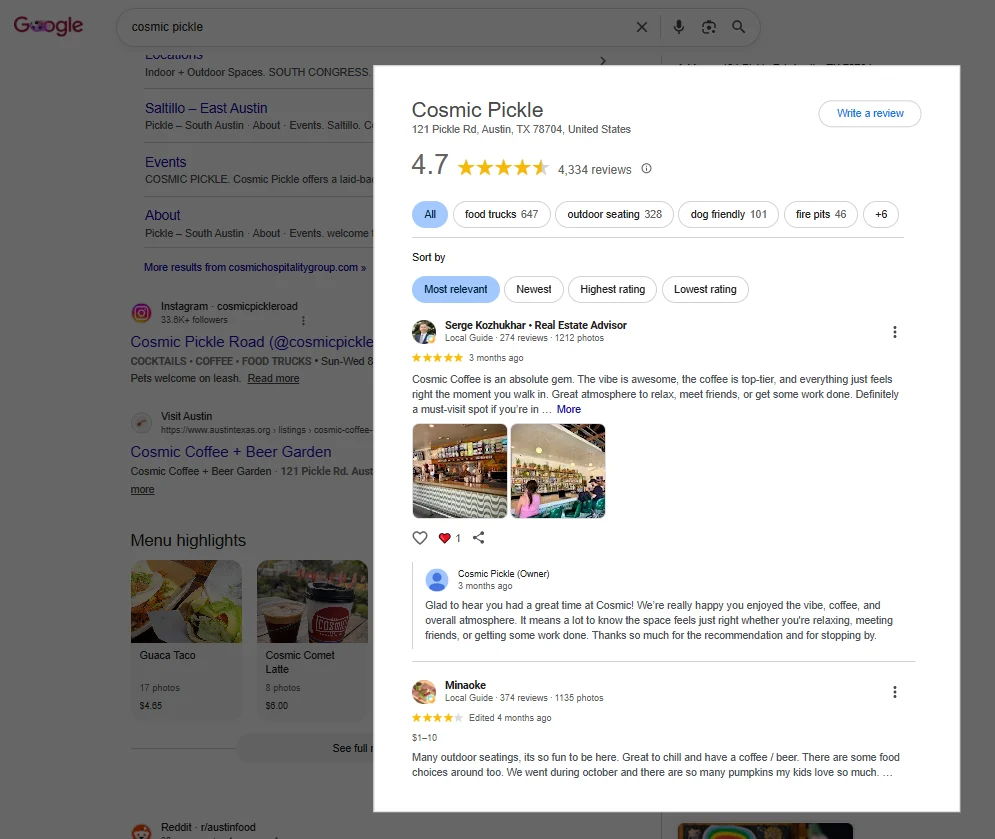
Google reviews are the star ratings and written feedback that customers leave on a business’s Google profile. They show up on the business listing in Google Maps and in the local panel on Google Search. Each review is one entry, and each entry carries a consistent set of fields. Think of a review as a small structured record attached to a business. A typical review includes:- Star rating (1 to 5)
- Review text
- Reviewer name
- Date or relative time (“2 weeks ago”)
- Owner response, if the business replied
- Helpful or like count, where shown
Where to Find the Data
Google reviews live in two connected places, and both point to the same review set.- The business listing on Google Maps: Open a business in Google Maps and click into its reviews section. (If you need to build the list of businesses first, here’s how to scrape Google Maps.)This is the fullest view, with every review loaded as you scroll, plus sort and filter options.
- The local panel on Google Search: Search a business name directly and Google shows a knowledge panel on the right with the rating, review count, and a reviews link that opens the same set.
Why Businesses and Researchers Scrape Google Review Data
Once you can pull reviews at scale, a lot of manual reading disappears. Here is what people actually use it for:- Reputation monitoring. Track your own ratings and new reviews over time, across one or many locations.
- Competitor analysis. Collect a rival’s reviews to see what their customers praise and complain about, direct input for your own positioning. Pair it with a look at where those rivals rank in search for the full competitive picture.
- Customer feedback analysis. Pull hundreds of reviews and look for recurring themes, the issues and strengths that come up again and again.
- Multi-location tracking. For chains or franchises, gather reviews across every location into one sheet to compare branches.
- Market and product research. Study reviews across a whole category to understand what customers in a market care about.
How to Scrape Google Reviews Without Code
Here is what the workflow looks like with Chat4Data, an AI web scraper that runs as a Chrome extension. Step 1: Describe your task Open the extension and type what you want in plain English: “Go to this Google Maps business listing, open the reviews section, scroll to load all reviews, and scrape the reviewer name, star rating, review text, and date for each one.” Step 2: Review the execution plan Before running anything, Chat4Data shows you a step-by-step breakdown of what it plans to do. Which page it visits, which fields it extracts, how it scrolls to load more reviews. You can adjust the plan or approve it as-is. No credits are used until you hit start. Step 3: Run and export The scraper works through the reviews like a real user, scrolling to load each batch and pulling every field. When it finishes, you export everything as Excel, CSV, or JSON. Step 4: Save and reuse Save the task once, and every future run skips the AI configuration step. If you track the same business or locations on a schedule, that means one click per run. A few practical notes:- Reviews load on scroll, so for a listing with hundreds of them, let the scraper keep scrolling until the list stops growing. Stopping early gives you only the most recent or most relevant batch.
- If you want reviews in date order, set the listing’s sort to “newest” before you run, since the default is “most relevant.”
- If Google shows a verification prompt mid-scrape, Chat4Data pauses so you can clear it manually, then picks up where it left off.
- Credits are only consumed during the initial AI configuration, not during extraction. A reviews task typically costs around 25-40 credits to set up, and that setup is saved permanently for reuse.
Wrapping Up
Google reviews hold the unfiltered customer feedback behind every local business, and collecting it used to mean either endless scrolling or hiring a developer. That is no longer the case. With an AI web scraper like Chat4Data, you can scrape Google reviews by simply describing what you want. If you want to try it, Chat4Data is available at chat4data.ai and on the Chrome Web Store.Frequently Asked Questions
1. Can you scrape Google reviews?
Yes. The rating, text, author, and date on each review are publicly visible on a business listing, and they can be collected at scale. You can do it with code, with a paid API, or with a no-code Chrome extension like Chat4Data that handles the whole process through a plain English instruction.2. What data can I scrape from Google reviews?
A well-configured scraper can pull:- Star rating
- Review text
- Reviewer name
- Date or relative time
- Owner response, if there is one
- The business’s overall average rating and total review count
3. How do I scrape all reviews from a business, not just the first few?
Reviews load in batches as you scroll, so the key is to let the scraper keep scrolling until no new reviews appear. In your instruction, say to scroll and load all reviews before extracting. For a listing with hundreds of reviews, this takes longer than grabbing the visible ones, but it is how you get the complete set.4. Can I scrape reviews for many businesses at once?
Yes. Point the scraper at each business listing, or save the task and re-run it per location. For a chain or a set of competitors, you run the saved task across each listing and combine the exports into one sheet. This is the usual setup for multi-location reputation tracking.5. Isscraping Google Maps reviews the same as Google reviews?
For local businesses, yes. The reviews on a business’s Google Maps listing and the ones in its Google Search knowledge panel are the same set. People say “Google reviews,” “Google Maps reviews,” and “Google business reviews” for the same data.6. Can I scrape Google Play Store reviews this way?
That is a different kind of review. Google Play Store reviews are app reviews on the Play Store, not business reviews on a Maps listing. The page layout and fields differ, but the same no-code approach applies: point the scraper at the app’s reviews page and describe the fields you want, like rating, review text, author, and date.7. Why does my scraped review count not match the number on the listing?
A few normal reasons:- Scroll depth. If the scraper stopped before loading every batch, you get fewer reviews than the total shown.
- Filtered or removed reviews. Google removes some reviews for policy reasons between the count updating and your run.
- Reviews without text. Some entries are a star rating only, with no written review, so depending on what you collect, the rows may differ from the headline count.
8. Is there a free Google reviews scraper?
Some tools offer free tiers, fine for pulling reviews from one or two businesses. For collecting reviews across many listings on a schedule, paid tools are more practical. If you are starting out, Chat4Data begins at $10/month and you scrape just by typing what you want, with no setup to learn.9. Can I scrape Google reviews with Python?
Yes. Common options include:- Libraries: Selenium or Playwright, since reviews load dynamically on scroll and a simple Requests call will not trigger that loading
- Managed APIs: services that return reviews as structured data and handle the scrolling and anti-bot work for you
- No-code alternative: Chat4Data, if you would rather skip the code entirely
10. Is scraping Google reviews legal?
Google’s Terms of Service restrict automated access to its services, but collecting publicly visible review data is widely practiced for reputation and market research, and courts have generally held that scraping public data is not inherently unlawful. Reviews are public, the same ones any visitor can read. One thing to keep in mind: review text and reviewer names can be personal data, so handle what you collect in line with privacy rules like GDPR where they apply. Review Google’s Terms of Service and consult a legal advisor for your specific situation.How to Scrape Google Reviews Without Code A competitor across town has four hundred reviews and you want to know what their customers actually complain about. You open their listing, read the first ten, scroll, the page loads ten more, you copy a few into a note, lose track of which you’ve read, and give up around review thirty. The patterns you were looking for, the recurring gripes about wait times or the praise for one specific staff member, are buried in the four hundred you didn’t get to. Whether you run one location or analyze a hundred, the insight in Google reviews is real, but reading them by hand does not scale. Every review carries structured data: the rating, the text, the author, and the date. Collected together, a few hundred reviews turn into something you can actually analyze. This guide shows you how to pull them without writing code. This guide covers:- what Google review data actually contains
- why businesses and researchers scrape it
- how to pull it into a spreadsheet without writing a single line of code
What Are Google Reviews?
Google reviews are the star ratings and written feedback that customers leave on a business’s Google profile. They show up on the business listing in Google Maps and in the local panel on Google Search. Each review is one entry, and each entry carries a consistent set of fields. Think of a review as a small structured record attached to a business. A typical review includes:- Star rating (1 to 5)
- Review text
- Reviewer name
- Date or relative time (“2 weeks ago”)
- Owner response, if the business replied
- Helpful or like count, where shown
Where to Find the Data
Google reviews live in two connected places, and both point to the same review set.- The business listing on Google Maps: Open a business in Google Maps and click into its reviews section. This is the fullest view, with every review loaded as you scroll, plus sort and filter options.
- The local panel on Google Search: Search a business name directly and Google shows a knowledge panel on the right with the rating, review count, and a reviews link that opens the same set.
Why Businesses and Researchers Scrape Google Review Data
Once you can pull reviews at scale, a lot of manual reading disappears. Here is what people actually use it for:- Reputation monitoring. Track your own ratings and new reviews over time, across one or many locations.
- Competitor analysis. Collect a rival’s reviews to see what their customers praise and complain about, direct input for your own positioning.
- Customer feedback analysis. Pull hundreds of reviews and look for recurring themes, the issues and strengths that come up again and again.
- Multi-location tracking. For chains or franchises, gather reviews across every location into one sheet to compare branches.
- Market and product research. Study reviews across a whole category to understand what customers in a market care about.
How to Scrape Google Reviews Without Code
Here is what the workflow looks like with Chat4Data, an AI web scraper that runs as a Chrome extension. Step 1: Describe your task Open the extension and type what you want in plain English: “Go to this Google Maps business listing, open the reviews section, scroll to load all reviews, and scrape the reviewer name, star rating, review text, and date for each one.” Step 2: Review the execution plan Before running anything, Chat4Data shows you a step-by-step breakdown of what it plans to do. Which page it visits, which fields it extracts, how it scrolls to load more reviews. You can adjust the plan or approve it as-is. No credits are used until you hit start. Step 3: Run and export The scraper works through the reviews like a real user, scrolling to load each batch and pulling every field. When it finishes, you export everything as Excel, CSV, or JSON. Step 4: Save and reuse Save the task once, and every future run skips the AI configuration step. If you track the same business or locations on a schedule, that means one click per run. A few practical notes:- Reviews load on scroll, so for a listing with hundreds of them, let the scraper keep scrolling until the list stops growing. Stopping early gives you only the most recent or most relevant batch.
- If you want reviews in date order, set the listing’s sort to “newest” before you run, since the default is “most relevant.”
- If Google shows a verification prompt mid-scrape, Chat4Data pauses so you can clear it manually, then picks up where it left off.
- Credits are only consumed during the initial AI configuration, not during extraction. A reviews task typically costs around 25-40 credits to set up, and that setup is saved permanently for reuse.
Wrapping Up
Google reviews hold the unfiltered customer feedback behind every local business, and collecting it used to mean either endless scrolling or hiring a developer. That is no longer the case. With an AI web scraper like Chat4Data, you can scrape Google reviews by simply describing what you want. If you want to try it, Chat4Data is available at chat4data.ai and on the Chrome Web Store.Frequently Asked Questions
1. Can you scrape Google reviews?
Yes. The rating, text, author, and date on each review are publicly visible on a business listing, and they can be collected at scale. You can do it with code, with a paid API, or with a no-code Chrome extension like Chat4Data that handles the whole process through a plain English instruction.2. What data can I scrape from Google reviews?
A well-configured scraper can pull:- Star rating
- Review text
- Reviewer name
- Date or relative time
- Owner response, if there is one
- The business’s overall average rating and total review count
3. How do I scrape all reviews from a business, not just the first few?
Reviews load in batches as you scroll, so the key is to let the scraper keep scrolling until no new reviews appear. In your instruction, say to scroll and load all reviews before extracting. For a listing with hundreds of reviews, this takes longer than grabbing the visible ones, but it is how you get the complete set.4. Can I scrape reviews for many businesses at once?
Yes. Point the scraper at each business listing, or save the task and re-run it per location. For a chain or a set of competitors, you run the saved task across each listing and combine the exports into one sheet. This is the usual setup for multi-location reputation tracking.5. Is scraping Google Maps reviews the same as Google reviews?
For local businesses, yes. The reviews on a business’s Google Maps listing and the ones in its Google Search knowledge panel are the same set. People say “Google reviews,” “Google Maps reviews,” and “Google business reviews” for the same data.6. Can I scrape Google Play Store reviews this way?
That is a different kind of review. Google Play Store reviews are app reviews on the Play Store, not business reviews on a Maps listing. The page layout and fields differ, but the same no-code approach applies: point the scraper at the app’s reviews page and describe the fields you want, like rating, review text, author, and date.7. Why does my scraped review count not match the number on the listing?
A few normal reasons:- Scroll depth. If the scraper stopped before loading every batch, you get fewer reviews than the total shown.
- Filtered or removed reviews. Google removes some reviews for policy reasons between the count updating and your run.
- Reviews without text. Some entries are a star rating only, with no written review, so depending on what you collect, the rows may differ from the headline count.
8. Is there a free Google reviews scraper?
Some tools offer free tiers, fine for pulling reviews from one or two businesses. For collecting reviews across many listings on a schedule, paid tools are more practical. If you are starting out, Chat4Data begins at $10/month and you scrape just by typing what you want, with no setup to learn.9. Can I scrape Google reviews with Python?
Yes. Common options include:- Libraries: Selenium or Playwright, since reviews load dynamically on scroll and a simple Requests call will not trigger that loading
- Managed APIs: services that return reviews as structured data and handle the scrolling and anti-bot work for you
- No-code alternative: Chat4Data, if you would rather skip the code entirely