
The web scraping industry has undergone a significant transformation over the last few years, primarily due to advancements in automation and AI. Speeding up your daily tasks to be more performant is a way to go if you want to make progress. That is why web scraping bots have been introduced to speed up your workflows and data gathering. Web scraping bots can help businesses, researchers, and developers with data analysis, monitoring, and insight through data.
Building a web scraping bot is a powerful skill that involves solving complexities such as anti-bot systems, dynamic content, and the specific legal requirements of each website. This guide will help you navigate different methods of building a web scraper bot.
By the end of the article, you will get a good grasp of:
- What is a Web Scraping Bot?
- How does a Web Scraping Bot Work?
- How to Build a Web Scraping Bot? Two different methods
- The future of Web Scraping Bots and AI
What is a Web Scraping Bot?
A web scraping bot is an automated program that visits a website and, according to the provided rules, fetches the HTML structure, parses it, and scrapes valuable data from it. Users can define their own rules to direct the web scraping bot towards the specific data they want, such as pricing or review data.
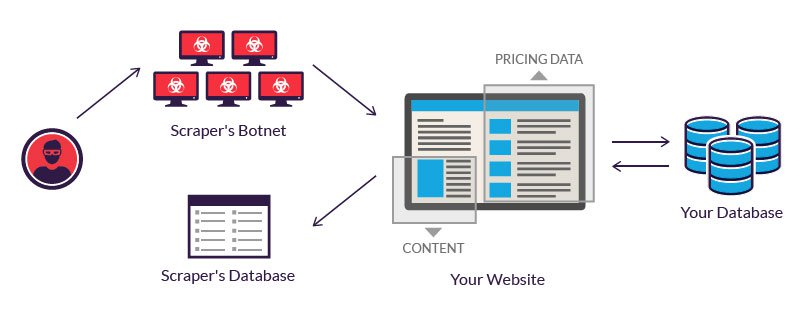
Think of web scraping bots as highly trained agents with advanced levels of automation and independence. In this step, AI takes web scraping bots to the next level, as it allows for “intuitive” thinking. For example, when dealing with advanced JavaScript code or dynamic AI structures, it can parse them much more intelligently and efficiently.
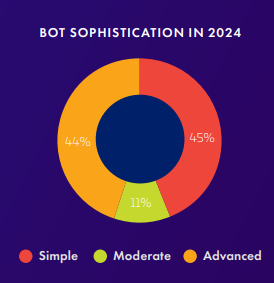
With the growth of AI, these web scraping bots are also becoming more advanced. According to Impreva’s 2025 Bad Bot Report, 44% of all bots are at the advanced level, rising from 40% in 2023. This means it is easier to overcome any bot protections, and valuable data has to be protected very well.
How does a Web Scraping Bot Work?
A web scraping bot is a complex automated script that gets data from a predefined website in a specific structure. During a multi-step process, a web scraping bot performs these steps sequentially:
- Fetching: The web scraping bot begins with a predefined set of web pages, so the first step is to extract the HTML structure from these pages.
- Parsing: Once we have a fetched HTML structure, the algorithm parses various types of elements, such as links, paragraphs, and images. It uses CSS selectors or XPath to locate the specific elements where this data is located.
- Scraping: After identifying the appropriate fields of data, we can begin scraping according to these rules from multiple pages as well.
- Data Processing: The extracted data is not clean, meaning that the types of data extracted require clear column names and processing to identify any missing fields.
- Data Exporting: To process the data for further analysis, we typically export it as CSV or JSON, as these are widely applicable formats.
- Orchestrating: For larger projects, this step is crucial, as it may require monitoring or scheduling of web scraping bots to ensure efficient execution.
Why You Need to Build a Web Scraping Bot
Although large organizations use scraping bots in large-scale operations, this does not stop you from using them in specific industries. Depending on the industry in which they work, professionals adapt scraping bots to meet their particular needs. Here are the most common and powerful use cases:
- Market and Price Tracking: Researching the market is one of the most significant assets you can have as a seller when comparing product trends and prices.
- Content Aggregation: Professionals seeking new and fresh ideas can observe various content strategies to enhance their business.
- Data for AI Training: Collecting data for AI-enhanced products has never been easier with web scraping.
- SEO and Site Auditing: By monitoring your competition and the narratives being promoted, you can stay up-to-date with the latest trends and effectively market your product.
How to Build a Web Scraping Bot: Two Main Methods
Web scraping bots can be built manually using code or with no-code options that include pre-built web scraping features. Coding a web scraping bot is quite a time-consuming process that requires development experience. This guide will help navigate some of the challenges this brings and offer alternatives to existing solutions for web scraping bots.
Method 1: Building Your Web Scraping Bot with Code (Using Python)
Python is a powerful programming language that comes with libraries that can fetch and parse HTML webpages. The library is called BeautifulSoup, and it has built-in functions for extracting data from HTML and XML pages. I pair it with the requests library, which can perform HTTP requests.
For more dynamic websites, you will need Playwright or Selenium libraries. They have their own browsers and interact with JavaScript much more easily.
Step 1: Install the libraries
Step 2: Import libraries
I will also utilize the CSV library to write scraped data to a file.
Step 3: Fetching
I send an HTTP request to Amazon’s website with a search for instant cameras.
Step 4: Parsing
If the status code is 200 (the general code for a successful response), we parse the returned content using the BeautifulSoup library. Find all product containers. You must find the correct selector via inspection.
I provide the example here of a CSS Selector, but such a filter can also be an XPath.
Step 5: Scraping
Extract specific elements within each container. Use .find() or .select_one() and handle cases where data might be missing. I store data by appending the extracted data as a dictionary.
Step 6: Exporting the data
I write all the scraped data to a new CSV file that can be processed further later. It is also possible to use a JSON format, which requires adjustment for this function.
This completes the basic self-built web scraping bot. We are still missing advanced features, such as anti-bot detection and pagination handling. To avoid being detected, we can set randomized times between browser interactions. The function would have to include all these steps:
For pagination, we need to detect the buttons responsible for navigating to the next page. This can be an issue as different websites use different mechanisms. Building a robust and advanced web scraping bot requires a significant amount of code and the ability to detect multiple CSS Selectors simultaneously.
Method 2: Modern Solutions Like Chat4Data
Modern platforms, such as Chat4Data, operate like screen-scraping bots directly within the browser. This means that it mimics human behaviour when clicking and scrolling. This already solves a huge problem you encounter when creating a web scraping bot yourself. Let’s see the other benefits this brings when using Chat4Data as a web scraping bot.
Step 1: Install Chat4Data
The Chat4Data browser extension is directly available in the Chrome Web Store, making it straightforward to install without additional steps. Make your account, and you are ready to go.
Step 2: Prompt for data
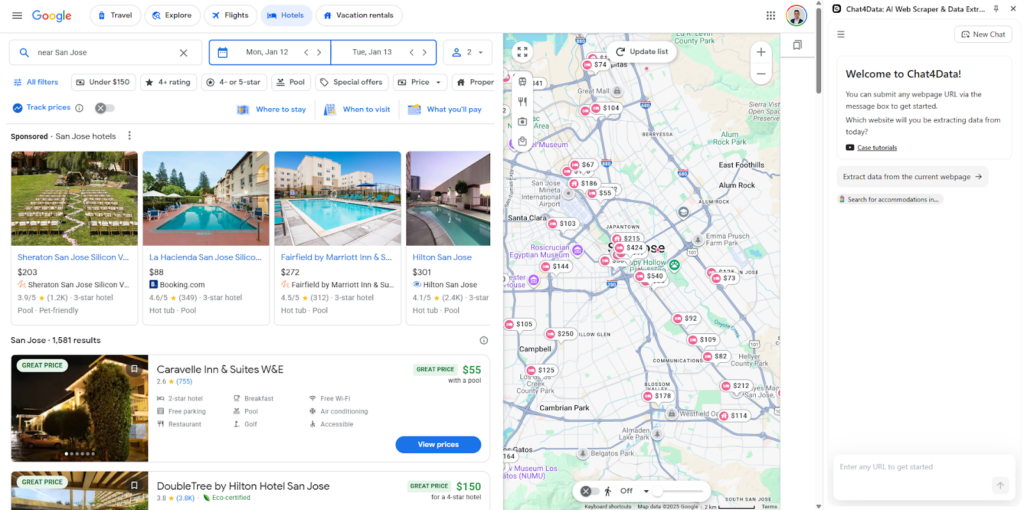
Let’s scrape Google Travel for the hotels they offer in the area of San Jose. When the Chat4Data web scraping bot extension starts, it provides a chat window ready for input. In natural language, I command Chat4Data to scan the current page. This prompt is auto-suggested by Chat4Data and helps out when you are uncertain about what you explicitly want.
Step 3: Choose a path
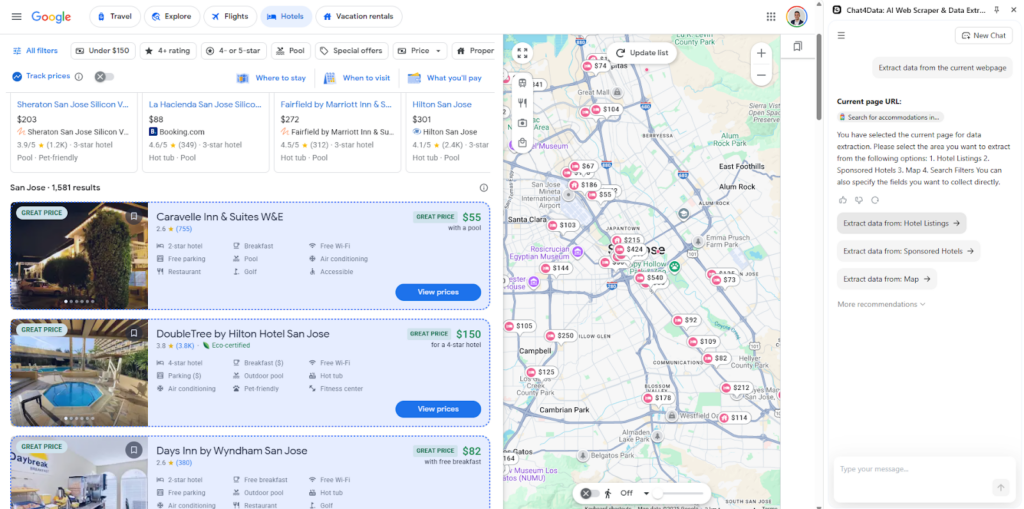
After scanning the page, Chat4Data identifies different parts of the webpage that it can scrape, so I choose the hotel list.
Step 4: Choose fields
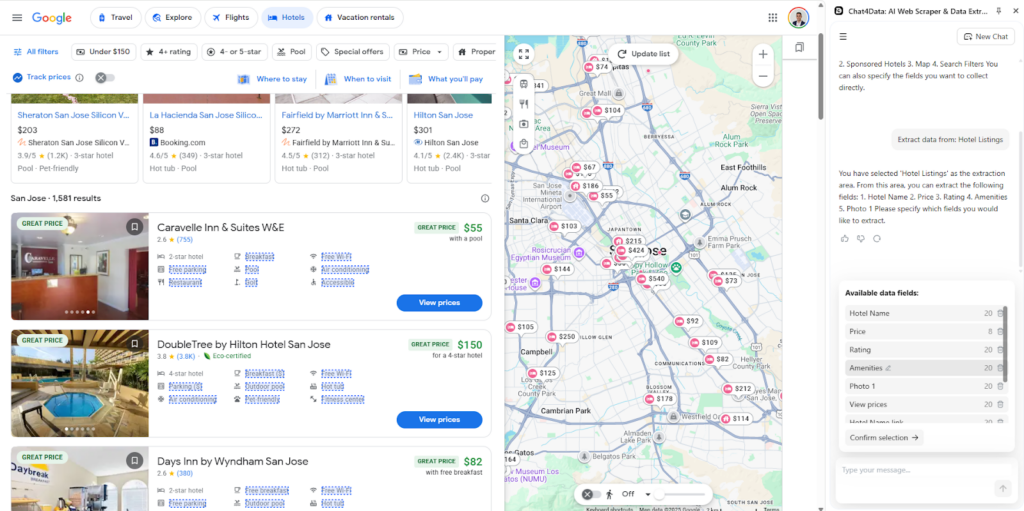
From the hotel list, Chat4Data has identified and categorized underlying HTML elements. You will notice that clear column names are essential here. This is one of the AI features Chat4Datat has.
Step 5: Scrape subpages
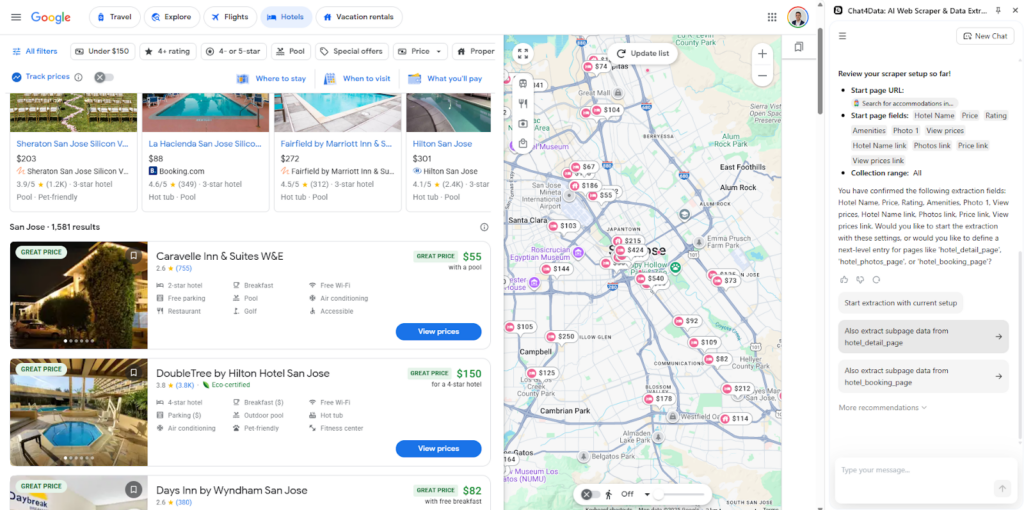
Chat4Data discovered underlying links for each hotel to gather even more information, but in this case, I want just a main list and scraping from all pages. If I were to choose to scrape subpages, Chat4Data would act like a web crawling bot.
Step 6: Final plan
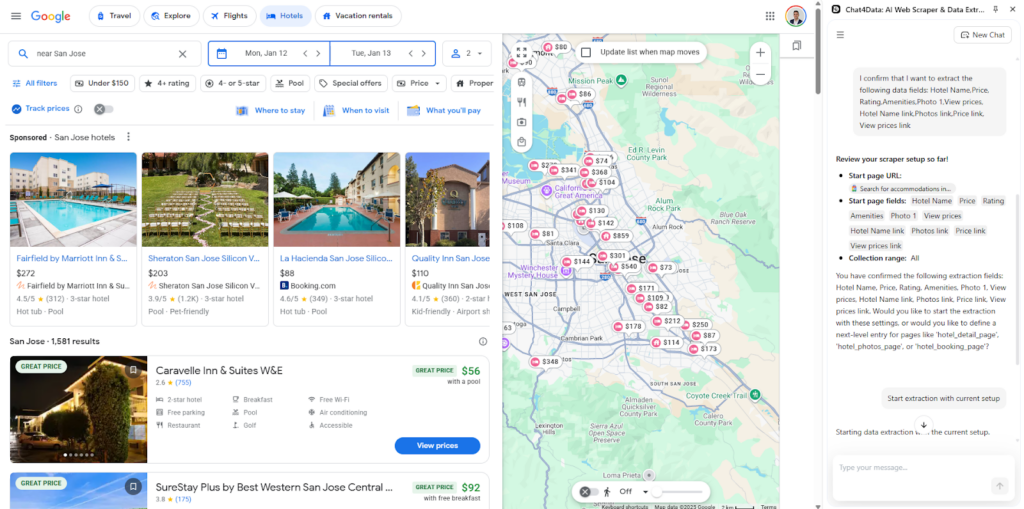
Chat4Data proposes a final plan for how the scraping will occur and which fields will be used. This provides a clear picture and makes it repeatable the next time you open the chat.
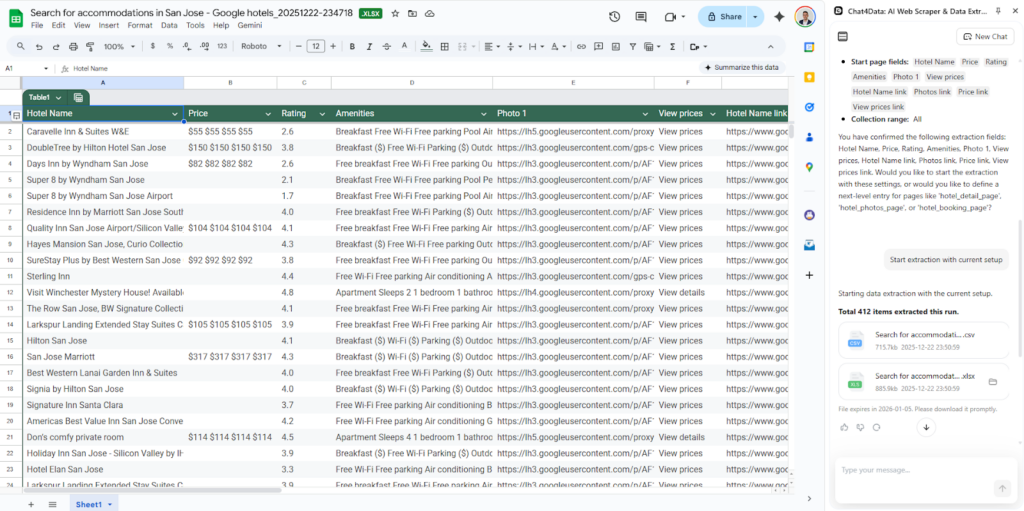
Step 7: Export data
Chat4Data automatically creates CSV and Excel formats for easy export and direct download access. If the file expires, you can restart the same scraping plan.
Choosing Your Path Forward with Web Scraping Bots
Chat4Data has many advantages over building your own web scraping bot. Those are:
- Conversational commands: Users can instruct the bot with simple, natural language prompts, removing the requirement for intricate coding.
- Privacy processing: Chat4Data handles all data locally and does not save any credentials, as no sensitive data is required upon login.
- AI automatic field detection: The AI engine intelligently recognizes and suggests relevant data fields on a page, saving users the manual effort of finding specific CSS selectors or XPath expressions.
- Clear column names: The AI automatically assigns human-readable and descriptive column names to the extracted data, making the output immediately understandable and ready for analysis.
- Automatic Pagination Handling: Chat4Data can automatically detect any type of ‘Next Page’ button for many different websites.
- Efficient Subpage Crawling: It can act as a web crawling bot when necessary, efficiently exploring underlying links (subpages) discovered during the main scrape to collect more detailed and relevant information.
These are just a few examples, but building your own web scraping bot can have advantages in cases where a highly customized solution is needed or when building at scale.
Want a deeper dive? Check out these articles:
- Top 5 Online Web Scrapers vs. Building Your Own Web Scraper
- Chat4Data vs. Instant Data Scraper
- 7 Best Web Scraping Plugins of 2025
- 8 Powerful AI Crawlers for Effortless Data Extraction in 2025
FAQs about Web Scraping Bots
- What’s the difference between a web scraper and a web scraping bot?
Both terms are usually used interchangeably. However, a web scraping bot implies a higher level of automation. It contains all the functions of a web scraper, yet it runs on a schedule. More robust web scraping bots can navigate various website structures that fall outside the scope of predefined rules, typically utilizing AI-enhanced features to do so.
- Is it legal to use the Python web scraping bot I found on GitHub?
Yes, but be careful how you use it. A few things to keep in mind:
- Check
robots.txt— this is where each website defines what bots are and aren’t allowed to access - Read the Terms of Service — some sites explicitly prohibit scraping, even for personal use
- Handle personal data carefully — it cannot be republished without the appropriate legal basis
- Using a bot you found on GitHub doesn’t transfer any legal responsibility — how you use it is on you
- Can I build a web scraping bot without knowing how to code?
Yes, without a doubt. There are numerous no-code web scraping bot solutions and AI web scrapers, including Chat4Data and Octoparse. They offer natural language prompting and visual feedback, similar to a screen-scraping bot.
- What are the most significant technical challenges when running a bot at scale?
A web scraping bot needs to be robust enough to handle changing JavaScript structures. Other features include switching proxies and mimicking human behavior without detection. Handling CAPTCHA is a significant problem for some websites, so a web scraping bot must be equipped with AI features that can also handle this challenge. Building this is not easy, so using no-code platforms like Chat4Data is a straightforward and efficient alternative.
- How do I prevent my own web scraping bot from getting blocked?
A few strategies that reduce detection risk:
- Add random delays between requests — fixed intervals are easy to detect, variable timing looks more human
- Rotate proxies — sending all requests from one IP is a red flag for most anti-bot systems
- Vary User-Agent strings — cycling through different browser identifiers helps avoid fingerprinting
- Use headless browser mode (Playwright or Selenium) for JavaScript-heavy sites instead of plain HTTP requests
- Limit request rate — don’t send hundreds of requests per minute; pace it realistically
If you’re running into blocks consistently, it’s often easier to switch to a browser-based tool like Chat4Data that handles all of this automatically rather than building around each site’s specific defenses.
 Try AI Web Scraper