
Amazon hosts roughly 600 million product listings globally as of 2025, across every category and region. That catalog is the largest public commerce dataset on the internet, and businesses mine it for competitive intelligence, pricing decisions, product development, and brand protection.
Manual collection does not work at that scale. A seller can open a browser and manually check three competitors. A retail brand monitoring daily Buy Box ownership, price changes, and review counts for 10,000 ASINs across five marketplaces cannot. That is where an Amazon data scraper comes in: software that replaces human clicks with code, reading HTML or JSON directly from Amazon’s servers in milliseconds and turning it into clean CSV, JSON, or database rows.
This guide covers what an Amazon data scraper actually is, why it matters, the five types of data you can collect, the tools available in 2026, the main challenges, and how to pick the approach that fits your team.
Quick Answer
An Amazon data scraper is an automated tool that extracts structured information from Amazon’s public listings. Most businesses use scrapers to collect five kinds of data: product details, seller profiles, prices, customer reviews, and search or video results. Options range from custom Python scripts to no-code browser extensions and official APIs, and the right pick depends on your scale, budget, and how fresh the data needs to be.
| Amazon data type | What you get | Common use case | Our deep-dive guide |
| Product | ASINs, titles, specs, images | Catalog building, affiliate sites | How to scrape Amazon |
| Seller | Seller IDs, FBA/FBM, ratings | Brand protection, MAP enforcement | Scrape a seller’s products on Amazon |
| Price | Buy Box, discounts, price history | Repricing, arbitrage, price alerts | Amazon price scraper |
| Review | Ratings, text, verified flags | Sentiment analysis, product R&D | Scrape Amazon reviews |
| Search / Video | SERP rank, ads, rich media | SEO, ASO, content strategy | Scrape Amazon video results |
What Is an Amazon Data Scraper?
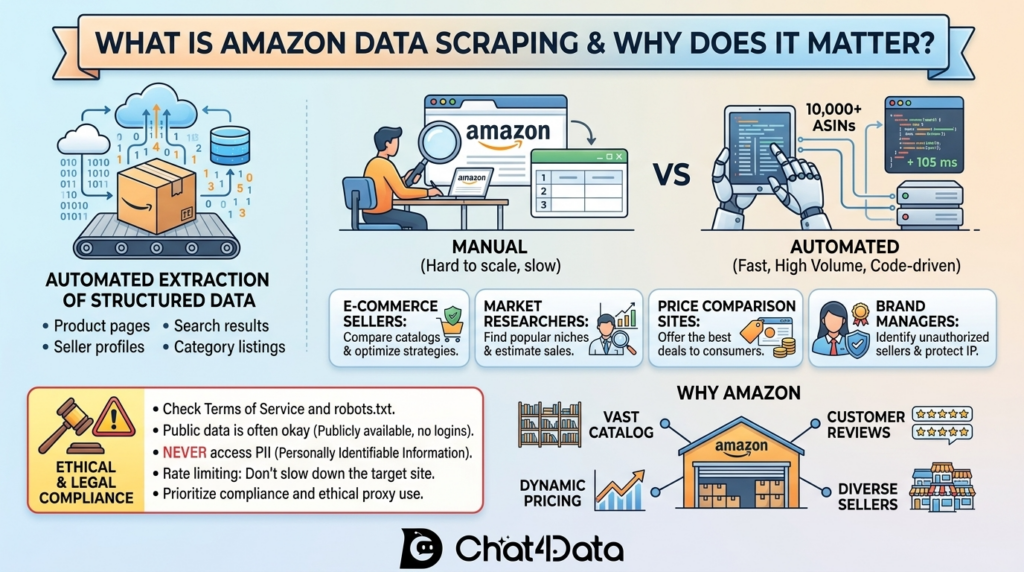
An Amazon data scraper is a program that automates the extraction of structured data from Amazon’s product pages, search results, seller profiles, and category listings. Instead of a person opening a browser tab and copying information, the scraper sends HTTP requests, renders JavaScript if needed, parses the response, and stores the extracted fields in a format you can analyze.
Most Amazon scrapers fall into one of three technical categories:
- HTTP-based scrapers send raw requests and parse HTML using libraries such as BeautifulSoup. Fast and lightweight, but blind to anything Amazon loads via JavaScript.
- Headless browser scrapers use tools like Playwright, Puppeteer, or Selenium to render pages as a real user would see them. Heavier, but necessary for reviews, offers, and dynamic filters.
- API-based tools query Amazon’s official Selling Partner API (SP-API) or wrap scraping infrastructure behind a clean endpoint you call with an ASIN or URL.
Is scraping Amazon legal?
In most jurisdictions, scraping publicly available data is legal as long as you do not bypass login walls, collect personally identifiable information, or overload the target site.
The 2022 hiQ v. LinkedIn ruling narrowed the federal Computer Fraud and Abuse Act, suggesting that public-data scraping is generally not a criminal access violation under U.S. law. The same case had a twist worth knowing: hiQ ultimately lost on LinkedIn’s breach-of-contract claim and shut down, a reminder that ToS-based civil claims remain a real risk even when CFAA does not apply. That said, aggressive scraping can still violate Amazon’s Terms of Service, and excessive request rates cross both ethical and legal lines. Compliance, rate limiting, and ethical proxy use matter at commercial scale.
Why You Need an Amazon Data Scraper
Five groups get the most out of Amazon scraping, and each one maps to a different dataset.
- Competitive analysis. E-commerce sellers scrape competitor catalogs, pricing, and reviews to benchmark against top performers. Pulling specs for the top 50 listings in a niche surfaces missing features, pricing gaps, and copy patterns that work.
- Market research. Analysts use scraped rankings and review volumes to gauge demand in emerging niches and spot trends before they appear in paid market reports. Review text run through NLP pipelines turns customer language into a product-development signal.
- Price monitoring. Retail arbitrageurs, repricers, and brands tracking MAP compliance need price data updated every few minutes. A scraped feed that detects a 5% competitor drop within minutes lets your system react before you lose the Buy Box.
- Brand protection. Large companies scrape seller data to identify unauthorized resellers, counterfeiters, and partners that violate Minimum Advertised Price policies. Seller-level data exposes the supply chain in a way the public product page does not.
- AI and analytics. Product titles, descriptions, and review text feed training datasets for recommendation engines, sentiment models, and e-commerce LLMs. Review scraping is one of the most common sources of public data for this work.
Why focus on Amazon specifically? Volume and velocity. The catalog is vast, prices change multiple times per day on competitive ASINs, reviews accumulate by the millions, and the third-party marketplace creates supply-chain signals you cannot get from any other retailer.
The Five Types of Amazon Data You Can Scrape
Amazon is not one webpage. It is a layered map of linked datasets, each with a distinct business purpose. The five sections below cover what you can collect and which dataset is best for each. For technical walkthroughs and tool comparisons on each, follow the deep-dive links.
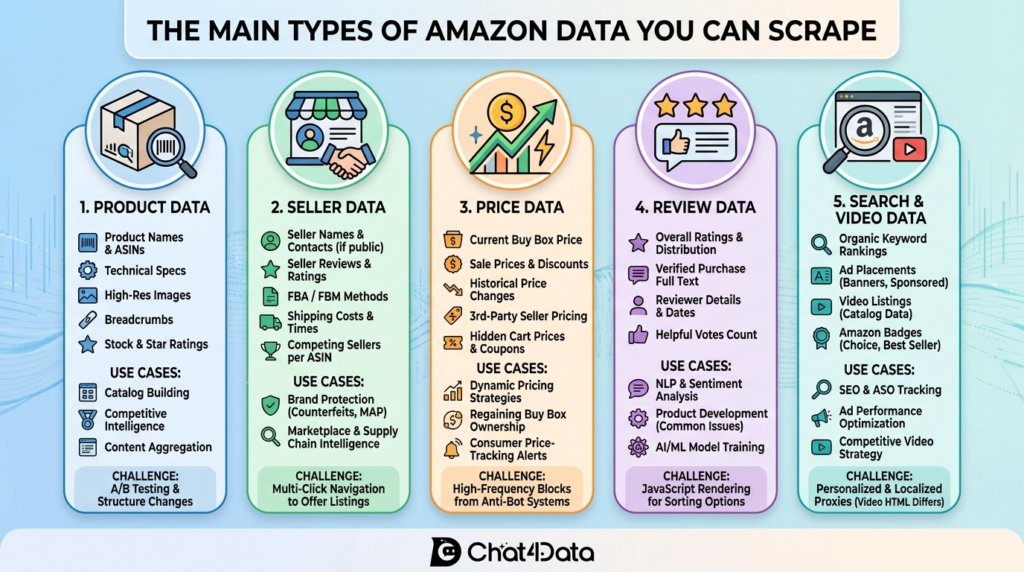
1. Product Data: The Foundation Layer
Product data is the base dataset for most e-commerce intelligence work. When you scrape an Amazon product page, you capture the fields that define a listing. Most of these fields are stable or change slowly.
What you get: ASINs, product titles, bullet descriptions, technical specifications, high-resolution image URLs, category breadcrumbs, stock status, and overall star ratings.
Best for: Catalog building, affiliate content sites, and competitive feature benchmarking.
For the full technical walkthrough, see our guide on how to scrape Amazon.
2. Seller Data: Mapping the Marketplace
Amazon has more than 9 million third-party sellers worldwide. Seller-level scraping exposes who is actually selling what, at what volume, and how.
What you get: Seller names, business addresses, publicly listed contact details, lifetime seller ratings, FBA vs FBM split, seller-specific shipping costs, and the number of sellers competing on each ASIN.
Best for: Brand protection, MAP enforcement, supply chain analysis, and reseller mapping.
For the full breakdown, see our guide on how to scrape a seller’s products on Amazon.
3. Price Data: The Fastest-Changing Layer
Prices on Amazon move constantly. Algorithmic repricers adjust listings based on stock, competitor moves, and demand signals, sometimes multiple times per hour on hot ASINs. Price is the most time-sensitive dataset you can scrape, and the hardest to collect with freshness.
What you get: Current Buy Box price, list price, sale price, discount percentage, historical price changes, third-party seller prices on the same ASIN, and available coupons.
Best for: Dynamic repricing engines, retail arbitrage, price-drop alerts, and consumer-facing browser extensions.
For the full technical walkthrough and tool comparison, see our guide to the Amazon price scraper.
4. Review Data: Voice of the Customer at Scale
Customer reviews are the richest qualitative dataset on the public internet. They show what buyers love, hate, and want in their own words.
What you get: Overall star ratings and their distribution, full review text with Verified Purchase flags, reviewer name and location, review date, and helpful-vote counts.
Best for: Sentiment analysis, product R&D, competitive review mining, and AI training datasets.
For the full breakdown, see our guide on how to scrape Amazon reviews. If you want a tool-by-tool comparison, see our roundup of the best Amazon review scraper tools.
5. Search Results and Video Data: Visibility and Content Intelligence
If a product does not appear on the first page of Amazon search results, it may not exist. Scraping SERPs and rich media is how brands and agencies measure visibility.
What you get: Organic keyword rankings, sponsored placements, “Amazon’s Choice” and “Best Seller” badge visibility, video thumbnails, and Prime Video catalog data.
Best for: Amazon SEO, ASO tracking, ad-spend effectiveness measurement, and competitive video analysis.
For the full breakdown, see our guide on how to scrape Amazon video results.
How Amazon Data Scrapers Work
Under the hood, every Amazon scraper follows the same four steps, regardless of whether you built it yourself or use a tool.
1. Request the page. The scraper sends an HTTP request to the target URL, often with rotating headers and user agents, and uses a residential proxy to mimic organic traffic.
2. Render if needed. If the data is in the initial HTML, a plain request call is enough. If Amazon loads it via JavaScript (reviews, offers, filters), a headless browser like Playwright or Puppeteer renders the page first.
3. Parse the HTML or JSON. Once the page is loaded, the scraper extracts specific fields using CSS selectors, XPath, regex, or, in newer AI-powered tools, natural-language instructions that map directly to data fields.
4. Structure and export. The parsed fields are cleaned, deduplicated, and written to CSV, JSON, a database, or pushed to an API endpoint for downstream analysis.
There are three main methods to get this done:
- Manual DIY coding: You write and maintain the entire stack in Python or Node.js.
- No-code tools: You point, click, or describe the data you want in natural language, and the tool handles the rest.
- Official APIs: Amazon’s own Selling Partner API (SP-API) returns structured data directly, but with strict access limits.
The tool you pick depends on the scale, budget, and the engineering bandwidth you can spare.
Key Features to Look for in an Amazon Data Scraper
Not every scraper handles Amazon well. These are the features that separate a production-grade tool from a prototype that breaks within a week.
- Anti-bot evasion. Amazon deploys Web Application Firewalls that check IP reputation, TLS fingerprints, browser signals, and request patterns. Rotating residential proxies and stealth configurations are the baseline, not optional add-ons.
- JavaScript rendering. Any scraper that cannot execute JavaScript will miss reviews, dynamic offers, and pagination on modern Amazon pages.
- Automatic pagination. Amazon shows 10 reviews per page and deeply paginates search results. A scraper that cannot crawl pagination automatically is nearly useless for real workloads.
- Data quality and structure. Output should have clear column names, consistent data types, and handle missing fields gracefully rather than silently dropping rows.
- Scalability. Small projects are easy. A tool that can scale from 100 ASINs to 100,000 without rewriting your pipeline is worth a premium.
- Customizability. You should be able to pick exactly which fields to extract, not just pull a fixed template.
- Ease of use. For non-technical teams, a visual interface or natural-language prompt beats writing Python every time.
- Maintenance overhead. Python scrapers typically take ten times the initial build effort to maintain as Amazon ships layout changes. Managed tools absorb this cost for you.
Popular Amazon Data Scrapers in 2026
These are the tools most commonly used across our deep-dive guides. Rather than a full review here, each one links out to the spoke article where we test and compare it in depth.
Chat4Data
Chat4Data is a Chrome extension that lets you scrape any public page using plain-English instructions. Open a page, for example, Amazon, and type what you want, such as:
“Scrape product title, price, rating, and review count for the top 50 results.”
Chat4Data generates a plan preview showing exactly what it will extract. You approve it, and the extension executes automatically, handling pagination and detail-page clicks. Data is exported as Excel, CSV, or JSON.
Unlike other AI scrapers that prioritize speed and often produce messy data, Chat4Data validates and self-corrects fields that look off. It is ideal for sellers, marketers, and researchers who need clean, structured data without writing code or managing complex selectors.



Octoparse
Octoparse is a long-established no-code desktop scraper with a visual point-and-click interface. Its 100+ pre-built templates include Amazon product, review, and best-seller scrapers that run with zero configuration. It handles dynamic content, scheduling, and cloud extraction. Heavier than a browser extension but flexible for complex multi-step workflows.
ParseHub
ParseHub is another visual scraper, strong at extracting nested elements and handling deep-navigated pages. Reasonable for one-off complex jobs, less ideal for high-volume recurring scraping.
Python: Scrapy, BeautifulSoup, and Playwright
For developers, the Python ecosystem is the default. BeautifulSoup handles HTML parsing for static pages. Scrapy is a full framework for scaling distributed crawls. Playwright and Selenium drive headless browsers for JavaScript-rendered content. Maximum flexibility, maximum maintenance burden.
Bright Data and Oxylabs
Enterprise-grade managed scraping services with dedicated Amazon scraper APIs. You pass an ASIN or URL, and the service returns structured JSON. Handles proxies, CAPTCHA, and layout changes for you. Typically, the best fit for teams scraping hundreds of thousands of listings a day with no dedicated engineering team.
Amazon’s Official APIs
Amazon provides two official APIs: the SP-API (Selling Partner API) for approved Amazon sellers and the PA-API (Product Advertising API) for Amazon Associates. PA-API was deprecated on April 30, 2026 and the endpoint fully retired on May 15, 2026; Amazon has moved Associate developers to the new Creators AP. Both APIs return clean, structured data, but with strict rate limits. SP-API rate limits vary by endpoint, typically from sub-1 to a few requests per second; the Creators API caps SearchItems and GetItems at 10 items per call. Both have strict usage plans documented in Amazon’s developer portal. Good for compliant, low-volume workflows. Too limited for large-scale competitive intelligence.
For a fuller tool-by-tool breakdown inside each data category, see the deep-dive guide linked in each of the five data-type sections above.
Step-by-Step: How to Scrape Data from Amazon (No-Code Example)
Here is the fastest way to get Amazon data with zero code, using Chat4Data as the example. The same general flow applies to other no-code tools.
Step 1: Add the extension. Grab Chat4Data from the Chrome Web Store (a free account is required to start).
Step 2: Open your target Amazon page. Navigate to a search results page, a product listing, or a seller storefront.
Step 3: Launch the scraper. Click the Chat4Data icon. The AI analyzes the page structure automatically and suggests data fields it can extract.
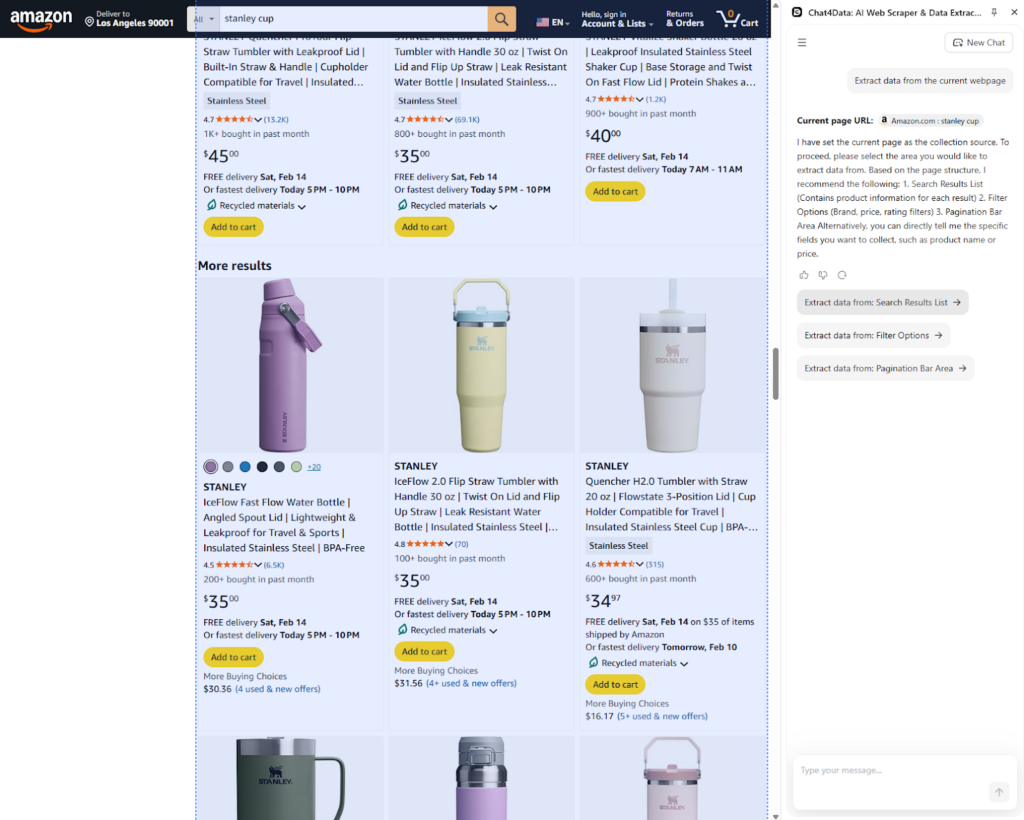
Step 4: Describe what you want. Type your instruction in plain English, such as “open this Amazon search page, scrape product title, brand, price, star rating, and review count for the first 3 pages of results.”
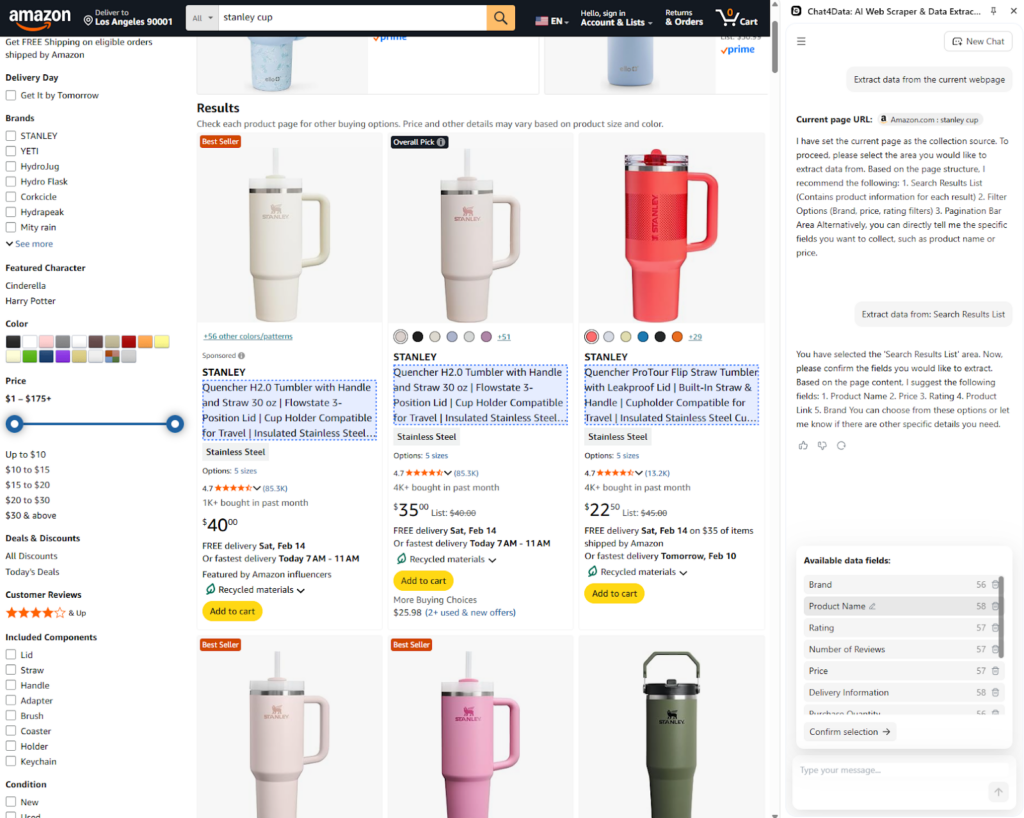
Step 5: Review the execution plan. Before running, Chat4Data shows you every step it intends to take, what page it’ll open, which fields it’ll grab, how it’ll handle pagination. Tweak it (“also grab the seller name”) or approve as-is.
Step 6: Run and export. The scraper handles pagination, extracts the fields, and exports to CSV or JSON when it finishes.
For Python-based tutorials with code samples, see our how to scrape Amazon guide.
Challenges in Amazon Data Scraping
Amazon invests heavily in anti-scraping infrastructure, which is why DIY projects so often stall in production.
- CAPTCHA and bot detection. Amazon’s Web Application Firewall monitors IP reputation, browser fingerprints, TLS signatures, mouse behavior, and request patterns. When it gets suspicious, you see CAPTCHA, 503 errors, or silent soft blocks that return empty pages. Bypassing this requires rotating residential proxies, realistic headers, and stealth-configured headless browsers.
- IP blocking. Hitting Amazon from a single IP at high frequency is the fastest way to get banned. Production scrapers rotate through hundreds or thousands of residential or ISP proxies, pace requests with randomized delays, and respect robots.txt and rate-limit headers.
- Dynamic page structure. Amazon A/B tests aggressively. The CSS selector carrying the price today can be renamed tomorrow, and the layout varies by category, country, and logged-in status. Production scrapers need robust fallback logic, constant monitoring, and a maintenance budget. Otherwise, pipelines silently break for days before anyone notices.
- JavaScript-rendered content. Reviews, offers, Q&A, and filters load asynchronously via JavaScript. A basic HTTP request returns an empty shell. Headless browsers like Playwright or Puppeteer are required for these fields.
- Data inconsistencies. Fields go missing (no rating yet), values change format (prices in different currencies), and optional elements appear or disappear. Clean pipelines need validation rules and graceful degradation rather than hard crashes.
- Scale vs reliability. Pulling 100 ASINs once is easy. Pulling 100,000 ASINs every six hours across five marketplaces is an infrastructure project. Distributed architecture, smart retry logic, and proxy pool management separate hobby scripts from production systems.
Legal Considerations for Amazon Data Scraping
Scraping Amazon sits in a legally grey but well-trodden area. A few principles keep most projects on the right side of the line.
Public data is generally safe. In the U.S., the hiQ v. LinkedIn ruling confirmed that scraping publicly accessible data does not violate the Computer Fraud and Abuse Act. Similar protections exist in many other jurisdictions, though specifics vary.
Terms of Service still matter. Amazon’s ToS prohibits automated scraping in several places. Violating ToS is not automatically illegal, but it can trigger account bans and civil action, especially if you are a seller with an Amazon account tied to the activity.
Do not touch personal data. Scraping publicly visible product data is one thing. Collecting email addresses, phone numbers, or anything that could identify a specific person instantly raises GDPR, CCPA, and other privacy-law issues.
Respect rate limits. Scraping so aggressively that you degrade Amazon’s performance moves you from the grey area to clear legal exposure, regardless of jurisdiction.
Use official APIs when they fit. SP-API and the new Creators API are the fully compliant routes for anyone whose volume falls within the rate limits. They are slower to set up, but they eliminate legal ambiguity.
When in doubt, consult a lawyer familiar with data scraping law in your jurisdiction before scaling up.
Best Practices for Scraping Amazon Data
A few rules keep production scrapers alive and out of trouble.
- Rotate residential proxies rather than hammering Amazon from one IP.
- Randomize request timing. Human browsing has natural gaps. Robotic one-request-per-second patterns are trivial to detect.
- Set realistic headers and user agents, and rotate them alongside proxies.
- Respect robots.txt and the Terms of Service, especially for any data behind interactive elements.
- Cache aggressively. If a product page has not changed in a day, do not fetch it again.
- Monitor for layout changes. Set alerts when extraction success rates drop. This catches Amazon A/B tests early.
- Keep scraping the scope tight. Pull only the fields you need. It reduces bandwidth, storage, and anti-bot risk.
- Separate concerns. Keep the scraping, parsing, and storage layers in separate services so a layout change does not break everything at once.
What to Do with Scraped Amazon Data?
Getting the data is half the job. Here is what teams actually build with it.
Price comparison and repricing tools. Scraped price feeds to power dynamic repricing engines, consumer-facing price-drop alerts, and cross-retailer price-comparison sites.
Product research and niche analysis. Rankings, review counts, and seller density combined reveal which niches are saturated and which still have room to grow. Sellers use this to pick new product launches.
Consumer insight mining. Review text at scale, run it through NLP and sentiment analysis, and turn it into a quantitative picture of what customers love and complain about. Product teams use this to prioritize roadmaps, and marketing teams use it to refine positioning.
Competitive intelligence. Tracking competitor catalogs, new launches, price moves, and review velocity builds an always-on intelligence layer for category managers and brand teams.
AI training datasets. Product descriptions and reviews are common feedstock for recommendation models, e-commerce LLMs, and classification tasks.
Conclusion
An Amazon data scraper is no longer an optional tool for serious e-commerce teams. With 600 million listings, millions of sellers, and prices that change by the hour, the businesses that make data-driven decisions on Amazon are the ones with a working data pipeline into the catalog.
Pick the approach that matches your scale: DIY Python for custom logic and small volumes, no-code tools like Chat4Data for marketing and research teams, and managed services for enterprise-grade workloads. Respect the legal and ethical guardrails, invest in proper proxy and anti-bot infrastructure, and your scraped data will outlast any single Amazon layout change.
If you want to get started without an engineering project, try Chat4Data. It handles anti-bot measures, pagination, and field detection automatically, so you can focus on what the data actually tells you.
FAQs: Amazon Data Scraping
Is it legal to scrape Amazon?
Scraping publicly available Amazon data is generally legal in most jurisdictions, including the U.S., under the 2022 hiQ v. LinkedIn ruling. That said, scraping can still violate Amazon’s Terms of Service, leading to account bans for sellers and civil action in aggressive cases. Avoid scraping personal data, respect rate limits, and consult a lawyer before scaling to commercial volume.
How do I prevent getting banned while scraping Amazon?
Use rotating residential proxies, randomize your request timing, and set realistic headers and user agents. Keep scraping frequency reasonable, since aggressive patterns get detected quickly. Cache results to avoid re-fetching unchanged pages, monitor for CAPTCHA and 503 errors as early warnings, and respect robots.txt. Managed scraping services handle most of this automatically if you want to skip the infrastructure work.
Can I scrape Amazon product reviews?
Yes, Amazon reviews are publicly viewable, which makes them legally accessible to scrape in most jurisdictions. The technical challenge is that reviews load via JavaScript and paginate at 10 per page, so a basic HTTP request returns an empty shell — you need a headless browser like Playwright or an AI-powered scraper that handles pagination automatically. Common fields include star rating, review text, Verified Purchase flag, reviewer name, location, date, and helpful votes.
Can Amazon detect web scrapers?
Yes. Amazon runs one of the most aggressive anti-scraping systems of any major e-commerce site. Its Web Application Firewall tracks IP reputation, TLS and browser fingerprints, request timing, session behavior, and header consistency. When triggered, you see CAPTCHAs, 503 errors, or silent soft-blocks that return empty pages. Working around detection requires rotating residential proxies, stealth-configured headless browsers, and human-like request patterns. No-code AI tools bundle most of this for you.
What is the difference between scraping Amazon and using Amazon’s API?
Amazon’s official APIs (SP-API and the new Creators API that replaced PA-API in April 2026) return structured data directly from Amazon’s databases with zero anti-bot friction. The tradeoff is strict access requirements (SP-API requires an approved developer account; Creators API requires Amazon Associates approval and a minimum of 10 qualified sales in the last 30 days) and tight rate limits. Scraping gives you more flexibility and no access gating, but you own the anti-bot and maintenance burden.
What is the best Amazon scraper for non-developers?
For non-technical users, AI-powered browser extensions like Chat4Data are the fastest path to usable data. You install the extension, open an Amazon page, describe what you want in plain English, and the tool handles field detection, pagination, and export: no Python, no proxies, no scripts to maintain.
How much does it cost to scrape Amazon data?
Costs split into three buckets. DIY Python is free in software but typically runs $50–200/month in residential proxies once you scale past a few hundred pages a day, plus engineering time for maintenance. No-code tools like Chat4Data and Octoparse start free for small jobs and charge $20–100/month for higher volumes. Managed enterprise services like Bright Data and Oxylabs charge per successful request, usually $1–3 per 1,000 requests, with monthly minimums in the hundreds to low thousands.