
Web scraping is growing rapidly in the Amazon e-commerce space, driven by use cases like price scraping, MAP compliance checks, and dropshipping research. All of these rely on product data that Amazon hides behind its shopping interface, rather than offering a simple download option. Manually copying and pasting this data wastes hours you don’t have.
This guide walks through three practical extraction methods ranked by setup complexity: a no-code browser extension, a third-party scraping API, and a custom Python script. Each section includes a working tutorial so you can test the approach against your own requirements before committing.
Quick Answer
Three main ways to scrape Amazon:
- No-code extension: Chat4Data, a conversational AI agent for data collection. Just type what you want in plain languge and it handles field detection, pagination, and anti-bot for you. Best for non-technical users.
- Scraping API (e.g., Bright Data): pay-per-request, clean JSON, no maintenance. Best for dev teams building data pipelines at scale.
- Custom Python script (Selenium): full control, but the highest setup and maintenance, and you manage proxies and anti-bot yourself.
The right choice depends on your technical skill, budget, and data volume.
Feature Comparison Table on How to Scrape Amazon methods
| Tool | Chat4Data | Amazon Scraper API | Python |
| Setup complexity | 1/5. Simple browser extension installation. | 3/5. Sign-up, API key, and basic HTTP request knowledge. | 5/5. Requires installing Python, drivers, libraries, and scripts. |
| Reliability | 5/5. Runs in-browser, mimics human behavior. | 4/5. Highly reliable, vendor handles anti-bot, but dependent on vendor uptime. | 2/5. High risk of being blocked; requires constant maintenance. |
| Ease of use | 5/5 (Natural Language) | 3/5 (Requires API knowledge) | 2/5 (Requires coding) |
| Maintenance | None. Chat4Data updates automatically when Amazon changes layouts. | Zero. Handled entirely by the API vendor. | High. You must manually update selectors if Amazon changes the HTML. |
| Anti-bot challenges | Built-in. IP rotation and CAPTCHA solving included. | Handled by Vendor. Sophisticated proxy rotation and anti-detection. | Manual. Must integrate 3rd-party tools to hide browser fingerprint. |
| Scalability | High. Browser extension scraping scales to millions of pages. | Very High. Designed for massive, instantaneous requests. | Medium. Browser instances consume a lot of RAM/CPU. Possible with multiple machines. |
| Pricing | Freemium (Free starter, Plans: $10-$35/mo) | Pay-per-successful-request (e.g., $1.5/1,000 requests) | Free (Open Source) + Proxy costs |
| Best use case | Market research and competitive analysis where non-technical users need reliable data without writing or maintaining code. | Integration into software, high-volume automated data feeds. | Developers needing deep interaction (clicks/logins). |
Why Scrape Amazon Data?
Amazon keeps its most useful data locked behind the shopping interface, with no download button in sight. Scraping is how teams get it out at scale, and what they pull depends on the decision they’re trying to make:
- Prices power competitor monitoring, MAP compliance checks, and dropshipping margins, the numbers that move hour to hour
- Reviews reveal why a product sells or gets returned, the raw text behind sentiment analysis and product gaps
- Search rankings show where you and competitors land for a keyword, and how that position drifts over time
- Product details and variants map a competitor’s full catalog, their range, their bundles, their gaps
- Best Seller and ranking data surface what’s trending in a category before it’s obvious to everyone else
Pulled together, this is market intelligence you can’t get by browsing. The catch is that Amazon guards it aggressively, which is exactly why the scraper you choose matters.
What makes an Amazon Scraper efficient?
When you scrape data from Amazon, you want it to be efficient and reliable. Here is a list of features that such a scraper must include:
- Setup complexity: Requires minimal coding knowledge, primarily for installing and running the browser extension. If the user gets frustrated at the first step, it will diminish the tool’s user base.
- Reliability: It is designed for continuous operation; it automatically handles Amazon’s website changes, ensuring consistent data extraction over time.
- Anti-bot Evasion: It must bypass Amazon’s sophisticated anti-bot detection systems. They have one of the best anti-bot algorithms in the world, as it contains a lot of valuable data, so it must be well protected.
- Data Quality: Essential for extracting high-quality data (e.g., product titles, descriptions, price, reviews, image links) with clear, well-labeled output columns.
- Scalability: The tool must handle tasks ranging from single-product scrapes to extensive market research involving up to 10,000 products.
- Ease of Use: Since the majority of users are non-technical, the primary goal is straightforward data acquisition, making usability a critical factor.
- Maintenance: A Python-based Amazon scraper carries heavy ongoing maintenance, often far more effort than the initial build. Amazon updates its DOM structure, anti-bot signals, and rate-limiting logic frequently, which means selectors, headers, and proxy strategies all need continuous attention.
Scrape Amazon Practical Tutorial: 3 Methods
To accommodate all levels of technical knowledge, I chose three different methods to show you today how to scrape Amazon data.
Method 1: The AI-powered Solution: Chat4Data
Chat4Data is a conversational AI agent for web scraping. As an in-browser web scraper, it blends the conversational nature of ChatGPT with scraping functionality. You can start scraping Amazon product data immediately. Before diving into the practical tutorial, let’s explore some of Chat4Data’s other features.
Setup complexity: 1/5. You install the Chrome extension and start scraping almost instantly. No templates, proxies, or server setup.
Reliability: 5/5. With the power of AI, robust anti-bot algorithms, and reliable data-detection methods, Chat4Data is the most reliable tool on the market for web scraping, delivering consistent results every time I use it.
Key Features:
- Natural Language Prompting for the generation of scraping rules using plain language.
- AI Data Field Detection: Automated identification of data fields and clear, descriptive column names.
- Automatic Pagination to ensure complete dataset retrieval throughout all result pages.
- Subpage Scraping: The extraction of data from associated subpages (e.g., product reviews, detailed listings).
Privacy & Security:
- Data processing is executed locally on the user’s system.
- No collected data is permanently saved or stored by the tool.
- The application neither processes nor stores user login credentials; access to data behind a login wall requires the user to authenticate independently before scraping.
Anti-bot challenges: Barely any issues with anti-bot measures. Since Chat4Data runs in your browser and appears to be a real person using the site, it’s way less likely to get blocked than automated scripts. It deals with CAPTCHA and acts like a human browsing around on its own.
Best-use scenarios: Perfect for people who aren’t tech-savvy and need market research, price comparisons, product ideas for dropshipping, quick one-off data checks, and dependable, large-scale Amazon data pulling without the hassle of upkeep.
Practical tutorial:
For today’s example, I am scraping Amazon for the gaming laptop category. I search for a gaming laptop, then start the Chat4Data extension.
- It immediately offers to scan the page for possible data categories and finds multiple. I want to scrape product data, but that is not the only thing. You can also combine data from the filter options.
- Chat4Data analyzes the underlying data fields in the product category and identifies rating, number of reviews, price, delivery information, purchase quantity, age, etc. This is an automatic data field recognition powered by AI in Chat4Data. If you want to tailor it to your specific needs, all you have to do is write in natural language, and Chat4Data makes a plan for you.
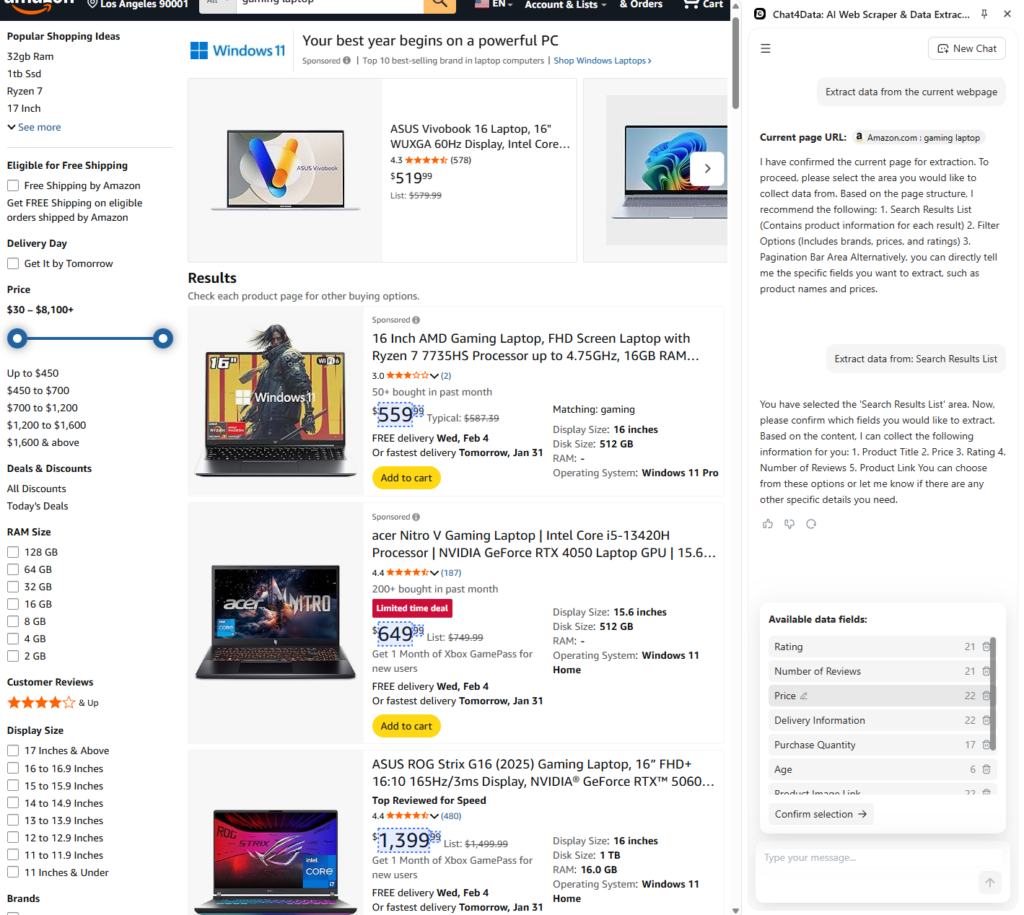
- Here is how Chat4Data helps me daily. Subpage scraping for extra information is an Amazon feature that allows scraping the full extent of available data. I chose this option to show you how easy it is to get even more data from Amazon.
- Chat4Data opens the product’s underlying link and displays all the data categories it found: product description, product video results, detailed price data, and much more. I choose to get a more detailed product description, as this will help me further analyze the market and laptop specifications.
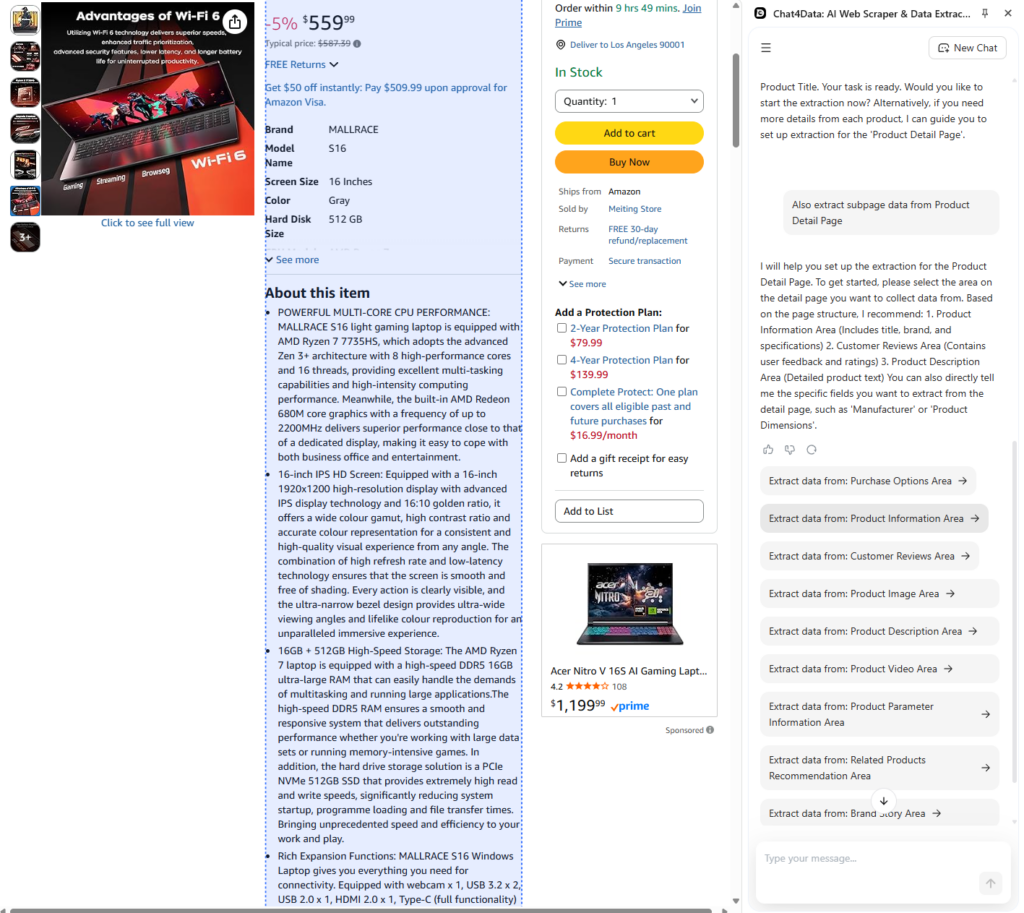
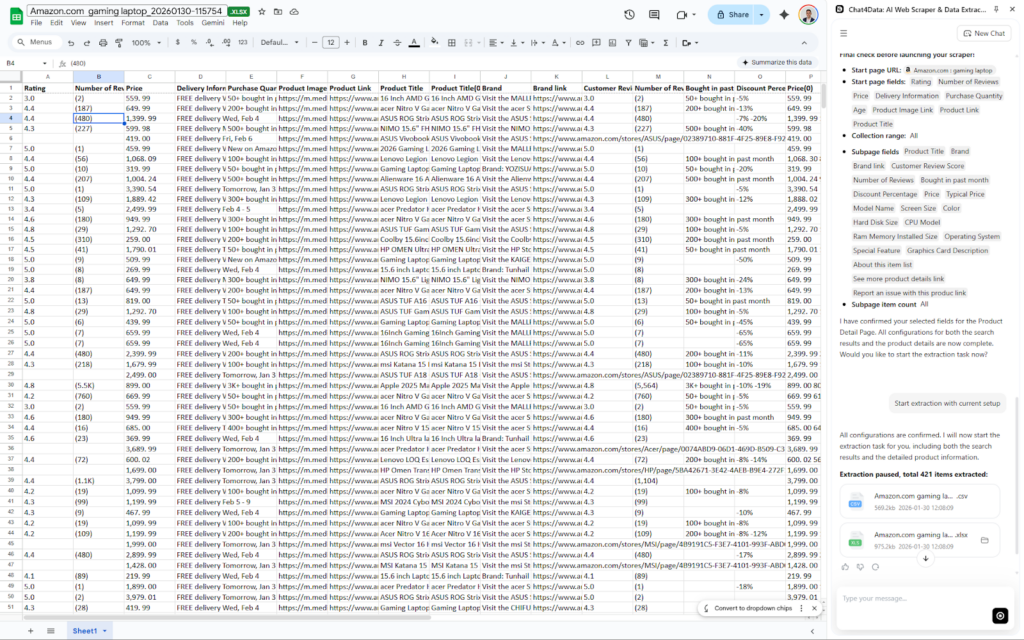
Chat4Data quickly opens each subpage while keeping the main tab open during the scraping process. This makes scraping fast and reliable. You can also see how many results are being fetched in real time.
Chat4Data allows me to export CSV and Excel formats. I chose Excel to further process my scraped Amazon data. Column names are clear because Chat4Data uses AI in the background to automatically recognize data types. In the final table, we have all these columns:
Rating, Number of Reviews, Price, Delivery Information, Purchase Quantity, Product Image Link, Product Link, Product Title, Product Title(0), Brand, Brand Link… (plus 20 more fields).
Method 2: The Remote Solution: Amazon Scraping API
Chat4Data is a helpful tool, but it does not integrate with other tools, unlike Amazon’s Scraping APIs. An Application Programming Interface (API) provides you with data directly from a specific website, and here that is Amazon. There is no official Amazon API, but many websites scrape the data themselves and sell it as a subscription for each request made through their API. Such tools are BrightData, Apify, ScraperAPI, etc. In today’s example, I am using BrightData’s Amazon Scraper API.
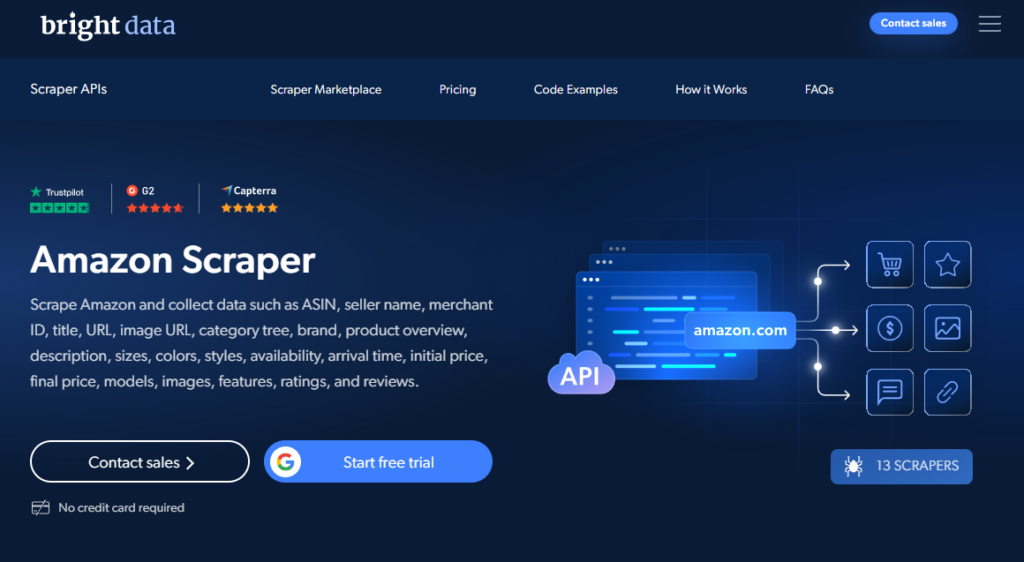
Setup complexity: 3/5. Requires signing up for the service, generating an API key, and basic coding knowledge (or a tool like Excel’s Power Query) to send HTTP requests. No browser or server setup is required, but you do need to understand how to authenticate requests and parse JSON responses.
Reliability: 4/5. The API provider handles the anti-bot measures and maintenance, offering high stability, but you are reliant on their uptime and maintenance schedule.
Key Features:
- Clean, structured output: Data is returned in JSON format, which is easy to parse.
- No maintenance: The provider handles all changes to Amazon’s website structure.
- High scalability: Designed to handle millions of requests without infrastructure concerns on your end.
- ASIN/URL input: Simply feed the API a product URL or ASIN, and it returns the data.
Anti-bot challenges: Vendor handles it. API services run on large proxy networks and anti-detection stacks sophisticated enough to bypass most of Amazon’s defenses without your involvement.
Best-use scenarios: Best for dev teams building data pipelines to ingest Amazon data at scale and automated pricing engines that use API calls to match their current business operations.
Pros:
- Immediate high-volume scraping capabilities.
- No need for managing proxies, headless browsers, or script maintenance.
- Structured data (JSON) output for further analysis.
Cons:
- The cost per request can be higher for large volumes.
- You are locked into the vendor’s data fields (less flexible than Python).
- Rely on a third-party service for your critical data stream.
Pricing: Based on successful requests (e.g., $1.5 per 1,000 requests). It can quickly become costly for larger projects and market research.
Ease of use: 3/5. Requires basic knowledge of APIs and HTTP requests.
Practical tutorial:
BrightData’s Amazon palette of predefined tasks allows you to fetch different parts of Amazon’s data. I am most interested in product data right now, so let’s see how it works in action.
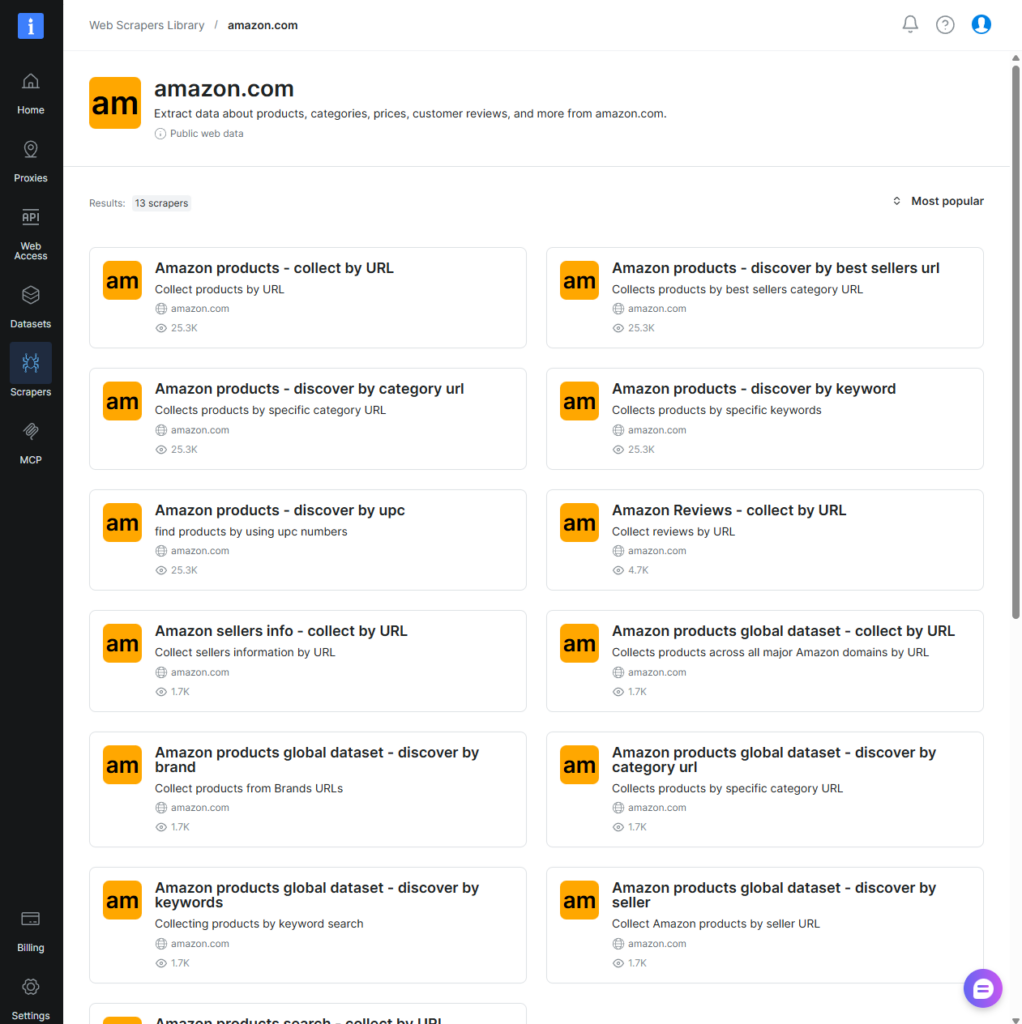
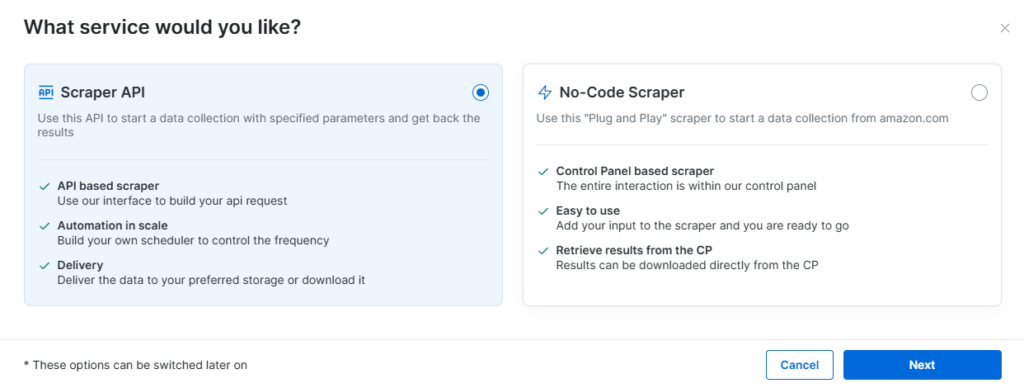
You can use APIs in programming languages like Python and others to easily integrate into workflows. For this example, I chose the no-code alternative to just fetch the data and showcase how it works.
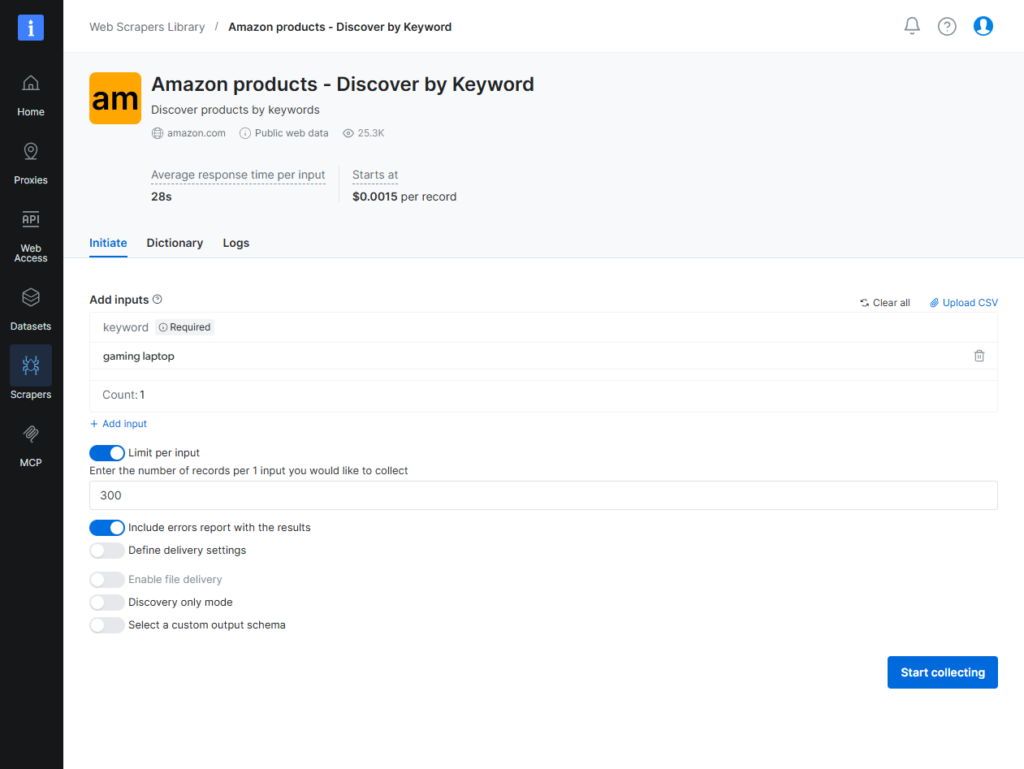
When you start a task, you can configure it however you like, including the search keyword, the number of results, and advanced output options.
I ran the job, and within 2 minutes, I had my data in both CSV and JSON. The data is pretty clean, and the column names are good. But the ISBN column is empty, which is not what you want from an API that promises accurate data.
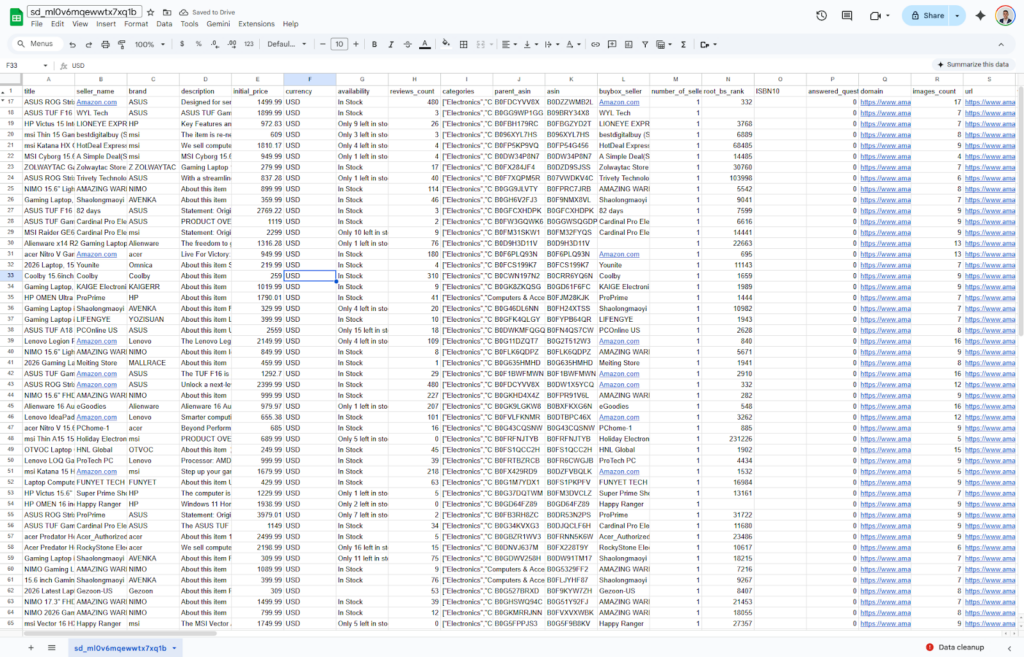
I ran a 500-ASIN batch against BrightData’s API on gaming laptops. Runtime: 2 min 14 sec. Cost: ~$0.75 at $1.50/1,000 requests. 97% parse success rate; 3% failures on ASINs with variant listings.
Method 3: The “Coding” Solution: Python and Selenium
Developing a custom Python script provides complete control over the required data, although it is a time-consuming process. The main difficulties encountered are anti-bot detection algorithms and the dynamic nature of website structures. For a practical guide to scraping data using Python, refer to this additional information: How to Build an Online Web Scraper.
Setup complexity: 5/5. Although the most flexible solution, the Python approach is the hardest to set up and maintain afterward, given the prior knowledge, time, and effort required.
Reliability: 2/5. Highly dependent on your coding skills and ability to manage anti-bot measures. Prone to breaking with every Amazon website update.
Anti-bot challenges: Require significant manual effort, including using proxy services, configuring browser headers, and hiding automation fingerprints (e.g., using undetected_chromedriver).
Best-use scenarios: Applications requiring unique browser interaction (such as complex login processes or specific button clicks), accurate, low-volume data extraction, or experienced developers who don’t mind heavy maintenance and require total control over the scraping process are examples of best-use cases.
Pros: Advantages include total control over data, excellent growth potential, and no expense (open source).
Cons: Frequent updates are needed (as websites change), it’s challenging to learn initially (coding is required), and there may be expenses for required proxies/setup for extensive projects.
Pricing: Free at the code level (open source), but expect ongoing costs for rotating proxies, CAPTCHA solvers, and developer time. For mid-volume projects, this can quietly become the most expensive option of the three.
Ease of use: 2/5. Requires technical expertise in development.
Practical tutorial:
To begin, set up your development environment and install Python. This example uses the Selenium library, an open-source Python framework for robust web browser automation, ideal for testing and routine tasks.
The following code first imports the necessary libraries from Selenium and pandas. Pandas helps process the extracted data into a clean, easy-to-manage format, which can then be saved as Excel, CSV, JSON, or other file types. A driver is essential for controlling (“driving”) the browser, enabling you to perform actions such as clicking, scrolling, and waiting.
It is advisable to incorporate waiting periods between actions to mimic human browsing behavior. Please be aware that this code may require adjustments over time, so tailor it to your specific scraping needs.
Running the script above against the gaming-laptop search page returned 18 products. Amazon threw a 503 after request 42 without proxies.
Conclusion
The ability to scrape Amazon product data unlocks a level of market intelligence that can define how your business competes today. Whether you are tracking competitor pricing, analyzing review sentiment, or monitoring stock levels, the data is publicly available. If you have the right tools to access it.
We have explored three valid paths:
- Chat4Data: The modern, AI-powered solution that democratizes data access. It removes the technical barriers of anti-bot detection and HTML parsing, making it the ideal choice for business users and analysts.
- Python Custom Script: The flexible, developer-centric approach. Perfect if you need to build a particular bot that interacts with the page in unique ways, provided you have the resources to maintain it.
- Amazon Scraper API: The hybrid approach. Leveraging existing work to speed up development, though often coming with hidden costs or reliability issues.
Most businesses eventually figure out that the “hidden costs” of keeping a Python script up to date, like buying proxies, updating selectors, and fighting CAPTCHAs, are much higher than the cost of a dedicated tool. Fighting against Amazon’s anti-bot team is a full-time job.
Chat4Data handles anti-bot detection, pagination, and field extraction in one browser-based workflow, so you can focus on the data itself. Install the free Chrome extension and run your first scrape in under five minutes.”
FAQs about Scraping Amazon
- Is there a reliable Amazon data scraping API?
Yes. There is no official public API for scraping from Amazon (the official Product Advertising API has strict rate limits and is for affiliates). However, third-party Amazon scraping API providers act as a middleman. You send them the ASIN or URL, and they return the data. This is reliable but can be costly for high-volume scraping compared to using a tool like Chat4Data.
- How to scrape Amazon reviews effectively?
Scraping Amazon reviews differs from scraping product data due to the sheer volume. Tens of thousands of reviews can exist for a single product, with extensive pagination. Scraping subpage data is the essential feature here, and Chat4Data provides it. To scrape Amazon reviews effectively, first filter the product market on Amazon, then start scraping with Chat4Data.
- How to scrape Amazon product data using GitHub code?
Public GitHub repositories provide already-functional Amazon scraper code at no cost. Maintainers handle all maintenance, but they are always grateful for developers’ contributions. Same with any Python script: you have to pull the code to your local machine and then run it in your environment. If you use a GitHub script without proxies, your local IP will likely be banned by Amazon within a few requests. Always route GitHub scripts through a rotating proxy service.
- How to scrape data from Amazon without getting blocked?
Amazon detects the “User-Agent” strings of standard Python libraries (such as requests or urllib) and blocks them instantly. Furthermore, if you are using Selenium, Amazon detects the navigator.webdriver flag set to true. To fix this, you must spoof your User-Agent to look like a real browser (Chrome/Firefox) and use libraries like undetected_chromedriver or modify the browser flags to hide automation traces. Web scraping tools like Chat4Data handle this out of the box, so for most people, this is the best option.
- Can I use Excel to scrape Amazon?
Power Query is the way to send API requests, and with some Amazon API providers, you can do this. You would have to write a script that sends the request and fetches data in a specific format.
6. Is it legal to scrape Amazon?
Scraping publicly available data is generally permitted in many jurisdictions, and U.S. rulings such as hiQ Labs v. LinkedIn have leaned in that direction for public web data. That said, scraping Amazon specifically still operates in a legal grey area and is subject to several conditions:
- Terms of Service (ToS) Violation: Aggressive scraping is prohibited under Amazon’s ToS and may result in civil action or account suspension, especially for sellers.
- Ethical and Rate Limits: Don’t scrape so aggressively that you overload or degrade Amazon’s website. High request rates can cross ethical and legal boundaries.
- Personal Data: You must not collect personally identifiable information (PII). This kind of data is particularly sensitive and may not be republished without the necessary permissions.
It is recommended to always respect Amazon’s robots.txt file and consult a lawyer before scaling up to commercial volumes.
- How much does it cost to scrape Amazon?
The cost of scraping Amazon varies by method:
- No-Code AI (e.g., Chat4Data): Freemium model with paid plans between $10–$35 monthly.
- Scraping APIs: Often pay-per-request (e.g., $1.50 per 1,000 requests). Specialized retail insight services can start at $250 per month.
- Custom Python (Selenium/GitHub): The open-source code is free.
- Hidden Costs: Requires rotating proxies and high maintenance. Ongoing efforts often exceed initial development by ten times due to Amazon’s frequent layout updates.
 AI Web Scraper by Chat