
Let’s be honest.
You have found a competitor on Amazon who is making insane sales. They have hundreds of products with insanely low pricing, high sales, great reviews, and their niche looks profitable.
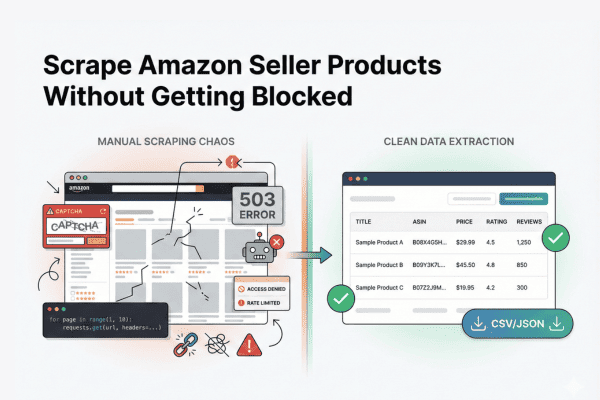
And then you think: I want to scrape this seller’s product data on Amazon.
You see, you are trying to scrape a seller‘s products on Amazon to get your job done.
To be precise, you want their full catalog, their pricing strategy, their new launches, their best-performing SKUs, and more before entering a niche or competing with them.
And in this guide, I’ll show you exactly how to scrape a sellers products on amazon that in 10 minutes, without turning this into a scraping infrastructure project.
So before we dig in, here’s the short version:
Quick Answer
To scrape a seller’s full product catalog on Amazon, you have two realistic options:
- Use Chat4Data: a conversational AI agent for data collection that runs as a Chrome extension. Open the seller storefront, describe the fields you want (title, price, rating, review count, URL), and it handles pagination and anti-bot behavior automatically. Best if you just want clean catalog data fast.
- Build it in Python: gives you full control, but you’ll manage rotating proxies, headers, session persistence, and dynamic pagination yourself, and rebuild it every time Amazon shifts its layout. Best if you’re building scraping infrastructure.
If your goal is seller insights rather than building a scraper, the no-code route gets you structured data in about 10 minutes.
Why Scrape a Seller’s Products on Amazon?
Pulling a single seller’s entire catalog in one structured export tells you things you can’t get by browsing their listings one by one. Here’s what that data is actually for:
- Map their full catalog. See every product a competitor sells, not just the few that show up in your searches, so you know the real size and shape of their lineup before entering a niche.
- Reverse-engineer their pricing strategy. With every SKU and price in one sheet, you can spot how they ladder prices across a range, where they undercut, and which items are loss leaders.
- Catch new launches early. Re-scrape on a schedule and any product that wasn’t there last week stands out, giving you an early read on where a competitor is expanding.
- Find their best performers. Sort the catalog by rating and review count to see which SKUs are doing the heavy lifting, the ones worth studying or competing against directly.
- Size up a niche before you enter it. A seller’s catalog breadth, pricing, and review depth together tell you how saturated and how profitable a category really is.
The catch is that getting this data cleanly is harder than it looks, which is where the real challenges begin.
The Real Challenges of Scraping a Seller’s Products on Amazon
When you say, “I want to scrape a seller’s products on Amazon”.
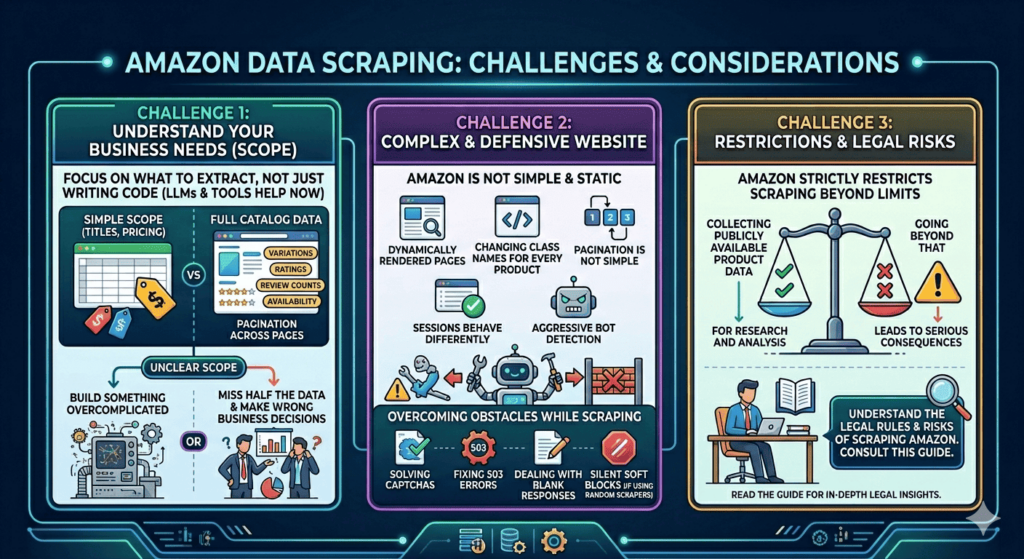
You don’t actually have the challenge of writing code since you can use an LLM or some of the best web scraper tools as an Amazon data scraper.
But you need to understand what you are trying to extract and what is useful for your business needs.
Is it just titles and pricing, or full catalog data including variations, ratings, review counts, availability, and pagination across tons of pages?
Because if your scope is unclear, you either build something overcomplicated… or you miss half the data and make wrong business decisions.
The second thing is that Amazon is not a simple static website.
And so seller pages are dynamically rendered, class names change for every product detail, pagination is not so simple, sessions behave differently, and bot detection is aggressive.
Even while scraping, you need to solve CAPTCHAs, fix 503 errors, deal with blank responses, and silent soft blocks if you use any random Amazon data scraper.
The third challenge is that Amazon strictly restricts scraping beyond a certain limit, and so you need to be extra careful.
For sure, you can collect publicly available product data for research and analysis, but going beyond that can lead to serious consequences.
If you want to understand the legal rules and risks of scraping Amazon in more detail, you can read this guide.
How Amazon’s Anti-Scraping System Works in 2026
We all know that Amazon is one of the popular ecommerce platforms, and so they have one of the most aggressive anti-scraping systems.
Here’s what they focus on:
1. Amazon renders everything dynamically
Yes, Amazon loads everything dynamically, and so their product pages and seller storefronts are loaded dynamically.
That’s not all, their pagination changes based on region, and class names change in every product detail.
And so, if you build a simple scraper, it will surely fail.
2. It tracks more than just your IP
Besides monitoring IP addresses, Amazon even focuses on how fast you are requesting pages, header consistency, session duration, cookie persistence, and device fingerprint signals.
And so, if you scrape faster, switch IPs randomly, send inconsistent headers, or reset sessions frequently,
Then it’s obvious that you are on the radar. And you start seeing 503 errors, CAPTCHAs, blank responses, and even get blocked.
3. Scraping is not just about proxies anymore
Yes, scraping Amazon is not just about rotating proxies.
It looks at your IP reputation, TLS fingerprint, browser fingerprint, user agent, location, and device signals.
If all of these do not match naturally, then your scraper won’t work.
And then you may need fresh IP pools, clean sessions, and different residential routes just to try again.
4. Pagination is not that simple
Most people write scripts to loop multiple pages, and assume they’re collecting the full catalog.
But pagination loads dynamically, changes based on region, hides products behind filters, and depends on session state.
The Right Way to Scrape a Seller’s Products on Amazon (Step-by-Step)
Step 1: Define the Output Before You Touch Anything
You know, most people make this mistake.
They open an Amazon seller page and think, “I’ll just use a Python library and scrape all the product data”.
But this actually makes the process more complicated, as we saw earlier.
So before scraping, answer this clearly: What exact fields do you need?
If I had to scrape, I would need the product title, price, rating, review count, product URL, availability, and similar fields.
Step 2: Identify the Seller Entry Point
You know, a typical seller storefront looks like this: https://www.amazon.com/sp?seller=SELLER_ID
Sometimes it redirects to a brand store layout, sometimes pagination is hidden, and sometimes filters dynamically change the URLs.
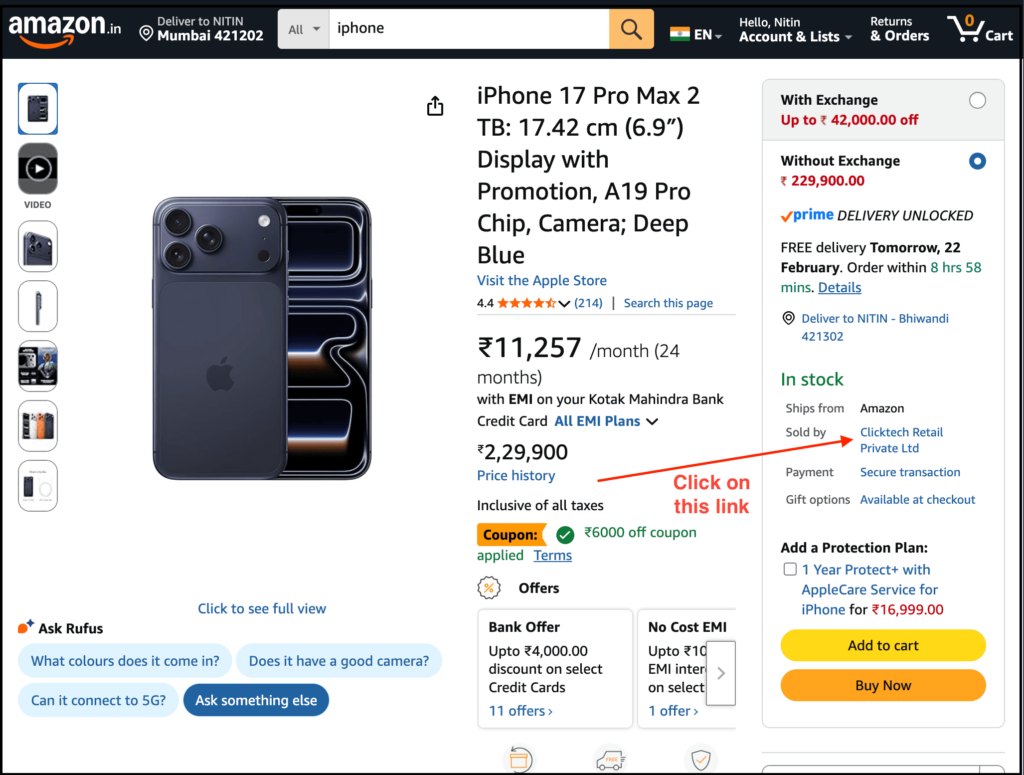
You can even search for a product and then click on the company selling it to reach the seller page.
Note that Amazon does not make seller scraping easy.
Pagination loads dynamically, results change based on region, some products are hidden behind filters, and heavy bot detection triggers quickly.
So if you try to scrape aggressively using requests, you will likely see CAPTCHAs, 503 errors, blank pages, or robot checks, and then your script dies.
Step 3: Decide How You’re Going to Get the Job Done
Now you have two real options:
Option 1: Build It in Python
You’ll need rotating residential proxies, proper headers, session persistence, controlled request timing, pagination logic, error handling, and more.
And you must:
- Keep the user-agent and headers consistent
- Avoid switching IPs on every request
- Simulate a normal browsing rhythm
Anti‑bot guides also emphasize that you should keep user agents and related headers locked as a consistent “fingerprint” and avoid rotating them independently of your IP and location, because mismatched headers plus proxies are a common reason scrapers get flagged.
In short, you are now building a scraping infrastructure just to scrape a seller’s product information.
At this point, you’re not just scraping a seller page anymore, you’re building a full Amazon data scraper system.
If that excites you, go ahead. But your job isn’t to build a scraping infrastructure.
Option 2: Use Chat4Data to Extract the Seller Catalog
If you want your job to be simply: “Give me structured seller product data,” then this is the fastest path.
Beyond its conversational interaction, Chat4Data has a few other things going for it:
- All data processed locally: nothing is sent to external servers, so your data stays private and secure
- Handles complex pages: supports pagination, infinite scroll, detail pages, and one-level-deeper extraction
- Adapts to dynamic pages: keeps extracting accurately even when layouts change
Here’s the practical workflow:
Step 1: Install the Chat4Data Chrome extension
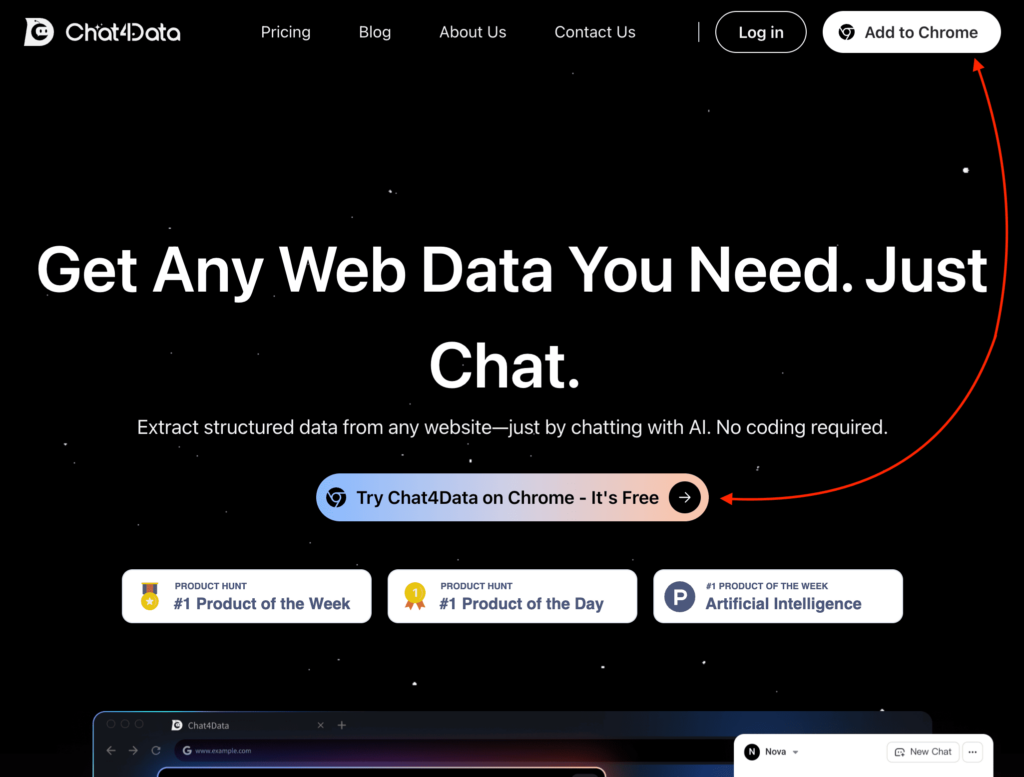
First of all, visit the Chat4Data website and click on the “Add to Chrome” button to download their Chrome extension.



Step 2: Open the seller storefront page
Now, you just need to visit the seller storefront page that you want to scrape.
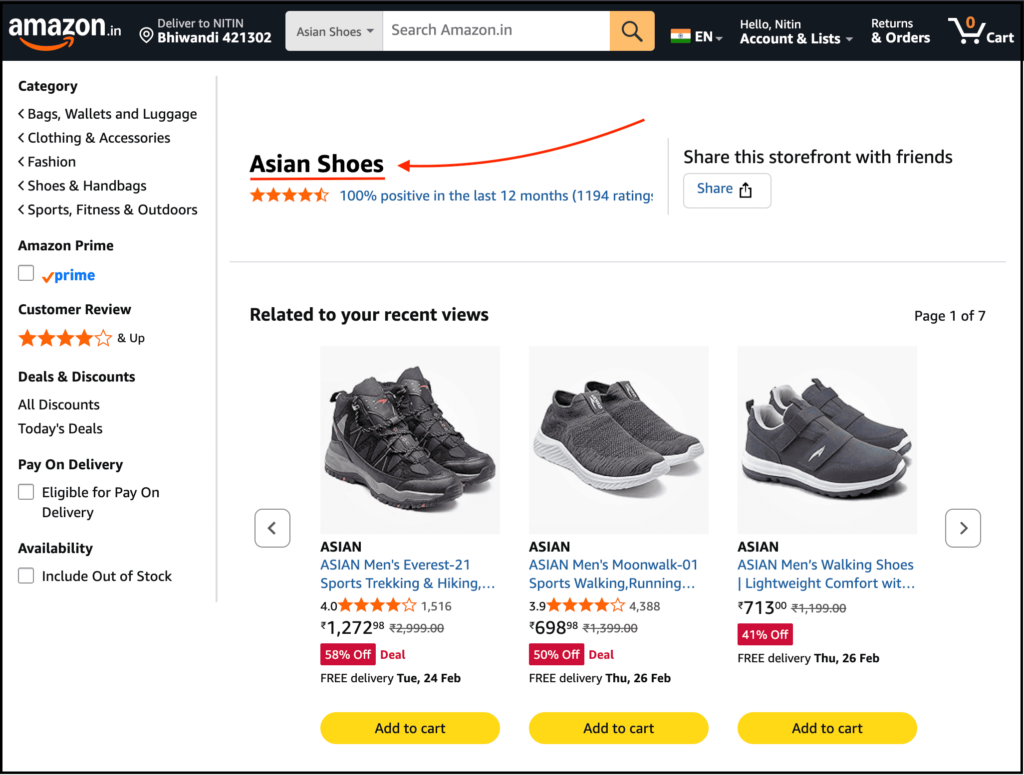
I visited the Asian Shoes seller page since it has some of the cheapest sports shoes, and I wanted to scrape the data.
Step 3: Open the Chat4Data Chrome extension and type a prompt
Now, simply open the Chat4Data Chrome extension.
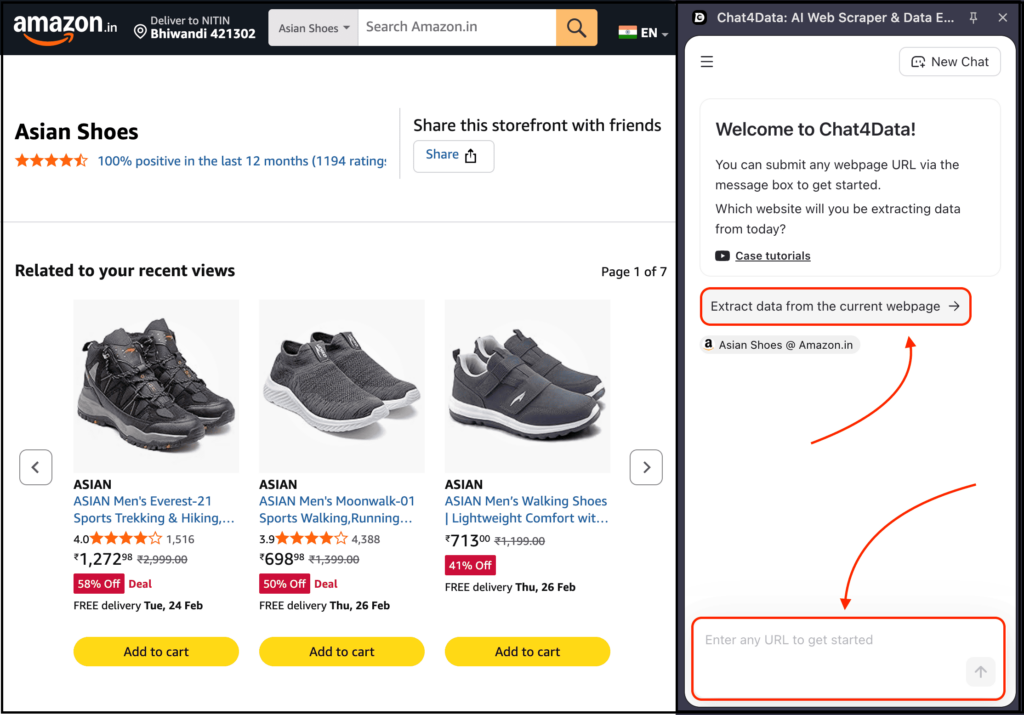
You can write a prompt describing what you want to extract, or simply select the option that says, “Extract data from the current webpage.”
Then it will ask what you want to extract from the current page, which fields you want, and more.
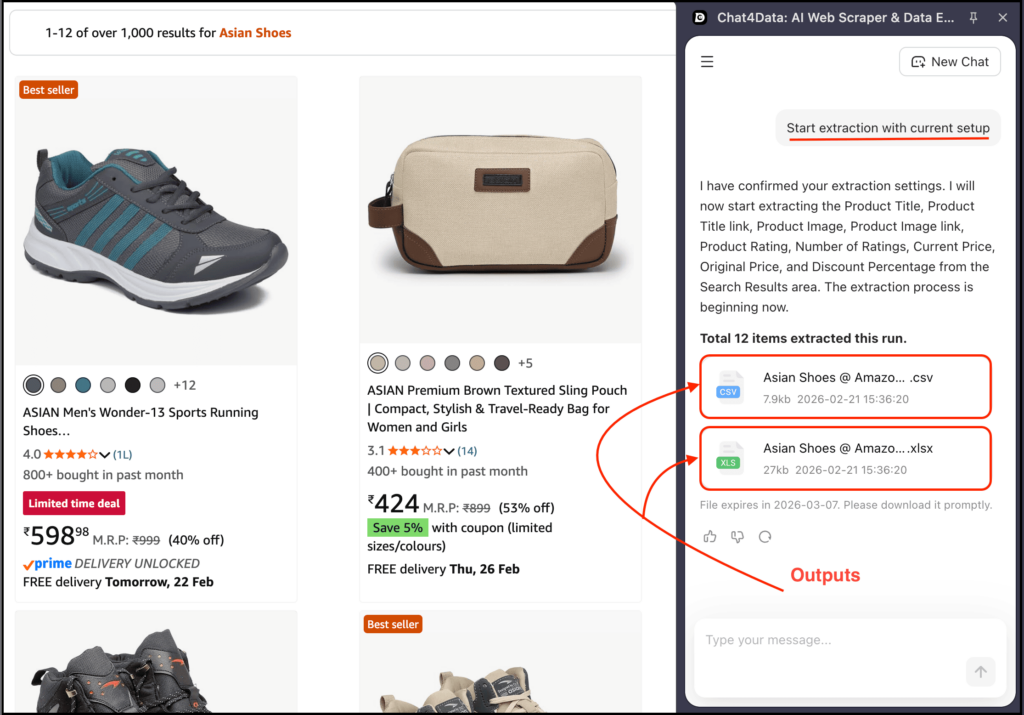
Yes, Chat4Data automatically handles pagination and related issues, so you can focus only on getting the work done.
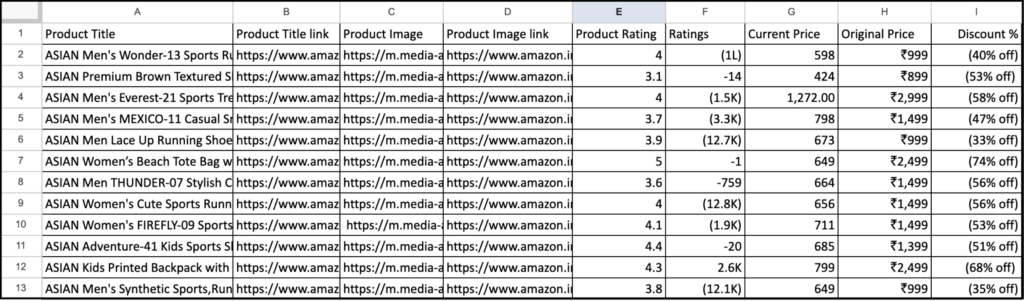
Here’s the output I got based on the above process:
But Is This Reliable at Scale?
So far, we have seen the problems we face when we want to scrape a seller’s products on Amazon.
And then I suggested two options, out of which the first one is difficult and the second one is easier to get the work done.
Now, you may ask: Nitin, is it really reliable?
Well, if you need:
- Daily competitor monitoring
- Price tracking
- Product launch alerts
- Track changes over time
Without the need to write code using a Python library, then yes, Chat4Data is reliable and can get the work done.
Python vs No-Code: Which One Fits You?
If you have read this far, you may already know which option is best to get your work done.
But if you still have some doubts about which one fits you, then this section is for you.
First of all, note that Python and Chat4Data work best for different types of tasks. So you can’t say one is perfect and the other one is useless.
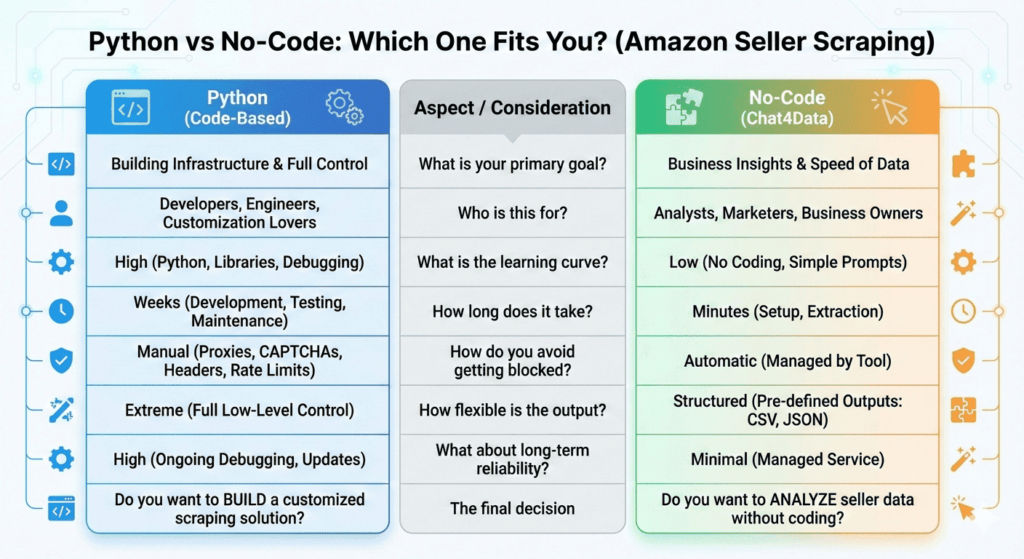
Just to be more specific, Python makes sense if:
- You love infrastructure
- You need extreme customization
- You’re building a scraping SaaS
- You want full low-level control
And Chat4Data makes sense if:
- You want seller data fast
- You care about business insights, not scraping theory
- You don’t want to debug anti-bot systems
- You need structured exports (CSV, JSON, etc.) quickly
So based on that, you just need to ask yourself:
- Do you want to write code to build a customized solution with full control?
- Or are you trying to analyze Amazon sellers without the need to write code?
And you will get your answer about which one to choose.
Want a deeper dive? Check out these articles:
- Three Best Methods to Scrape Amazon Video Results
- Build a Crawler Bot Quickly: Two methods
- Scrape Any Websites with the 8 Best AI Web Scrapers in 2025
- Build a Web Scraping Bot Easy: Complete Tutorial
FAQs: Before You Scrape a Seller on Amazon
1. Can I scrape a seller’s products on Amazon without getting blocked?
Yes, you can use Chat4Data to scrape a seller’s products on Amazon.
And the best part is that it mimics real user behavior, and works well with rotating proxies, and automatically takes care of pagination, delays, and retries, so you focus on getting your work done.
2. Why does my Python scraper stop working after a few pages?
Well, Amazon is not a static HTML page.
And so most seller storefronts are dynamically rendered, change based on region, react to filters in real time, and sit behind aggressive bot detection layers.
So when you casually loop through page=1,2,3…, you are assuming pagination works in a clean, predictable way. It doesn’t.
And the moment your scraper stops behaving like a real human browsing normally, Amazon notices, and blocks the process.
3. How do I extract all seller products including hidden or paginated ones?
Well, if your goal is to extract a full catalog then your approach must handle dynamic pagination, infinite scroll behavior, filter-based URL changes, session consistency, CAPTCHA solving, pagination and more.
And with Python, you need to manually handle this logic.
And with Chat4Data, most of these are handled automatically so you focus on getting the work done.
4. Is Chat4Data reliable for ongoing competitor tracking?
If you want daily monitoring, tracking price changes, watching new product launches, and exporting structured data regularly.
Then yes, it is reliable for that purpose.
5. Should I build my own scraper or use a no-code tool?
This depends on your real objective.
If you want to build a scraping SaaS, want API-level automation, and extreme customization then you should go with Python.
And if you want seller insights fast in structured format without the need to write code, and handle complex stuff then you should go with Chat4Data.