

- what buyers actually want
- what competitors are getting wrong
- and where your next product improvement should come from
- What Amazon reviews are and why they matter
- Why sellers scrape review data
- How to scrape Amazon reviews without writing any code
What Are Amazon Reviews?
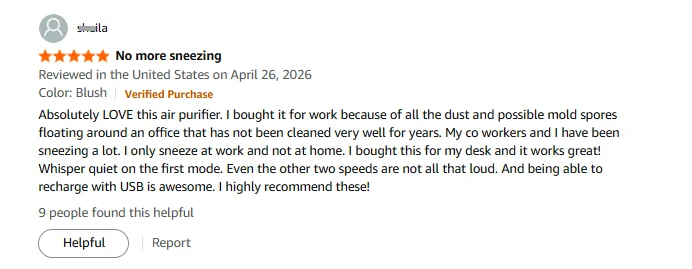
Amazon reviews are buyer-submitted evaluations attached to a specific product listing. Every review lives on the product page under the “Customer Reviews” section. Each review contains:- Reviewer name
- Star rating (1 to 5)
- Review title
- Submission date and country
- Product variant (color, size, etc., if the product has options)
- Verified Purchase badge (when applicable)
- Review body
- Attached photos (when the reviewer uploads them)
- Helpful votes count
Why Amazon Sellers Scrape Review Data
Knowing what’s in a review is one thing. Knowing what to do with hundreds of them at once is what makes scraping worth the effort. Here is what sellers actually use review data for. 1. Identify recurring complaints in competitor products. When twenty buyers in a row mention the same flaw, that’s a product development signal. Sort competitor reviews by rating, look for repeated language, and you have a list of exactly what your product should fix. 2. Surface feature requests buried in 3-star reviews. Three-star reviewers usually like the product but want one specific thing changed. Filtering by rating isolates these requests fast. 3. Monitor your own review sentiment over time. Your average rating can stay flat while sentiment shifts underneath. Weekly scraping catches emerging issues, like a supplier quality dip, before they compound. 4. Detect fake review patterns. A sudden spike in generic five-star reviews with no verified purchase badges is worth investigating. Scraped data surfaces patterns that Amazon’s interface hides. 5. Pull voice-of-customer language for listing copy. The phrases buyers use to describe what they love are the phrases that convert in bullets and headlines. Scrape reviews to write listings with real language instead of guesses.How to Scrape Amazon Reviews Without Code
Now you know what review data is good for. Here is how to collect it.Step 1: Describe Your Task
Open the Chat4Data extension and type what you need in plain English:“Go to amazon.com, search for ‘wireless earbuds’, click into each product listing, scroll to the reviews section, and scrape the reviewer name, star rating, review title, review body, verified purchase status, and review date from the first 3 pages of results.”You do not even need to find the product URL in advance. Just tell Chat4Data which site you want to scrape and what data you need. It handles the navigation from there.
Step 2: Review the Execution Plan
Before running anything, Chat4Data shows you a step-by-step breakdown of what it plans to do: which pages it will visit, which fields it will extract, how it handles pagination through review pages. You can adjust the plan or approve it as written. No credits are used until you hit start.Step 3: Run and Export
The scraper navigates Amazon like a real user, moving through search results, entering product pages, and working through review pagination. When it finishes, export your data as Excel, CSV, or JSON. Need to run the same task again next week? Just open the menu in the top-left corner of the extension to find your conversation history. Click into any previous task and run it again. No need to re-describe what you want or redo the AI setup.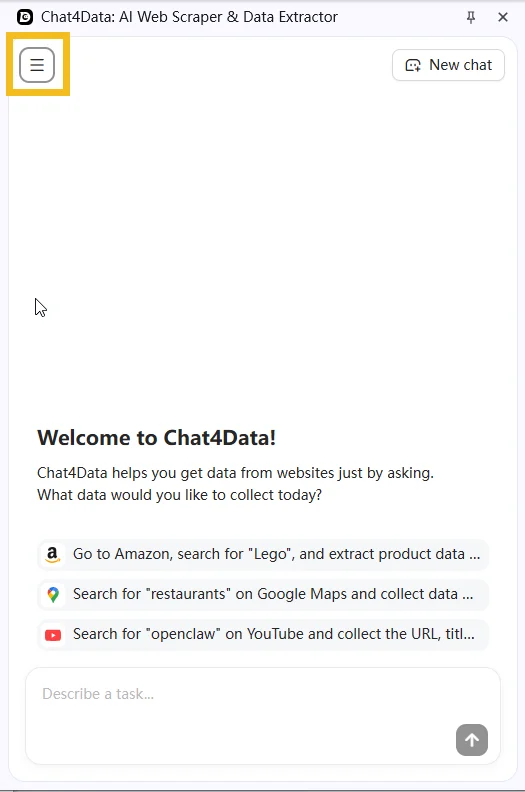
Practical Notes
- Amazon paginates reviews in batches of 10. If you need reviews beyond the first page of a product’s review section, specify how many pages deep you want to go in your Chat4Data prompt. The scraper handles multi-page navigation automatically.
- You can filter by star rating before scraping. Amazon lets you filter reviews to show only 1-star or 5-star submissions. You can describe this filter in your Chat4Data prompt directly: “filter reviews to show only 1-star ratings, then scrape the review body and date.”
- If a CAPTCHA appears mid-scrape, Chat4Data pauses so you can solve it manually, then picks up exactly where it left off.
Wrapping Up
Review data is one of the highest-signal inputs an Amazon seller has access to, and it has always been sitting in plain sight. The barrier was never access. It was collection at scale. AI web scrapers remove that barrier entirely. With Chat4Data, you can set up a review scraping task by simply describing what you want, export the results in minutes, and reuse the same task next week by opening it from your conversation history. If you want to try it, Chat4Data is available at chat4data.ai and on the Chrome Web Store.Frequently Asked Questions
1. What is an Amazon price scraper?
A tool that automatically extracts price data from Amazon product listings. Options range from Python scripts (like BeautifulSoup) to no-code Chrome extensions like Chat4Data that work through a plain English interface.2. Can I scrape prices from multiple products at once?
Yes. You can tell Chat4Data to search for a keyword on Amazon, visit each product listing in the results, and pull pricing fields from all of them in a single task. No need to look up individual URLs or ASINs beforehand.3. Why is the price I scraped different from what I see on Amazon?
This trips up a lot of sellers, and it usually isn’t a scraper error. Amazon shows different prices to different visitors depending on:- Login and Prime status. Logged-in or Prime users may see member-only or discounted prices a fresh browser doesn’t.
- Region and locale. Price and availability vary by country and even by delivery address.
- Buy Box rotation. The headline price comes from whichever seller currently holds the Buy Box, and that can flip hourly.
- A/B tests. Amazon sometimes shows different prices to different users as part of ongoing tests.
4. Can I scrape the final price after coupons and discounts?
Mostly, with one limit. Whatever is shown on the public product page can be scraped: the current price, list price, deal badges (like “Limited time deal”), and coupon callouts (like “Save 10% with coupon”). What a scraper can’t capture is a price that only appears after you add the item to your cart or reach checkout, since that isn’t on the listing page. For most competitor tracking, the listing-level price plus the coupon callout is enough to see how a rival is positioned.5. Can I scrape prices from other sellers, not just the Buy Box?
Yes. A listing with multiple sellers shows an “other sellers” panel, and you can ask Chat4Data to pull those prices and seller names alongside the Buy Box price. This is the core data for MAP monitoring (spotting sellers pricing below your minimum) and for seeing the full price range competing on a single listing.6. Can I track price history, and how often should I re-run a scrape?
Yes. Run the same scrape on a schedule and append each run’s output to a master spreadsheet. Frequency depends on the category:- Fast-moving categories (consumer electronics, seasonal goods): daily
- Buy Box monitoring: daily or more frequent, since ownership can rotate hourly
- Stable categories: weekly
7. Can the scraper alert me when a competitor drops their price?
Not on its own. Chat4Data captures a price snapshot each time you run it; it doesn’t send automatic alerts. The practical workaround is to append each run to one spreadsheet and use conditional formatting or a simple formula to highlight when a price changes between runs. For fully automated alerts, you’d export the data into a separate tool that handles notifications.8. How often is it safe to scrape, and will frequent runs get me blocked?
A few practices help, especially for high-frequency price tracking:- Mimic real user behavior. Chat4Data navigates pages like a human would, which avoids most anti-bot triggers.
- Pause on CAPTCHA. When one appears mid-scrape, Chat4Data stops so you can solve it manually, then resumes.
- Space out high-frequency runs. Hourly Buy Box tracking is doable, but avoid aggressive parallel scraping in the same session. Spreading runs out keeps your footprint low.
9. Can I compare prices across different Amazon marketplaces?
You can scrape them, but treat each marketplace as a separate job. A product on amazon.com returns USD, amazon.co.uk returns GBP, and amazon.de returns EUR. Run one task per marketplace using that country’s URL, then normalize everything to a single currency in your spreadsheet. Keep in mind that exchange rates shift on their own, so cross-region price gaps will move even when the listed prices don’t.10. Is scraping Amazon prices legal?
Amazon’s Terms of Service prohibit automated access, but scraping publicly visible data is widely practiced for competitive research. Courts have generally held that collecting public data is not inherently unlawful. Review Amazon’s ToS and consult a legal advisor for your specific situation.11. Can I scrape Amazon prices with Python?
Yes. Common approaches:- Requests + BeautifulSoup for basic extraction
- Scrapy for larger projects
- Managed APIs like ScraperAPI or Bright Data that handle proxy rotation and anti-bot measures