

- what Amazon ASINs are
- why they matter
- how to scrape them without writing a single line of code
What Is an Amazon ASIN?
ASIN stands for Amazon Standard Identification Number. It’s a 10-character alphanumeric code that Amazon assigns to every product in its catalog. Think of it as Amazon’s internal SKU. Every listing has one, and every variation (different color, size, or format) gets its own unique ASIN.Where to Find an ASIN
There are two places you can find an ASIN:- Product URL: The string after /dp/ — e.g. https://www.amazon.com/JBL-Vibe-Beam-Cancelling-Technology/dp/B0DN45YMP6 means the ASIN is B0DN45YMP6
.png?fit=max&auto=format&n=oc25bo86Gv5ofyUK&q=85&s=6c00e9b77b330648c0720d23025b7b95)
- Product page: Scroll to Product information and find ASIN in the item details
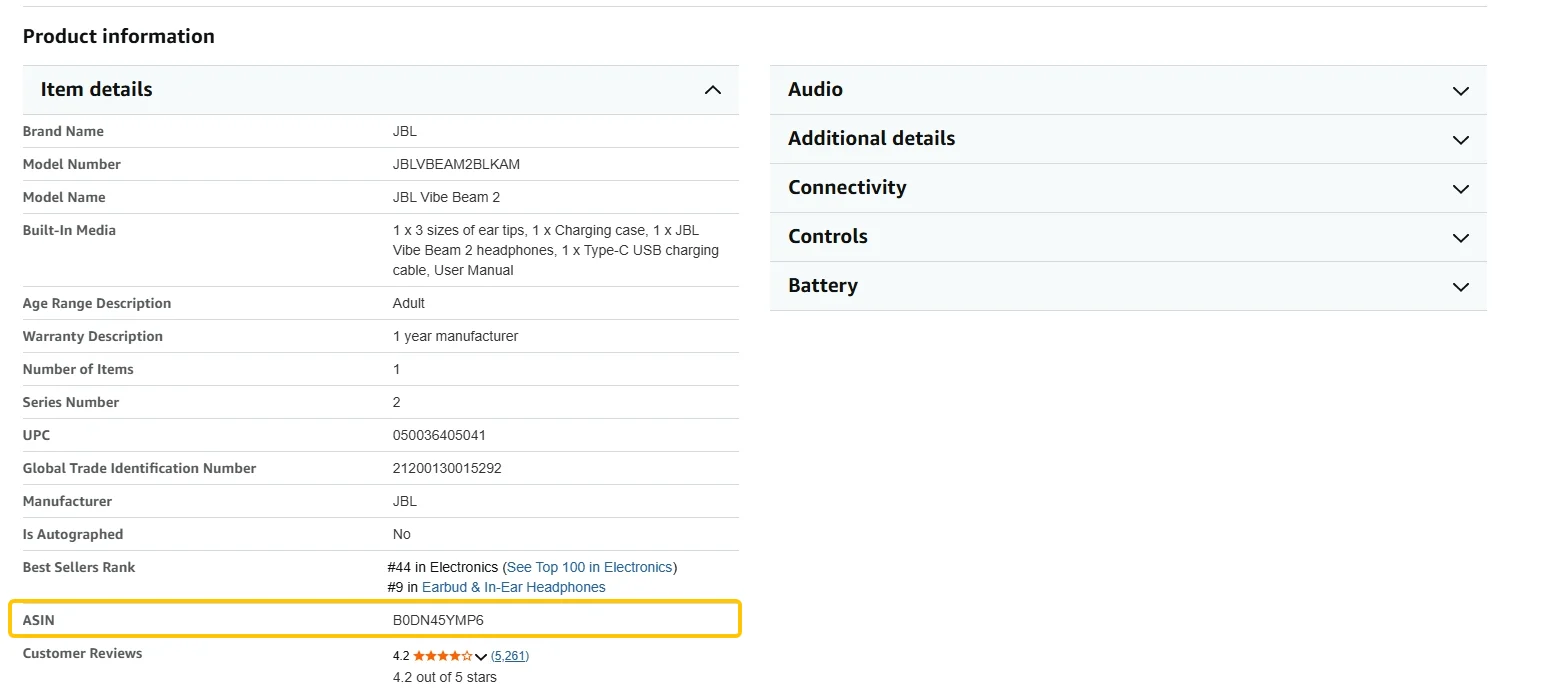
Why Amazon Sellers Scrape ASIN Data
Once you have a product’s ASIN, you can pull any data attached to it — price, reviews, availability, seller info — on demand and at scale. Here’s what sellers actually use it for:- Competitive price monitoring. Track when competitors discount, run promos, or change pricing, on a schedule.
- Product and category research. Get a snapshot of who’s winning a category, at what price, and with how many reviews.
- Review analysis. See what buyers complain about or love across competing products — direct input for listings and product development.
- Inventory and stock tracking. Spot when a top competitor goes out of stock and act on the window.
- Brand protection. Surface unauthorized resellers or MAP violations across storefronts.
How to Scrape Amazon ASINs Without Code
Here’s what the workflow looks like: Step 1: Describe your task Open the extension and type what you need in plain English: “Go to Amazon, search for ‘portable air purifier’, click the link of each product, scroll down and click the “Item Details” section,and scrape the Product name and ASIN, and rating from the first 5 pages.” Step 2: Review the execution plan Before running anything, Chat4Data shows you a step-by-step breakdown of exactly what it plans to do — which pages it will visit, which fields it will extract, how it handles pagination. You can tweak the plan or approve it as-is. No credits are used until you hit start. Step 3: Run and export The scraper navigates Amazon like a real user, working through each page of results. When it finishes, you export the data as Excel, CSV, or JSON. Step 4: Save and reuse Save the task once, and every future run skips the AI configuration step entirely. For weekly price monitoring or category tracking, that means one click per run. A few practical notes:- If Amazon triggers a CAPTCHA mid-scrape, Chat4Data pauses so you can solve it manually, then picks up where it left off
- Credits are only consumed during the initial AI configuration, not during the extraction itself. Amazon pages typically cost 25-40 credits to set up, and that setup is saved permanently for reuse
Wrapping Up
ASINs are the building block of Amazon product data, and collecting them used to require real technical effort. That’s no longer the case. With AI web scrapers like Chat4Data, you can scrape amazon ASIN by simply chatting. If you want to try it, Chat4Data is available at chat4data.ai and on the Chrome Web Store.Frequently Asked Questions
1. What is an Amazon ASIN scraper?
A tool that automatically extracts ASIN codes and associated product data from Amazon search results or product pages. Options range from developer APIs to no-code Chrome extensions like Chat4Data.2. What is the difference between an ASIN and a product URL?
The product URL is the full web address of a listing. The ASIN is the unique product identifier embedded within it, the string after /dp/. For example, amazon.com/dp/B0DFNL2Q4L has the ASIN B0DFNL2Q4L. URLs can change, but the ASIN stays the same, which is why scrapers use ASINs to reliably track a product over time.3. Why do I need ASINs to track competitor data?
ASINs are the most reliable way to identify a product over time. Price, reviews, and availability all live on a product’s ASIN page. Without the ASIN, you’d have to re-search and re-identify each product every time you want updated data.4. What data can I pull alongside an ASIN?
A well-configured scraper can pull:- Product title, brand, price, original price
- Rating, review count
- Availability, seller name
- Images, product description, feature bullets
- Badges (Best Seller, Amazon’s Choice)
- Product specifications
5. Can I scrape Amazon ASINs without coding?
Yes. AI web scraper Chrome extensions handle the whole workflow through a plain English interface:- Navigation and pagination
- Field detection and export
- You describe what you want, the tool does the rest
6. How do I tell the scraper which ASINs to collect?
You point it at the page that contains them. There are three common ways:- Keyword search: “Search for [keyword] on Amazon, click into each product, and scrape the ASIN from the first [X] pages.”
- Storefront: Storefronts are public pages listing all of a brand’s or seller’s products. Point the scraper at the storefront URL the same way you would a search page.
- Your own ASIN list: If you already have competitor ASINs, point the scraper at each product page (the URL is just amazon.com/dp/ + the ASIN). Save the task and re-run it whenever you need fresh data.
7. Can I scrape all the variations of an ASIN (different colors or sizes)?
Yes. Each variation (color, size, format) has its own ASIN, and they’re all listed on the product page. Just ask the scraper to capture the variation ASINs along with the main one, for example: “scrape the product name, main ASIN, and all variation ASINs.” This is handy when you want a competitor’s full lineup, not just the default option shown.8. Can I scrape ASINs from different Amazon marketplaces (.com, .co.uk, .de)?
Yes, but treat each marketplace as a separate job. The same product usually has a different ASIN on amazon.com, amazon.co.uk, amazon.de, and so on. If you’re monitoring several countries, run one task per marketplace using that country’s URLs, then combine the exported files afterward.9. Is scraping Amazon ASIN data legal?
Amazon’s ToS prohibits automated access, but scraping publicly visible data is widely practiced for competitive research, and courts have generally held it isn’t inherently unlawful. Review Amazon’s ToS and consult a legal advisor for your situation.10. Will scraping ASIN data get my Amazon seller account banned?
Scraping public product pages is separate from your Seller Central account:- You’re reading public listing pages, the same ones any shopper sees, not logging into any seller backend
- Tools like Chat4Data run in your normal browser and behave like regular browsing, which keeps the footprint low
- It does go against Amazon’s ToS, so avoid hitting the site with huge request volumes in a short time
11. Is the scraped price and stock data real-time? Can it update automatically?
The data reflects the moment you run the scrape, so it’s as current as your latest run. With a browser-based tool like Chat4Data, you trigger each run yourself (it isn’t a cloud service that runs unattended), but saved tasks make repeat runs one click. For daily or weekly price monitoring, you just open the saved task and re-run it on your own schedule.12. Why is the price I scraped different from what I see on Amazon?
A few normal reasons the numbers can differ:- Location. Amazon shows different prices and availability by region, so results depend on which marketplace and location the page loads in
- Buy Box. The price often comes from whichever seller currently holds the Buy Box, and that rotates
- Deals and member pricing. Coupons, lightning deals, and Prime-only prices may not show the same way for every visitor
13. What happens if an ASIN goes out of stock or the listing is removed?
If a product sells out, the scraper still pulls the page but the availability field shows it as out of stock, which is useful signal on its own. If a listing is fully removed, that page no longer exists, so the scraper returns nothing for it. When you run a saved task across many ASINs, the rest keep working, so one dead listing won’t break the whole job.14. Is there a free Amazon ASIN scraper?
Some extensions offer free tiers, useful for small one-off pulls. For reliable repeatable scraping across multiple pages, paid tools are more practical. If you’re just getting started, Chat4Data starts at $10/month and you can scrape just by typing what you want, no setup needed.15. Can I scrape Amazon ASINs with Python?
Yes. Options include:- Libraries: Requests, BeautifulSoup, Scrapy
- Managed APIs: ScraperAPI, Bright Data (handle proxy rotation and anti-bot measures for you)
- No-code alternative: Chat4Data, if you’d rather skip the code entirely