

- who your top-ranked competitors are for each keyword, and how heavily sponsored the SERP is
- how a keyword’s market is shifting overall, including sponsored saturation, price clustering, and how crowded the top of page one is getting
- and where your own listing actually sits on the SERP for each keyword you care about
- What Amazon search results data is and why it matters
- Why sellers scrape search results data
- How to scrape Amazon search results without writing any code
What Is Amazon Search Results?
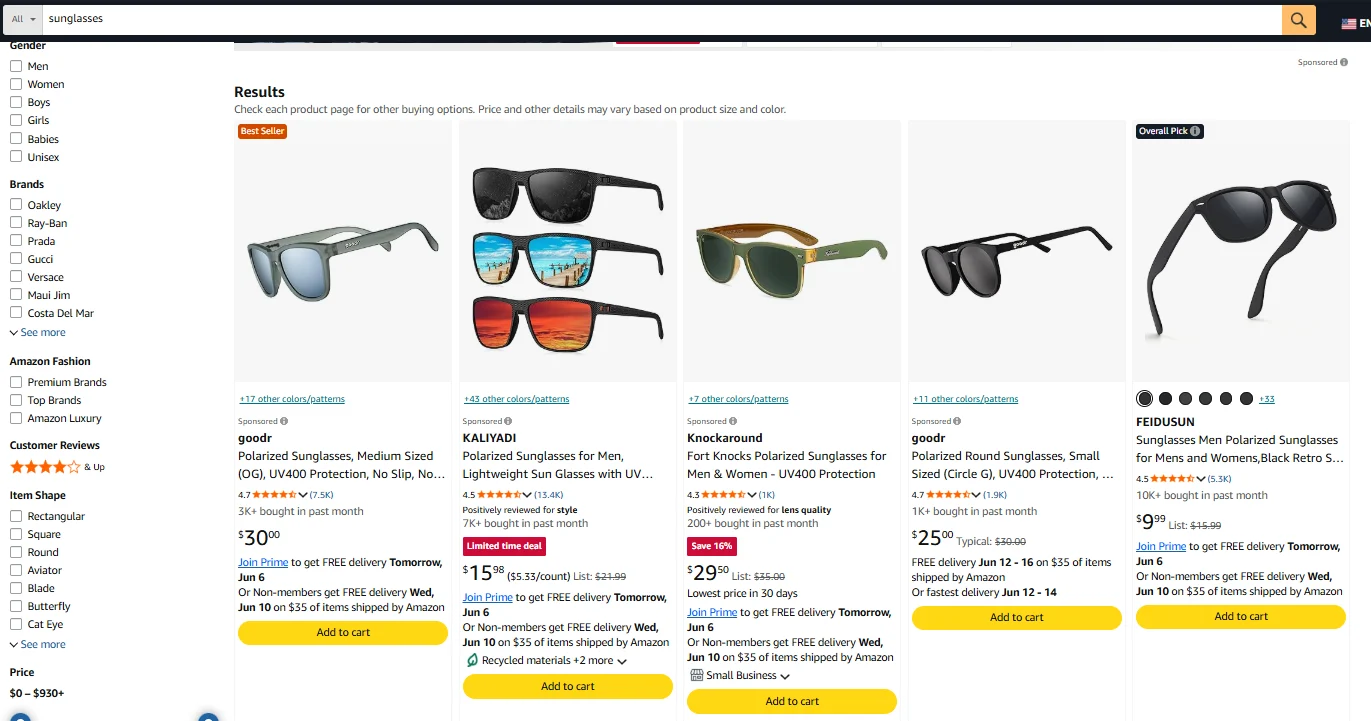
Amazon Search Results is the ranked list of products Amazon returns when a buyer types a keyword into the search bar. Each results page is generated dynamically based on relevance, sales history, ad bids, and other signals Amazon doesn’t publish. Each result tile contains:- Position (the rank of the product on the SERP for that keyword)
- Product title (the listing headline as it appears in the result tile)
- ASIN (Amazon’s unique product identifier)
- Price (the price shown on the tile, sometimes a range across variants)
- Star rating and review count (average customer rating and total reviews)
- Sponsored flag (whether the listing is a paid placement or organic)
- Badges (Amazon’s Choice, Best Seller, or none)
Why Amazon Sellers Scrape Search Results Data
A one-time search lookup tells you where you stand today. Scraping the same keyword set on a schedule tells you where you’re moving. Here is what sellers actually use search results data for. 1. Track keyword ranking for your listings. Watch where your ASIN appears across your target keywords over time. A drop from position 8 to position 23 on your main keyword is a signal to investigate the listing change, pricing change, or new sponsored ad that caused it. 2. Map the competitive set per keyword. Pull who ranks in the top 20 for each keyword you care about. The set of competitors changes by keyword, and knowing who you’re up against for “stainless steel water bottle 32oz” versus “insulated bottle reusable” lets you tailor your listing copy. 3. Measure sponsored saturation. Count how many positions on the SERP are paid versus organic for each keyword. High sponsored density means buyers are scrolling past three or four ads to reach organic results, which affects how aggressive your bidding strategy needs to be. 4. Spot algorithm shifts. Scrape the same keyword set weekly. When ranks across many of your keywords move together (everyone climbs or drops at once), that’s a sign Amazon adjusted the algorithm, not a problem with your listing.How to Scrape Amazon Search Results Without Code
Now you know what search results data is good for. Here is how to collect it. For non-technical sellers, the realistic options are manual copy-paste or anAI web scraper. Manual works for one keyword on one day. It falls apart the moment you want to track twenty keywords on a weekly schedule. AI web scrapers have changed that. The current generation is simple enough that pulling the data is basically a conversation: you type what you want in plain English, and the tool figures out the rest. The rest of this guide uses Chat4Data, an Amazon search results scraper Chrome extension, as the example. Here is why it fits this use case:- Lightweight. Chat4Data is a Chrome web extension web scraper. Nothing to download or install beyond adding it to your browser.
- Conversation-based. No templates, no clicking on elements. Just type what you want, like explaining a task to a colleague.
- Privacy-first. All scraping runs locally in your browser. Your data never passes through a cloud server.
- Task reuse. Every scrape is stored in your conversation history. Click any previous task to re-run it without redoing the setup.
- Cost-efficient. Starts at $10/month. Credits are only consumed during initial AI configuration, not during extraction itself.
Step-by-Step: Scraping Amazon Search Results with Chat4Data
Step 1: Describe Your Task
Open the Chat4Data extension and type what you need in plain English:“Go to amazon.com and search for ‘stainless steel water bottle 32oz’. For the first 3 pages of results, scrape every listing’s position, product title, ASIN, price, star rating, review count, sponsored flag, and any badges (Amazon’s Choice or Best Seller).”You don’t need URLs or ASINs in advance. Just describe the keyword and the fields you want. Chat4Data handles the search, the pagination, and the field detection from there.
Step 2: Review the Execution Plan
Chat4Data shows you the plan first: which pages it’ll visit, which search results fields it’ll extract, and how it handles pagination. It also previews the first page of data so you can verify the output before the full run. Approve or adjust before starting.Step 3: Run and Export
The scraper navigates Amazon like a real user, moving through each page of results and tagging each entry by position, sponsored or organic status, and badge. When it finishes, export your data as Excel, CSV, or JSON. Need to run the same task again next week? Just open the menu in the top-left corner of the extension to find your conversation history. Click into any previous task and run it again. No need to re-describe what you want or redo the AI setup.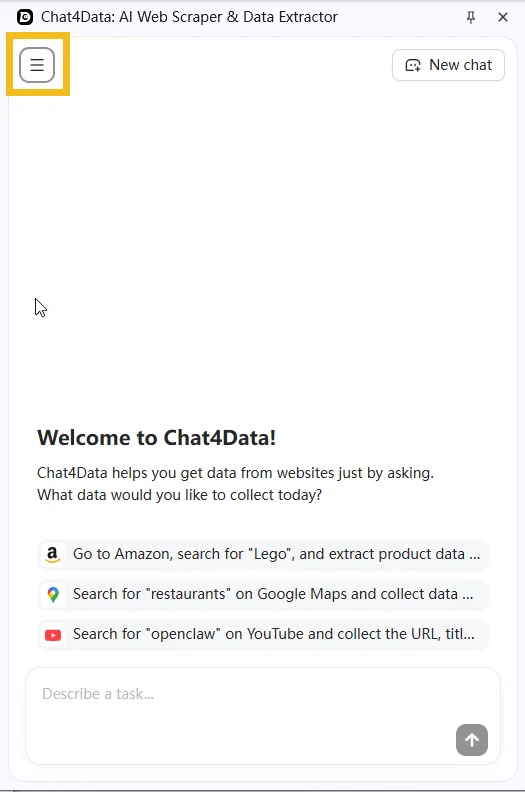
Practical Notes
- Sponsored placements count toward visible position but not toward organic rank. If you want to measure your organic rank specifically, filter out sponsored entries before analyzing. Both data points matter, but they answer different questions.
- Mobile and desktop SERPs are different layouts. Amazon serves different result orderings and ad placements depending on whether the buyer is on a phone or a laptop. If you scrape from one device profile and your competitors are optimizing for the other, your rank comparisons will be misleading. Pick a device profile and stay with it.
- If a CAPTCHA appears mid-scrape, Chat4Data pauses so you can solve it manually, then picks up exactly where it left off.
Wrapping Up
Search results are where your visibility is decided, one buyer query at a time. AI web scrapers turn that decision from invisible to measurable. With Chat4Data, you describe your keyword set and fields once, then re-run weekly to see exactly how your rank is moving. The same workflow works for scraping Amazon best sellers if you want to pair keyword-level visibility with category-level rankings. If you want to try it, Chat4Data is available at chat4data.ai and on the Chrome Web Store.Frequently Asked Questions
1. What is an Amazon search results scraper?
A tool that pulls the ranked list of products Amazon shows for a given keyword search, along with per-listing fields like position, ASIN, price, rating, and sponsored or organic flags. Options range from Python scripts using libraries like BeautifulSoup to no-code Chrome extensions like Chat4Data that work through a plain English interface.2. Can I scrape search results for multiple keywords at once?
Yes. You can chain multiple keyword searches in a single task. For example, “search for ‘stainless steel water bottle,’ ‘insulated water bottle,’ and ‘reusable water bottle,’ and pull the top 3 pages of results for each.” You don’t need to gather ASINs beforehand. Chat4Data reads each ASIN directly from the SERP.3. Is the rank I scraped my true ranking, or is it affected by my browsing history?
This is the single most important thing to get right. Amazon personalizes search results heavily based on your location, login state, Prime status, and past searches, so the rank you see in your normal browser may not be the rank a neutral shopper sees. To measure something close to a true ranking:- Scrape in a logged-out or incognito session
- Keep the location and device profile the same every run
- Compare the same keyword over time rather than trusting any single snapshot
4. How do I separate organic rank from sponsored placements?
Sponsored listings take up visible positions on the page but aren’t part of the organic ranking. Chat4Data tags each result as sponsored or organic when it scrapes, so in your export you can filter out the sponsored rows and count only the organic ones to find your true organic position. Both numbers are useful: visible position tells you what a shopper actually scrolls past, while organic rank tells you how your SEO is really doing.5. Why don’t desktop and mobile show the same rankings?
Amazon serves different result orderings and ad placements depending on whether the buyer is on a phone or a laptop, so the same keyword can rank your listing differently across devices. If you scrape from desktop but most of your buyers are on mobile (or vice versa), your rank tracking can be misleading. Pick one device profile, note which one it is, and stay consistent so your comparisons are apples to apples.6. Can I get the search volume or popularity of a keyword?
Not from the search results page. Amazon doesn’t publish search volume on the SERP, so a scraper can’t pull it directly. What you can measure is competitive intensity: how many results a keyword returns, how many of the top positions are sponsored, the price range, and which brands dominate. For actual search volume estimates, you’d pair this data with a dedicated keyword tool like Helium 10 or Jungle Scout, which have their own data sources.7. My product isn’t showing up in the results. What does that mean?
A few things could be going on, so it’s worth ruling them out one by one:- It ranks past the pages you scraped (try pulling more pages)
- Personalization is pushing it down in your session (try a clean, logged-out session)
- It genuinely hasn’t built ranking for that keyword yet
8. How many pages of search results should I scrape per keyword?
It depends on the use case. For tracking your own listing’s rank, 5 pages is usually enough; positions past page 5 see almost no buyer clicks. For mapping the competitive landscape, the first 3 pages cover the listings that win the bulk of attention. For measuring sponsored saturation, the first 2 pages are where most paid placements concentrate.9. Is scraping Amazon search results legal?
Amazon’s Terms of Service prohibit automated access, but collecting publicly visible search results is widely practiced for SEO and competitive research. Courts have generally held that scraping public data is not inherently unlawful. On the ethical side, most sellers use search results data for keyword research and rank tracking, not to replicate competing listings. Review Amazon’s ToS and consult a legal advisor for your specific situation.10. How do I scrape Amazon search results without getting blocked?
The simplest answer is to use a good AI web scraper. Chat4Data is built to navigate Amazon without tripping anti-bot defenses:- Real user behavior. Chat4Data clicks, scrolls, and waits the way a person would, which avoids most anti-bot triggers in the first place.
- Local browser execution. Scraping runs from your own browser and your own IP, not a shared cloud proxy pool that other users may have already burned.
- CAPTCHA pause. If one appears mid-scrape, Chat4Data stops so you can solve it manually, then picks up exactly where it left off.
11. Can I scrape Amazon search results with Python?
Yes. Common approaches:- Requests + BeautifulSoup for static page extraction
- Scrapy for larger-scale, scheduled tracking
- Managed APIs that handle proxy rotation and anti-bot measures